360 Vision Eclipse HD Stainless Steel Foglio di istruzioni

Eclipse HD SS v2.1.22 Page 1
© 360 Vision Technology Ltd.
Eclipse HD Stainless Steel
Installation/Conguration Manual

Eclipse HD SS v2.1.22 Page 2
© 360 Vision Technology Ltd.
Table of Contents
1 Safety and Precautions .............................................................................................................................. 3
2 Housing Dimensional Drawing ................................................................................................................... 3
3 Connection ................................................................................................................................................. 4
3.1 Washer Connection............................................................................................................................ 5
4 Locating the Eclipse HD on your Network.................................................................................................. 6
5 Connecting to the Eclipse HD .................................................................................................................... 6
5.1 Live View............................................................................................................................................ 8
5.1.1 Live Video .................................................................................................................................. 8
5.1.2 Status......................................................................................................................................... 9
5.2 Settings .............................................................................................................................................11
5.2.1 Video .........................................................................................................................................11
5.2.2 Video Advanced ....................................................................................................................... 12
5.2.3 Advanced Features .................................................................................................................. 14
5.2.4 Camera .................................................................................................................................... 16
5.2.5 Date/Time................................................................................................................................. 18
5.2.6 Network.................................................................................................................................... 19
5.2.7 Interfaces ................................................................................................................................. 20
5.3 Add/Edit Users ................................................................................................................................. 21
5.4 Maintenance..................................................................................................................................... 22
5.5 Browser ............................................................................................................................................ 24
6 Network Settings Recovery...................................................................................................................... 25
7 Special Presets ........................................................................................................................................ 25
8 Important - Care of Painted Surfaces....................................................................................................... 26
9 Storage and Handling............................................................................................................................... 26
10 Warranty................................................................................................................................................. 26
11 PSU Enclosure ....................................................................................................................................... 26
12 1080p Stream Resolutions & RTSP Links.............................................................................................. 27
13 720p Stream Resolutions & RTSP Links................................................................................................ 28
14 White Balance and Fast Shutter options................................................................................................ 29

Eclipse HD SS v2.1.22 Page 3
1 Safety and Precautions
1. Please read these notes before attempting to operate the 360 Vision Eclipse HD Stainless Steel, and keep
for future reference.
2. DO NOT disassemble or remove covers. This will break the water seals and invalidate the warranty.
3. All servicing and repairs must be handled by 360 Vision Technology.
4. Avoid pointing the camera directly towards a bright light source (sunlight), or expose the camera to intensive
light situations as this may damage the camera pick-up device.
5. Installation should be carried out by suitably qualied personnel, in accordance with local codes of practice
and regulations.
6. 360 Vision Technology Limited accept no liability for any damage caused by incorrect or improper installation.
7. Use only 360 Vision Eclipse HD power supplies.
8. Please handle the Eclipse HD with care, as improper handling may cause damage within this unit.
2 Housing Dimensional Drawing
MUST NOT BE REPRODUCED OR SHOWN TO
DO NOT SCALE
ALL DIMENSIONS IN MM
REMOVE ALL SHARP EDGES
SHEET:
D
C
B
A
D
C
B
A
4
3
2
1
4
3
2
1
A3
DESCRIPTION SCALE:
PERMISSION OF THE AUTHOR.
ANY THIRD PARTY WITHOUT THE DIRECT WRITTEN
C COPYRIGHT PROTECTED AND
THIS DRAWING AND ALL COPIES ARE
PART NUMBER:
0.167 3 OF 3
TOLERANCES:-
X = 0.5
X.X = 0.1
X.XX = 0.05
A3
3rd ANGLE PROJECTION
360 Vision Technology Ltd.
Unit 7, Seymour Court,
Manor Park, Runcorn, Cheshire,
WA7 1SY. United Kingdom.
www.360visiontechnology.com
365.0
PAN
SWEEP
490
TILT
SWEEP
215.0
9.0 (x4) ON
101.6 (4") PCD
51.0
125
MOUNTING
BASE
NAME:
M5650-B
ECLIPSE STAINLESS STEEL
ASSEMBLY AND BOM
ISS DATE REFERENCE
A 250816 FIRST ISSUE
B 160916 TILT AND SWEEP UPDATED
250816
DATE :
K.CRAIK
RELEASED:
APPROVED:
ENGINEER:
--
MATERIAL: FINISH:
SCALE 0.3
SCALE 0.3
SCALE 0.25
MOUNT PLATE
Weight 7.2kg

Eclipse HD SS v2.1.22 Page 4
© 360 Vision Technology Ltd.
3 Connection
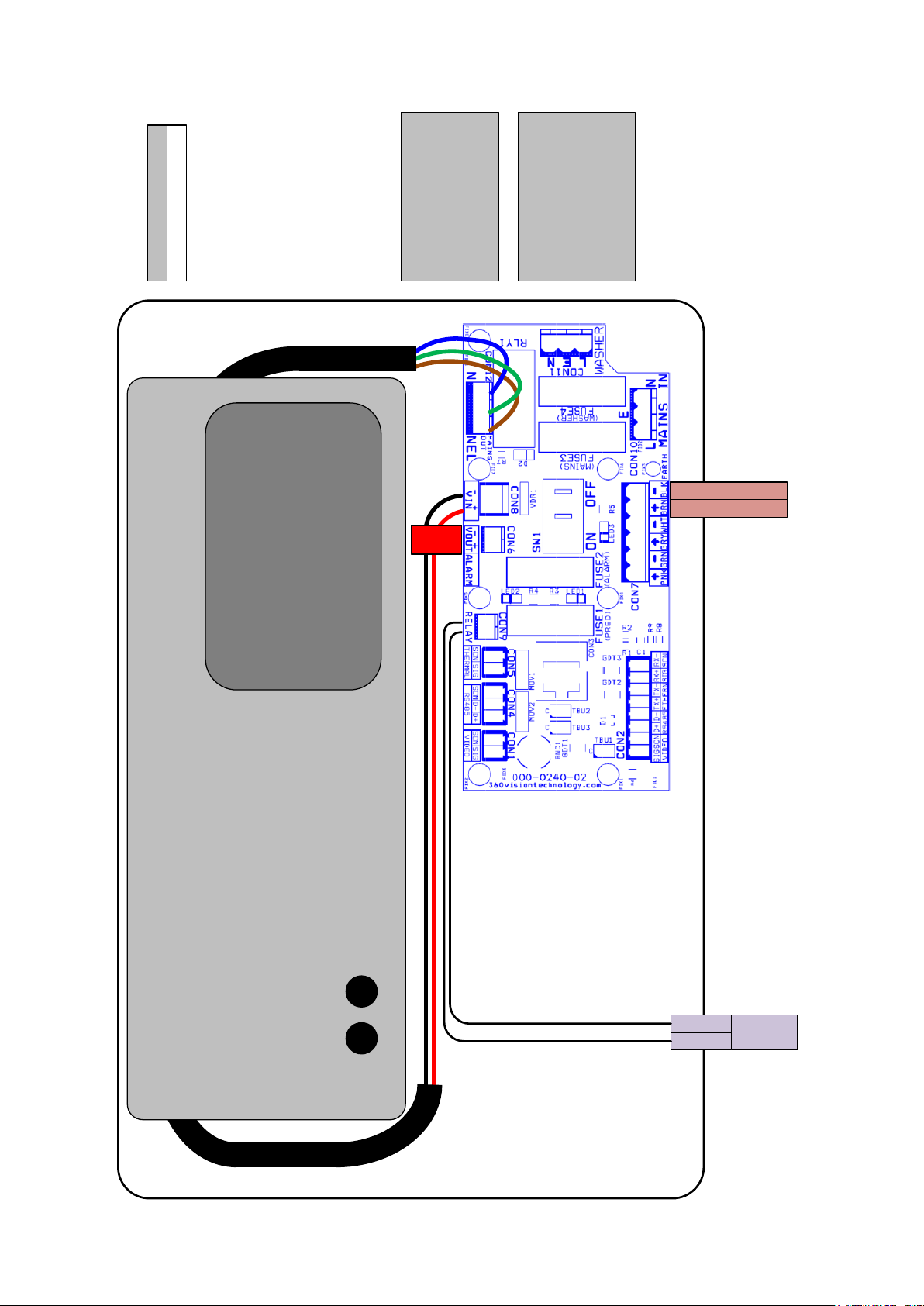
MAINS FUSE
PRED-PSU-SM-WA-HD
MAINS FUSE 3 = 2AF
OUTPUT FUSE
PRED-PSU-SM-WA-HD
FUSE 1 = 6.3AT
FUSE 2 = 1AT
FUSE 4 = 1AT
MAINS input
100 - 240Vac
Io Vo
Adj Adj
Model Number: PRED-PSU-SM-WA-HD
Serial Number: yymmndd-xxxx
Input Voltage:100-240VAC 50/60Hz
Input current 2.1A
Output Voltage: 30V DC
Output Current: 6.2A
PRED-PSU-SM-WA-HD
255 x 180 x 100mm
Enclosure Dimensions
360
USE
30Vdc(+)RED
30Vdc(-)BLACK
ORANGE
WHITE WASHER
RELAY

Eclipse HD SS v2.1.22 Page 5
© 360 Vision Technology Ltd.
The Ethernet connection uses standard CAT5, CAT5e or CAT6 cables tted with RJ45 connectors.
RJ45 CAT5, CAT5e, CAT6 Cable Signal
Pin 1 White with Orange Band Tx+
Pin 2 Orange Tx-
Pin 3 White with Green Band Rx+
Pin 4 Blue
Pin 5 White with Blue Band
Pin 6 Green Rx-
Pin 7 White with Brown Band
Pin 8 Brown
The power connection is supplied as a standard length of 2m cable (red/black)
• 24Vdc - 36Vdc (Max)
• 24Vac - 28Vac (Max)
The washer connection is supplied as a standard length of 2m cable (orange/white)
• Normally Open Volt Free contact
• Contact ratings - 1A 30Vdc (Resistive) or 0.5A 125Vac
3.1 Washer Connection
MUST NOT BE REPRODUCED OR SHOWN TO
DO NOT SCALE
ALL DIMENSIONS IN MM
REMOVE ALL SHARP EDGES
SHEET:
D
C
B
A
D
C
B
A
4
3
2
1
4
3
2
1
A3
DESCRIPTION SCALE:
PERMISSION OF THE AUTHOR.
ANY THIRD PARTY WITHOUT THE DIRECT WRITTEN
C COPYRIGHT PROTECTED AND
THIS DRAWING AND ALL COPIES ARE
PART NUMBER:
0.167 3 OF 3
TOLERANCES:-
X = 0.5
X.X = 0.1
X.XX = 0.05
A3
3rd ANGLE PROJECTION
360 Vision Technology Ltd.
Unit 7, Seymour Court,
Manor Park, Runcorn, Cheshire,
WA7 1SY. United Kingdom.
www.360visiontechnology.com
365.0
PAN
SWEEP
490
TILT
SWEEP
215.0
9.0 (x4) ON
101.6 (4") PCD
51.0
125
MOUNTING
BASE
NAME:
M5650-B
ECLIPSE STAINLESS STEEL
ASSEMBLY AND BOM
ISS DATE REFERENCE
A 250816 FIRST ISSUE
B 160916 TILT AND SWEEP UPDATED
250816
DATE :
K.CRAIK
RELEASED:
APPROVED:
ENGINEER:
--
MATERIAL: FINISH:
SCALE 0.3
SCALE 0.3
SCALE 0.25
MOUNT PLATE
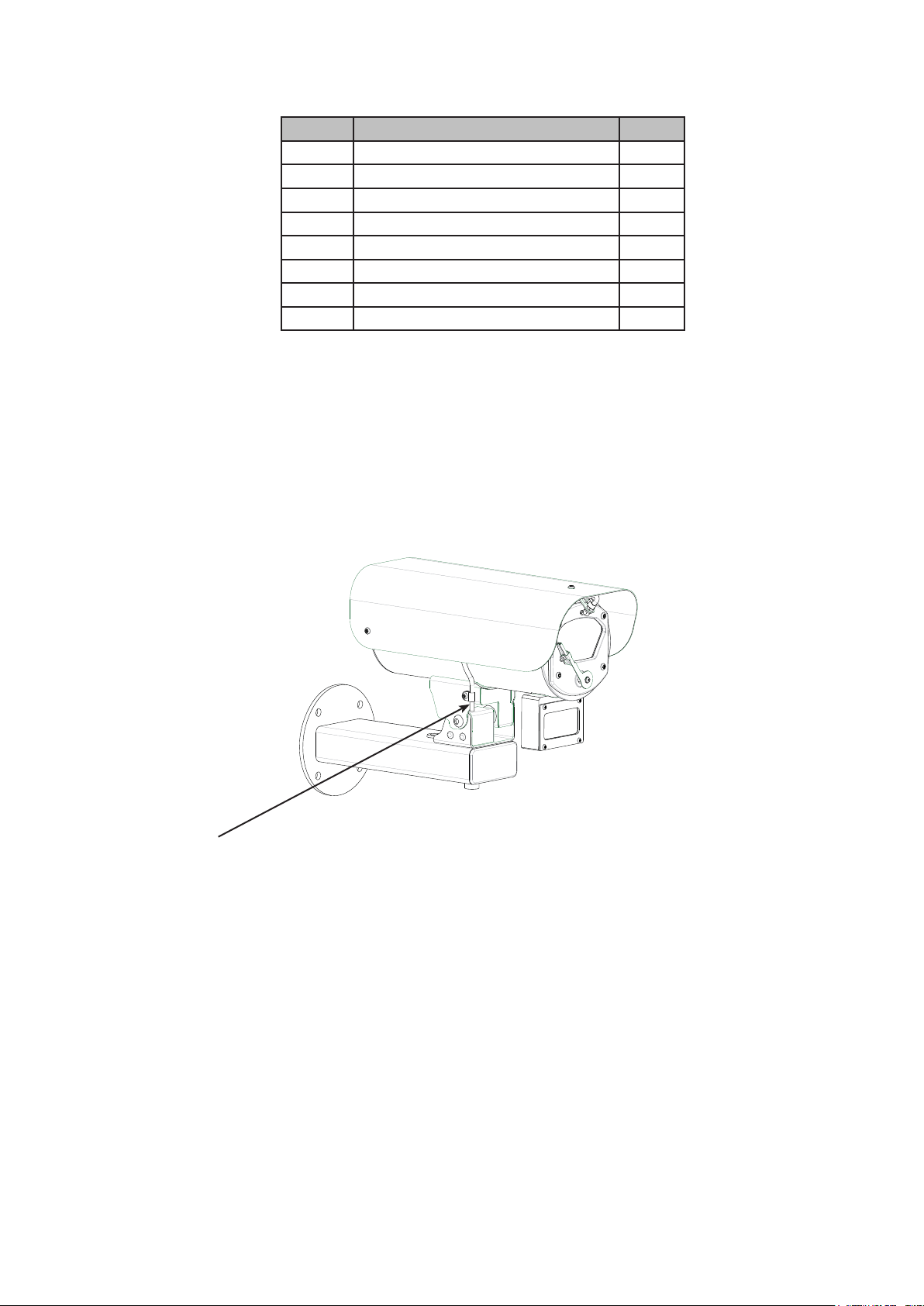
Tube Connection
• Suitable tube (not supplied) for connection to the nozzle is PVC with internal diameter 3mm and
outside diameter 6mm PVC.
• The end of the tube is pushed over the ridged tube. Fit a cable tie around the joint between the PVC
tube and the ridged tube to ensure that the tube can not become detached.

Eclipse HD SS v2.1.22 Page 6
© 360 Vision Technology Ltd.
Eclipse HD Stainless Steel Conguration
4 Locating the Eclipse HD on your Network
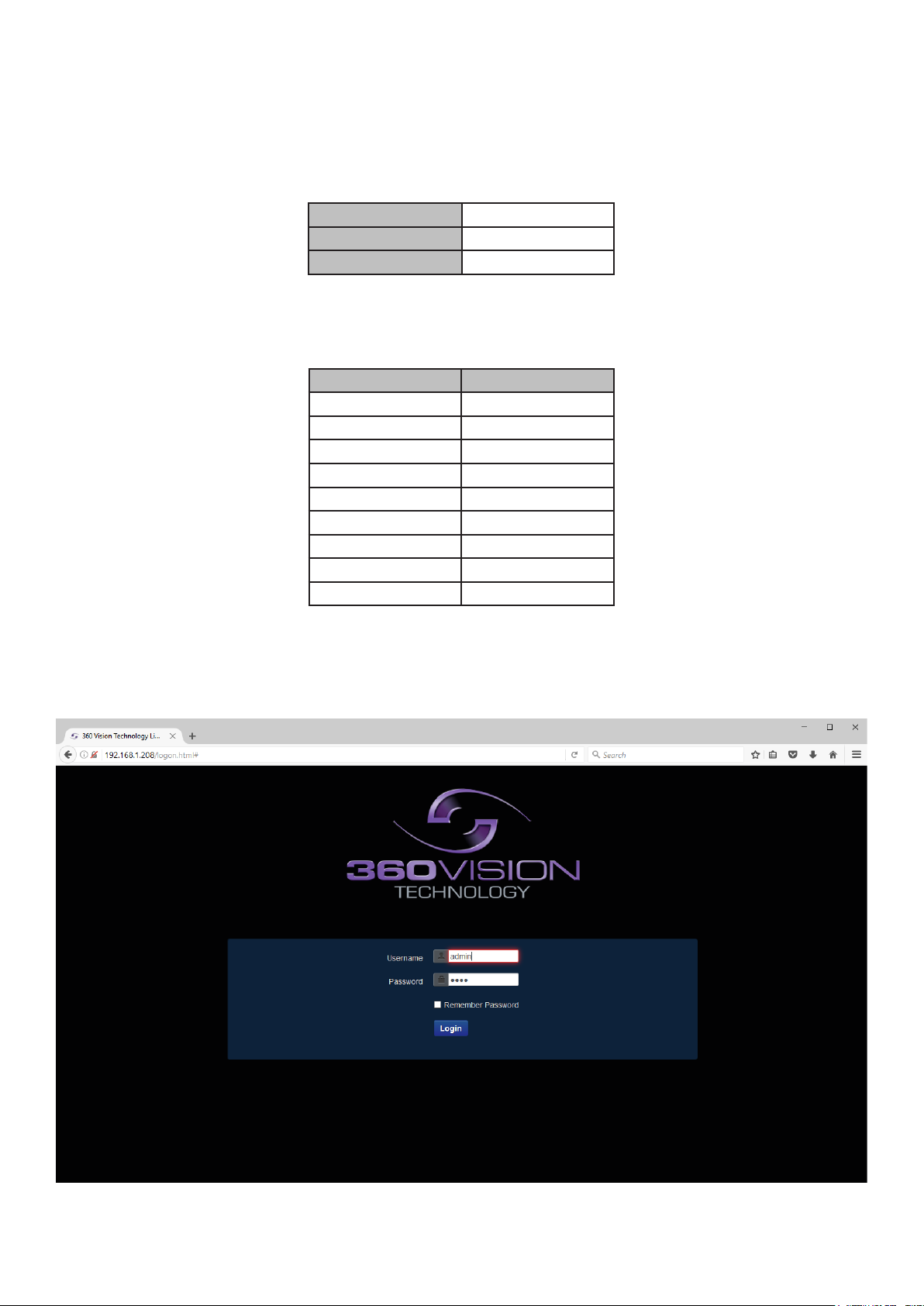
Default IP Address 192.168.1.187
Subnet 255.255.255.0
Gateway 192.168.1.4
Using the DVR management software, ‘Onvif Device Manager’ or 360 Vision Discovery Tool (which can be
found on the CD supplied or from the 360 Vision Technology technical support) to nd the IP address of the
Eclipse HD. Note the ports used by the Eclipse HD are:-
Protocol Port
ONVIF/HTTP 80 TCP
RTP Stream 1 6970 TCP/UDP
RTCP Stream 1 6971 TCP/UDP
RTP Stream 2 6972 TCP/UDP
RTCP Stream 2 6973 TCP/UDP
RTSP 554 & 8554 TCP
360 SDK 3600 TCP
360 Event 9001 TCP
NTP 123 UDP
5 Connecting to the Eclipse HD
Type in the IP address of the Eclipse HD into the address bar of Internet browser and install the plug-ins as
required. The web page of the camera will then appear.
Eclipse HD Web Page Login screen

Eclipse HD SS v2.1.22 Page 7
© 360 Vision Technology Ltd.
Enter the User Name (default is admin)
Enter the Password (default is 9999)
If you select the box ‘Remember Password’ it could compromise the security of the Eclipse HD camera.
Select Submit
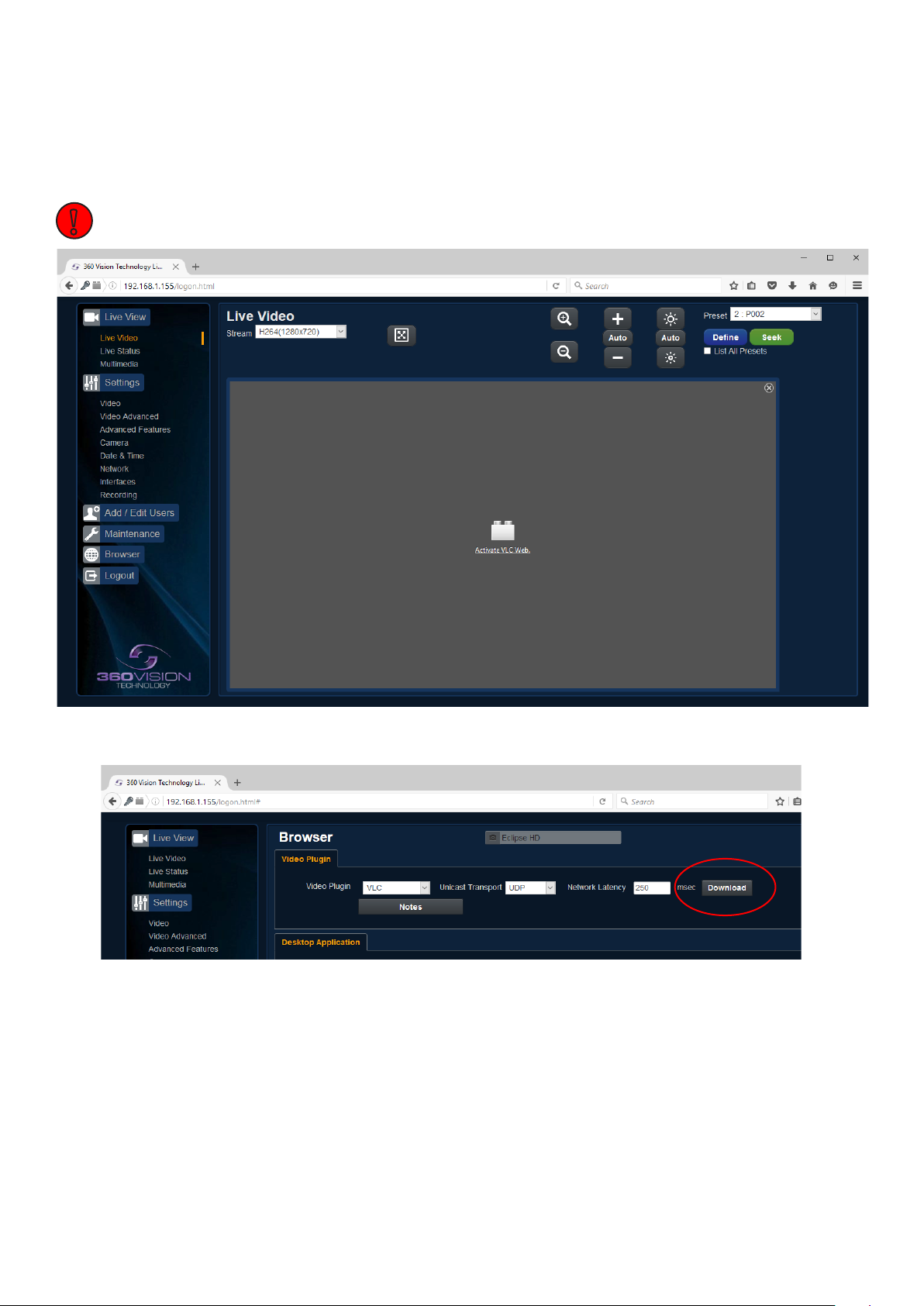
The camera web page uses VLC as the video player.
VLC video plug-in le can be downloaded from the camera if it is not installed on the connecting PC/laptop
(See Browser - page 24)
!

Eclipse HD SS v2.1.22 Page 8
© 360 Vision Technology Ltd.
There are six main tabs on the left of the web page/screen.
1 Live View
2 Settings
3 Add/Edit Users
4 Maintenance
5 Browser
6 Logout
5.1 Live View
5.1.1 Live Video
The Live Video page oers options to:-
• Stream - Choose required stream from drop down selection.
• 1x Display - Use to show selected stream as full screen.
• Zoom In/Out - This will operate the optical and digital zoom (if digital zoom is enabled).
(See Camera - Digital Zoom - page 16)
• Focus +/-/Auto - This will operate the manual focus near, far or automatically focus as required.
(See Camera - AF AI when PTZ - page 16)
• Iris +/-/Auto - This will operate the manual iris open, close or automatic as required.
(See Camera - AF AI when PTZ - page 16)
• Preset Seek/Dene - This will allow admin and operator user levels to seek or dene presets (Viewer
user level can only seek presets). (See Advanced Features - Presets - page 14)
• List all Presets - Use to show all presets or programmed presets in drop down selection box.

Eclipse HD SS v2.1.22 Page 9
© 360 Vision Technology Ltd.
5.1.2 Status
Status page shows information relating to the camera status.
Status page, top section.
Status page, bottom section.

Eclipse HD SS v2.1.22 Page 10
© 360 Vision Technology Ltd.
• Save - Used to save the status page information as a HTML le.
• Refresh - Select an automatic page refresh option.
• Camera - Shows information relating to the camera time & date settings, the version of codec and
mainboard software loaded
• Video Streams - Shows the current video streams conguration.
• Streaming - Shows the IP address on the PC that is receiving the video streams.
• System - Shows how long the camera has been powered, how much bandwidth it is using etc.
• Current Status - Shows the camera function information.
• Frame Statistics - Gives information about the video stream, how big the frames are, how big the I frames
are, how long it is taking to transmit the frames.
Indice
Altri manuali 360 Vision Telecamera di sicurezza

360 Vision
360 Vision Visiondome-HD Foglio di istruzioni

360 Vision
360 Vision PRED-3M Foglio di istruzioni

360 Vision
360 Vision Predator Ultra Foglio di istruzioni

360 Vision
360 Vision Vision i Dome Foglio di istruzioni

360 Vision
360 Vision Predator Radar Foglio di istruzioni

360 Vision
360 Vision Affiniti Thermal IP Foglio di istruzioni

360 Vision
360 Vision Invictus Hybrid Manuale

360 Vision
360 Vision Vision-i-Dome Foglio di istruzioni

360 Vision
360 Vision Illuminator HD Foglio di istruzioni

360 Vision
360 Vision Predator Ultra Foglio di istruzioni