
Acard AEC-67162M Manuale utente
PCI Ultra160 SCSI Adapter
AEC-67162M
User’s Manual
Copyright © 2004 ACARD Technology Corp.
Release: January 2004
Version:1.1

Copyright and Trademarks
The information of the product in this manual is subject to change without prior
notice and does not represent a commitment on the part of the vendor, who as-
sumes no liability or responsibility for any errors that may appear in this manual.
ACARD and SCSIDE are the trademarks of ACARD Technology Corp. Apple logo
is the registered trademark of Apple Computer, Inc.
This manual contains materials protected under International Copyright Laws. All
rights reserved. No part of this manual may be reproduced in any form or by any
means, electronic or mechanical, including photocopying, without the written per-
mission of the manufacturer and the author. All inquires should be addressed to
ACARD Technology Corp.

Table of Contents
Chapter 1 Introduction .......................................4
1.1 Overview ................................................................ 4
1.2 Features ................................................................. 4
1.3 Specifications........................................................ 4
1.4 OS Compatibility ................................................... 5
1.5 Power Mac Compatibility ..................................... 5
1.6 Package.................................................................. 5
Chapter 2 Hardware Installation........................6
2.1 Board Layout ......................................................... 6
2.2 Install the Adapter................................................. 6
2.3 Connect Internal Devices..................................... 7
2.4 Connect External Devices.................................... 8
Chapter 3 System Installation ...........................9
3.1 Install AEC-67162M into the New OS .................. 9
3.1.1 In Mac OS 9 ....................................................................... 9
3.1.2 In Mac OS X 10.3............................................................. 10
3.2 Install AEC-67162M into the Existing OS ......... 12
3.2.1 In Mac OS 9 ..................................................................... 12
3.2.2 In Mac OS X 10.3............................................................. 13
3.3 Verify System Profiler......................................... 14
Chapter 4 Troubleshooting..............................18
Appendix Update the Driver ...........................19
Technical Support Form....................................21

AEC-67162M Manual
4
Chapter 1 Introduction
1.1 Overview
ACARD AEC-67162M is a high-performance, 2-channel, PCI-to-Ultra160 SCSI
adapter. It has the full features of PCI 64-bit bus master transfer capability and PCI
enhanced data transfer commands. It is fit for Macintosh workstations and servers.
1.2 Features
nUltra160 2-channel SCSI adapter
nData transfer rate up to 160MB/s per channel
nPCI bus master reduces CPU’s I/O loading
nDomain validation for the probably highest data transfer rate
nUpgradeable on-board flash firmware
nDouble-edge clocking technology
n32-bit CRC (Cyclic Redundancy Check) for data security
nCable length up to 12 meters in LVD mode
n80MIPS RISC SCSI phase engine
nSupports 64-bit/66MHz PCI bus master
nSupports multitasking and multithreading
nSupports SCSI-1, SCSI-2, SCSI-3, Ultra SCSI, Ultra2 SCSI,
and Ultra160 SCSI
nConnects up to 30 SCSI devices (15 per channel)
1.3 Specifications
nPower requirement --- Voltage: 3.3V +/–2%
5V +/–2%
Current: 0.5A Max.
nEnvironment --- Operation temperature: 0oC to 60oC
Storage temperature: –20oC to 85oC
Humidity: 15% to 90%

AEC-67162M Manual
5
1.4 OS Compatibility
When you open the package, please examine the following items.
nAEC-67162M SCSI Adapter × 1
nInternal SCSI Cable ×2
nTerminator ×2
nUser’s Manual × 1
nACARD Support CD × 1
nDimensions --- Width: 16.76cm
Height: 8.83cm
nConnectors --- Two 68-pin SCSI internal connectors and
one 68-pin SCSI external connector
nMac OS 9
nMac OS X 10.2.x (non-bootable)
nMac OS X 10.3
1.6 Package
1.5 Power Mac Compatibility
nPower Mac G3 Blue & White
nPower Mac G4 Series
nPower Mac G5 Series
AEC-67162M doesn’t support the upgraded mode of Power Mac.

AEC-67162M Manual
6
Chapter 2 Hardware Installation
2.1 Board Layout
2.2 Install the Adapter
The layout of AEC-67162M board is shown as follows.
Please follow the steps below to install the adapter AEC-67162M.
(1). Power off the Mac computer.
(2). Unplug the power cord of the Mac computer.
(3). Open the Mac computer’s case (refer to Mac Hardware Installation Guide).
(4). Locate an unused PCI expansion slot. Unscrew and remove the slot cover.
(5). Insert the adapter’s PCI edge connector into the slot firmly (as figure on P.7).
(6). Screw the adapter to the PC frame.
(7). Close the Mac computer’s case.
Channel B Channel A
(CN3) (CN2)
Channel B
(CN1)
Channel B (CN1): 68-pin Ultra160 LVD SCSI external connector
Channel A (CN2): 68-pin Ultra160 LVD SCSI internal connetor
Channel B (CN3): 68-pin Ultra160 LVD SCSI internal connector

AEC-67162M Manual
7
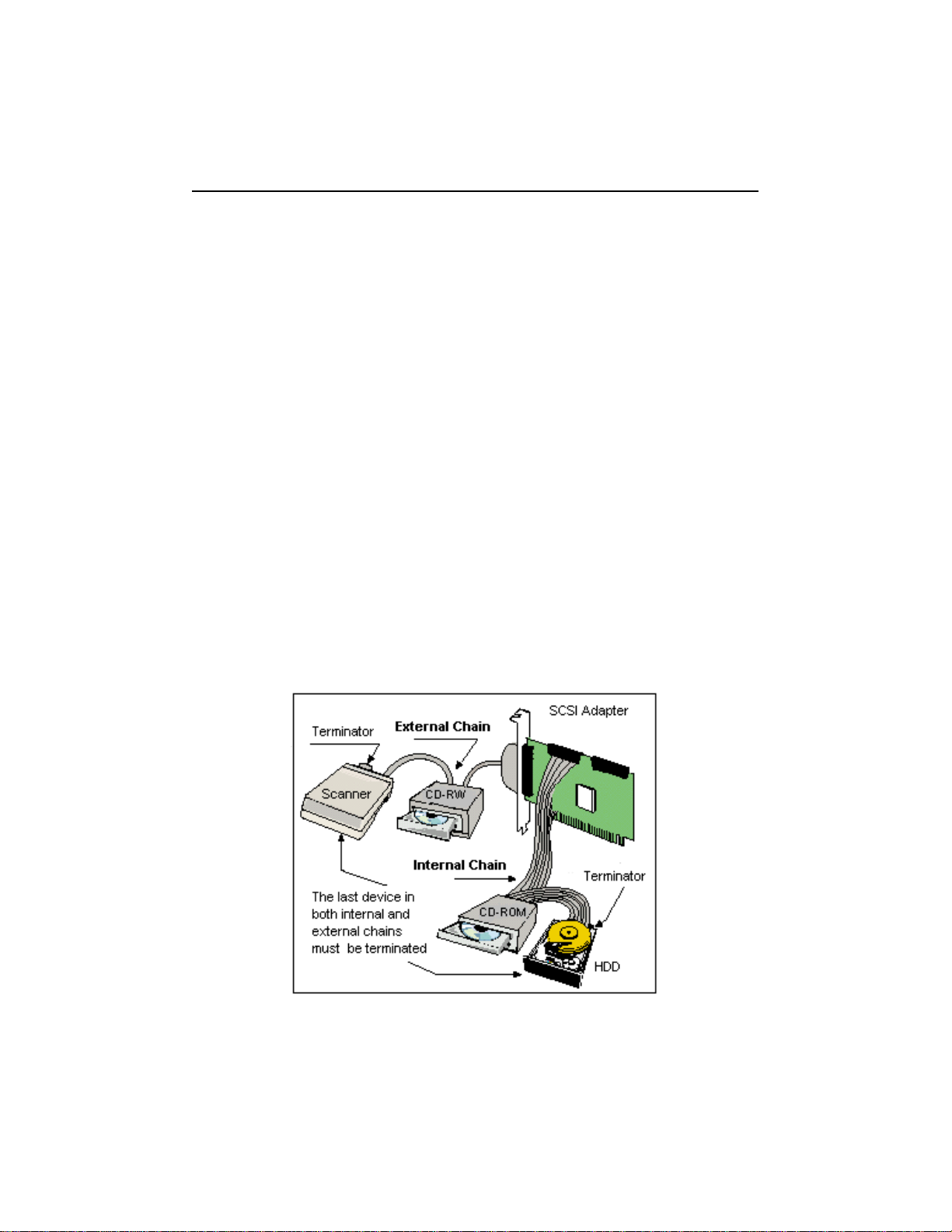
2.3 Connect Internal Devices
Connect internal devices to the adapter according to the following steps.
(1). Connect one end of the internal SCSI cable to any one of the adapter’s 2 inter-
nal connectors.
(2). Find an unused connector on the other end of the cable, and connect it to your
SCSI device.
(3). Repeat step 2 if you want to connect more than one devices.
(4). Add a terminator to the last end of the cable.
(5). Be sure that the devices’ ID numbers don’t conflict with one another.
(6). Do not set SCSI ID to 7, which is reserved for the host adapter.
AEC-67162M Manual
8
2.4 Connect External Devices
Connect one external device to the adapter according to the following steps.
(1). Connect one end of the external SCSI cable to the adapter’s external connec-
tor.
(2). Connect another end of the SCSI cable to the first connector of your SCSI
device.
(3). Add a terminator to the second connector of the device and enable it.
Connect more external devices to the adapter in a daisy chain according to the
following steps.
(1). Connect one end of the SCSI cable to the adapter’s external connector.
(2). Connect another end of the SCSI cable to the first connector of your first SCSI
device.
(3). Get another external SCSI cable, and connect its one end to the second con-
nector of the first device.
(4). Connect another end of the SCSI cable to the first connector of your second
SCSI device.
(5). Repeat step 3 to 4 when you connect more devices.
(6). Add a terminator to the second connector of the last device and enable it.
AEC-67162M Manual
9
Chapter 3 System Installation
3.1 Install AEC-67162M into the New OS
Here we take OS 9 and OS X 10.3 as examples to show the installation into the
hard drive connected with AEC-67162M. After installation you can boot from AEC-
67162M or the original hard drive.
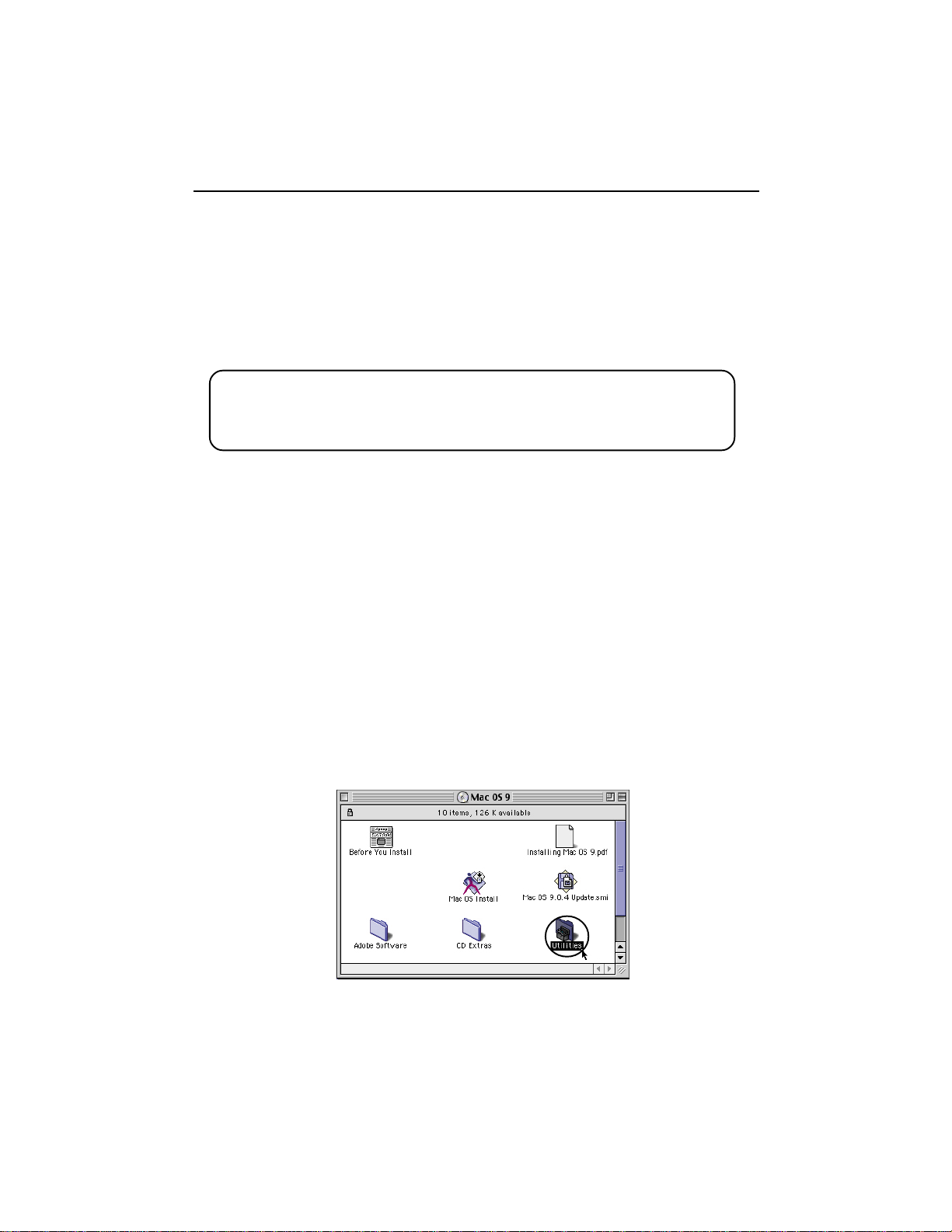
3.1.1 In Mac OS 9
1. Be sure that the hardware is installed correctly.
2. Insert the OS 9 source CD into CD/DVD-ROM.
3. Power on and press “C” key.
4. Wait for the appearance of OS 9.
5. Double click “Utilities”.
After installing hardware, please install the driver of AEC-67162M. There are two
choices. The first one is to install the driver into a new OS that is in the hard drive
connected to AEC-67162M as stated in 3.1. The second one is to install the driver
into an existed OS as stated in 3.2.
No driver of AEC-67162M is built in OS X 10.1.x and 10.2.x, so you
cannot install an OS into the hard drive connected to the adapter and
boot hence.

AEC-67162M Manual
10
7. Choose the hard drive connected to AEC-67162M, then click “Initialize”. For de-
tailed information of “Drive Setup”, please refer to Mac OS manual.
8. Start to install OS 9 onto the hard drive.
3.1.2 In Mac OS X 10.3
1. Be sure that the hardware is installed correctly.
2. Insert the OS X source CD into CD/DVD-ROM.
3. Power on and press “C” key.
4. Before installation, click “Installer” on the top selection row.
5. Click “Open Disk Utility”.
6. Choose a hard drive to initialize, and click “Partition” to decide the number of
partitions you need.
6. Double click “Drive Setup”.
Indice
Altri manuali Acard Adattatore

Acard
Acard AEC-6710S Manuale utente

Acard
Acard AEC-6290M Manuale utente

Acard
Acard Mirror Smart Ultra160 Manuale utente

Acard
Acard AEC-6885MLP Manuale utente

Acard
Acard AEC-6290 Manuale utente

Acard
Acard AEC-67160D Manuale utente

Acard
Acard AEC-7722 Manuale utente

Acard
Acard AEC-7730A Manuale utente

Acard
Acard AEC-67162 Manuale utente

Acard
Acard AEC-6293M Manuale utente


