
ACOUSTIC SOLUTIONS DVD 421 Manuale utente

PRECAUTIONS
Please read these precautions before using this unit.
POWER CORD PROTECTION:
To avoid any malfunctions of the unit, and to protect against electric shock, re or personal injury, please observe the following:
• Hold the plug rmly when connecting or disconnecting the AC power cord.
• Keep the AC power cord away from heating appliances.
• Never put any heavy object on the AC power cord.
• Do not attempt to repair or change the AC power cord in any way.
LOCATION:
Avoid placing the unit in areas of:
• Direct sunlight.
• High temperature (over 35˚C).
• High humidity.
• In a dusty environment.
NON-USE PERIODS:
When the unit is not being used, turn it off. If it is to be left unused for a long period of time, the unit should be unplugged from the
household AC outlet.
KEEP FINGERS AND OTHER OBJECTS OUT OF THE PLAYER:
• Touching internal parts of this unit is dangerous, and may cause serious damage to the unit. Do not attempt to disassemble the unit.
• Do not put any foreign object on the disc tray.
KEEP AWAY FROM WATER / MAGNETS:
• Keep the unit away from ower vases and other souces of water, if liquids are spilled into the unit, serious damage could occur.
• Keep magnets, or magnetised objects, away from the unit.
STACKING:
• Place the unit in a horizontal position, and do not place anything heavy on top of it.
CONDENSATION:
Moisture may form inside the player under the following conditions:
• Immediately after a heater has been turned on.
• In a steamy, or very humid, room.
• When the unit is suddenly moved from a cold environment to a warm one. If moisture forms on this unit, it may not operate properly. In
this case, turn off the power and wait for the moisture to evaporate.
IF THERE IS NOISE INTERFERENCE ON THE TV FROM THE DVD PLAYER:
• Depending on the reception condition of the TV, interference may appear on the TV while you watch a TV broadcast and the DVD is left
on. This is not a malfunction of the DVD or the TV. Under these circumstances turn off the DVD.
CONTENTS
P1. Precautions.
P2. Safety Information.
P3. Features.
Summary of Dolby Digital, Surround,
Pro Logic and DTS.
P4. Disc Handling and Maintenance.
P5/P6. Connections/Audio Connections.
P7. Remote Control.
P8. Remote Control Functions.
P9. Viewing and Listening.
Front Panel Display.
P10. Set Up Menu Navigation.
P11. Troubleshooting.
P12. Glossary.
May we take this opportunity to thank you for purchasing this DVD player. We strongly suggest that you carefully study these operating
instructions before attempting to operate the unit, and that you note the listed precautions.
1
DVD 421 /451
SAFETY INFORMATION
CAUTION:
This unit employs a laser. Due to possible eye injury, only qualied service personnel should remove the cover or attempt to service this
device. Use of controls, adjustments, or performance of procedures other than those specied here-in, may result in hazardous radiation
exposure.
NOTE:
This equipment has been tested and found to comply with the limits for a Class B digital device persuant to part 15 of the FCC Rules.
These limits are designed to provide reasonable protection against interference in a residential installation. This equipment generates, uses,
and can radiate, radio frequency energy and, if not installed and used in accordance with the instructions, may cause interference to radio
communications. However, there is no guarantee that interference will not occur in a particular installation. If this equipment does cause
interference to radio or television reception, which can be determined by turning the equipment off and on, the user is encouraged to try to
correct the interference by one or more of the following measures:
• Reorient or relocate the receiving antenna.
• Increase the separation between the equipment and the receiver.
• Connect the equipment into an outlet on a mains circuit different from that to which the receiver is connected.
• Consult the dealer or an experienced radio / TV technician for help.
Manufactured under licence from Dolby Laboratories. “Dolby”, “AC-3” and the double-D symbol are trademarks of Dolby Laboratories.
Condential Unpublished Works. © 1992-1997 Dolby Laboratories, Inc. All rights reserved.
This product incorporates copywrite protection technology that is protected by method claims of certain U.S. patents and other intellectual
property rights owned by MacroVision Corporation and other rights owners. Use of this copywrite protection technology must be authorised
by MacroVision Corporation, and is intended for home and other limited viewing uses only unless otherwise authorised by MacroVision
Corporation. Reverse engineering or disassembly is prohibited.
CAUTION:
To reduce the risk of electic shock, do not remove the cover. No
user serviceable parts inside. Refer to qualied service personnel
for servicing.
IMPORTANT SAFETY INSTRUCTIONS:
1) Read and keep these instructions available for future reference.
2) Heed all warnings.
3) For indoor use only.
4) Do not use this apparatus where it might get damp.
5) Clean only with a dry cloth.
6) Do not block any of the ventalation openings, install in accordance with all instructions.
7) Do not install near any heat sources such as radiators or other apparatus ( including ampliers ) that produce heat.
8) Protect the power cord from being damaged.
9) Only use attachments / accessories specied by the manufacturer.
10) Unplug this apparatus during lightning storms or when unused for long periods of time.
11) Refer all servicing to qualied service personnel. Servicing is required when the apparatus has been damaged in any way; such as when
the power-supply cord or plug is damaged, liquid has been spilled or objects have fallen into the apparatus, the apparatus has been
exposed to rain or moisture, does not operate normally, or has been dropped.
This DVD player is Double Insulated, when servicing use only identical replacement parts.
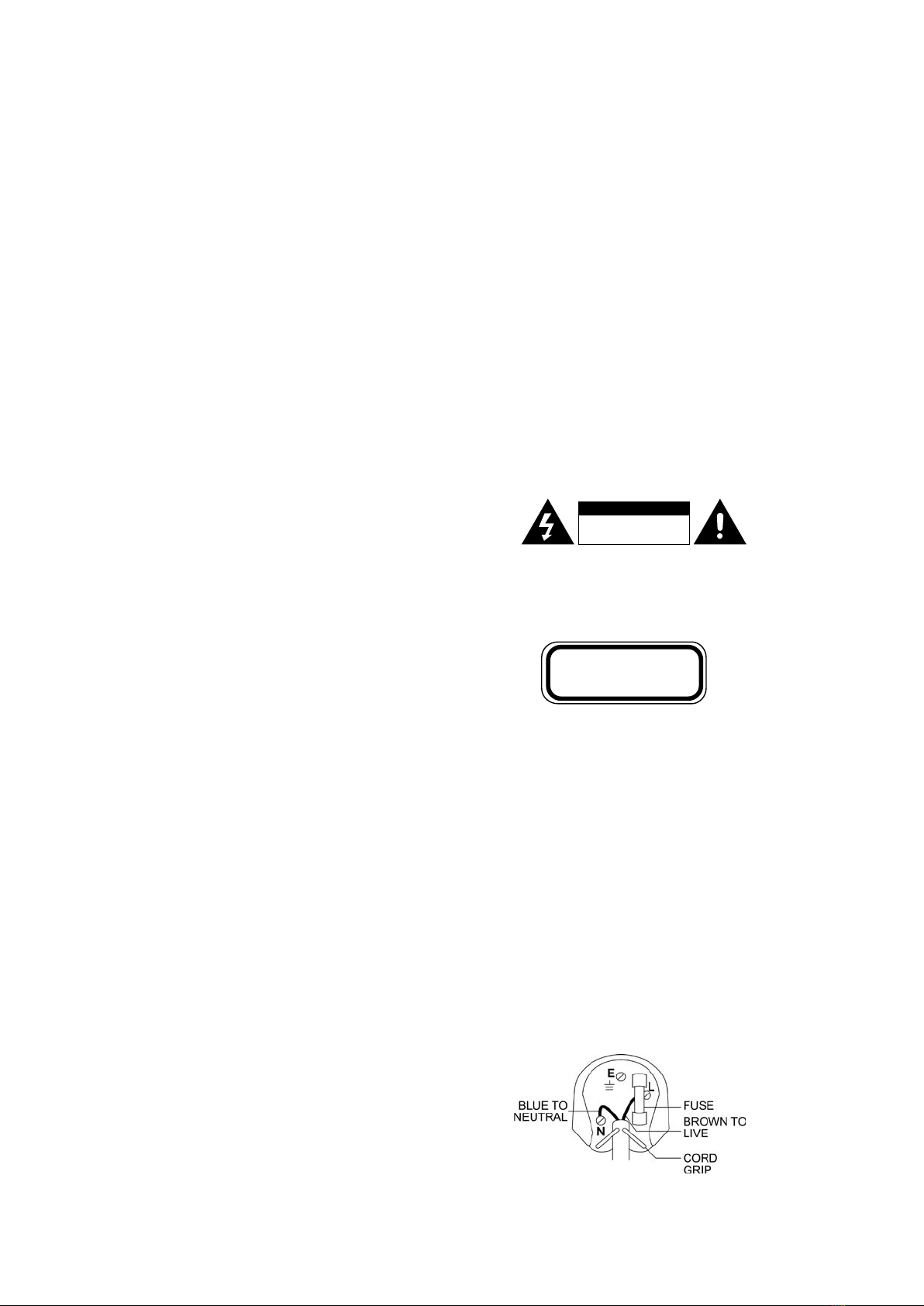
CAUTION
RISK OF ELECTRIC SHOCK!
DO NOT OPEN!
CLASS 1
LASER PRODUCT
CAUTION:
VISIBLE AND INVISIBLE LASER RADIATION WHEN OPENED AVOID
EXPOSURE TO BEAM (WARNING LOCATION: INSIDE ON LASER
COVER SHIELD).
UK MAINS PLUG DETAILS:
For your convenience a mains plug with a fuse (3 Amp) has been tted to
this appliance. For your safety please observe the following information.
The DVD player is designed to operate on AC mains supply between 220
and 240 volts, 50 Hz.
The wires in the mains lead are coloured in accordance with the following
code:
BLUE NEUTRAL
BROWN LIVE
WARNING:
To reduce the risk of re, electric shock or annoying interference,
do not expose this appliance to rain or moisture and only use the
recommended accessories.
2
FEATURES
DVD: A completely new dimension in video entertainment
• Subtitles may be displayed in one of up to 32 languages.
• The audio soundtrack can be played in many languages (dependant on the DVD disc used).
• The multi-angle function allows you to choose the viewing angle of scenes which were shot from a number of different angles (limited
to DVD discs recorded with multiple camera angles).
• Supports MP3 & DTS playback.
• High quality digital audio.
• The Dolby Digital decoder built into the DVD 451 player makes it possible to enjoy 5.1 Dolby Digital Surround Sound.
• With linear PCM sound from 48 KHz/24 bit through to 96 KHz/24 bit, audio quality exceeds that of an audio CD player.
• Many convenient features
• Direct access of favourite scenes (title/chapter/time/track search).
• Parental lock settings to prevent playing discs unsuitable for young viewers (DVD only).
• Compatible with PAL and NTSC DVD discs
• This DVD player can be set to play discs in PAL or NTSC format, or both (multi-system). However, the DVD player must be connected to
a suitable TV to play PAL DVD disc or NTSC DVD disc.
• Compatible with audio CD, as well as DVD.
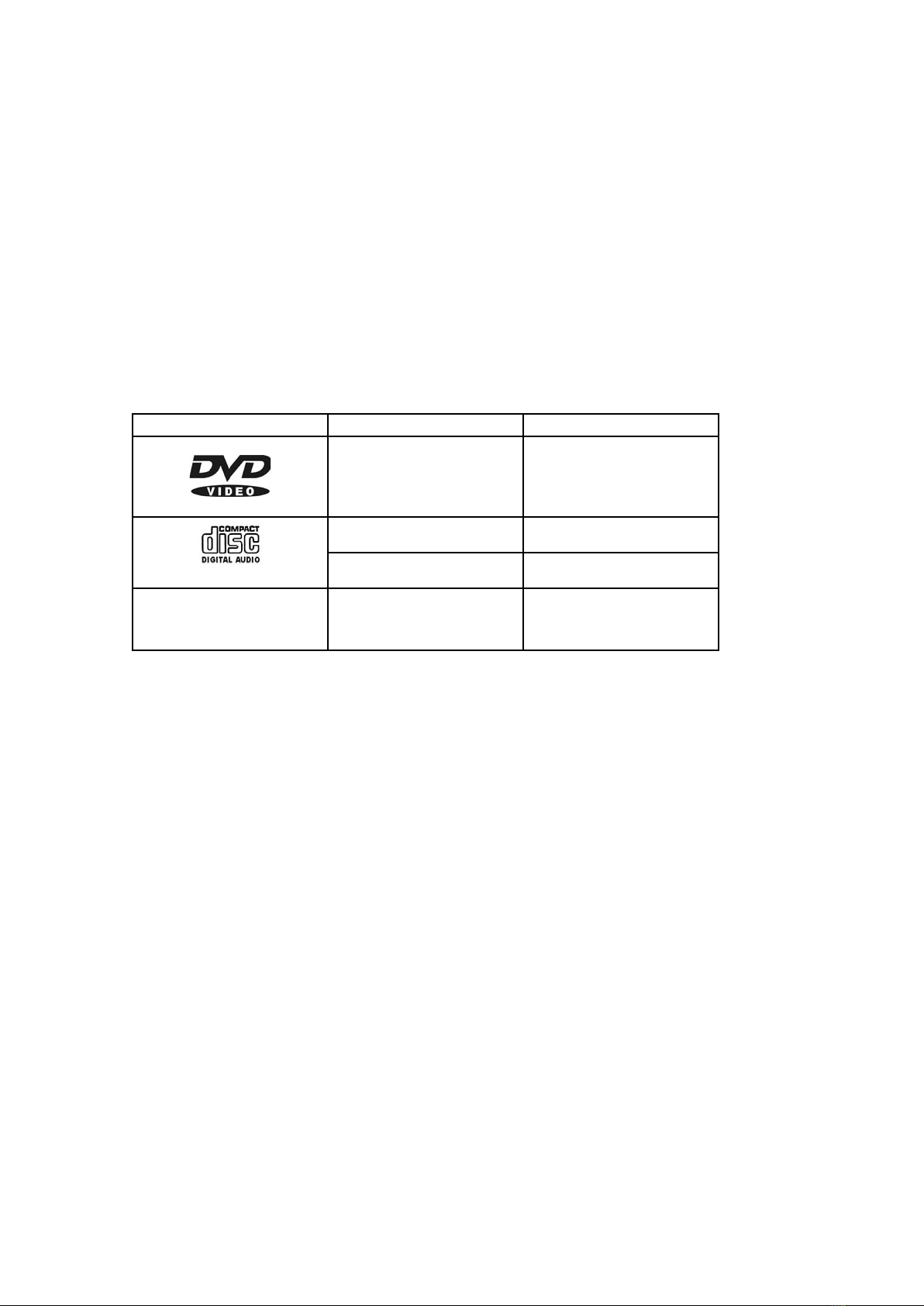
Disc formats supported by this player:
Summary of Dolby Digital, Dolby Surround,
Dolby Pro Logic, and DTS
Almost every DVD disc has audio in Dolby Digital format. DTS is an optional audio format that can be added to a disc in addition to Dolby
Digital audio. Dolby Digital and DTS can store mono, stereo, and multi channel audio (usually 5.1 channels).
Every DVD player has an internal Dolby Digital decoder. The DVD 421 has a built-in 2 channel decoder which turns Dolby Digital into
standard analog stereo audio, which can be fed to most types of audio equipment using a stereo audio cable. The DVD 451 player has a
built-in 5.1 Dolby Digital decoder to provide 6 channels of analog audio via the rear panel connectors to a suitable 6 channel amplier/ home
theatre system.
Dolby Surround is a standard audio mixing technique that adds a rear channel and a centre channel onto a 2-channel signal. A Dolby
Surround signal can be played on any stereo system, in which case the rear- and centre - channel sounds remain mixed in with the left and
right channels. When a Dolby Surround signal is played on a multi channel audio system, the extra channels are extracted to feed centre
speakers and rear speakers. The original technique of decoding Dolby Surround, called simply Dolby Surround, extracts only the rear
channel. An improved decoding technique, Dolby Pro Logic, also extracts the centre channel. Dolby Pro Logic II extracts both the centre
channel and the rear channel signals and also processes the audio channels to create more of a 3D audio environment. Dolby Surround is
independent of the storage or transmission format. In other words, a 2 - channel Dolby Surround signal can be analog audio, broadcast TV
audio, digital PCM audio, Dolby Digital, DTS, MP3, audio on a VHS tape, etc.
Unlike Dolby Surround, Dolby Digital encodes each channel independently. Dolby Digital can carry up to 5 channels (left, centre, right, left
surround, right surround) plus an omnidirectional sub-woofer (LFE - Low Frequency Effects channel). The built-in, 2-channel Dolby Digital
decoder in every DVD player handles multi channel audio by “down mixing” it to two channels using Dolby Surround. This allows the analog
stereo outputs to be connected to just about anything, including TVs and Hi Fi systems with Dolby Pro Logic capability. DVD players also
output the down mixed 2-channel Dolby Surround signal in digital PCM format, which can be connected to a digital audio receiver, most of
which can decode to Dolby Pro Logic.
The DVD 421/451 players also output the “raw” Dolby Digital signal for connection to a receiver with a built-in Dolby Digital decoder.
The DVD 421/451 players have a DTS Digital Out feature, which sends the raw DTS signal to an external receiver with a DTS decoder.
Suitable disc Diameter / Side / Layer Maximum playing time
DVD
12cm / Single / Single
12cm / Single / Double
12cm / Double / Single
12cm / Double / Double
MPEG II TYPE
133min ( 4.7GB )Max
242min (8.5GB )Max
266min (9.4GB )Max
484min (17GB )Max
CD-DA
12cm / Single / Single
74min Max
CD-DA
12cm / Single / Single
20min Max
MP3
8cm / Single / Single
12cm / Single / Single
MPEG I Layer III
640min Max
MP3
3

HANDLING PRECAUTIONS:
Hold disc by the edges so the surface will not be soiled by
ngerprints. (A) Fingerprints, dirt and scratches can cause
skipping and distortion. Do not write on the label side with a
ball-point pen or other writing instruments. Do not use record
cleaning spray, benzine, thinners, static electricity prevention
liquids or any other solvents. Be careful not to drop or bend the
disc. Do not install more than 1 disc on the disc tray.
(A)
(B)
(C)
General Maintenance:
Be sure to turn the unit off and disconnect the AC power cord before doing any maintenance on the unit.
Wipe with a dry soft cloth.
If the surfaces are extremely dirty, wipe clean with a cloth which has been dipped in a weak soap-and-water solution and wrung out
thoroughly, and then wipe again with a dry cloth.
Never use alcohol, benzine, thinners, cleaning uids or other chemicals. Do not use compressed air to remove dust.
REGION CODING:
Since DVD movies are released at different times around the world, all DVD discs are “region coded” and will only play in a DVD player of
the same region. If you try and play a different region disc an error message will be displayed on the TV screen.
DISC HANDLING AND MAINTENANCE
The world is divided into 6 main regions, and the discs are identied by the region number superimposed on a world globe:
Region 1: Canada, USA, US Territories.
Region 2: Europe, Middle East (including Egypt).
Region 3: Southeast Asia, East Asia (including Hong Kong).
Region 4: Central America, South America, Mexico, Australia, New Zealand, Pacic Islands, Caribbean.
Region 5: Russian Federation, Africa (not Egypt), North Korea, Mongolia.
Region 6: China.
Please contact your hardware retailer or manufacturer for further information on region codes or RCE - Regional Coding Enhancement.
Do not try to close the disc tray when the disc is not installed properly
(B). Be sure to store the disc in its case when not in use.
If the surface is soiled (C):
Wipe gently with a soft, damp (water only) cloth. When wiping discs,
always move the cloth from the centre hole towards the outer edge.
(if you wipe the disc using a circular motion, circular scratches are
likely to occur, which will cause noise).
If the disc is brought from a cold to a warm environment, moisture may form on the disc:
Wipe the moisture off with a soft, dry, lint-free cloth before using the disc.
Improper disc storage:
You can damage discs if you store them in the following places:
• Areas exposed to direct sunlight.
• Humid or dusty areas.
• Areas directly exposed to a heat outlet or heating appliance.
Discs which cannot be played on this player:
CDV, CD-G, some rewritable DVDs, photo CDs.
4
CONNECTIONS
Identifying your DVD player
Model 421 features - Dolby Digital 2.0 stereo (two channels of recorded digital audio - left and right channels)
Model 451 features - Dolby Digital 5.1 (surround sound) the standard discrete surround-sound conguration of three full-range front channels
(front R/L and centre channels) two full-range surround channels (rear R/L) and a bass-only LFE (Low Frequency Effects ) or Sub Woofer
channel.
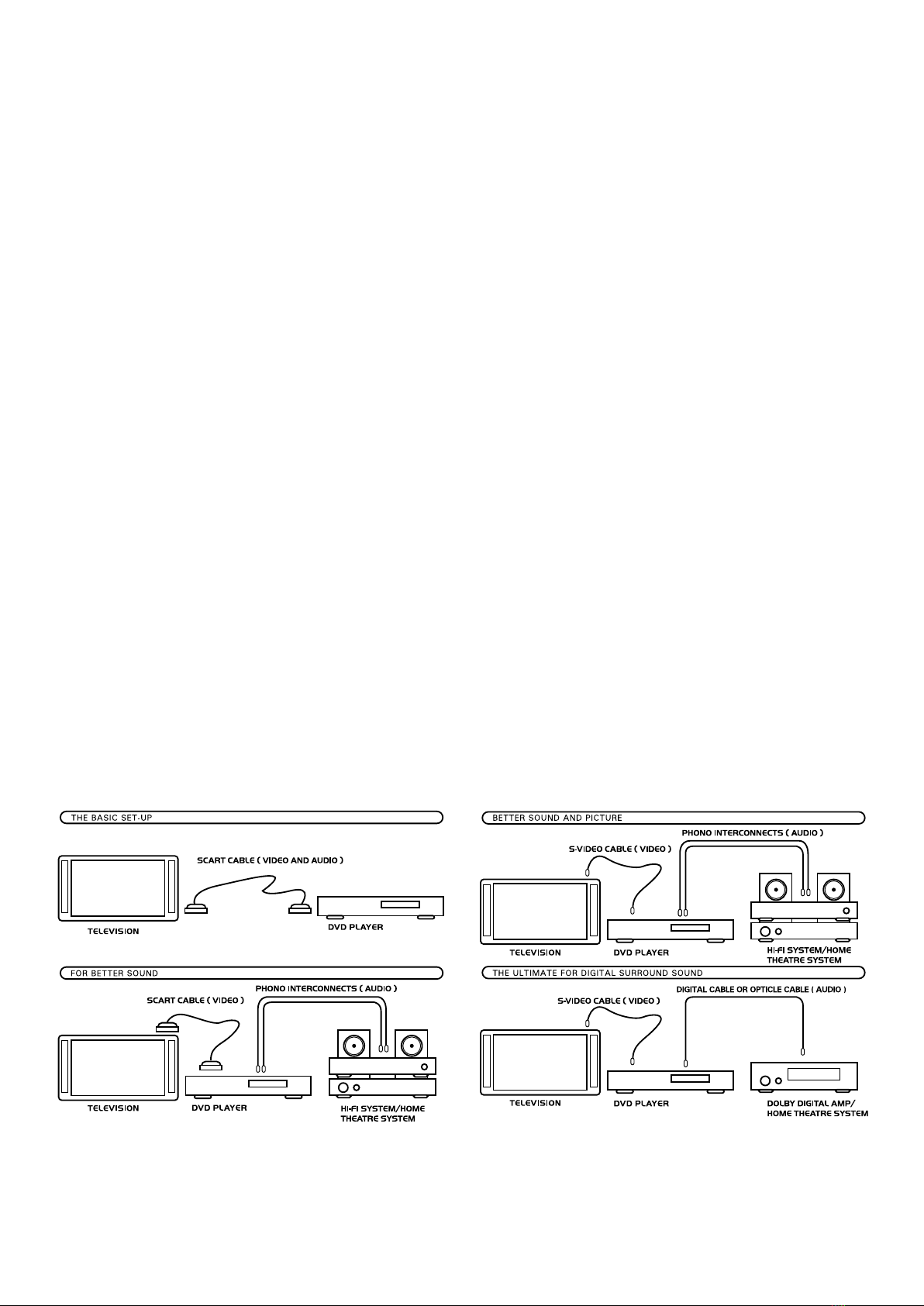
Connecting your DVD player into your Audio/Video system
SCART Lead:
The all-in-one connection (DVD 421 and 451) SCART lead - contains:
• Composite video signal
• RGB video signal
• Stereo sound (non-decoded sound from the 451 player)
The simplest installation to most TVs, giving picture and sound from the TV set only.
Individual video outputs:
• Composite video (CVBS) using single RCA video connector (usually a yellow lead and connector) to send digital video signals to a TV
with a digital video input (some TVs have A/V IN sockets - connect V IN to the video output socket on the DVD player).
Note - to get best picture quality use only a digital RCA lead not an audio RCA lead.
• S-video - (4-pin connector) Provides separate video signals (brightness Y and two colour signals C). For TVs with S-video socket.
Individual audio outputs:
• Analogue (decoded) outputs:
DVD 421 - two phono sockets for Right and Left audio channels. Connect to a stereo Hi Fi system, the A IN sockets on a TV set with
A/V IN sockets, or the stereo inputs of a Home Theatre System (to produce stereo or simulated surround sound).
DVD 451 - six phono sockets for each of the decoded 5.1 channels. Connect to the 6 input sockets on a suitable 5.1 (6 channel) Hi Fi
amplier, or connect to the 6 channel inputs of a Home Theatre System.
Note: If you have a 451 player but do not yet own a Home Theatre System or suitable 6 channel amplier, you can connect the audio
outputs “Front Left and Right” into a conventional stereo Hi Fi amplier, and setting the DVD player audio to “stereo” (see Set Up
menus, page 10) you will enjoy the full DVD sound track in stereo only.
• Digital Audio (RCA coaxial) - all 6 channels (non-decoded) output as one digital audio stream using an RCA lead. Connect to a suitable
amplier with a digital input and a Dolby Digital 5.1 decoder to enjoy full surround sound, or an amplier with a digital input (no decoder)
to enjoy the full sound track in stereo only.
• Digital Audio (Optical) - all 6 channels (non-decoded) output as one digital audio stream. Connect to a suitable amplier with an optical
input and a Dolby Digital 5.1 decoder to enjoy full surround sound.
CAUTION:
• Do not connect to an amplier with an optical digital input connector which does not contain a Dolby Digital decoder.
• Audio CDs can be played as they are normally played.
5
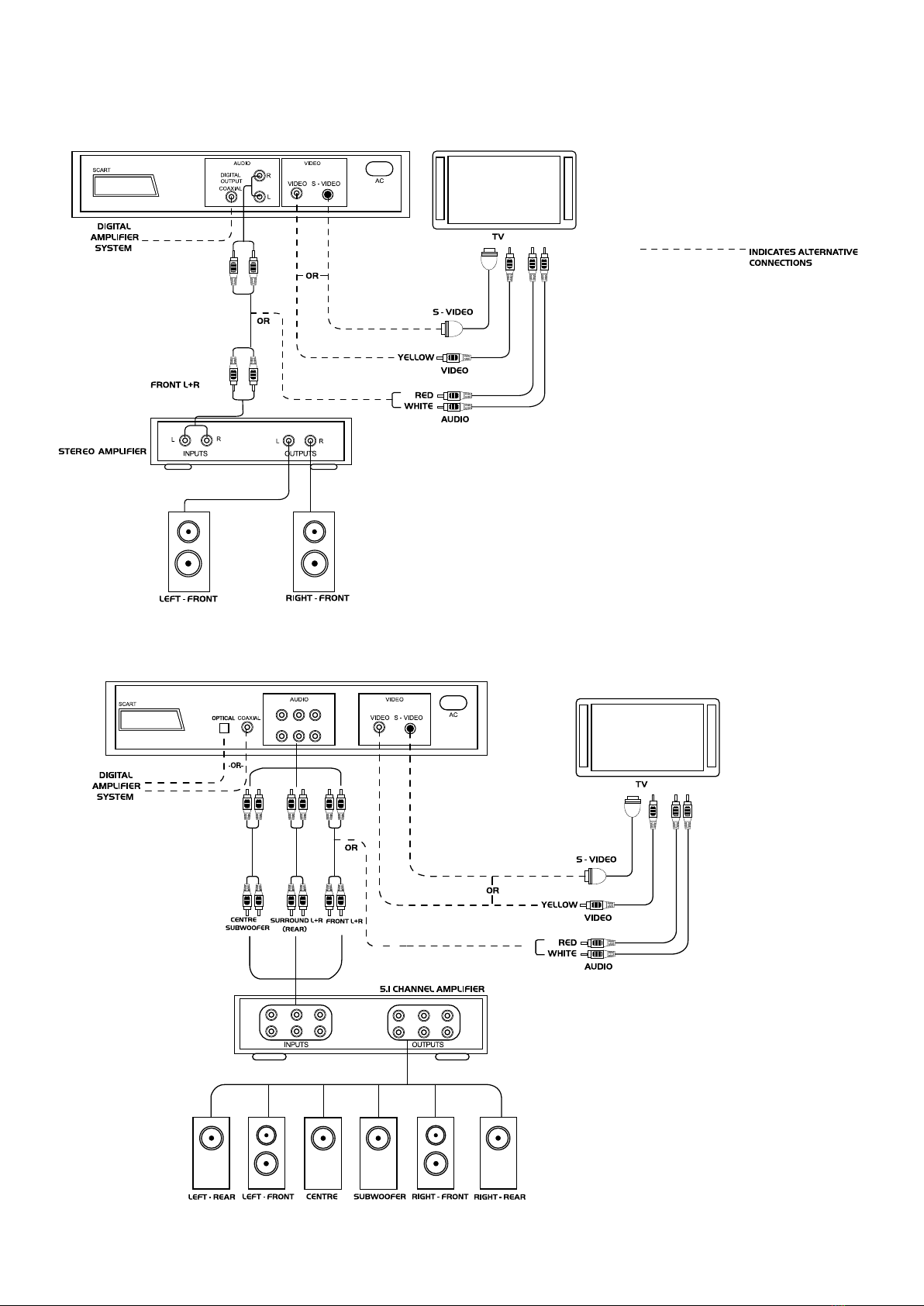
421 - CONNECTION OPTIONS TO STEREO SOUND SYSTEM OR
DIGITAL AMPLIFIER, WHEN NOT USING A SCART LEAD.
451 - CONNECTION OPTIONS OF 6 CHANNEL OUTPUT
TO HOME THEATRE SYSTEM, WHEN NOT USING A SCART LEAD.
SYSTEM CONNECTION
6
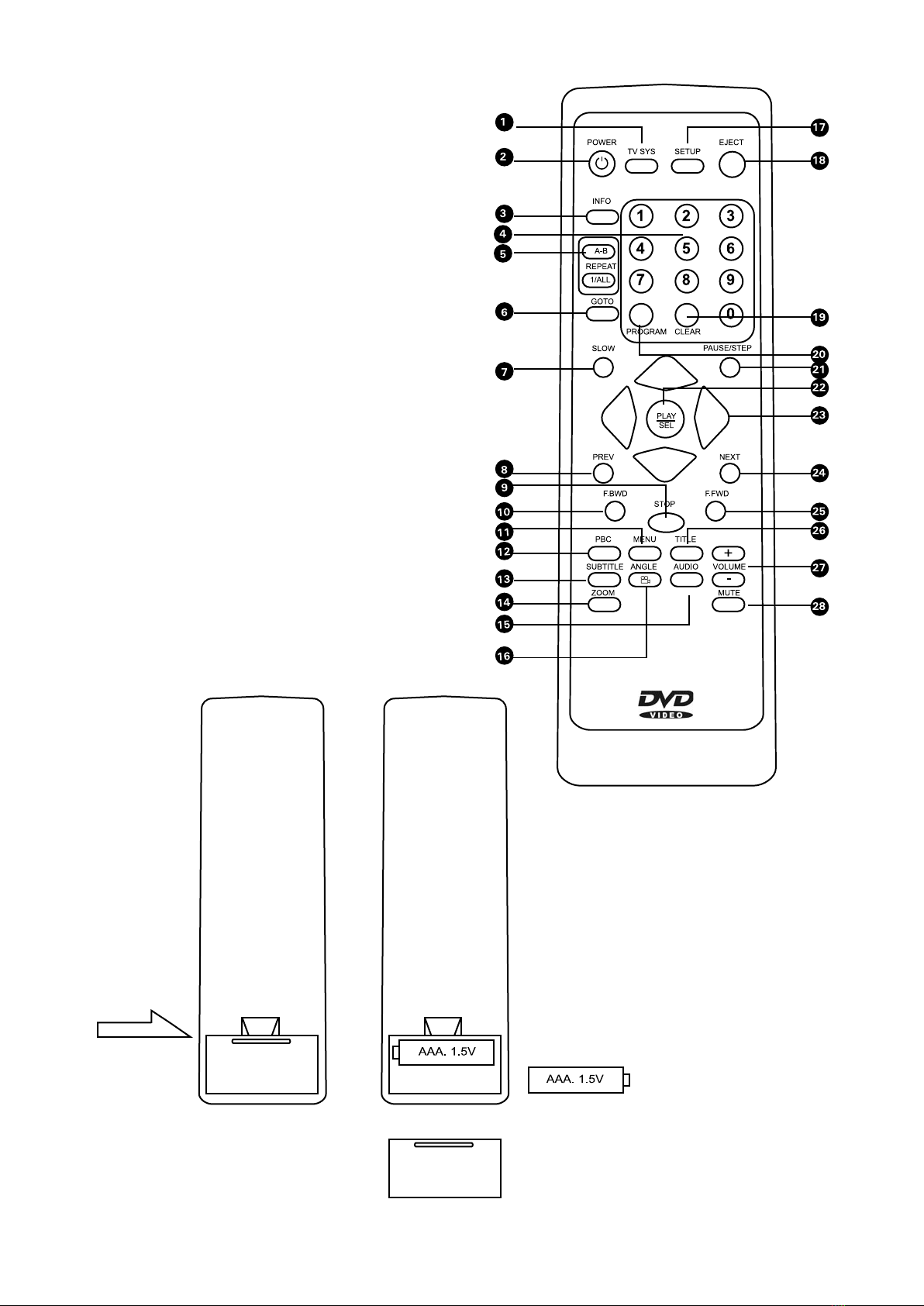
REMOTE CONTROL
Battery Installation
Insert the batteries observing the correct (+) and (-) polarities as
illustrated.
• If the remote control unit only works when it is operated near the
player, replace the batteries.
• Use size’AAA’ batteries.
NOTE
• Do not use rechargeable (Ni-Cd) batteries.
• Do not attempt to recharge or short circuit the batteries.
• Do not drop, step on or otherwise cause shock to the remote
control unit. This may damage the unit or lead to malfunctioning.
• Do not mix old and new batteries.
• If the remote control unit is not going to be used for a long time,
remove the batteries, otherwise electrolyte may leak causing
malfunction, and also burns if skin contact is made with the
electrolyte.
• Wipe away any electrolyte leaked inside the remote control unit,
and install new batteries.
• If any electrolyte should come into contact with hands, wash it
off thoroughly with water.
• If it comes into contact with your eyes or is swallowed, wash
thoroughly and seek medical attention.
REMOTE CONTROL OPERATION RANGE
Point the remote control no more than 7 m from the remote control
sensor and within about 60° of the front of the unit.
NOTE
• Do not place objects between the remote control unit and the
remote control signal sensor.
• Operating this remote control unit while simultaneously operating
the remote control unit of any other equipment may cause
interference.
7
9. STOP. Press STOP once to hold playing, and press PLAY/SEL to
resume playing from the same point. Note that the resume point will
be stored even if the DVD player is turned OFF. Press STOP twice
to completely stop playing the disc.
10. F/BWD (Fast Backward). Fast reverse at x2, x4, x8, x16 and
x32 playing speed can be selected by repeatedly pressing F/BWD.
Press PLAY/SEL to return to normal playback.
11. MENU. Pressing MENU returns to the ROOT menu to select
other titles on a DVD. Press PLAY/SEL to start playback of the
selected title.
Note: that some discs do not support menu display.
12. PBC. Not applicable on DVD 421/451.
13. SUBTITLE. Repeated pressing of SUBTITLE allows you to select
the desired language of subtitles to be displayed on the TV screen.
Selecting SUBTITLE OFF removes subtitles from the display.
Note: that some discs do not support subtitles, or not all subtitle
languages will be available.
14. ZOOM. Allows you to zoom in to a scene. Repeated pressing of
ZOOM allows you to view the scene in x2 and x4 normal size.
Note: that zooming into a scene only allows you to view the central
area of interest, and the outer parts of the scene will not be
viewable. Repeated pressing of ZOOM until ZOOM OFF is displayed
will return to normal viewing (x1).
15. AUDIO. To change the soundtrack type or language press
AUDIO during playback. Repeatedly press AUDIO until the desired
soundtrack type or language is displayed.
Note: that the disc played must support multiple soundtrack type
and language selection. The main soundtrack types are 2 channel
(stereo), DTS 5.1 channel, or 5.1 Dolby Digital. The on-screen
display will show all options available for the disc being played.
16. ANGLE. Repeated pressing of ANGLE allows viewing of scenes
from different angles. The current selected viewing angle is
displayed on the TV screen.
Note: that many discs do not support multi-angle display.
17.SET UP. Pressing SET UP at any time allows you to enter the
various set up menus (see page 10) During SET UP any disc being
played will stop, playback will resume from when SET UP was
selected. Press SET UP again to resume playing discs.
18. EJECT. Press EJECT to open the disc tray. Load a disc and
press EJECT again to close the tray and read the disc.
19. CLEAR. Use the CLEAR button during data entry (for GOTO or
PROGRAM options) to clear entered data.
20. PROGRAM. To program a disc supporting track/chapter
programming. Press PROGRAM during play to display the
programming menu, and input the required track numbers (using 3
digits for each track number) so enter “001” for track 1, etc. Press
PLAY/SEL to enter to the next track number for the program. Press
PLAY/SEL twice to play the programmed tracks.
21. PAUSE/STEP. Press PAUSE/STEP once to pause playback.
Pressing PAUSE/STEP twice pauses playback and allows you to step
forward by one frame each time the PAUSE/STEP button is pressed.
Press PLAY/SEL to resume playing at normal speed.
22. PLAY/SEL. Use to start playback or to select options and
features, start programmed playback, etc.
23. ARROW KEYS. Use the up, down, left, right arrow keys to
navigate menus to select features, options, etc.
24. NEXT. Press NEXT to skip to subsequent chapters.
25. F/FWD (Fast Forward). Fast forward at x2, x4, x8, x16 and x32
playing speed can be selected by repeatedly pressing F/FWD. Press
PLAY/SEL to return to normal playback.
26.TITLE. Pressing TITLE during playback of some discs will display
the titles of the disc being played. Use the arrows to select the
desired title. Press PLAY/SEL to start playback of the selected title.
Note: that some discs do not support title display.
27. VOLUME (+ and -). Adjusts the sound output level of the DVD
player. Use in conjunction with the TV volume control to set
optimum sound level.
28. MUTE. Pressing MUTE turns off the sound output from the DVD
player. Pressing MUTE again will restore the sound to the previous
level.
REMOTE CONTROL FUNCTIONS
Basic functions can be controlled from the buttons on the front of the DVD player, However the remote controller is needed for advanced
operation.
Note: if appears during remote operation, it means you have selected an option that cannot be performed (limited by the type of
disc, etc.)
8
4. NUMERICAL KEY PAD. Numerical key pad used for selecting
tracks, entering data, etc.
5. RPEAT A-B AND 1/ALL. To repeatedly play a selected section
(A to B) or to repeat the entire disc. Press A-B during playback,
at the point where repeat playing is to start. Press A-B again at
the point where repeat playing is to stop. Repeat playing of the
selected section between points A and B will now start. Press A-B
again to cancel repeat playing and return to normal playback (A-B
CANCELLED will be displayed on the TV screen). Note that A-B
repeat only works within the same chapter of a disc. Repeated
pressing of 1/ALL repeats the playback of a chapter, a title, all of
the disc, or cancels repeat playing.
Note: that the repeat functions only work on discs that support the
display of elapsed playing time on the DVD display.
6. GOTO. To select a scene by title or chapter number during play,
press GOTO, select title or chapter number using the right/left
arrow keys, enter the desired chapter or title number using the
key pad, and press PLAY/SEL to play the required selection. Single
digit title/channel numbers are entered using “0” before the number
(so chapter 3 is entered as “03”). To select a scene by time (for
example to view a scene 1 hour, 50 minutes and 35 seconds from
the start of a chapter): Press GOTO twice, and input the starting
time using the key pad (in this example enter 0,1,5,0,3,5 for 1
hour, 50 minutes and 35 seconds). Press PLAY/SEL to advance to
the required time.
Note: that not all discs support elapsed time display and the GOTO
time function.
7. SLOW. Press SLOW for slow speed playback. Repeated pressing
of SLOW allows selection of play speed x1/2, x
1
/4, x1/8, x
1
/16, x
1
/32
and return to normal playback. Press PLAY/SEL to resume normal
playback from any slow speed selection.
8. PREV. Press PREV to skip backwards to previous chapters.
Remote control operation:
1. POWER. Switches the device between ON (ready to play discs
- green light) and STAND BY (power saving mode - red light)
2. TV SYS. Repeated pressing of TV SYS selects between the TV
standards PAL, NTSC or MULTI. Select according to your
TV standard.
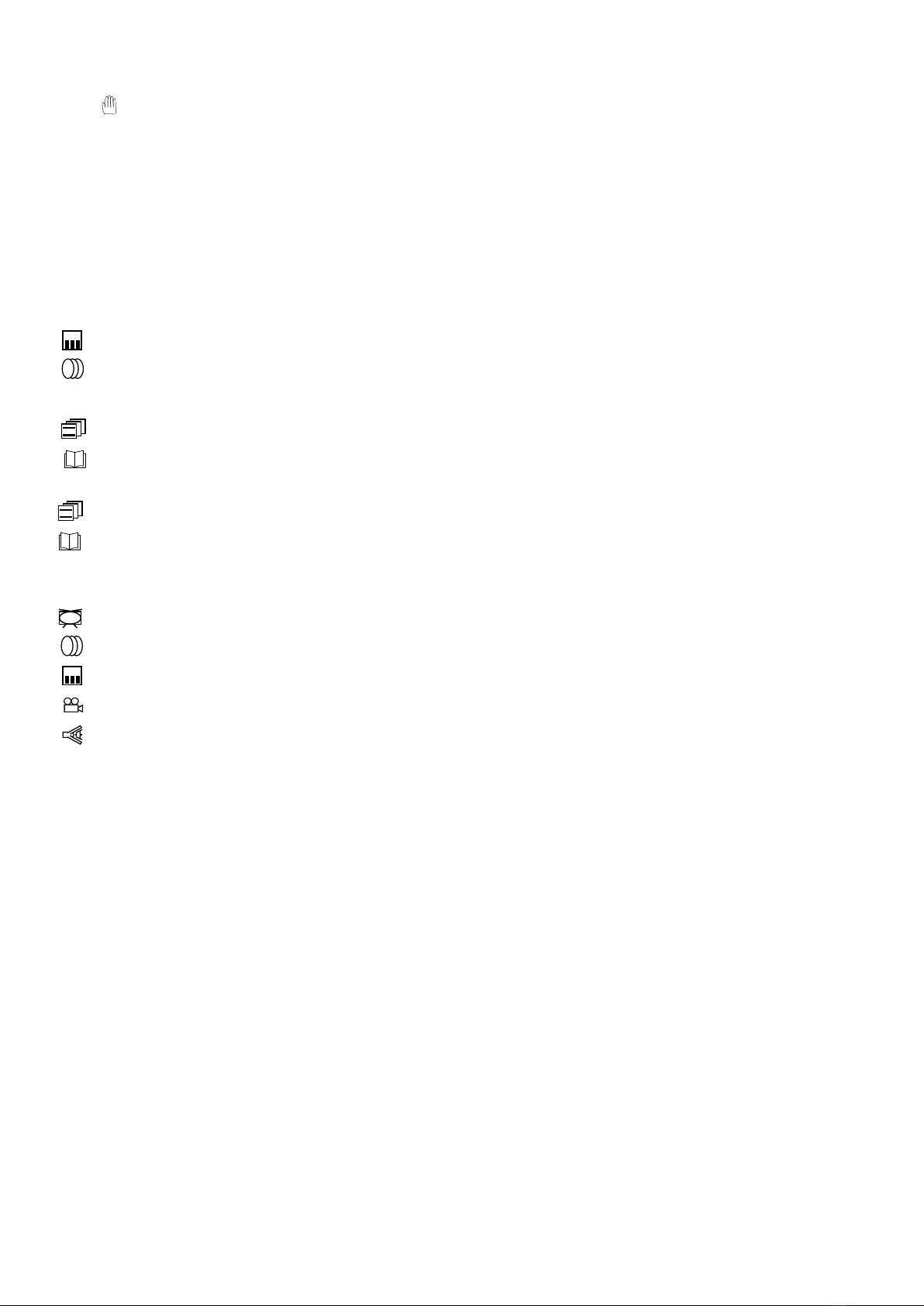
3. INFO. Pressing INFO once displays disc summary information,
pressing twice gives more detailed information on the disc, pressing
a third time clears the INFO display.The information displayed
corresponds to:
Summary information:
Type of disc being played.
Subtitle track number (or OFF)
Soundtrack type number
Elapsed playing time
Title number
Chapter number
Detailed Information:
Title number selected/total number of titles
Chapter number selected/total number
of chapters
Elapsed playing time
TV System selected
Soundtrack number/total number of soundtracks
Subtitles selected/total number of subtitles
Camera angle selected/total number of angles
Description of soundtrack selected.
:OFF
:2
:1
:3
1/4
3/5
2/4
1/12
DTS
1/9
• Switch on the TV, then switch to “VIDEO” or A/V mode.
1. SWITCH ON THE POWER.
• Press the “POWER” switch to activate the device.
• The green light indicates the DVD player is on and ready to play a disc. The blue “DVD” screen will be displayed on the TV.
2. INSERT THE DISC
• Press the “OPEN/CLOSE” button to open the tray. The TV screen and display panel will indicate “OPEN”.
• Insert the disc in the centre of the tray.
• Press the “OPEN/CLOSE” button again, after closing the tray,“CLOSE” will be displayed on the TV screen and on the display panel.
• If the disc supports the “FIRST PLAY” function, the disc will start to play immediately.
3. START PLAYING
• Pressing the “PLAY/SEL” button will start playing the disc.
• If the disc inserted is a DVD disc, the title menu is displayed to select playing or various special playing functions depending on the
content of the disc.
4. STOP PLAYING
• Pressing the “STOP” button will immediatly stop playing.
• On the display “STOP” will appear.
• Press the “PLAY/SEL” button again to resume playing.
• Press the “STOP” button twice to completely stop playing the disc.
5. REMOVE THE DISC
• Press the “OPEN/CLOSE” button. The screen will display “OPEN”, and the disc can be removed.
6. SWITCH OFF THE POWER/STANDBY
• Pressing “POWER” on the remote will turn the DVD player to “STANDBY”. The green light will turn to red and the TV display will go
blank. Reselecting the “POWER” button on the remote will activate the player to “ON”. See “Remote Control” for more advanced
controls.
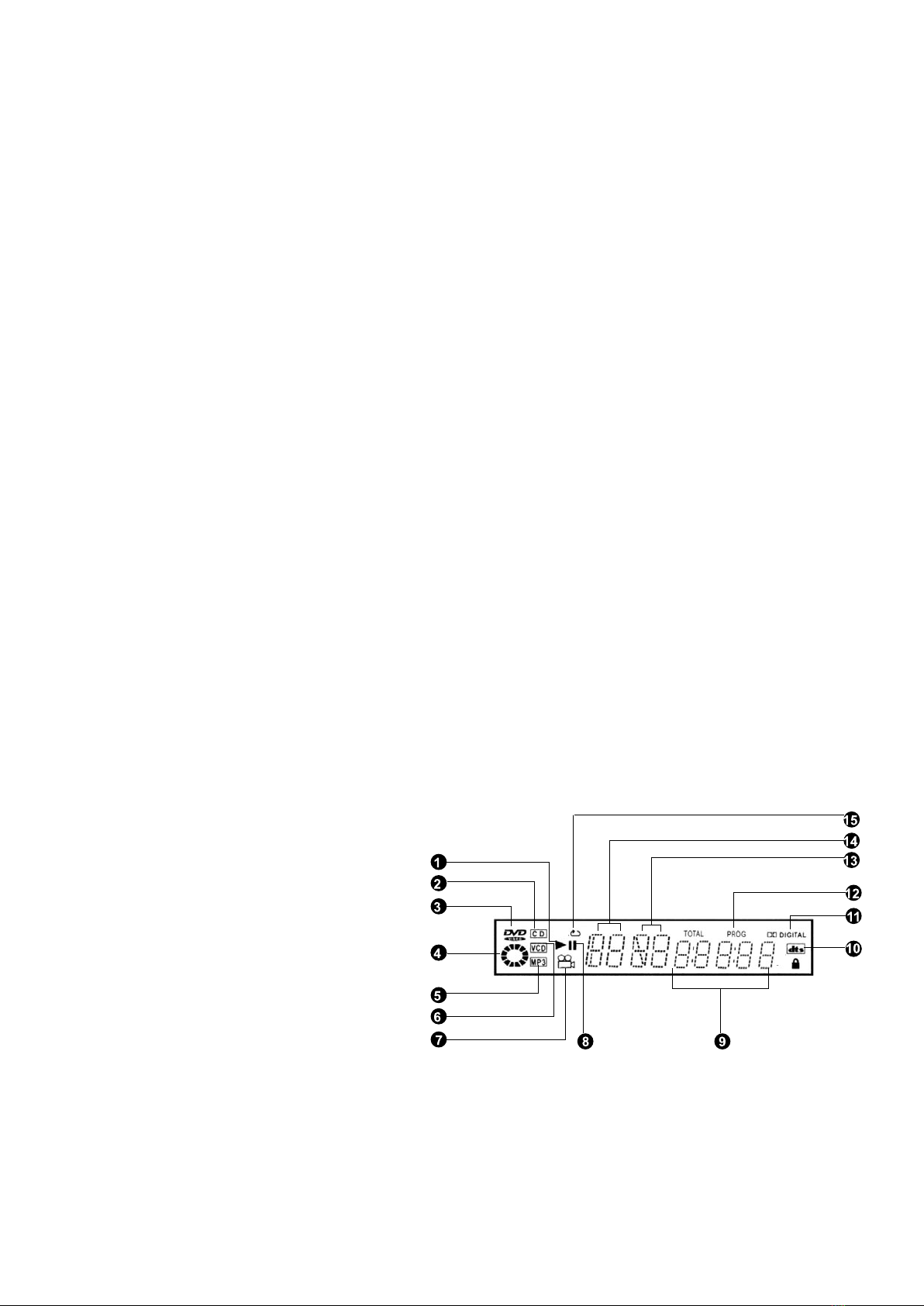
FRONT PANEL DISPLAY
1. Playback indicator
Lights when playing back any disc.
2. CD indicator
Lights when a CD is loaded.
3. DVD indicator
Lights when a DVD is loaded.
4. Disc playing indicator
Lights rotate when a disc is being played back.
5. MP3 disc indicator
Lights when an MP3 disc is loaded.
6. VCD indicator
Lights if a VCD is loaded. The DVD 421/451 players do not
support VCD playback. Contact your dealer or the Acoustic
Solutions Helpline for further details
7. ANGLE indicator
Lights when playing a disc recorded with multi-angle views.
8. PAUSE indicator
Lights when PLAYBACK is paused.
9. Counter display
Displays the playback mode, type of disc, playback time,
remaining time etc.
10. DTS indicator
Indicates DTS sound playback.
11. Dolby Digital indicator
Indicates Dolby Digital sound playback.
12. Programming playback indicator
Lights when playing a programmed order of soundtracks.
13. Chapter/Track indicator
Indicates a title number is being played back.
14. TITLE indicator
Indicates a title number is being played back.
15. Repeat playback indicator
Indicates the entire disc, the same title, chapter / track, or a
specic segment is being played back repeatedly.
VIEWING AND LISTENING
9
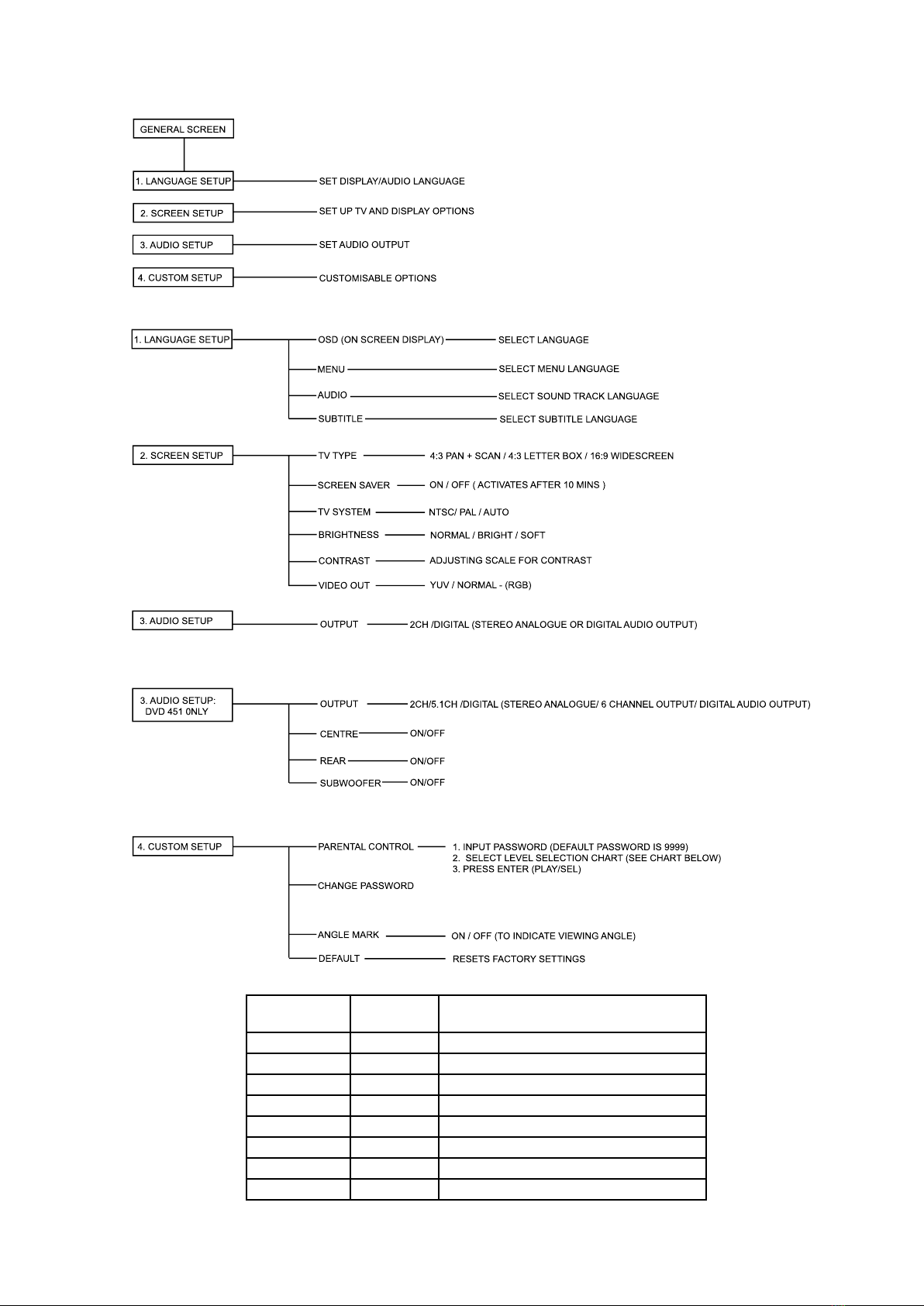
MPAA RATING PARENTAL
LEVEL
GENERAL DESCRIPTION
8 UNRATED (RESTRICTED AUDIENCE)
NC-17 7 ADULT AUDIENCE
R 6 MATURE AUDIENCE
5 MATURE TEENAGE AUDIENCE
PG-13 4 TEENAGE AUDIENCE
PG 3 MATURE YOUNG AUDIENCE
2 MOST AUDIENCES
G 1 GENERAL (UNRESTRICTED AUDIENCE)
SET UP MENU NAVIGATION: DVD 421 /451
10
Questo manuale è adatto per i seguenti modelli
1


