
Actisense PRO-MUX-2 Foglio di istruzioni

1Active Research Ltd 2022
Connect without limits
Professional Type Approved
NMEA®0183 Multiplexer
Conguration Manual
Issue 1.0

2Active Research Ltd 2022
Important Notices
The device to which this manual relates
complies with the Electromagnetic Compatibility
requirements according to IEC 60945:2002-08,
DNVGL-CG-0339:2019 & IACS UR E10 Rev7.
The unit should always be used in conjunction
with appropriately approved, shielded cable
and connectors as per NMEA 0400 to ensure
compliance. A declaration of conformity is
available for download at www.actisense.com.
If the device to which this manual relates is to be
installed within ve metres of a compass, please
refer to the ‘Compass Safe Distance’ section in the
‘Technical Specications’ table.
Trademarks and Registered Trademarks
Actisense®and the Actisense logo are registered
trademarks of Active Research Limited (Ltd).
All other trademarks are the property of their
respective owners.
The NMEA®name and NMEA logo are copyright
held by the NMEA. All uses in this manual are by
permission and no claim on the right to the NMEA
name or logo are made in this manual.
Fair Use Statement
The contents of this manual may not be
transferred or copied without the express written
permission of
Active Research Ltd. Copyright © 2021 Active
Research Ltd. All rights reserved.
Technical Accuracy
To the best of our knowledge the information
contained in this document was correct at the
time it was produced. Active Research Ltd cannot
accept liability for any inaccuracies or omissions.
The products described in this manual and the
specications thereof may be changed without
prior notice. Active Research Ltd cannot accept
any liability for differences between the product
and this document. To check for updated
information and specications please check www.
actisense.com.
Active Research Ltd will not be liable for
infringement of copyright, industrial property
rights, or other rights of a third party caused by
the use of information or drawings described in
this manual.
Product Registration
Please register your product via the online form at
https://actisense.com/product-registration
Your product package includes a unit serial
number. The serial number is six digits long and
can be found below the barcode on the label. Your
registration will assist Actisense Support to link
your product to your details, simplifying any future
assistance you may require.
Product Guarantee
All Actisense products are provided with a 5 year
guarantee upon registration. To register your
product, visit https://actisense.com/product-
registration.
If you suspect that the unit is faulty please refer to
the Troubleshooting Section of the User Manual
before
contacting support.
It is a requirement of the guarantee that all
installations of electronic equipment follow the
NMEA 0400 specication. Any connection to a
battery or power supply must meet the mandatory
essential safety requirements that may be
imposed by local regulatory agencies.
Actisense products are intended for use in a
marine environment, primarily for below deck
use. If a product is to be used in a more severe
environment, such use may be considered misuse
under the Active Research Ltd guarantee.
Product Disposal
Please dispose of this product in accordance with
the WEEE Directive. The product should be taken
to a registered establishment for the disposal of
electronic equipment.

3Active Research Ltd 2022
Intelligent Type Approved NMEA Multiplexer - PRO-MUX-2
Contents Page
Introduction.........................................................................................................................................4
PRO-MUX-2 overview........................................................................................................................4
Accessing the PRO-MUX-2 via the network.................................................................................5
The PRO-MUX-2 home page...........................................................................................................6
Information Icon................................................................................................................................6
Status Icon..............................................................................................................................7
Settings Icon.........................................................................................................................10
Planning your NMEA 0183 network.............................................................................................11
Conguring Input from ‘Talkers’.........................................................................................11
Conguring Output to ‘Listeners’.......................................................................................12
Routing of Input and Output Data................................................................................................14
Basic Routing...................................................................................................................................15
Autoswitching..................................................................................................................................16
Advanced Routing.....................................................................................................................17-18
Troubleshooting Guide..................................................................................................................19
Technical Specication............................................................................................................20-21
Dimensioned Drawing....................................................................................................................21

4Active Research Ltd 2022
Introduction
The PRO-MUX-2 is a powerful NMEA 0183 multiplexer/router, capable of advanced ltering, allowing
the user to forward any NMEA0183 data from their installed ‘talkers’ to any other connected ‘listener’
that requires it.
Being a multiplexer, the PRO-MUX-2 allows these incoming data streams from ‘talkers’ to be
combined into a single output stream and fed to a listening device that requires data from multiple
sources at the same time. The baud-rate of reception & transmission is also adjustable making the
device even more exible.
The PRO-MUX-2 allows for two separate methods for conguration.
• Mode pin set-up. This method is covered in the install/user manual.
• In-built conguration tool (the web-based method for conguring your PRO-MUX-2).
This manual cover details of the web-based method for conguring your PRO-MUX-2.
The conguration tool is compatible across all popular Operating Systems.
The PRO-MUX-2 also supports a direct Ethernet connection to a PC without the need for a specialised
ethernet crossover cable.
Please read through this manual carefully to realise the full potential of the PRO-MUX-2.
This manual should be read in conjunction with the user/install manual, available from the Acti-
sense website using the following link:
https://actisense.com/wp-content/uploads/2020/01/PRO-MUX-1-User-Manual-issue-1.00.pdf
PRO-MUX-2 Overview
Mode Pins
Alarm Input
NMEA0183 Inputs from talkers (x8)
Status LED
Grounding Stud
Power
Serial Port
NMEA0183 Outputs to listeners (x6)
Ethernet Port
Mounting Holes
Mounting Holes

5Active Research Ltd 2022
Intelligent Type Approved NMEA Multiplexer - PRO-MUX-2
Accessing the PRO-MUX-2 via the network
The PRO-MUX-2 can be connected to your network in one of two ways.
1: Standard Ethernet Networks
• If the PRO-MUX-2 is connected to an ethernet network containing both DHCP and DNS servers,
launch any of the popular web browsers.
• Replacing ‘xxxxxx’ with the serial number of your PRO-MUX-2, type the following command into
the address bar.
• http://promux-xxxxxx
The home-page for the PRO-MUX-2 will be shown as below.
2: Direct connection or basic ethernet networks
• If the PRO-MUX-2 is connected directly to a PC, or the ethernet network does not have a DHCP
server, the PRO-MUX-2 will communicate using the auto-IP by default.
• The auto-IP process can take up to 60 seconds to complete.
• The PC’s ‘Local Area Connection’ must also be set-up to use auto-IP in order to communicate on
this network. Most PC’s are set-up to do this by default. If needed, instructions on how to do this
using Windows 10 are given in the user/install manual (other Windows operating systems will be
similar).
https://actisense.com/wp-content/uploads/2020/01/PRO-MUX-1-User-Manual-issue-1.00.pdf
• NOTE: Administrator privileges are required to carry out these modications.
• Once the PC and PRO-MUX-2 are using the same IP address range, launch any popular web
browser.
• Replacing ‘xxxxxx’ below with the serial number of your PRO-MUX-2, type in the following com-
mand into the address bar.
• http://promux-xxxxxx
The home-page for the PRO-MUX-2 will be as shown below.
NOTE: Clicking on any of the icons at this point will allow you to view the current settings of your
PRO_MUX-2, but alterations are not possible until a user ‘Login’ is performed.
When prompted, please use Username: admin & Password: admin. The password can be altered
later. The username ‘admin’ is static and cannot be altered.

6Active Research Ltd 2022
Navigating the PRO-MUX-2 home-page
Information Icon
• This icon will display all the relevant technical information relating to the device itself.
• This information is important if you need to troubleshoot your device or require technical
assistance at a future date.
7Active Research Ltd 2022
Intelligent Type Approved NMEA Multiplexer - PRO-MUX-2
Status Icon
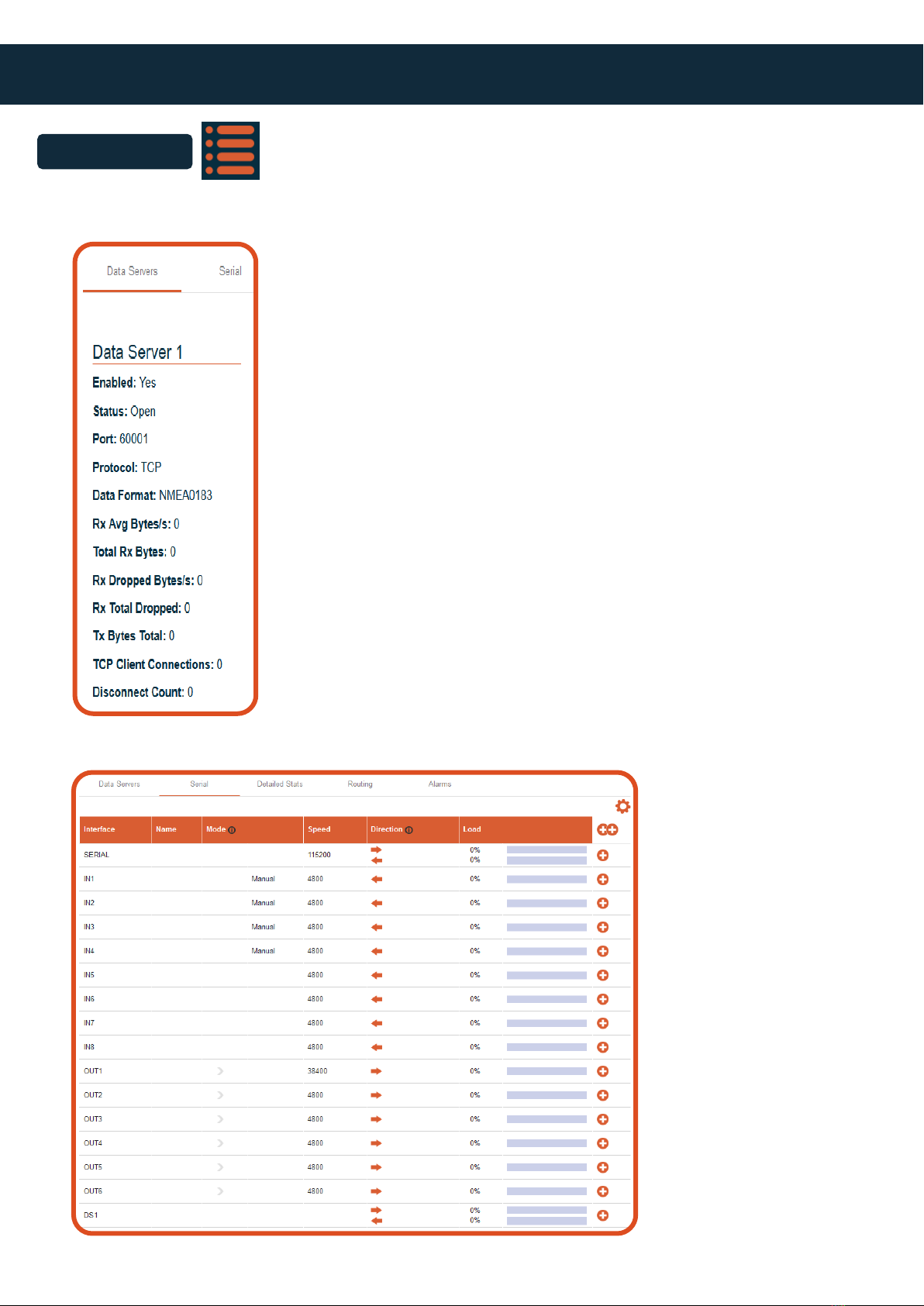
• This icon displays the current status of all the various user controlled settings:
• Data Servers: Displays the following information relating to the data server if enabled.
• Serial: Displays the current status of all the serial ports, including their baud rate, alias name if
applied, port direction and the current data load on each port.

8Active Research Ltd 2022
• Detailed Stats: Once the PRO-MUX-2 is operational, this page will show the number of individ-
ual sentences being received or transmitted over a 10 second period. The picture below shows
a simple case of GPS sentences being sent and received. Once the PRO-MUX-2 has more inputs
and outputs enabled this will contain all the sentences being routed through the device.
• Messages being received from talkers
• Messages being transmitted to listeners

9Active Research Ltd 2022
Intelligent Type Approved NMEA Multiplexer - PRO-MUX-2
• Routing: Matrix showing data ow between inputs and outputs
• Alarms: Shows the status of any alarms which are currently set
10 Active Research Ltd 2022
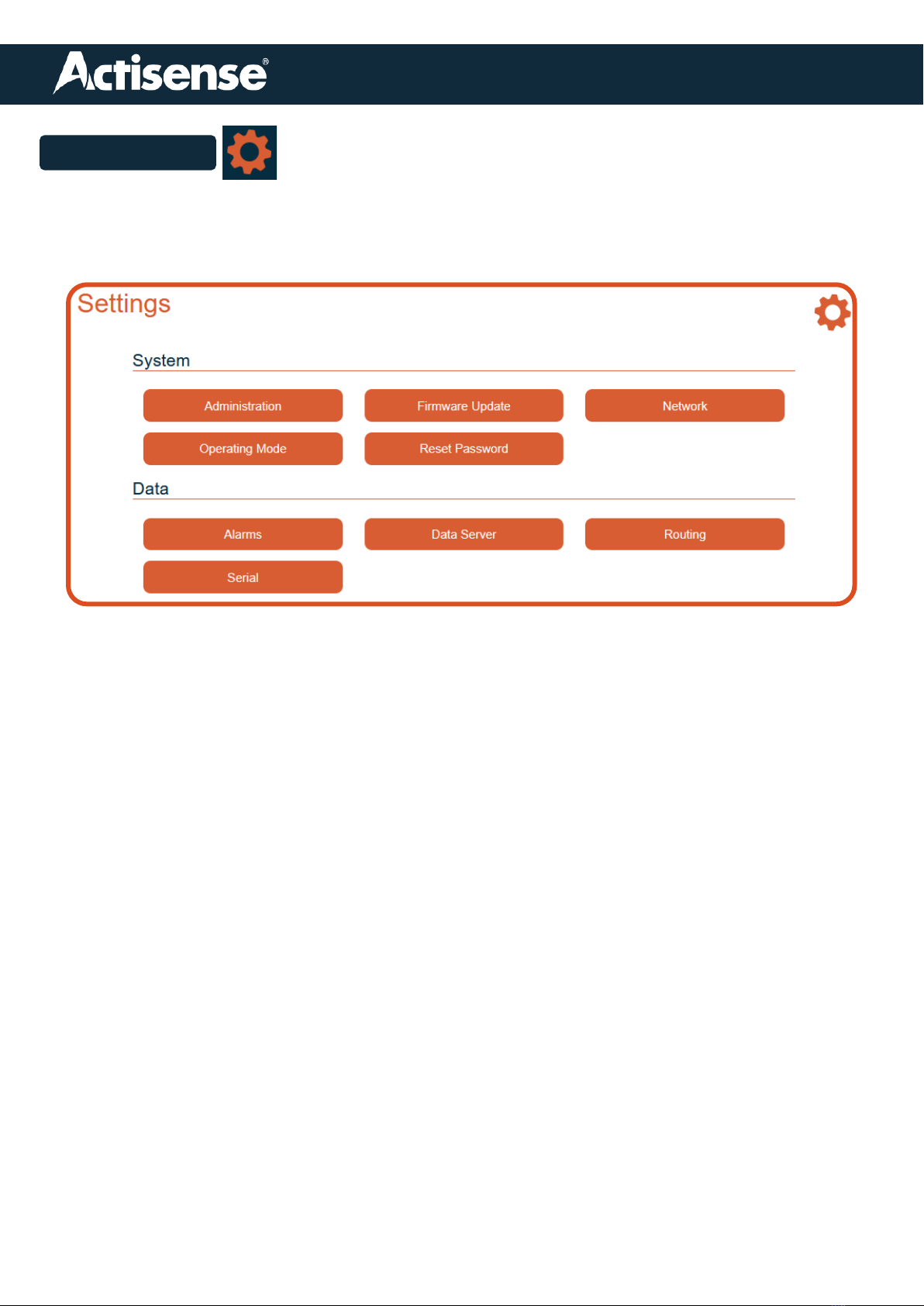
Settings Icon
• Provides access to the device for conguration.
• Using any of these setting requires that the user ‘Login’ to the device (see page 5).
• The settings page provides the following functionality:
Administration:
Facility to change password only (Username is always ‘admin’)
Facility to re-start device.
Firmware Update:
Details current rmware version and provides the facility to update.
Network:
Allows the network to be congured correctly depending upon your particular set-up.
Operating mode:
Allows any pre-congured modes to be selected.
Reset Password:
Password can be reset to factory default
Alarms:
Allows the user to set up any required alarms.
Data Server:
Provides facility to turn server on/off as well as specifying data format output, direction and
output protocol.
Routing:
Main conguration table to allow precise routing of data between inputs an outputs.
Access to ‘autoswitch’ operation and set-up.
Serial:
Allows full conguration for each port including baud rate setting, data direction, an ‘alias’
naming facility and also shows the current data load on each port.
Altri manuali per PRO-MUX-2
2
Indice
Altri manuali Actisense Multiplexer

Actisense
Actisense PRO-MUX-2 Manuale utente

Actisense
Actisense PRO-NDC-1E Manuale utente

Actisense
Actisense PRO-MUX-1 Manuale utente

Actisense
Actisense PRO-MUX-2 Manuale utente

Actisense
Actisense NDC-4 Manuale utente

Actisense
Actisense NMEA 0183 Manuale utente

Actisense
Actisense NDC-4 Manuale utente

Actisense
Actisense NMEA 0183 Manuale utente

Actisense
Actisense NDC-5 Manuale utente

Actisense
Actisense PRO-BUF-2 Foglio di istruzioni


