
ACTOP WIFI601 Manuale utente


Contents
1、Introduction of product……………………………………………………………………………………………… 1
2、Installation ……………………………………………………………………………………………………………2
3、Port definition…………………………………………………………………………………………………………3
4、Initial use and operation instruction………………………………………………………………………………4
5、Doorbell Setting………………………………………………………………………………………………………5
5.1、Add doorbell settings……………………………………………………………………………………………5
5.2、System settings…………………………………………………………………………………………………. 6
5.3、White list settings…………………………………………………………………………………………………7
5.4、Alarm settings……………………………………………………………………………………………… 8
5.5、Equipment clock settings.……………………………………………………………………………………… 9
5.6、Interface settings………………………………………………………………………………………………….9
5.7、Wifi settings.………………………………………………………………………………………………………10
6、Introduce of functions………………………………………………………………………………………………11
6.1、Intercom ………………………………………………………………………………………………………… 11
6.2、Monitor. ……………………………………………………………………………………………………………12
6.3、Real-time Alerts.……………………………………………………………………………………………………13
6.4、Video replay ……………………………………………………………………………………………………. 14
6.5、Local pictures.………………………………………………………………………………………………………15
6.6、Visitors/Alarm record. ……………………………………………………………………………………………16
7、Software system settings …………………………………………………………………………………………… 17
8、Specification of product ……………………………………………………………………………………………… 18
9、Components …………………………………………………………………………………………………………… 19

1
1、Introduction of product
Wifi Visual intercom doorbell is a doorbell work with wifi . It connect with home wifi or wired LAN achieve two-way intercom between
doorbell and cell phone .When visitors press the doorbell ,doorbell sounds and meanwhile camera will start to work sending real-time
picture and call to smart phone . User receive the call and see the video to check who is outside ,can intercom with visitors and
remotely unlock door etc .
Wifi Visual intercom doorbell have alarm and remote control functions , make your home security has more powerful barrier . Advance
infrared light design make users can distinguish
the visitors in the evening. AC/DC power supply , eliminate the troubles of frequenty replacing battery .
2.4G wifi transmission systems , real-time video transmission , Audio and video data transmission band up to 100M band at most ,
Support Android OS and Iphone OS.One doorbell can connect with Multi cell phone at the same time . Make you and your family can
monitor home outdoor surroundings from anywhere .
Pass CE , RoHS certification.
Thank you for your support of this products , your satisfaction is our aim !
2
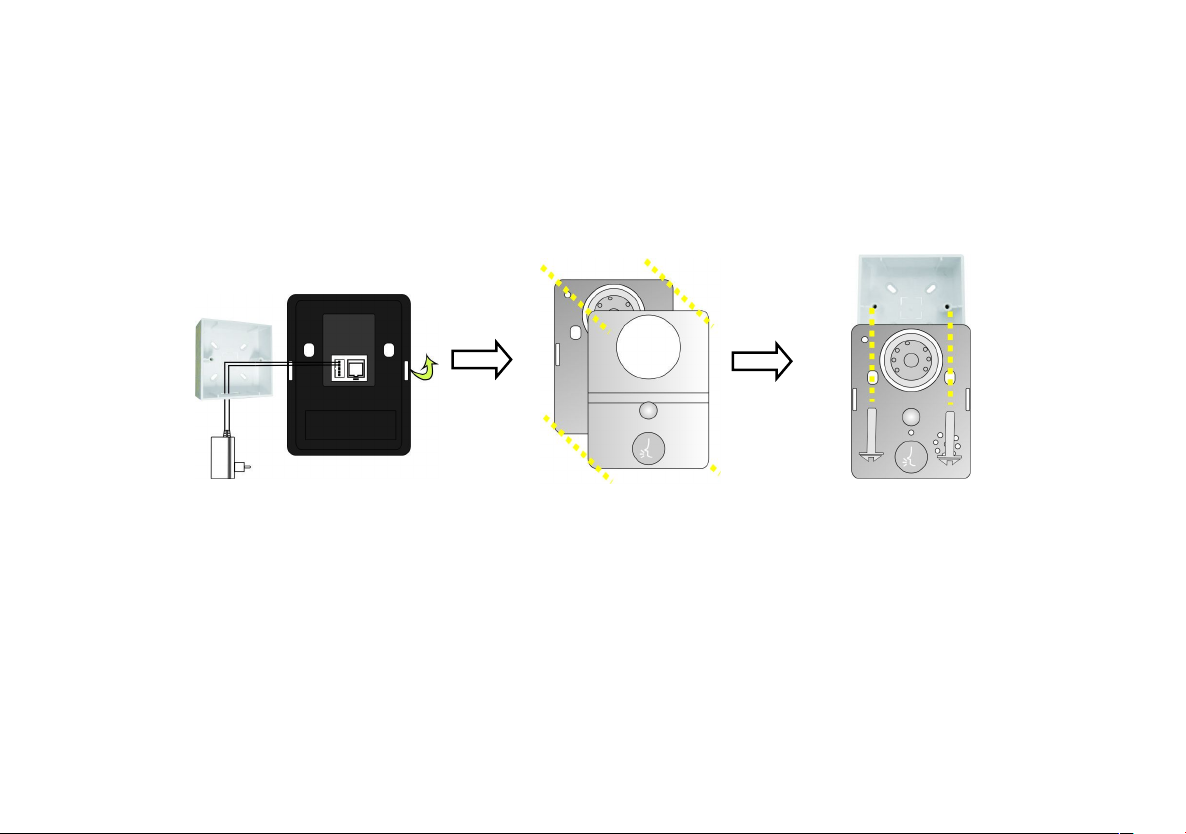
2、Installation Diagram
+
open surface shell from
midde plosition
1. Switch four screws in the top part and bottom part . Open
the cover from middle position ,connect 12V/1A power wire .
2. Fix the doorbell and 86
box with screws.
3. Cover up the cover just
opened , and install the 4 screws to
finish .
3
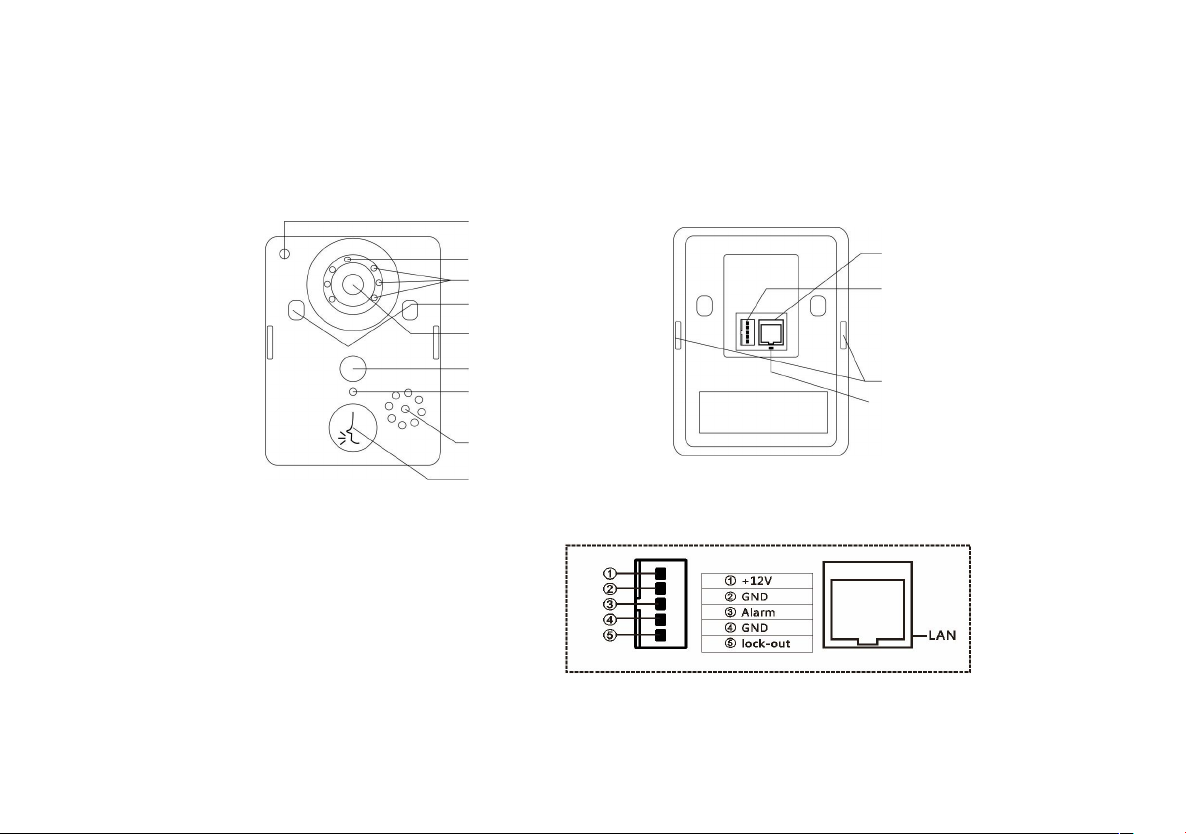
3、Port Defination
Microphone
photoresistance
Infrared light
Fixed the screw
Camera lens
PIR sensor
Work indicator LED
Speaker
Call button
RJ45 port
Power Socket
LED light
Reset switch
front view
Rear connection diagram
Rear view

4
4、Initial use and operation instructions
1. According to the installation diagram and connection diagram install doorbell , connect to power and lock to door bell .
2. Wait about one minutes , after speak “Sucessfully start system,welcome to smart home” .
3. Mobile phone Configuration :
1).Install wifi door phone APP in mobile . Press the doorbell button above 3 seconds , Doorbell enter in Configuration model , and give
a notice “Network configuration model now , set it down in 5mins” .
2).Open mobile’ wifi,connect to the hot spot named “BELL-00******”,initial password is 123456789,.After connecting successfully,
open wifi door phone app again , press“Add doorbell”, then click search or shake mobile ,when smart phone show a ID number ,
Click the ID number , then click”done”icon to finish.
3). First connected mobile Defaults to the administrator. If need to add more cellphone user , set up at administrator cellphone
phone .Enter into white list setting add user name and password (at most 8users including admin).
4. Network Configuration as soon as finishing “add door bell ID sucessfully” :
1). Enter into wifi settings , add home wifi ,click "done”to finish
2).Insert internet cable to LAN port directly ,wifi setting is no need
5. Change administrator password : administrator cellphone enter into white list settings , click “admin user “, put into password click
“done”to finish .Notice :After set up administrator password , need to delete doorbell and add again by new password . Or
cell phone will notice wrong password .
6. Each time change the admin, press “reset switch”at door bell back above 10S , can restore factory settings .
5
5、Door bell setting
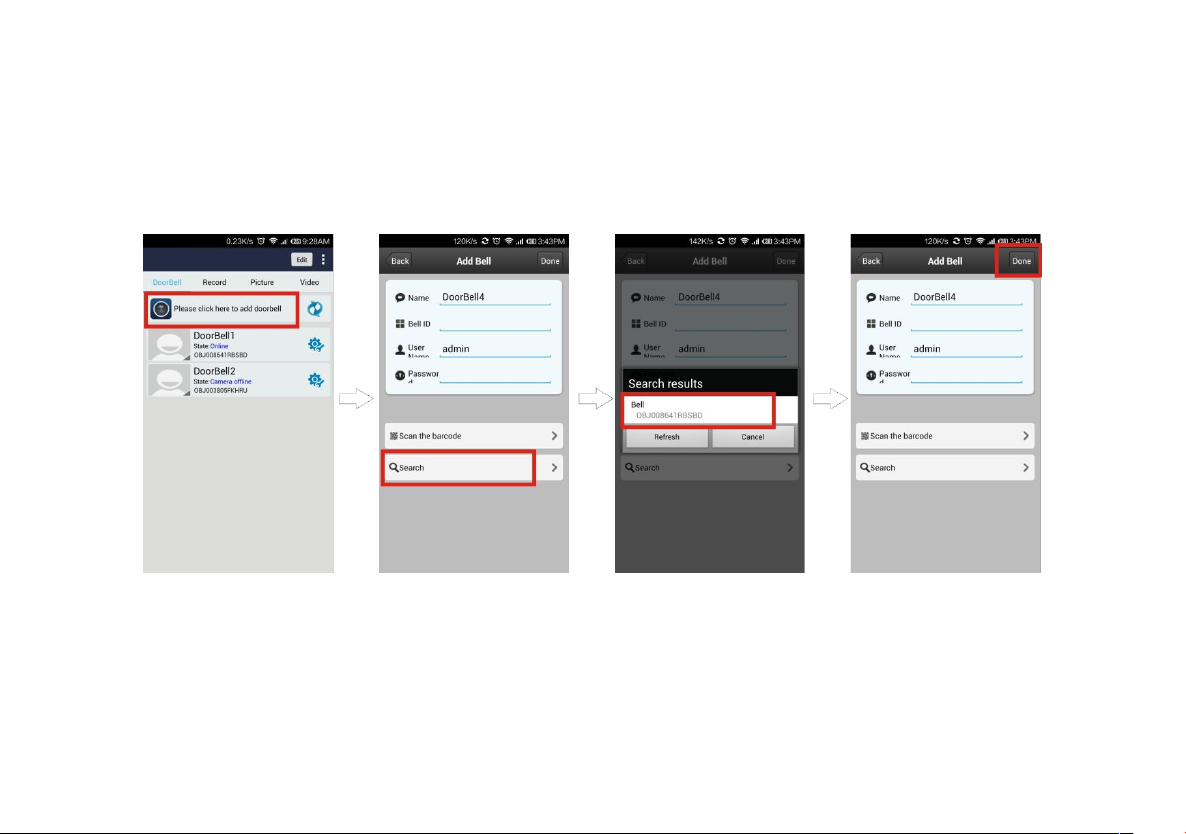
5.1、Add door bell
1.Click add door bell
2.Can choose to manually input,
QR code scanning,or LAN
search to find the door bell and
add it
3.When search over LAN,pls make
sure mobile phone is the same LAN
with door bell device,then select the
target device,regular target device
name is bell+ ID number.
4.When operation is
complete,click”done”
to finish

6
1.Voice prompt switch : turn on or turn off . Turn on by factory
settings.
2.Configuration mode switch: turn on or turn off .Turn on by factory
settings.
3.Monitoring the maximum length of time : Range from 10 to 300 S.
4.Call maximum length of time: Range from 10 to 300 S.
5.Call waiting the maximum length of time : Range from 10 to 30 S.
5.2、System settings

7
5.3、White list settings
1.Administrator can add and delete other
cellphone user . Common cellphone user only
can Modify own password .Same user log in
different cell phone is not allowed .
2.Add new cellphone user
3.Modify user password
8
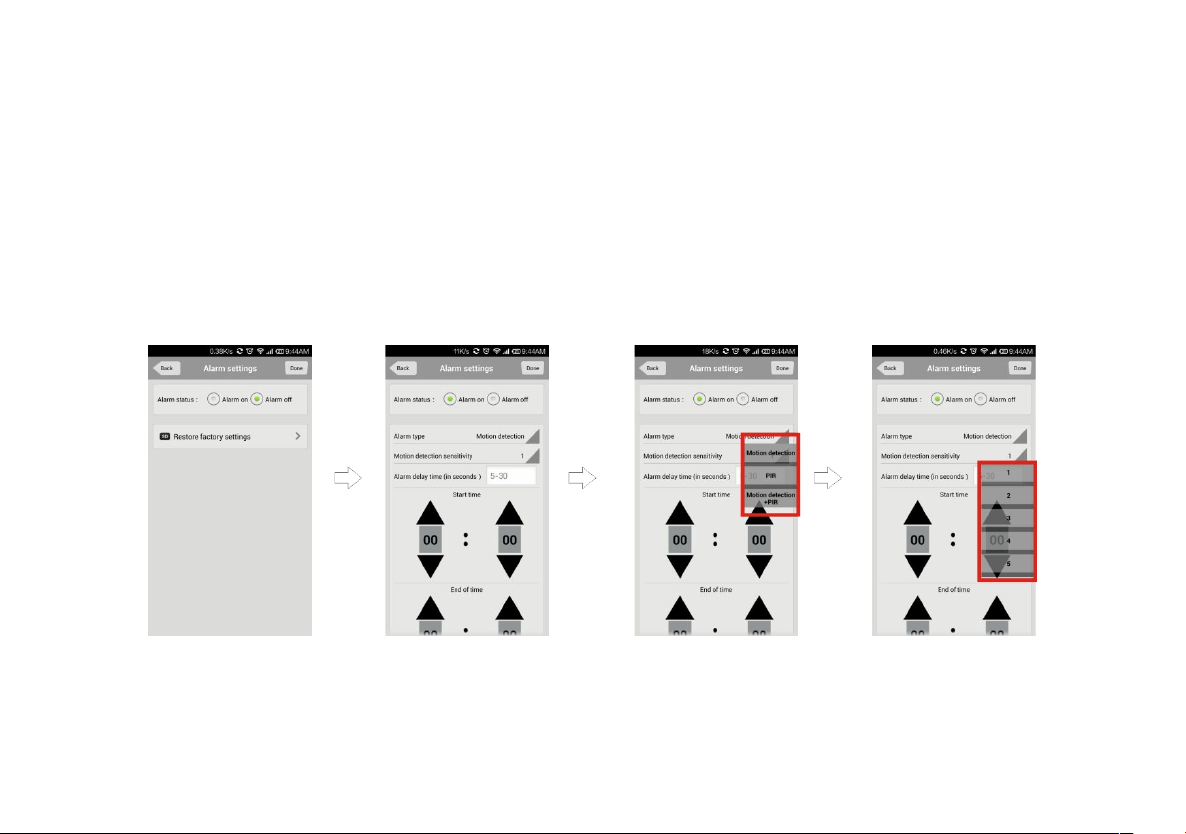
5.4、Alarm settings
1.When alarm turn off (Disarm )Any alarms are not notified to cellphone
2.When alarm turn on(Arming) User can set up other parameters further
A. Alarm type : Motion detection ,PIR and so on
B. 1-5
C. Alarm delay
D. Alarm effective time
Altri manuali per WIFI601
1
Indice


