Adata ATX H-264 Manuale utente

AData ATX DVR
User Manual

User Manual of AData ATX H.264 DVR
AData Series ATX H.264 DVR
User Manual
(V2.0)
Thank you for purchasing our embedded Net ATX DVR. Please read this User Manual
carefully to ensure that you can use the device correctly and safely. The contents of this Manual
are subject to change without notice.
AData Ltd. Page 2of 108
Copyright © 2006. All rights reserved.

User Manual of AData ATX H.264 DVR
AData Ltd. Page 3of 108
Copyright © 2006. All rights reserved.
Index
Chapter1 Product Introduction..................................................................................................5
1.1 Summary ...................................................................................................................5
1.2 Model Description.....................................................................................................5
1.3 Features .....................................................................................................................5
Chapter2 ATX DVR Description..............................................................................................7
2.1 ATX DVR boardset ...................................................................................................7
2.2 ATX DVR Demonstration Graphic...........................................................................7
2.3 Rear Panel Description..............................................................................................8
2.3.1 ATX DVR Rear Panel .......................................................................................8
2.4 External Alarm In/Out Connection ...........................................................................9
Chapter3 Operational Instructions..........................................................................................11
3.1 ATX DVR Boardset Front Panel.............................................................................11
3.2 IR Controller ...........................................................................................................12
3.3 Menu Description....................................................................................................15
3.3.1 Menu Items .....................................................................................................15
3.3.2 Menu Operation ..............................................................................................17
3.4 Character Input........................................................................................................20
Chapter4 Basic Operation Guide ............................................................................................21
4.1 Power on .................................................................................................................21
4.2 Preview....................................................................................................................22
4.3 User name and password.........................................................................................25
4.4 PTZ Control ............................................................................................................27
4.5 Manual Record........................................................................................................30
4.6 Playback ..................................................................................................................31
4.7 Backup Recorded Files ...........................................................................................36
4.8 Shut down DVR ......................................................................................................38
Chapter5 Parameters Setup Guide ..........................................................................................40
5.1 Administrator and Password ...................................................................................40
5.2 Add and Delete User ...............................................................................................42
5.3 Unit Name ...............................................................................................................46
5.4 Video Output Standard and VGA Setup..................................................................47
5.5 OSD Setup...............................................................................................................48
5.6 Video Parameters Setup ..........................................................................................52
5.7 Mask Area Setup .....................................................................................................54
5.8 View Tampering Alarm ...........................................................................................57
5.9 Video Loss Alarm....................................................................................................59
5.10 Motion Detection Alarm .........................................................................................61
5.11 Preview Properties ..................................................................................................66
5.12 Recording Setup......................................................................................................68
5.13 External Alarm Input and Relay Output..................................................................72
5.14 Network Parameters ................................................................................................77


User Manual of AData ATX H.264 DVR
AData Ltd. Page 4of 108
Copyright © 2006. All rights reserved.
5.15 PTZ .........................................................................................................................80
5.16 RS232 setup ............................................................................................................84
5.17 Exceptions...............................................................................................................85
Chapter6 Utilities....................................................................................................................86
6.1 Save Parameters ......................................................................................................86
6.2 Restore Parameters..................................................................................................86
6.3 Upgrade...................................................................................................................87
6.4 Hard Disk Management ..........................................................................................88
6.5 Clear Alarm Out ......................................................................................................88
6.6 Reboot .....................................................................................................................88
6.7 Power Off ................................................................................................................88
6.8 View Log .................................................................................................................89
6.9 System Information.................................................................................................92
Chapter7 Firmware Upgrade ..................................................................................................93
7.1 FTP Server Setup ....................................................................................................93
7.2 Upgrade Mode.........................................................................................................95
Appendix A HDD Capacity Calculation .....................................................................................97
Appendix B DVR Connect Cable Definition ..............................................................................98
1 RS-485 connect cable made method ...............................................................................98
2 UTP network connect cable made method......................................................................98
3 RS-232 connect cable made method .............................................................................100
Appendix C Specifications ........................................................................................................103
Appendix D Quick Search Function Table ................................................................................104
Appendix E Troubleshooting ....................................................................................................106
Appendix F Product Service .....................................................................................................108

User Manual of AData ATX H.264 DVR
AData Ltd. Page 5of 108
Copyright © 2006. All rights reserved.
Chapter1 Product Introduction
1.1 Summary
AData ATX series DVR is an excellent digital surveillance product. It uses the embedded
MCU and embedded operating system, combining the most advanced technology in Information
Industry such as video and audio encoding/decoding, hard disk record and TCP/IP. The firmware
is burned in the flash, more stable and reliable.
AData ATX series DVR has both the features of digital video recorder (DVR) and digital
video server (DVS). It can work stand alone, also be used to build a powerful surveillance network,
widely used in bank, telecommunication, transportation, factories, warehouse, irrigation, etc.
1.2 Model Description
The ATX Series DVR currently has following models:
8 Channels
16 Channels
1.3 Features
Compression
zSupport 16 channnels video input (PAL/NTSC) at most. Each channel is independent,
H.264 hardware compression. Support both variable bitrate and variable frame rate.
zSupport 2CIF compression. 2CIF resolution is 704x288 for PAL and 704x240 for NTSC.
Total frames of 8-ch are 50FPS, and 16-ch are 100FPS.
zSupport multi area motion detection.
zSupport OSD and changeable OSD position.
zSupport LOGO and changeable LOGO position.
Local functions
Record
zSupport multiple record type, including real time, manual record, motion detection,
external alarm, motion&alarm, motion|alarm.
zSupport one IDE HDD and HDD can support 2000GB.

User Manual of AData ATX H.264 DVR
AData Ltd. Page 6of 108
Copyright © 2006. All rights reserved.
zSupport FAT32 file system.
zSupport HDD SMART technology.
zSupport cycle or none cycle record.
zSupport recorded files and clips backup. Support USB memory and IDE CD-R/W.
Preview and playback
zSupport analog moniotor and VGA output.
zSupport multiple preview modes.
zSupport sensitive area mask.
zSupport camera spiteful block alarm.
zSupport 1-ch playback. Support play forward, backward, pause, frame by frame, etc.
zSupport play back by files or by time.
zDisplay local record status.
PTZ
zSupport many kinds of PTZ protocol.
zSupport preset, sequence and cruise.
Alarms
zSupport exception alarm, motion detection alarm, external alarm, etc.
Others
zSupport IR control.
zSupport multi-level user management.
Network
zSupport TCP, UDP, RTP, and Multicast for network preview.
zSupport PPPoE for board band dialup.
zSupport remote parameters setup.
zAlarm information can be sent to remote center.
zNetwork control PTZ.
zNetwork record the real time stream.
zNetwork download and playback the recorded files in DVR.
zRemote upgrade the firmware.
zSupport IE to preview and config DVR.
zSupport log.

User Manual of AData ATX H.264 DVR
Chapter2 ATX DVR Description
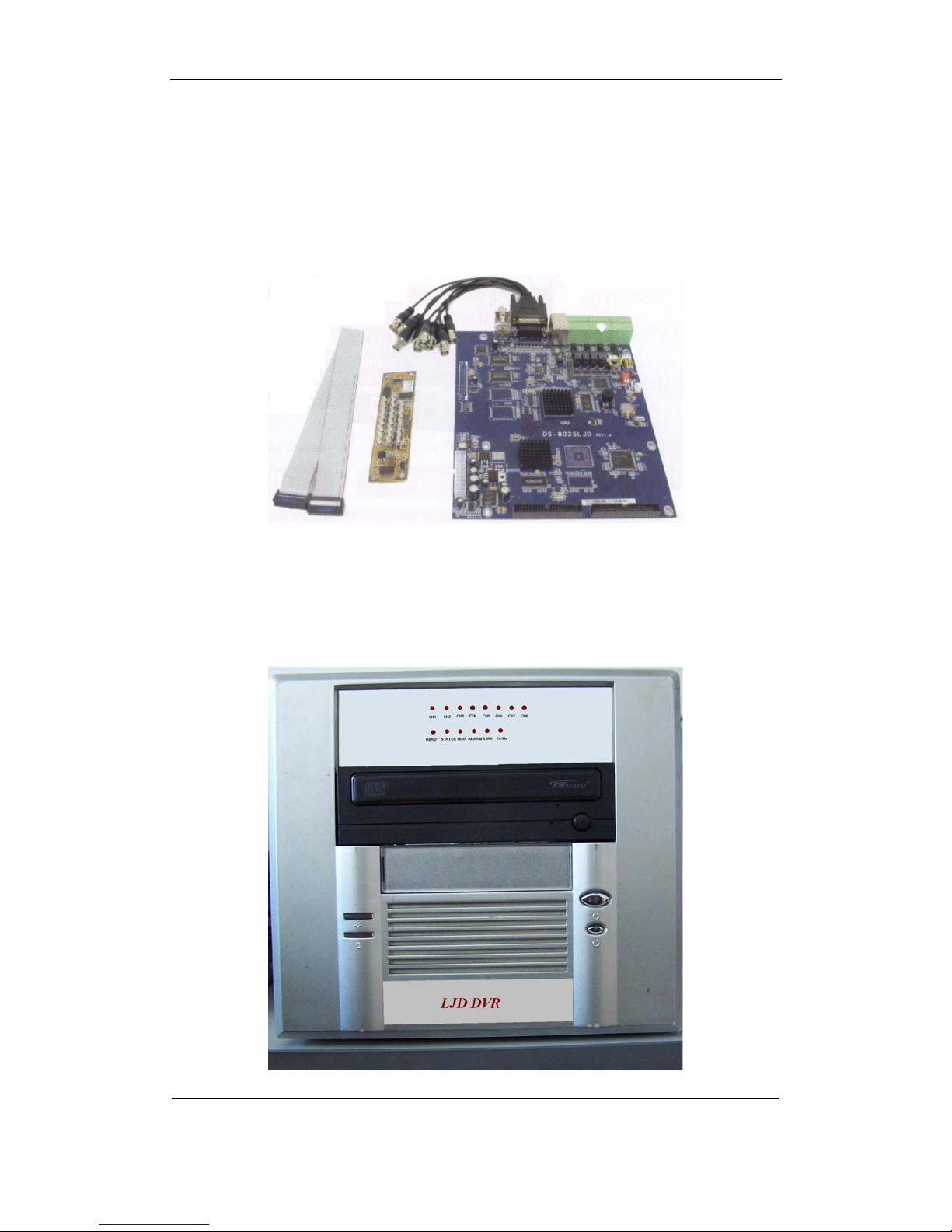
2.1 ATX DVR boardset
When you get the product, check that all the items are included in your product package.
There is a list in the package. If any of the items is missing, please contact your dealer.
2.2 ATX DVR Demonstration Graphic
AData Ltd. Page 7of 108
Copyright © 2006. All rights reserved.

User Manual of AData ATX H.264 DVR
2.3 Rear Panel Description
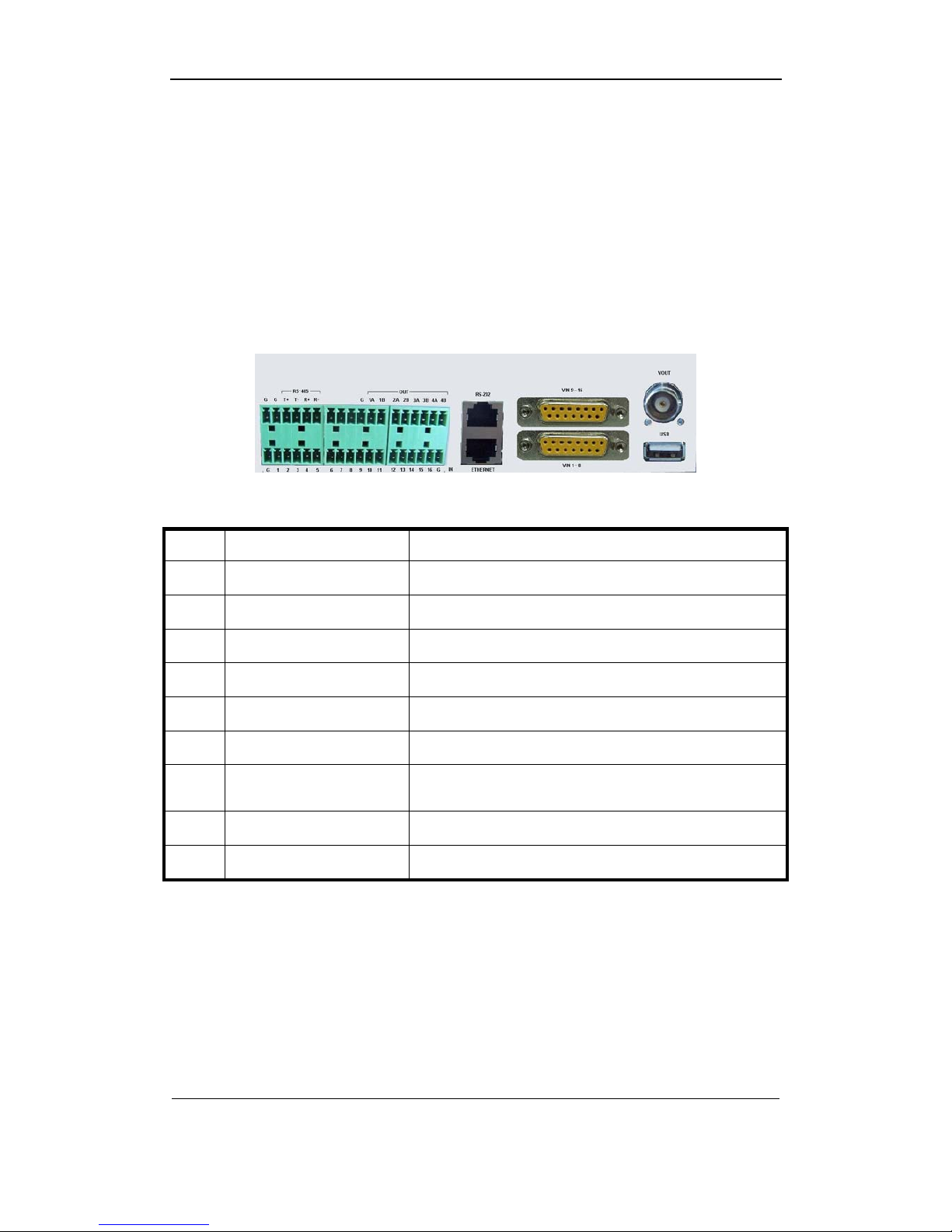
2.3.1 ATX DVR Rear Panel
Notice: This picture is for 16 channels
①②③④⑤
⑥⑦⑧ ⑨
Index Physical Interface Description
1 RS485 For PTZ connection
2 Relay output 4 relay outputs
3 RS232 Console port
4 Video input For channel9 ~ channel16
5 Video output For local display
6 Sensor alarm input 16 ports
7 UTP Network Interface Connect network devices. Refer to Appendix B for pin
definition.
8 Video input For channel1 ~ channel8
9 USB interface For backup
AData Ltd. Page 8of 108
Copyright © 2006. All rights reserved.

User Manual of AData ATX H.264 DVR
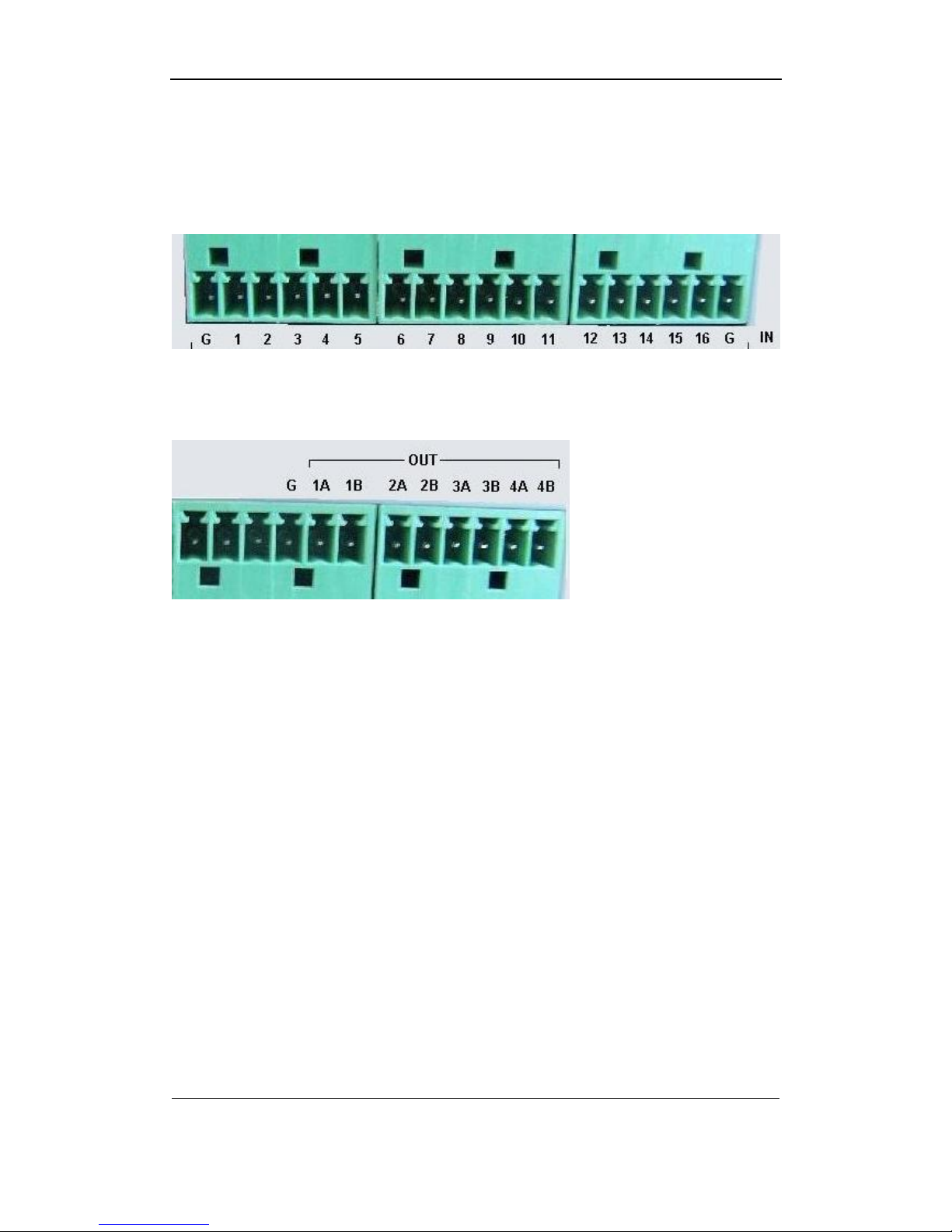
2.4 External Alarm In/Out Connection
Alarm input port:
G(GND): Connect the GND of sensor.
1~16: Alarm input, support normal open / normal close.
Alarm output:
4 relay outputs.
AData Ltd. Page 9of 108
Copyright © 2006. All rights reserved.

User Manual of AData ATX H.264 DVR
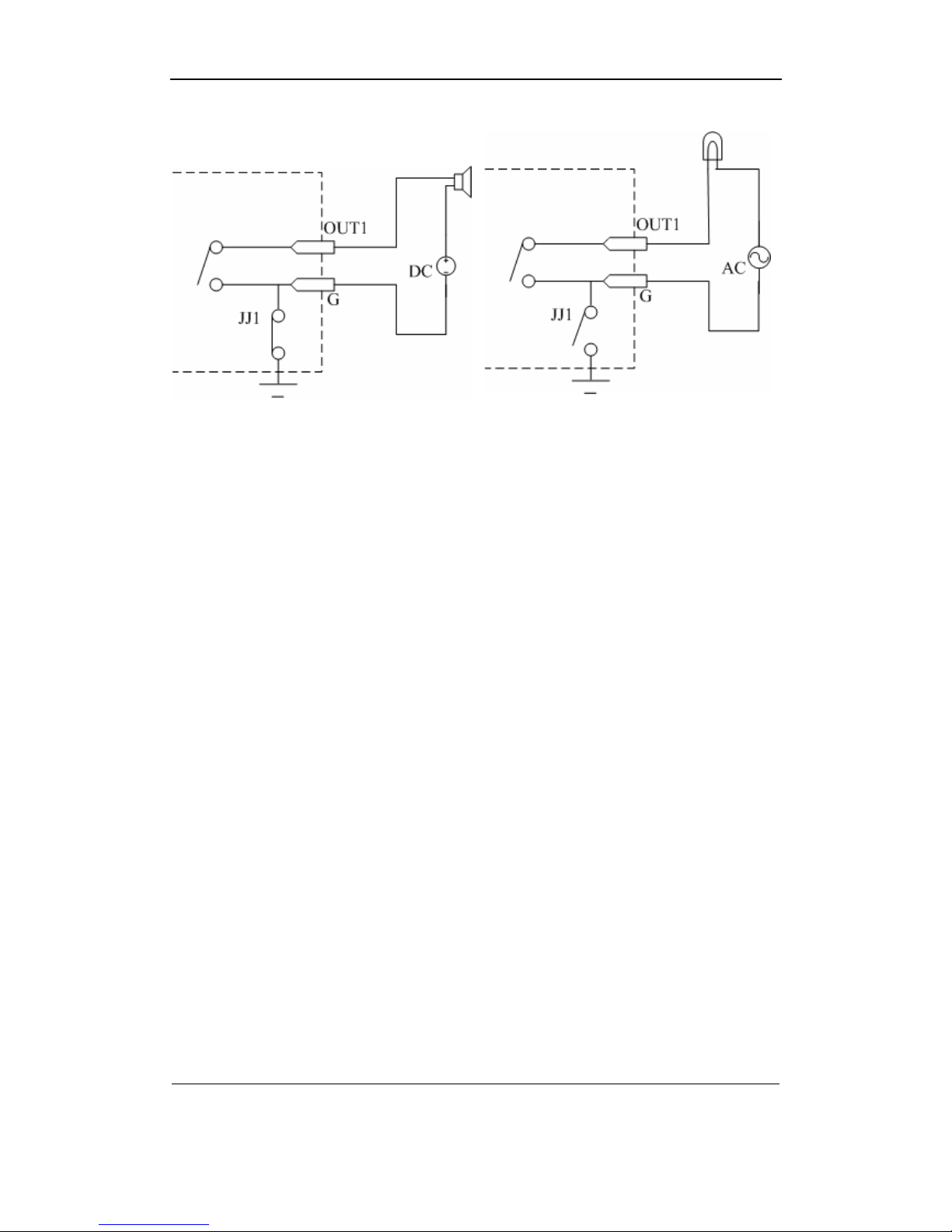
Alarm output connection
Please note the usage of jumper JJ1. If you use DC, either of connections is OK. We suggest
you to use those DC under 12V, 1A.
If you use AC, please open the jumper. There are 4 jumpers (JJ1, JJ2, JJ3 and JJ4) in DVR
main board, corresponding with 4 alarm output. The default is closed.
Warning: If you use AC input for relay output, please open the jumpers.
AData Ltd. Page 10 of
108
Copyright © 2006. All rights reserved.
Questo manuale è adatto per i seguenti modelli
1
Indice