Adcon addIT A720 Series Manuale utente

ADCON
TELEMETRY
addIT A720/A723 Series
User Guide
SMART WIRELESS SOLUTIONS

ADCON
TELEMETRY
ADCON TELEMETRY GMBH
INKUSTRASSE 24
A-3400 KLOSTERNEUBURG
AUSTRIA
TEL: +43 (2243) 38 280-0
FAX: +43 (2243) 38 280-6
http://www.adcon.at
Proprietary Notice:
The Adcon logo, the A720 and A730 series, addIT™, the A840 series, addVANTAGE®, addVAN-
TAGE Lite and addVANTAGE Pro are trademarks or registered trademarks of Adcon Telemetry.
All other registered names used throughout this publication are trademarks of their respective
owners.
Neither the whole nor any part of the information contained in this publication may be repro-
duced in any material form except with the prior written permission of Adcon Telemetry.
This publication is intended only to assist the reader in the use of the product. Adcon Telemetry
shall not be liable for any loss or damage arising from the use of any information in this publica-
tion, or any error or omission in such information, or any incorrect use of the product.
Document Release 2.0, August 2000
Copyright ©1999-2004 by Adcon Telemetry GmbH.
All rights reserved.

3
Contents
Contents ______________________________________________ 3
Chapter 1. Introduction _________________________________ 5
What are addIT devices?_________________________________5
Installation issues _______________________________________6
Conventions____________________________________________7
Chapter 2. Using the Base Station _______________________ 9
Opening the packages___________________________________9
Installing the base station _______________________________10
Installing the receiver ________________________________10
Installing the power supply ___________________________11
Replacing the fuse___________________________________12
Configuring the software_____________________________12
Chapter 3. Using the RTU ______________________________13
Opening the packages__________________________________13

Contents
4
Installing the RTU _____________________________________ 14
More about the LED tool ____________________________ 16
Configuring an addIT RTU in the addVANTAGE software 17
Maintaining and servicing the RTU_______________________ 17
The RTU battery____________________________________ 17
Changing the battery _______________________________ 18
Chapter 4. Performing Advanced Functions_____________ 21
Device series _________________________________________ 22
Understanding connectors______________________________ 22
The receiver connector______________________________ 22
The RTU connectors ________________________________ 23
Configuring the devices________________________________ 24
Serial communication protocol __________________________ 25
General format of a command _______________________ 25
General format of an answer _________________________ 25
Using terminal commands ______________________________ 26
Series 1 devices ____________________________________ 26
The SET series of commands______________________ 26
Querying the actual configuration parameters_______ 29
Series 2 and 3 devices ______________________________ 30
Notifications __________________________________________ 53
Returned errors list ____________________________________ 54
Command line interpreter ___________________________ 54
Device descriptors and storage handler _______________ 54
Real time clock_____________________________________ 54
Radio interface _____________________________________ 54
Notifications _______________________________________ 55
Appendix. Specifications ______________________________ 57
Index ________________________________________________ 61
Credits and Colophon_________________________________ 65

5
Chapter 1. Introduction
This manual explains the hardware aspects of Adcon’s addIT™
A72xx series, including installation issues and certain parameter
configurations. The manual is divided into these chapters:
• "Introduction," which gives some general information and
document conventions.
• "Using the Base Station," which details the installation and
use of the receiving unit.
•"Using the RTU," which details the installation and use of the
remote telemetry unit.
• "Performing Advanced Functions," which discusses technical
information for the advanced user.
What are addIT devices?
Adcon’s addIT devices (A720, A723 and A720B) are uniquely
suited to your remote measuring needs. The A720 and A723
devices are remote telemetry units (RTU) that can be used with
Adcon and other compatible sensors to track those parameters
important to you. And the A720B device, in conjunction with your
computer, is a base station that offers many ways for you to view
and manipulate the data received from the RTUs.

CHAPTER 1
Introduction
6
The addIT A720/A723 RTU can be used in one of the following
ways:
• Installed in the vicinity of an Adcon remote measuring station
(A730MD), the addIT RTU can use the A730MD station to
relay its data to a base station (A730SD or A840). If the base
station is close enough to the addIT RTU, the RTU can
communicate directly with the base station.
•As a standalone device, the addIT RTU communicates directly
with the addIT base station (A720B).
The addIT A720B base station works with up to three addIT RTUs,
storing the data it receives until you download it to your computer.
Installation issues
The following restrictions apply:
• In general, the maximum “line-of sight” distance an addIT
RTU can communicate is 800 m (approximately half a mile).
This is valid if the partner device is mounted on a 3 m mast (9
ft.) and the RTU is mounted on a 30 cm mast (1 ft.); the results
may vary under different conditions.
• As with all wireless communication devices, the higher the
transmitter is, the better the communication will be.
Mountainous or hilly terrain makes for poor communication.
• When using the addIT RTU with an A730 system, Adcon
strongly recommends limiting the number of RTUs to under 6
per A730MD station in order to avoid exhausting the station’s
battery, especially during the winter. However, you can have
as many RTUs as you want if they are directly connected to the
base station.
Note: Your local conditions may vary. If you are located closer to
the Equator, the maximum obtainable energy is greater than
that at the Poles and it may be possible to “hang” more
addIT devices per station.
• When using the addIT RTU in a standalone system (that is,
with an A720B base station), you are limited to a maximum of
three RTUs per base station.
• addIT RTUs cannot route data. They can communicate with
either the A730SD, A840 or A720B base station, or with an

CHAPTER 1
Conventions
7
A730MD remote station, but they cannot communicate with
each other.
• All addIT devices accept the standard Adcon sensors;
however, the connectors are different. Waterproof connectors
are used to provide IP65 class protection. All new sensors will
be delivered with this new connector. A special adapter will
be supplied to connect new sensors to RJ-12 ports of the
A730MD stations.
Note: For technical reasons, Adcon cannot provide adapters for
the RJ-12 connector to the addIT devices.
Conventions
Certain conventions apply in this documentation.
Italics
Indicate the text is variable and must be substituted for
something specific, as indicated in the explanation.
Italics can also be used to emphasize words as words
or letters as letters.
Bold
Indicates special emphasis of the text. Also indicates
menu names and items in a window.
fixed font
Indicates characters you must type or system mes-
sages.
File
Save
Indicates menu selection. For example, select the
File
menu, then the
Save
option.
Note Indicates information of interest. Notes appear
after
the information they apply to.
CAUTION
Indicates that you may get unexpected results if you
don’t follow the instructions. The graphic symbol
appears next to the paragraph the Caution applies to,
and the Caution text follows the paragraph.
WARNING
Indicates danger to yourself or damage to the device if
you don’t follow the instructions. The graphic symbol
appears next to the paragraph the Warning applies
to, and the Warning text follows the paragraph.

CHAPTER 1
Introduction
8

9
Chapter 2. Using the Base Station
Your addIT base station consists of the receiver (A720B), the power
supply (A720PS), and addVANTAGE Lite software.
Note: If you are using the addIT RTU as part of an A730 system,
this chapter does not apply to you. For information about
the addIT RTU, see “Using the RTU” on page 13. For infor-
mation about installing an A730 base station, refer to the
addVANTAGE A730 User Guide
or the
addVANTAGE A730
Releases Notes for Version 3.35
.
Opening the packages
You get several boxes when you purchase the addIT base station.
When you open them, you’ll see they contain:
• The A720B receiver and ring clamp
• The A720PS power supply, serial cable, and power cord
• The 30-meter (approx. 99 ft) base station communication
cable
• The addVANTAGE Lite software on a CD-ROM

CHAPTER 2
Using the Base Station
10
Make sure you’ve received all the equipment and read through the
instructions that follow. When you’re sure you understand them,
you’re ready to install your base station.
Installing the base station
The following considerations are important to installation:
•From a radio perspective, the height of the receiving antenna
is essential—the higher the antenna, the greater the
communication range. In the case of the addIT devices, the
antenna is built-in; therefore, the entire unit must be mounted
as high as possible. A roof is an ideal location.
•Put the base station in the location most convenient to where
you work, but keep in mind that, geographically, it is better to
have it in the center of the area where the transmitters will be
installed.
• Do not put the base station in places like cellars, near heat
sources, or in damp locations.
• Make sure you have a telephone connection next to the PC
for those times when you need technical support.
Installing the receiver
The receiver communicates over an RS485 interface. The receiver
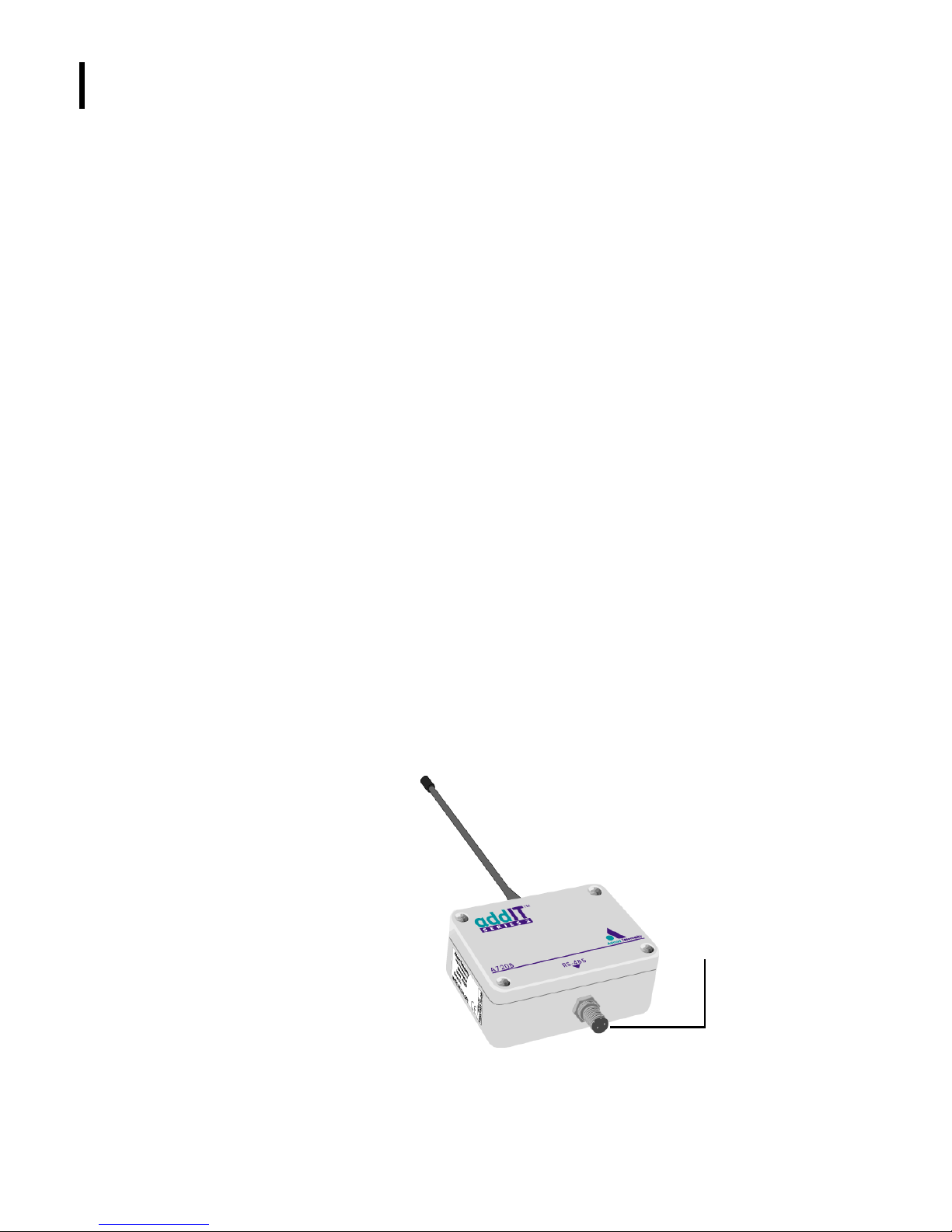
and the RTU look very much like, except that the receiver has only
one connector, which links the receiver to the power supply.
Figure 1 illustrates the addIT receiver.
Figure 1. addIT Receiver
TO
POWER
SUPPLY
Questo manuale è adatto per i seguenti modelli
1
Indice
Altri manuali Adcon Modem radio