
Advantech Advantech Modem ADAM-4550 Manuale utente

ADAM-4550
User’s Manual
Radio Modem Module
(RS-232/485 Interface)
Part no. 2000455001 3rd Edition Printed in Taiwan June 1999ADAM and the ADAM logo are trademarks of Advantech

2 ADAM-4550 User's Manual
Contents
1. Introduction .............................................
4
1.1 Built-in Intelligence .......................... 4
1.2 Features .......................................... 4
1.3 Specifications ................................. 5
2. Installation ..............................................
6
2.1 Basic Configuration ........................ 6
2.2 Power Supply ................................. 6
2.3RS-485CommunicationWiring ....... 7
2.4 Software Configuration .................. 7
2.5 Configuring ADAM-4550................. 8
2.6 Uploading a New Version
of Firmware ................................... 11
2.7 Using the Diagnostics Functions .... 12
2.8 Antenna Installation ........................ 13
3. Using ADAM-4550 ..................................
16
3.1 A Test Sample ................................. 16
4. ADAM-4550 Command Set ....................
17
4.1 Set New Configuration ................... 20
4.2 Read Configuration ......................... 22
4.3 Write Identification .......................... 22
4.4 Read Identification .......................... 23
4.5 Set Delimiter Character ................... 23
4.6 Read Delimiter Character ................ 24
4.7 Set Data Gate.................................. 24
4.8 Read Data Gate Status ................... 26
4.9 Read Firmware Version.................. 26
4.10ReadModuleName ....................... 27
4.11 Uploading....................................... 27
4.12 Send Data to Remote .................... 28
4.13 Get Error Rate Statistics ............... 29
4.14 Set Channel Number ..................... 30
4.15 Get Current Channel Number ....... 30
Appendix A: External Antenna Options ....
32
Appendix B: External Antenna
Wiring Diagram ...................
34

ADAM-4550 User's Manual 3
FCC Identification
MKZAZY4550MDM
FCC Warning
This equipment has been tested and found to comply with the limits for a Class A digital device,
pursuant to Part15 of the FCC Rules. These limits are designed to provide reasonable protection
against harmful interference when the equipment is operated in an industrial / commercial installa-
tion. This equipment generates, uses, and can radiate radio frequency energy and, if not installed
and used in accordance with the instruction manual, may cause harmful interference to radio
communications. Operation of this equipment in a residential area is likely to cause harmful
interference in which case the user will be required to correct the interference at his own
expense. However, there is not a guarantee that interference will not occur in a particular
installation.

4 ADAM-4550 User's Manual
1. Introduction
ADAM-4550isaneconomical,wirelessRS-232/
485 converter designed to interface any bidi-
rectional RS-485 device with a control center
host computer. The ADAM-4550 can be used
in data acquisition where data sensors are in-
accessible to the host computer due to wiring
difficulties or long distances that make wiring
impractical or impossible.
1.1 Built-in Intelligence
The ADAM-4550 is equipped with an on-board
microprocessor and a radio-frequency (RF)
module that can be used to interface one host
computer with multiple RS-485 networks. Each
RS-485 network can be used to support nu-
merous data acquisition devices.
1.2 Features
•Built-in microprocessor
•Data transmission speeds up to 115.2 Kbps
•Built-in RS-485 line surge protection
•Software configurable address and baud
rate
•Easily mounted on DIN rails, panels or as a
piggyback unit.
•All communication setup information stored
onsystemEEPROM
•Automatically sets RS-232 port to DTE/DCE
and automatic RS-485 data flow control
•Can be used as point to point or point to
points communication
•Can be operated with address or without
address

ADAM-4550 User's Manual 5
1.3 Specifications
•Transmission speed (bps): 300, 600,
1200, 2400, 4800, 9600, 19.2K, 38.4K,
57.6K, 115.2K (transmission speeds are
software configurable)
•Radio frequency : 2.442 GHz, Direct
Sequence Spread Spectrum (DSSS)
•Radio bandwidth : 22 MHz
•Radio transmission power: 100 mW
nominal
•Radio transmission rate: 1 Mbps
•Power requirement: Unregulated (+10VDC
to +30VDC) with protection from power re-
versals
•Case: ABS with captive mounting hard-
ware
•Standard accessories: Nylon DIN-rail
mounting adapter, SECC panel mounting
bracket
•RS-232 interface connector: DB-9
(female)
•RS-485 interface connector: Plug-in
screw type terminal [accepts AWG 1-#12
or 2-#14~#22 (0.5 to 2.5 mm2) wires]
•Operating temperature: -10oto 70oC
•Power consumption : 4 W
•Communication distance: 550 ft. effec-
tive range (under open site test with 2 dBi
omni antenna). Actual distance depends
on environmental conditions, antenna type
and positioning.

6 ADAM-4550 User's Manual
2. Installation
2.1 Basic Configuration
Before installing the ADAM-4550 in an existing
network, the ADAM-4550 unit should be pre-
configured. Though all modules are initially pre-
configured at the factory, it is recommended
that you check the baud rate settings.
Factory Default Settings:
Baud Rate: 9600 bps (both RS-232 and RS-485)
Delimiter: {
Parity: none
Address: 00
DTE/DCE:auto
RF channel: 3
2.2 Power Supply
For ease of use in industrial environments,
ADAM modules are designed to accept indus-
try standard +24 VDC unregulated power. Mod-
ules are certified for operation with any power
supply source between +10 and +30 VDC. Pow-
er ripples must be limited to 5 V peak to peak,
while voltage must in all cases remain between
+10 and +30 VDC. All power supply specifica-
tions are referenced at the module connector.
Power cables should be selected according to
thenumberofmodulesconnected and thelength
of the power lines. When using a network with
long cables, we advise the use of thicker wire
to limit the line voltage drop. In addition to seri-
ous voltage drops, long voltage lines can also
cause interference with communication wires.
We advise that the following standard colors
(as indicated on the modules) be used for pow-
er lines:
+Vs ð(R) Red
GND ð(B) Black

ADAM-4550 User's Manual 7
2.3 RS-485 Communication Wiring
We recommend using shielded-pair cables
which comply with the EIA RS-485 standard to
reduce interference in an ADAM network. Only
one set of twisted-pair cables is required to
transmit both DATA and RTS signals. We ad-
vise that the following standard colors (as indi-
cated on the modules) be used for the commu-
nication lines:
DATA+ ð(Y) Yellow
DATA- ð(G) Green
DATA+ must be connected to V+ and DATA-
must be grounded if RS-485 is not used.
Note: When RS-485 connection is not in use, it
is highly recommended to connect DATA+ to
V+ and DATA- to ground instead of leaving them
floating.
2.4 Software Configuration
The ADAM-4550 comes with a setup disk that
contains software for the following:
•Baud rate configuration
•Address configuration
•Statistical RF error rate retrieval
•Firmware upload tool for firmware upgrades
Note :
1. To configure the ADAM-4550, first short the
INIT pin (pin 6) to ground, then power on to set
the device in configuration mode. The yellow
LED should blink at approximately 1-second
intervals to indicate the device is in the config-
uration mode.
2. ADAM-4550 will automatically set itself as a
DCE during configuration mode.

8 ADAM-4550 User's Manual
2.5 Configuring ADAM-4550
1. Insert the ADAM-4550 disk in drive A. Start
Microsoft Windows 95/98. Go to the Start
Menu and choose Run.
Type a:\ADAM4550 and pressENTER. The
ADAM Configuration and Diagnostics win-
dow should now open.
2. You must now set the host computer’s port
configuration before configuring your
ADAM-4550. To configure your host com-
munication port, select the Setting... menu
and choose Local. A dialog box will open.
Select the proper COM port that is con-
nected to the ADAM-4550 and set the baud
rate to 9600. Click the OK button.
3. Connect your PC’s RS-232 serial port to
ADAM-4550’s RS-232 port. Connect the
INIT pin with the ADAM-4550’s ground pin.
Turn on the power. The unit is now in con-
figurationmode. TheyellowLED light should
blink slowly.
4. You must now search your unit for its cur-
rent settings. To do this, select the Set-
ting... menu and choose Get. Enter a start-
ing address into the dialog box or use the
default start address 0. Click the OK but-
ton. The configuration software will scan
the unit for the address by matching the
unit’s address with each address number
between the starting address and 255. If
the unit’s address is found, its ID address,
baud rate and delimiter settings will be dis-
played.
5. You may now change the settings. To
change the configuration, select the Set-
ting... menu and choose Set. A dialog box
will open. Enter the new configuration set-
tings (new address, identification, new baud
rate, master/slave) and click the OK button.
Follow the procedure in the Search sec-
tion to get the new desired configurations.
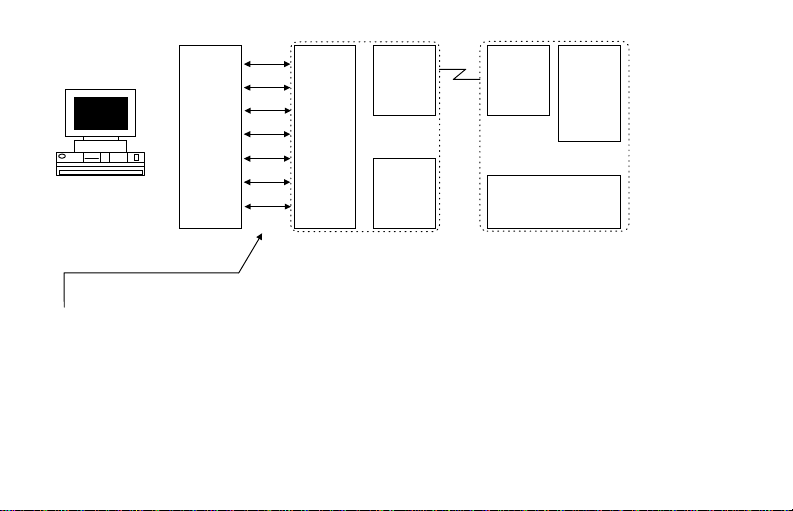
ADAM-4550 User's Manual 9
Figure 1: Basic Connection Diagram
Note:
The RS-232 cable does not have to be
a null-modem cable. The ADAM-4550
will automatically detect and set itself
as a DCE, if it is configured as auto for
theDCE/DTEsetting.
PC
2 RX
3 TX
7 RTS
8 CTS
4 DTR
6 DSR
5 GND
2 RX/TX
3 TX/RX
7 CTS/RTS
8 RTS/CTS
4 DSR/DTR
6 DTR/DSR
5 GND
RF
Module
DATA+
DATA-
RS-485
RF
Module DATA+
DATA-
RS-485
RS-232 Connector
RS-232 ADAM-4550 ADAM-4550

10 ADAM-4550 User's Manual
Figure 2: Pin Assignment
Altri manuali per Advantech Modem ADAM-4550
1
Indice
Altri manuali Advantech Modem


