
AEN B9971-5 Manuale utente

B9971-5
User manual Oven

Thank you for choosing one of our high-quality products.
To ensure optimal and regular performance of your appliance please read this
instruction manual carefully. It will enable you to navigate all processes perfectly
and most efficiently. To refer to this manual any time you need to, we recommend
you to keep it in a safe place. And please pass it to any future owner of the
appliance.
We wish you much joy with your new appliance.
CONTENTS
SAFETY INFORMATION 3
General safety 3
Children and vulnerable people safety 3
Installation 3
Electrical connection 4
Use 4
Care and cleaning 4
Pyrolytic cleaning 5
Risk of fire 5
Oven lamp 5
Service centre 5
Disposal of the appliance 6
PRODUCT DESCRIPTION 6
General overview 6
Inside of door 7
Oven accessories 7
DAILY USE 7
Initial Cleaning 7
Setting the language 7
Setting the time 7
Activating theSMELL FILTER YES/NO 8
Indicators 8
Menu status bar 8
Symbol status bar 9
Oven buttons 9
Menu operation in overview 9
Switching on/off the appliance 10
Setting the oven function 11
Changing the oven temperature 11
Switching off the oven function 11
Cooling fan 11
Residual heat indicator 11
Oven functions 11
Meat programmes 12
Telescopic runners - Inserting the Oven
Accessories 13
Synchronised shelf runners 13
Meatprobe 14
Automatic programmes 15
Meat programmes with weight input 15
Meat programmes with meat probe 16
Options menu 16
RECIPE MENU (overview) 17
Setting a recipe 17
Memory menu 18
Saving settings for "personal recipes" 18
Finding settings for “personal recipes” 19
Overwriting a memory position 19
SETTINGS MENU 19
Adjusting the SETTINGS MENU 20
More hints for SETTINGS MENU 20
Pre-heating with the RAPID HEAT UP
function 21
Clock functions 22
Setting the clock functions 22
CHILD LOCK 23
BUTTON LOCK 23
Door lock 24
CARE AND CLEANING 24
Pyrolytic cleaning 25
Reminder function for pyrolytic cleaning
25
Telescopic shelf runners 26
Oven lamp 26
Oven door and glass panels 27
WHAT TO DO IF… 28
TECHNICAL DATA 29
INSTALLATION INSTRUCTIONS 30
ENVIRONMENT CONCERNS 31
2Contents

Subject to change without notice
SAFETY INFORMATION
Before the installation and use, read this manual carefully:
• For your personal safety and the safety of your property
• For the respect of the environment
• For the correct operation of the appliance.
Always keep these instructions with the appliance also if you move or sell it.
The manufacturer is not responsible if incorrect installation or use results in damage.
General safety
• Do not change the specifications of this appliance. There is the risk of injury and damage
to the appliance.
• Do not let the appliance stay unattended during operation.
• Switch off the appliance after each use.
Children and vulnerable people safety
• This appliance can be used by children aged from 8 years and above and persons with
reduced physical, sensory or mental capabilities or lack of experience and knowledge if
they have been given supervision or instruction concerning use of the appliance in safe
way and understand the hazards involved. Children shall not play with the appliance.
• Keep all packaging away from children. There is the risk of suffocation or physical injury.
• Keep children and animals away from the appliance when the door is open or the appli-
ance is in the operation, because it becomes hot. There is the risk of injury or other per-
manent disability.
• If the appliance has Child Lock or Key Lock (Control Lock) function, use it. It prevents
children and animals from accidental operation of the appliance.
Installation
• Only an approved electrician can install and connect the appliance. Contact an approved
service centre. This is to prevent the risks of structural damage or physical injury.
• Make sure that the appliance is not damaged because of transport. Do not connect a
damaged appliance. If necessary, contact the supplier.
• Remove all packaging, stickers and layers from the appliance before first use. Do not re-
move the rating plate. It can invalidate the guarantee.
• Make sure that the appliance is disconnected from the power supply during the installa-
tion.
• Be careful when you move the appliance. The appliance is heavy. Always use safety
gloves. Do not lift the appliance by the handle.
• The electrical installation must have an isolation device which lets you disconnect the
appliance from the mains at all poles. The isolation device must have a contact opening
width of minimum 3 mm.
• You must have correct isolation devices: line protecting cut-outs, fuses (screw type fuses
removed from the holder), earth leakage trips and contactors.
Safety information 3

• Before the installation, make sure that the kitchen cabinet has the recess dimensions ap-
plicable.
• Make sure that the appliance is installed below and adjacent safe structures.
• Keep the minimum distances to the other appliances and units.
• The appliance cannot be positioned on a base.
• Built in ovens and built in cooking surfaces are attached with special connection system.
To prevent damage to the appliance, only use an appliance with the appliances from the
same manufacturer.
Electrical connection
• The appliance must be earthed.
• Make sure that the electrical data on the rating plate agree with your domestic power
supply.
• Information on the voltage is on the rating plate.
• Always use a correctly installed shockproof socket.
• Do not use multi-way plugs, connectors and extension cables. There is the risk of fire.
• Do not replace or change the mains cable. Contact the service centre.
• Make sure not to squash or cause damage to the mains plug (if applicable) and cable
behind the appliance.
• Do not pull the mains cable to disconnect the appliance. Always pull the mains plug – if
applicable.
Use
• The appliance is only for domestic use. Do not use the appliance for commercial and in-
dustrial use.
• Only use the appliance for domestic cooking tasks. This is to prevent physical injury to
persons or prevent damage to property.
• Do not use the appliance as a work surface or storage surface.
• The interior of the appliance becomes hot during use. There is the risk of burns. Do not
touch the heating elements in the appliance. Use gloves when you insert or remove the
accessories or pots.
• Be careful when you remove or install the accessories to prevent damage to the oven
enamel.
• Always stay away from the appliance when you open the door while the appliance is in
operation. Hot steam can release. There is the risk of skin burns.
• To prevent damage or discoloration to the enamel:
– do not put any objects directly on the appliance floor and do not cover it with alumi-
nium foil;
– do not put hot water directly into the appliance;
– do not keep moist dishes and food in the appliance after you finish the cooking.
• Discoloration of the enamel has no effect on the performance of the appliance so it is
not a defect in the sense of the warranty law.
• Do not apply pressure on the open door.
• Always close the appliance door when you cook, even while grilling.
Care and cleaning
• Before maintenance, switch off the appliance and disconnect the appliance from the
power supply.
4Safety information

• Before maintenance, make sure that the appliance is cold. There is the risk of burns.
There is the risk that the glass panels can break.
• Keep the appliance clean at all times. A build-up of fats or other foodstuff can result in a
fire.
• Regular cleaning prevents the surface material from deteriorating
• Use a deep baking tray for very moist cakes to prevent that fruit juices cause stains that
can be permanent.
• For your personal safety and the safety of your property, only clean the appliance with
water and a soap. Do not use flammable products or products that can cause corrosion.
• Do not clean the appliance with steam cleaners, high-pressure cleaners, sharp objects,
abrasive cleaning agents, abrasive sponges and stain removers
• If you use an oven spray, follow the instructions from the manufacturer.
• Do not clean the glass door with abrasive cleaning agents or metal scraper. Heat resist-
ant surface of the inner glass can break and shatter.
• When the door glass panels are damaged they become weak and can break. You must
replace them. Contact the service centre.
• Be careful when you remove the door from the appliance. The door is heavy!
• Do not clean catalytic enamel (if applicable).
Pyrolytic cleaning
• Do not leave the appliance unattended during Pyrolytic cleaning.
• Do not try to open the door and do not cut the power supply during Pyrolytic cleaning.
• Keep children away during pyrolytic cleaning. The appliance becomes very hot. There is
the risk of burns.
• During pyrolytic cleaning, stubborn dirt can cause discoloration to the enamel. Discolora-
tion to the enamel has no effect on the performance of the appliance
Risk of fire
• Open the door carefully. The use of ingredients with alcohol can cause a mixture of alco-
hol and air. There is the risk of fire.
• Do not let sparks or open flames come near the appliance when you open the door.
• Do not put flammable products or items that are wet with flammable products, and/or
fusible objects (made of plastic or aluminium) in, near or on the appliance.
Oven lamp
• Bulb lamps used in this appliance are special lamps selected for household appliances use
only. They cannot be used for the full or partial illumination of a household room.
• If it becomes necessary to replace the lamp use one of the same power and specifically
designed for household appliances only.
• Disconnect the appliance from the power supply before the replacement of the oven
lamp. There is the risk of electrical shock.
Service centre
• Only an approved engineer can repair or work on the appliance. Contact an approved
service centre.
• Use only original spare parts.
Safety information 5
Disposal of the appliance
• To prevent the risk of physical injury or damage
– Disconnect the appliance from the power supply.
– Cut off the mains cable and discard it.
– Discard the door catch. This prevents children or small animals from being closed in-
side of the appliance. There is the risk of suffocation.
PRODUCT DESCRIPTION
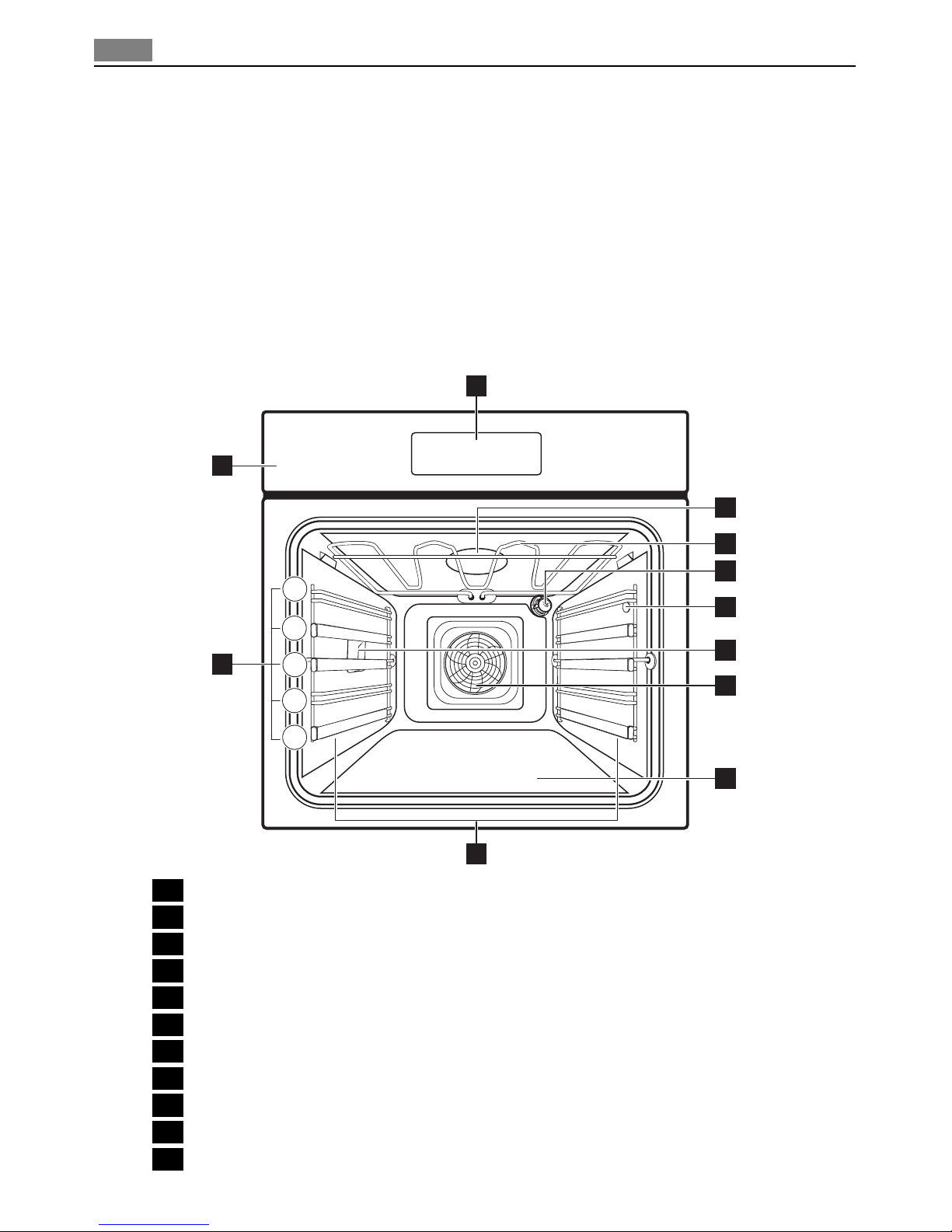
General overview
5
4
3
2
1
2
1
11
4
3
6
5
7
8
9
10
1Control panel
2Electronic programmer
3Smell filter
4Heating element
5Oven lamp
6Meat probe socket
7Oven lamp
8Fan and rear wall heating element
9Bottom heat
10 Oven shelf runners, removable
11 Shelf positions
6Product description

Inside of door
You will find the shelf position number on the inside of the oven door.
Oven accessories
•Oven shelf
For cookware, cake tins, roasts.
•Nonstick oven shelf
For cookware, cake tins, roasts.
•Flat baking tray
For cakes and biscuits.
•Nonstick flat baking tray
For cakes and biscuits.
•Nonstick deep roasting pan
To bake and roast or as pan to collect fat.
•Meat probe
To measure how far the food is cooked.
•Synchronised shelf runners
Retaining clips with connection clamp. To remove the telescopic shelf runners more easi-
ly.
DAILY USE
WARNING!
Refer to "Safety information" chapter.
Initial Cleaning
• Remove all parts from the appliance.
• Clean the appliance before first use.
Refer to chapter "Care and Cleaning".
Setting the language
1. Connect the appliance to the power supply.
The display shows SPRACHE EINSTELLEN - LANGUAGE MENU .
2. Use or to set the language.
3. Use to confirm.
The texts in the display are in the set language.
Setting the time
The display shows TIME OF DAY .
You cannot use the appliance if the time is not set.
Daily use 7
1. Use or to set the correct time.
2. Use to confirm.
The appliance is now ready to use.
Refer to “Settings menu” to change the set-
tings.
Activating the SMELL FILTER YES/NO
After the language is set, the display shows SMELL FILTER MENU .
The smell filter limits odours.
When the smell filter is on, it sets on and off automatically.
1. Use or to choose between SMELL FILTER ON and SMELL FILTER OFF .
2. Use to confirm.
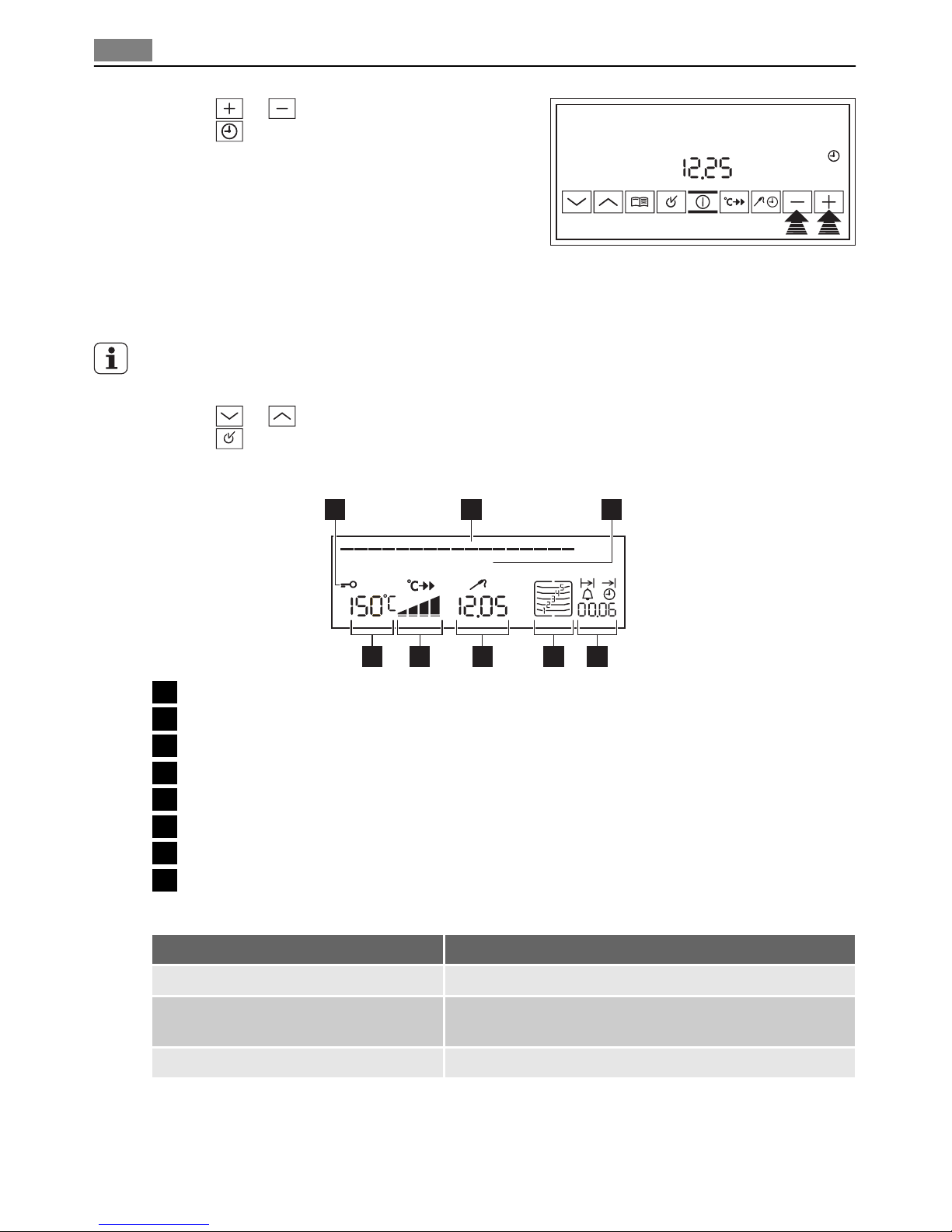
Indicators
XXXXX XXXX
1 2 3
45678
1Symbol status bar
2Menu status bar
3Text line
4Clock functions. Period of operation
5Shelf levels
6Time. Meat core temperature
7Heat indicator
8Temperature
Menu status bar
Indication Function
A bar in the status bar flashes. The position in a menu is shown.
The status bar is not shown. • The appliance starts to heat.
• The set time starts to count down.
Every second bar is shown. The Smell filter is operating.
TIME OF DAY
8Daily use
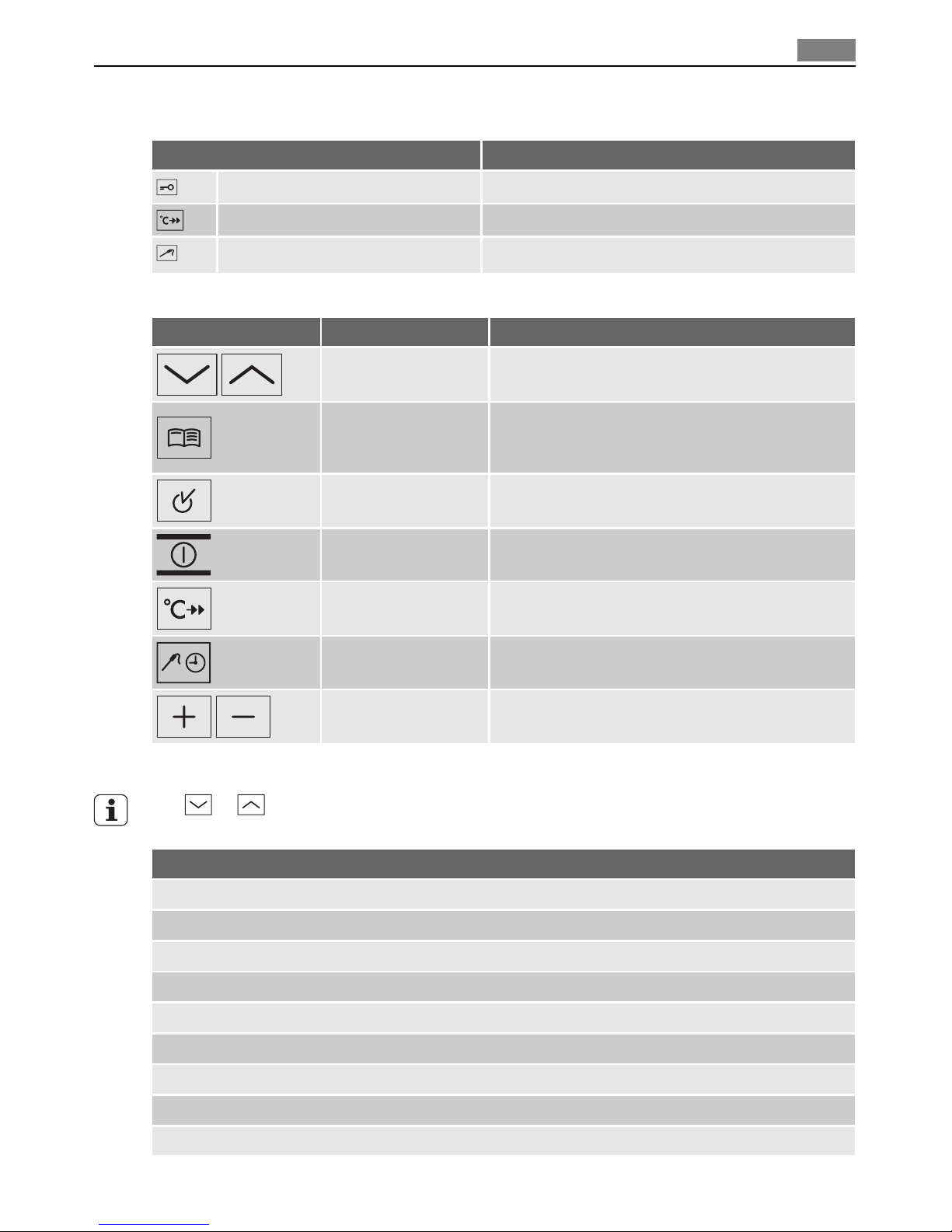
Symbol status bar
Symbol Function
Door lock The door is locked.
RAPID HEAT UP RAPID HEAT UP is in operation.
MEATPROBE The MEATPROBE is installed.
Oven buttons
Button Function Description
DOWN, UP To set the oven function.
To move up and down in the menu.
OPTION
To open the Options menu.
To close the Options menu (push and hold the
button).
OK To confirm or open the submenu.
ON/OFF To switch the appliance on or off.
RAPID HEAT UP To switch the rapid heat up function on or off.
SELECTION To select oven function, clock function and
MEATPROBE.
PLUS, MINUS To set values (e.g. temperature, time, weight, de-
gree of cooking).
Menu operation in overview
Use or to move in menu
Oven functions menu
TRUE FAN
FAN BAKING
SLOW COOK ONE
CONVENTIONAL
ROTITHERM
DUAL GRILL
SINGLE GRILL
KEEP WARM
DEFROST
Daily use 9

Oven functions menu
BASE HEAT
POULTRY
PORK
BEEF
VEAL
GAME
Use to access the Options menu from the Oven functions menu
Options menu
RECIPE MENU
MEMORY MENU
CLEANING MENU
SETTING MENU
Use to access the Options submenu from the Options menu
Options submenu
SMELL FILTER MENU
HEAT+HOLD MENU
EXTRA TIME MENU
RAPID HEAT UP MENU
RESIDUAL HEAT MENU
SOUND MENU
LANGUAGE MENU
FACTORY SETTINGS
Switching on/off the appliance
Use to switch on the appliance.
The display shows the OVEN FUNCTIONS menu.
Use to switch off the appliance.
–—OVEN FUNCTIONS
10 Daily use
Indice


