
Akai ACVDS731UXT Manuale utente

ENGLISH
OWNER`S MANUALOWNER`S MANUAL
OWNER`S MANUAL
PORTABLE DVD PLAYERPORTABLE DVD PLAYER
DUAL SCREENS PORTABLE DVD PLAYERDUAL SCREENS PORTABLE DVD PLAYER
Please read thismanual before operating
UNIVERSAL SERIAL BUS
REVERSE 16:9 / 4:3 MODE UP DOWN
REVERSE 16:9 / 4:3 MODE UP DOWN
ACVDS731UXT


~ 1 ~
Table of Contents
Table of Contents.......................................................................................................................................................................1
Safety Information......................................................................................................................................................................2
Remote Control..........................................................................................................................................................................3
Description of the Player.............................................................................................................................................................4
Description of the LCD Screen.....................................................................................................................................................5
Using the RemoteControl............................................................................................................................................................6
Connecting the LCD Screens.......................................................................................................................................................7
Using USB Port..........................................................................................................................................................................8
Using the AC Adapter..................................................................................................................................................................9
Connecting Earphones to the DVD Player...................................................................................................................................10
Mounting the Screens for In-Car Use..........................................................................................................................................11
Playing a Disc.....................................................................................................................................................................12-14
Playing MP3 and Regular Audio CD...........................................................................................................................................15
Playing Picture CD....................................................................................................................................................................16
Displaying and Sorting Files......................................................................................................................................................17
Setting Language for OSD, Menu, Audio, Subtitle........................................................................................................................18
Setting Screen for Display Format, Screen Saver, TV System.......................................................................................................19
Setting Audio for Downmix ........................................................................................................................................................20
Setting Parental Control, Password, Camera Angle, Default.........................................................................................................21
Adjusting LCD Screen...............................................................................................................................................................22
Troubleshooting.......................................................................................................................................................................23
Specifications..........................................................................................................................................................................24

~ 2 ~
Safety Information
CLASS 1 LASERPRODUCT / KLASSE 1 LASERPRODUKT / LUOKAN 1 LASER LAITE / KLASS 1 LASER APPARAT / PRODUCTO
LASER CLASE.
INVISIBLE LASER RADIATION WHEN OPENAND INTERLOCKSDEFEATED. AVOIDEXPOSURE TO BEAM.
1.Toprevent fire orelectrical shock, donot expose thisPlayer to rainor moisture.
2.Toavoid electrical shock,do not openthe cabinet, nouser-serviceable parts inside,refer servicing toqualified personnel only.
3.Listening with earphones for many hoursat maximum volumemay damage yourhearing.
4.The Player shouldbe connected toa power supplyonly of thetype described inthe operating instructionsor as markedon the Player.
Please read allof the safetyand operating instructionsbefore operating thisPlayer, followall warnings placedon the Player
and in theuser's manual. Thesesafety and operatinginstructions should beretained for futurereference.
WARNING
SAFETY WARNING
Safety Information
Do not exposethe system toexcessive moisture, rain,sand, or heat sources.
Place the DVDPlayer on afirm, flat surface.
Keep the DVDPlayer away fromdomestic heating equipment and direct sunlight.
When placing theDVD Player ina cabinet, allow about one inch of space all around the DVD Player for ventilation.
Attention:
Remove the protectioncard inside thedisc compartment beforeusing this Player.

Remote Control
~ 3 ~
Remote Control 14.DVD/USB Button
Switches between DVDand USB
mode.
15.DISPLAYButton
Displays the currentdisc playback
information.
16.MUTE Button
17.ANGLE Button
Use to accessvarious
camera angles ona DVD.
18.LANGUAGE Button
Selects the voicelanguage in a DVD.
19.SLOW Button
20.VOL- Button
Use to decreasethe volume.
21.VOL+ Button
Use to increasethe volume.
22.FAST REVERSE( ) Button
23.FAST FORWARD ( ) Button
24.REPEAT Button
Allows you torepeat play
a title, chapter, track, ordisc.
25.MARK Button
Use to marka point wherethe
playback starts eachtime when
the MARK buttonis pressed
later on.
1.MENU/PBC Button
Brings up thedisc menu.
2.L/R Button
Selects left, rightand stereo
sound tracks.
3.P/N Button
Selects PAL/NTSC/AUTO TV systems.
4.TITLE Button
5.SUBTITLE Button
Selects the subtitle'slanguage.
6.Number Buttons (0,1,...,9)
7.SETUP Button
Brings up thesetup MENU
to set upthe system's
language, audio, display,
password etc.
8.(PLAY/ENTER)/DIRECTION Buttons
9.STOP ( ) Button
10.SKIP FORWARD ( )Button
Use to skipto next title,chapter or track.
11.SKIP BACKWARD ( ) Button
Use to skipto previous title,
chapter or track.
12.ZOOM Button
13.GOTO Button
Use to enterthe specific chapter, track
or time toplayback.
2
3
4
5
6
7
8
9
10
11
12
15
16
17
18
19
20
21
22
23
24
14
13
25
1

USB
~ 4 ~
Description of the Player
1.OUT1/OUT2 jack
2.DC IN 12 V jack
3.DISC COVER
4.DIRECTION button ( up / down / left / right )
5.ENTER button
6.MENU button
7.DVD/USB button
8.PLAY BUTTONS
SKIP BACKWARD ( )
SKIP FORWARD ( )
PLAY / PAUSE ( )
STOP ( )
9.PUSH: Press here to open and close disc
compartment cover
10.POWER ON/OFF
11.USB slot
12.REMOTE CONTROL SENSOR
13.LED LIGHT
OUT1 OUT2
POWRE
ONOFF
1
2
4
3
567
10
12 13
11
9
8

ON OFF
POWER
VOL
DC .AV INPUT
REVERSE 16:9 / 4:3 MODE UP DOWN
1
4
1
5 6 7 8
2
9
10
11
12
14
13
1.
2.LCD
3.LED
4.REVERSE button
5.16:9/4:3 button
6.MODE button
7.UP button
8.DOWN button
9.SPEAKER
10.
11.
12.EARPHONE JACK
13.
14.DC.AV IN PUT jack
Heat vent
Socket for connecting stand or
mounting device.
Speaker volume knob
Power On/Off switch
3
Description of the LCD Screen
~ 5 ~

~ 6 ~
Using the Remote Control
Using the remote control
Point the remotecontrol directly atthe remote sensor
on the frontof the DVDPlayer.
Remote Control Sensor
O
30
O
30
2m(6.5ft)
Installing the battery
1. Open thebattery compartment coverusing a coin.
3. Replace thebattery compartment coverand turn clockwise
until it stops.
2. Insert a3V lithium batteryinto the batterycompartment with
the polarity (+ ) facingup as marked.
Battery
battery compartment
cover
Corrosion, oxidation, battery-leakageand any othergradually
acidic defect ofthis nature willinvalidate the guarantee.

~ 7 ~
Connecting the LCD Screens
The power forthe two screensis provided bythe DVD playerthrough the providedcables which alsoserve to providethe audio/video
signal from theplayer to thescreens. Follow thesesteps to makethe connections.
Warning!
1. Do notturn on theDVD player poweruntil the connection of Power/AV cable between the Player and the screen is done.
2. Alwaysturn off the DVD playerpower before disconnectingthe Power/AV cable between the Player and the screen.
1. Connect oneend of thePower/AV cable (mini DIN)to the OUT1 on the playerand the otherend to theDC. AV INPUT on the screen.
2. Repeat step1 for theother screen.
OUT1 OUT2
ON OFF
POWER
VOL
DC .AV INPUT
ON OFF
POWER
VOL
DC .AV INPUT
DVD Player
LCD Screen
Power/AV Cable
~ 8 ~
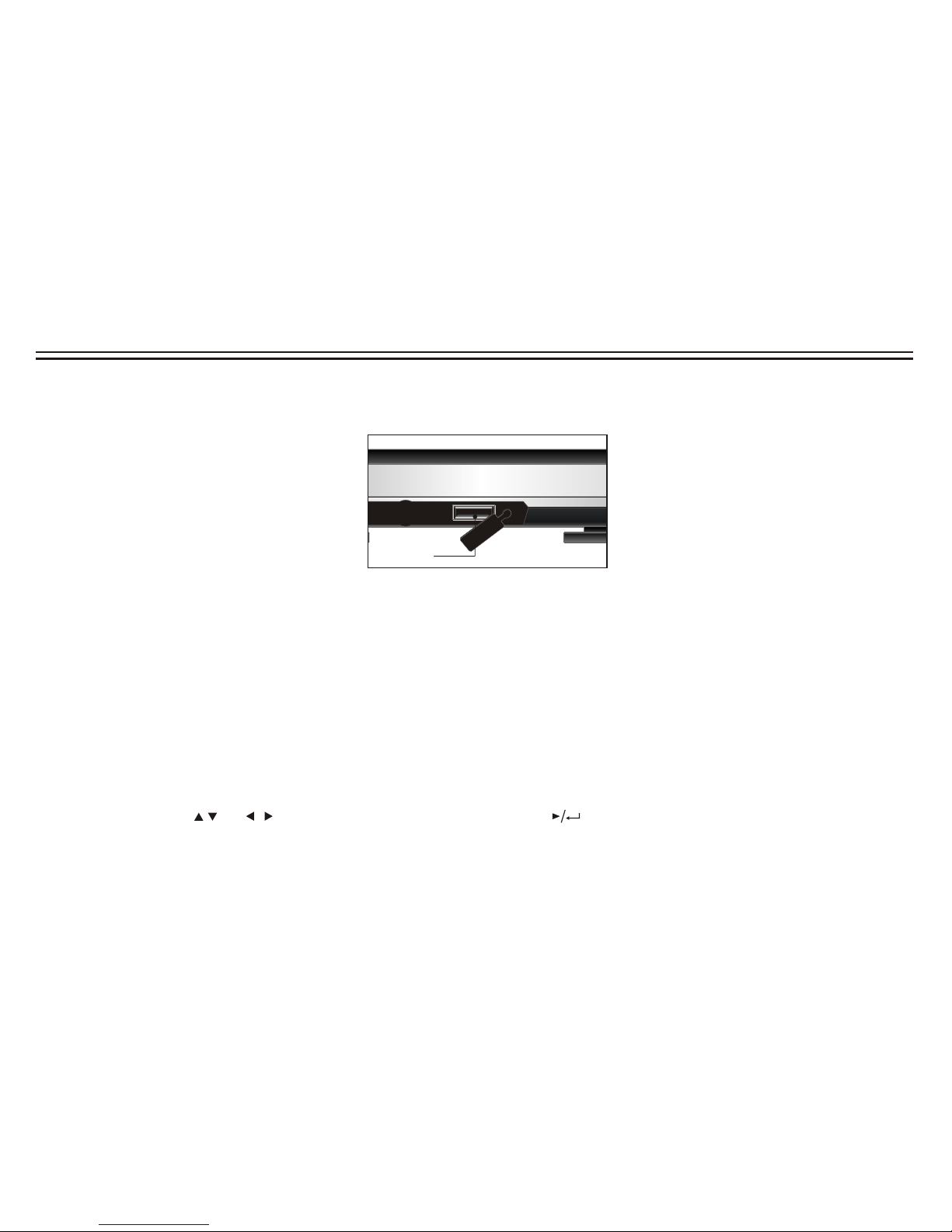
Using USB Port
USB
USB slot
Pluging a USB device
1.Plug inthe USB deviceto the USBport on theplayer.
2.Repeatedly press DVD/USB to select USBmode.
Removing a USB device
You can remove the USB device anytime even it is playing. To remove theUSB device, simplygrasp the endof the USBand remove it
from the slot.
Playing a USB device
The player accepts mostUSB devices such asMP3, DSC, USB- drive, Digital Camcorder etc. The USB in this Player supports
version 1.1/2.0.
1.Insert theUSB device andrepeatedly press DVD/USB to select USB mode. The file manager appears and the first song file of the
first folder plays.
2.Use direction key( and )to select thefile you want to play and press to play.
Note:
If you have differentfile types (photo, music, video) in the USB, make sure you have selected to display all file types ( see "
Displaying and Sorting Files") otherwise, some file types may not display.
Indice
Altri manuali Akai Lettore DVD portatile

Akai
Akai ACVDS735 Manuale utente

Akai
Akai ACVDS715UX Manuale utente

Akai
Akai ACVDS735 Manuale utente

Akai
Akai PDVD-193S Manuale utente

Akai
Akai ACVDS736 Manuale utente

Akai
Akai ACVDS955 Manuale utente

Akai
Akai AKDVD10 Manuale utente

Akai
Akai Walt Disney's Donald Duck ACVDS9DD Manuale utente

Akai
Akai AKPDVD702D Manuale utente

Akai
Akai ADP-841 Manuale utente

Akai
Akai PDVD172 Manuale utente

Akai
Akai A51007 Manuale utente

Akai
Akai ACVDS940UCX Manuale utente

Akai
Akai ACVDS736T Manuale utente

Akai
Akai AC-V6507D Manuale utente

Akai
Akai ACVDS702 Manuale utente

Akai
Akai APD710T Manuale utente

Akai
Akai ACVDS737TG Manuale utente

Akai
Akai APD909 Manuale utente

Akai
Akai APV-4300MB Manuale utente


