Akaso Brave 7 Manuale utente

BRAVE 7
anba
ACTION CAMERA

01
EN
Important Messages --------------------------------------------------------------------------06
Micro SD Card Use -----------------------------------------------------------------------------07
IPX8 Waterproof Rating ----------------------------------------------------------------------08
Overheating Detection -----------------------------------------------------------------------10
1. Specications---------------------------------------------------------------------------------11
2. What’s in the Box----------------------------------------------------------------------------12
3. Your Brave 7 Action Camera------------------------------------------------------------13
4. Getting Started-------------------------------------------------------------------------------15
4.1 Unboxing ------------------------------------------------------------------------------------15
4.2 Take the Camera Out of the Camera Frame------------------------------------15
4.3 Detach the Camera Frame from the Packing Box ----------------------------16
4.4 Charge the Battery Separately-------------------------------------------------------16
4.5 Install the Battery ------------------------------------------------------------------------17
4.6 Install the Micro SD Card --------------------------------------------------------------17
4.7 Charge the Battery in the Camera--------------------------------------------------18
4.8 Power on the Camera ------------------------------------------------------------------18
5. Getting Started-------------------------------------------------------------------------------19
5.1 Operation Instructions -----------------------------------------------------------------19
(1) Powering On and Off ----------------------------------------------------------------19
(2) Preview Screen -------------------------------------------------------------------------19
(3) Using the Shutter Button------------------------------------------------------------20
(4) Quickly Switching Modes ------------------------------------------------------------20
(5) Zooming in or out ---------------------------------------------------------------------21
(6) Video Sound ----------------------------------------------------------------------------22
(7) Album Access ---------------------------------------------------------------------------23
(8) Setting Resolution ---------------------------------------------------------------------23
(10) Switching Screens-------------------------------------------------------------------24
5.2 Quick Operation Guide-----------------------------------------------------------------25
Content

02
EN EN
5.3 Quick Menu---------------------------------------------------------------------------------26
(1) Voice Control----------------------------------------------------------------------------27
(2) Wi -----------------------------------------------------------------------------------------27
(3) Screen Brightness --------------------------------------------------------------------28
(4) Screen Lock------------------------------------------------------------------------------28
(5) One Key Fast Shooting ---------------------------------------------------------------28
(6) Grid ----------------------------------------------------------------------------------------29
(7) Preferences------------------------------------------------------------------------------29
(8) Exiting the Quick Menu --------------------------------------------------------------29
6. Video --------------------------------------------------------------------------------------------30
6.1 Video Modes -------------------------------------------------------------------------------30
(1) (1) Video (default) ----------------------------------------------------------------------32
(2) Timelapse Video -----------------------------------------------------------------------33
(3) HyperLapse Video ---------------------------------------------------------------------34
(4) Slow Motion Video---------------------------------------------------------------------35
6.2 Video Settings -----------------------------------------------------------------------------36
(1) Resolution--------------------------------------------------------------------------------38
(2) Timelapse Interval --------------------------------------------------------------------39
(3) HyperLapse Speed -------------------------------------------------------------------40
(4) Slow Motion Speed -------------------------------------------------------------------41
(5) Image Stabilization --------------------------------------------------------------------42
(6) Metering----------------------------------------------------------------------------------42
(7) EV-------------------------------------------------------------------------------------------43
(8) ISO -----------------------------------------------------------------------------------------44
(9) White Balance---------------------------------------------------------------------------44
(10) Sharpness ------------------------------------------------------------------------------45
(11) Bit Rate----------------------------------------------------------------------------------45
(12) Filter--------------------------------------------------------------------------------------46
(13) Fragment -------------------------------------------------------------------------------46
(14) Driving Mode --------------------------------------------------------------------------47
(15) Wind Noise Reduction--------------------------------------------------------------47
(16) Dark Light Mode----------------------------------------------------------------------48
(17) Distortion Calibration -------------------------------------------------------------48

03
EN
(18) Capture Duration --------------------------------------------------------------------48
(19) WDR--------------------------------------------------------------------------------------49
(20) HindSight -------------------------------------------------------------------------------49
6.3 Video Settings Menu --------------------------------------------------------------------51
7. Photo --------------------------------------------------------------------------------------------53
7.1 Photo Modes-------------------------------------------------------------------------------53
(1) Photo (default) -------------------------------------------------------------------------55
(2) Timelapse Photo -----------------------------------------------------------------------56
7.2 Photo Settings -----------------------------------------------------------------------------57
(1) Resolution--------------------------------------------------------------------------------58
(2) Metering----------------------------------------------------------------------------------58
(3) EV-------------------------------------------------------------------------------------------59
(4) ISO------------------------------------------------------------------------------------------60
(5) Shutter ------------------------------------------------------------------------------------60
(6) White Balance---------------------------------------------------------------------------61
(7) Sharpness--------------------------------------------------------------------------------61
(8) Filter ---------------------------------------------------------------------------------------62
(9) Self-Timer --------------------------------------------------------------------------------62
(10) Image Format -------------------------------------------------------------------------63
(11) Capture Duration --------------------------------------------------------------------63
(12) Burst Photo ----------------------------------------------------------------------------64
(13) Photo Quality--------------------------------------------------------------------------64
(14) WDR--------------------------------------------------------------------------------------65
(15) Distortion Calibration---------------------------------------------------------------65
7.3. Photo Settings Menu -------------------------------------------------------------------66
8. System Settings------------------------------------------------------------------------------67
8.1 Preferences --------------------------------------------------------------------------------67
(1) Voice Control ---------------------------------------------------------------------------68
(2) Language---------------------------------------------------------------------------------68
(3) Video Format----------------------------------------------------------------------------69
(4) Code ---------------------------------------------------------------------------------------69
(5) Power Frequency ----------------------------------------------------------------------70

04
EN EN
(6) Wireless Connection------------------------------------------------------------------70
(7) Remote ----------------------------------------------------------------------------------72
(8) One Key Fast Shooting --------------------------------------------------------------72
(9) Gyroscope -------------------------------------------------------------------------------73
8.2 General Settings --------------------------------------------------------------------------73
(1) Screen Brightness --------------------------------------------------------------------73
(2) Sound -------------------------------------------------------------------------------------74
(4) Video Sound-----------------------------------------------------------------------------77
(5) Auto Power Off -------------------------------------------------------------------------78
(6) Screen Saver ----------------------------------------------------------------------------78
(7) Date & Time -----------------------------------------------------------------------------79
(8) Date Stamp ------------------------------------------------------------------------------80
(9) Format ------------------------------------------------------------------------------------81
(10) Factory Reset--------------------------------------------------------------------------82
(11) Voice Command ---------------------------------------------------------------------82
(12) About ------------------------------------------------------------------------------------82
9. Album--------------------------------------------------------------------------------------------83
9.1 Album Access ------------------------------------------------------------------------------83
9.2 Album Interface---------------------------------------------------------------------------84
9.3 Video Playback ---------------------------------------------------------------------------84
(1) Playback Videos ------------------------------------------------------------------------84
(2) Video Screen ----------------------------------------------------------------------------85
9.4 Photo Playback ---------------------------------------------------------------------------85
(1) Playback Photos------------------------------------------------------------------------85
(2) Photo Screen ---------------------------------------------------------------------------86
9.5 File Deletion --------------------------------------------------------------------------------86
(1) Delete Files from the File List ------------------------------------------------------86
(2) Delete Files on the Video Screen -------------------------------------------------87
(3) Delete Files on the Photo Screen -------------------------------------------------87
10. Data Transmission------------------------------------------------------------------------88
10.1 Transferring Files to a Computer -------------------------------------------------88
10.2 Webcam Mode --------------------------------------------------------------------------88

05
EN
11. App Download & Wi Connection --------------------------------------------------89
11.1 Camera Wi ------------------------------------------------------------------------------89
11.2 Features of the AKASO GO App ---------------------------------------------------89
11.3 Download the AKASO GO App ----------------------------------------------------89
11.4 Create An Account for the AKASO GO App ------------------------------------90
11.5 Connect to the AKASO GO App via Wi-----------------------------------------91
11.6 AKASO GO App Menu -----------------------------------------------------------------94
(1) User Interface --------------------------------------------------------------------------94
(2) Video --------------------------------------------------------------------------------------94
(3) Photo -------------------------------------------------------------------------------------97
(4) Album -------------------------------------------------------------------------------------99
(5) System Settings ----------------------------------------------------------------------102
12. Remote -------------------------------------------------------------------------------------107
12.1 Connect to the Remote-------------------------------------------------------------107
12.2 Button Operation Instructions---------------------------------------------------108
12.3 Indicators--------------------------------------------------------------------------------108
13. Mount Your Brave 7 -------------------------------------------------------------------109
14. Troubleshooting -------------------------------------------------------------------------110
15. Battery Maintenance-------------------------------------------------------------------110
15.1 Maximizing Battery Life ------------------------------------------------------------110
15.2 Battery Handling and Storage----------------------------------------------------111
16. Precautions--------------------------------------------------------------------------------112
17. Contact Us ---------------------------------------------------------------------------------112

06
EN
Important Messages
Congratulations on your new AKASO Brave 7 Action Camera! You must be excited
to use your new camera, but please spend some time familiarizing yourself with
this manual rst so that you get the most out of your camera’s features and use
it safely.
It’s of great importance to regularly update the camera’s rmware. To do this, you
can connect your camera to the AKASO GO app via the camera’s Wi, and then
download and install the newest rmware.
1. This camera is a precision instrument. Safeguard it from drops or impacts to
prevent damage.
2. Store the camera away from devices or objects with strong magnetic elds or
power, like motors and magnets.
3. Ensure the camera operates within its recommended temperature range. Avoid
leaving it at high or low temperatures for extended periods, as this can reduce
its lifespan.
4. This camera body is waterproof, but make sure all covers are tightly closed and
the lens area is free from debris before immersing it underwater.
5. After using the camera in saltwater, rinse it with fresh water and gently dry it
with a soft cloth.
6.Don’t charge the battery for long periods of time.
7. Keep the battery away from kids and pets to prevent accidents.
8. Remove the battery from the camera if you don’t plan to use it for an extended
period.
9.Store the camera away from sharp objects and moisture-prone areas.

07
EN
To capture photos and videos, you’ll need a separate memory card. We recommend
branded memory cards that meet the following criteria:
1. U3
2. Capacity up to 512GB (FAT32)
Warm Tip:
1. Format the memory card in the camera before using it to ensure compatibility.
2. Memory cards larger than the specied maximum capacity can cause issues
like non-recognition or even camera malfunctions like unresponsiveness or
rmware failure.
3. Regularly reformat your memory card for optimal performance. Remember,
reformatting erases all data, so transfer your photos and videos before reformatting.
With FAT32, the card will stop recording and create a new le if the le size of a
recording reaches 4GB.
Notes
1. Don’t use the card near strong currents or magnetic elds.
2. Don’t let the card touch metal objects, or use any metal tools on it case it’s
squeezed, bent, or falls.
3. Store the card in dry places away from corrosive substances.
4. Insert the card into the card slot in the right orientation.
5. Ensure that no foreign items are inserted into the card slot.
6. Turn off the camera before inserting or removing the card.
Micro SD Card Use

08
EN
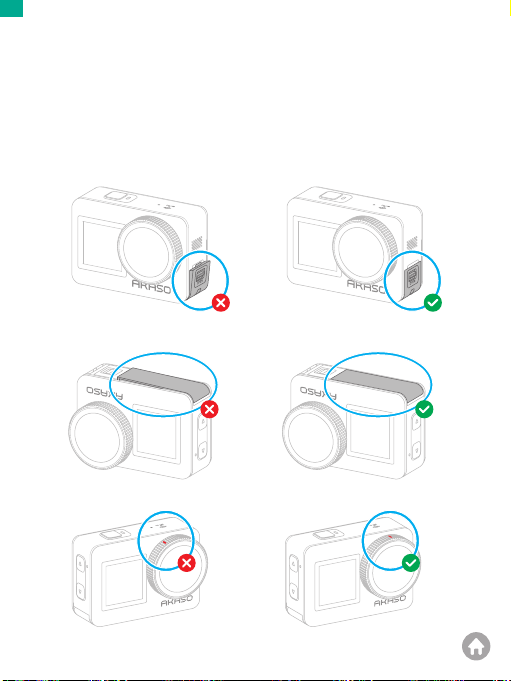
The Brave 7 action camera boasts an IPX8 waterproof rating, allowing submersion
up to 8 meters (26 feet) deep without an external case. However, always ensure
the protective covers are tightly sealed to prevent any leakage. Listen for a click - this
means the covers are securely fastened and you can begin your underwater
adventure with peace of mind.
IPX8 Waterproof Rating
USB port cover not closed securely
Battery cover not closed securely
USB port cover closed securely
Battery cover closed securely
Lens cover not closed securely Lens cover closed securely

09
EN
Notes:
1. While the Brave 7 action camera is waterproof, moisture can interfere with the
touchscreen, resulting in screen drift or multiple screen jumps. Therefore, it’s
best to use the physical buttons for underwater operations.
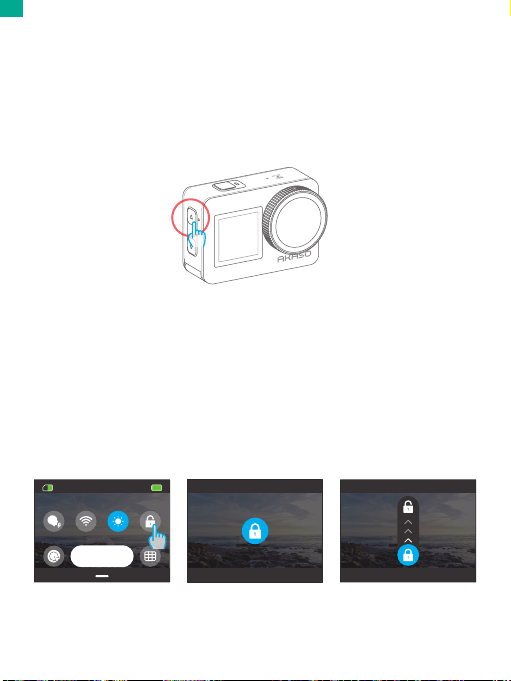
2. For instance, to switch shooting modes underwater, ensure the camera displays
the preview screen and then press and hold the Up button for 3 seconds.
3. To prevent touchscreen issues underwater, lock the screen by tapping the Lock
icon on the quick menu. Unlocking is just as simple: tap the Lock icon and
swipe up.
Reminder: The camera cannot be operated through the touchscreen underwater;
please use the buttons instead.
4. If you plan a deep dive, equip your Brave 7 with the waterproof case (sold
separately) to prevent it from getting soaked.
Note: The camera won’t record sound when it’s in the waterproof case.
05:05
Preferences
Altri manuali per Brave 7
5
Indice
Altri manuali Akaso Fotocamera d'azione

Akaso
Akaso V50 Elite Manuale utente

Akaso
Akaso EK7000 Manuale utente

Akaso
Akaso V50 Pro SE Manuale utente

Akaso
Akaso EK7000 Manuale utente

Akaso
Akaso Brave 4 Elite Manuale utente

Akaso
Akaso V50X Manuale utente

Akaso
Akaso V50 Pro SE Manuale utente

Akaso
Akaso Brave 4 Manuale utente

Akaso
Akaso EK5000 Manuale utente

Akaso
Akaso Keychain Manuale utente

Akaso
Akaso EK7000 Manuale utente

Akaso
Akaso Brave 7 LE Manuale utente

Akaso
Akaso Brave 4 Manuale utente

Akaso
Akaso EK7000 Manuale utente

Akaso
Akaso EK7000 Manuale utente

Akaso
Akaso Brave 6 Manuale utente

Akaso
Akaso Brave 4 Manuale utente

Akaso
Akaso EK7000 Plus Manuale utente

Akaso
Akaso Brave 4 Manuale utente

Akaso
Akaso Brave 4 Manuale utente