
Alcatel onetouch SmartBand Manuale utente
1
Quick Start Guide
English - CJB33N0ALAAA

2
Contents
1 Your Smartband ...........................................................................3
2 Pairing..............................................................................................6
3 Walk tracking................................................................................8
4 Sleep tracking................................................................................9
5 Call reminder ..............................................................................10
6 Alert while left............................................................................11
7 Silent alarm ..................................................................................12
Troubleshooting................................................................................13
Safety and use....................................................................................14
General information........................................................................15
Warranty.............................................................................................16

3
1
Your Smartband
1.1 What’s included
Your Smartband box includes:
• Corebox
• Wristband
• Charger
• Smartband Quick Start Guide
4
1.2 Charging your Smartband
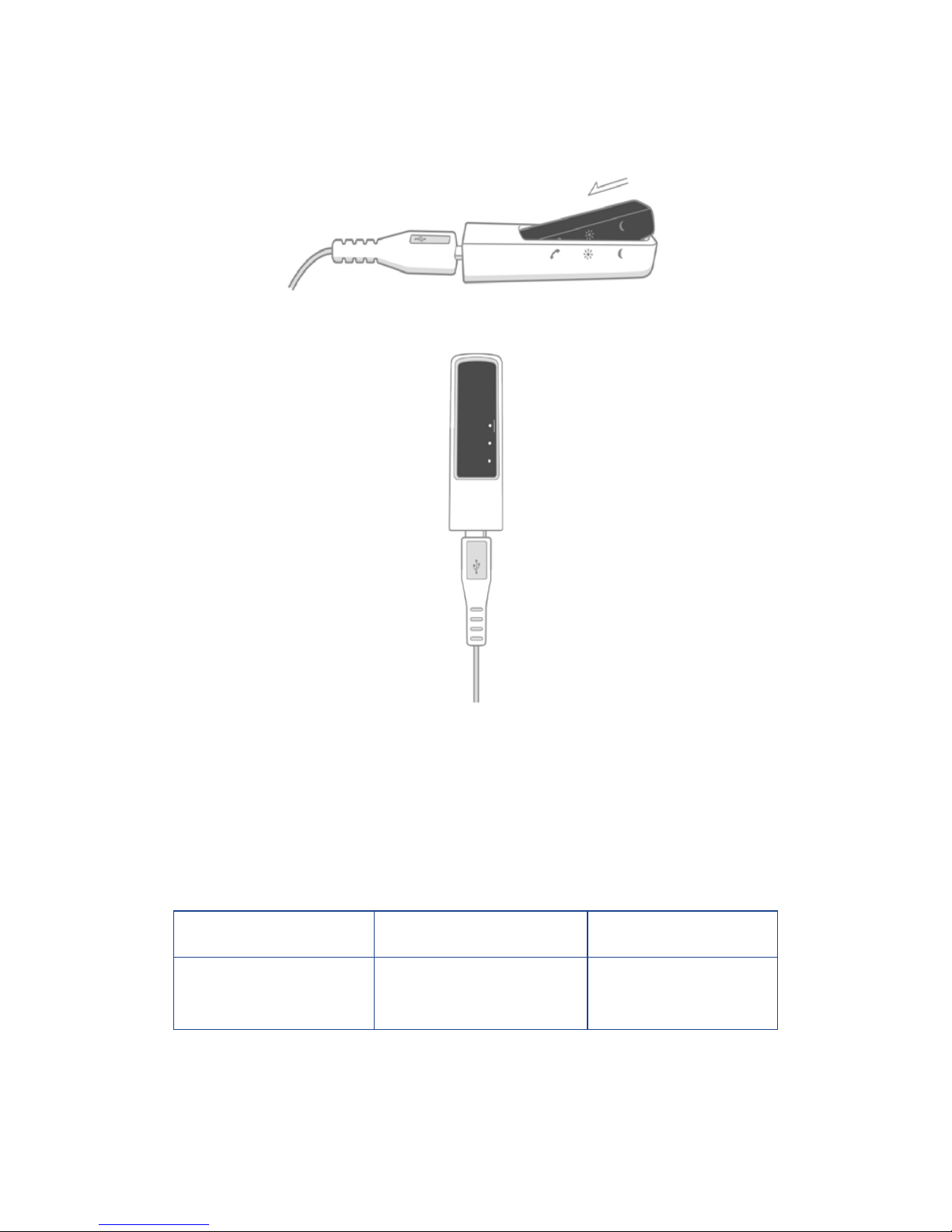
Insert the corebox into the charger, as the arrow shows in the
following picture. Ensure that the icons on the corebox match those
on the charger.
• Pre-charging: If the Smartband has run out of battery, the LED lights
will indicate after several minutes' charging.
• Charging: The LED lights will progressively indicate on your
Smartband and blink every 5 seconds.
• Fully charged: Five lights are on and blink every 30 seconds.
Battery type Standby time Charging time
Lithium-polymer
battery
3-5 days About 1.5 hours
5
1.3 Installation
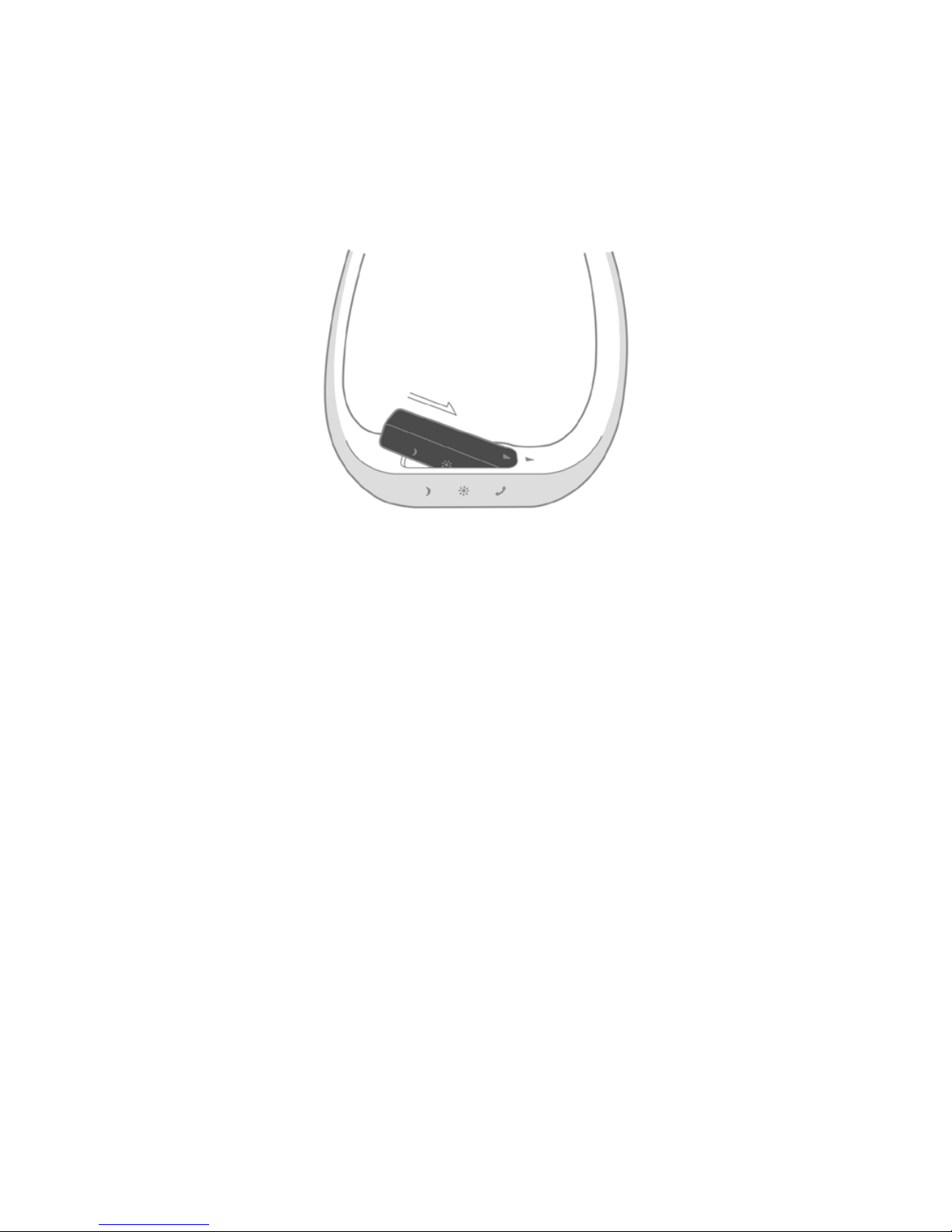
Insert one end of the corebox into the wristband, as the arrow
shows in the following picture and then place the corebox into the
wristband totally.
Perform the steps in the reverse order to remove the corebox.

6
2
Pairing
The Smartband is compatible with mobile devices supporting
Bluetooth 4.0 LE (Android 4.3 or higher versions).
Currently, the Smartband supports the following models: ALCATEL
ONETOUCH Idol X+; ALCATEL ONETOUCH POP S3; ALCATEL
ONETOUCH POP S7; ALCATEL ONETOUCH POP S9; ALCATEL
ONETOUCH IDOL 2 Mini; ALCATEL ONETOUCH IDOL 2 Mini S;
ALCATEL ONETOUCH IDOL 2S;ALCATEL ONETOUCH IDOL 2.
2.1 First pairing
• Download Smartband Life from http://www.alcatelonetouch.
com/global-en/support/faq/smartband.html. (Smartband Life is pre-
installed in ALCATEL ONETOUCH Idol X+.)
• After entering the main interface of Smartband Life, a message is
displayed to prompt you to turn on Bluetooth (if it is off) and then
search for the Smartband devices.
• Smartband Life requests to pair with the nearby Smartband
devices and will remind you to knock the Smartband twice for
confirmation.The 5 LED lights will blink in sequence.
• When the Smartband is successfully paired, it will vibrate once and
5 lights are on together.“Paired” will be displayed.
At least 4 LED lights are required for the first pairing. It is
recommended that the corebox be charged during the
first pairing.

7
2.2 Changing paired phones
• Enter the main interface of Smartband Life and a message is
displayed to prompt you to turn on Bluetooth (if it is off) and then
search for the Smartband devices.
• If you changed the paired phones, all original data recorded from
the Smartband will be saved in the old phone and new data will
generate in your new paired phone.
2.3 Changing Smartband devices
If you want to change the Smartband, please unbind the old one
and then add the new device. In this way, can Smartband life work
normally.

8
3
Walk tracking
Your Smartband is designed to track your sports data based on the
specific goal or value that you define.
When your Smartband is standby, you can manually change its mode
between Sleep and Sports by continuously knocking it for 6 times.
When your Smartband is set to Step Counting mode, it vibrates once
and the sports indicator blinks for 3 times.
Your Smartband can:
• Correctly recognize walking actions: Generally, the standby time
will be 3-5 days.
• Count the calories burned.
• Count the distance walked.
• When the Smartband is standby and you knock it twice, the LED
lights will show the goal conditions you’ve accomplished. Each LED
light represents 20% of the total goal.The last light blinks and will
be off after 5 seconds.
• When the goal is achieved, 5 LED lights will blink 3 times from the
outer side to the middle for congratulations.
• View sports graph of Today/ 7 days/ 31 days.
You are advised to rapidly knock the front centre of the
wristband with two fingers. Try more times if the first
knocking fails.

9
4
Sleep tracking
Your Smartband can track your sleep quality.
When your Smartband is standby, you can manually change its mode
between Sleep and Sports by continuously knocking it for 6 times.
When your Smartband is set to Sleep mode, it vibrates once and the
sleep indicator blinks for 3 times.
Your Smartband can:
• Measure your total sleeping time.
• Detect your sleeping status such as awake, turning over, and asleep.
• View sleep graph of Today/ 7 days/ 31 days.
When you are awake from sleep, please knock the Smartband to
change to Sports mode for data accuracy.
Sleep sync reminder
From My reminders, you can turn on this function and if your
Smartband has changed to Sleep mode, your mobile phone will be
in silent mode.

10
5
Call reminder
Your Smartband can remind you of missed calls if you set Call Reminder
to On in Smartband Life settings.The reminder is off by default.
• When there is an incoming call, your Smartband will vibrate and the
call indicator will blink 6 times quickly.
• Your Smartband can remind you of all missed calls or calls fromVIP
contacts.A maximum of 5 VIP contacts can be added.
• You can stop the alert by knocking the wristband twice.
• This feature is available only when the Smartband and mobile
phone is well connected.
Indice
Altri manuali Alcatel Fitness Tracker


