
Alexandre Christie AC DIGI Manuale utente
www.alexandrechristie.com/manual/en
Download Manual Instruction
www.alexandrechristie.com
AC DIGI - MANUAL INSTRUCTION Cal.VD3 (VD33B/34B)
1
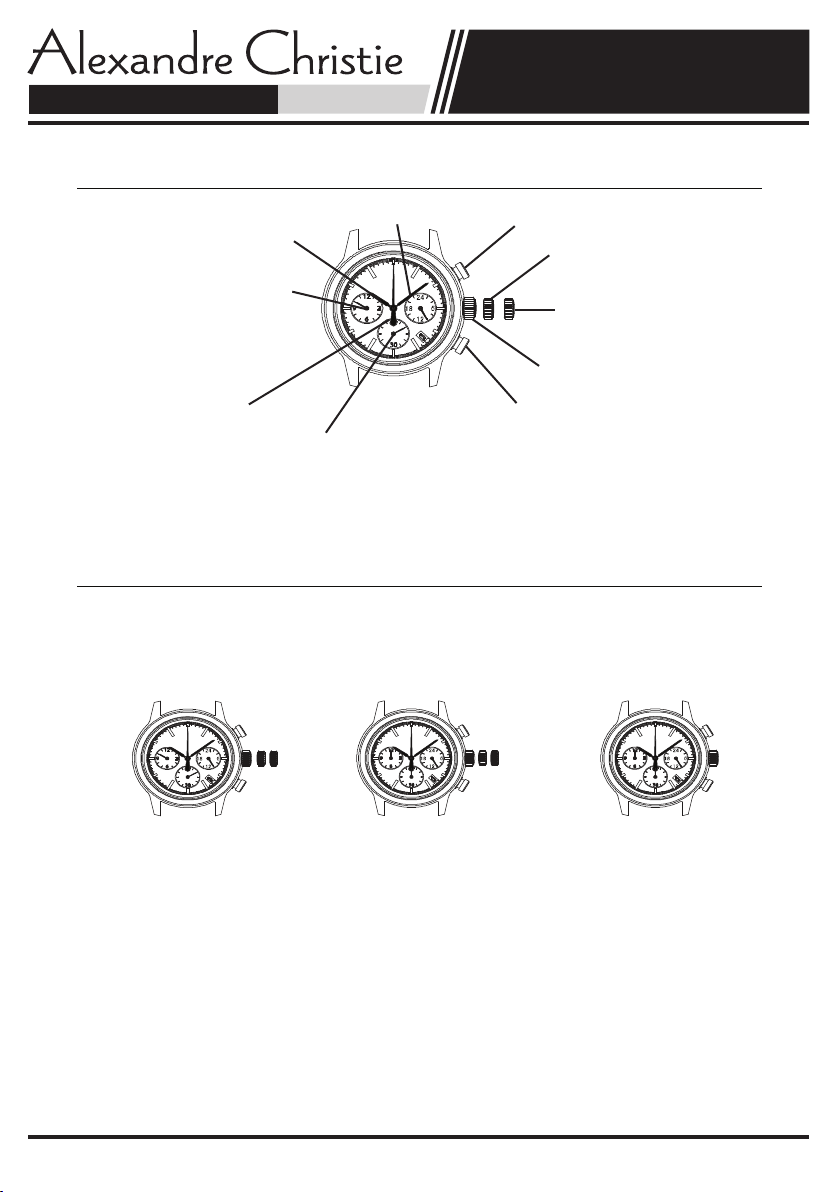
Minute hand Button A: - 1 hour / push
Hour hand
First position
VD33:First setting
VD34:Time setting
gnittesdnoceSevom,tcerrocemitniecnereffiD(
gnittesemiT:33DVetunim06emitlaudhtiwrehtegot
regulator hand)
Crown at normal position
hsup/ruoh1+:BnottuBdnahdnoceS
Dual time of 60 minute regulator hand
(Difference in time correct, move together24 hour hand
with dual time 12 hour regulator hand)(Indicates the time on a 24 hour basis)
Note
*Dual time of 60 minute regulator hand rotates one revolution every 15 minute.
There is no problem because this is typical function.
Before setting the time, check if the dual time of 12 hour regulator and dual time of 60 minute regulator
hands are in the "0" (12 o'clock) position.
If either of the dual time of 12 hour regulator and dual time of 60 minute regulator hands are not in the
"0" position, reset them following the procedure below.
The battery setting and after battery change, please execute the "0" position adjustment.
1.Pull out the crown.3.Press button A or B to reset the4.Push the crown back to
VD33:second clickdual time of 12 hour regulator andthe normal position.
VD34:first clickdual time of 60 minute regulator
hands to "0" position.
2.Keep the buttons A & B*By pressing button A the hands
pressed at the same time move counter clockwise.
more than 2 seconds,*By pressing button B the hands
and then release the buttons. move clockwise.
*Dual time of 60 minute regulator*Press and hold the button,
hand moves. Returned to where possible to fast-forward modification.
eradnahrotalugerruoh21foemitlauD*.sawti
linked to dual time of 60 minute regulator hand.
Note
Please repeat above 4 steps, as 0 position adjustment, if the dual time of 60 minute regulator hand
moves as follows;
Up to 1 minute to 14 minutes, one step / push, in 15 minutes, repeat the one rotation / push
DISPLAY AND CROWN / BUTTON OPERATION
Dual time of 12 hour regulator hand adjustment
Dual time of 12 hour regulator hand
Dual time of 12 hour regulator hand adjustment
A
B
A
B
ADJUSTING THE DUAL TIME OF 12 HOUR REGULATOR AND DUAL TIME OF 60 MINUTE REGULATOR HANDS POSITION
www.alexandrechristie.com/manual/en
Download Manual Instruction
www.alexandrechristie.com
AC DIGI - MANUAL INSTRUCTION Cal.VD3 (VD33B/34B)
2
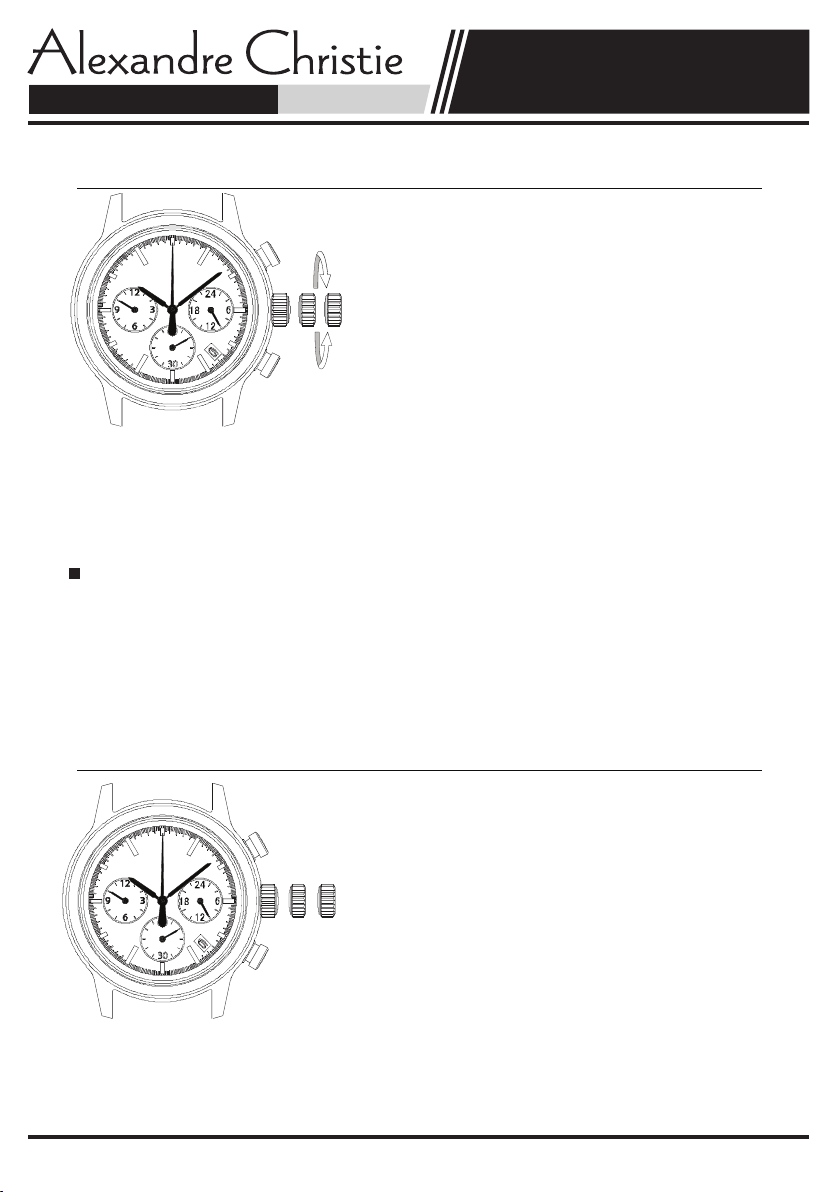
1.Pull out the crown when the second hand is at the
12 o'clock position.
[ Crown position ]
VD33:Second click
VD34:First click
2.Turn the crown to set the hour and minute hands.
(Check that 24 hour hand is set correctly)
3.Push the crown back normal position in accordance with
a time signal.
Note
*The 24 hour hand moves correspondingly with the hour hand.
*The moment the date changes is midnight. when setting the hour hand, make sure that AM/PM
is correctly set by using the 24 hour hand as an AM/PM indicator.
*At the time of carrying, dual time of 60 minute regulator hand rotates one revolution every 15 minutes.
There is no problem because this is typical function.
Using the time different correction
When moving to a country or area which is in a different timezone, the current time in the local time
can be corrected.
1.Crown the normal position.
2.To adjust the time by pressing the button A or B.
*By pressing button A the hands move counter clockwise. - 1 hour / push
*By pressing button B the hands move clockwise. + 1 hour / push
1.Pull out the crown when the second hand is at the
12 o'clock position.
[ Crown position ]
VD33:Second click
VD34:First click
2.To adjust the time by pressing the buttons A or B.
By pressing button A the hands move counter clockwise.
By pressing button B the hands move clockwise.
*Press and hold the button, possible to fast-forward modification.
3.Push the crown back in to the normal position.
Note
Every 15 minutes, dual time of 60 minute hand is one rotation / push.
TIME SETTING
TIME SETTING (DUAL TIME OF 12 HOUR REGULATOR AND
DUAL TIME OF 60 MINUTE REGULATOR HANDS)
A
B

www.alexandrechristie.com/manual/en
Download Manual Instruction
www.alexandrechristie.com
AC DIGI - MANUAL INSTRUCTION Cal.VD3 (VD33B/34B)
3
*Before setting the date, be sure to set the time.
1.Pull out the crown to the first click.
2.Turn the crown to clockwise until the next date appears.
3.Push the crown back in to the normal position.
Note
*Do not set the date during any time between 9:00 P.M. and 1:00 A.M.
Otherwise, the date may not change properly. If it is necessary to set the date during that time period,
First change the time to any time outside it, set the date and then reset the correct time.
DATE SETTING (Cal.VD33 only)
Questo manuale è adatto per i seguenti modelli
1
Indice


