
Alienware Hangar18 Manuale utente

ALIENWARE HANGAR 18: HD ENTERTAINMENT CENTER MANUAL
The contents herein are subject to change without notice. ©1996-2007 Alienware
Corporation. All rights reserved.
Reproduction of this manual in any manner without the prior written
permission of Alienware Corporation is strictly prohibited.
Trademarks used in this manual: Alienware, Alienlce, the AlienHead logo, and
AlienAutopsy are trademarks or registered trademarks of Alienware Corporation.
Microsoft and Windows are registered trade-marks of Microsoft Corporation. Other
trademarks and trade names may be used in this manual to refer to either the entities
claiming the marks and names or their products. Alienware Corporation disclaims any
proprietary interest in trademarks and trade names other than its own.
Rev 3.1 SEPTEMBER 2007
H18media_sever_final_091707.indd1 1 9/17/2007 12:35:19 PM
Alienware HD Entertainment Center Manual
2
CONTENTS
Introduction, 5
Chapter 1 System Preparation and Setup, 7
Overview, 8
When your HD Entertainment Center First Arrives, 8
Location and Positioning of Your HD Entertainment Center, 9
Getting to Know Your HD Entertainment Center, 10
Front I/O Ports and Features, 10
Rear Panel I/O Ports and Features, 12
Connecting to your HDTV or Monitor, 15
HDMI Input, 15
HDMI to DVI Input, 15
Component Input, 15
Connecting Speakers, 16
Connection to 5.1 Surround Sound Speakers, 16
Setting up your TV Remote Control, 17
Connecting and Viewing Blu-ray DVD, 18
Putting Your Hangar 18 Into Away Mode, 18
Chapter 2 Start Using Vista Media Center, 19
Overview, 20
Lets Get Started, 20
Setting up your TV Signal, Internet and Speakers, 21
Chapter 3 System Recovery, 23
AlienRespawn 2.0, 24
Chapter 4 Troubleshooting, 26
Before Troubleshooting, 27
Things to Check Before Troubleshooting, 27
Software Diagnostics Tools, 28
Backup and general Maintenance, 28
Answers to Common Problems, 29
CD-ROM, DVD-ROM, CD-RW, DVD±RW or Blu-ray Drive, 29
Website connection is slow, 30
Keyboard, 31
The keyboard is not responding, 31
A keyboard character is repeating, 31
Spills on the Keyboard, 31
Monitor, 31
H18media_sever_final_091707.indd2 2 9/17/2007 12:35:19 PM

Alienware HD Entertainment Center Manual
3
There is no display on the screen, 31
The color is not uniform, 32
Displayed text is dim, blurry, or otherwise difficult to read, 32
Mouse, 32
The mouse is not working, 32
Power, 33
When the HD Entertainment Center is turned on, nothing happens, 33
Speakers, 33
There is no sound from the speakers (external), 33
Game Controllers, 33
The HD Entertainment Center does not recognize the game controller, 33
Appendix A Microsoft Critical Updates, 34
Appendix B General And Electrical Safety Precautions, 36
HD Entertainment Center Setup, 36
HD Entertainment Center Use, 36
When You Should Contact Alienware, 37
Replacement Components or Accessories, 37
Appendix C Terms And Conditions Agreement, 38
Appendix D Limited Product Warranty; Disclaimer Of Warranties;
And Limitation Of Liability, 40
Limited Product Warranty, 40
Obtaining Warranty Service, 40
Systems Returned to Alienware for Repair, 41
Replacing a Defective Component, 42
Return First, 42
Replace First, 42
Keep in mind, 43
30-day Money Back Guarantee, 44
Appendix E Contacting Alienware, 45
Sales, 45
Customer Service, 45
Technical Support, 46
Corporate Headquarters, 46
Appendix F Important Information, 47
H18media_sever_final_091707.indd3 3 9/17/2007 12:35:19 PM

Alienware HD Entertainment Center Manual
4
H18media_sever_final_091707.indd4 4 9/17/2007 12:35:20 PM

Alienware HD Entertainment Center Manual
5
INTRODUCTION
Dear Valued Alienware Customer,
Welcome to the Alienware family. We are thrilled to include you among the
growing number of savvy HD Entertainment Center users.
The Alienware technicians who have crafted your machine have made certain that
your Hangar18: HD Entertainment Center is properly optimized and performs to its
fullest potential. We build machines with one single unwavering purpose: Build It
As If It Were Your Own. The technicians will not rest until your new machine meets
or exceeds our very demanding criteria!
We have tested your machine extensively in order to ensure that you enjoy the
highest levels of performance. In addition to a standard burn-in period, your
system has been evaluated using real-world tools such as synthetic performance
benchmarks.
We invite you to share your experience with your new HD Entertainment Center
with us, so please do not hesitate to either e-mail or call Alienware with any
questions or concerns. The entire staff shares your enthusiasm for new technology
and we hope that you enjoy using your new HD Entertainment Center as much as
Alienware enjoyed building it for you.
Sincerely,
Alienware Staff
H18media_sever_final_091707.indd5 5 9/17/2007 12:35:20 PM

Alienware HD Entertainment Center Manual
6
H18media_sever_final_091707.indd6 6 9/17/2007 12:35:20 PM

Alienware HD Entertainment Center Manual
7
CHAPTER 1: SYSTEM PREPARATION AND SETUP
H18media_sever_final_091707.indd7 7 9/17/2007 12:35:20 PM

Alienware HD Entertainment Center Manual
8
CHAPTER 1: SYSTEM PREPARATION AND SETUP
Overview
Congratulations on the purchase of your Alienware Hangar18: HD Entertainment
Center! The Alienware HD Entertainment Center is the best Media Center solution
available for the living room environment.
From the comfort of your couch you can enjoy all your digital content (TV recordings,
movies, pictures and music) on your main living room HDTV. The HD Entertainment
Center enhances your digital entertainment in your living room by combining all of the
following components into one box:
• High-Definition Digital Video Recorder (DVR) for recording and playing back your
HD content
• Up to 4 TV tuners (two analog and two HD/digital TV tuners):
1. Base platform – (1 analog and 1 digital tuner) allows you to record 1 analog
and 1 digital/High Definition Over-the-Air (OTA) channel at the same time.
2. Optional platform – (2 analog and 2 digital tuners) allows you to record 2
analog and 2 digital/High Definition Over-the-Air (OTA) channels at the same
time.
• Digital amplifier for 5.1 speakers and subwoofer (5 channels- each delivering
200W at peak power)
• Wireless 802.11 b/g
• Gigabit Ethernet connection for downloading movies and other content
from the internet
• AMD Live!TM software applications running with Microsoft Vista OS
• Slim slot loading DVD/CD player/burner
• Bluetooth receiver for use with Bluetooth devices such as keyboards, TV remotes
and headphones
When Your HD Entertainment Center First Arrives
Before setting up your HD Entertainment Center or components, please inspect all
items for any physical damage that may have occurred during shipment. Report any
damaged items to customer service within 5 days of receiving the shipment. Shipping
damage reported after the first 5 days of receiving the shipment will not be honored.
Before setting up your HD Entertainment Center or components, please refer to the
included invoice to verify that all items ordered are present. Report any missing
components to customer service within 5 days of receiving the shipment. Anything
reported missing after the first 5 days of receiving a shipment will not be honored.
H18media_sever_final_091707.indd8 8 9/17/2007 12:35:20 PM

Alienware HD Entertainment Center Manual
9
Do not place the HD Entertainment Center near or over a radiator or
heating vent. If all or parts of your HD Entertainment Center are placed
in a cabinet, ensure that adequate ventilation is provided. Do not
place the HD Entertainment Center in a humid location or in any area
the HD Entertainment Center may be exposed to rain or water. Be
careful not to spill liquid of any kind on or into the HD Entertainment
Center.
Your HD Entertainment Center was designed to operate in an upright
position. Never power on or operate the system when not in an upright
position.
Do not block the ventilation holes on both the top panel and side
panels of your HD Entertainment Center, or overheating may occur.
Location and Positioning of Your HD Entertainment Center
When positioning your HD Entertainment Center, be sure that:
• It is placed on an surface that is both level and stable
• Power and other cable connectors are not jammed between the
HD Entertainment Center and a wall – or any other object
• Nothing obstructs airflow in front of, on side of, behind, or below the
HD Entertainment Center
To avoid the risk of electrical shock, do not remove the top panel of your
HD Entertainment Center.
H18media_sever_final_091707.indd9 9 9/17/2007 12:35:20 PM
Alienware HD Entertainment Center Manual
10
Getting to Know Your HD Entertainment Center
This section provides essential information about your new HD Entertainment Center
to familiarize you with its various features and get you up and running quickly.
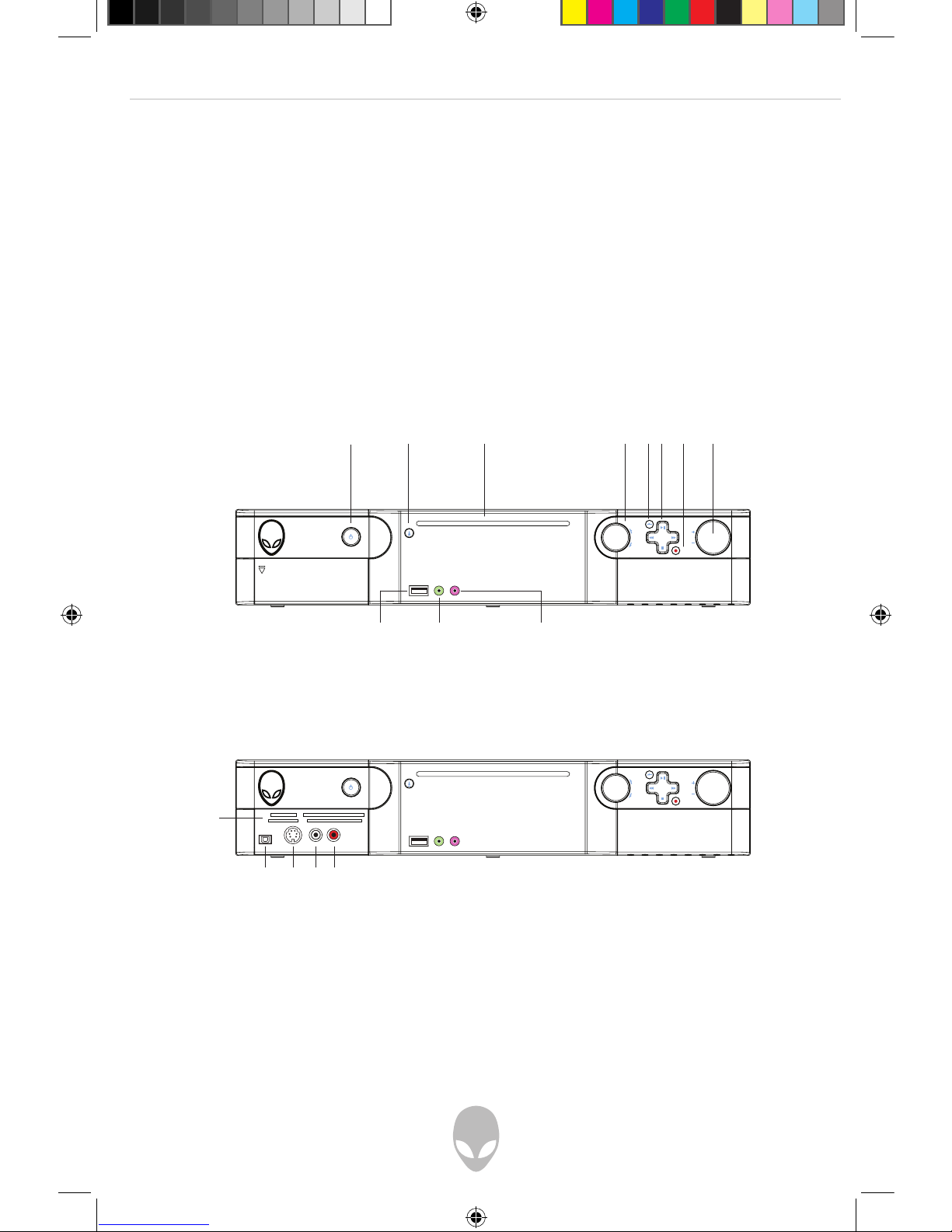
Front I/O Ports and Features
Power
Digital Camera
Memory Card
Disc
Eject
DVD/CD
Slot
Previous / Next
Back Button
Play/FWD/RWD/Stop
Record Button
Volume Knob
USB 2.0 Microphone
Jack
Headphone
Jack
Fire Wire (IEEE 1394)
S-Video Input Port
Audio input Port (Left)
Audio input Port (Right)
H18media_sever_final_091707.indd10 10 9/17/2007 12:35:20 PM
Altri manuali per Hangar18
2
Indice
Altri manuali Alienware Impianto stereo


