
Alink PA200AV Manuale utente

PA200AV(b)
Ethernet Powerline Adaptor
User Manual
Single Pack or Twin Pack
Ethernet Powerline Adaptor i
FCC Radiation Norm
This equipment has been tested and found to comply with limits for a Class B digital device pursuant to
47 CFR, Part 2 and Part 15 of the Federal Communication Commission (FCC) rules. Operation is subject to
the following Two conditions:
1. This device may not cause harmful interference
2. This device must accept any interference received including interferences that may cause
undesired operations.
CE Radiation Norm
This equipment has been tested and found to comply with the limits of the European Council Directive
89/336/EEC on the approximation of the law of the member states relating to EN
55022:1998/A1:2000/A2:2003 Class B, EN61000-3-2:2000, EN 61000-3-3:1995/A1:2001, EN
55024:1998/A1:2001/A2:2003 and EN 60950-1.
Important Safety Instructions
1. Do Not open this product or attempt to service this product, it may expose you to dangerous high
voltage and other risks.
2. Do Not operate this product near water.
3. Do Not place or operate near or over radiator or heat register.
4. Do Not expose this product to dampness, dust or corrosive liquids.
5. Do Not connect this product and Disconnect from wall socket during a lightning or thunderstorm
6. Do Not obstruct this product ventilation slots, as insufficient airflow may harm this product.
7. Do Not put anything on this product.
8. Plug directly into wall socket (100Vac~240Vac). Do Not use an extension cord between this
product and theAC power source.
9. When plugging this product into wall socket, make sure that electrical socket are not damaged,
and no leakage for gas or water pipes to begin with.
10. Place the connecting cables carefully so people won’t stumble or walk on it.
11. The Powerline Adaptor should be operated from the type of power indicated on the marking
label. If you are not sure of the type of power available, consult the qualified technician.
12. Unplug the Powerline Adaptor from the mains and refer the product to qualified service
personnel for the following conditions:
•If liquid has been spilled on the product
•If the product has been exposed to rain or water
13. Unplug from the wall socket before cleaning. Use a damp cloth for cleaning. Do not use
liquid cleaners or aerosol cleaners
This symbol on the product or in the instructions means that your electrical and electronic equipment should
be disposed at the end of its life separately from your household waste. There are separate collection
systems for recycling in the EU
For more information, please contact the local authority or your retailer where you purchased the product.
Ethernet Powerline Adaptor ii

CAUTION!
The Federal Communication Commission warns the user that changes or modifications to the unit
not expressly approved by the party responsible for compliance could void the user’s authority to
operate the equipment.
Ethernet Powerline Adaptor iii

Ethernet Powerline Adaptor iv
Chapter 1 Introduction .....................................................................................................................1
1.1 Features .....................................................................................................................................2
1.2 Packet Contents.........................................................................................................................3
Chapter 2 Connecting Mechanism...................................................................................................4
2.1 Introduction ...............................................................................................................................4
2.1 LED Indicator............................................................................................................................5
2.2 Physical Interface......................................................................................................................6
2.3 Hardware Connection – Computer............................................................................................7
2.4 Hardware Connection – Internet...............................................................................................8
Chapter 3 Installing Management Utility........................................................................................9
Chapter 4 Using The Management Utility ....................................................................................13
4.1 Main.........................................................................................................................................14
4.1.1 Rename .................................................................................................................................16
4.1.2 Enter Password.....................................................................................................................17
4.1.3 Add Device............................................................................................................................18
4.2 QOS..........................................................................................................................................19
4.3 Privacy.....................................................................................................................................21
4.4 Diagnostics..............................................................................................................................23
4.5 About........................................................................................................................................25
Advance Feature: How to Use the Push buttons......................................................................26
Pair( Secure with 128 bits-AES)....................................................................................................26
Set Up a Powerline AV Network with the Pair button...................................................................26
Pair Button Behavior.....................................................................................................................27
Reset...............................................................................................................................................27
Appendix A: Troubleshooting Guide .............................................................................................28
Copyright..........................................................................................................................................29

Chapter 1 Introduction
Congratulations on your purchase of this outstanding Ethernet PowerlineAdaptor. This device is a
200Mbps Powerline Ethernet Adaptor which transforms your house’s existing electrical wiring into a
ubiquitous networking infrastructure. Simply plug this 200Mbps Ethernet Powerline Adaptor into an ordinary
AC power outlet which will easily extend your Cable/xDSL broadband connection or existing Ethernet (LAN)
network to any other electrical outlet in any room of a house without the need of any new cabling.
This Ethernet PowerlineAdaptor supports up to 200Mbps data rate over the existing household power
circuit. With data rates of 200Mbps, full multimedia application can easily be supported throughout the whole
house in addition to Internet access. This Ethernet PowerlineAdaptor uses the existing power lines installed
in a home as a path to transmit digital data, voice, audio and video between devices.
To ensure data communication’s security and multimedia applications, this Ethernet Powerline Adaptor
support built-in 128-bitAES encryption and Quality of Service (QOS) features.
With minimum setup, you can install and use this Ethernet Powerline Adaptor within minutes. The
adaptor add two new function to be useful
1. Existing connection with a new unassociated device added via the Pair button.
2. Reset to default setting via the Reset button.
Ethernet Powerline Adaptor 1

Ethernet Powerline Adaptor 2
1.1 Features
Powerline AV
yHigh speed data transfer rate up to 200Mbps
yHomePlug AV standard compliant
yWorks withAC input of 100V ~ 240V
yPlug-and-Play (PnP) configuration
yHigh-speed Powerline adapter with Ethernet interface
yLow power consumption
yOFDM techniques for high data reliability in noisy media conditions
yIntelligent channel adaptation maximizes throughput under harsh channel conditions
yBuild-in QoS and Error Correction feature
y128-bit AES Link Encryption with key management for secure power-line communications
yTransmission range up to 200m over household power supply grid
ySupport two Push Button “Pair” and “Reset”
yRoHS (Lead-Free) compliant
System Requirement
yAt least two AC 100V ~ 240V power outlets with standard home power wiring
yA computer with the following:
Operating System with TCP/IP installed
Pentium III compatible processor and above
Ethernet LAN card installed with TCP/IP protocol
64 MB RAM or more
50 MB of free disk space (Minimum)
CD-ROM Drive
Target Application
yStandard Video TV (SDTV) Distribution
yHigher data rate broadband sharing
yShared broadband Internet access
yAudio and video streaming and transfer
yExpanding the coverage of wireless LANs
yVoice Over Internet Protocol (VoIP)
yPC file and application sharing
yPrinter and peripheral sharing
yNetwork and online gaming
ySecurity cameras

Ethernet Powerline Adaptor 3
1.2 Packet Contents
The 200Mbps Ethernet Powerline Adaptor package contains the following items:
One Ethernet PowerlineAdaptor or Two for Twin pack
One CAT-5 Ethernet (LAN) Cable or Two for Twin pack
One Quick Start Guide
One CD-ROM (Utility / Manual / Quick Setup Guide/Acrobat Reader)
If any of the above items are damaged or missing, please contact your dealer immediately.

Chapter 2 Connecting Mechanism
2.1 Introduction
The Ethernet PowerlineAdaptor support up to 200Mbps data rate. With this high speed connection rate,
this Ethernet Powerline Adaptor allows you to setup a high speed home network by using your home existing
electrical wiring. Simply plug this Ethernet PowerlineAdaptor into an ordinary power outlet to extend your
Cable/xDSL broadband connection or existing LAN network to any other electrical outlet in any rooms of your
house.
Take notes that this Ethernet PowerlineAdaptor works in pairs. You need to plug one Ethernet
Powerline Adaptor into a power outlet for each computer (Connect to the computer LAN card) you want to
connect (Network access); you will also need another Ethernet PowerlineAdaptor connected to your
Cable/xDSL broadband (Ethernet port) in order to extend your broadband connection or Internet surfing.
Section below describes the Ethernet Powerline Adaptor’s LED indicators, physical interface and
hardware connection mechanism.
Ethernet Powerline Adaptor 4
2.1 LED Indicator
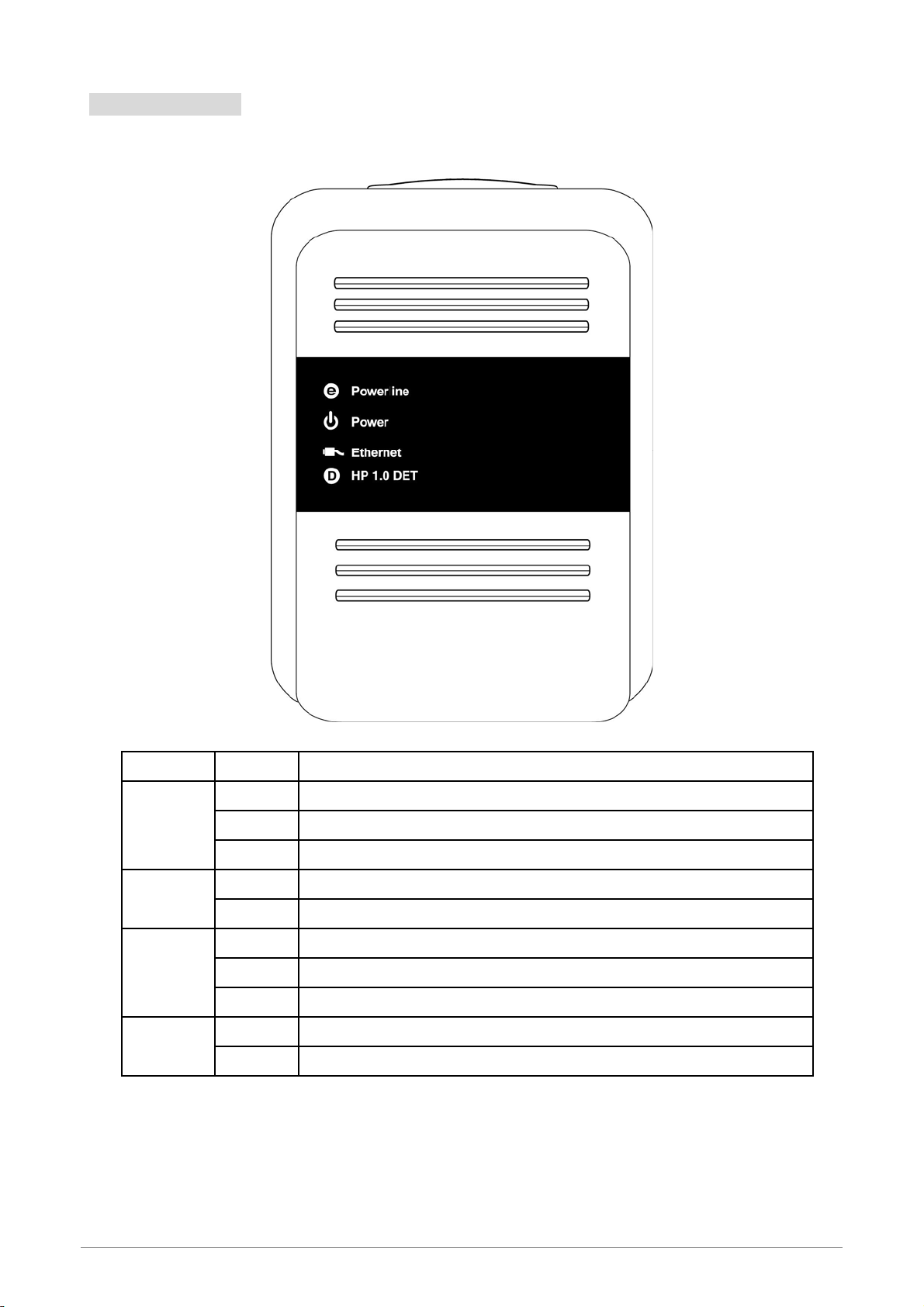
The LED indicator displays information about the device’s status.
Label Status Description
ON Another powerline port is detected on the same powerline network
OFF Did not detect any other powerline port on the same powerline network
Powerline
Blinking The powerline port is transmitting/receiving data
ON The Ethernet Powerline Adaptor is power on
Power OFF The Ethernet Powerline Adaptor is not receiving power
ON The Ethernet port is on and ready to receiving/transmitting data
OFF The Ethernet port is not connected or not power on
Ethernet
Blinking The Ethernet port is receiving/transmitting data
OFF Did not detect any HomePlug 1.0 device on the same powerline network
HP 1.0 DET Blinking Another HomePlug 1.0 device is detected on the same powerline network
Ethernet Powerline Adaptor 5

2.2 Physical Interface
There are two physical interfaces on this Ethernet Powerline Adaptor.
Interface Description
Ethernet One 10/100Mbps Ethernet port connected to PC LAN card or broadband device.
Power Plug Power Plug connected to any 100V ~ 240VAC power socket.
Ethernet Powerline Adaptor 6
Questo manuale è adatto per i seguenti modelli
1
Indice
Altri manuali Alink Adattatore


