ALZA MS814 Manuale utente

MS814
User Manual • Uživatelský manuál •
Užívateľský manuál • Használati utasítás •
Benutzerhandbuch

2
Dear customer,
Thank you for purchasing our product. Please read the following instructions carefully
before first use and keep this user manual for future reference. Pay particular attention
to the safety instructions. If you have any questions or comments about the device,
please contact the customer line.
✉www.alza.co.uk/kontakt
✆+44 (0)203 514 4411
Importer
Alza.cz a.s., Jankovcova 1522/53, Holešovice, 170 00 Praha 7, www.alza.cz

3
Key function distribution
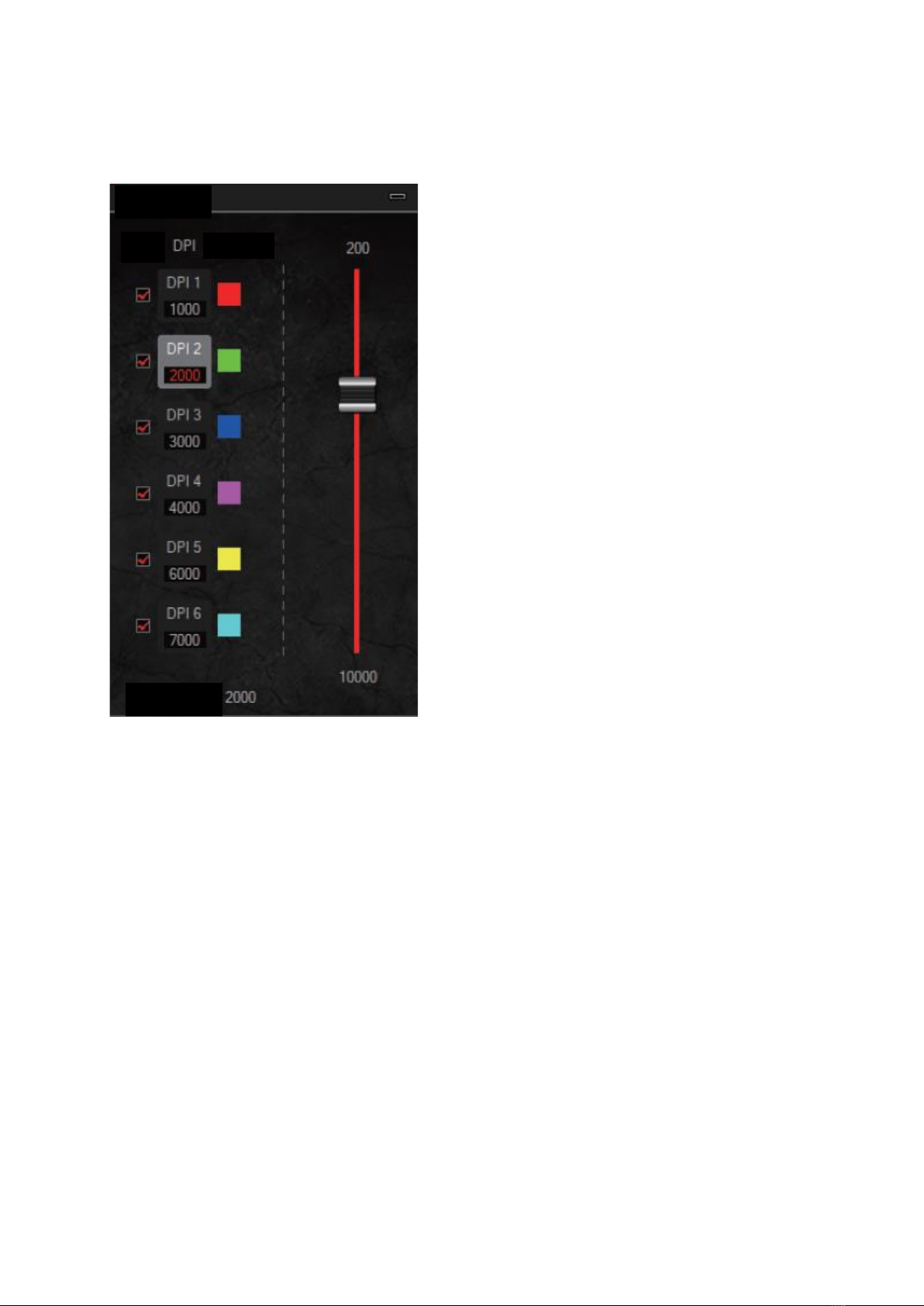
DPI value: 1000-2000-3000-4000-6000-7000DPI (which can be set)
Seafault lamplaight DPI first level/red, second level/green, three level/blue, four
level/purple, five level/yellow, six level/cyan.
10 kinds of RGB light effect:
1. Colourful Streaming mode; 2. Steady mode; 3. Breathing mode; 4. Colourful Tail
mode; 5. Neon mode; 6. Volourful Steady mode; 7. Flicker mode ; 8. Tail mode; 9. Wave
mode ; 10. LED OFF
The RGB light mode can be adjusted by “”LED switch button”. For more functions please
enter “http://www.havit.hk/downloads/” to download the driver.
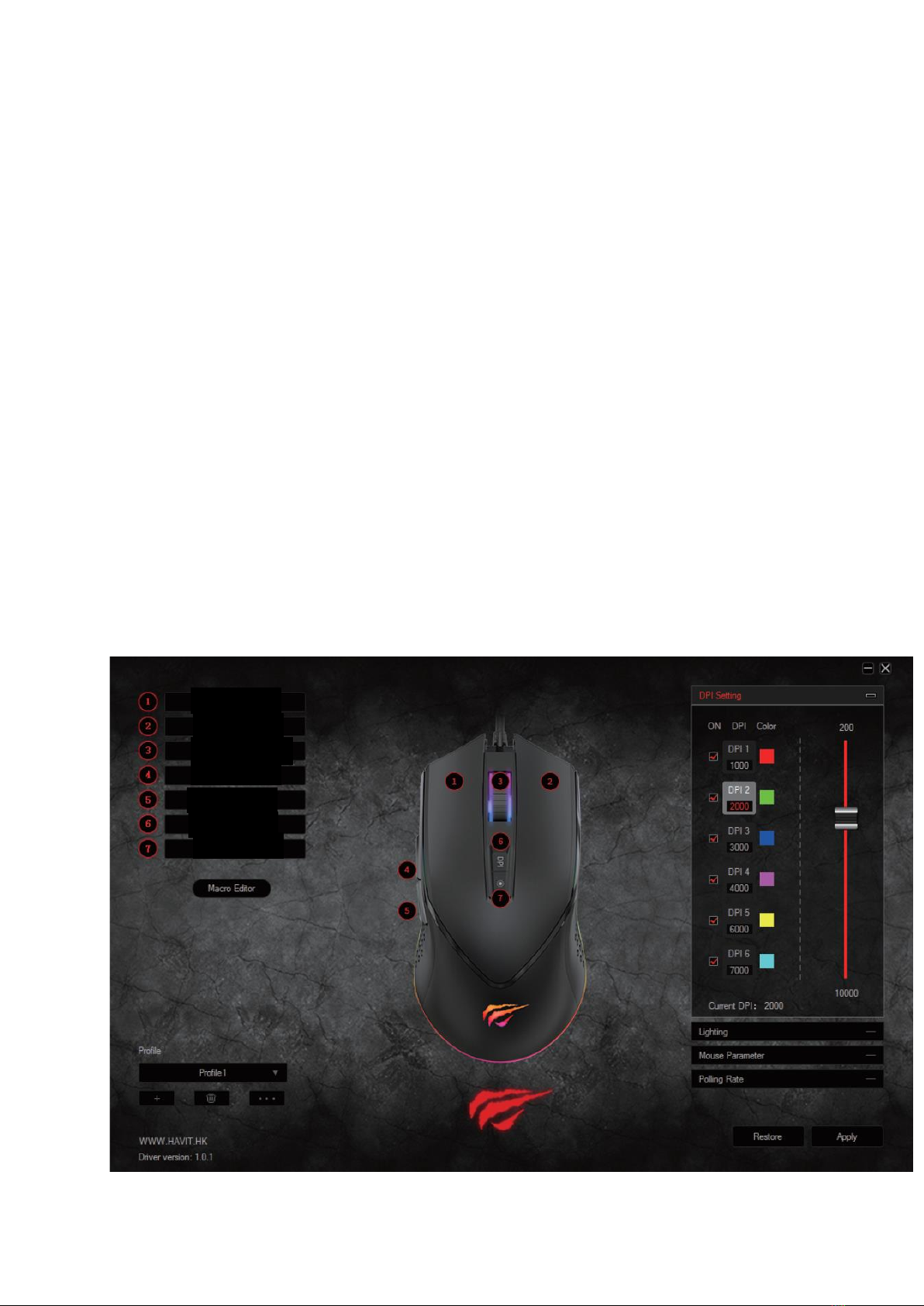
Main interface and functions description:
Left Button
Right button
Middle Button
Forward
Back
Switch Effect
DPI Loop

4
Left Button
Right button
Middle Button
Forward
Back
Switch Effect
Left Button
Scroll Up
Scroll Down
Three click
Fire Key
Key Combination
Macro
Disable
DPI
Multimedia
DPI Lock
DPI +
DPI -
DPI Loop
Media Player
Play/Pause
Next
Previous
Stop
Mute
Volume Up
Volume Down
Email
Calculator
Explorer
Home Page

5
Left Button
Note: The smaller intervals value is, the faster the speed of keystroke is.
Intercals (5-255)
Loop (1-255)
Fire key
Fire key

6
1. Left button: left button function
2. Right button: right button function
3. Middle button: middle button function
4. Back button: back to the previous page
5. Forward button: enter to the next page
6. DPI+: switch to higher DPI value, without loop switch
7. DPI-: switch to lower DPI value, without loop switch
8. Three bursts: Equivalent to click the left key for 3 times
9. Fire key: Speed rate can be adjusted in software for the mouse key.
10. Combination key: customize Ctrl, Shift, Alt, Win and any of the keyboard buttons
to combine button functions (support 3 reassembles farthest, such as Ctrl+A+B)
11. Multimedia function: include Play/Pause, Stop, Previous, Next, Volume Up,
Volume Down, Mute, Email, Calculator, My computer and Homepage functions.
12. Disable the key: to set bottom has no function.
13. DPI: DPI+, DPI- and DPI loop
14. Locking Dpi, from 200-1100 to lock any of the DPI values.
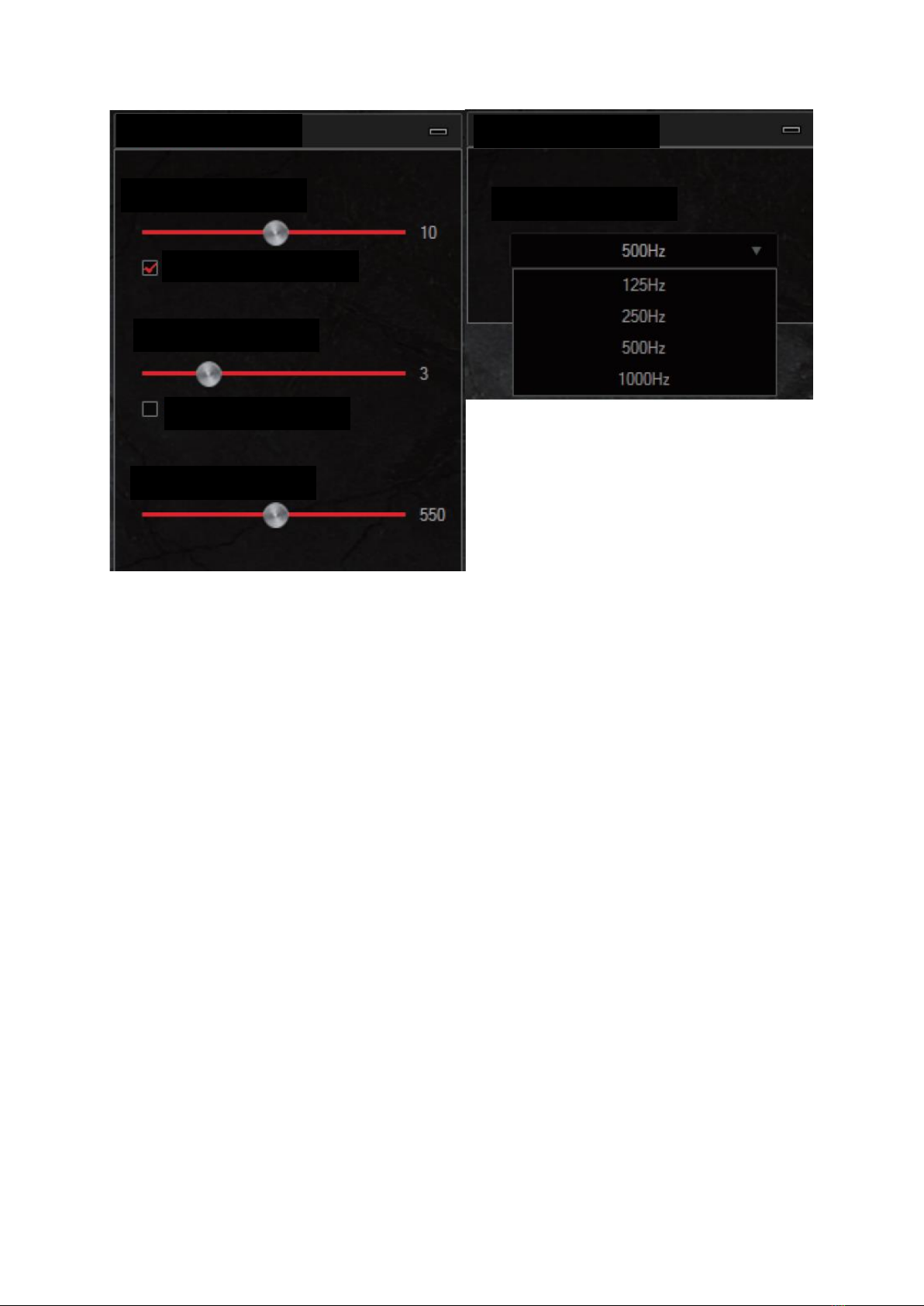
15. The return rate of mouse: with 125 HZ/250HZ/500HZ/1000HZ to choose.
16. The movement speed of mouse: to adjust the movement speed of mouse
17. The scroll wheel speed of mouse: to adjust the scroll wheel speed of mouse
18. The double/click speed of mouse: to adjust the double-click speed of mouse.
19. Export the current configuration: store the contents that have been set to your
computer.
Mouse Parameter
Mouse Sensitivity
Scrolling Speed
Improve pointer precision
Scroll One Page
Double-Click Speed
USB Polling Rate (Hz)
Polling Rate

7
20. Import the configuration file: load the existing documents from the computer.
21. Factory reset: Set the mouse to the factory default
22. Application: write the settings to mouse
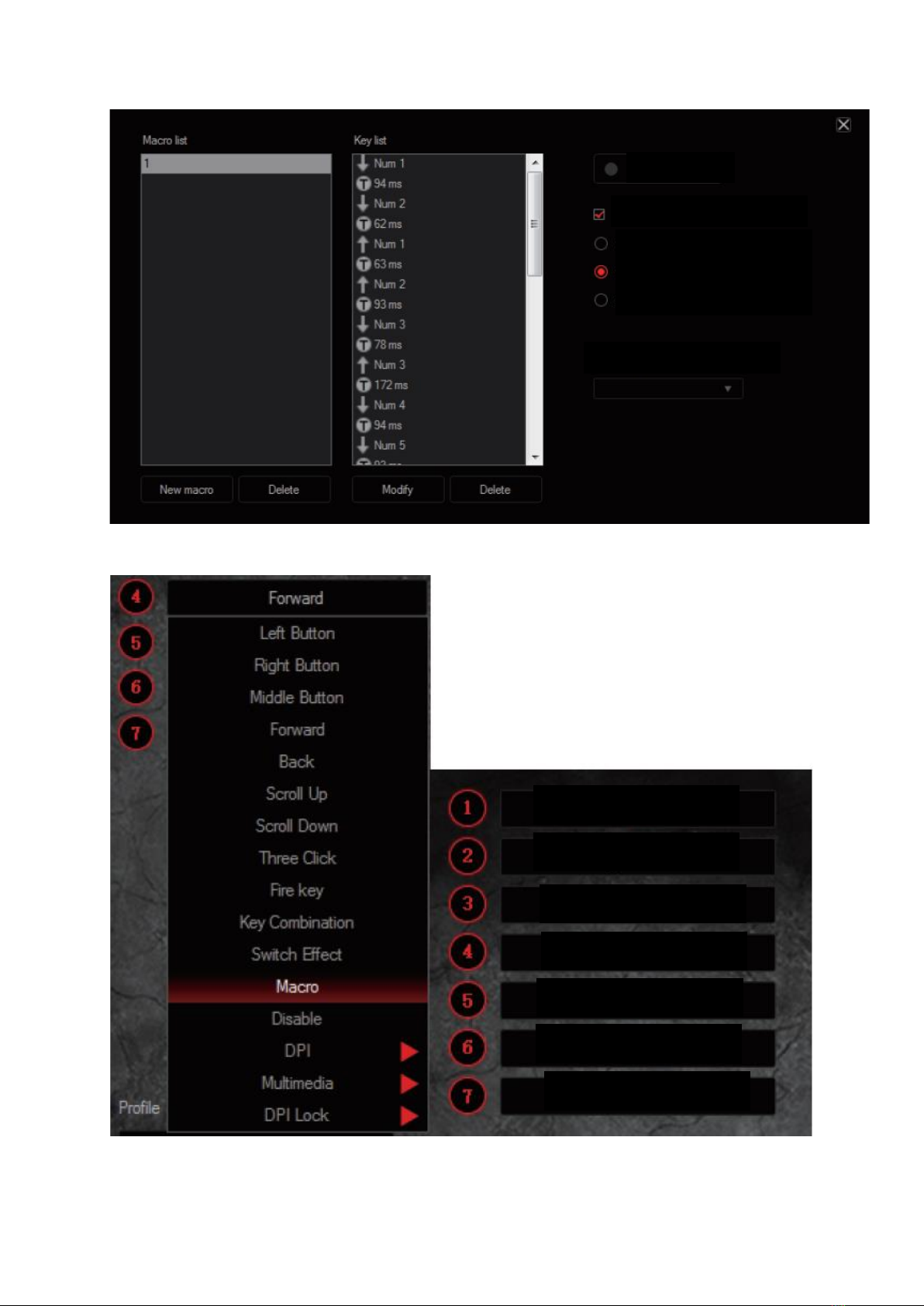
Macro definition
Macro management can record any keys of keyboard, the time of keys reactions and the
number of keys cycles.
a. Click (create) to create a new file, such as a, b, c…
b. Select whether to increase the delay and the times of cycles
c. Click (start recording) and start recording any keys of keyboard. The keys you
recorded will display in the macro edit box
d. After the recording, click “stop recording”
e. To revise the recording content, please make the following changes in the macro-
options:
Choose to insert the event: insert relevant content in the selected location
Delete: Delete the selected content
Modify: Modify the delay value and input button again
f. After recording is complete, just exit the macro recording interface, no need to
click the confirmation keys
g. Execute a macro, such as the mouse button 4 key set to “macro functions”, after
recording is complete, press the mouse 4 key to play the recorded content

8
Automatic insert delay
Start record
Cycle until the key released
Cycle until any key pressed
Specified cycle times
Insert event
Left Button
Right Button
Middle Button
Macro - 1
Back
DPI Loop
Switch Effect

9
DPI settings
1. Five groups DPI: gear1 / gear 2 / stalls 3 / stalls 4 / stalls 5 / stalls 6, check the
selections.
2. DPI setting: set the 5 groups of DPI value, adjust within the range of 200 –
10 000DPI
DPI Setting
ON
Colour
Current DPI:

10
Lighting settings
10 kinds of light effect: Colourful Streaming mode –Steady mode –Breathing mode –
Colourful Tail mode –Neon mode –Colourful Steady mode –Flicker mode –Tail mode –
Wave mode –LED OFF
Uninstall
Open the control panel and open the “Add of Remove Programs” window, find “MS814
Gaming Mouse” and lick “delete” to complete the uninstall program.
Lighting
Effect
LED OFF
Wave
Tail
Flicker
Colourful steady
Neon
Colourful Tail
Breathing
Steady
Colourful Streaming
Colourful Streaming
Indice
Lingue:
Altri manuali ALZA Topo