
AMagic ACC-ECU3 Manuale utente

User’s Manual
ACC-ECU3
USB 3.0 ExpressCard

ABOUT THIS MANUAL
This manual is designed for use with the USB 3.0 ExpressCard. Information
in this document has been carefully checked for accuracy; however, no
guarantee is given to the correctness of the contents. The information in this
document is subject to change without notice. The manufacturer does not
make any representations or warranties (implied or otherwise) regarding the
accuracy and completeness of this document and shall in no event be liable
for any loss of profit or any commercial damage, including but not limited to
special, incidental, consequential, or other damage.
SAFETY INSTRUCTIONS
Always read the safety instructions carefully:
Keep this User’s Manual for future reference.
Keep this equipment away from humidity.
If any of the following situations arises, get the equipment checked by a
service technician:
The equipment has been exposed to moisture.
The equipment has been dropped and damaged.
The equipment has obvious sign of breakage.
The equipment has not been working well or you cannot get it to work
according to the User’s Manual.
COPYRIGHT
This document contains proprietary information protected by copyright. All
right are reserved. No part of this manual may be reproduced by any
mechanical, electronic or other means, in any form, without prior written
permission of the manufacturer.
1

Table of Contents
1. Introduction ................................................................................................................... 3
Features........................................................................................................................... 4
Package Contents ........................................................................................................... 4
System Requirements...................................................................................................... 4
2. Installation ..................................................................................................................... 5
Windows XP/ Vista/ 7....................................................................................................... 5
3. Hardware Installation.................................................................................................... 9
4. Installation Verification............................................................................................... 12
5. Notice ........................................................................................................................... 12
6. Specifications.............................................................................................................. 13
7. Regulatory Compliance .............................................................................................. 14
FCC Conditions .............................................................................................................14
CE.................................................................................................................................. 14
WEEE Information.........................................................................................................14
2
1. Introduction
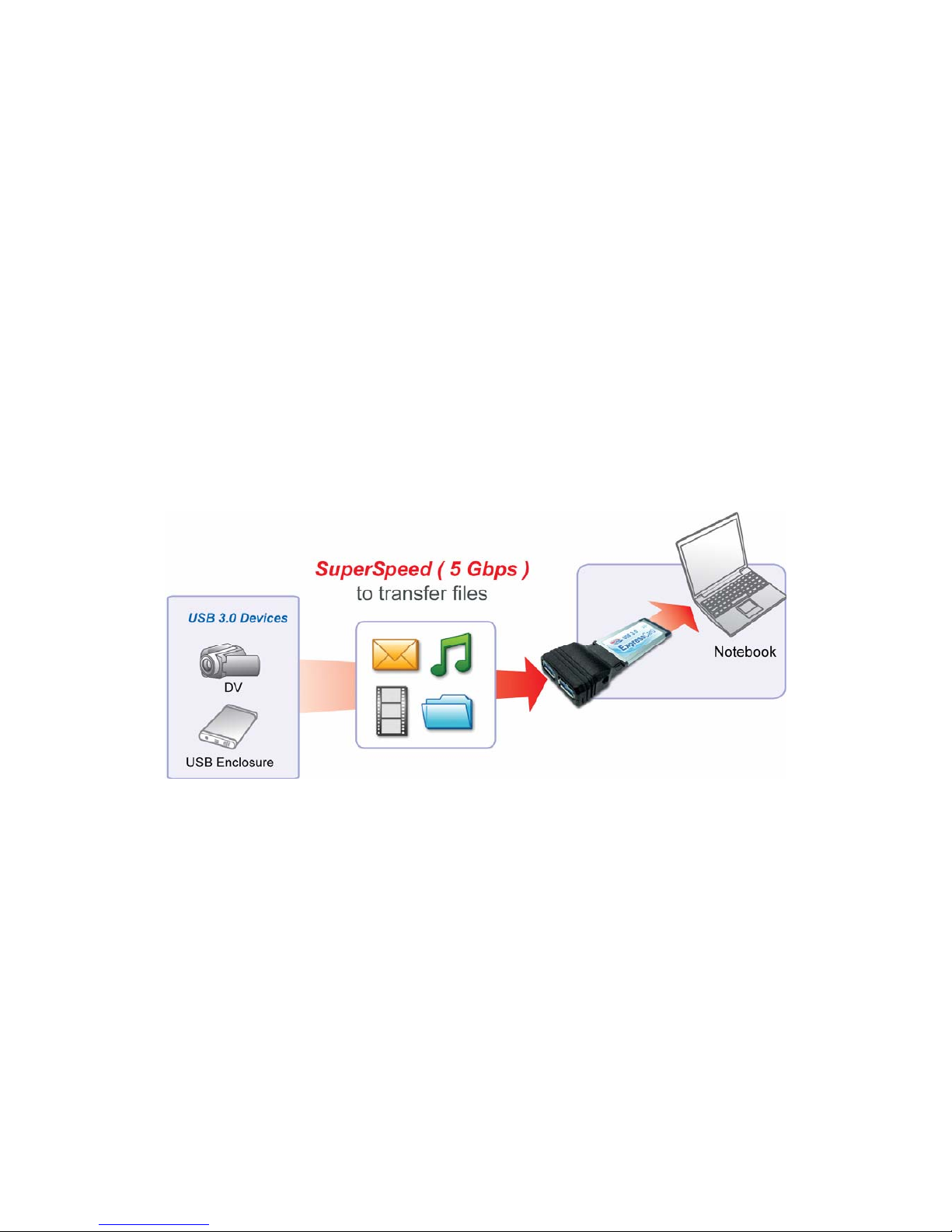
The USB 3.0 ExpressCard is compliant to USB 3.0 standards and backward
compatible with USB 2.0 devices. It also allows you to connect multiple
peripherals to your PC at the same time. The USB 3.0 2-Port ExpressCard
enhances the performance of transmission that excessively faster than existing
USB 2.0 devices. It is the ideal interface for transferring extremely large amounts
of data from USB 2.0/3.0 compliant products such real-time video cameras,
portable devices and others.
3

Features
Add 2 ports to USB 3.0 devices.
Install easily into any ExpressCard slots of laptops.
Supports USB 3.0 transfer rate.
Plug and play.
Package Contents
USB 3.0 ExpressCard x1
CD (Driver and User’s Manual) x1
Quick Installation Guide x1
USB 2.0 to DC Plug Cable(Optional) x1
Power Adapter (Optional) x1
System Requirements
Windows-based (WindowsXP, WindowsVista, Windows7)
computer with available ExpressCard slot.
Notice: Mac systems do not support this USB 3.0 2-port ExpressCard.
4
2. Installation
You will need to install the driver for your USB 3.0 ExpressCard first. Please
follow the procedures as below.
On Windows XP/ Vista/ 7
To Install the Driver:
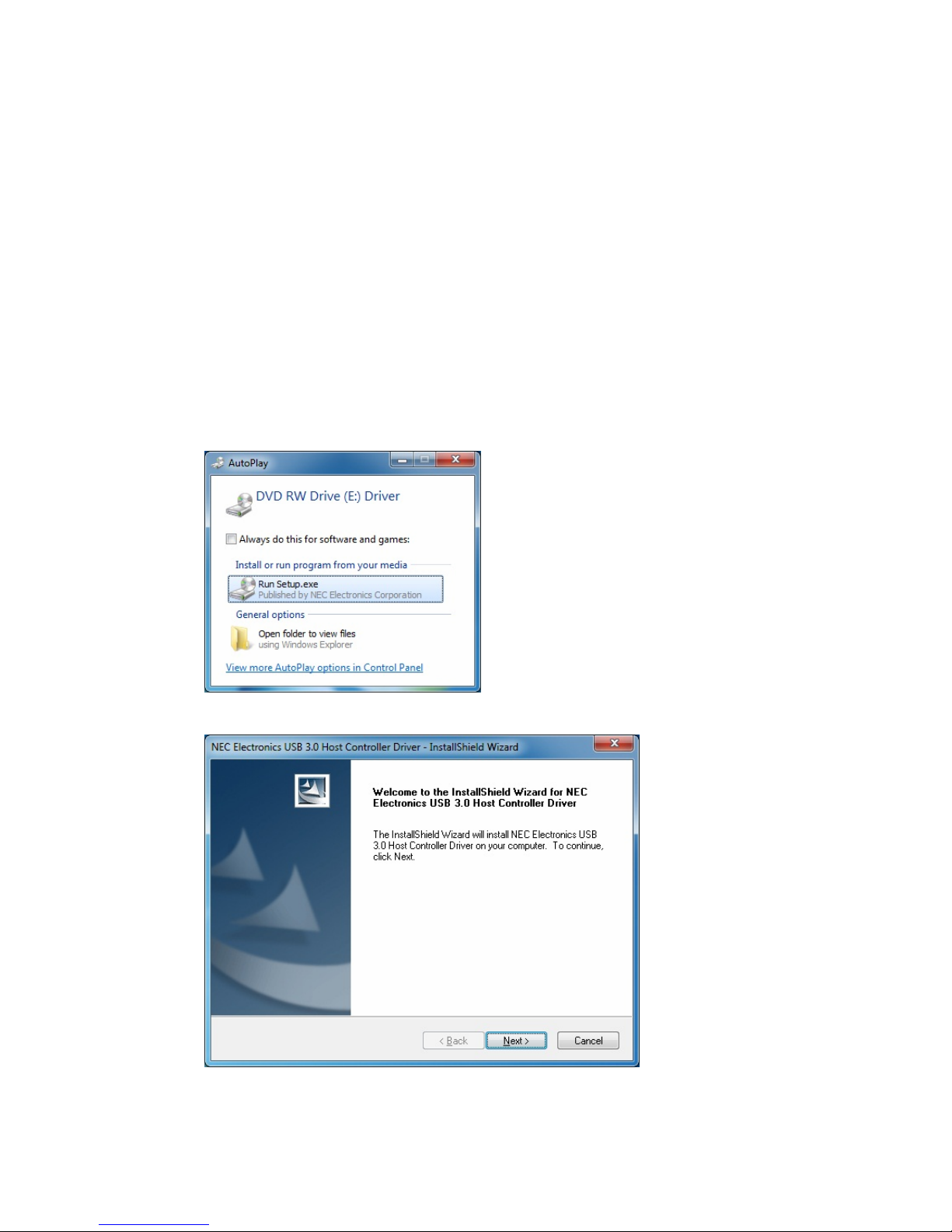
1. Insert the provided CD into CD-Rom locates and double-click the Setup.exe
file.
2. When the following screen show up, please click Next to install the Driver.
5
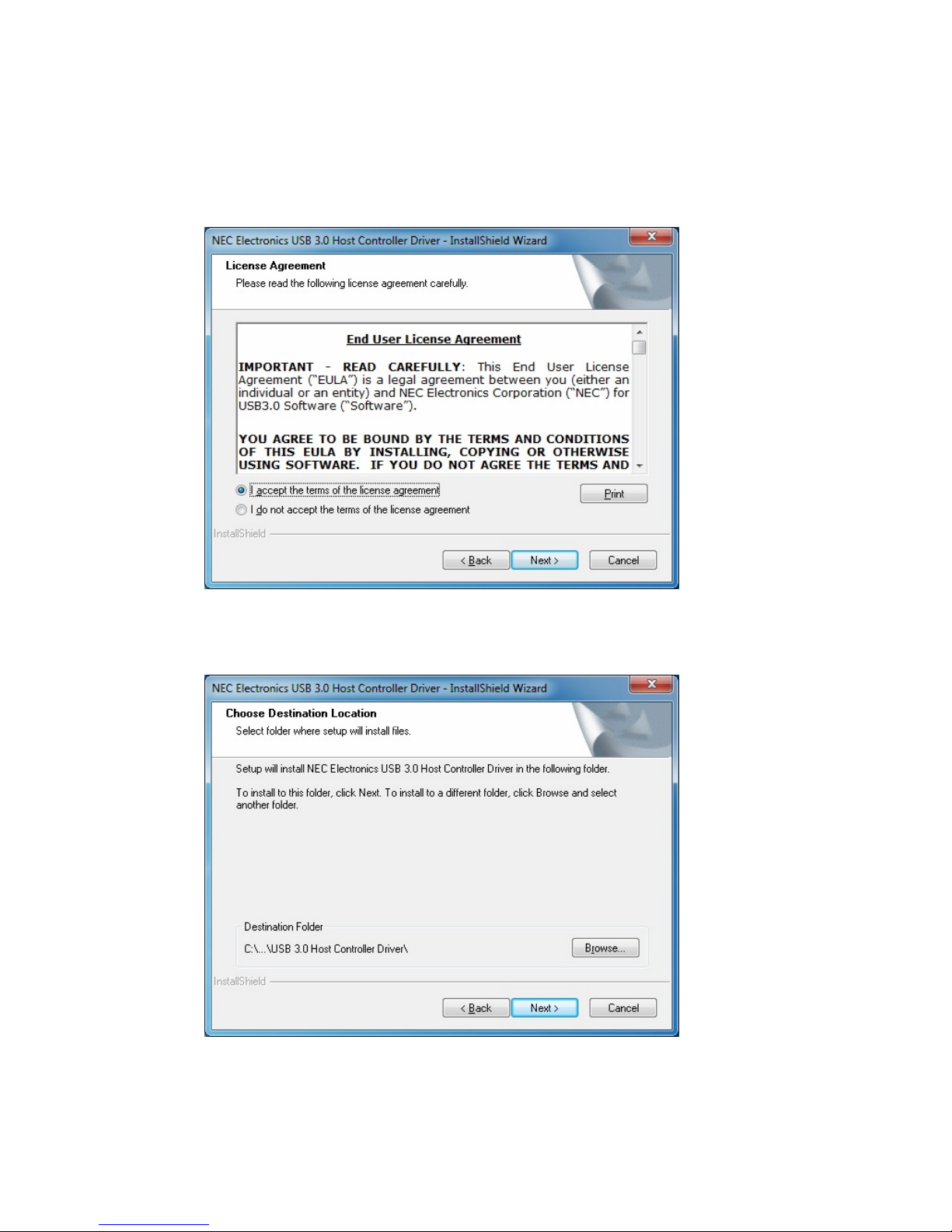
3. After reading End-User License Agreement, please choose “I accept the
terms in the License Agreement” and click Next.
4. Please click Browse to choose the Destination Folder.After that, please
click Next.
6
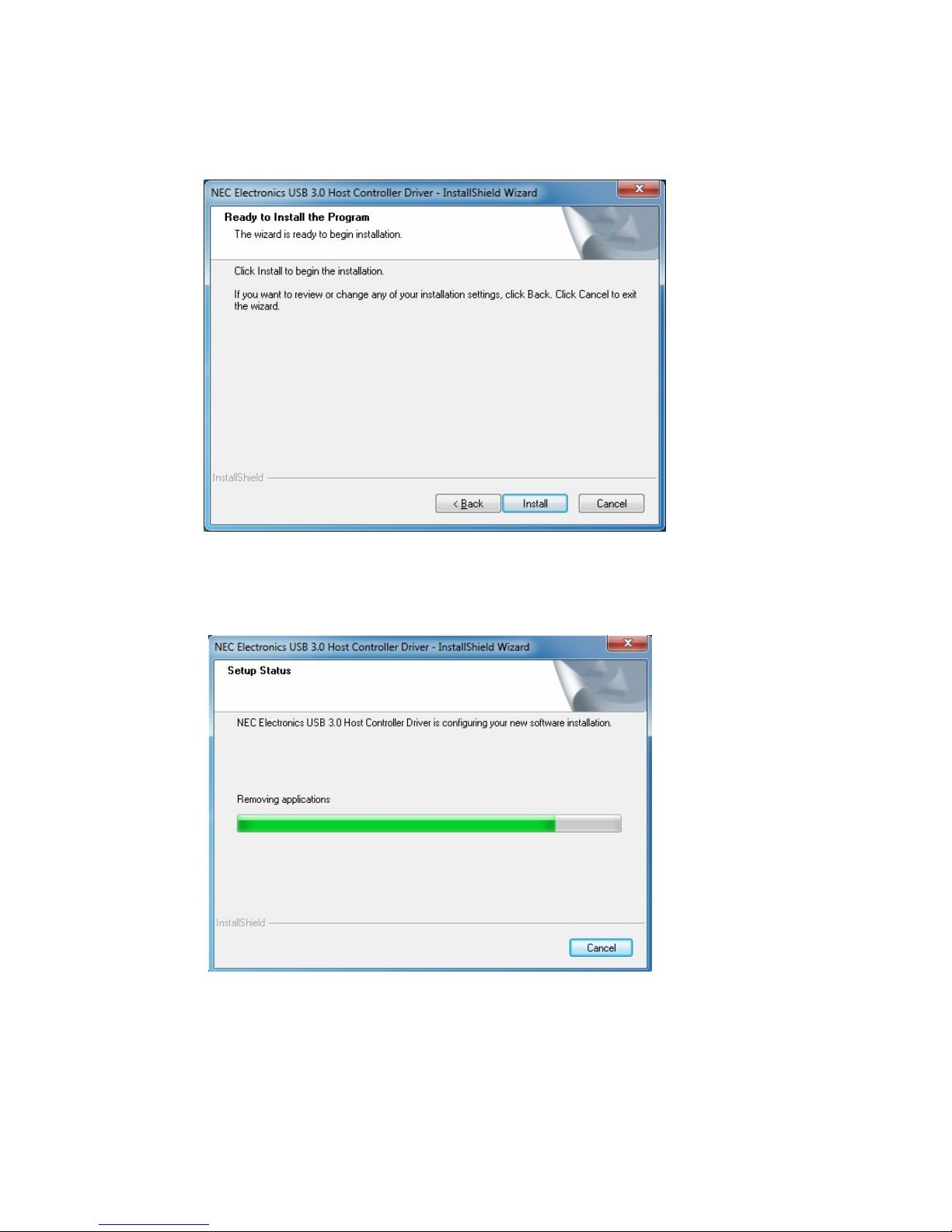
5. Click Install to install NEC Electronics USB 3.0 Host Controller Driver.
6. It will take a while to install the driver.
7
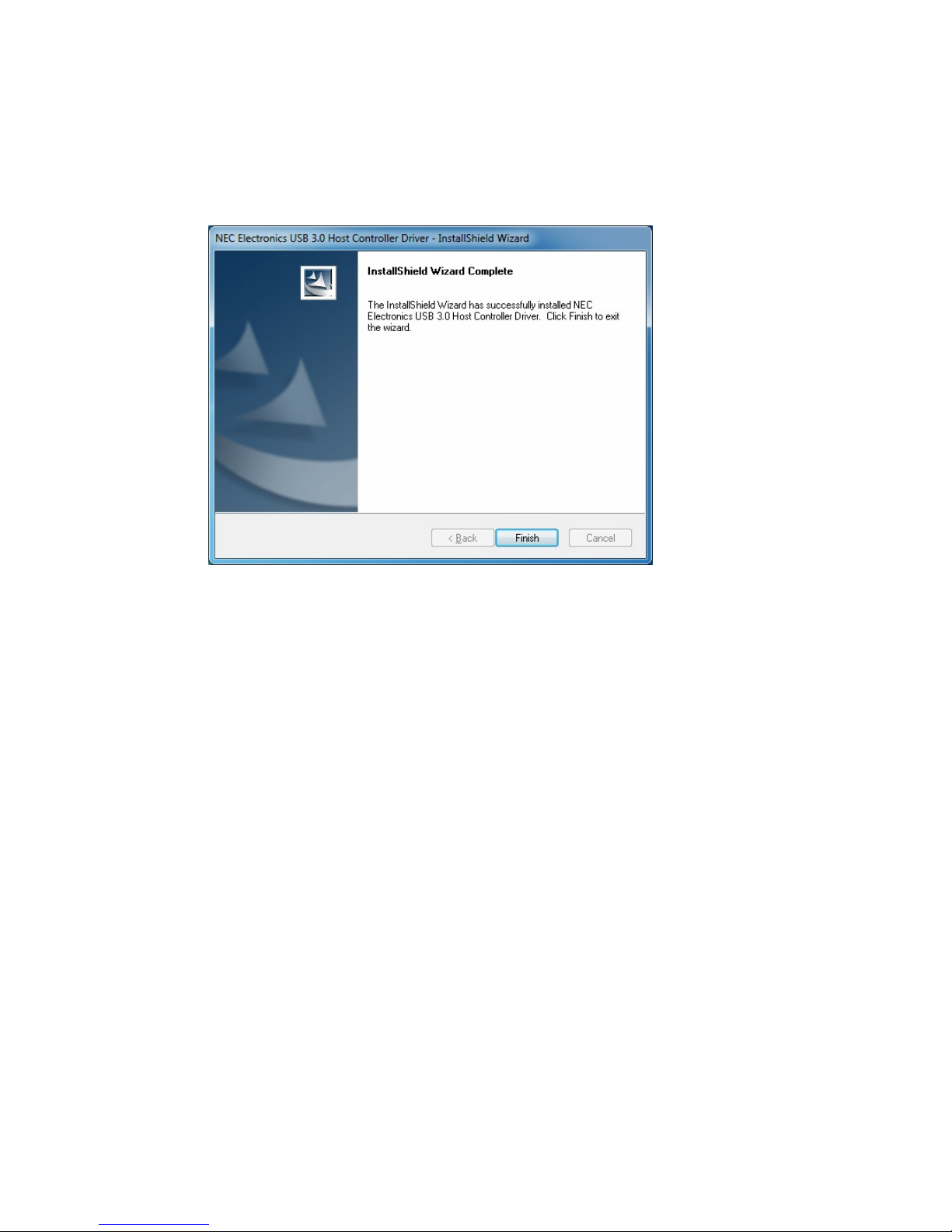
7. Please click Finish to complete the NEC Electronics USB 3.0 Host Controller
Driver.
*Actual strings depend on your operation system. These screen shots are from Windows 7 and might
vary slightly for each operation system.
8
3. Hardware Installation
Please find the CardBus port of your system, and insert the USB 3.0 2 Ports
ExpressCard into the port. The USB 3.0 2 Ports CardBus Card supports
hot-swapping, so you don’t need to turn off your system before the installation.
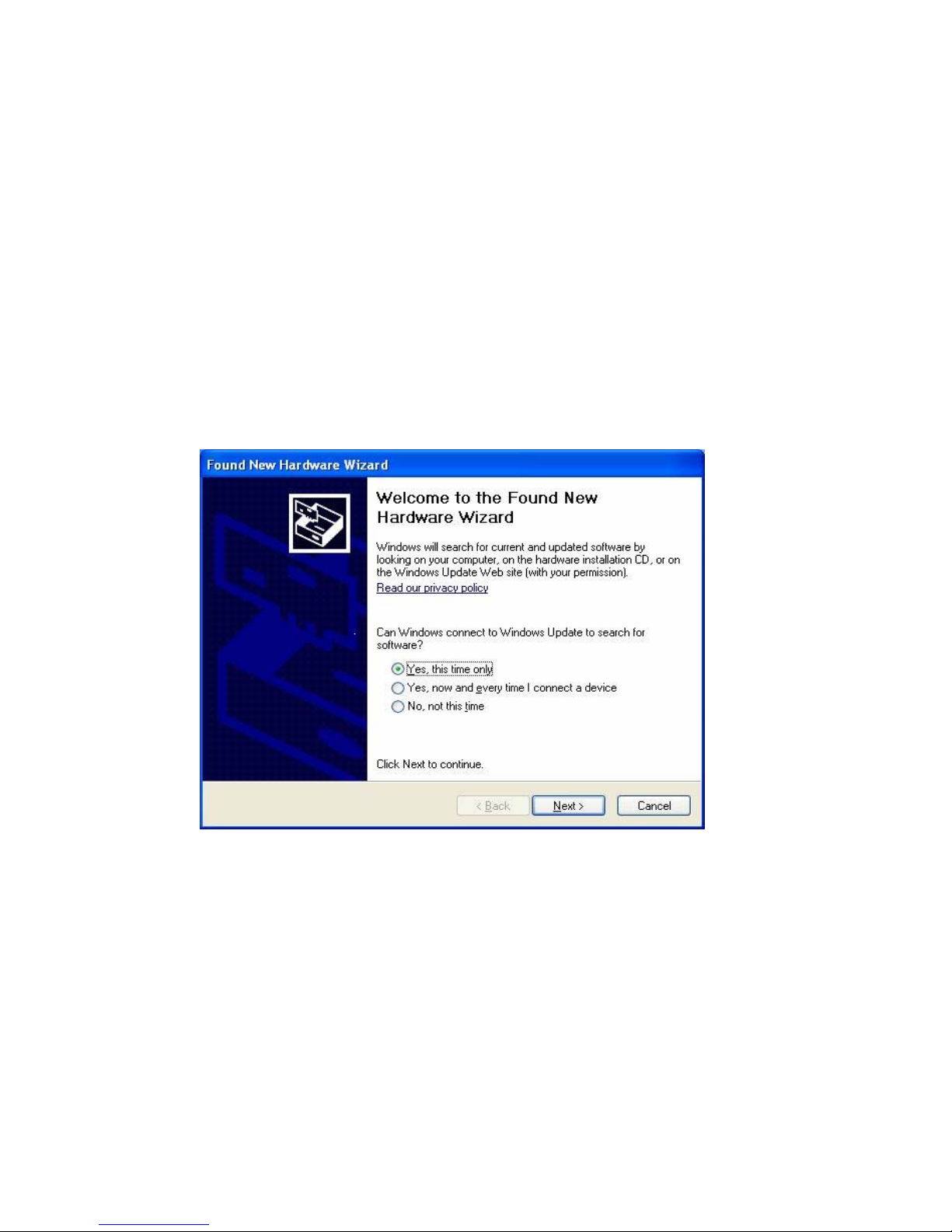
For Window XP:
A. When inserting USB 3.0 2 Ports ExpressCard into the port, the following
screen will show up. Please choose “Yes, this time only” and click Next.
9
Indice
Manuali Hardware per computer popolari di altre marche

EMC2
EMC2 VNX Series Manuale del proprietario

Panasonic
Panasonic DV0PM20105 Manuale utente

Mitsubishi Electric
Mitsubishi Electric Q81BD-J61BT11 Manuale utente

Gigabyte
Gigabyte B660M DS3H AX DDR4 Manuale utente

Raidon
Raidon iT2300 Manuale utente

National Instruments
National Instruments PXI-8186 Manuale utente


