
Ametek SI1500 Manuale operativo

SI1000 SERIES DISPLAY UNIT
user and installation manual

Index
502893 issue 4.1
Index
Section Title Page
1.0 Safety Summary .............................................2
2.0 Service and Repair ...........................................3
3.0 Installation into a Panel........................................4
4.0 General Description ..........................................6
4.1 Overview ...................................................6
4.2 Specification ................................................6
5.0 Display Panel and Connections .................................7
5.1 Front and Rear Panel Layouts ..................................7
5.1.1 Layout of Rear Panel SI1500 . . . . . . . . . . . . . . . . . . . . . . . . . . . . . . . . . . . 8
5.1.2 Layout of Rear Panel SI1300 . . . . . . . . . . . . . . . . . . . . . . . . . . . . . . . . . . . 8
5.1.3 Layout of Rear Panel SI1100 ...................................9
5.2 Connection Details ...........................................10
6.0 Set up Options ..............................................13
6.1 Main Menu Overview .........................................13
6.2 Menu Setup Detail ...........................................16
6.3 Calibration Menu.............................................19
6.3.1 Set the Maximum Reading to the Maximum Sensor Output ...........19
6.3.2 Set the Minimum Reading to the Minimum Sensor Output ............20
6.3.3 Calibrate the Maximum and Minimum ............................21
7.0 Functions...................................................22
7.1 Zero Function ...............................................22
7.2 Hold Function ...............................................22
7.3 Peak Function ...............................................23
7.4 Input Relays ................................................24
8.0 Communication Protocol.......................................25
Appendix A Units Supplied with Power Supply ...............................27
Return Of Goods
Solartron Sales Offices
1

502893 issue 4.1
Terms in this Manual
WARNING statements identify conditions or practices that could result in personal injury or loss of life.
CAUTION statements identify conditions or practices that could result in damage to the equipment or other property.
Symbols in this Manual
This symbol indicates where applicable cautionary or other information is to be found.
Service Safety
This equipment has been designed and tested to meet the requirements of the Low Voltage Directive (1997) and has been supplied in a
safe condition. This manual contains information and warnings that must be followed by the user to ensure safe operation and to retain the
apparatus in a safe condition.
Power Source
24 V ±10 % DC 20 VA
WARNINGS:
Do not operate in an explosive atmosphere
Do not remove covers or panels
To avoid personal injury, do not remove covers and panels. Do not operate the equipment without the covers and panels fitted. There are no
internal adjustments required during commissioning of the equipment.
Grounding the Equipment
The unit is supplied by 24 VDC and therefore does not require an earth grounding cable to avoid electric shock. However it is recommended
that the unit is properly grounded to a known good earth via the tag at the rear of the SI1000 to meet the full specification and EMC
requirements.
2
1.0 Safety Summary
1.0 Safety Summary

502893 issue 4.1
3
This equipment contains no user serviceable parts.
This equipment must be returned to your Solartron dealer for any service and repair.
The SI1000 is designed to be maintenance free.
Contact with solvents should be avoided.
Any attempt to dismantle any of the SI1000 will invalidate the warranty.
The SI1000 series are precision instruments and should be handled with care.
2.0 Service and Repair
2.0 Service and Repair

502893 issue 4.1
4
3.0 Installation into a Panel
3.0 Installation into a Panel
- Ensure that there is sufficient space behind the relevant instrument panel for the SI1000 and its cabling
Cut out the panel aperture to the dimensions shown.
Working from behind the panel, with the box fully located, fit the side brackets to the studs and slide them forward toward the panel until they
lock into place.
Screw the brackets to the panel.

502893 issue 4.1
5
3.0 Installation into a Panel (cont)
3.0 Installation into a Panel (cont)
CAUTION: Do not over tighten the screws as this may damage the case of the instrument.
WARNING: On installing or removing the SI1000, you must be aware of any hazardous equipment or materials in the vicinity. Make sure that
any equipment into which the SI1000 system is to be installed is switched off and made safe.
CAUTION: Avoid installing the SI1000 close to switch gear, contactors or motor starters.
CAUTION: Do not place other signal and power supply wiring in the same loom as the SI1000 wiring.
CAUTION: Use screened cables for all leads, with the screen earthed at one end only.

502893 issue 4.1
6
4.0 General Description
4.0 General Description
4.1 OVERVIEW
The SI1000 series of readouts provides a simple way of using Solartron transducers. All of the basic metrology functions are provided within
this small robust instrument.
4.2 SPECIFICATION
See the Product data Sheet 502892

502893 issue 4.1
7
5.0 Display Panel and Connections
5.0 Display Panel and Connections
5.1 FRONT AND REAR PANEL LAYOUTS
1 Range Lamps
2Mode Key ◄
3UP and Hold Key ▲
4 7 digit Red Display
5Down and Zero Key or Preset Key ▼
6Set Key ►

502893 issue 4.1
8
5.0 Display Panel and Connections (cont)
5.0 Display Panel and Connections
5.1.1 Layout of Rear Panel SI1500
7 RS232 and RS485 Connection
8 Analogue Outputs
4-20 mA or VOLT
9 Digital Probe (Orbit Input)
10 High/Middle/Low Alarm Output
Zero Input
Hold/Peak+/Peak-/Diff input
24 VDC Input
5.1.2 Layout of Rear Panel SI1300
7 RS232 and RS485 Connection
8 Analogue Inputs: 4-20 mA or VOLT
9High/Middle/Low Alarm Output
Zero Input
Hold/Peak+/Peak-/Diff input
24 VDC Input
502893 issue 4.1
9
5.0 Display Panel and Connections (cont)
5.0 Display Panel and Connections
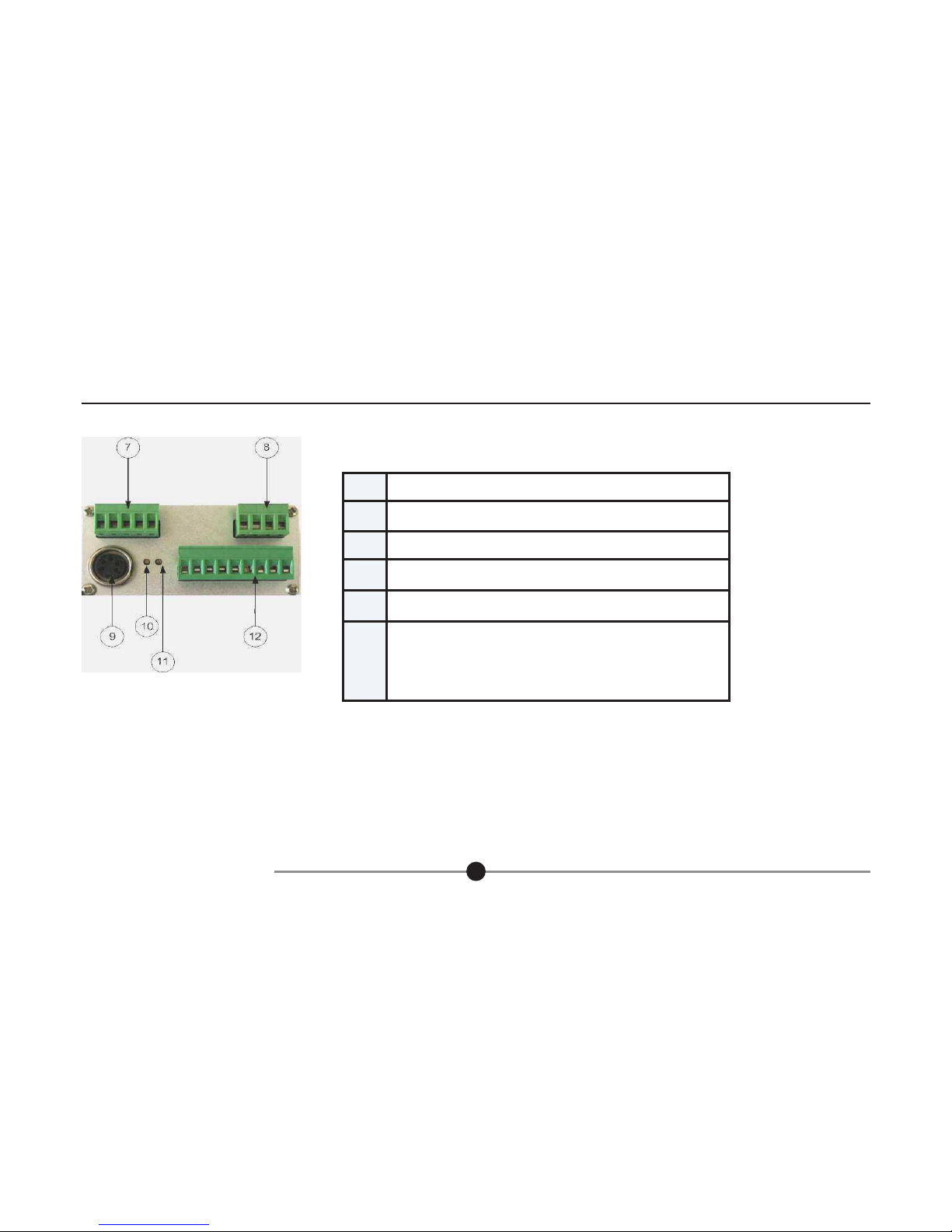
5.1.3 Layout of Rear Panel SI1100
7 RS232 and RS485 Connection
8 Analogue Outputs: 4-20 mA or VOLT
9LVDT Transducer Input
10 Transducer Zero Adjustment
11 Transducer Gain Adjustment
12 High/Middle/Low Alarm Output
Zero Input
Hold/Peak+/Peak-/Diff input
24 VDC Input
Questo manuale è adatto per i seguenti modelli
2
Indice
Altri manuali Ametek Monitor


