
Ampete 444 Manuale utente

Owner's Manual 444
Ampete
444
Owner's Manual
Ampete Engineering GbR
Gutenbergstrasse 48
50823 Cologne
Germany
on 49 (0) 221 55 94 118
ax 49 (0) 221 55 94 118
mail [email protected]
web www.ampete.com
1

Owner's Manual 444
__________________________
Ampete Engineering GbR, 2014
Ampete is a registered trademark
copyright 2014, all rights reserved
2

Owner's Manual 444
We all
... produce electronic waste! It's just a matter of time!
We here at Ampete En ineerin are not only consumers, like you yourselves, but also en ineers of electronic
products that we want to place into a modern world. Here it looks at first lance that everythin has been
invented already. But demands are ettin more refined and specific by the day and as in the economics,
the sports- or even spiritual world, performance, utility and consistency depend on small chan es and
nuances in improvements. In other words we are supposed to et better every day. This is not a one way
street, it's a hu e responsibility in the other hands!
For us it means more than wantin a slice of the pie. It means to review every sin le product we desi n for
its added values, to anticipate the circumstance you put it into in order to ‚simply' be able to maintain it
everywhere it has been sold to.
Today our whole life is determined by electronics, at home, on the road, at work or vacation, in
supermarkets, concert arenas or even in natural resorts.
Today in eneral electronics aren`t built any lon er to last! They`re cheap.
For people from the 70ies like us it is a turnin point. We rew up in a world where an electronic device is
nothin short of a masterpiece. Today 90% of electronic applications are manufactured by usin robots or
exploitation in countries where ` lobal players` celebrate the abolition of workers protection and minimum
salaries. But it doesn’t end there.
After an expected life cycle, more or less short, the cheap electronic waste is onna be ‚disposed‘ of. Dispose
mi ht su est that components like housin , metal and synthetics will be recycled to find their way back
into a product. But of course often this is not how it is done!
If you ever heard of 'toxic city' (and I don't mean the fantastic album of a reat band) you probably know
what we speakin of.
It mi ht surprise you to read this in a manual for an electronic device.
We want to make sure you understand that by purchasin an Ampete En ineerin Product you will et a
device in which we put all our passion, belief and knowled e and that you et a product in the tradition of
many reat people before us, for whom electronics were and still are wonderful masterpieces.
But you also purchased a little piece of responsibility. Maintain your Ampete En ineerin Product – we will
be here to support you, we built this to survive… possibly even us.
In case you should be faced with any issue on any day at any place somewhere in the world, we are here as
you would expect us to be.
This is not a promise, it is our view of life.
Thanks for lettin us be a part in enablin your musical world.
Yours sincerely,
Ampete
3

Owner's Manual 444
Table of Contents
Foreword............................................................................... 3
Introduction........................................................................... 5
Features................................................................................ 5
Front panel............................................................................ 6
Rear panel............................................................................. 7
Hook up................................................................................. 9
A typical setup in eneral........................................................ 9
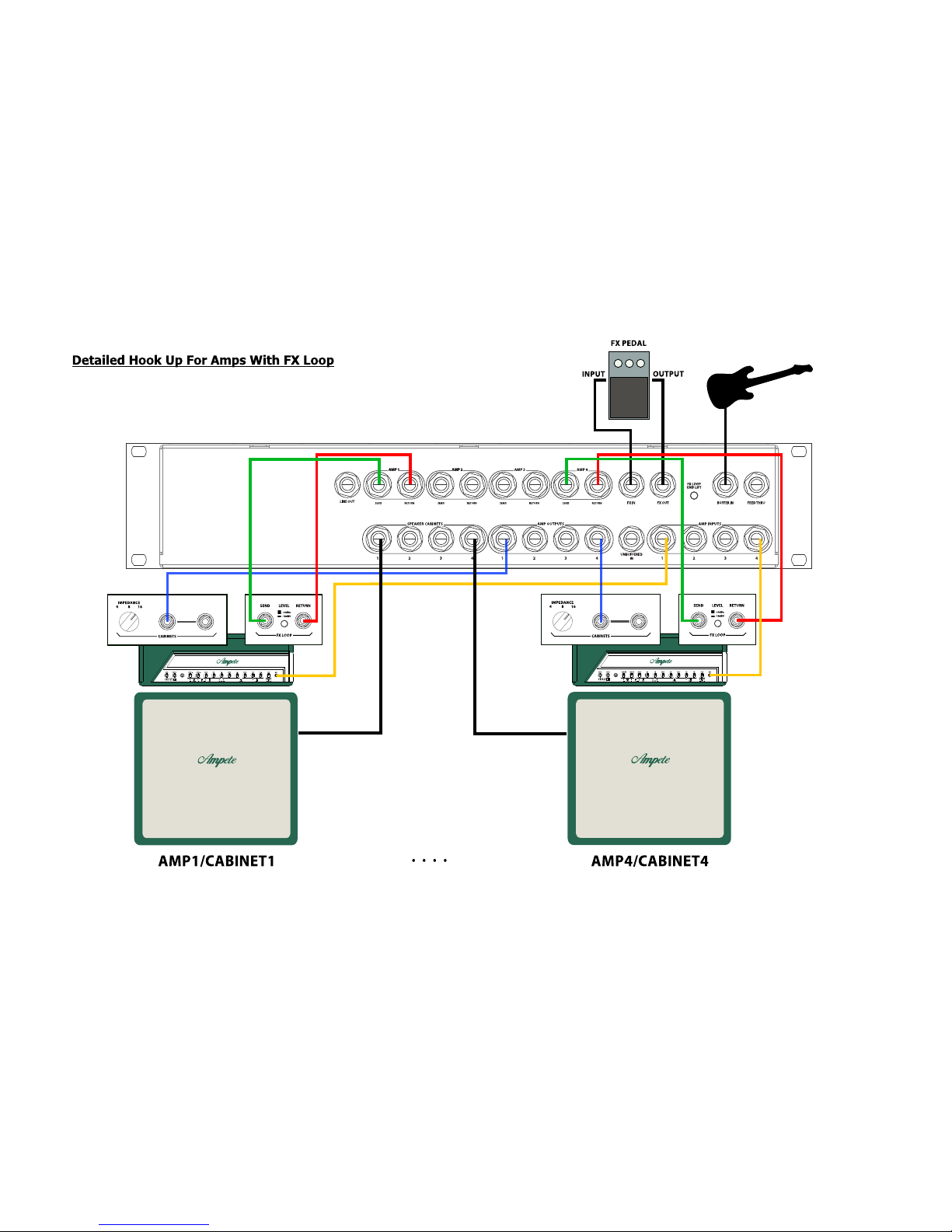
detailed hook up of amps with FX-Loop....................................10
detailed hook up of amps without FX-Loop................................ 11
Controllin the 444 via the front panel..................................... 12
Selectin Amplifiers and Cabinets / Switchin rules & protection....... 12
FX Loops …................................................................... 12
Amps without FX Loops...................................................... 12
Controllin the 444 via MIDI
Checkin and settin the MIDI Channel................................... 13
MIDI Pro ram Chan e....................................................... 13
MIDI Control Chan e........................................................ 13
MIDI Control Chan e modes................................................ 13
Settin the Control Chan e mode.......................................... 13
MIDI Control Chan e messa es table...................................... 14
Troubleshootin ..................................................................... 15
A word on impedances........................................................... 16
4

Owner's Manual 444
Introduction
The 444 is desi ned to combine uitar amplifiers, uitar cabinets and uitar effects!
There have been Audio Loopers before, but there hasn't been the possibility to route one out of four
amplifiers into one or two out of four cabinets.
... one out of two, two out of... ??
… furthermore you are not any lon er in need of several delay, reverb, modulation pedals or rack units,
simply route every sin le FX loop of your amplifiers into one common FX loop for drivin one common
FX unit or one common FX ri .
… one common... ???
… nor there has been the option to run a wet/dry/wet system from one system of several uitar
amplifiers without usin line mixers and audio transformers and...
… transformers... ????
Don't et nervous, it sounds complicate, but indeed it's very simple and the 444 truly simplifies your
uitar ri in a way it hasn't been possible before, simply by usin our old and beloved midi pedal.
We will uide you throu h it in this manual.
Features
–4 amplifiers selectable
–4 speaker cabs selectable, up to 2 at a time
–external FX units assi nable to any of the 4 connected amplifiers
–FX-Loops from any of the connected amplifiers assi nable to one common FX Loop
–Line out for drivin external power amplifiers when runnin W/D/W systems
–buffered and unbuffered inputs
–feed thru jacks for easy wirin in the rack
–amplifier and cabinet selection without loss in sound, dynamics or noise
–no switchin noises
–no switchin latency
–protection circuits to prevent amplifiers from dama e
–midi controllable via pro ram chan e or control chan e
5
Owner's Manual 444
Front Panel
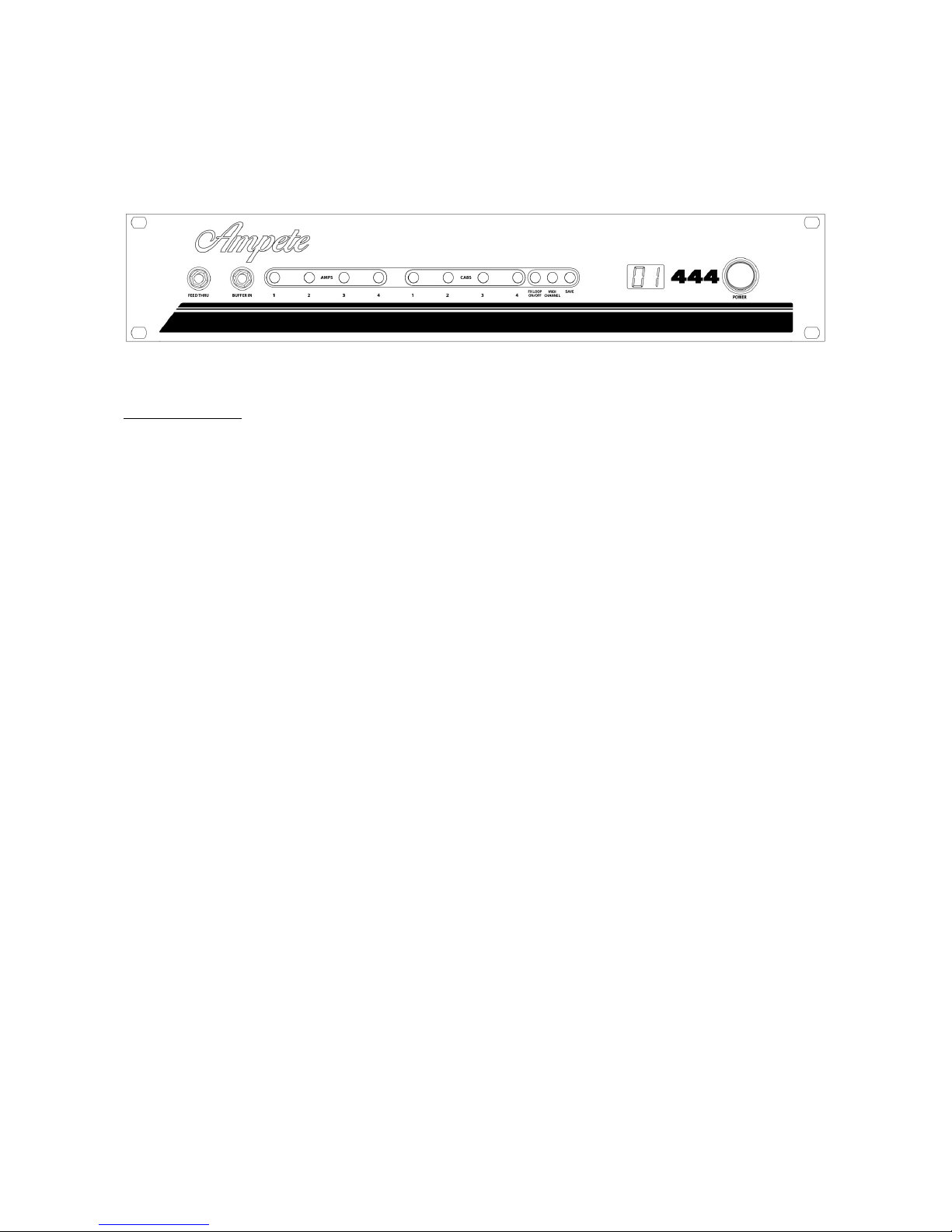
1. FEED THRU: Jack for an un rounded direct si nal connection from/to the backpanel FEED THRU.
Use it for connectin tuners, wireless systems or any connection you need from back to front
without usin lon cable connections.
2. BUFFER IN: Front Panel instrument input, which routes the instrument si nal to your connected
amplifier inputs via a hi h to low impedance buffer, for keepin si nal clean and noiseless without
colorin it.
3. AMPS 1-4: Select one of four possible connected amplifiers by pushin the correspondin
illuminated switch. The other 3 amplifiers are connected to an internal load to prevent them from
any dama e. Input si nal is only routed to the selected amplifier.
4. CABS 1-4: Select up to two cabinets at the same time by pushin the correspondin illuminated
switch.
5. FX LOOP ON/OFF: Switches the FX Loop Send/Return jacks of the currently chosen amplifier to
the FX In and FX Out jacks to share one FX unit or FX ri with all of the 4 connected amplifiers. That
way spillover effects from reverb or delay effects are possible between the different amplifiers.
Please be aware to set the send and return levels of the connected amplifiers equally to avoid
chan es in volume.
6. MIDI CHANNEL/CC MODE: Displays and selects the Midi Channel when pressed short. To les
the Control Chan e mode when pressed lon . See „Controllin via MIDI“ for more informations
about the MIDI Control Chan e Modes
7. SAVE: Saves the current state of the 444 to the previously selected Pro ram Chan e preset.
8. Display: Gives informations about the selected Pro ram Chan e preset, Midi Channel, or Control
Chan e mode.
9. Power On/Off: I bet you know what this is for...
6
Owner's Manual 444
Rear Panel
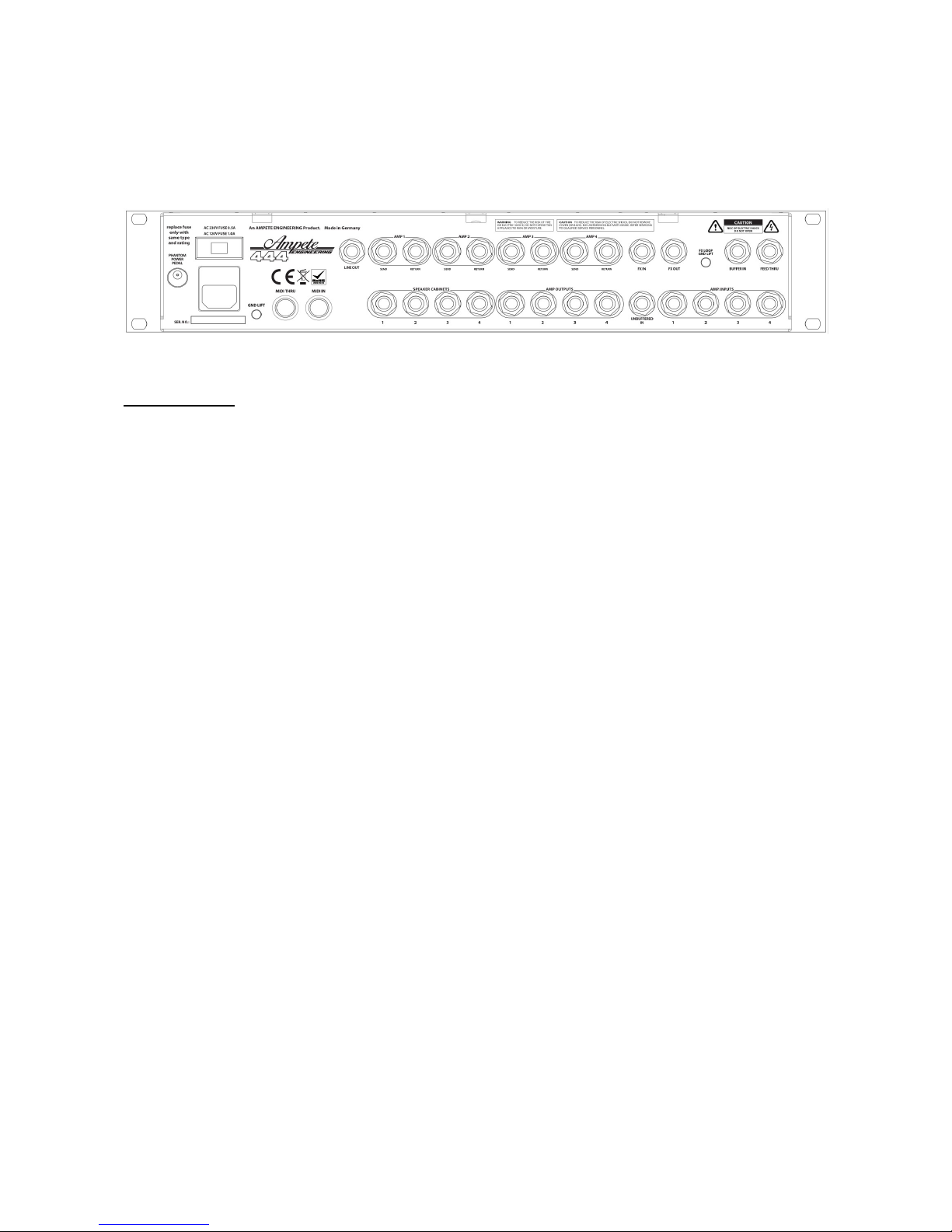
1. PHANTOM POWER PEDAL Jack: Connect a DC power supply to provide phantom power for your
MIDI pedal. By default the DC jack is connected to pin 1 (center pole) and 3 of the 7-pin MIDI
connector. It can can be internally modified to serve pin 6 and 7.
2. AC JACK / AC VOLTAGE SELECTOR: When chan in AC volta e for usin the 444 in a different
country, make sure fuse values are correct.
3. GROUND LIFT: Controls whether the 444s audio round is connected to earth conductor or not.
The chassis is rounded when the switch is in the 'Out' position. We recommend this position when
usin the 444 as the input device for your uitar. In case you are usin other audio loopers in front
of the 444, you mi ht notice hum noise, which is most often caused by round loops between two
devices. Switchin the round lift to the 'In' position will solve the issue ina lmost any case.
4. MIDI THRU: If you have several MIDI devices in your setup, connect the MIDI Thru with the MIDI
In of the followin device.
5. MIDI IN: Connect a MIDI pedal or any other MIDI device, to control the 444 via Pro ram Chan e
or Control Chan e messa es. If your MIDI device can be powered via the MIDI cable, connect the
correct DC power supply to the PHANTOM POWER PEDAL jack. Make sure supply volta e and pin
assi nment is correct.
6. LINE OUT: Outputs the SPEAKER Outs or FX LOOP Send si nal of the currently selected amp at line
level. It can be internally jumpered to be a speakers or an FX send line out. We recommend the
speaker settin , which also is set by default. Note that when feedin the LINE OUT from the FX
Send Bus, it's only active when the chosen amps FX loop is connected and activated!
7. AMP1 SEND: Connect the FX Loop Send/preamp out/line out of Amplifier 1 to the AMP 1 SEND jack
of the 444. Please be aware that this is not an independent loop but the correspondin FX loop of
the amplifier you drive with the AMP INPUT 1 and AMP OUTPUT 1 jacks of the 444!
8. AMP1 RETURN: Connect the FX Loop Return/power amp in/line in of Amplifier 1 to the AMP 1
RETURN of the 444. Like before mentioned, this is not an independent loop but the correspondin
FX loop of the amplifier you drive with the AMP INPUT 1 and AMP OUTPUT 1 jacks of the 444!
9. AMP2/3/4 SEND and AMP2/3/4 Return: Proceed like described under point 7 and 8.
7
Owner's Manual 444
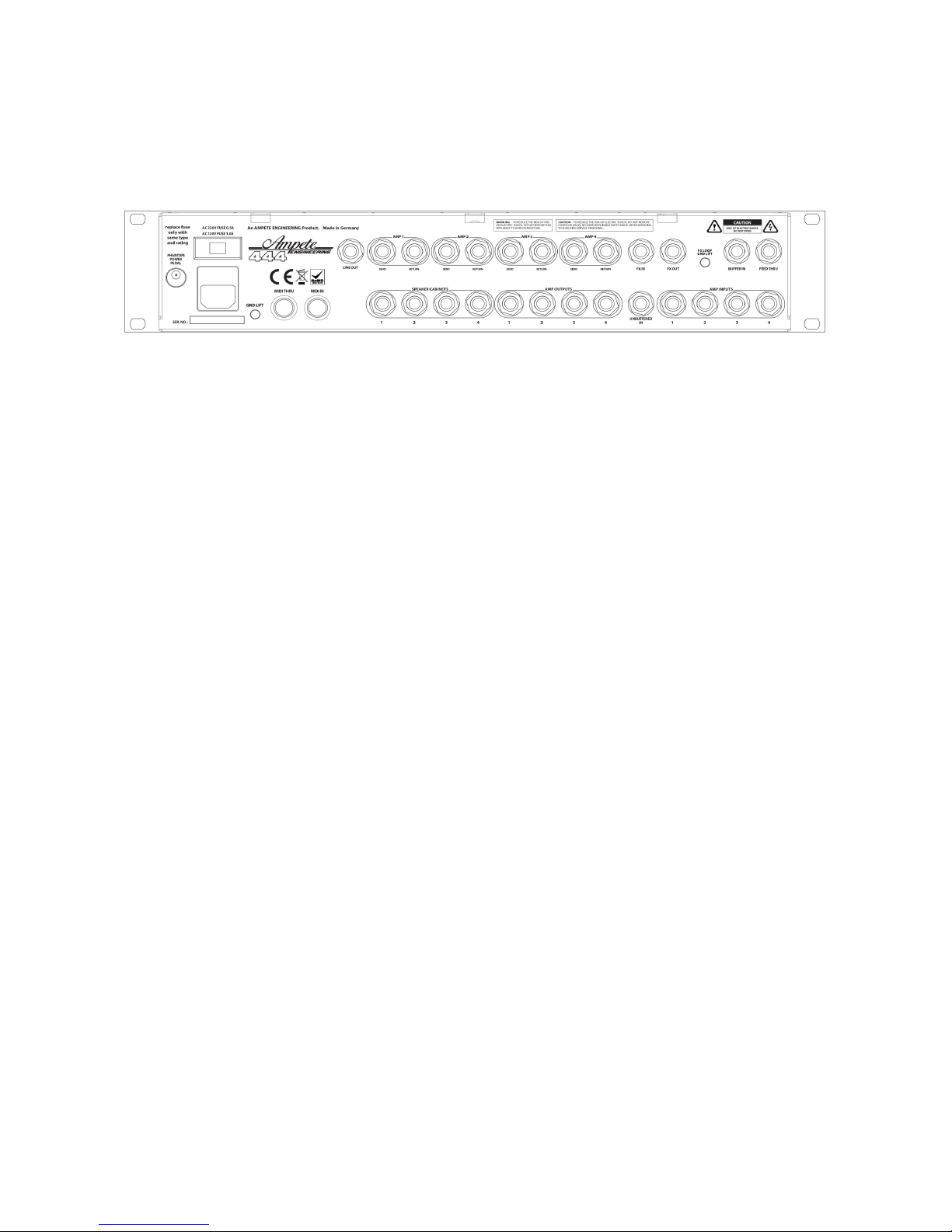
10. FX IN: Connect the FX IN jack of the 444 to the input of your effect, whether it is a sin le unit like
a delay pedal, a chain of pedals or rack units or another audio looper. This is exactly like you would
connect it to your amp's FX Loop Send. When switchin between amps on the 444, it automatically
switches your effects to the currently selected amp.
11. FX OUT: Connect the FX OUT jack of the 444 to the Output of your effect, whether it is a sin le unit
like a delay pedal, a chain of pedals or rack units or another audio looper. This is exactly like you
would connect it to your amp's FX Loop Return. When switchin between amps on the 444, it
automatically switches your effects to the currently selected amp.
12. FX LOOP GND LIFT: The FX LOOP GND LIFT lets you suppress possible pops when switchin
between 2 amps with usin spillover effects like lon delays or reverbs. This is most often caused by
a static volta e rowin to a non rounded electronic si nal path or switchin between from one
audio round to another. In almost any case that switch will solve the issue
13. BUFFER IN: BUFFER IN to drive the AMP INPUTS of the 444. Same as BUFFER IN at the front side,
but disconnected when front panels BUFFER IN is in use.
14. FEED THRU: Direct un rounded si nal connection to the front panel FEED THRU jack only to
simplify the rack wirin .
15. SPEAKER CABINETS 1-4: Connect your speaker cabinets here. No matter which cabinets you
choose, from 1x12“ to 4x12“ with every impedance everythin is possible, but consider not to
exceed the power handlin of the speaker cabinet to avoid any dama e to the speakers and/or the
amplifier. Use speaker cables only!
16. AMP OUTPUTS 1: Connect the loudspeaker/cabinet/amp output outputs of amplifier 1 here. This is
NOT an independent output but it corresponds to the number of the AMP INPUT 1 and the AMP1
SEND and RETURN jacks of the 444. Use speaker cables only!
17. UNBUFFERED IN: Input between the BUFFER IN and AMP INPUTS. This input bypasses the buffer,
when it's used, the BUFFER IN jacks are disconnected. We recommend this input when usin
preceded buffer units or preamps.
18. AMP INPUTS 1-4: Connect the instrument inputs of your amps here. This is the most sensitive
connection settin up the 444, make sure to use hi h quality instrument cables.
8
Altri manuali per 444
1
Indice


