
Amplifico PARKLIO ANPR Manuale utente

PARKLIO™ ANPR
USER MANUAL

1
Dear Customers,
Thank you for the condence you have shown us by purchasing Parklio™ ANPR.
We hope that all your expectations of this product will be fullled. Parklio™ ANPR
is manufactured using the latest technologies and has undergone rigorous quality
control procedures. The User Manual will help you use your product quickly and
safely. Information contained in this manual is subject to change without notice.
Statement of Conditions
In the interest of improving internal design, operational function, and/or reliabili-
ty, Parklio™ reserves the right to make changes to the products described in this
document without notice. Parklio™ does not assume any liability that may occur
due to the use or application of the product(s) or circuit layout(s) described here-
in. Thank you for the condence you have shown us by purchasing our Parklio™
ANPR system.
Trademarks
Parklio™ is a trademark of Amplico d.o.o.
Other brand and product names are registered trademarks or trademarks of their
respective holders.

2
TABLE OF CONTENTS
1. Safety warnings.....................................................................................................3
2. Camera Installation..............................................................................................5
2.1. Before You Start....................................................................................................................5
2.2. Lens Selection.......................................................................................................................5
2.3. Installation Angle................................................................................................................6
2.4. Installation height and distance................................................................................6
2.5. Installation of the camera..............................................................................................7
2.6. Controlling a device.........................................................................................................13
2.7. Generic device.....................................................................................................................13
2.8. Parklio Devices...................................................................................................................14
3. Camera Setup.......................................................................................................15
3.1. Prerequisites..........................................................................................................................15
3.2. Camera activation.............................................................................................................15
3.3. Camera web interface.....................................................................................................18
3.4. Detection area setup.......................................................................................................21
4. Assigning camera to Parklio™ PMS..............................................................23
4.1. Installing Parklio™ Connect.........................................................................................23
4.2. Login.........................................................................................................................................24
4.3. FAQ............................................................................................................................................29

3
1. Safety warnings
This section contains safety instructions that will help to protect you from risk of
injury or property damage. Failure to follow these instructions will invalidate all
warranties.
• Do not use the ANPR camera, if you have not read and understood the operat-
ing instructions before.
• Before rst use of the ANPR camera, make sure that all the parts listed in these
instructions are inside of the original packaging.
• Only parts supplied by the manufacturer of the ANPR camera should be used.
Use of nonmanufacturer provided parts may affect the loss of warranty.
• Ignoring usage instructions, improper installation and use of the device may
result in damage to the ANPR camera or injuries to the user. Instructions should
always be at hand.
• Never expose the inner workings to water.
• The device and external supply must be disconnected from power supply
during installation, maintenance, cleaning, and repairs.
• Leave the repairs to a specialist. Improper repairs may lead to an accident or a
malfunction in the unit.
• The warranty does not cover consumable parts of the device, color fading and
chipping, increased noise due to aging of the device and other aesthetic effects
that do not affect its functionality or safety.
• Strictly follow the instructions for proper installation and connection to the
electrical network.
• Installation requires mechanical and electrical skills, therefore it shall be carried
out by qualied personnel only, who can issue the Compliance Certicate con
cerning the whole installation.
• Do not install the product in explosive environments and atmospheres, the
presence of inammable gases or fumes is a serious safety hazard.

4
PARKLIO (AMPLIFICO D.O.O.) HAS THE RIGHT TO MODIFY THE DEVICE
WITHOUT PREVIOUS NOTICE. PARKLIO (AMPLIFICO D.O.O.) DECLINES
ANY RESPONSIBILITY FOR DAMAGE OR INJURY TO PEOPLE OR THINGS
CAUSED BY IMPROPER USE OR WRONG INSTALLATION.
THE APPLIANCE HAS BEEN ESTABLISHED ACCORDING TO ALL VAL-
UENT SAFETY CRITERIA AND STANDARDS. HOWEVER, WE RECOM-
MEND THAT WITHOUT THE NEEDED HELP AND SUPERVISION, CHIL-
DREN, A PERSON WITH DISABLED PHYSICAL, MOTOR, OR PERSONAL
EQUALITY AND RELATED PEOPLE WITHOUT PREVIOUS EXPERIENCE
OR KNOWLEDGE DO NOT USE THE BARRIER. EXCEPTION IS THE DE-
VICE USAGE UNDER ADEQUATE SUPERVISION IF THEY HAVE RE-
CEIVED SAFETY INSTRUCTIONS AND TRAINING, OR IF THEY ARE IN-
FORMED ABOUT THE DANGER CAUSED BY IMPROPER USAGE. THE
SAME RECOMMENDATION IS FOR JUVENILES AND THEIR USAGE OF
THE DEVICE.
DO NOT ALLOW CHILDREN TO PLAY WITH THE DEVICE. DO NOT LET
CHILDREN CLEAN THE DEVICE, USE IT, NOR MAINTAIN IT, WITHOUT
ADEQUATE SUPERVISION.

5
2. Camera Installation
NOTE: If you are unsure how to properly install the ANPR camera, you can al-
ways schedule a video call with us via email.Our team will explain in detail how
to install ANPR camera for the optimal license plate reading.
2.1. Before You Start
The camera installation conditions should meet the following requirements:
• Trees or items should not orobscure the view of the road/vehicle entrance.
• The license plate tilt angle must be within +/-5 degrees.
To ensure accurate detection and that enough pixels are in the frame, it is required
to select a proper lens.
Steps for choosing the lens:
• Dene the Identication distance of the scene.
• To get the identication distance, dene the camera height (H).
• The detection range (L) can be calculated as L = cot 30° × H ≈ 1.73 x H
• Note: The recommended camera Height (H) is 1,6m to 2m.
2.2. Lens Selection

6
Select a proper lens according to the table below. The identication distance is
based on the camera’s focal length.
The installation angle must meet the requirements below:
• The Vertical angle should not exceed 30 degrees.
• The Horizontal angle should not exceed 30 degrees
2.3. Installation Angle
The camera Height (H) should be 1,6m to 2m.
2.4. Installation height and distance:
Camera
LPR
Camera
Lens (mm)
2.8 - 12 6 11,2
30
15
8 - 32
Scene
Entrance
Road
Trafc
Min.
Identication
Distance (m)
Max.
Identication
Distance (m)

7
Before installing the camera read the quick installation guide included in the
camera box.
The camera package should contain the following items:
2.5. Installation of the camera:
1 1x ANPR Camera
2 1x QR Code
3 8x Waterproof tape
4 4x Mounting screws with dowels
5 1x Cable gland
6 1x Allen wrench
7 1x Screw terminals
8 1x Connection cable
9 2x Quick start guide
10 1x CD
NOTE:
If any of the parts are incorrect, missing, or damaged, contact your Parklio™ deal-
er. Keep the original packing materials, in case you need to return the product for
repair.
1
2
3
456
78
910

8
Wall Mount Option
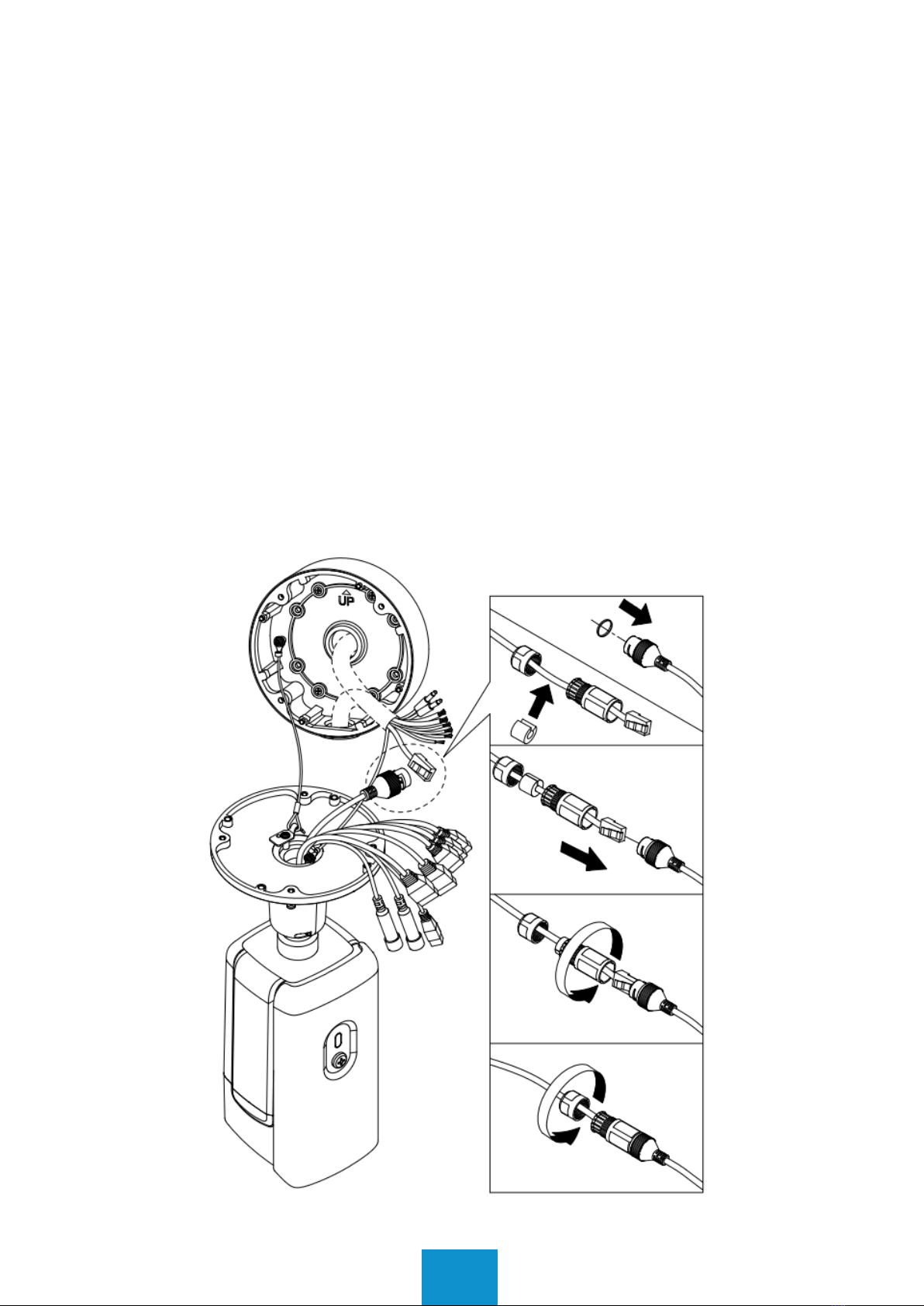
To install the camera on a wall follow the instructions illustrated below:
9
Pole Mount Option
For mounting the camera to a pole a pole mounting kit is needed. The pole mount-
ing kit is not included with the camera.
To mount the camera to a pole follow the instructions included with the pole
mounting kit.
Connections
All wiring connections should be made inside the base plate to protect them from
environmental conditions.
If connecting the camera via Ethernet use the provided gasked.
For protection other terminal connections use the provided water proof tape.
Indice


