
Analogue Solutions 4Voice Manuale utente

analogue solutions Semblance/4Voice V2e&oe(c)21-10-2004
1
Semblance / 4Voice user manual
english

analogue solutions Semblance/4Voice V2e&oe(c)21-10-2004
2
Contents
Note About This Manual .............................................................3
SPECIFICATION...........................................................................4
INTRODUCTION...........................................................................7
APPLICATIONS............................................................................7
SAFETY INSTRUCTIONS ............................................................8
INITIAL TUNING...........................................................................9
CIRCUITS IN DETAILS.................................................................9
VCO1...........................................................................................10
VCO2...........................................................................................11
SYNC...........................................................................................12
NOISE GENERATOR..................................................................13
MIXER.........................................................................................13
VCF .............................................................................................14
Filtering External Sound Sources............................................16
ENVELOPE GENERATORS.......................................................17
EG1 ASR.....................................................................................17
EG2 ASR.........................................................................................
VCA.................................................................................................
LFO .................................................................................................
MIDI to CV CONVERTER...............................................................
EG2 ASR.....................................................................................18
VCA.............................................................................................18
LFO / Sample and Hold.............................................................19
REAR PANEL .............................................................................21
REAR PANEL DETAILS .............................................................22
REAR PANEL AUDIO CONNECTIONS .....................................23
NO SIGNAL? ..............................................................................24
QUICK METHOD FOR ZERO MODULATION............................24
EXPANSION................................................................................24
INTERNAL CALIBRATION OF VCOs........................................24
MIDI CONNECTIONS .................................................................26
LED Description.........................................................................26
Program Mode ...........................................................................26
To Set MIDI Receive Channel ...................................................27
4Voice Supplement Manual......................................................28
analogue solutions Semblance/4Voice V2e&oe(c)21-10-2004
3
Note About This Manual
This manual is for the Semblance synthesiser, but includes a section for the 4Voice
version.
As the 4Voice is literally four Semblances in a rack with a few extras, it is not necc-
esary to duplicate the information. Instead we have just added an addendum to outline the
additional features of the 4voice. The main voice architechture of both are identical.
The main functional differences for the 4 voice are;
Polyphinc mode
Mono audio mixer
The main physical differences are;
13U rack mount case
Internal transformer type mains power supply.
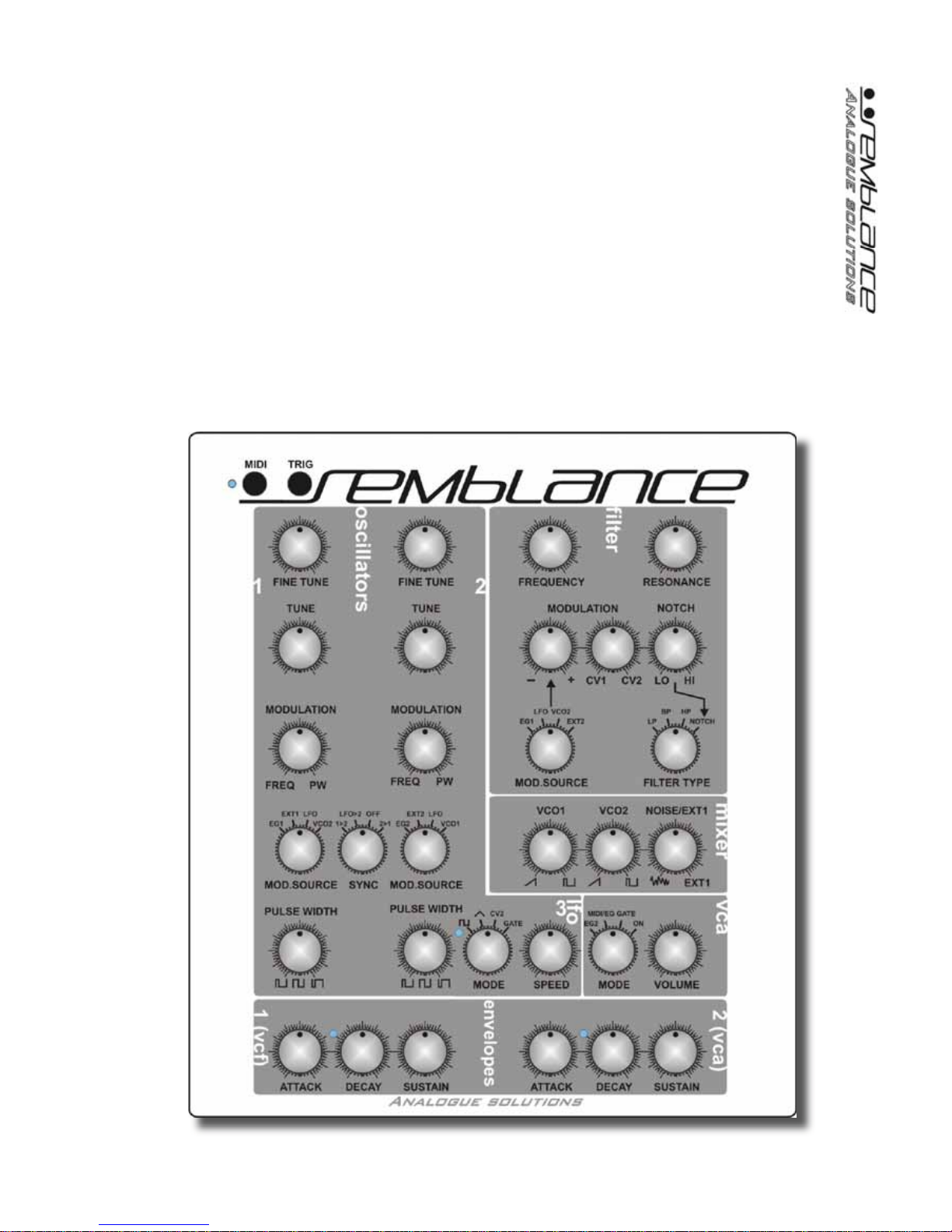
Below; Semblance

analogue solutions Semblance/4Voice V2e&oe(c)21-10-2004
4
SPECIFICATION
Brief Overview:
Semblance / 4Voice is a self contained TRUE analogue synthesiser. The voice cir-
cuitry is entirely analogue, using all discrete and op-amp components. There is no voice
DSP happening!
Semblance / 4Voice has a similar sound and specification to the classic Oberheim
SEM, but with many improvements such as MIDI, Noise, more modulation. Note however,
Semblance is not intended to be and is not a clone of the SEM. If you want a true SEM
sound, buy a SEM!
The 4Voice version has a Poly mode, to allow four the voices to be used as one big
4-voice poly synth!
Semblance / Single voice Specification;
VCO1
Fine Tune, Tune, PW Mod, FM, manual PW, Mod Source controls, Saw out, Pulse
out, Sync
VCO2
Fine Tune, Tune, PW Mod, FM, manual PW, Mod Source controls, Saw out, Pulse
out, Sync
VCF
Low pass filter, High pass filter, Band pass filter, Notch filter, variable Notch filter.
Cut-off, Resonance, ModulationAmount, Mod Source, MIDI Mod
Mixer
Audio source mixer
VCA
Mode switch, Output volume
EG1
ASR envelope with trigger LED
EG2
ASR envelope with trigger LED
LFO
Speed, Output Mode (Square, Triangle, Gate, External CV)
Noise Generator
White noise

analogue solutions Semblance/4Voice V2e&oe(c)21-10-2004
5
Sample and Hold
For random modulation effects
MIDI to CV Converter
16 bit high resolution with auxiliary controller CV2 output
Many modulation possibilities.
Rotary controls:
24
Rotary switches:
6
Push button:
2
LEDs:
4
Jack sockets (6.35mm, mono);
3
MIDI Sockets;
2
Rugged steel contruction
4Voice Additional Features;
MIDI
Poly mode, to allow all 4 voices to be played as one poly synth.
Master Mixer
Mono audio mixer with master level, headphone and main output.
Intenal PSU
Internal filter mains transformer. Switchable 115V/230V.

analogue solutions Semblance/4Voice V2e&oe(c)21-10-2004
6
Semblance Physical Specs;
Dimensions:
Height: 110mm Width: 242mm. Depth: 275mm
Weight:
2.3Kg
Power:
Uses external 15VAC, 500mA mains adaptor, 2.1mm DC type barrel plug.
Accessories:
Manual, Mains adaptor (230v UK or Euro type).
4Voice Physical Specs;
Dimensions:
Height: xmm Width: xmm. Depth: xmm
Weight:
xKg
Power:
115V 60hZ / 230v/50hZ, filtered internal power supply, IEC socket.
Accessories:
Manual, IEC mains lead (230v UK or Euro, or 115V USA).

analogue solutions Semblance/4Voice V2e&oe(c)21-10-2004
7
INTRODUCTION
Congratulations on buying the Semblance synthesiser. Semblance is part of theAna-
logue Solutions range of analogue music equipment. Semblance is a precision electronic
musical instrument. It combines all the often needed music electronic circuitry to make a
music synthesiser in one compact module.
Nocompromisehas beenmadewith theconstructionof Semblance.Cheaperoptions
in parts have not been used;
Full rugged steel case - no plastic mouldings
Good quality smooth potentiometers, fully sealed against dust
Good quality knobs with spun aluminium caps
High grade double sided circuit board
All power and signal input/outputs have EM filters to remove external noise and im-
prove immunity
High Quality DAC - 16bit! (others use 12 or even 8 bit)
Very stable MIDI to CV conversion
Very stable analogue oscillators
Expensive blue and even more expensive white LEDs
Hand built by humans
Lasting quality and appeal with a life far longer than any software plug-in or DSP
synth
APPLICATIONS
SYNTHESISER
Semblance is for use any time you need analogue sound effects, fat basses, scream-
ing leads, beeps, tones, zaps, and all the other crazy sounds associated with analogue
synthesis. Use in place of your boring digital synths and DSP soft synths.
EFFECTS PROCESSOR
Semblance has an audio input socket, so you can feed external sounds into the on-
board analogue filters for analogue processing.

analogue solutions Semblance/4Voice V2e&oe(c)21-10-2004
8
SAFETY INSTRUCTIONS
Please read carefully before using:
• Semblance: only use the correct power adaptor - 230V (or 115V whatever your
country needs).
• 4Voice: ensure the correct voltage is selected on the bottom of the synth. 115V or
230V depending on your supply. Disconnect the power cable before changing.
• Never handle the adaptor/mains cable with wet hands
• Never excessivly bend the adaptor/mains cable or get it trapped or place heavy
objects on it. If the cable becomes damaged, replace it.
• Ensure the unit is disconnected from the mains before moving or cleaning.
• Always disconnect the unit from the mains if there is lightning in your area.
• Ensure Semblance is on a stable surface, and never place heavy objects on top of
it. The 4Voice must be rack-mounted.
• Never allow young children or animals to operate the unit or adaptor.
• Do not use excessive force when using the controls or inserting cables to the con-
nectors.
• Theunitshould notbeoperated intherain ornearwater andshouldnot beexposed
to moisture. If the unit is brought from a cold environment to a warm one, the unit should
be left to reach the ambient temperature.
• Keep the unit away from heat sources, such as radiators, ovens, heaters etc.
• Never allow the unit to get wet. Do not operate it near water, like pools, sinks, bath-
rooms etc. Do not place beverages on or near it.
• Never open the case or attempt to make repairs. Refer any servicing to a qualified
service personnel.
Preventing damage to other connected devices;
Semblance/4Voicehasaveryhighdynamicrange.Itiscapableof produceloud signals
of very high and sub-sonic frequencies that could blow inadequate speakers if played too
loud. It is recommended that input levels to external equipement (mixers, amp's etc.) is
kept low when first connected, and then sowly increased to a userable level.
Maintenance Instructions
Any cleaning of the Semblance/4Voice case should be done with a clean lint-free
cloth. DO NOT USE SOLVENTS OR CLEANERS, as this will deteriorate the exterior ap-
pearance of the equipment.
Mounting
Semblancemounting does notmean 'place onthe wall' or'to make love to' in this instance.
Place Semblance soundly on any stable surface so he cannot fall off or over, causing it
or yourself injury.
The 4Voice version should be mounted in a suitable instrument rack case (19" type). En-
sure you use all rack-mount holes.
POWER
Possible sources of US voltage mains adaptors for the Semblance (not tested);
www.radioshack.com p/n 273-1631 or 273-1690

analogue solutions Semblance/4Voice V2e&oe(c)21-10-2004
9
The following sections apply to the Semblance specifically, but in gen-
eral also to the and single voice of the 4Voice too.
INITIAL TUNING
Once the MIDI and audio connections have been made it may be neccessary to tune
in the VCOs to the rest of your music set-up. Allow a five minute warm up time.
First set up the controls of Semblance to make a simple sound. It is usually best to
leave the VCA at ON. Turn VCO2 to zero volume so you can only hear VCO1.
Play, say middle C on the keyboard. Using a digital keyboard as a reference, adjust
the course or fine tuning of VCO1 until it plays in tune with your reference.
Finally, turn up VCO2 so both VCOs can be heard. Using the tune controls of VCO2,
tune it to VCO1.
CIRCUITS IN DETAILS
Here follows details on all the sockets and controls, with brief simplified explanations
of what the circuits do. We have not gone into technical details on how and exactly what
each circuit does but tried to explain each control's function and effect.
Anyone who has used synthesisers before should be familiar with the terms used and
therefore be able to predict their behaviour and how they affect the sound. The best way
to learn how to use Semblance is to go straight ahead and play with it. Reading of this
manual may only be neccessary for finer operational detail.
analogue solutions Semblance/4Voice V2e&oe(c)21-10-2004
10
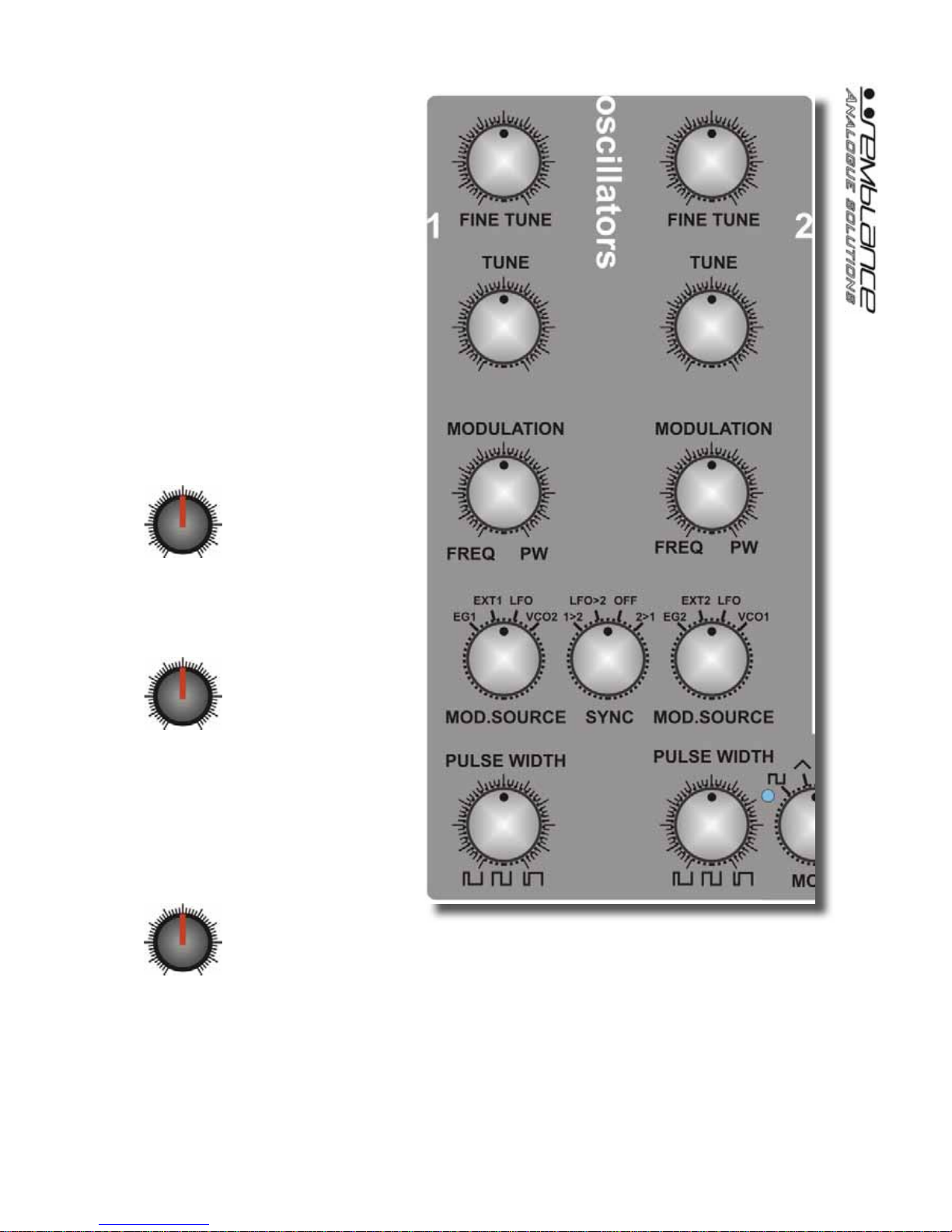
VCO1
The voltage controlled oscil-
lators (VCOs 1 and 2) produce the
rawaudiowaveform usually used as
the initial source for sound creation.
Theyprovide cyclic audiowaveforms
that can be pitched. VCOs usually
receive treatment from the VCF to
turn their basic tones into pleasant
sounds.
FINE TUNE
Controlsfinepitchadjustmentof
VCO1.Use thistotuneVCO1to your
other instruments or VCO2.
TUNE
Controls the course pitch of
VCO1.Rangeisabout+/-2octaves.
Use this to tune VCO1 to your other
instrumentsor to shiftthe VCO pitch
up or down an octave compared to
the VCO2.
MODULATION
This controls the amount of modulation to either pulse width or pitch from the modula-
tion source selected by the SOURCE switch.
Turnthisknobclockwiseinincreasingamountstoapplypulsewidthmodulation(PWM)
to the square wave. This will have the affect of thickening up the VCO sound. Extreme
settings of modulation may result in the sound cutting out.
Turn this knob anti-clockwise in increasing amounts to apply frequency modulation
(FM) to VCO1. Use this for vibrato and trill effects on the pitch.
In a central position, there will be no modulation to either PW or Frequency.
Questo manuale è adatto per i seguenti modelli
1
Indice
Altri manuali Analogue Solutions Sintetizzatore

Analogue Solutions
Analogue Solutions Telemark Manuale utente

Analogue Solutions
Analogue Solutions FUSEBOX X Manuale utente

Analogue Solutions
Analogue Solutions NYBORG 12 Manuale utente

Analogue Solutions
Analogue Solutions Telemark Manuale utente

Analogue Solutions
Analogue Solutions Telemark-k Manuale utente

Analogue Solutions
Analogue Solutions Treadstone Manuale utente

Analogue Solutions
Analogue Solutions LEIPZIG-S Manuale utente

Analogue Solutions
Analogue Solutions Leipzig-v3 Manuale utente

Analogue Solutions
Analogue Solutions VOSTOK 2020 Manuale utente

Analogue Solutions
Analogue Solutions LEIPZIG-S Manuale utente


