
AngelTrax CATV2400 Manuale utente
Patent Pending
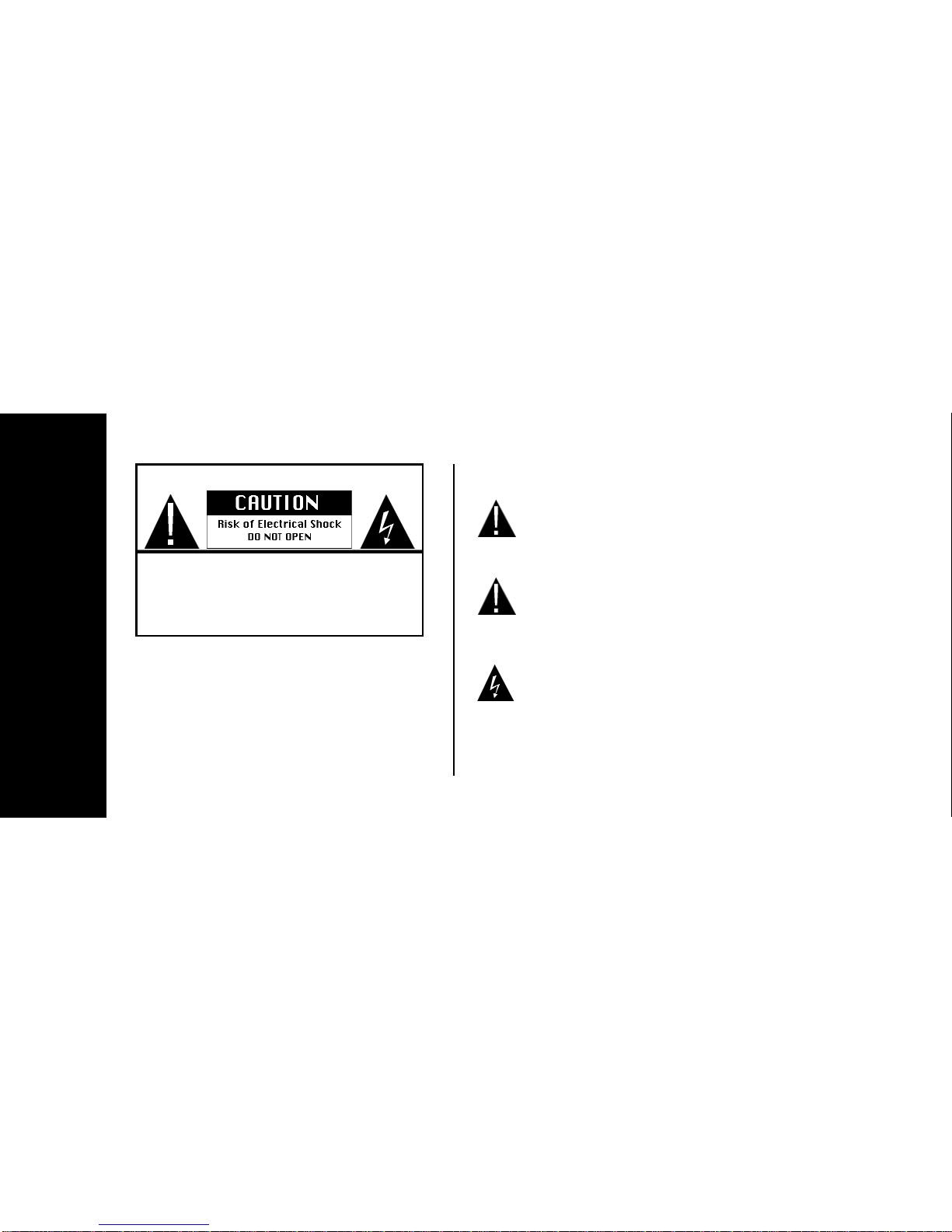
Warning statements identify conditions
or practices that could result in injury or
loss of life.
Caution statements identify conditions
or practices that could result in damage
to this product or other property.
To reduce the possibility of electrical
shock, do not remove the cover to this
product.
Safety
To reduce the possibility of Electrical Shock, do
not remove the cover to any component in this
package. There are no user-serviceable parts
inside the components. Please refer all service to
qualified personnel only.
WARNING
Safety Terms and Symbols:
WARNING:
DANGER:
CAUTION:
To prevent fire or electrical shock haz-
ard, do not expose the units to rain or
moisture.

Important Safety Instructions:
1. All of the safety, set-up and operating instructions should be
read before the product is operated.
2. The safety and operating instructions should be retained for
future reference.
3. All warnings on the product and in the operating instructions
should be adhered to.
4. All operating and use instructions should be followed.
5. Unplug this product from the wall outlet before cleaning. Do not
use liquid cleaners or aerosol cleaners. Use a damp cloth for
cleaning.
6. Do not use attachments not recommended by the products
manufacturer if they may cause hazards.
7. Do not use this product near water - for example, near a bath
tub, wash bowl, kitchen sink, or laundry tub. Never spill liquid of
any kind on this product.
8. Any mounting of the product should follow the manufacturer’s
instructions and should use a mounting accessory recommended
by the manufacturer.
9. This product should be operated only from the type of power
source indicated on the marking label. If you are not sure of the
type or power supply to your home, consult your product dealer or
local Power Company. For products intended to operate from bat-
tery power, or other sources, refer to the operating instructions.
10. Power supply cord should be routed so that they are not likely
to be walked on or pinched by items placed upon or against them.
11. For added protection for this product during a lightning storm,
or if it is left unattended and unused for long periods of time,
unplug it from the wall outlet and disconnect the cable system.
This will prevent damage to the product due to lightning and
power line surges.
12. Never push objects of any kind into this product through the
openings as they may touch dangerous voltage points or short-
out parts that could result in a fire or electric shock.

13. Do not overload wall outlets with extension cords or integral
convenience receptacles as this can result in a risk of fire or elec-
tric shock.
14. Unplug this product from the wall outlet and refer servicing to
qualified services personnel under the following conditions:
a. When the power supply cord or plug is damaged.
b. If liquid has been spilled, or objects have fallen into
the products.
c. If the product does not operate normally by following
the operation instructions, adjust only those controls that
are covered by the operating manual as an improper
adjustment of other controls may result in damage and
will often require extensive work by a qualified technician
to restore this product to its normal operation.
d. If the products have been dropped or damaged in any
way.
e. When the product exhibits a distinct change in
performance -- this indicates a need for service.
15. When replacement parts are required, be sure the service
technician has used replacement parts specified by the manufac-
turer or that have the same characteristics as the original part.
Unauthorized substitutions may result in fire, electric shock, or
other hazards.
16. Upon completion of any service or repair to this product, ask
the service technician to perform safety checks to determine that
the product is in proper operating condition.
17. The product should be situated from heat sources such as
radiators, heat registers, stoves, or other products including ampli-
fiers that produce heat.
FCC
This device complies with Part 15 of the FCC Rules. Operation is subject to the fol-
lowing two conditions:
(1) This device may not cause harmful interference, and
(2) This device must accept any interference received, including interference that
may cause undesired operation.
Warning: Changes or modifications to this unit not expressly approved by the party
responsible for compliance could void the user authority to operate the equipment.

Specifications:
Transmitter
Frequency: 2400MHz~2483MHz
Sender Power: 10dBm
Channels: 4 - 2414,2432,2450,2468MHz
Frequency Stability: +100KHz
Video Input Level: 1 Vp-p
Audio Input Level: 1 Vp-p
Supply Voltage: 12V
Power Consumption: 150mA
Antenna: Dipole Internal
Dimension: 5”Dx2”Wx7”5H
Operating Temperature: -10C~+60C
Receiver
Frequency: 2400MHz~2483MHz
Sensitivity: -90dBm
Channels: 4 - 2414,2432,2450,2468MHz
L.O. Stability: +100KHz
Video Input Level: 1 Vp-p
Audio Input Level: 1 Vp-p
Supply Voltage: 12V
Power Consumption: 200mA
Antenna: Dipole Internal
Dimension: 5”Dx2”Wx7”5H
Operating Temperature: -10C~+60C

Congratulations
ongratulations on your purchase of the AngelTrax CATV2400/CATV2400PLUS Wireless Cable TV System. This
product combines easy set-up, ease of use and convenience for your wireless cable TV viewing experience.
Whether you need a TV in your kitchen, garage, back porch or a room without a cable connection, the AngelTrax wire-
less cable TV systems will provide you with years of wireless cable TV enjoyment.
For assistance using or connecting your AngelTrax Wireless TV System, visit http://www.angeltrax.com/troubleshooting.
If you have an immediate need for assistance, please call and ask for technical support at 800-673-1788.
Our technical support hours are Monday through Friday from 9am to 6pm Central Standard Time. If you need to call
for assistance other than Live Tech Support hours, leave a message on extension 131. We will return your call.
For an easy and quick set-up of your new AngelTrax product, follow the instructions on the following pages.
We sincerely hope you enjoy your new AngelTrax Wireless Cable TV System.
Register your product today at: www.angeltrax.com/register
To purchase accessories, go to http://www.ivsshop.com
C
QUICK SET-UP
1Start Here
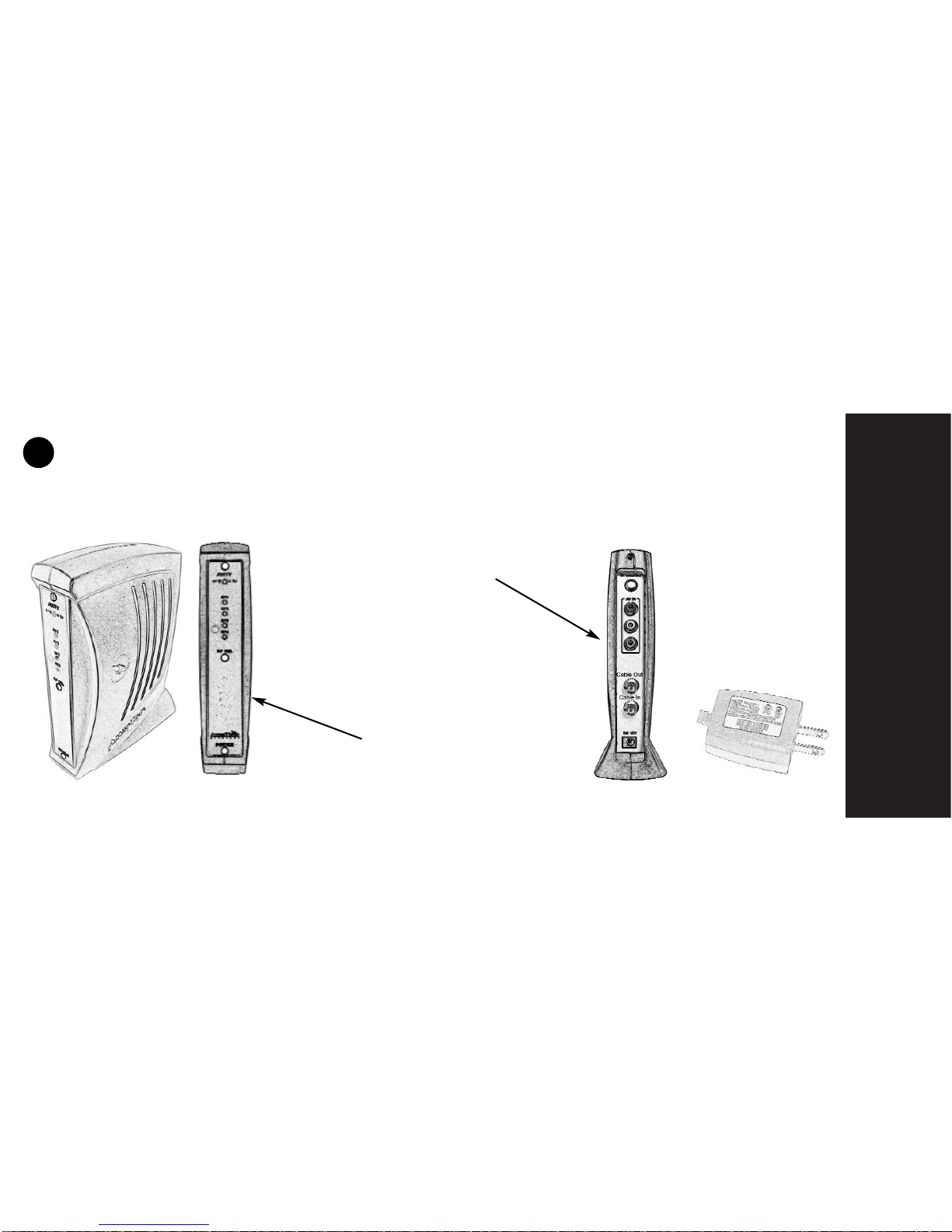
Unpack your equipment and locate your Power Adapters, the Transmitter and your RF cables.
Front view of transmitter
Rear view of transmitter
Power Adapter
Setting up the Transmitter
1
QUICK SET-UP
2
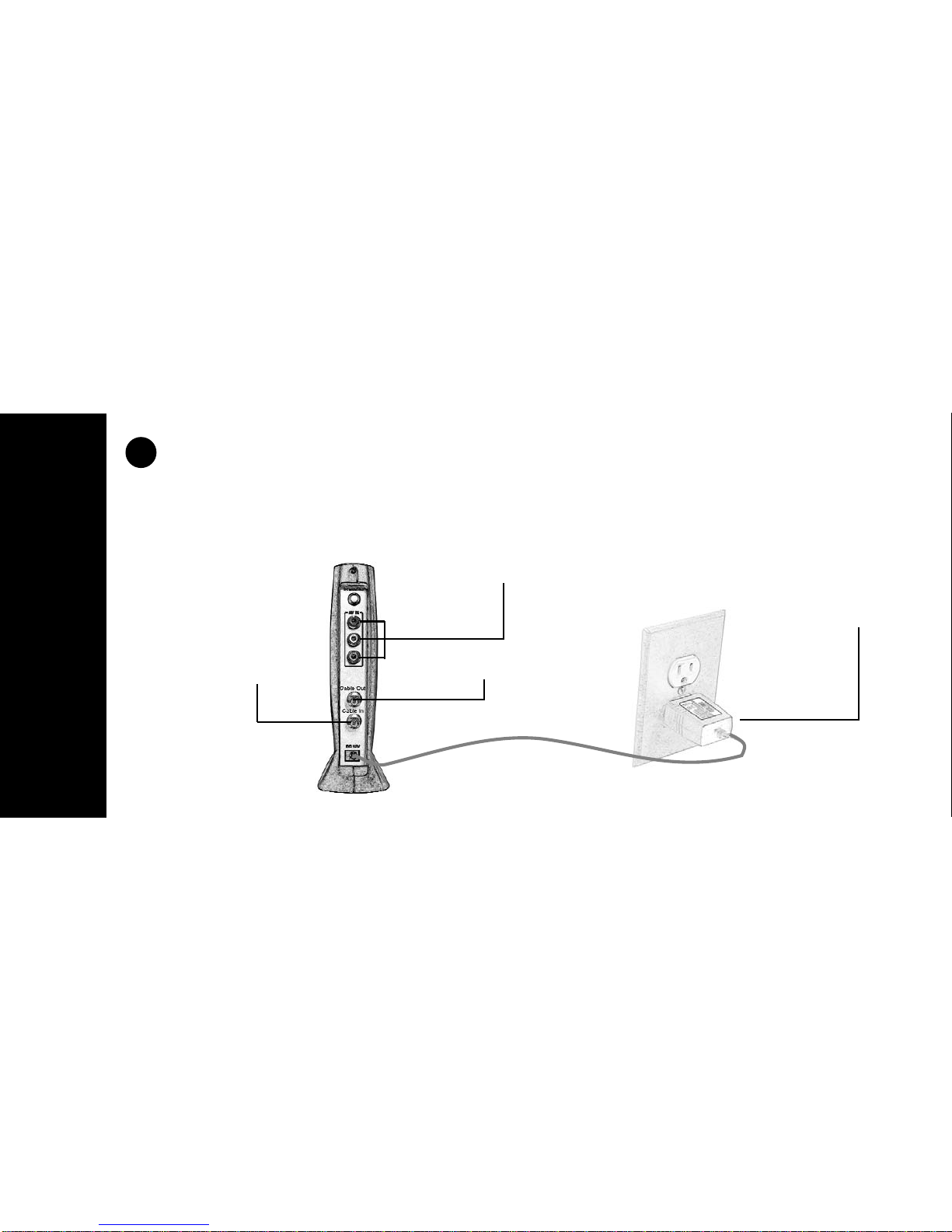
Place your transmitter to the closest cable drop to the remote TV. (NOTE: If you plan to also
connect your Digital Cable Box, you must locate the transmitter close to your Digital Box.) See
Page 8 for advanced set-up.
1. Connect your
incoming cable to the
“F” Type connector on
the rear of the trans-
mitter marked “Cable
In.”
2. Connect the 12V
power adapter to your
transmitter and to your
110V wall outlet.
For Digital Box Connection.
See Page 8
Out to TV or Digital Box
(Optional)
2
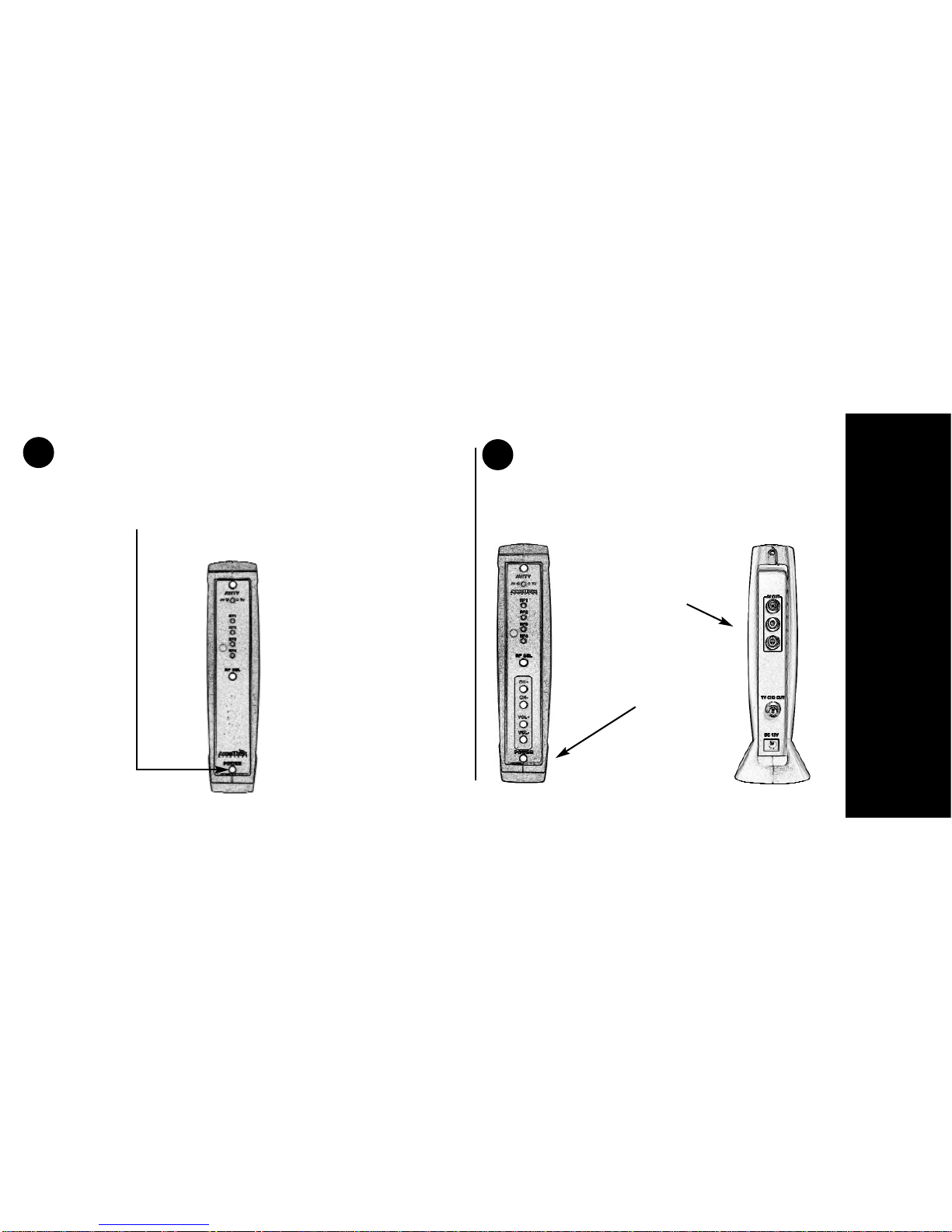
3. Turn on the Transmitter by pressing
the power button at the bottom of the
transmitter.
3
Your
Transmitter
is
Now
Ready
4Setting up the Receiver
Unpack your equipment and locate your
Receiver, Power Adapter and Cables.
Rear
view of
Receiver
Front
view of
Receiver
QUICK SET-UP
3
4
QUICK SET-UP
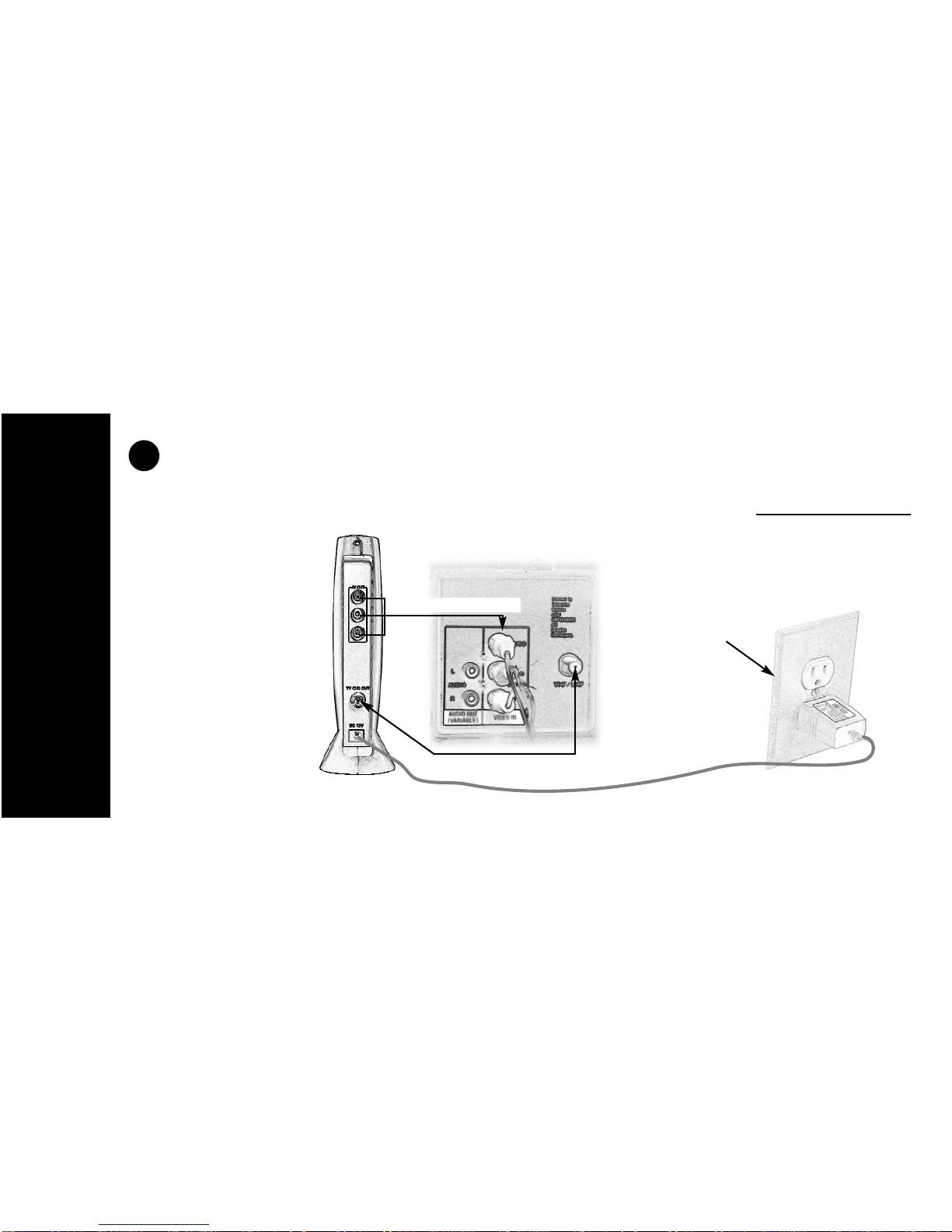
Place your receiver close to the remote TV. We have supplied 2 options for connections to your remote TV;
Through the Antenna Connection or through the Composite video Input. Choose one: DO NOT USE BOTH!
5
1. Connect one of the
RF cables (Supplied)
to the “TV CH3 OUT”
on the back of the
receiver. Connect the
other end to the RF
(Antenna) input on the
back of the TV. Or,
connect the RCA
cables to the back of
the Receiver and the
TV. RF Connection Option
RCA Connection Option
2. Connect the 12V
power adapter to your
transmitter and
to your 110v
wall outlet.
Altri manuali per CATV2400
1
Questo manuale è adatto per i seguenti modelli
1
Indice
Manuali Sistema microfonico popolari di altre marche


Sennheiser
Sennheiser Evolution Wireless Digital EW-DX EM 2 Manuale utente

Alpha Technologies
Alpha Technologies RBMS Manuale utente

SWIT Electronics Co.,LTD.
SWIT Electronics Co.,LTD. CW-S150 Manuale utente

Shure
Shure UA844 Manuale utente

Panasonic
Panasonic SHFX70 - DVD HOME THEATER WIRELESS SYSTEM Manuale utente

Pyle
Pyle PDWM5000 Manuale utente