Anthem BLX 200 Manuale utente

BLX 200
BLU-RAY DISC PLAYER
BLX-200(A)_091023:BLX-200(A) 2009-10-26 오 5:52 페이지 1

ENGLISH
2
1. Read these instructions.
2. Keep these instructions.
3. Heed all warnings.
4. Follow all instructions.
5. Do not use this apparatus near water.
6. lean only with dry cloth.
7. Do not block any ventilation openings.
Install in accordance with the manufacturer’s
instructions.
8. Do not install near any heat sources such as radiators,
heat registers, stoves, or other apparatus (including
amplifiers) that produce heat.
9. Do not defeat the safety purpose of the polarized or
grounding-type plug. A polarized plug has two blades
with one wider than the other.
A grounding type plug has two blades and a third
grounding prong. The wide blade or the third prong are
provided for your safety. If the provided plug does not
fit into your outlet, consult an electrician for
replacement of the obsolete outlet.
10. Protect the power cord from being walked on or
pinched particularly at plugs, convenience receptacles,
and the point where they exit from the apparatus.
11. Only use attachments/accessories specified by the
manufacturer.
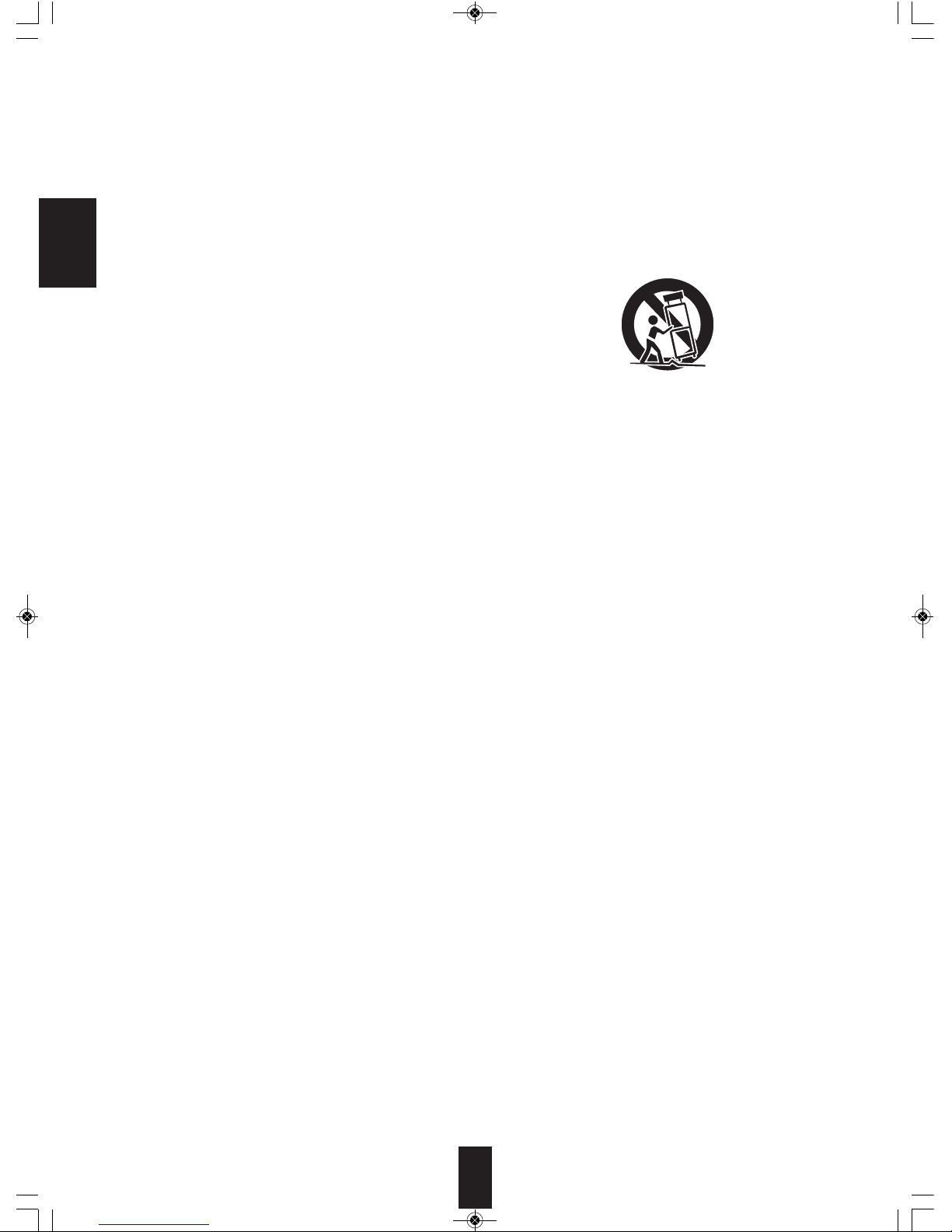
12. Use only with the cart, stand, tripod, bracket, or table
specified by the manufacturer, or sold with the
apparatus.
When a cart is used, use caution when moving the
cart/apparatus combination to avoid injury from tip-
over.
13. Unplug this apparatus during lightning storms or when
unused for long periods of time.
14. Refer all servicing to qualified service personnel.
Servicing is required when the apparatus has been
damaged in any way, such as power-supply cord or
plug is damaged, liquid has been spilled or objects
have fallen into the apparatus, the apparatus has been
exposed to rain or moisture, does not operate
normally, or has been dropped.
IMPORTANT SAFETY INSTRUCTIONS
ENGLISH
PORTABLE CART WARNING
BLX-200(A)_091023:BLX-200(A) 2009-10-26 오 5:52 페이지 2

3
ENGLISH
Introd ction
READ THIS BEFORE OPERATING YOUR UNIT
: TO REDU E THE RISK OF ELE TRI SHO K,
DO NOT REMOVE OVER (OR BA K). NO USER-
SERVI EABLE PARTS INSIDE. REFER
SERVI ING TO QUALIFIED SERVI E
PERSONNEL.
: TO REDUCE THE RIS OF FIRE OR ELECTRIC SHOC ,
DO NOT EXPOSE THIS APPLIANCE TO RAIN OR MOISTURE.
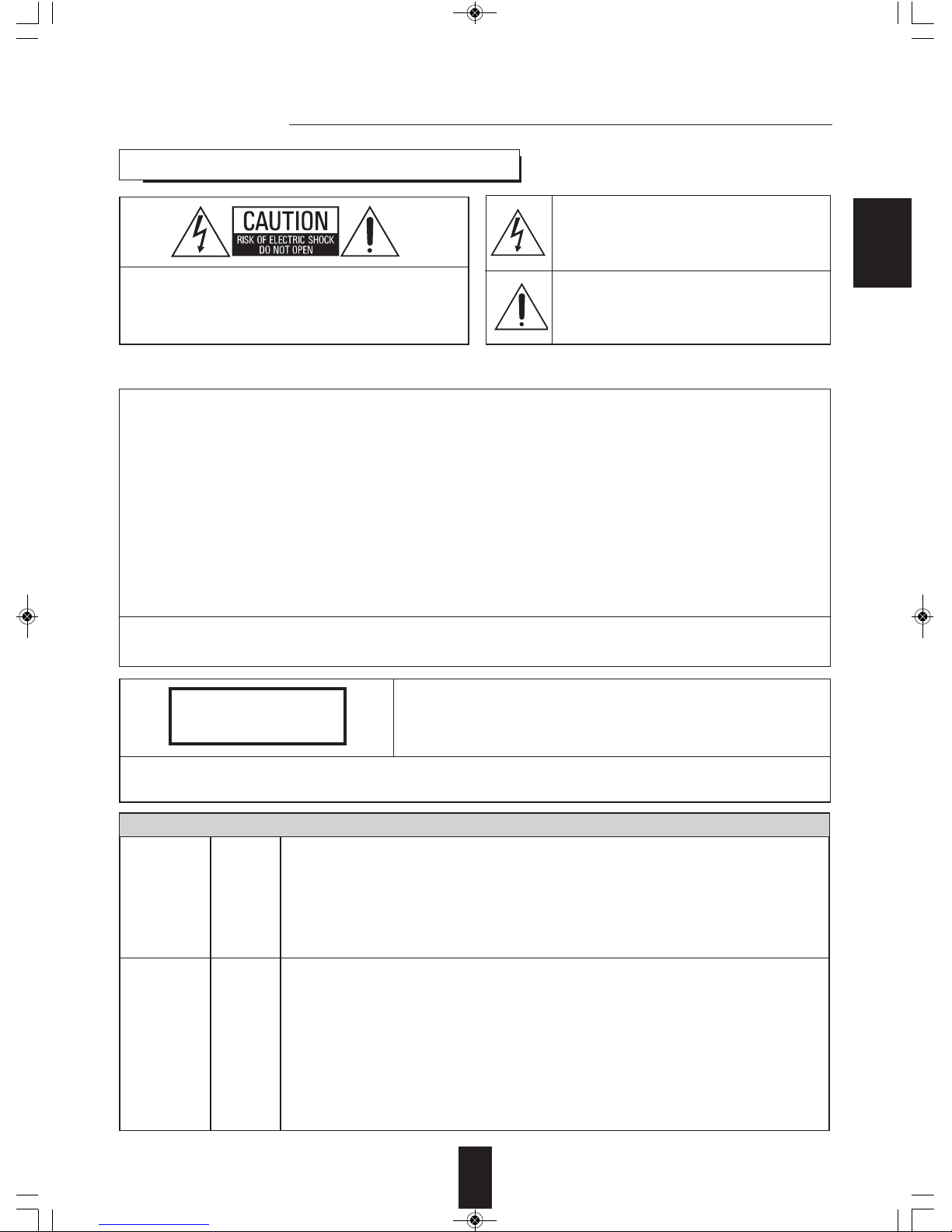
CAUTION
WARNING
This symbol is intended to alert the user to the
presence of uninsulated "dangerous voltage" within
the product's enclosure that may be of sufficient
magnitude to constitute a risk of electric shock to
persons.
This symbol is intended to alert the user to the
presence of important operating and maintenance
(servicing) instructions in the literature accompanying
the appliance.
FCC INFORMATION (FOR U.S.A.)
This equipment has been tested and found to comply with the limits for a lass B digital device, pursuant to Part 15 of the F
Rules. These limits are designed to provide reasonable protection against harmful interference in a residential installation. This
equipment generates, uses and can radiate radio frequency energy and, if not installed and used in accordance with the
instructions, may cause harmful interference to radio communications. However, there is no guarantee that interference will not
occur in a particular installation. If this equipment does cause harmful interference to radio or television reception, which can be
determined by turning the equipment off and on, the user is encouraged to try to correct the interference by one or more of the
following measures:
• Reorient or relocate the receiving antenna.
• Increase the separation between the equipment and receiver.
• onnect the equipment into an outlet on a circuit different from that to which the receiver is connected.
• onsult the dealer or an experienced radio/TV technician for help.
aution : Any changes or modifications in construction of this device which are not expressly approved by the party responsible
for compliance could void the user’s authority to operate the equipment.
This lass B digital apparatus complies with anadian I ES-003.
et appareil numérique de la lasse B est conforme à la norme NMB-003 du anada.
CAUTION
Invisible laser radiation when the unit is open.
Do not stare into beam.
AUTION : USE OF ANY ONTROLS, ADJUSTMENTS, OR PRO EDURES OTHER THAN THOSE SPE IFIED
HEREIN MAY RESULT IN HAZARDOUS RADIATION EXPOSURE.
CLASS 1
LASER PRODUCT
FOR YOUR SAFETY
Units shipped to the U.S.A and ANADA are designed for operation on 120 V A only.
Safety precaution with use of a polarized A plug.
However, some products may be supplied with a nonpolarized plug.
U.S.A
CANADA
120 V : To prevent electric shock, match wide blade of plug to wide slot, fully insert.
: Pour éviter chocs électriques, introduire la lame la plus large de la fiche dans
la borne correspondante de la prise et pousser jusqu’ au fond.
CAUTION
ATTENTION
To ensure safe operation, the three-pin plug supplied must be inserted only into a standard three-
pin power point which is effectively earthed through the normal household wiring. Extension cords
used with the equipment must be three-core and be correctly wired to provide connection to earth.
Improper extension cords are a major cause of fatalities. The fact that the equipment
operates satisfactorily does not imply that the power point is earthed and that the installation
is completely safe. For your safety, if in any doubt about the effective earthing of the power
point, consult a qualified electrician.
PAN-EUROPEAN UNIFIED VOLTAGE
All units are suitable for use on supplies 220-240 V AC.
EUROPE
220 V
-
240 V
BLX-200(A)_091023:BLX-200(A) 2009-10-26 오 5:52 페이지 3

ENGLISH
4
ENGLISH
PRECAUTIONS
■Moisture condensation
Moisture may form on the lens in the following conditions.
• Immediately after a heater has been turned on.
• In a steamy or very humid room.
• When this unit is moved from a cold place to a warm one.
If moisture forms inside this unit, it may not operate properly.
In this case, turn on the power and wait about one hour for the moisture to evaporate.
■If there is noise interference on the TV while a broadcast is being received.
Depending on the reception condition of the TV, interference may appear on the TV screen while you are watching a TV
broadcast and this unit is left on. This is not a malfunction of this unit or the TV. To watch a TV broadcast, turn off this unit.
■Do not transport this unit with discs left in it.
■Do not place on the component such as amplifier or receiver that generates heat.
If so, the temperature inside this unit rises and malfunction may occur.
• Leave a space around the unit for sufficient ventilation.
• Avoid installation in extremely hot or cold locations, or in an area
that is exposed to direct sunlight or heating equipment.
• Keep the unit free from moisture, water, and dust.
• Do not let foreign objects in the unit.
• The ventilation should not be impeded by covering the ventilation
openings with items, such as newspapers, table-cloths, curtains,
etc.
• No naked flame sources, such as lighted candles, should be placed
on the unit.
• Please be care the environmental aspects of battery disposal.
• The unit shall not be exposed to dripping or splashing for use.
• No objects filled with liquids, such as vases, shall be placed on the
unit.
• Do not let insecticides, benzene, and thinner come in contact with
the set.
• Never disassemble or modify the unit in any way.
■Notes on the AC power cord and the wall outlet.
• The unit is not disconnected from the A power source(mains) as
long as it is connected to the wall outlet, even if the unit has been
turned off.
• To completely disconnect this product from the mains, disconnect
the plug from the wall socket outlet.
• When setting up this product, make sure that the A outlet you are
using is easily accessible.
• Disconnect the plug from the wall outlet when not using the unit for
long periods of time.
CAUTION
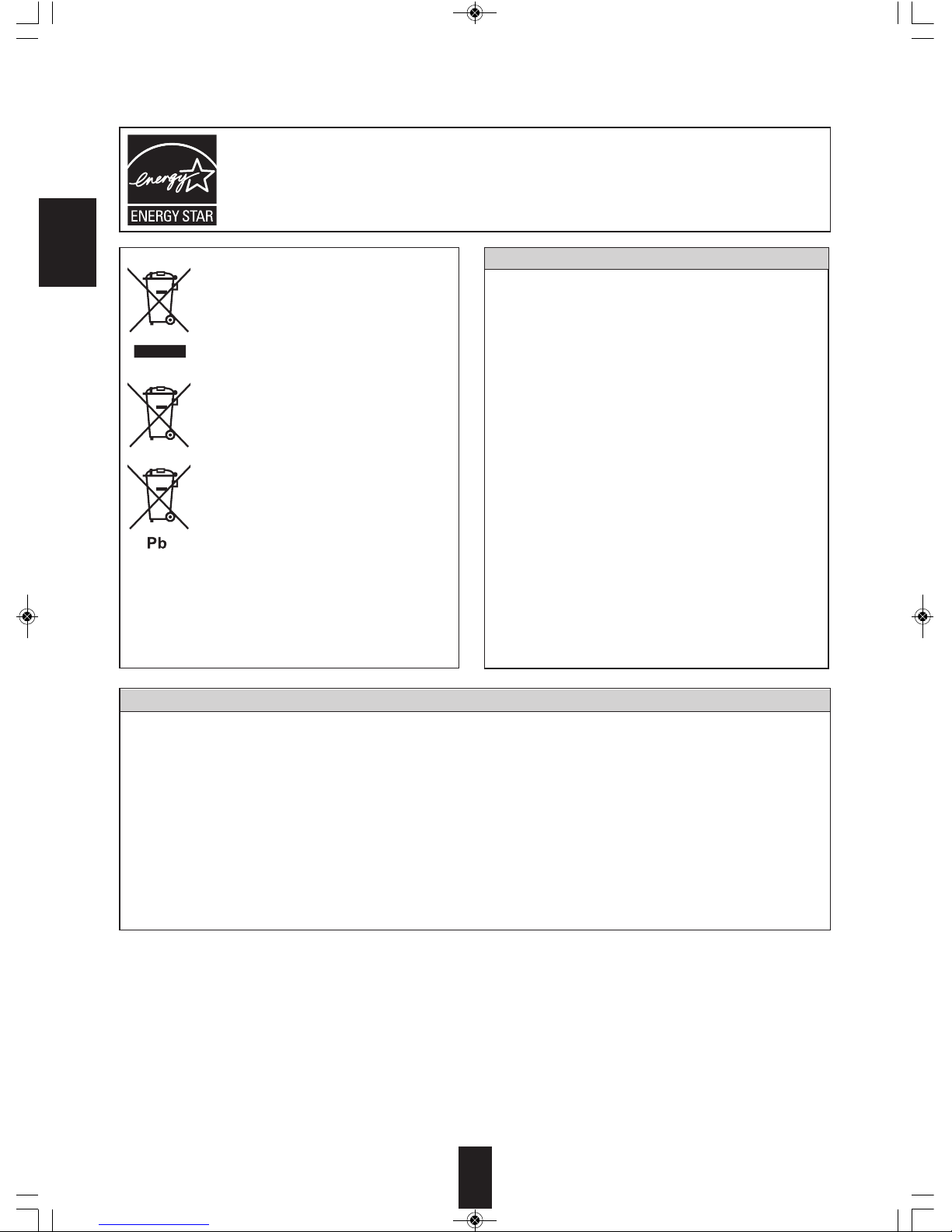
ENERGY STAR®is a U.S. registered mark. As an ENERGY STAR®Partner, Sherwood has determined that this
product meets the ENERGY STAR®guidelines for energ efficienc .
Information for Users on Collection and Disposal of
Old Equipment and used Batteries
These symbols on the products, packaging, and/or
accompanying documents mean that used electrical
and electronic products and batteries should not be
mixed with general household waste. For proper
treatment, recovery and recycling of old products and
used batteries, please take them to applicable
collection points, in accordance with your national
legislation.
By disposing of these products and batteries correctly,
you will help to save valuable resources and prevent
any potential negative effects on human health and the
environment which could otherwise arise from
inappropriate waste handling.
For more information about collection and recycling of
old products and batteries, please contact your local
municipality, your waste diposal service or the point of
sale where you purchased the items.
[Information on Disposal in other Countries outside the
European Union]
These symbols are only valid in the European Union. If
you wish to discard these items, please contact your
local authorities or dealer and ask for the correct
method of diposal.
Note for the battery symbol (bottom two symbol examples):
The sign Pb below the symbol for batteries indicates
that this batteries contains lead.
BLX-200(A)_091023:BLX-200(A) 2009-10-26 오 5:52 페이지 4

5
ENGLISH
• IMPORTANT SAFETY INSTRUCTIONS ................................................................................................... 2
• Introduction
READ THIS BEFORE OPERATING YOUR UNIT ...................................................................................... 3
• System Connections
ONNE TING TO A/V AMPLIFIER OR RE EIVER .................................................................................. 6
ONNE TION TO TV WITH HDMI IN ONNE TOR ............................................................................... 8
ONNE TING TO NETWORK ................................................................................................................... 9
ONNE TING MULTI-ROOM SYSTEM KIT .............................................................................................. 9
• Front Panel Controls .............................................................................................................................. 12
• Remote Controls .................................................................................................................................... 13
REMOTE ONTROL OPERATION RANGE ............................................................................................ 14
LOADING BATTERIES ............................................................................................................................. 14
• Preliminary nowledge About Discs
PLAYABLE DIS TYPES .......................................................................................................................... 15
REGION ODE ......................................................................................................................................... 15
NOTES ON OPYRIGHT ......................................................................................................................... 16
SYMBOL ABOUT INVALID OPERATION ................................................................................................. 16
PLAYABLE FILES ..................................................................................................................................... 16
ARE AND HANDLING OF DIS S .......................................................................................................... 16
• Operations
PLAYING A DIS ...................................................................................................................................... 17
ENJOYING BONUSVIEW OR BD-LIVE .................................................................................................... 23
PLAYING FILES ........................................................................................................................................ 24
• System Settings ..................................................................................................................................... 29
SETTING THE SYSTEM ........................................................................................................................... 30
SETTING THE DISPLAY .......................................................................................................................... 31
SETTING THE AUDIO .............................................................................................................................. 32
SETTING THE LANGUAGE ...................................................................................................................... 33
SETTING THE PARENTAL ONTROL .................................................................................................... 34
SETTING THE NETWORK ....................................................................................................................... 35
• Definition Of Terms ................................................................................................................................ 37
• Troubleshooting Guide .......................................................................................................................... 39
• Specifications .......................................................................................................................................... 40
• License ..................................................................................................................................................... 41
• Limited Warranty ..................................................................................................................................... 45
cONTENTS
BLX-200(A)_091023:BLX-200(A) 2009-10-26 오 5:52 페이지 5

ENGLISH
6
ENGLISH
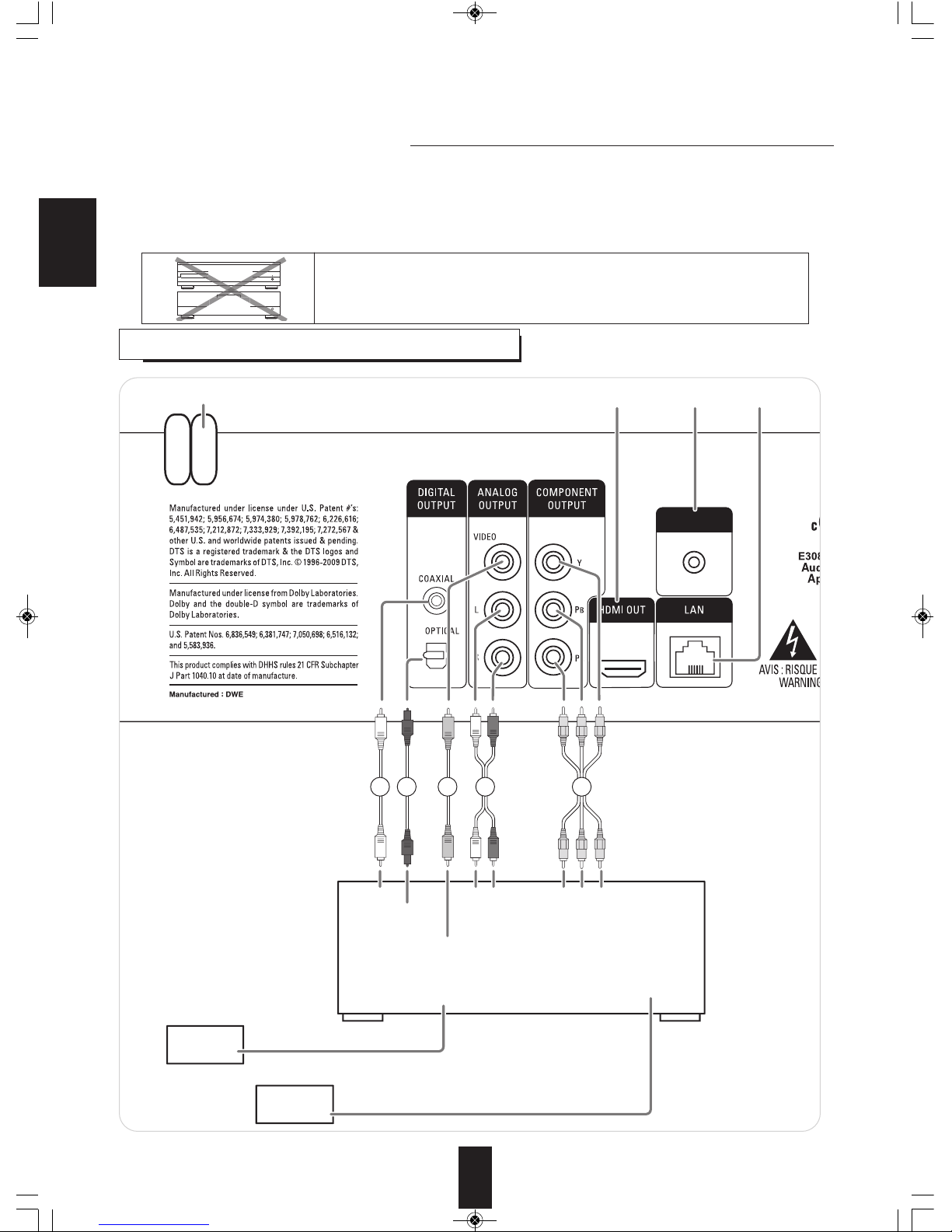
IR IN
COAXIAL LR Pr/Cr Cb/Pb Y
(COMPOSITE)
VIDEO IN
OPTICAL AUDIO IN
VIDEO IN
TV
Speakers
A/V Amplifier or Receiver
HDMI, COMPONENT, COMPOSITE
FRONT L/R, CENTER, SURROUND L/R, SUBWOOFER, etc.
COMPONENT
VIDEO IN
(MONITOR)
VIDEO OUT SPEAKERS
DIGITAL INs
2 2 3 1 4
5678
System Connections
• Do not connect the A input cord into the A outlet when plugging and unplugging connection cords.
• Since different components often have different terminal names, carefully read the operating instructions of the component
connected.
• Be sure to observe the color coding when connecting audio and video cords.
• The supplied cords are a (stereo) audio cord and a composite video cord. Other cords are commercially-available cords.
cONNEcTING TO A/V AMPLIFIER OR REcEIVER
■Caution :
This Unit
Amplifier
A
r
Do not stack this unit on the amplifier, etc. such as heating equipment.
This could damage this unit and/or the amplifier or could result in
mulfunction.
BLX-200(A)_091023:BLX-200(A) 2009-10-26 오 5:52 페이지 6

7
ENGLISH
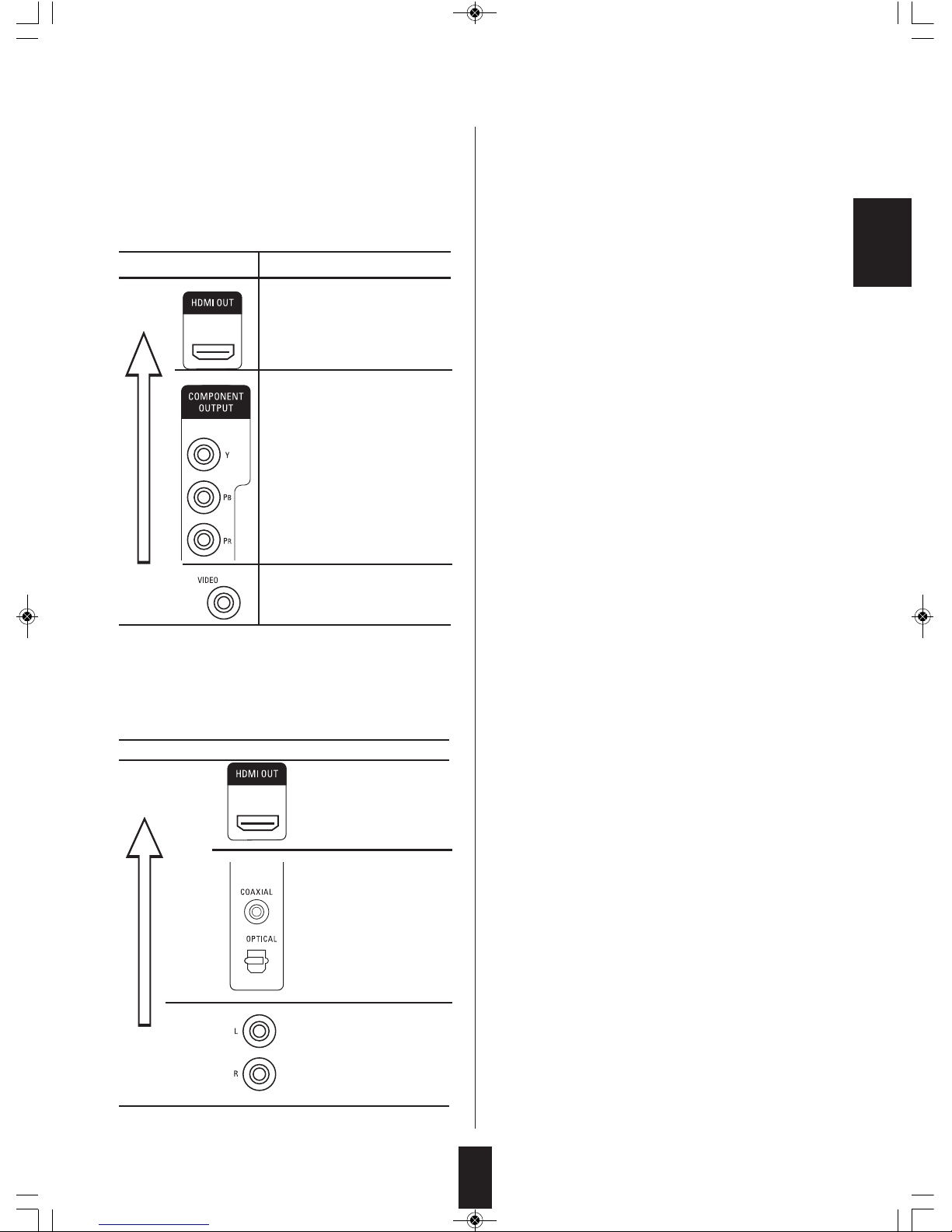
■About video/HDMI OUT jacks
• You don’t need to make all kinds of video connections
between components. (e/ g., this unit to A/V amplifier, A/V
amplifier to TV and so on.)
Depending on what kinds of video jacks that A/V amplifier
TV, etc. has, we recommend you to make the same kinds
of video connections between components.
■About audio/HDMI OUT jacks
• You don’t need to make all kinds of audio connections,
too.
onnect this unit to A/V amplifier depending on the audio
input jack that A/V amplifier has.
1. Connecting AUDIO OUTs
• onnect these jacks to the AUDIO IN jacks of BD(DVD,
D, etc.) of your amplifier.
2. Connecting DIGITAL AUDIO OUTs
• onnect either the OPTI AL or the OAXIAL DIGITAL
OUT jack to the corresponding DIGITAL IN jack of your
amplifier. (You don’t need to do both.)
■Notes :
• When your amplifier is not compatible with the digital
signals that are output from this unit, loud noise or no
sound may be heard from the speakers, and it may be
harmful to your ears and damages the speakers. To
prevent it, you should disconnect the DIGITAL OUTs to
your amplifier and make analog audio connection.
• When making the OAXIAL DIGITAL connection, be sure
to use a 75ΩOAXIAL cord, not a conventional AUDIO
cord.
3. Connecting COMPOSITE VIDEO OUT
• onnect this jack to the (composite)VIDEO IN jack of your
amplifier or TV.
4. Connecting COMPONENT VIDEO OUTs
• onnect these jacks to the OMPONENT VIDEO OUT
jacks of your amplifier or TV.
• When making OMPONENT VIDEO connections,
connect “Y” to “Y”, “PB” to “PB” (, “ b”, “B-Y”), “PR” to “PR”
(, “ r”, “R-Y”).
■Notes :
• If the resolutions of the video signals which are output
from the OMPONENT VIDEO OUTs and/or the HDMI
OUT and your TV are not matched, the picture is not
clear, natural or displayed.
To prevent it, you should set the Resolution to one which
the TV can handle. (For details, refer to “SETTING THE
DISPLAY” on page 31.)
• Do not connect the unit to the TV through a V R.
Otherwise the picture may be disturbed due to the copy
protection function.
5. HDMI OUT CONNECTOR
• Refer to “ ONNE TING TO TV WITH HDMI IN
ONNE TOR” on next page.
6. LAN CONNECTOR
• Refer to “ ONNE TING TO NETWORK” on page 9.
7. IR IN JAC
• Refer to “ ONNE TING MULTI-ROOM SYSTEM KIT” on
page 9.
8. AC INPUT CORD
• Plug the cord into a wall A outlet.
Jack type Video resolution
High
quality
Digital
High Definition :
1080/24p, 1080p, 1080i, 720p
Standard Definition :
480p(/576p), 480i(/576i)
Analog
High Definition :
1080i, 720p
Standard Definition :
480p(/576p), 480i(/576i)
Standard
quality
Standard Definition :
480i(/576i)
Jack type
High
quality
Digital
Standard
quality
Analog
BLX-200(A)_091023:BLX-200(A) 2009-10-26 오 5:52 페이지 7

ENGLISH
8
ENGLISH
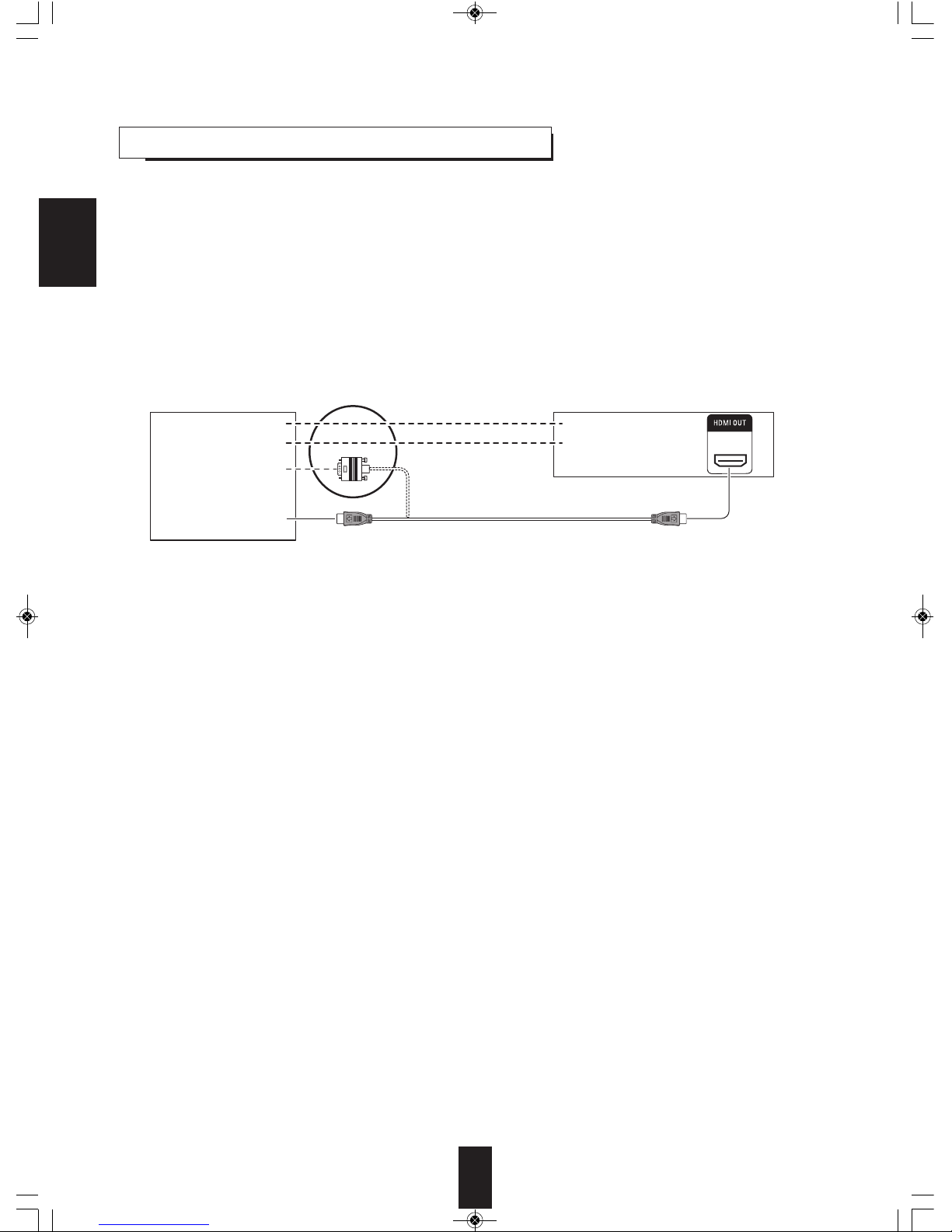
• If you have a HDMI IN connector equipped TV or projector, etc., connected it to the HDMI OUT connector of this unit using a
commercially available HDMI cord.
The HDMI connection can carry uncompressed digital video and multi-channel (up to 7.1ch) digital audio signals.
• Among the HDMI IN connector equipped TV or projector, etc., some do not support audio output (for examples, projectors).
In such a case, make an audio connection between this unit and A/V amplifier.
• If you have a DVI IN connector epuipped TV or projector, etc., compatible with both DVI and High-bandwidth Digital ontent
Protection (HD P), connect it to the HDMI OUT connector of this unit using a commercially available HDMI-DVI converter
cord.
Since the HDMI-to-DVI connection cannot carry audio signals, you should make an audio connection. (For details on audio
connection, refer to the operating instructions of the DVI IN connector equipped component.)
• If you have a HDMI or DVI connector equipped A/V amplifier, you can connect this unit to TV or projector, etc., through A/V
amplifier. (For details on connection between components, refer to the operating instructions of your amplifier.)
cONNEcTING TO TV WITH HDMI IN cONNEcTOR
■Copyright protection system
• This unit supports HD P (High-bandwidth Digital ontents Protection), technology to protect copyright of digital video signals
against illegal duplication. HD P must also be supported on the components connected to this unit.
If a component incompatible with HD P is connected, the video signals will not be output properly.
• This unit is HDMI Ver. 1.3 compatible.
• HDMI, the HDMI logo and High-Definition Multimedia Interface are trademarks or registered trademarks of HDMI licensing
LL .
■Notes :
• When connecting the HDMI OUT connector to TV or projector, etc., you should set Display and Audio settings correctly. (For
details, refer to “SETTING THE DISPLAY” on page 31 and “SETTING THE AUDIO” on page 32.)
• For stable signal transfer, we recommend using HDMI cords that are a maximum of 5 meters in length.
• Among the components that support HDMI, some components can control other components via the HDMI connector.
However, this unit cannot be controlled by another component via the HDMI connector.
• The audio signals from the HDMI connector (including the sampling frequency and bit length) may be limited by the
component that is connected.
(analog) AUDIO IN
DIGITAL IN
(analog) AUDIO OUT
DIGITAL OUT
DVI and audio connections
DVI
IN
TV, Projector, etc. This unit
HDMI
IN
or
BLX-200(A)_091023:BLX-200(A) 2009-10-26 오 5:52 페이지 8

9
ENGLISH
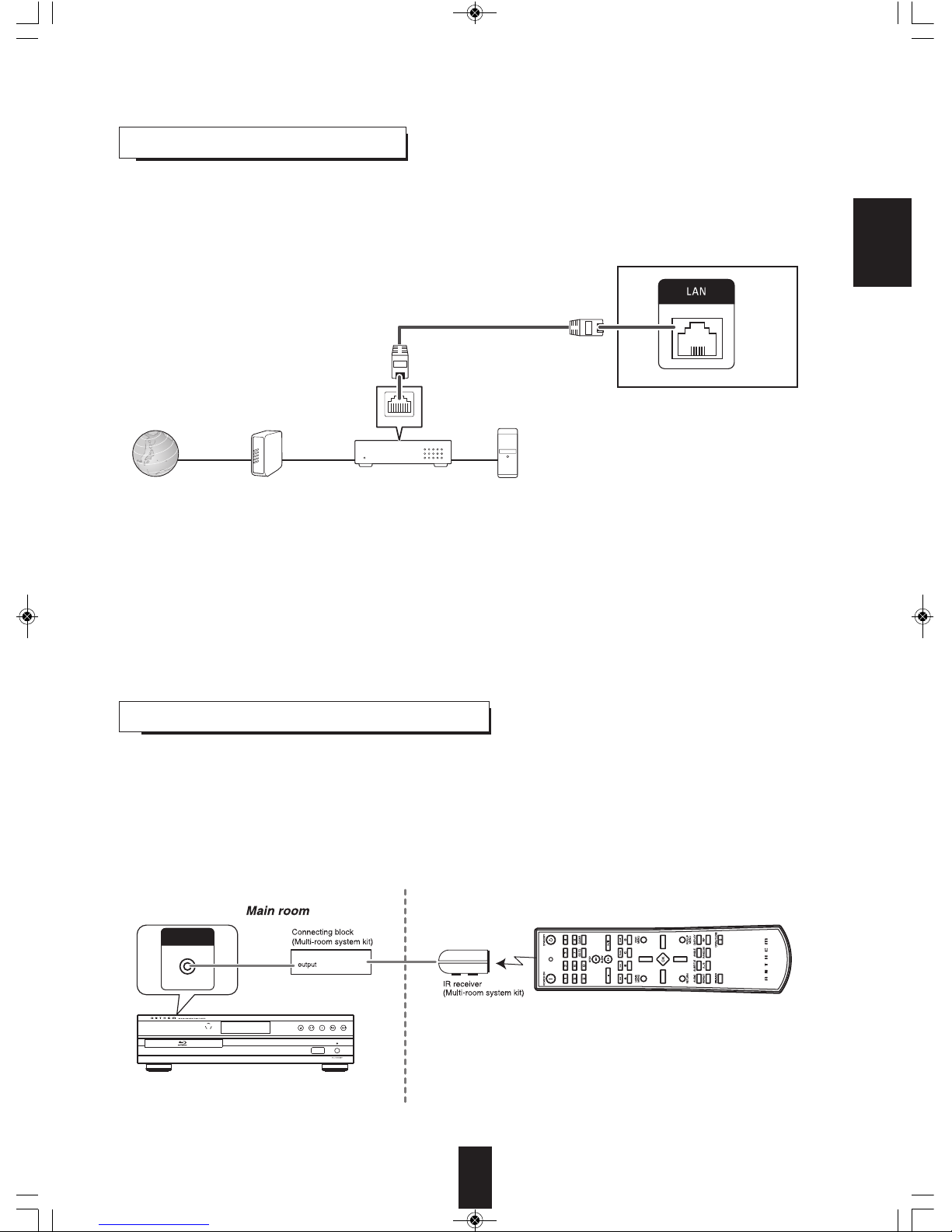
• You can enjoy a variety of contents with interactive functions by connecting to the internet when playing BD-LIVE compatible
discs.
• onnect the LAN connector of this unit to your internet source.
cONNEcTING TO NETWORK
■Notes :
• After making a broadband internet connection, you should set the communication setting. (For details, refer to “SETTING THE
NETWORK” on page 35.)
• When using a broadband internet connection, a contract with an internet service provider is required. For more information,
contact your nearest internet service provider.
• Refer to the operating instructions of the equipment because the connected equipment and connection method may differ
depending on your internet environment.
• Use a LAN cable/router supporting 10 BASE-T/100 BASE-TX.
• Some LAN cables are easily affected by noise.
We recommend using a shielded type cable.
LAN
Internet Modem PCBroadband router
This unit
• The multi-room system kit(sold separately) is essential for operation from a remote location .
For information on the multi-room system kit, contact the Xantech corporation at 1-800-843-5465 or www.xantech.com.
• IR IN jack allows you to control this unit from other room with the remote control unit.
• To control this unit from other room with the remote control unit, connect the IR IN jack to the output of the connecting block.
■Note :
• Remote operation may become unreliable if the IR receiver is exposed to strong light such as direct sunlight or inverted
fluorescent.
cONNEcTING MULTI-ROOM SYSTEM KIT
This unit
Another room
IR IN
BLX-200(A)_091023:BLX-200(A) 2009-10-26 오 5:52 페이지 9

10
■Video output resolution
• The video output resolution differs depending on the Resolution setting.
(For details, refer to “SETTING THE DISPLAY” on page 31.)
*1: • When the OMPONENT OUTs and the HDMI OUT are connected to your TV, the video signals of 480i(NTS )(or 576i(PAL)) will be output.
*2: • When the HDMI OUT is not connected to your TV and the copy protected DVD Videos are played, the video signals of 480p(or 576p) will be
output.
■Notes :
• If the resolution of video signal to be output from OMPONENT OUTs or HDMI OUT does not match that of your TV, the
picture is not clear, natural or displayed.
Should this happen, first make (composite) video connection between this unit and TV, and select the (composite) VIDEO as
an input source on the TV to display the setting menu, then set the Resolution correctly. (For details on the resolution
acceptible for your TV, refer to its operating instructions.)
• When the HDMI OUT connector is connected to your TV, the TV reports to this unit what resolutions it supports. Therefore, if
you set the Resolution to HDMI Auto, this unit outputs the video signals of the highest resolution acceptable for your TV.
In this case, you cannot select the resolution inacceptable for your TV.
Resolution setting Video OUTs
( omposite) VIDEO OUT OMPONENT OUTs HDMI OUT
HDMI Auto 480i(NTS )(or 576i(PAL)) 1080i*1,*2highest resolution
1080p 480i(NTS )(or 576i(PAL)) 1080i*1,*21080p
1080i 480i(NTS )(or 576i(PAL)) 1080i*1,*21080i
720p 480i(NTS )(or 576i(PAL)) 720p*1,*2720p
480p 480i(NTS )(or 576i(PAL)) 480p(NTS )(or 576p(PAL)) 480p(NTS )(or 576p(PAL))
480i 480i(NTS )(or 576i(PAL)) 480i(NTS )(or 576i(PAL)) 480i(NTS )(or 576i(PAL))
ENGLISH
BLX-200(A)_091023:BLX-200(A) 2009-10-26 오 5:52 페이지 10
Indice