
Anviz M5 Manuale utente

M5
User Manual
(V1.0)

User Manual
II
PREFACE
Honorable customers:
Thanks for choosing products of our company. The product with world cutting edge
technologies—fingerprint/card recognition, computer communication, as well as microelectronics,
is considered to be combination of three technologies: electronics, optics and computer
communication. It is no doubt that it has become the first choice of standalone time & attendance
for enterprises with its strong function and veracity. Please read this user manual carefully to have
an initial understanding of functions and basic knowledge of installation, debugging, maintenance,
application and management to better use this product.
Utilizing the latest biometric technology, this product will bring you a unprecedented reliability,
convenience and benefits.

User Manual
III
CONTENTS
1. Product Introduction ...............................................................................................2
1.1. Product overview.......................................................................................2
1.2. Module......................................................................................................2
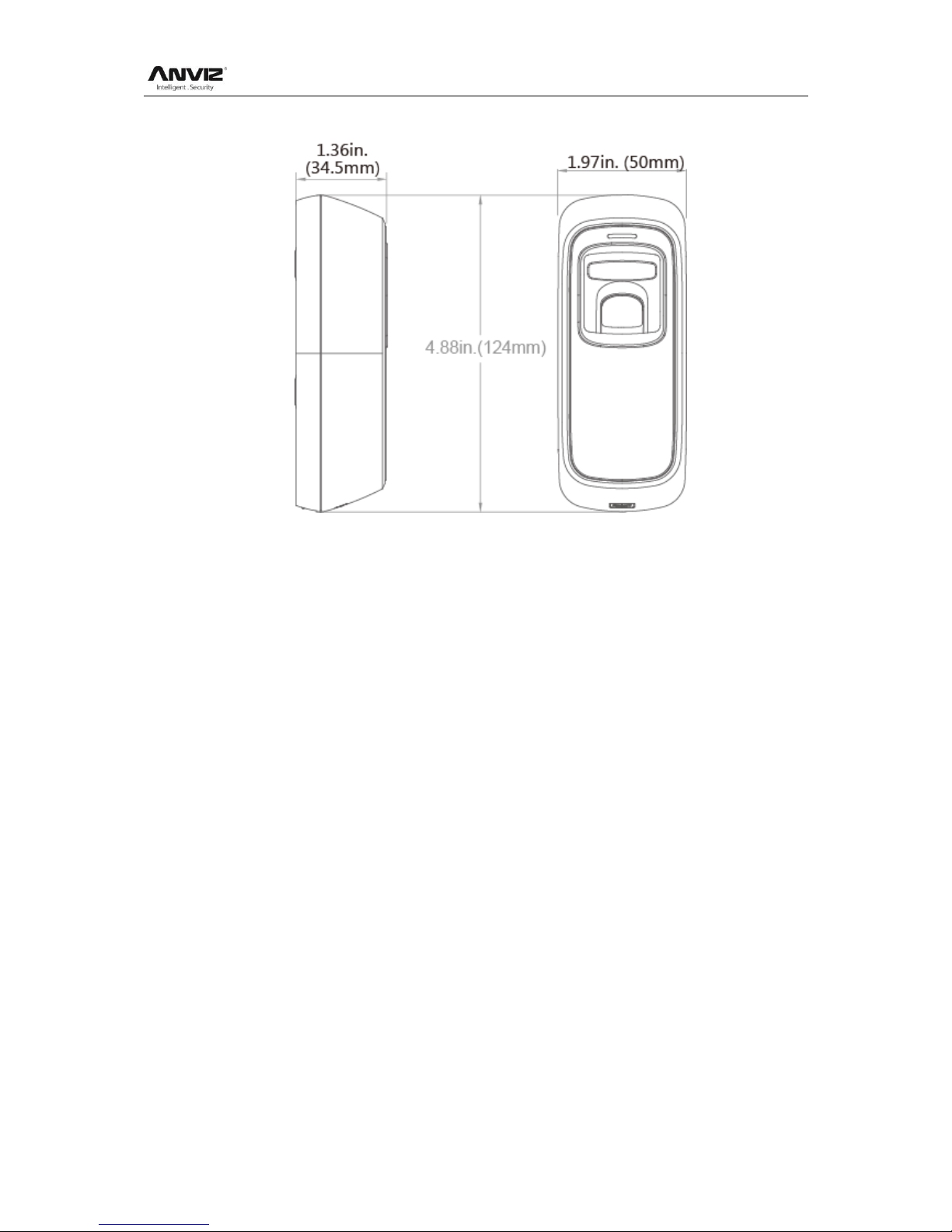
1.3. Size...........................................................................................................3
2. Operation Guide.....................................................................................................5
2.1. Interface Introduction ................................................................................5
2.2. Upper Electricity........................................................................................5
2.3. Register User............................................................................................5
2.3.1. Register User’s Fingerprint.................................................................5
2.3.2. Register User’s Card ..........................................................................6
2.3.3. Register Two Fingerprints...................................................................6
2.3.4. Register Fingerprint and Card of one User.........................................6
2.3.5. Register Two Fingerprints and Card of one User................................7
2.4. Delete users..............................................................................................7
2.4.1. Delete user’s fingerprint or fingerprint and card ..................................7
2.4.2. Delete user’s card ..............................................................................8
2.4.3. Delete All Users..................................................................................8
2.5. Function button.........................................................................................8
2.6. Register Management Cards ....................................................................9
2.7. Illustration for pressing fingerprint .............................................................9
2.8. Usage Notice ............................................................................................9
3. FAQ...................................................................................................................12
4 Appendix............................................................................................................15
4.1 Wiring Instruction.......................................................................................15
4.2 Wiring diagram of M5 ................................................................................16

Chapter 1. Product Introduction
This chapter introduces the advantages,
performance, and functionality of M5.

User Manual
2
1. Product Introduction
1.1. Product overview
M5 is a biometric fingerprint and RFID Card reader with a compact design, which is
suitable for installing on a door frame. With master cards, you can register or delete
users under offline state. The USB power supply and debug make operations
simple. The IK10 and IP65 for outdoor solution.
M5 have the same look as following:
1.2. Module
Module Features:
2000 Fingerprints; 50000 Records;
Touch Auto Wakeup Sensor;
Management cards for user management;
Support TCP/IP, USB Device, Wiegand Out;
Support FP, Card, or Card+FP Identification Mode;
IP54;IK10;
Standard EM ID card module.
User Manual
3
1.3. Size

User Manual
4
Chapter2. Operation Guide
This chapter is about the hardware operation
and contains information of how to set the
administrator, and how to add/delete users,
etc.

User Manual
5
2. Operation Guide
2.1. Interface Introduction
Note: The restart operation will not delete any user data stored in the device.
2.2. Upper Electricity
The DC 12V Power supplies the power to the device. Blue LED flashes fast and
Fingerprint Sensor lights with beeps.
There are 4 cards in the packing: Enroll Card , Delete Card and User Card
* 2.
2.3. Register User
2.3.1. Register User’s Fingerprint
At first, swipe the Enroll Card. The blue LED will flash quickly, and enter into the
registration stage. Now, we can register the user finger.
1. After finish enrolling current user, please swipe enroll card and then continue
register another user.
2. After finish enrollment, please swipe enroll card TWICE to exit enroll status.
Note: When place finger, Red LED flashes with two long beeps means the finger
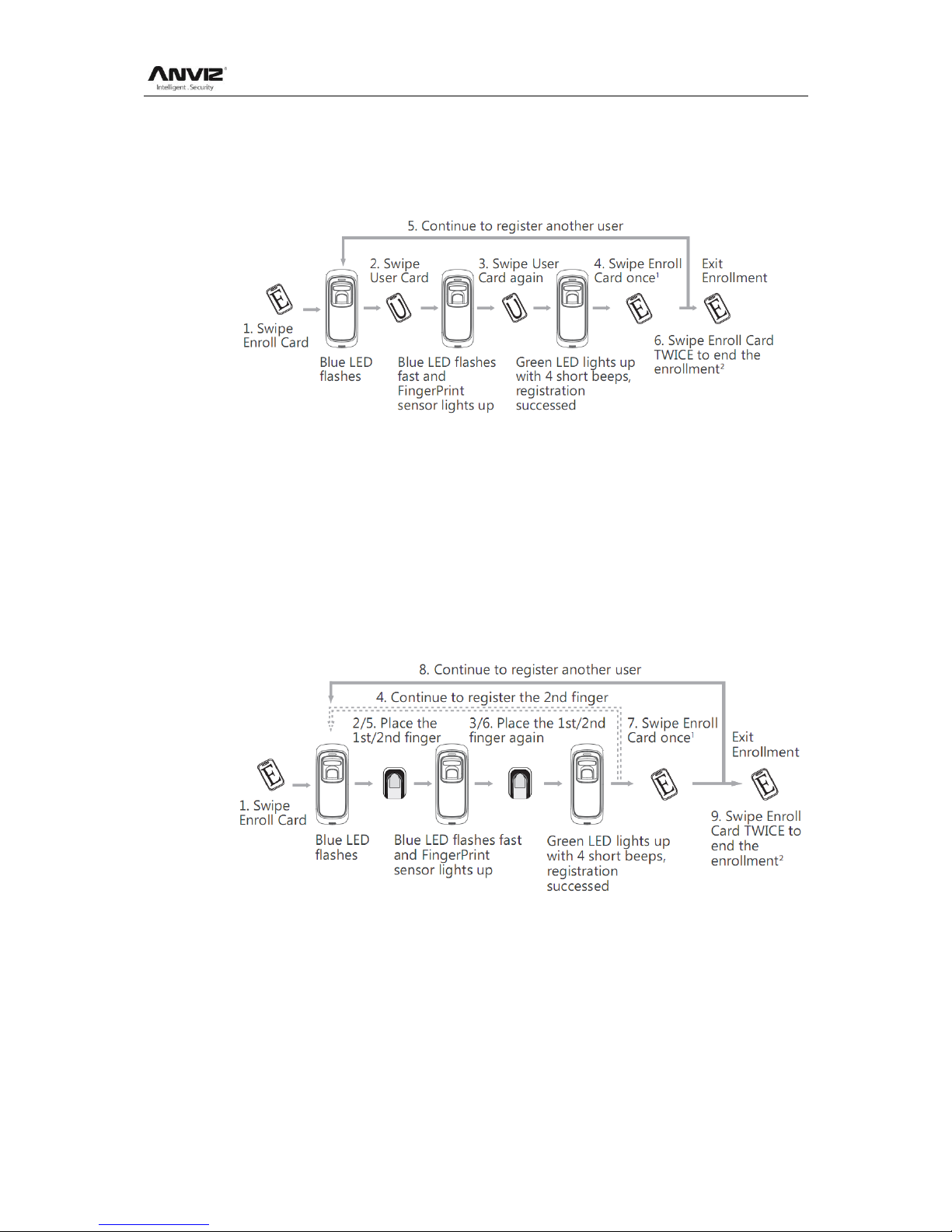
User Manual
6
have been registered.
2.3.2. Register User’s Card
Swipe Enroll Card. The blue LED will flash quickly, and enter into registration stage.
In time we can swipe the user card.
1. After finish enrolling current user, please swipe enroll card and then continue
register another user.
2. After finish enrollment, please swipe enroll card TWICE to exit enroll status.
Note: When swipe card, Red LED flashes with two long beeps means the card have
been registered.
2.3.3. Register Two Fingerprints
If the User Card has been already registered, the red LED will flash twice and follow
with 2 beeps.
1. After finish enrolling current user, please swipe enroll card and then continue
register another user.
2. After finish enrollment, please swipe enroll card TWICE to exit enroll status.
2.3.4. Register Fingerprint and Card of one User
If the User Card has been already registered, the red LED will flash twice and follow
with 2 beeps.

User Manual
7
1. After finish enrolling current user, please swipe enroll card and then continue
register another user.
2. After finish enrollment, please swipe enroll card TWICE to exit enroll status.
Note: The wiegand output of fingerprint and card are the same
2.3.5. Register Two Fingerprints and Card of one User
If the User Card has been already registered, the red LED will flash twice and follow
with 2 beeps.
1. After finish enrolling current user, please swipe enroll card and then continue
register another user.
2. After finish enrollment, please swipe enroll card TWICE to exit enroll status.
Note: The wiegand output of fingerprint and card are the same
2.4. Delete users
2.4.1. Delete user’s fingerprint or fingerprint and card
Swipe Delete Card. The red LED will flash quickly, and enter into the deletion stage.
Now, you can delete the user.
Altri manuali per M5
2
Indice
Altri manuali Anviz Sistema di sicurezza


Manuali Sistema di sicurezza popolari di altre marche


EDM
EDM Solution 6+6 Wireless-AE Manuale utente

Highway Safety Group
Highway Safety Group EA401 Manuale utente

Siren
Siren LED GSM Manuale utente

Detection Systems
Detection Systems 7090i Istruzioni per il montaggio

Se-Kure Controls
Se-Kure Controls MicroMini SK-4841 Manuale utente

Siemens
Siemens FDM273 Manuale utente