
APODON AM2440N Manuale utente

1
MPPT Charge Controller
Negative Grounded
AM2440N / AM4860N
User Manual
*We may modify these specifications without prior notice.
2
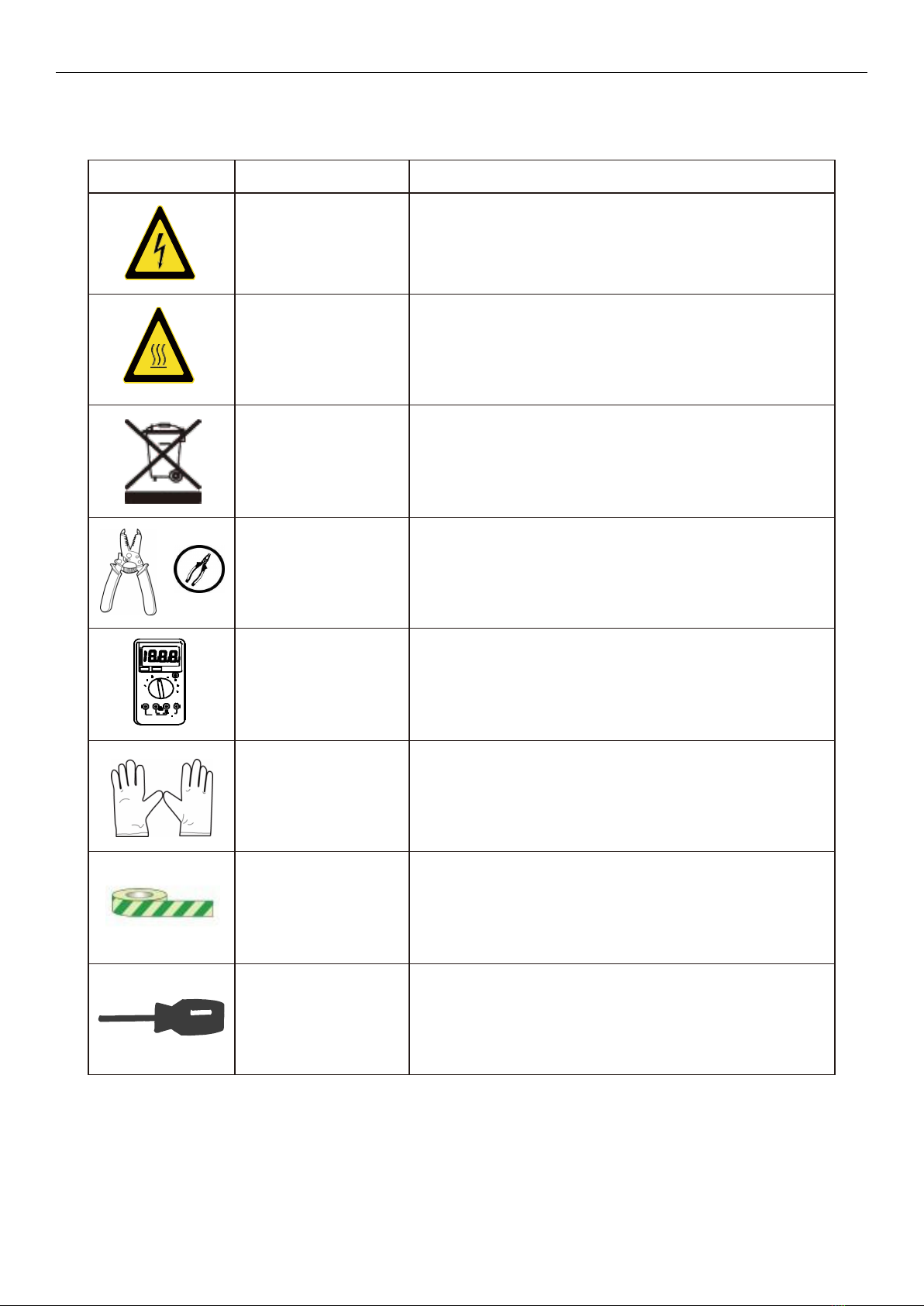
1. Warnings and Tools Icon Chart
Icons
Name
Description
High Voltage
High voltage device.
Installation should be performed by an electrician.
High Temperature
This device will produce heat.
Mount device away from other items.
Environmental
Hazard
Electronic Equipment. Do not put in landfill.
Wire Cutter
A wire cutter is needed for cutting and stripping
wires prior to connection.
Multimeter
A multimeter is needed for testing equipment and
verifying polarity of cables.
Anti-static Glove
Anti-static gloves are recommended to prevent
controller damage caused by static electricity.
Electrical Tape
Electrical tape is recommended to safely insulate
spliced or bare wires.
Screwdriver
A common size screwdriver is needed to attach
wires to the controller.

3
2. Safety Tips
Review this manual thoroughly before attempting installation.
Beware of any nearby electrical equipment that may interfere with installing this device.
Solar panels can generate high voltages and currents, make sure your solar panels are
completely covered from sunlight during installation. It is recommended that installation be
performed by a qualified electrician.
Connecting wires to this device can generate sparks, please wear proper insulation gear while
installing this device.
To avoid damage to the battery or controller, use proper fuses in wiring. Please do not hesitate to
contact the professions if you need help with fuse sizing.
Always keep children away from this device.
Be certain to use the correct gauge of wire, see below for a table of recommended wire size for
various current loads.
Solar Input Current
5A
10A
20A
30A
40A
60A
Wire Cross Section Area (mm²)
1.5
2.5
5
8
10
12
Wire AWG
15
13
10
8
7
6

4
3. Product Features
Thank you for choosing our products. This MPPT solar charge controller is a device for solar charge
regulation and direct current output load control. This device is mainly used in small and medium
sized off-grid solar power systems.
These MPPT charge controllers have features as follows:
By continuously checking solar panel power output changes, the controllers employ multiple
MPPT charge algorithms in combination to boost charging efficiency in different weather and
temperature conditions.
Built-in buffer, allows max 25% exceeding rated power input.
Charging modes available for most common deep-cycle battery types in the market, including
AGM (sealed lead acid batteries), GEL, Flooded, and Lithium.
Allows mobile phone APP operation for monitoring and parameters settings, with connection of
external blue tooth communication module (optional accessory, not in the standard package
list).
Auto recognition of 12V/24V battery system voltage by M2440N model; auto recognition of
12V/24V/36V/48V battery system voltage by M4860N model. Lithium battery excluded from this
feature.
Supports recording of system running data including power generated and power utilized for up
to 300 days, compatible with monitoring App through IOS and Android.
Provides multiple load control mode options for light based, time based and manually adjusted
scenarios. Low no-load loss.
Industrial grade design with reverse polarity protection for solar panels, battery and load.

5
4. Device Diagram
M2440N & M4860N
#
Description
#
Description
1
LCD Display Screen
6
DC Load Terminals
2
Function Key ([SET], [UP], [DOWN], [ESC])
7
RS485 Communication Port
3
External Temperature Sensor Terminal
8
LED Indicator (PV, BAT, LOAD, FAULT)
4
Solar Terminals
9
Installation Mounting Holes
5
Battery Terminals
1

6
5. Mounting Instruction

7
6. Wire Connection Sequences
During installation of your MPPT controller, please follow the order of connection below:
1. Connect the positive battery wire followed by the negative battery wire.
2. Make sure your solar panels are fully covered to prevent electrical shock.
Connect the positive solar array output wire followed by the negative solar array output wire.
3. Connect DC load wires to the DC load output (if applicable).
4. Connect the external temperature sensor to its terminal shown above.
5. Connect the mobile application module to the communication port (if applicable).

8
7. LED Light Signal Interpretation Chart
LED Name
LED Display
Signal Indication
PV
Off
Solar Input Not Charging
*PV LED is generally off during nighttime.
Double Flash
Solar Input Charge Detected
Single Flash
Solar Input Reverse Polarity
Steady On
MPPT Charge Mode
Fast Flash
Equalize or Boost Charge Mode
Slow Flash
Float Mode
BATTERY
Single Flash
Battery Input Reverse Polarity
Fast Flash
Battery Over Voltage
Slow Fast
Battery Over Discharged
Steady On
Battery On
LOAD
Off
No DC Load Connected/Load Off
Fast Flash
DC Load Short Circuit
Steady On
DC Load On
FAULT
Off
No Errors
Steady On
System Error – Check Error Code
Check the Fault light to spot if a system error may be present.

9
8. LED Flash Rhythm Chart
Flash
Status
Indication
Description
Steady
On
On
Off
LED light on.
Off
On
Off
LED light off.
Fast
Flash
On
Off
LED light blinks at frequency of
2Hz (twice every second).
Slow
Flash
On
Off
LED light blinks at frequency of
0.5Hz (once every two seconds).
Single
Flash
On
Off
LED light blinks for 0.1 second
after every 2 seconds.
Double
Flash
On
Off
LED light blinks for 0.1 second
twice after every 4 seconds.

10
9. LCD Display Interface Overview
10.LED Display Interface
Display Section
Display Layout
Charge Status
Charge Mode
&
Parameter
Active Functions
Questo manuale è adatto per i seguenti modelli
1
Indice


