Apollo 23G Guida alla pianificazione

2004R1
255895
APOLLO 23G

1. Read all instructions before using this appliance.
2. This heater is hot when in use. To avoid burns, do not let bare
skin touch hot surfaces.
pillows,bedding, papers, clothes and curtains at least 3 feet
(0.9m) from the front of this heater and keep them away from the
sides and rear.
3. CAUTION: Extreme caution is necessary when any heater is
used by or near children or invalids and whenever the heater is left
operating unattended.
4. Always unplug this appliance when not in use.
5. Do not operate any heater with a damaged cord or plug or after
the appliance malfunctions, has been dropped or damaged in any
manner. Return heater to authorized service facility for examination,
electrical or mechanical adjustment, or repair.
6. Any repairs to this appliance should be carried out by a qualified
service person.
7. Under no circumstances should this appliance be modified.
8. Do not use outdoors.
9. This heater is not intended for use in bathrooms,laundry areas
and similar indoor locations. Never locate heater where it may fall
into a bathtub or other water container.
10. Do not run cord under carpeting. Do not cover cord with throw
rugs, runners or similar coverings. Arrange cord away from traffic
areas and where it will not be tripped over.
11. To disconnect this appliance, turn controls to the off position,
then remove plug from outlet.
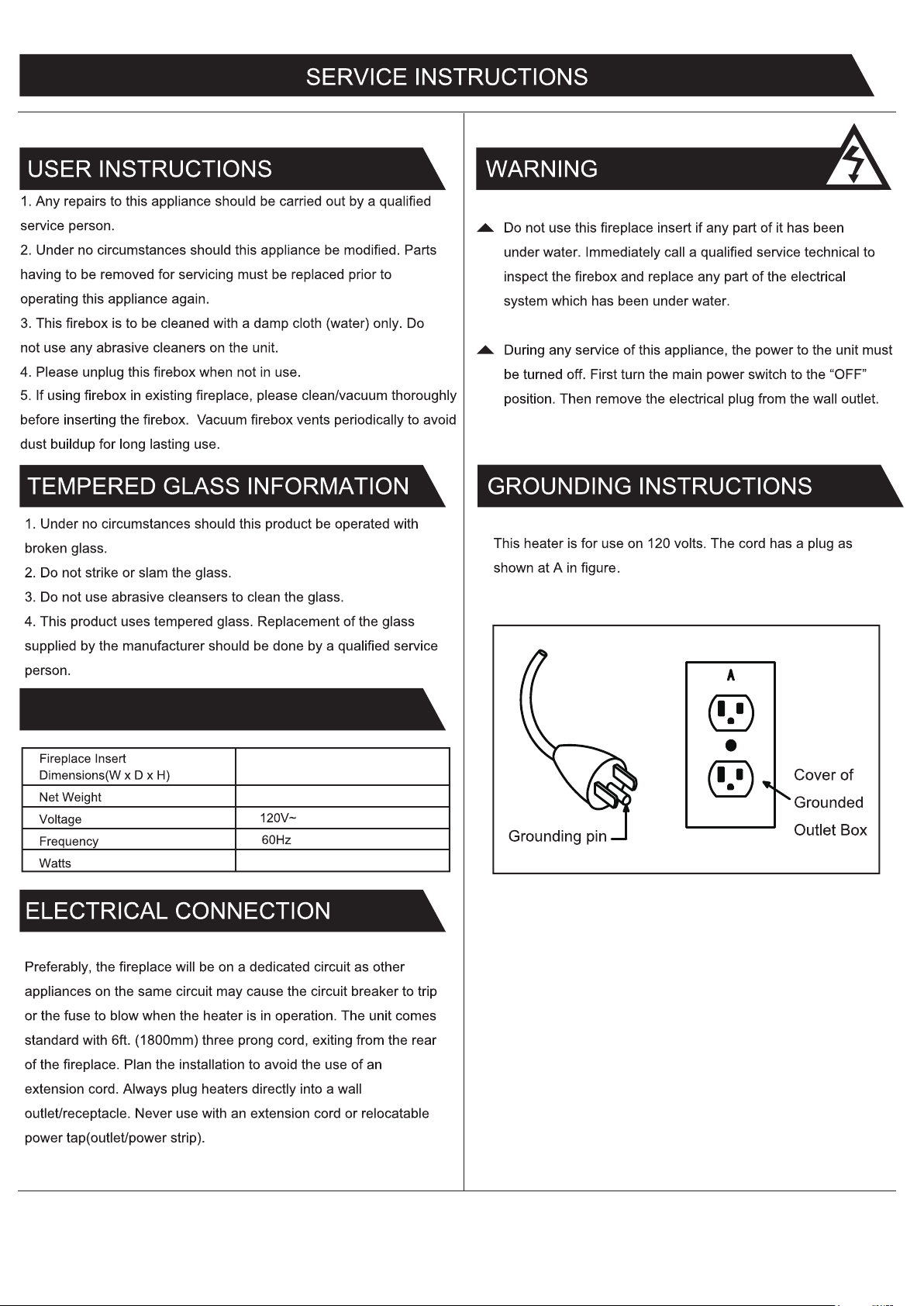
12. Connect to properly grounded outlets only.
13.This appliance, when installed must be electrically grounded in
accordance with local codes, with the current CSA C22.1 Canadian
Electrical code or for USA installations, follow local codes and the
National Electric Code,
ANSI/NEPA No. 70.
14. Do not insert or allow foreign objects to enter any
ventilation or exhaust opening as this may cause an electric
shock, fire or damage the heater.
15. To prevent possible fire, do not block air intakes or exhaust
in any manner. Do not use on soft surfaces, like a bed, where
openings may become blocked.
16. This heater has hot and arcing or sparking parts inside. Do
not use it in areas where gasoline, paint or flammable liquids
are used or stored. This appliance should not be used as a
drying rack for clothing, nor should Christmas stockings or
decorations be hung on or near it.
17. Use this appliance only as described in this manual. Any
other use not recommended by the manufacturer may cause
fire, electric shock or injury to person.
18. Always plug heaters directly into a wall outlet/receptacle.
Never use with an extension cord or relocatable power
tap(outlet/power strip).
19.Once the inner temperature of this insert reach to 85± 2°C,
this insert will off-work automatically.To reset temperaturing
limiting control, disconnect power using plug or main switch
for 10 minutes.
Your new electric fireplace may be installed on the floor only
in your home.This heater is a fireplace insert and can't be
used as an movable fireplace. When choosing a location for
your electric fireplace, ensure that the general instructions are
followed. For best results, install the electric fireplace away
from direct sunlight and dust.
General
LOCATING
YOUR FIREPLACE
E-1
Keep combustible materials, such as
furniture,
IMPORTANT INSTRUCTIONS
ASSEMBLY INSTRUCTIONS
21.SAVE THESE INSTRUCTIONS.
20.This Class B digital apparatus complies with Canadian
ICES-003.

7.2kg
1400 Watts
23 x 5 x 17 1/8 inch
58.4 x 12.8 x 43.5 cm
ELECTRIC FIREPLACE SPECIFICATIONS
E-2

E-3
2. INSTALLING THE FIREPLACE INSERT
1. ATTACHING THE METAL TRIMS
Phillips
Screwdriver
(not included) AA x 1 BB x 2
REQUIRED TOOLS HARDWARE
CC x 6+2 extra
Ф
4 X 10mm
DD x 6+2 extra
Ф
4 X 6mm
CC
CC
ASSEMBLY INSTRUCTIONS
BB
BB
AA
DD DD
DD
DD
DD
DD

1. Identifying the control panel
The control panel is located on the top right corner
of the fireplace/heater unit.
The control panel contains the display unit (1),
function indicator (2), timer function (3), heater
control (4), flames control (5), and main power (6).
The display unit (1) displays information about the
flame level, timer, and current temperature.
3. Using the timer function
The timer button (3) allows you to set the amount of time you want the fireplace/heater to run. The timer button (3) operates
both the flames and the heater function. If the heater is operating when the timer is set, then the heater is on the timer. If the
flames are operating, then the timer will control the flames. If both the heater and flames are operating with the timer set,
then the timer controls both the flames and the heater. Pressing the button in sequence will set the timer for a set interval.
This interval period is shown in the display (1), in blue. The set intervals are displayed in this table. The timer interval is set
from the time the interval is selected. There is no clock function for turning the heater or flames on or off at a specific time.
The function indicator (2) has three square LEDs –
red, green, and blue. The red LED indicates that the
Fahrenheit temperature heating function is running,
the green LED indicates that the Celsius temperature
heating function is running, and the blue LED
indicates that the timer function is engaged.
1 2 34
5
6
3
Button Press Timer Interval Display
1st press 30 Minutes 30
2nd press
3rd press
4th press
5th press
6th press
7th press
8th press
1 Hour
2 Hours
3 Hours
4 Hours
5 Hours
6 Hours
OFF
1h
2h
3h
4h
5h
6h
None
2. Understanding the function indicator
E-4
2

4. Using the heater control
The heater button (4) turns the heater on or off. There is no speed setting for the heater blower. If you put the heater in a
standby mode (turn off by the main power button 6), the unit will hold the settings in the memory. When the power is turned
back on, the heater will turn on at the same settings.
5. Using the flame control
Press the flame button (5) to set the flames for different levels of flame height. These flame levels are shown in the
display (1). The flame settings are as follows:
When the heater function turns on, the flame level will cycle through the 3 different level settings continuously.
With the heater on, gently press and hold the main power button for five seconds to enter temperature converting
mode. The LED indicator flashes five times in red color then changes to green. In this converting mode, the display
(1) flashes (interval is 0.5 second). Press and hold the heater button (4) for five seconds to enter temperature
adjustment mode. There are 12 levels to change Celsius temperature 22°C
–
23°C …27°C
–
ON
~
17°C
–
18…21°C.
4
5
Button Press Flame Level Display Value Fireplace Appearance
1st press
2nd press
3rd press
4th press
High
Medium
Low
All Off
L3
L2
L1
None
Flames Highest, Logs Glow Highest
Flames Medium, Logs Glow Medium
Flame Low, Logs Glow Low
Flame Off, Logs Off
Button Press Flame Level Display Value Fireplace Appearance
1st press
2nd press
3rd press
High
Medium
Low
L3
L2
L1
Flames Highest, Logs Glow Highest
Flames Medium, Logs Glow Medium
Flame Low, Logs Glow Low
After it is set, the display (1) flashes five times. Repeat the same process to convert Celsius temperature into
Fahrenheit temperature.
E-5
When the heating function turns on, press and hold the heater button (4) for five seconds to enter temperature adjustment
mode. (The remote control does not have this function, but it can adjust the temperature by pressing the increase button or
the decrease button after pressing the heat button to enter the digital flash.) The LED indicator is red. In adjustment mode,
the display unit (1) flashes (interval is 0.5 second). There are 22 levels to change Fahrenheit temperature
72°F–73°F…82°F–ON—62°F–63°F …71°F. After this is set, the display (1) will flash five times and exit from setting status.

E-6
6. Using the main power button
Press the power button (6) to turn the fireplace/heater unit on and off. Press the power button (6) once to turn the unit on.
Press again to turn the unit off.
7. Using the remote control
The operation of the remote control buttons works the same as the buttons on the front panel of the fireplace/heater.
Review the Operation section for more information on the functionality of these buttons.
NOTE: The remote control cannot lock/unlock the flame and heating function.
6
Heater Control
Heater Up
Heater Down
Main Power
Flames Control
Timer Function

REPLACEMENT PARTS LIST AND EXPLODED VIEW
Main circuit board
Flame generator drive motor
Heater / blower assembly
Emberbed with log
Flame effect circuit board
Control panel buttons
Control panel circuit board
Some parts and specifications may change without notice.
Part Part name
1
2
4
7
Flame generator / spinner8
Remote control9
5
3
6
4 5 6
7
2
3
1
8
9
E-7

TROUBLE SHOOTING GUIDE
There is a visible flame effect, but the heater
does not blow warm air.
The heater does not work, but the Power and
Heater switches are in the “ON” position and
thermostat is set to “HI”.
The main power switch lights up, but there is
no flame effect.
Open the top and back panel to check if the flame spindle has fallen off
from the spindle motor.
Confirm that the temperature setting exceeds the room temperature.
Turn on/off the Heater button several times to make sure it is in the “ON”
position.
Turn all switches to the “OFF” position and unplug the unit from the wall
outlet for 5 minutes. After 5 minutes plug the unit back into the wall outlet,
and operate as normal.
Change the remote batteries.
Operate remote transmitter at a slow measured pace. Press the remote
control buttons with an even motion and gentle pressure.
Repeatedly pressing buttons in rapid succession may cause the transmitter
to malfunction.
Check that the unit is plugged into a standard 120V outlet.
Press the power button on the control panel.
The unit does not turn on.
Remote control is not working.
PROBLEM SOLUTION
E-8

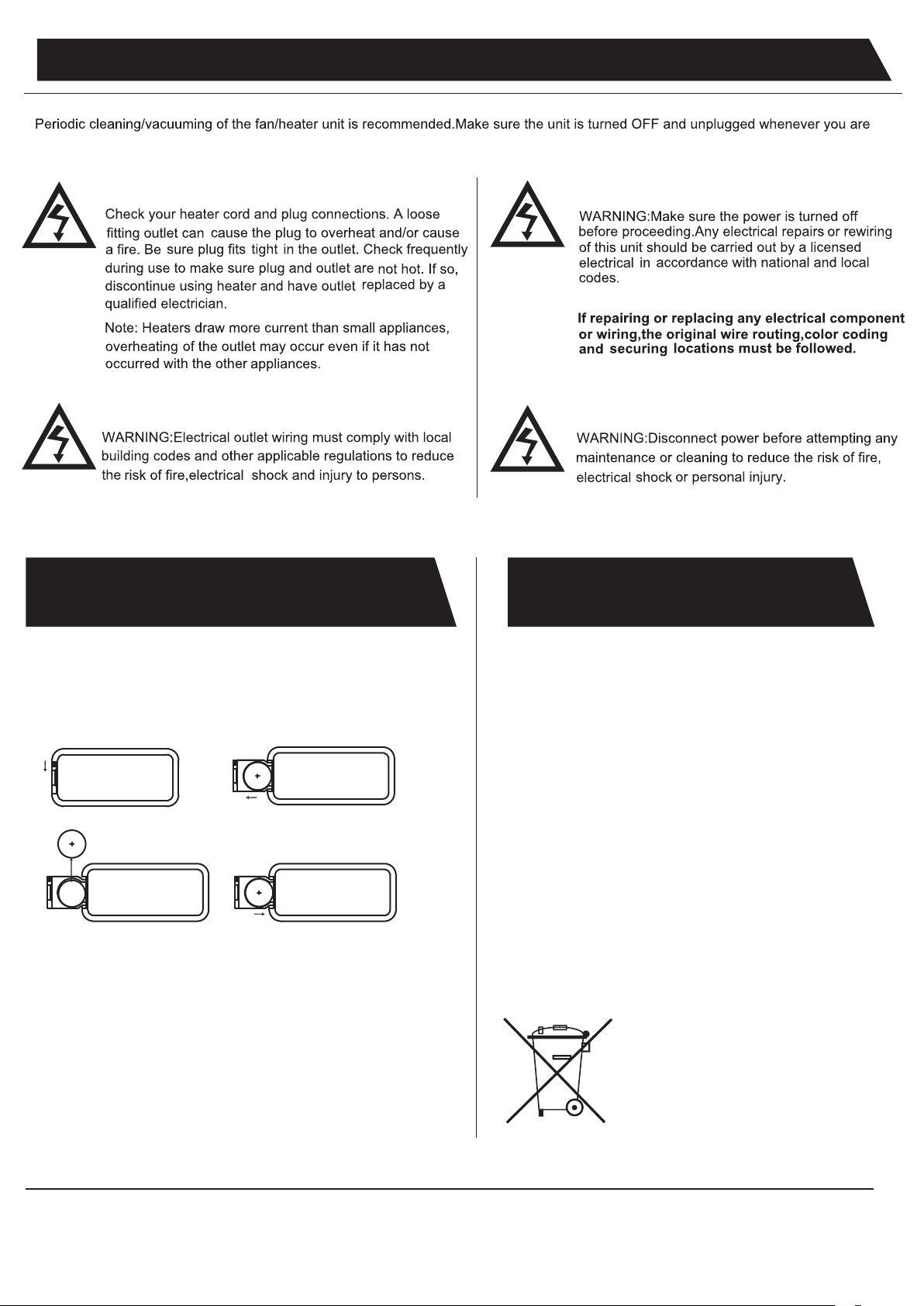
REPLACING THE REMOTE
CONTROL BATTERY
DISPOSING OF USED
BATTERIES
When the remote control stops operating or its range seems reduced,
Please operate the remote control at a slow measured pace. Press
the remote control buttons with an even motion and gentle pressure.
Repeatedly pressing buttons in rapid succession may cause the
transmitter to malfunction.
it is time to replace the battery with new ones.
Do not mix alkaline, standard (carbon-zinc), or rechargeable (ni-cad,
ni-mh, etc) batteries.
Battery should be removed if the product is to be left unused for a
long time.
The batteries may contain hazardous substances that could
endanger the enviroment and human health.
This symbol appearing on the battery and/or packaging
indicates that used batteries must not be processed with
municipal waste. Instead they should be brought to the
appropriate collection point for recycling.
By correctly disposing of used batteries, you prevent potential
negative consequences for the environment and human
health. Recycling used materials also preserves our natural
resources.
For more information about collecting and recycling used
batteries, please contact your local municipality, your waste
disposal service or the store where you purchased this product.
3 volt lithium coin cell type 2025.
NOTE:
Caution for Ingestion.
1 2
34
INSTRUCTIONS
cleaning the appliance.
E-9
Indice
Lingue: