Applied Engineering Viewmaster 80 Manuale utente

Viewmaster
80™
User's Manual
A DIVISION OF AE RESEARCH CORPORATION
v4.4

Applied Engineering
Telephone Numbers
Technical Support
(214) 241-6069
9 AM to 12:30 PM & 1:35 to 5 PM (CST)
Monday through Friday
Do not return any
product for service without a
Retum Material Authorization (RMA) number.
An RMA number can be obtained by calling Technical Support.
Sales
(214) 241-6060
9 AM to ll PM (CST) 7 days

Viewmaster
80™
User's Manual

Federal Communications Commission
Radio Frequency Interference Statement
The equipment described in this manual generates and uses radio frequency energy. If it is not
installed and used properly, that is, in strict accordance with these instructions, it may cause
interference to radio or television reception.
FCC I.D. Number: EYW5QGVIEWMASTER
This equipment has been type tested and found to comply with the limits for a Class B computing
device in accordance with the specifications in Subpart I of Part 15 of the FCC Rules. These rules
are designed to provide reasonable protection against radio and television interference in residential
installation.
However, there is no guarantee that interference will not occur in a particular installation. If this
equipment does cause interference to radio or television equipment off and on, the user is
encouraged to try to correct the interference by one or more of the following measures:
Reposition the receiver's antenna. Also make sure the antenna
wires are making good electrical contact.
Use a roof-mounted antenna rather than a "rabbit-ear" antenna
or an antenna mounted in the attic.
Make sure that all electrical connections on the computer are
secure and any shielded I/O cables are properly fastened.
Move the computer away from the receiver.
Plug the computer and receiver into separate electrical circuits.
If necessary, the user should consult the dealer or an experienced radio/television technician for
additional suggestions. The user may find the following booklet prepared by the Federal
Communications Commission helpful:
"How to Identify and Solve Radio-TV Interference Problems"
This booklet is available from the U.S. Govemment Printing Office, Washington, D.C, 240402,
Stock No. 004-000-00345-4.
Applied Engineering®is not responsible for any radio or television interference caused by
unauthorized modifications to this equipment. It is the responsibility of the user to correct such
interference.
Warning: This equipment has been certified to comply with the limits for
Class B computing device, pursuant to Subpart J of Part 15 of FCC Rules.
Only peripherals (computer input/output devices, terminals, printers, etc.)
certified to comply with the Class B limits may be attached to this
computer. Operation with non-certified peripherals is likely to result in
interference to radio and TV reception.

Limited Warranty & Disclaimer
Applied Engineering warrants the Viewmaster card against defects in material and workmanship for a period of 5 years
from the date of original retail purchase. Applied Engineering also warrants that, under normal use, the magnetic media
on which the included Æ software is stored is free from defects in materials and workmanship for a period of 30 days
from the date of original purchase. Any misuse, abuse, or non authorized alteration, modification and/or repair to the
Applied Engineering product will void the warranty. This warranty will also be void if you use the IE product for any other
purpose than its intended use. If you discover a defect, Applied Engineering will, at its option, repair or replace only the
Applied Engineering product, provided you return the product during the warranty period, transportation prepaid, to
Applied Engineering.
This warranty applies to the original retail purchaser only, Therefore, please include a copy of the original invoice or
a small service charge may be applied. lf the product is to be sent to Applied Engineering by mail, the purchaser will
insure the package or assume full responsibility for loss or damage during shipping. Prior to returning the product for
warranty consideration, call Applied Engineering Technical Support for a Return Material Authorization (RMA) number
and shipping instructions.
Even though Applied Engineering has tested the software and reviewed the documentation, Applied Engineering makes
no warranty or representation, either express or implied, with respect to the manual or the software; their quality,
performance, merchantability, or fitness for a particular purpose. As a result, the software and manual are sold "as is",
and you, the purchaser, are assuming the entire risk as to their quality and performance.
ln no event will Applied Engineering be liable for loss or damages of any kind caused either directly or indirectly by the
use or possession of its products, even if advised of the possibility of such damages. The Applied Engineering Warranty
is for the Applied Engineering Product itself. In particular, Applied Engineering shall have no liability for any other
equipment used in conjunction with Applied Engineering products nor for programs or data stored in or used with Applied
Engineering products, including the costs of recovering such equipment, programs, or data.
The warranty and remedies set forth above are exclusive and in lieu of all others, oral or written, express or implied. No
Applied Engineering dealer, agent, or employee is authorized to make any modification, extension, or addition to this
warranty.
Some states do not allow the exclusion or limitation of implied warranties or liability for incidental or consequential
damages, so the above limitation or exclusion may not apply to you. This warranty gives you specific legal rights, and
you may also have other rights which may vary from state to state.
This manual and the software (computer programs) described herein are copyrighted by Applied Engineering with all
rights reserved. Under the copyright laws, this manual or the programs may not be copied, in whole or in part, without the
written consent of Applied Engineering, except in the normal use of the software or to make an archival copy. This
exception does not allow copies to be made for others, whether or not sold, but all of the materials purchased(with all
archive copies) may be sold, loaned, or given to another person. Under the law, copying includes translating into another
language or format. You may use this software on any computer owned by you but extra copies cannot be made for this
purpose.
Applied Engineering cannot guarantee that you will receive notice of revisions to the software, documentation, or
products described in this manual. Be sure to check with your dealer or Applied Engineering for information on possible
updates. However, Applied Engineering reserves the right to make any improvements to Applied Engineering products
without any responsibility toward upgrading previously released products.
Apple is a registered trademark of Apple Computer, Inc. AppleWorks, AppleWriter, DOS 3.3, and ProDOS are trademarks
of Apple Computer, Inc.
Applied Engineering is a registered trademark of Applied Engineering. Viewmaster, Viewmaster 80, Z-80 Plus, and AW 2
Expander are trademarks of Applied Engineering.
Franklin Ace is a registered trademark of Franklin Computer Corporation. CP/M is a registered trademark of Digital
Research, Inc. Videoterm is a trademark of Videx, inc. Microsoft and Softcard are trademarks of Microsoft Corporation.
Radio Shack is a registered trademank of Tandy Corporation.
©Copyright 1988, Applied Engineering
Applied Engineering
P.O. Box 5100
Carrollton, Texas 75011
Sales: (214) 241-6060 9 AM - 11 PM (CST) 7 days
Technical Support: (214) 241-6069 9 AM - 12:30 & 1:35 - 5 PM (CST) Monday - Friday
(The Technical Support telephone lines cannot be accessed through the Sales department.)


Table Of Contents
INTRODUCTION -GETTING STARTEDiii
About the Viewmaster 80iii
System Requirementsiii
CHAPTER ONE -INSTALLING THE VIEWMASTER 801
CHAPTER TWO -USING THE VIEWMASTER 803
Adjusting the Video Screen3
Software Compatibility4
In General...4
CP/M Software5
Pascal Software5
Hardware Compatibility5
What’s Next...6
CHAPTER THREE -SPECIAL KEYBOARD CHARACTERS7
Alternate Keyboard Characters7
Lowercase Characters8
Optional Shift Key Hardware Modification8
APPENDICES10
A: Video Troubleshooting Guide11
B: Automatic Graphics Override13
C: For Programmers Only...15
Activating the Viewmaster 80 from BASIC15
Screen Editing Commands15
Controlling the Display from Applesoft BASIC16
Display Control Commands17
Cursor Positioning19
Custom Cursor Shape19
Viewmaster 80 Graphics Display20
Hardware Control of Viewmaster 8021
40 Column Override21
Light Pen Support22
Table of Contents i

D: A Brief ProDOS Tutorial23
Operating System23
Naming Volumes23
Root Directory and Subdirectory23
Pathname24
System Files24
Additional Resources25
E: Getting Help26
Returning a Product27
Include27
When You Ship28
When We Receive28
ii ViewMaster 80

INTRODUCTION
Getting Started
This chapter tells you a little about the Viewmaster 80™ and what
you need to install it.
About the Viewmaster 80
The best way to describe the Viewmaster 80 is to list some of its
many features:
- Super sharp 7 x 9 dot character matrix with true descenders
- Capable of both normal and inverse video character display
- Full 80 columns by 24 lines
- Fully compatible with all Apple®programming languages
- Highest compatibility with existing 80 column software
- Power and input connector for light pen
- Programmable cursor shape
- All Apple II on-screen editing commands supported
- Fully Videoterm™ compatible
- Compatible with both 60 and 50 Hertz power
- Very low power consumption (CMOS technology)
- High speed scroll rate (18 MegaHertz)
- Compatible with Apple ][, ][ Plus and Franklin Ace®computers
System Requirements
Here’s what you need to install your Viewmaster 80:
- An Apple ][, Apple ][ Plus or Franklin Ace (1000 series)
computer
- At least one disk drive
- A composite video monitor capable of 80 column display (NTSC
composite video).
Intro. - Getting Started iii

Most monochromatic computer monitors are capable of 80 column
display. Most TV sets, on the other hand, are not. Televisions are only
acceptable for programs which use a 40 column display. The
narrower 80 column characters tend to blur and are very difficult to
read when displayed on a TV screen.
iv ViewMaster 80

CHAPTER ONE
Installing the Viewmaster 80
Nothing complicated here. Just read these instructions carefully.
1. Turn the computer power supply switch OFF, but leave the
computer plugged in (This provides an electrical path to
discharge static electricity).
2. Remove the computer's cover.
3. Discharge any static electricity on your body or clothing by
touching the metal case of the power supply. Go ahead, it won't
hurt. And it is important! A static shock can seriously damage
the chips on the Viewmaster and on the computer’s
motherboard as well.
4. Remove the Viewmaster 80 from its anti-static bag. Do not
touch its gold edge connector.
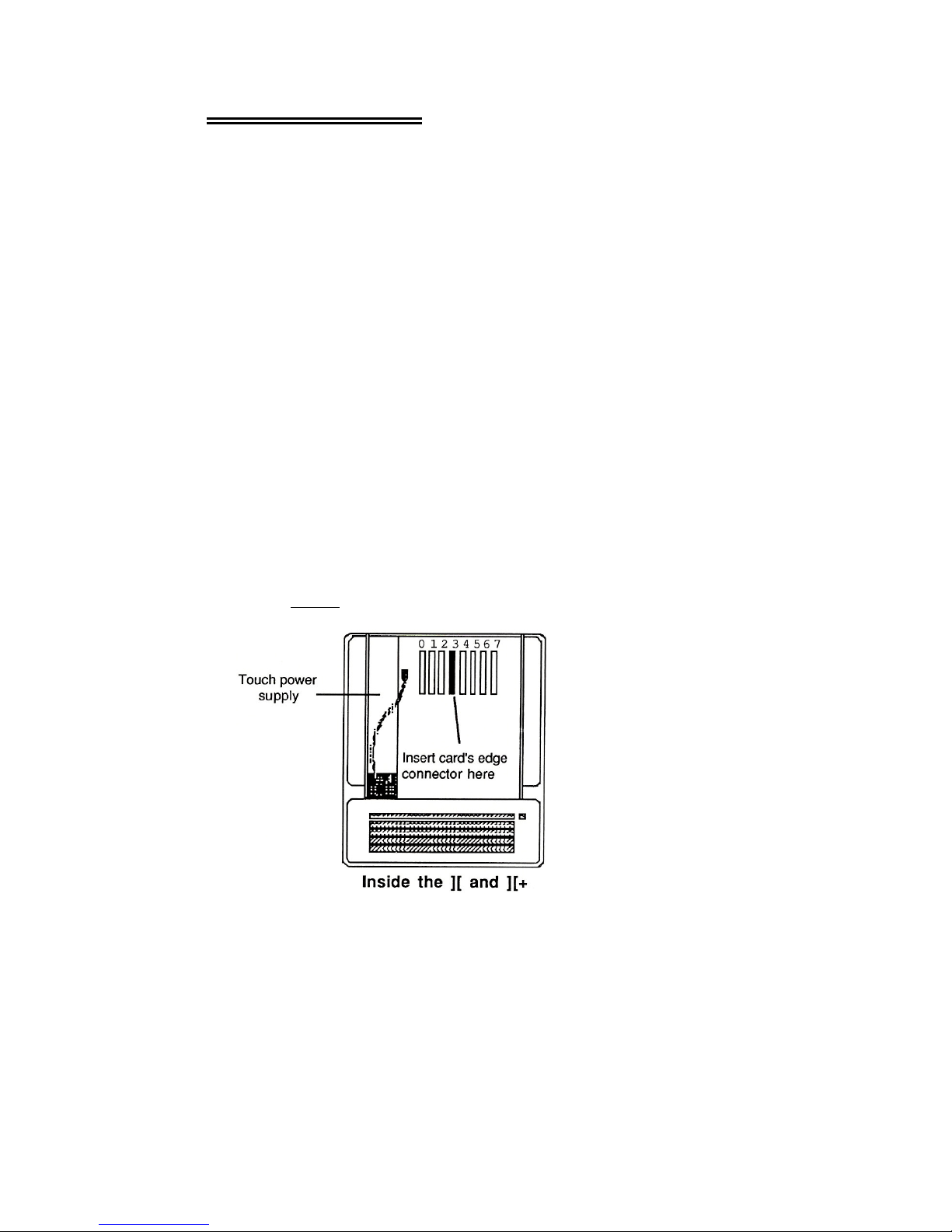
5. Line up the gold fingers of the edge connector with slot 3 then
gently and firmly insert the connector into the slot by pressing
down on the top of the card.
Note: Expansion slot 3 in an Apple ][, Apple ][ Plus, or Franklin
Ace is fourth from the LEFT.
6. Connect one end of the short video cable, included with the
Viewmaster 80, to the bottom video connector on the
Viewmaster 80 card.
Ch. 1 - Installing the ViewMaster 80 1
Indice