
Aputure Light Storm LS 600d Pro Manuale utente

Product Manual
English
LS 600d Pro

-1-
Thank you for purchasing Aputure “Light Storm” LS 600d Pro.
Detailed product manual for Light Storm can be found on www.aputure.com .
Foreword
IMPORTANT SAFETY INSTRUCTIONS
When using this unit, basic safety precautions should always
be followed, including the following:
1. Read and understand all instructions before using.
2. Close supervision is necessary when any fixture is used
by or near children. Do not leave the fixture unattended
while in use.
3. Care must be taken as burns can occur from touching hot
surfaces.
4. Do not operate the fixture if a cord is damaged, or if the
fixture has been dropped or damaged, until it has been
examined by qualified service personnel.
5. Position any power cables such that they will not be tripped
over, pulled, or put into contact with hot surfaces.
6. If an extension cord is necessary, a cord with an amperage
rating at least equal to that of the fixture should be used.
Cords rated for less amperage than the fixture may
overheat.
7. Always unplug the lighting fixture from the electrical outlet
before cleaning and servicing, or when not in use. Never
yank the cord to remove the plug from the outlet.
The Aputure LS 600d Pro is a perfect fixture with big power.
It owns all features of previous series products,and further it
will support the battery charging under the operation and
another feature of it is that it can work on raining .
-2-
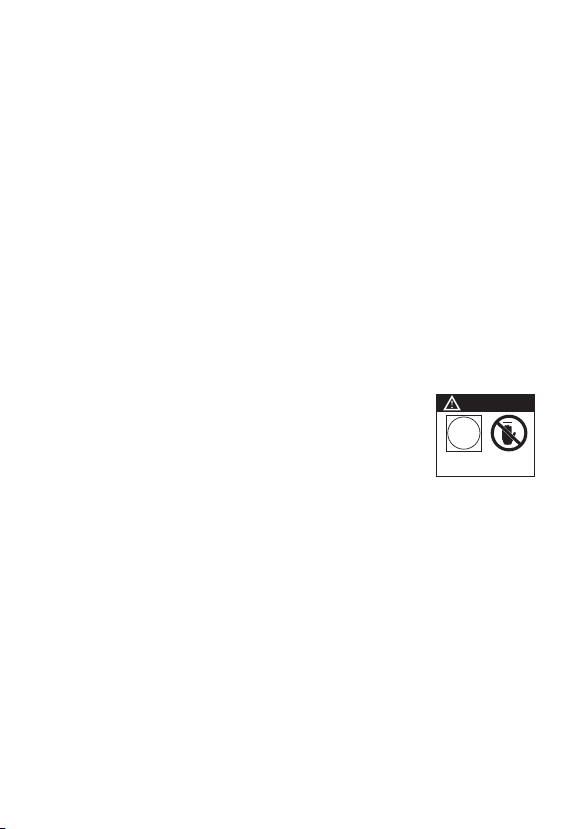
CAUTION
DO NOT TOUCH LED
Light Source Surface
8. Let the lighting fixture cool completely before storing.
9. To reduce the risk of electric shock, do not immerse this
fixture in water or any other liquids.
10. To reduce the risk of fire or electric shock, do not
it to qualified service personnel when service or repair
work is required. Incorrect reassembly may cause electric
shock when the lighting fixture is in use.
11. The use of an accessory attachment not recommended
by the manufacturer may increase the risk of fire, electric
shock, or injury to any persons operating the fixture.
12. Power this fixture by connecting it to a grounded outlet.
13. Please remove the protective cover before powering on
the light.
14. Please remove the protection cover before using the
reflector.
15. Please do not block the ventilation and do
not look at the light directly when it is
powered on.
16. Please do not place the LED lighting fixture near any
liquids or other flammable objects.
17. Only use a dry microfiber cloth to clean the product.
18. Please have the product checked by an authorized
service personnel agent if your product has a problem.
19. The malfunctions caused by unauthorized disassembly
are not covered under the warranty.
20. We recommend only using the original Aputure cable
accessories. Please note that our warranty for this
product does not apply to any repairs required due to
any malfunctions of unauthorized Aputure accessories,
although you may request such repairs for a fee.

-3-
FCC Compliance Statement
21. This product is certified by RoHS, CE, KC, PSE, and FCC.
Please operate the product in full compliance with the
operation standards. Please note that this warranty does
not apply to repairs arising from malfunctions, although
you may request such repairs on a chargeable basis.
22. The instructions and information in this manual are
based on thorough, controlled company testing
procedures. Further notice will not be given if the design
or specifications change.
SAVE THESE INSTRUCTIONS
This device complies with Part 15 of the FCC Rules. Operation is subject to the
following two conditions:
(1) This device may not cause harmful interference.
(2) This device must accept any interference received, including interference that may
cause undesired operation.
Warning:
Changes or modifications not expressly approved by the party responsible
for compliance could void the user's authority to operate the equipment.
NOTE:
This equipment has been tested and found to comply with the limits for a Class
B digital device, pursuant to Part 15 of the FCC Rules. These limits are designed to
provide reasonable protection against harmful interference in a residential installation.
This equipment generates, uses, and can radiate radio frequency energy and, if not
installed and used in accordance with the instructions, may cause harmful interference
to radio communications. However, there is no guarantee that interference will not
occur in a particular installation. If this equipment does cause harmful interference to
radio or television reception, which can be determined by turning the equipment off
and on, the user is encouraged to try reorient or relocate the receiving antenna.

-4-
Increase the separation between the equipment and receiver.
Connect the equipment to an outlet on a different circuit than the receiver is
connected to.
Consult the dealer or an experienced radio/TV technician for help.
RF Warning Statement:
This device has been evaluated to meet general RF exposure requirements.This
equipment should be installed and operated with minimum distance 20cm
between the radiator & your body.
Check list
Please make sure all accessories listed below are completed before using. If not,
please contact with your sellers immediately.
600d Pro
Lamp Head (1 pc)
Control Box
(1 pc)
Quick-Release
"Lightning Clamp"
(1 pc)
Carrying Case
(1 pc)
Paracord
Strap(1 pc)
600 Series
Hyper Reflector (1 pc)
Protection
Cover (1 pc)
VA-Remote RC1+
(1 pc)
5-Pin Male-to-Female
Connecting Cable (3m) (1 pc)
Neutrik® powerCON AC
Power Cable (6m) (1 pc)
Cable Tie Cable Tie

-5-
Product Details
2. Control Box
1. Lamp Head
Made in China
Baby Pin Receiver/Mounting
Column (5/8in. / 16mm)
5-Pin Male XLR Receiver
Bowens Mount
55° Hyper-Reflector
LED Light Source
T-Handle
/ Baby Pin
Mounting Screw
Ratcheting Disk
Brake Handle
Bowens Mount
Release Latch
Label
UID
Cable Relief Hook
Power Button
Select/Confirm Button
Paracord Strap Plate
OLED Display
Menu Button
Effects Button
Lighting Button
Back Button
Antenna Box
Battery Plate
(*Anton Bauer or
V-mount)
USB Port
Floor Stand
Floor Stand
Quick-Release
Plate
RJ45 Port

-6-
3. VA-Remote RC1+
Channel Indicators
Channel Selector
CR2302 Battery Compartment
Group A On/Off
Group B On/Off
Group C On/Off
Group D On/Off
Group A Dimming Controls
Group B Dimming Controls
Group C Dimming Controls
Group D Dimming Controls
FX Button Group C Frequency Controls
Group D Frequency Controls
DMX IN
Port
DMX OUT
Port
Neutrik®
powerCON
Power Input
5-Pin Female XLR Power Output
Battery Input
(DC)

Installations
-7-
Notice: Always remove the protection cover prior to turning on the light. Always re-install the cover when packing it away.
1. Attaching/detaching the protection cover
Pull back the retaining pin, rotate the cover clockwise, then detach the cover.
To reattach the cover, insert it into the Bowens mount and rotate counterclockwise.
2. Attaching/detaching the Hyper-Reflector
To install the reflector, pull back the retaining pin, insert the reflector into the Bowens
mount, and rotate it counterclockwise as shown in the following pictures.
To remove the reflector, pull back the retaining pin and rotate the reflector clockwise.
3. Setting up the Lamp Head
Mount the Lamp Head onto a light stand, then fix it in place using the T-Handle/Mounting
Screw on the Baby Pin Receiver/Mounting Column (5/8in. / 16mm). Then loosen/tighten
the handbrake locking mechanism on the yoke to adjust the fixture's angle of tilt.

-8-
Sizes (L*W*H)
4. Instructions for the Quick-Release "Lightning Clamp"
* Hang the cable from the head cable relief hook
to manage and reduce tension on the cable.
* Disconnect the XLR head cable by pushing down on the locking tabs on the female XLR connectors,
then remove the cable.
5. Connect the Lamp Head to the control box
XLR Locking Tab
XLR Locking SlotXLR Locking Slot
XLR Locking Tab
Weight
* The Quick-Release "Lightning Clamp" can clamp onto square or round pipe with a
diameter between 2-5cm or 0.79-1.97in.
670g / 1.48lbs 10.35x8.74x12.5cm / 4.07x3.44x4.92in
Specifications
1
2
1
2
PUSH
1) Clamp the Lightning Clamp onto a light stand.
2) To attach the control box, rotate the release lever to unlock the quick-release
baseplate, then mount the control box onto the Lightning Clamp (the release
lever will automatically spring back).
3) To remove the control box, grasp it firmly, then unlock the quick-release plate by
turning the release lever, and detach the control box.
Connect the Lamp Head to the control box using the 5-Pin Male-to-Female XLR Head
Cable.
-9-
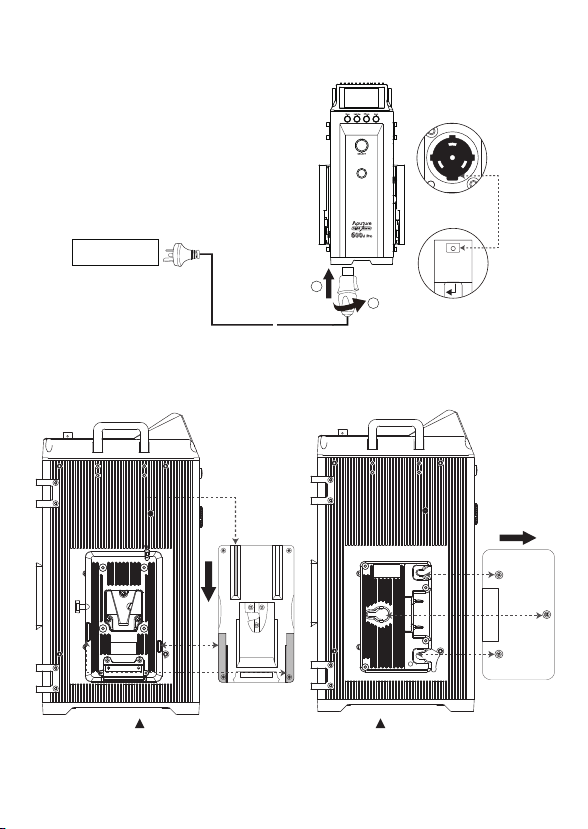
2) Powering by Batteries
* Batteries Spec: Voltage 14.4~28.8V,but the capacity is higher 180Wh.
* Customers can choose V-Mount or A-Mount battery plates for their control boxes upon purchase according to their needs.
* It can be supported charge when the fixture operate.
1) Powering by AC
6. Powering up the controller
Neutrik® powerCON
Male Connector
Neutrik® powerCON Female
Locking Connector
1
2
AC 100V-240V
~
~
PUSH
To disconnect the Neutrik® powerCon cable, pull back on the yellow release tab on the
cable connector, and rotate the connector counterclockwise.
V-Mount Battery Anton Bauer Battery
Indice
Altri manuali Aputure Apparecchio di illuminazione

Manuali Apparecchio di illuminazione popolari di altre marche

Emos
Emos CLASSIC ZY1431T Manuale utente

Westinghouse
Westinghouse Outdoor Lighting Fixture Manuale utente

Hedler
Hedler C 12 silent Manuale utente

Blizzard Lighting
Blizzard Lighting Puck: CSI Manuale utente

Energetic Lighting
Energetic Lighting ELYSL-5004 Series Manuale utente

Lightmaxx
Lightmaxx Shaft 5R Manuale utente


Cooper Lighting
Cooper Lighting Halo L3232E Manuale utente

Stageline
Stageline ODW-2410RGBW Manuale utente

Light Sky
Light Sky Tornado Series Manuale utente

Lightolier
Lightolier Paralyte 2424 PLA2G9LS26U Manuale utente

Lightolier
Lightolier Lytespan 83ED17S Manuale utente

Lightolier
Lightolier Calculite CS8226 Manuale utente