Arestech MEGA 3110 Series Manuale utente

User Manual
MEGA-3110 Series
High-Performance GPU Computer
with Intel® 9th / 8th LGA1151 Processors

2
User Manual
Record of Revisions
Version
Issue Date
Descriptions
Made By
1.0
2021/10/18
First Release
Jerry

3
User Manual
Copyright
The documentation and the software included with this product are copyrighted by Arestech
Cooperation Co., Ltd. All rights are reserved. No part of this manual may be reproduced, copied,
translated, or transmitted in any form or by any means without the prior written permission of
Arestech Cooperation Co., Ltd. Information provided in this manual is intended to be accurate and
reliable.
Trademark Acknowledgement
Brand and product names are registered trademarks of their respective owners.
Disclaimer
Arestech reserves the right to make changes, without notice, to any product described or contained
in this manual to improve design and/or performance. Applications that are described in this
manual are for illustration purposes only. Arestech makes no representation or guarantee that such
application will be suitable for the specified use without further testing or modification. This
manual might include unintentional typographical or technical errors. Arestech will periodically
correct such erroneous files and incorporate these corrections into the new version of the manual.
Technical Support and Assistance
If there is a problem with your product and you are unable to get a solution from the user’s manual,
please contact the local distributor.
Product Warranty (2 Years)
Arestech warrants to you, the original purchaser, that each of its products will be free from defects
in materials and workmanship for two years from the invoice date. This warranty does not apply to
any products which have been repaired or altered by persons other than repair personnel authorized
by Arestech, or which have been subject to misuse, abuse, accident, or improper installation.
Arestech assumes no liability under the terms of this warranty as a consequence of such events.
When a defect is discovered, please obtain an RMA (return merchandize authorization) from our
website, which allows us to process your return more quickly. The returned product must be properly
packaged in its original packaging to obtain warranty service.

4
User Manual
Safety Instructions
1. Read these safety instructions carefully.
2. Keep this User Manual for later reference.
3. Disconnect this equipment from any AC outlet before cleaning. Use a damp cloth. Do not use
liquid or spray detergents for cleaning.
4. For plug-in equipment, the power outlet socket must be located near the equipment and must
be easily accessible.
5. Keep this equipment away from humidity.
6. Put this equipment on a reliable surface during installation. Dropping it or letting it fall may
cause damage.
7. The openings on the enclosure are for air convection. Protect the equipment from
overheating. DO NOT COVER THE OPENINGS.
8. Make sure the voltage of the power source is correct before connecting the equipment to the
power outlet.
9. Position the power cord so that people cannot step on it. Do not place anything over the
power cord.
10. All cautions and warnings on the equipment should be noted.
11. If the equipment is not used for a long time, disconnect it from the power source to avoid
damage by transient overvoltage.
12. Never pour any liquid into an opening. This may cause fire or electrical shock.
13. For safety reasons, the equipment should be opened only by qualified service personnel. If one
of the following situations arises, get the equipment checked by service personnel:
◼The power cord or plug is damaged.
◼Liquid has penetrated into the equipment.
◼The equipment has been exposed to moisture.
◼The equipment does not work well, or you cannot get it to work according to the user
manual.
◼The equipment has been dropped and damaged.
◼The equipment has obvious signs of breakage.
14. DO NOT LEAVE THIS EQUIPMENT IN AN ENVIRONMENT WHERE THE STORAGE TEMPERATURE
MAY GO BELOW -20°C (-4°F) OR ABOVE 55°C (131°F). THIS COULD DAMAGE THE
EQUIPMENT. THE EQUIPMENT SHOULD BE IN A CONTROLLED ENVIRONMENT.
15. CAUTION: DANGER OF EXPLOSION IF BATTERY IS INCORRECTLY REPLACED. REPLACE ONLY
WITH THE SAME OR EQUIVALENT TYPE RECOMMENDED BY THE MANUFACTURER, DISCARD
USED BATTERIES ACCORDING TO THE MANUFACTURER'S INSTRUCTIONS.

5
User Manual
Safety Precaution - Static Electricity
Follow these simple precautions to protect yourself from harm and the products from damage:
1. To avoid electrical shock, always disconnect the power from your PC chassis before you work on
it. Don't touch any components on the CPU card or other cards while the PC is on.
2. Disconnect power before making any configuration changes. The sudden rush of power as you
connect a jumper or install a card may damage sensitive electronic components.

6
User Manual
Contents
Chapter 1. Product Introductions ..................................................................................8
1.1 Overview..................................................................................................................8
1.2 MEGA-3110 Series Specifications............................................................................9
1.3 Panel I/O ................................................................................................................11
1.3.1 Front Panel..................................................................................................11
1.3.2 Top Panel ....................................................................................................13
1.4 Mechanical Dimensions.........................................................................................15
1.4.1 MEGA-3112.................................................................................................15
1.4.2 MEGA-3113.................................................................................................16
Chapter 2. Switches and Connectors ...........................................................................18
2.1 Switches and Connectors ......................................................................................18
2.1.1 Front View ..................................................................................................18
2.1.2 Top View.....................................................................................................18
2.2 Switches, LEDs and Connectors Definitions ..........................................................19
2.3 Switch Definitions..................................................................................................20
2.4 Connector Definitions............................................................................................23
Chapter 3. System Setup .............................................................................................32
3.1 Removing CPU Heat Sink Cover.............................................................................32
3.2 Installing CPU.........................................................................................................33
3.3 Installing A SODIMM..............................................................................................38
3.4 Installing A Mini-PCIe or mSATA Module ..............................................................40
3.5 Installing An Antenna ............................................................................................41
3.6 Installing A Removable SATA HDD Bay..................................................................43
3.7 Installing An Internal SATA HDD Bay.....................................................................44
3.8 Installing A CFast1/2 or SIM1/2 Card ....................................................................47
3.9 Installing An Internal SIM3/4 Card ........................................................................48
3.10 Changing A CMOS Battery ..........................................................................50
3.11 Assembly the CPU Heat Sink Cover ............................................................51
3.12 Installing A PCIe Expansion Card ................................................................52

7
User Manual
3.13 Connecting The Expansion Module with The PC Module ..........................55
3.14 Installing A Stand / Wall Mount .................................................................56
Chapter 4. BIOS Setup.................................................................................................57
4.1 BIOS Introduction ..................................................................................................57
4.2 Main Setup.............................................................................................................58
4.3 Advanced Setup.....................................................................................................59
4.3.1 CPU Configuration ......................................................................................59
4.3.2 PCH-FW Configuration................................................................................60
4.3.3 SATA & RST Configuration ..........................................................................61
4.3.4 Trusted Computing.....................................................................................62
4.3.5 ACPI Settings...............................................................................................64
4.3.6 Super IO Configuration...............................................................................65
4.3.7 Serial Port Console Redirection..................................................................69
4.3.8 Hardware Monitor......................................................................................71
4.3.9 USB Configuration ......................................................................................72
4.3.10 CSM Configuration....................................................................................73
4.4 Chipset...................................................................................................................75
4.4.1 System Agent (SA) Configuration ...............................................................75
4.4.2 PCH-IO Configuration .................................................................................78
4.5 Security ..................................................................................................................81
4.6 Boot 82
4.7 Save & Exit .............................................................................................................83
Main Menu.......................................................................

8
User Manual
Chapter 1. Product Introductions
1.1 Overview
MEGA-3110 series is a high-spec GPU system equipped with convertible expansion module
technology (CEM technology). It supports PCIe modular expansion functions and can be used with
nVIDIA RTX-2080 or higher GPU graphics cards or accelerator cards. It can reduce CPU loading and
increase the speed and ability of image processing.
What’s more, MEGA-3110 series uses Intel® 9th/8th CFL-R/S platform, which can support up to
octa-core processors. The configuration of 4x SATA and 2x CFast/ mSATA in the system is more
suitable for the storage and backup of large amounts of data. This series is ideal for image
recognition, security monitoring, unmanned intelligent vehicles, factory automation, machine
vision, and other fields.

9
User Manual
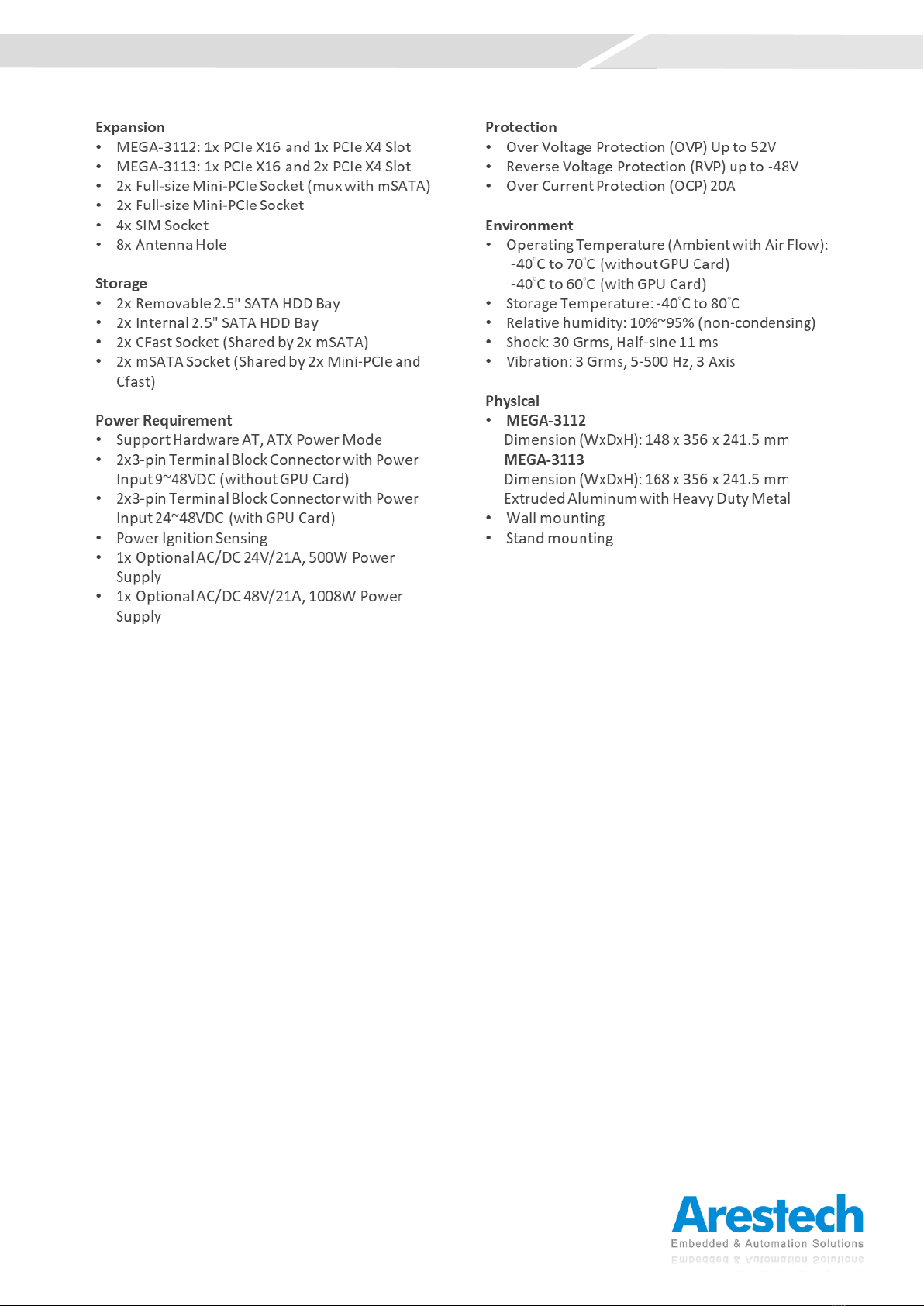
1.2 MEGA-3110 Series Specifications

10
User Manual
Indice
Altri manuali Arestech Scrivania