
Argom Tech T9020 Manuale utente


2 User Guide

User Guide 3
Content
English
01 Foreword .........................................................................6
1.1 Acknowledgements .......................................................6
1.2 Announcements .............................................................6
1.3 Safety Tips.........................................................................7
1.4 Terms.................................................................................8
02 Brief Description of MID Series of Products...................9
2.1 MID Overall Drawing.......................................................9
2.2 MID Accessories Introduction ......................................10
2.3 MID Use and preparation.............................................10
2.4 MID State and information...........................................11
03 Quick start......................................................................12
3.1 Boot and shut down .....................................................12
3.2 Screen of opening and closing................................... 13
3.3 The use of touch screen...............................................14
3.4 Page interface ..............................................................15
3.5 Status bar describe.......................................................17
3.6 Use touch panel............................................................ 17
3.7 Equipment basic settings .............................................18
3.7.1 Silent mode, volume, notication, ringtone, audible
selection, screen lock sounds............................................ 20
3.7.2 Application .................................................................21

4 User Guide
3.7.3 Privacy.........................................................................21
3.7.4 Storage........................................................................23
3.7.5 Language & Keyboard ............................................23
3.7.6 Date & time setting....................................................24
3.8 APPS install and uninstall ..............................................26
3.8.1 APPS install ..................................................................26
3.8.2 APPS uninstall..............................................................26
04 Establish connections...................................................27
4.1 USB connection.............................................................27
4.1.1 Copy les to memory cards......................................29
4.1.2 Content of MID Storage Device...............................29
4.1.3 Storage card ..............................................................29
4.1.4 Input text .....................................................................30
4.2 WIFI connection ............................................................ 31
05 Communication.............................................................33
5.1 E-MAIL.............................................................................33
06 Multimedia .....................................................................35
6.1 Support the le format.................................................. 36
6.2 Music...............................................................................36
6.3 Camera..........................................................................38
6.4 Gallery ............................................................................40
07 Internet ...........................................................................43
7.1 Browser ...........................................................................43

User Guide 5
08 Troubleshooting .............................................................46

6 User Guide
01 Foreword
1.1 Acknowledgements
Thank you for choosing our products. Product MID (Mobile
Internet Device) is a kind of mobile Internet equipment,
delicate and cabinet, easy to carry. Equipped with a high
resolution 800x480 capacitive 5- touch screen, this MID
supports high-denition videos and images, installation of
multiple Oce Micro Software, entertainment and other
applications.
The dazzle cruel interface can provide you new user
experience.
This manual introduces the various functions, using skills and
announcements.
Please read the manual carefully before using MID.
1.2 Announcements
Maintenances
• Please keep MID dry. Keep the equipment and battery
charger away from water, vapor and wet hand in case of
short circuit, corrosion or equipment failure.
• Keep the equipment, battery and charger away from
strongly impact or vibration in case of equipment/battery/
charger fault, re or explosion.
• Keep the equipment, battery and charger away from very
high/low temperature region in case of equipment/battery/

User Guide 7
charger fault, re or explosion.
• Do not hit, throw or acupuncture product MID, and avoid
dropping, extruding and bending MID.
• Keep the equipment and accessories authorized, otherwise
the equipment and accessories would not be under our
company warranty scope.
1.3 Safety Tips
Before you use the MID, please read this section of
information and keep your child aware of this information.
For detailed information, please refer to the safety guidelines.
• Do not use MID during driving for safety.
• In medical sites, please follow the relevant regulations
by turning o your MID when you are in medical sites.
• Please turn o your MID or turn on planes mode when
you are boarding, to avoid wireless signals jamming
aircraft control signal.
• Please turn o your MID near the use of high precision
electronic equipment, otherwise it may lead to
electronic equipment disability.
• Do not take apart your MID or accessories without
authorizing. Only authorized institutions can repair
this MID.
• Please keep MID away from magnetic equipment.
The radiation of MID will erase the information of the
magnetic storage device.
• Please don’t use MID under high temperature or in

8 User Guide
ammable areas (example: gas station).
• Please keep your MID and accessories away from
children without supervising.
• Please obey the relevant laws and regulations when
you use your MID, and respect others lawful rights and
privacy.
• Please obey the relevant specication of this manual
when you use USB cable. Otherwise it may damage
your MID or personal computer.
• Please don’t use your MID in the damp environment
such as bathroom etc. keep your MID from being
soaked or ushed by the liquid.
• Please choose the appropriate volume, use
headphones should not be too big voice, if feel
tinnitus, lower the volume or stop using it.
1.4 Terms
Acronym/terms Full name Instruction
MID Mobile Internet Device Mobile Internet
terminals
WIFI Wireless Fidelity Based on the IEEE
802.11B standard
wireless LAN
TF Trans Flash Also call : Micro SD
User Guide 9
02 Brief Description of MID Series of
Products
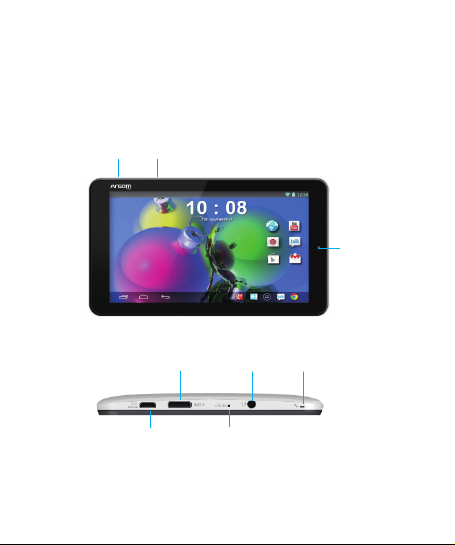
2.1 MID Overall Drawing
Volume
Camera
Power
Macro USB
HDMI
Reset
Headphone Microphone
Indice
Lingue:
Altri manuali Argom Tech Tavoletta


