ArtDio IPF-2000 Manuale utente

IPF2000PoE User’s Manual/使用手冊
V1.0 Version
www.artdio.com.tw

IPF2000PoE User’s Manual/使用手冊
2
Safety Instructions
•Do not attempt to service the product by yourself. Any servicing of this product should be referred to qualified service
personnel.
•To avoid electrical shock, do not put your finger, any pin, wire, or other metal objects into the vents and gaps.
•To avoid accidental fire or electrical shock, do not twist power cord or place it under heavy objects.
•The product should be connected to a power supply of the type described in the operating instructions or as marked on the
product.
•To avoid hazard to children, dispose of the product's plastic packaging carefully.
Please read all the instructions before using this product.

IPF2000PoE User’s Manual/使用手冊
3
Contents
Ⅰ. PRODUCT FEATURES.......................................................................................................................................................................................7
1.1 SOFTWARE FEATURES............................................................................................................................................................................................7
1.2 HARDWARE FEATURES...........................................................................................................................................................................................7
1.3 PRODUCT OVERVIEW .............................................................................................................................................................................................8
1.3.1 Phone Front View .........................................................................................................................................................................................8
1.3.2 Phone Side View...........................................................................................................................................................................................8
1.3.3 Phone Rear View ..........................................................................................................................................................................................9
Ⅱ. INSTALLATION..................................................................................................................................................................................................9
2.1 PACKAGE CONTENT ...............................................................................................................................................................................................9
2.2 HARDWARE INSTALLATION....................................................................................................................................................................................9
2.2.1 Installation with PSE Router.........................................................................................................................................................................9
2.2.2 Installation with Power Resources..............................................................................................................................................................10
2.2.3 Wall mount..................................................................................................................................................................................................10
2.3 LCD STATUS DISPLAY.........................................................................................................................................................................................11
Ⅲ.BASIC OPERATION...........................................................................................................................................................................................13
3.1 PHONE DIAGRAM .................................................................................................................................................................................................13
3.2 PHONE KEYS FUNCTION .......................................................................................................................................................................................14
Ⅳ.CONFIGURATION SETTINGS..........................................................................................................................................................................15
4.1 PHONE BOOK........................................................................................................................................................................................................15
4.2 CALL HISTORY......................................................................................................................................................................................................15
4.3 PHONE SETTING....................................................................................................................................................................................................15
4.3.1 Call forward ................................................................................................................................................................................................15
4.3.2 Do not Disturb.............................................................................................................................................................................................16
4.3.3 Alarm setting...............................................................................................................................................................................................16
4.3.4 Date/Time setting........................................................................................................................................................................................16
4.3.5 Volume&Gain.............................................................................................................................................................................................16
4.3.6 Ringer..........................................................................................................................................................................................................16
4.3.7 Auto Dail.....................................................................................................................................................................................................16
4.4 NETWORK.............................................................................................................................................................................................................16
4.4.1 WAN Setup.................................................................................................................................................................................................16
4.4.2 DNS.............................................................................................................................................................................................................17
4.4.3 Status...........................................................................................................................................................................................................17
4.5 SIP SETTING .........................................................................................................................................................................................................17
4.5.1 Service domain............................................................................................................................................................................................17
4.5.2 Codec...........................................................................................................................................................................................................17
4.5.3 RTP setting..................................................................................................................................................................................................18
4.6 NAT TRANSVERSAL.............................................................................................................................................................................................18
4.7 ADMINISTRATOR..................................................................................................................................................................................................18
Ⅴ. CONFIGURATION USING WEB BROWSER.................................................................................................................................................18
5.1 INFORMATION.......................................................................................................................................................................................................19
5.2 PHONE SETTING ...................................................................................................................................................................................................19

IPF2000PoE User’s Manual/使用手冊
4
5.2.1 Phone Book.................................................................................................................................................................................................19
5.2.2 Speed Dial...................................................................................................................................................................................................21
5.2.3 Dial Plan Setting .........................................................................................................................................................................................21
5.2.4 Call Forward................................................................................................................................................................................................23
5.2.5 Call Waiting................................................................................................................................................................................................24
5.2.6 DND Setting................................................................................................................................................................................................24
5.2.7 Volume Setting............................................................................................................................................................................................25
5.2.8 Melody Setting............................................................................................................................................................................................25
5.3 NETWORKING.......................................................................................................................................................................................................26
5.3. 1 Status..........................................................................................................................................................................................................26
5.3. 2 WAN Setting..............................................................................................................................................................................................27
5.3. 3 DDNS Setting ............................................................................................................................................................................................28
5.3. 4 SNTP Setting..............................................................................................................................................................................................29
5.4 SIP SETTING .........................................................................................................................................................................................................30
5.4. 1 Service Domain..........................................................................................................................................................................................30
5.4. 2 Port Setting.................................................................................................................................................................................................31
5.4. 3 Codec Setting.............................................................................................................................................................................................32
5.4. 4 Codec ID....................................................................................................................................................................................................32
5.4. 5 DTMF Setting............................................................................................................................................................................................33
5.4. 6 STUN Setting.............................................................................................................................................................................................34
5.4. 7 RPort Setting..............................................................................................................................................................................................34
5.4. 8 Other Setting..............................................................................................................................................................................................35
5.5 OTHERS ................................................................................................................................................................................................................35
5.5. 1 Auto Config................................................................................................................................................................................................35
5.5. 2 Firmware Upgrade .....................................................................................................................................................................................36
5.5. 3 Auto Update...............................................................................................................................................................................................37
5.5. 4 Default Setting ...........................................................................................................................................................................................38
5.5. 5 Advanced Setting.......................................................................................................................................................................................38
5.5. 6 System Auth...............................................................................................................................................................................................39
5.6 SAVE CHANGE......................................................................................................................................................................................................39
5.7 REBOOT................................................................................................................................................................................................................39
Ⅵ. PRODUCT SPECIFICATIONS..........................................................................................................................................................................40
Ⅶ. FREQUENTLY ASKED QUESTIONS (Q&A).................................................................................................................................................41

IPF2000PoE User’s Manual/使用手冊
5
目 錄
一.產品介紹..........................................................................................................................................................................................................45
1.1 軟體功能............................................................................................................................................................................................................45
1.2 硬體功能............................................................................................................................................................................................................45
1.3 產品外觀............................................................................................................................................................................................................46
1.3.1 話機正面...................................................................................................................................................................................................46
1.3.2 話機側面...................................................................................................................................................................................................46
1.3.3 話機背面...................................................................................................................................................................................................47
二.產品安裝..........................................................................................................................................................................................................47
2.1 包裝內容............................................................................................................................................................................................................47
2.2 設備連接............................................................................................................................................................................................................47
2.2.1 有 PSE 供電路由器的接法: ...................................................................................................................................................................47
2.2.2 有電源供電的接法:.................................................................................................................................................................................48
2.2.3. 牆面安裝..................................................................................................................................................................................................48
2.3 設備接入狀態顯示...........................................................................................................................................................................................49
三.話機按鍵設定.................................................................................................................................................................................................51
3.1 話機按鍵示意圖...............................................................................................................................................................................................51
3.2 話機按鍵功能說明...........................................................................................................................................................................................51
四.話機選單設定.................................................................................................................................................................................................53
4.1 PHONE BOOK ........................................................................................................................................................................................................53
4.2 CALL HISTORY......................................................................................................................................................................................................53
4.3 PHONE SETTING....................................................................................................................................................................................................53
4.3.1 Call forward ................................................................................................................................................................................................53
4.3.2 Do not Disturb.............................................................................................................................................................................................54
4.3.3 Alarm setting...............................................................................................................................................................................................54
4.3.4 Date/Time setting........................................................................................................................................................................................54
4.3.5 Volume&Gain.............................................................................................................................................................................................54
4.3.6 Ringer..........................................................................................................................................................................................................54
4.3.7 Auto Dial.....................................................................................................................................................................................................55
4.4 NETWORK.............................................................................................................................................................................................................55
4.4.1 WAN Setup.................................................................................................................................................................................................55
4.4.2 DNS.............................................................................................................................................................................................................55
4.4.3 Status...........................................................................................................................................................................................................55
4.5 SIP SETTING .........................................................................................................................................................................................................55
4.5.1 Service domain............................................................................................................................................................................................55
4.5.2 Codec...........................................................................................................................................................................................................56
4.5.3 RTP setting..................................................................................................................................................................................................56
4.6 NAT TRANSVERSAL.............................................................................................................................................................................................56
4.7 ADMINISTRATOR..................................................................................................................................................................................................56
五.網頁設定..........................................................................................................................................................................................................57
5.1 INFORMATION.......................................................................................................................................................................................................57
5.2 PHONE SETTING ...................................................................................................................................................................................................58
5.2.1 Phone Book.................................................................................................................................................................................................58


IPF2000PoE User’s Manual/使用手冊
6
5.2.2 Speed Dial...................................................................................................................................................................................................59
5.2.3 Dial Plan Setting .........................................................................................................................................................................................59
5.2.4 Call Forward................................................................................................................................................................................................61
5.2.5 Call Waiting Setting....................................................................................................................................................................................62
5.2.6 DND Setting................................................................................................................................................................................................62
5.2.7 Volume Setting............................................................................................................................................................................................63
5.2.8 Melody Setting............................................................................................................................................................................................63
5.3 NETWORKING.......................................................................................................................................................................................................64
5.3. 1 Status..........................................................................................................................................................................................................64
5.3. 2 WAN Setting..............................................................................................................................................................................................65
5.3. 3 DDNS Setting ............................................................................................................................................................................................66
5.3. 4 SNTP Setting..............................................................................................................................................................................................67
5.4 SIP SETTING .........................................................................................................................................................................................................68
5.4. 1 Service Domain..........................................................................................................................................................................................68
5.4. 2 Port Setting.................................................................................................................................................................................................69
5.4. 3 Codec Setting.............................................................................................................................................................................................70
5.4. 4 Codec ID Setting........................................................................................................................................................................................70
5.4. 5 DTMF Setting............................................................................................................................................................................................71
5.4. 6 STUN Setting.............................................................................................................................................................................................72
5.4 .7 RPort Setting..............................................................................................................................................................................................72
5.4. 8 Other Setting..............................................................................................................................................................................................73
5.5 OTHERS ................................................................................................................................................................................................................73
5.5. 1 Auto Config................................................................................................................................................................................................73
5.5. 2 Firmware Upgrade .....................................................................................................................................................................................74
5.5. 3 Auto Update...............................................................................................................................................................................................74
5.5. 4 Default Setting ...........................................................................................................................................................................................76
5.5. 5 Advanced Setting.......................................................................................................................................................................................76
5.5. 6 System Auth...............................................................................................................................................................................................77
5.6 SAVE CHANGE......................................................................................................................................................................................................77
5.7 REBOOT................................................................................................................................................................................................................77
六.產品規格..........................................................................................................................................................................................................78
七.常見問題與排解(Q&A)............................................................................................................................................................................79

IPF2000PoE User’s Manual/使用手冊
7
Ⅰ. Product Features
The ArtDio IPF2000PoE is the latest generation of Enterprise IP Phone that supports SIP (Session Initiation Protocol), the
innovative technology and excellencies in engineering deliver the best voice quality and multiple control functionality.
1.1 Software Features
¾Support SIP v1.0 (RFC 2543),SIP v2.0(RFC 3261),TCP/UDP/IP, RTP/RTCP,
HTTP,ICMP,ARP/RARP,DNS,DHCP(include DHCP client and DHCP server), SNTP,PPPoE,STUN,TFTP
protocols.
¾Support multiple audio codecs, including G.711 (64k bit/s, PCM), G.723.1 (6.3k / 5.3k bit/s), G.726 (16k / 24k /
32k / 40k bit/s, ADPCM), G.729A and G.729B .
¾Support VAD (Voice Activity Detection),CNG (Comfort Noise Generation),LEC (Line Echo Cancellation),Packet
Loss Compensation and Adaptive Jitter Buffer control.
¾Support standard calling functions, such as Caller ID Display and Block,Call Waiting,Call Hold,Call Transfer
(attended /blind),Call Forwarding and 3-way Conference.
¾Support in-band and out-of band DTMF (RFC2833) and SIP INFO.
¾Support for Layer 3 QoS(Tos Field)settings.
¾Support HTTP1.1 website settings,MD5 For SIP certification(RFC2069/RFC2617), to ensure security level.
¾Support up to 3 SIP accounts,supports Outbound Proxy and up to 11 media channels concurrently.
¾Support configuration settings using phone keypad, through the website, Console control and Telnet settings, or
provide automated provisioning by downloading encrypted configuration file via HTTP/TFTP for enterprise users.
¾Built-in different ring tones allow for user-customization on ring tone settings.
¾Support firmware upgrade via HTTP or TFTP/FTP.
1.2 Hardware Features
¾1 x RJ-45 10/100M Base-T Ethernet ports, which enable to connect to WAN settings.
¾MIC & Line-Out jack, support headset which will auto switch to headset when plugged in.
¾Support functions of Speakerphone, Redial, Incoming/Dialed Call, Volume up and down, address book, Call
Transfer, 3-way Conference, DND (Do-Not-Disturb), Microphone Mute
¾Phone keypad supports switching between 2 lines, and 10 speed dial keys (0~9).

IPF2000PoE User’s Manual/使用手冊
8
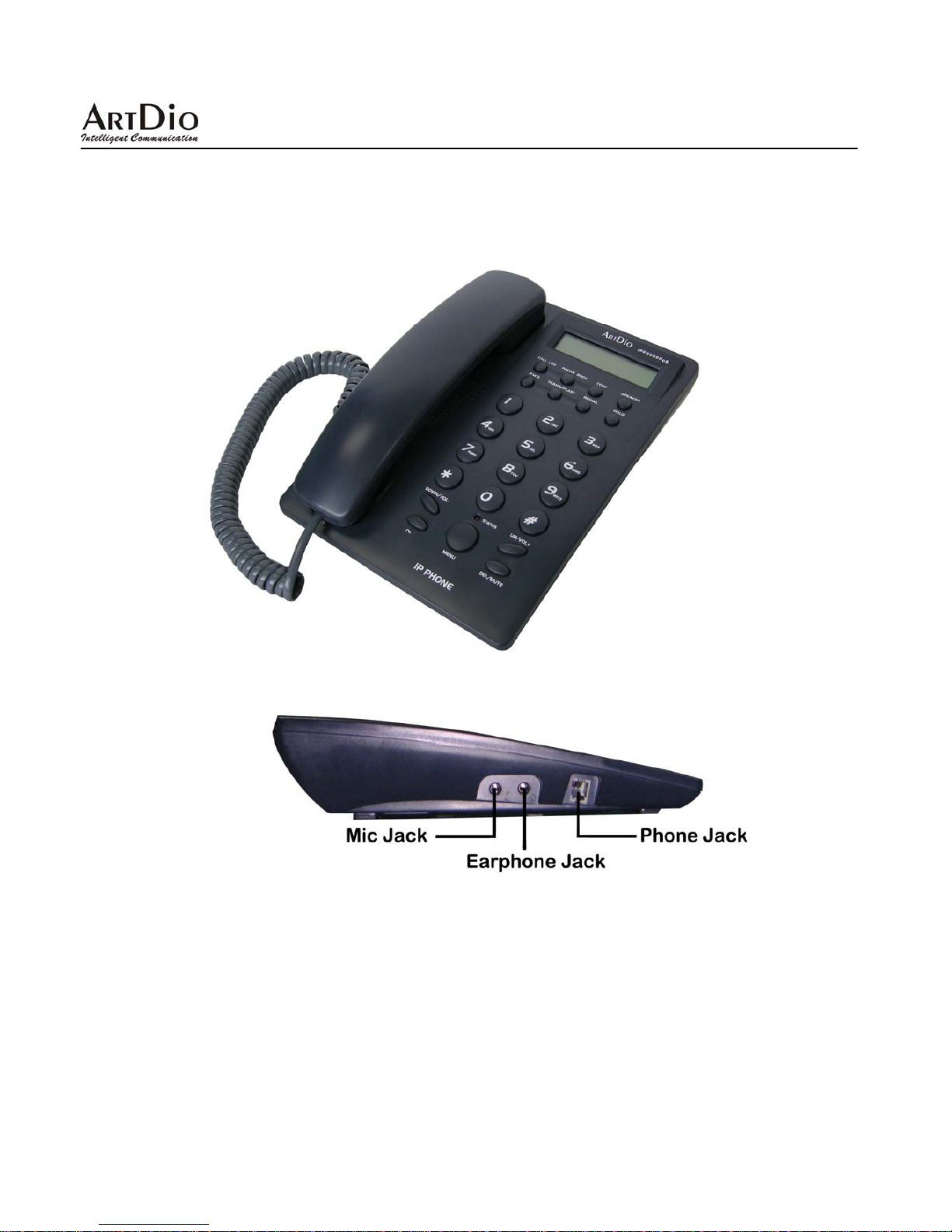
1.3 Product Overview
1.3.1 Phone Front View
1.3.2 Phone Side View

IPF2000PoE User’s Manual/使用手冊
9
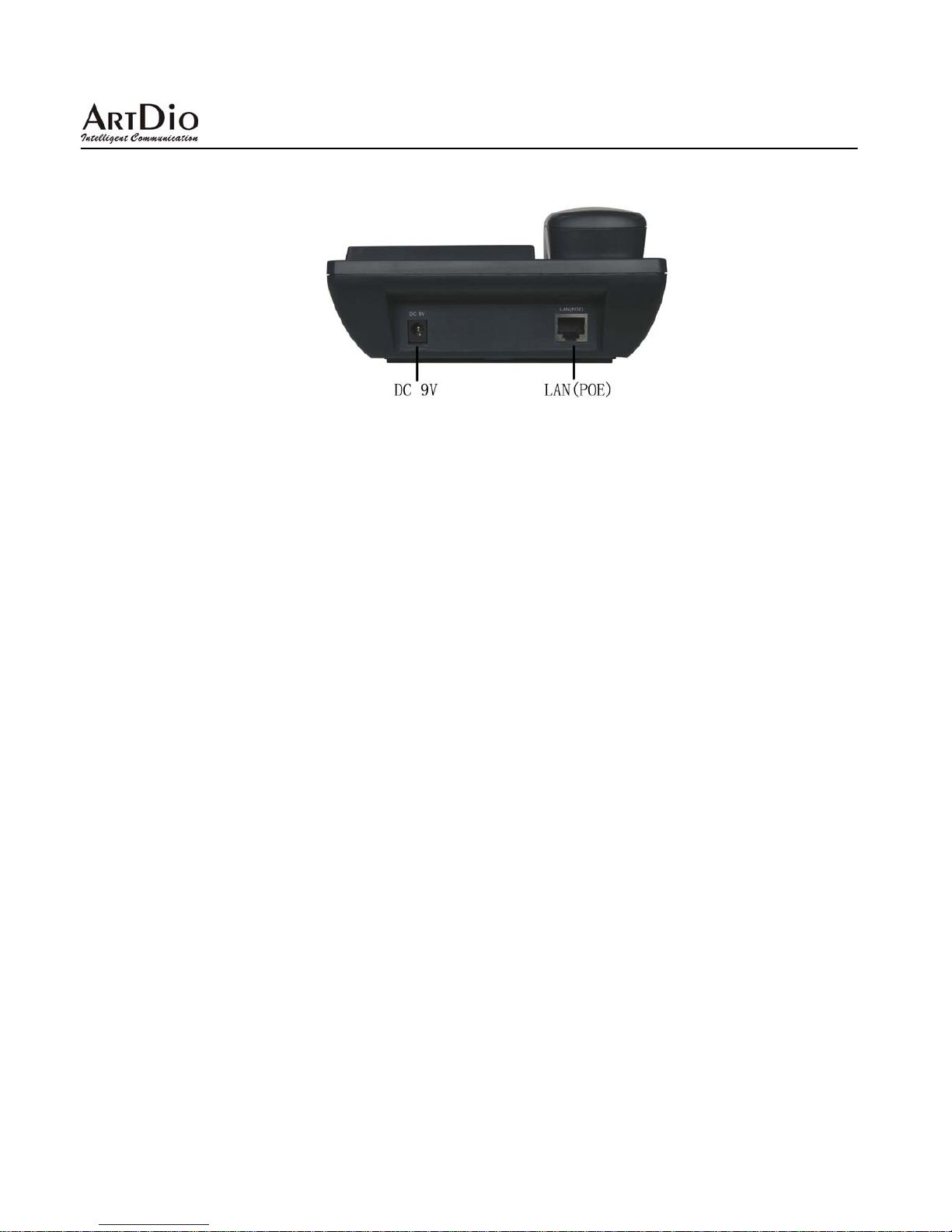
1.3.3 Phone Rear View
Note: You also can use a power adaptor with rated 9Vdc @ 1A output, center positive for non-PoE environment.
Ⅱ. INSTALLATION
2.1 Package Content
1 x IPF2000PoE IP Phone
1 x handset
1 x power adapter(Option)
1 x RJ-45 Cable
User's Guide
2.2 Hardware Installation
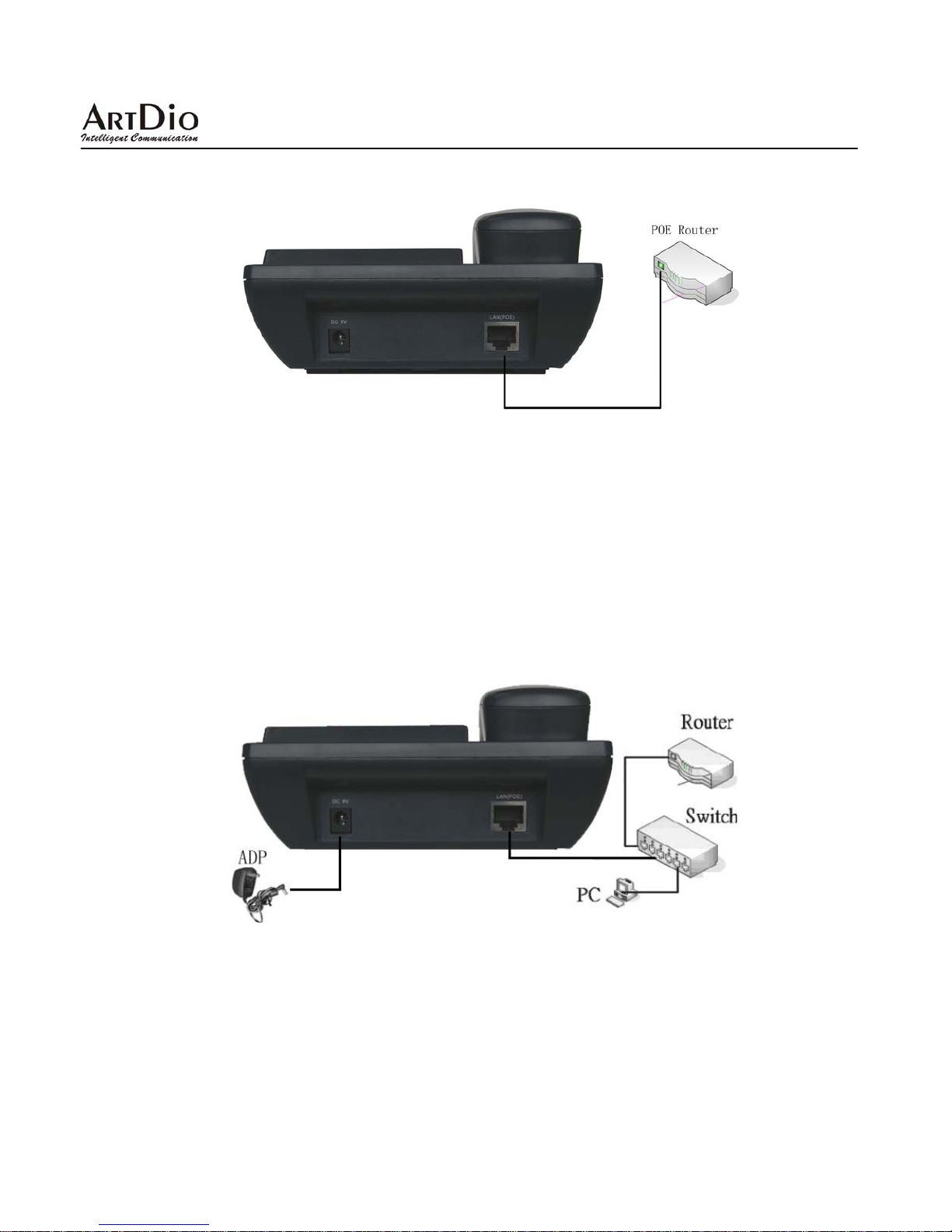
2.2.1 Installation with PSE Router
As a PD (powered device) IPF2000PoE supports IEEE 802.3af Power-over-Ethernet industrial standard, which allows
powering from a PSE (power sourcing equipment) router or equipment. You can only connect LAN interface of
IPF2000PoE with PSE Router directly, shown as following figure:

IPF2000PoE User’s Manual/使用手冊
10
2.2.2 Installation with Power Resources
You also can use a power adaptor with rated 9Vdc @ 1A output, center positive for non-PoE environment. If there is
IP router in use, please connect one end of RJ-45 network cable with IP router (or network switching device under IP
router) LAN interface and the other end with LAN interface of IPF2000PoE. You may also connect LAN interface of
IPF2000PoE with IP router directly, shown as following figure:
2.2.3 Wall mount
(1)IPF2000PoE can be wall mounted. There are two wall mount holes on the bottom of the main body
Altri manuali per IPF-2000
3
Questo manuale è adatto per i seguenti modelli
1
Indice
Altri manuali ArtDio Telefono IP