
ASAHOM S1025 Manuale utente

English
Deutsch
Français
Italiano
Español
.................................01
.................................05
.................................09
.................................13
.................................17
01
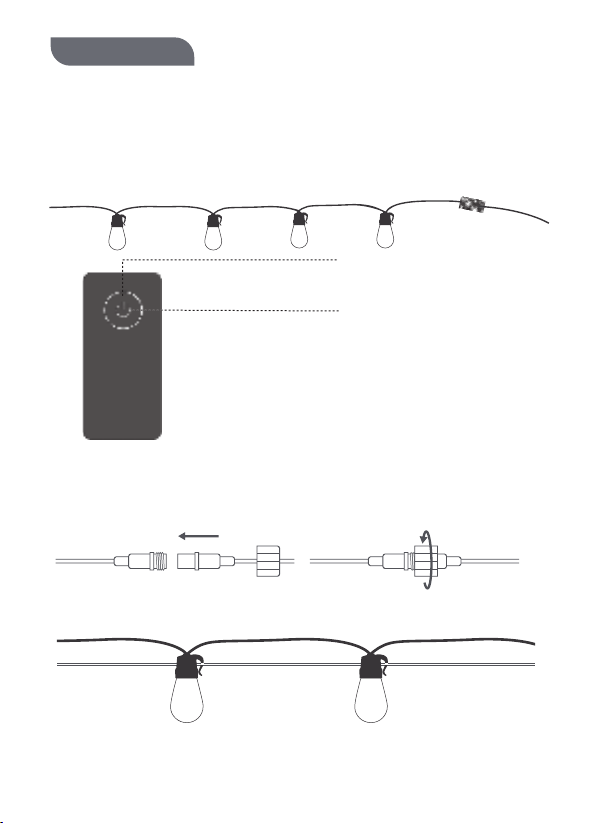
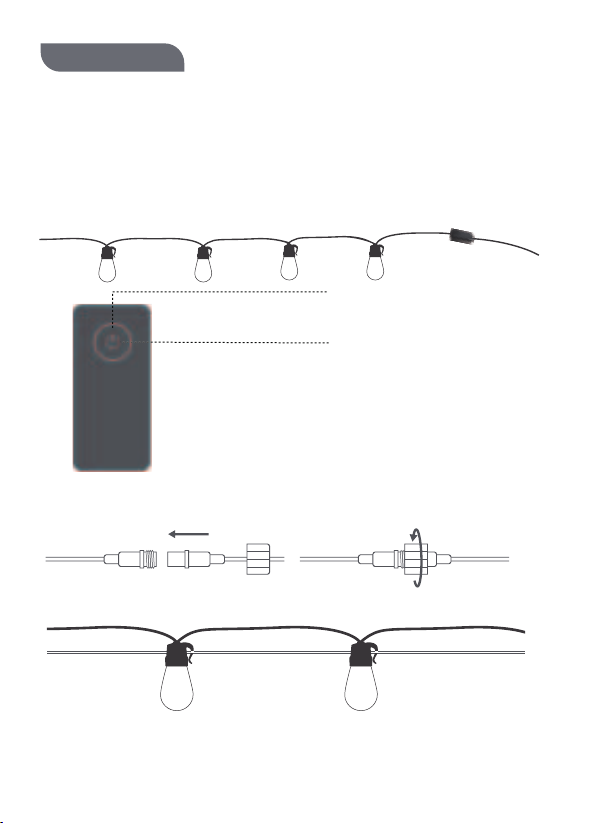
Connect the string lights and solar module together as shown below
Hang the light bulbs onto the rope using the hook.
The adapter is not waterproof. Exercise caution when using the adapter outdoors.
Installing Your Device
Introduction
At Glance
Thank you for choosing the ASAHOM LED Bulb String Lights. This product has an IP65
water-resistant rating, making them ideal for outdoor use. You can adjust the
brightness and set up a timer through the Smart Life app.
English
Short press: ON/OFF
Long press 5s:
White light flashing, restore factory
setting, enter into the WiFi pairing
status
Pairing Your Device with the Smart Life App
What You Need:
·A smartphone or tablet running iOS 8.0 (or above) or Android 4.3 (or above).
·Make sure the device Power button has been pressed.
1.Download the Smart Life app from the App Store (iOS devices) or Google Play (Android
devices).
2.Turn on the Bluetooth on your smartphone.
3.Keep the distance between the smartphone and the control box within 25m(82ft)
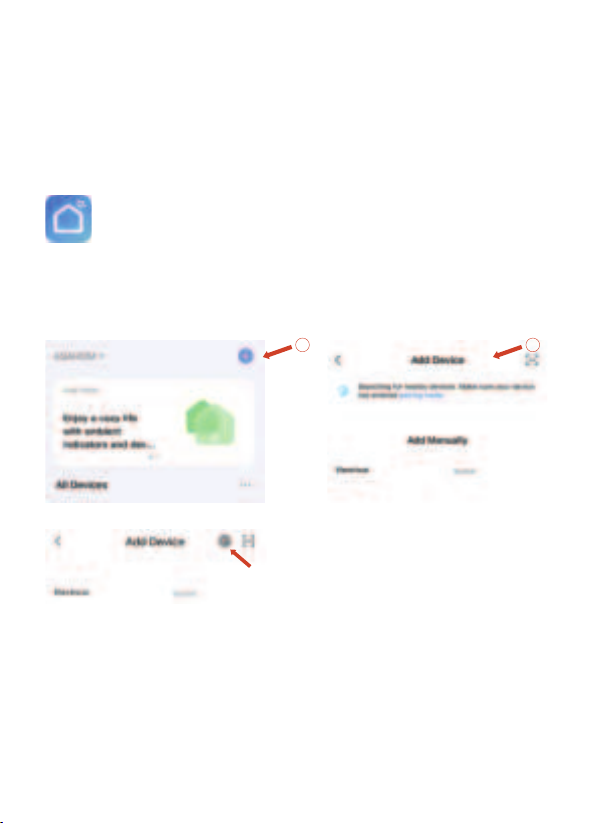
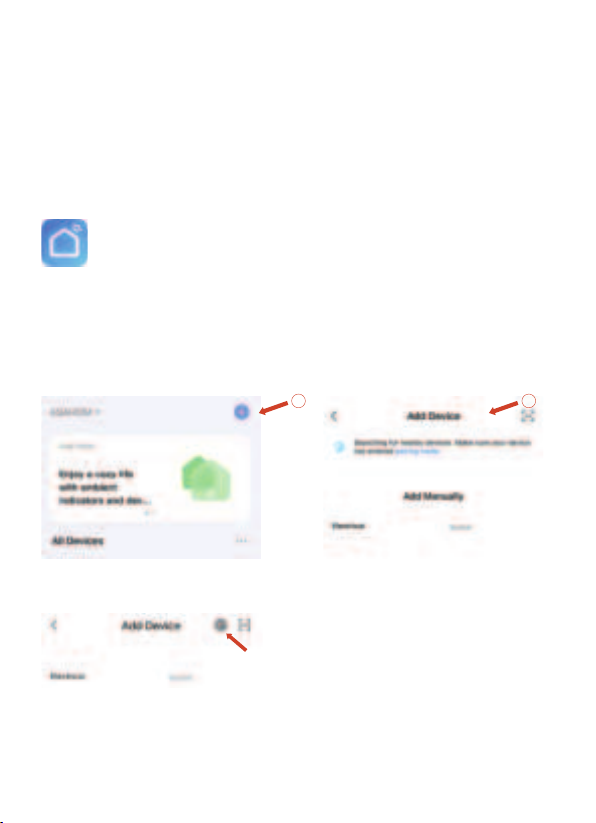
4.Open the app, tap the “+” icon in the top right corner , the device will automatically
appear in the scan list.
Repeat the above part or click this icon to enter the automatic scan again
5.Tap the device icon and follow the on-screen instructions to complete pairing.
1 2
02
How to use
Adjust Color
1. APP can't scan the device
·Ensure the string lights are powered on.
·Confirm Bluetooth on your smartphone is enabled.
·Position your smartphone close to the control box, then try again
·If it still fails to scan, press and hold the button for 5 seconds, white
light flashing and try again.
2. Can't connect to WiFi
·Confirm your home WiFi is 2.4GHz and you entered the correct password during the connection.
·Position your smartphone close to the control box
· Press and hold the button for 5 seconds, re-add the device after the light starts to flash.
3. Some of the bulbs do not work
Unplug the adapter, then plug it in again.
If the problem persists, please contact Customer Service
Troubleshooting
03
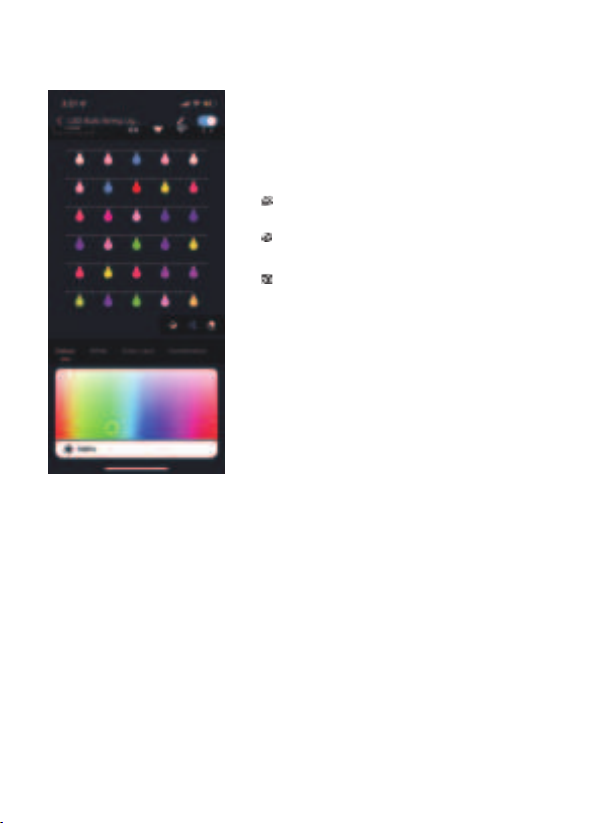
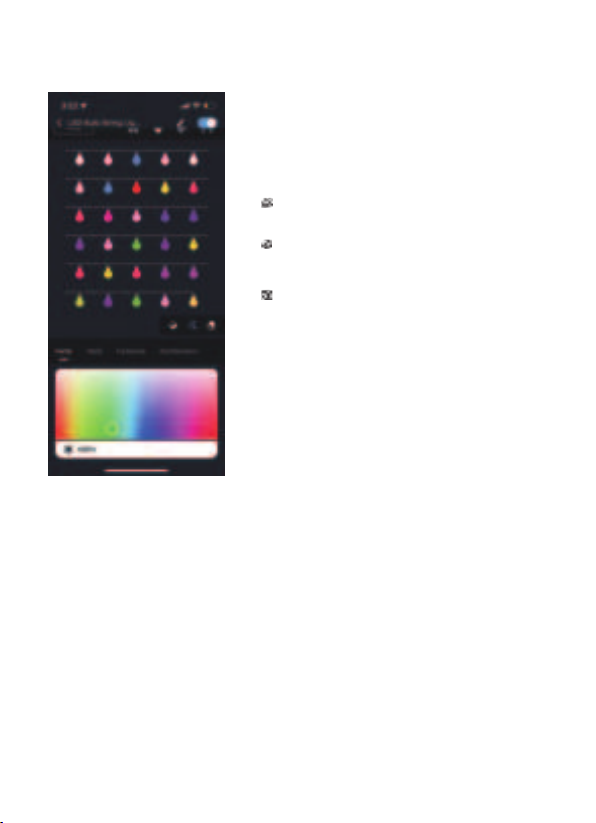
:After selection, click on the color wheel, then
click on the light bulb, you can apply the color to
the selected light bulb.
:After selecting, click on the color wheel to
adjust the whole string of lights to the same color.
:After selection, click on the light bulb to turn
off the light of the selected light bulb.

3. Some of the bulbs do not work
·Unplug the adapter, then plug it in again.
·If the problem persists, please contact Customer Service.
Specifications
Input ( Adapter) AC 100-240V 50 / 60Hz 0.8A MAX
Output (Adap ter) DC 12V,2A
Color RGBW
Water Resistance IP65 (String Lights)
Wireless protocol WiFi 2.4GHz 802.11 b/g/n
Working Temperature -20+50°C / -4+122°F
Length 96ft / 30bulbs
04
0505
Verbinden Sie die String-Leuchten und das Solarmodul zusammen, wie unten gezeigt
Hängen Sie die Glühbirnen mit dem Haken auf das Seil.
Der Adapter ist nicht wasserdicht. Seien Sie vorsichtig, wenn Sie den Adapter im
Freien verwenden.
Installieren des Geräts
Einführung
Auf einen Blick
Vielen Dank, dass Sie sich für die Auswahl der ASAHOM-LED-Birnen-String-Leuchten
entschieden haben. Dieses Produkt hat eine wasserbeständige IP65-Bewertung, die sie
ideal für den Außenbereich ist. Sie können die Helligkeit einstellen und einen Timer
durch die Smart Life-App einrichten.
Deutsch
Kurz drücken: EIN/AUS
Langes Drücken 5s:
Weißes Licht blinkt, Werkseinstellung
wiederherstellen, in den WiFi-Pair
ing-Status wechseln
Paarung Ihres Geräts mit der Smart Life-App
Was du brauchst:
·Ein Smartphone oder Tablet, das iOS 8.0 (oder obiger) oder
Android 4.3 (oder höher) läuft.
·Stellen Sie sicher, dass das Gerät eingeschaltet ist, der eingeschaltet ist.
1.Laden Sie die Smart Life-App aus dem App Store (iOS-Geräte) oder Google Play
herunter(Android-Geräte).
2.Schalten Sie das Bluetooth auf Ihrem Smartphone ein.
3.Halten Sie den Abstand zwischen dem Smartphone und dem Steuerkasten innerhalb
von 25 m (82ft).
4.Öffnen Sie die App, tippen Sie auf das Symbol "+" in der oberen rechten Ecke, das
Gerät wird automatisch in der Scandiste angezeigt.appear in the scan list.
Wiederholen Sie den obigen Teil oder klicken Sie auf dieses Symbol, um den
automatischen Scan erneut einzugeben.
5.Tippen Sie auf das Gerätesymbol und befolgen Sie die Anweisungen auf dem
Bildschirm, um das Pairing abzuschließen.
1 2
06
Wie benutzt man
Farbe anpassen
Fehlerbehebung
07
:Klicken Sie nach der Auswahl auf das Farbrad
und klicken Sie dann auf die Glühbirne, Sie können
die Farbe an die ausgewählte Glühlampe
anwenden.
:Klicken Sie nach der Auswahl auf das Farbrad,
um die gesamte Lichtkette auf dieselbe Farbe
einzustellen.
:Klicken Sie nach der Auswahl auf die Glühbirne,
um das Licht der ausgewählten Glühbirne
auszuschalten.
1. APP kann das Gerät nicht scannen
·Stellen Sie sicher, dass die Lichterketten eingeschaltet sind.
·Vergewissern Sie sich, dass Bluetooth auf Ihrem Smartphone aktiviert ist.
·Positionieren Sie Ihr Smartphone in der Nähe der Steuerbox und versuchen Sie es erneut.
·Wenn der Scanvorgang immer noch fehlschlägt, halten Sie die Taste 5 Sekunden lang gedrückt,
während das weiße Licht blinkt, und versuchen Sie es erneut.
2. Kann keine WLAN-Verbindung herstellen
·Bestätigen Sie, dass Ihr Heim-WLAN 2.4 GHz hat und Sie während der Verbindung das richtige
Passwort eingegeben haben.
·Positionieren Sie Ihr Smartphone in der Nähe der Steuerbox.
·Halten Sie die Taste 5 Sekunden lang gedrückt und fügen Sie das Gerät erneut hinzu,
nachdem das Licht zu blinken beginnt.
3. Einige der Glühbirnen funktionieren nicht
·Stecken Sie den Adapter aus und wieder ein.
·Wenn das Problem weiterhin besteht, wenden Sie sich bitte an den Kundendienst.

08
3. Einige der Glühbirnen funktionieren nicht
·Ziehen Sie den Adapter aus und wieder ein.
·Wenn das Problem weiterhin besteht, wenden Sie sich bitte an den Kundendienst.
Spezifikationen
Eingang (Adapter) AC 100-240V 50 / 60Hz 0.8A MAX
Ausgang (Adapter) DC 12V,2A
Farbe RGBW
Wasserbeständigkeit IP65 (String Lights)
Wireless-Protokoll WiFi 2.4GHz 802.11 b/g/n
Arbeitstemperatur -20+50°C / -4+122°F
Länge/Anzahl der Glühbirnen 96ft / 30Glühbirnen
Indice
Lingue:
Altri manuali ASAHOM Attrezzatura di illuminazione


