
Asco WS90ENTEE Manuale utente

Instructions for use
Cooker hood
CW4938G / WS90ENTEE
CW41238G / WS12ENTEE

EN 4
EN Manual EN 3 - EN 23
Pictograms used:
Important information
Tip

EN 3
CONTENTS
Your cooker hood
Introduction 4
Use
Description 5
Operation 6
Cleaning filters 8
Maintenance
Cleaning 9
Installation
General 12
Connection 13
Build-in dimensions 14
Assembly 15
Technical specifications
22
Appendix
Disposal 23

EN 4
Introduction
On reading these user manuals you will soon become familiar with
the features of this appliance. Please read the appliance’s safety and
maintenance instructions.
Please retain the operating and installation instructions as these may be
useful for future reference.
Please read the separate safety instructions
prior to use.
YOUR COOKER HOOD

EN 5
USE
Description
1. Switching on/off and dimming the lighting
2. Reducing air extraction capacity and switching off
3. Cleaning carbon filter indicator
4. Cleaning grease filter indicator
5. Display status
6. Timer function indicator
7. Clean Air function indicator
8. Switching on and increasing air extraction capacity
9. Switching on timer function
Note!
• Prior to activating or deactivating a function, the motor and lighting
should be switched off.
• If you have a cooker hood with a carbon filter, you should activate
the carbon filter indicator as described in the ‘Cleaning filters’
paragraph.
1 2 3 4 5 6 7 8 9

EN 6
USE
Operation
Switching extraction on and off
• Press the ‘+’ button (8).
The cooker hood will switch on at the lowest setting.
• Press the ‘+’ button (8) again to set a higher extraction setting.
Press and hold the ‘+’ button (8) for 2 seconds to select the highest
setting (boost) (see switching on intensive setting).
The extraction setting can be set between speeds 1 to 5 or 9
(depending on the model).
• Press the ‘-’ button (2) to select a lower setting.
The extraction setting is indicated in the display (5).
• If the extraction setting is set at 1, you can switch off the cooker
hood by quickly pressing and releasing the ‘-’ button (2).
• To switch off the cooker hood from whatever setting press and hold
the ‘-’ button (2) for at least 2 seconds.
Alter the number of speed-settings (models with 9 speed-settings)
You can choose between 9 speed-settings (standard) or 5 speed-
settings.
• Press and hold the ‘-’ button (2) and ‘+’ button (8) for at least 5
seconds.
This selects the 5 speed-setting option. Press and hold the ‘-’
button (2) and ‘+’ button (8) again for at least 5 seconds to select
the 9 speed-setting option.
Switching the lighting on and off
• Quickly press and release the lighting button (1).
The light switches on at maximum strength.
• Press and hold the lighting button (1) to set the lighting strength.
• To turn off the light, quickly press and release the lighting button (1)
while the light is on.
The lighting changes from maximum to minimum strength and
vice versa.

EN 7
Switch on intensive setting:
• Press and hold the ‘+’ button (8) for approximately 2 seconds.
The intensive setting (setting ‘P’) is switched on for ten minutes
(depending on the model). The display will flash (5) during this
period. The original extraction setting will be reactivated after this
period.
• Quickly press and release the ‘+’ (8) button to switch off the
intensive setting.
Switching on the timer
• Press the timer button (9).
The timer indicator (6) will light up.
The cooker hood will switch off automatically after 10 minutes.
• Switch off the timer function by pressing the ‘-’ button ‘2’.
If the lighting is lit its strength will be reduced automatically by 30-40%
once the timer has finished.
Note!
If the intensive setting has been selected you cannot activate the timer
function.
Clean Air function
The Clean Air function allows you to freshen the air in your kitchen for a
maximum of 12 hours.
• Switch off the cooker hood.
• Press and hold the timer button (9) for approximately 4 seconds.
The cooker hood will switch on automatically for 10 minutes every
hour at the lowest speed setting. During extraction the Clean Air
indicator will flash (7).
When the hood switches off after 10 minutes, the Clean Air
indicator (7) will be lit continuously until the hood switches on again
after 50 minutes.
• Switch off the Clean Air function in the meantime by pressing a
random button (except the one for the lighting).
USE

EN 8
Cleaning filters
Saturation grease and carbon filters
The filters should be replaced or cleaned when the grease filter
indicator (4) or the carbon filter indicator (3) are lit.
Grease filter
The grease filter indicator (4) will flash after 30 operating hours.
• The grease filters should then be cleaned.
• Reset the memory by pressing and holding the ‘-’ button (2) until
the grease filter indicator (4) stops flashing.
Carbon filter
The carbon filter indicator (3) will flash after 120 operating hours.
• The carbon filter should then be cleaned or replaced.
• Reset the memory by simultaneously pressing and holding the ‘-’ (2)
and ‘+’ (8) buttons until the carbon filter indicator (3) stops flashing.
Switching on carbon filter indicator
• Simultaneously press and hold the ‘+’ (8) button and the lighting
button (1) until the carbon filter indicator (3) flashes twice.
The carbon filter indicator is activated.
Switching off carbon filter indicator
• Simultaneously press and hold the ‘+’ (8) button and the lighting
button (1) until the carbon filter indicator (3) flashes once.
The carbon filter indicator is switched on:
• The carbon filter indicator (3) lights up for 3 seconds.
The carbon filter indicator is switched off:
• The carbon filter indicator (3) flashes for 3 seconds.
USE

EN 9
Cleaning
Important!
For all maintenance first switch off the mains power to the cooker hood
by pulling the plug out of the socket or by turning off the home's master
switch. The hood needs to be cleaned regularly, both inside as well as
outside (at least in the same frequency as the grease filter cleaning).
Do not use abrasive cleaning products. Do not use alcohol!
Important!
If the instructions regarding cleaning the appliance or replacing the
filters are not followed, this can cause a fire. These instructions should
be followed! The manufacturer is not liable for damage to the hood
or fire damage resulting from incompetent maintenance or from
non-adherence to the above safety instructions.
Cooker hood
Clean the cooker hood with soapy water and a soft cloth.
Then wash off with clean water. Do not use aggressive cleaning agents
such as caustic soda. The cooker hood finish stays in good condition if
it is buffed periodically following the application of wax.
Stainless steel cooker hoods
Do not use scouring pads or other abrasive cleaners on stainless steel
cooker hoods. Finish with a non-abrasive, non-polishing agent and buff
the stainless steel in the direction of the grain.
Metal grease filters
Metal grease filters should be cleaned once a month (or when indicated
by the filter cleaning indicator – if present on the model) using a neutral
cleaning agent, either by hand or in the dishwasher on a short, low-
temperature program. Place the grease filters with the openings facing
downwards in the dishwasher so the water can drain out of the filter.
Aluminium grease filters become dull as a result of dishwasher cleaning
agents. This is normal and does not effect the working.
MAINTENANCE
EN 10
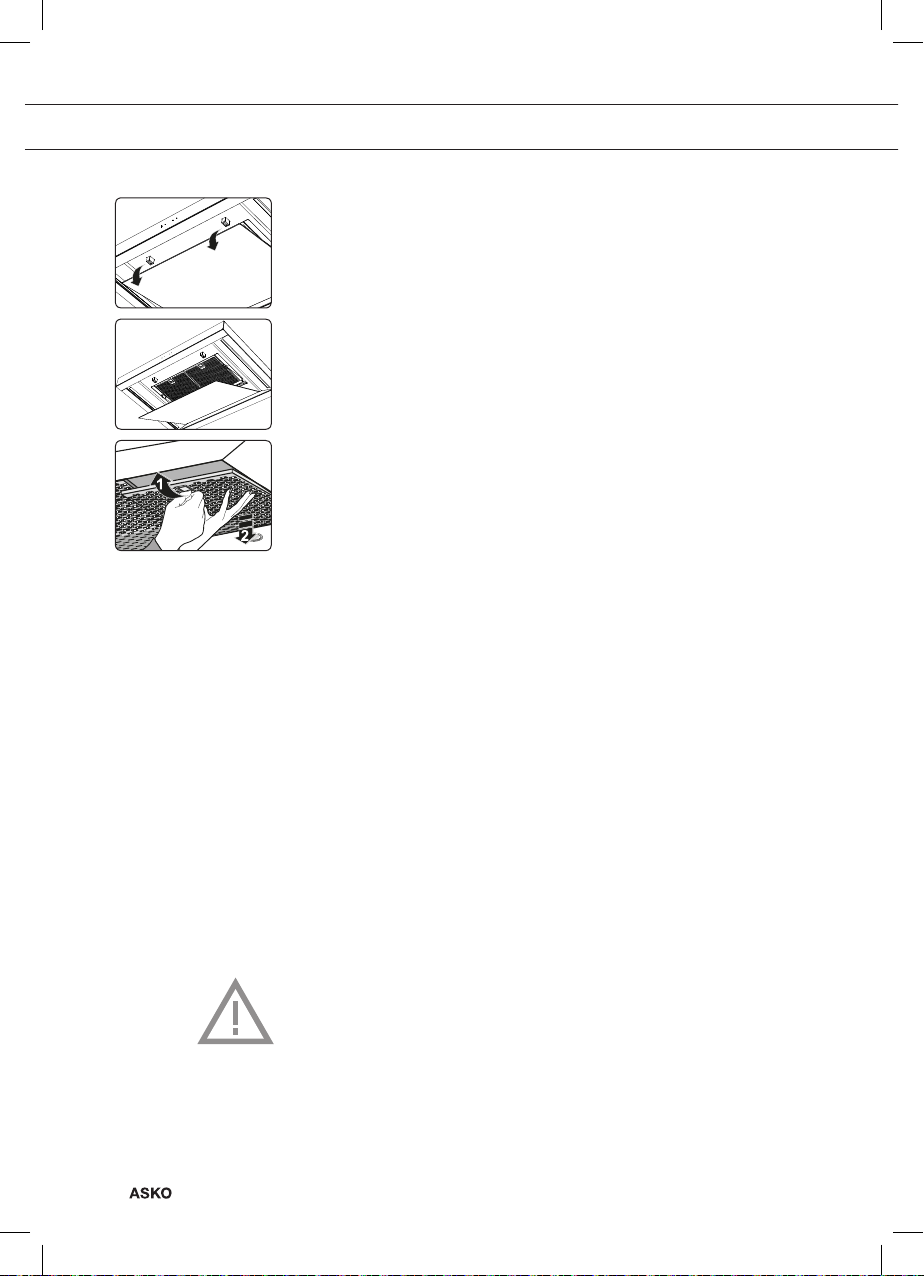
Removing cassette filter
1 Switch off the motor and lighting.
2 Grasp the front of the glass plate with both hands and pull it
carefully (using some force) out of the seal. Tilt the glass plate
downwards.
3 Open the filter’s access hatch.
4 Remove the filter from the hood.
Cleaning
The filters can be cleaned in the dishwasher. Allow the filters to drain
well before replacing.
The filters can also be cleaned by hand.
Clean the filters in soapy water with washing up liquid and rinse. Allow
the filters to drain well. See page 9 for instructions. The underside of
the cooker hood can be cleaned with a mild cleaning agent and a damp
cloth. Dry off with a paper towel.
Replacing cassette filter
The filter should be placed with the locking mechanism on the side.
Open the filter access hatch. The notches at the side of the filter will
then slot in. Hold the access hatch in this position when placing the
filters.
1 Slot the notches at the back of the filter in the specially designed
opening to the side of the cooker hood.
2 Tilt the filter upwards.
3 Release the filter access hatch. The notches at the back of the
filter will extend outwards and slot into the specially designed
openings of the cooker hood.
The filter is now in position again.
4 Press the glass plate firmly in the seal again (you will hear a click).
The glass plate can be removed for cleaning. Always remove the
glass plate with 2 persons (due to its weight)!
MAINTENANCE
Questo manuale è adatto per i seguenti modelli
3
Indice
Altri manuali Asco Cappa di ventilazione


