
Asus E18203 Manuale utente
E18203
First Edition / June 2021
User Guide
MyASUS FAQ
2
Notebook PC User Guide
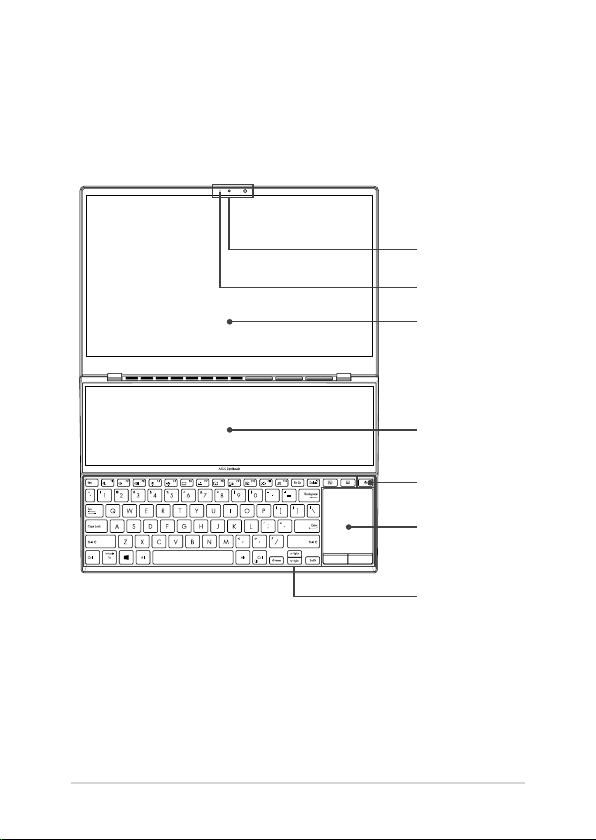
NOTE: The keyboard's layout may vary per region or country. The top view may also
vary in appearance depending on the Notebook PC model.
Top View
Camera/IR Camera
Touch screen panel
Keyboard
Power button
Touchpad
Camera indicator
Touch screen panel
Notebook PC User Guide
3
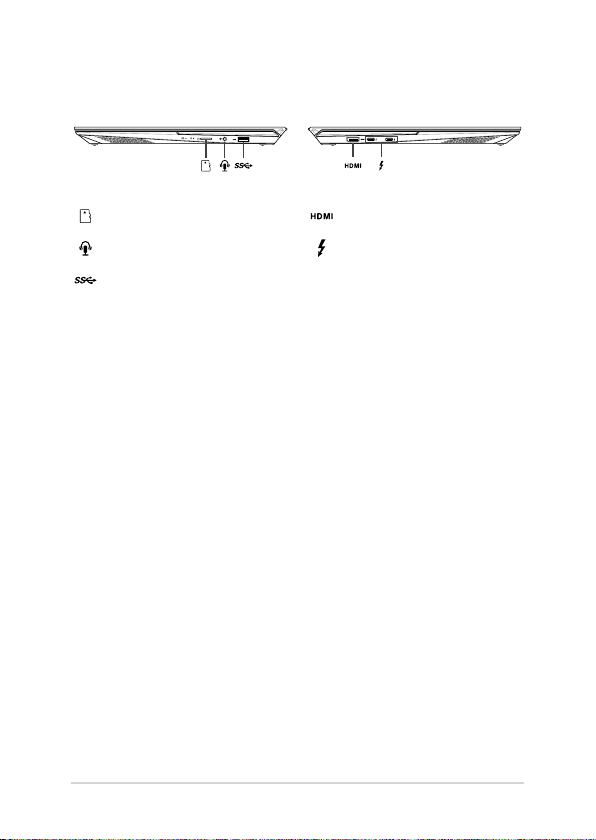
I/O ports and slots
MicroSD card slot HDMI output port
Headphone/Headset/Microphone jack Thunderbolt™ 4 port with
Power Delivery
USB 3.2 Gen 1 port
4
Notebook PC User Guide
Getting started
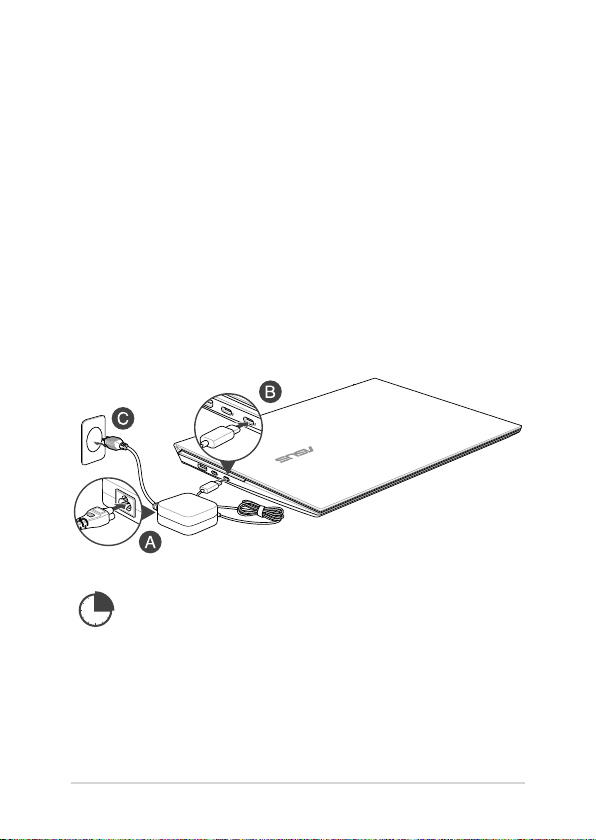
NOTE: The power adapter may vary in appearance, depending on models and your
region.
Charge the Notebook PC for 3 hours before using it in battery mode
for the rst time.
IMPORTANT! Use only the bundled power adapter to charge the battery pack and
supply power to your Notebook PC.
1. Charge your Notebook PC
A. Connect the AC power cord to the AC/DC adapter.
B. Connect the DC power connector into your Notebook PC’s power (DC) input port.
C. Plug the AC power adapter into a 100V~240V power source.
IMPORTANT!
Do not use this Notebook PC for cryptocurrency mining (consuming a vast amount of electricity
and time to gain convertible virtual currency) and/or related activities.
Notebook PC User Guide
5
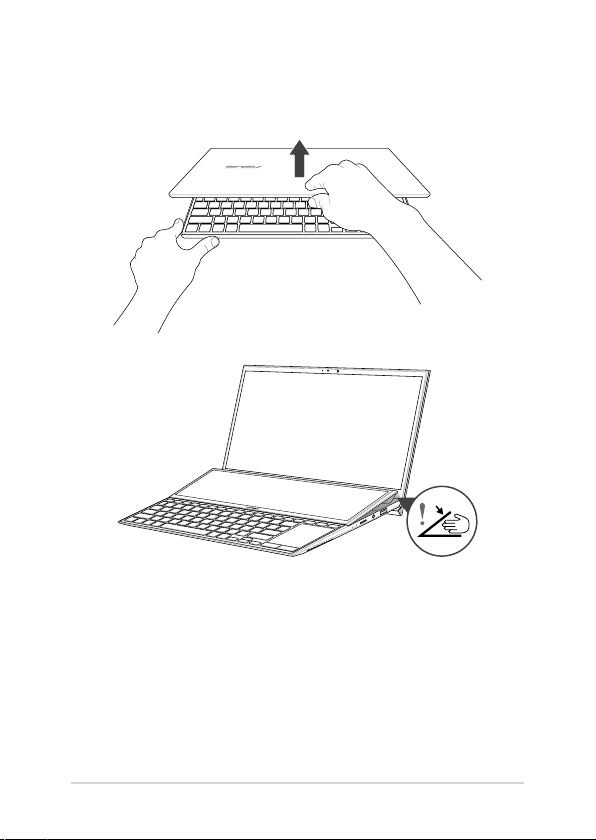
2. Lift to open the display panel
IMPORTANT! For your own safety, please do not place your ngers or any object
under the secondary display.
6
Notebook PC User Guide
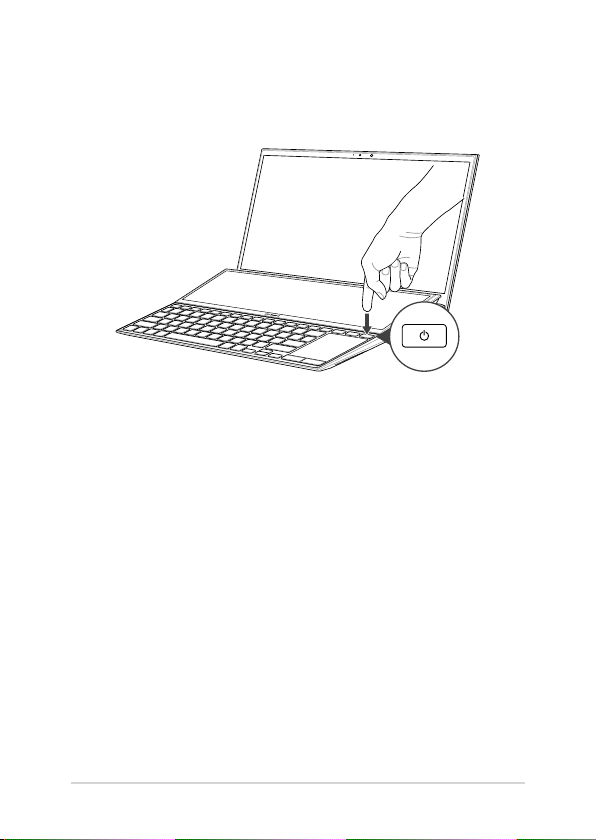
3. Press the power button

Notebook PC User Guide
7
Safety notices for your Notebook PC
WARNING!
Your Notebook PC can get warm to hot while in use or while charging the battery pack. Do not
leave your Notebook PC on your lap or near any part of your body to prevent injury from heat.
When working on your Notebook PC, do not place it on surfaces that can block the vents.
IMPORTANT!
• Ensure that your Notebook PC is connected to the power adapter before turning it on for the
rst time. Always plug the power cord into a wall socket without using any extension cords.
For your safety, connect this device to a properly grounded electrical outlet only.
• When using your Notebook PC on power adapter mode, the socket outlet must be near to the
unit and easily accessible.
• Locate the input/output rating label on your Notebook PC and ensure that it matches the
input/output rating information on your power adapter. Some Notebook PC models may
have multiple rating output currents based on the available SKU.
• Power adapter information:
- Input voltage: 100-240Vac
- Input frequency: 50-60Hz
- Rating output current: 3.25A (65W)
- Rating output voltage: 20V
WARNING!
Read the following precautions for your Notebook PC’s battery:
• Only ASUS-authorized technicians should
remove the battery inside the device
(for non-removable battery only).
• The battery used in this device may present
a risk of re or chemical burn if removed or
disassembled.
• Follow the warning labels for your personal
safety.
• Risk of explosion if battery is replaced by an
incorrect type.
• Do not dispose of in re.
• Never attempt to short-circuit your
Notebook PC’s battery.
• Never attempt to disassemble and
reassemble the battery
(for non-removable battery only).
• Discontinue usage if leakage is found.
• This battery and its components must be
recycled or disposed of properly.
• Keep the battery and other small
components away from children.
CAUTION!
• This Notebook PC should only be used in environments with ambient temperatures between
5°C (41°F) and 35°C (95°F).
• Refer to the rating label on the bottom of your Notebook PC and ensure that your power
adapter complies with this rating.
• The power adapter may become warm to hot while in use. Do not cover the adapter and keep
it away from your body while it is connected to a power source.

8
Notebook PC User Guide
Avis concernant les batteries remplaçables
• La batterie de l’appareil peut présenter un risque d’incendie ou de brûlure si celle-ci est
retirée ou désassemblée.
• La batterie et ses composants doivent être recyclés de façon appropriée.
Copyright Information
You acknowledge that all rights of this Manual remain with ASUS. Any and all rights, including without
limitation, in the Manual or website, are and shall remain the exclusive property of ASUS and/or its
licensors. Nothing in this Manual intends to transfer any such rights, or to vest any such rights to you.
ASUS PROVIDES THIS MANUAL“AS IS”WITHOUT WARRANTY OF ANY KIND. SPECIFICATIONS AND
INFORMATION CONTAINED IN THIS MANUAL ARE FURNISHED FOR INFORMATIONAL USE ONLY, AND
ARE SUBJECT TO CHANGE AT ANY TIME WITHOUT NOTICE, AND SHOULD NOT BE CONSTRUED AS A
COMMITMENT BY ASUS.
Copyright © 2021 ASUSTeK COMPUTER INC. All Rights Reserved.
Limitation of Liability
Circumstances may arise where because of a default on ASUS’part or other liability, you are entitled to
recover damages from ASUS. In each such instance, regardless of the basis on which you are entitled to
claim damages from ASUS, ASUS is liable for no more than damages for bodily injury (including death)
and damage to real property and tangible personal property; or any other actual and direct damages
resulted from omission or failure of performing legal duties under this Warranty Statement, up to the
listed contract price of each product.
ASUS will only be responsible for or indemnify you for loss, damages or claims based in contract, tort or
infringement under this Warranty Statement.
This limit also applies to ASUS’suppliers and its reseller. It is the maximum for which ASUS, its suppliers,
and your reseller are collectively responsible.
UNDER NO CIRCUMSTANCES IS ASUS LIABLE FOR ANY OF THE FOLLOWING: (1) THIRD-PARTY CLAIMS
AGAINST YOU FOR DAMAGES; (2) LOSS OF, OR DAMAGE TO, YOUR RECORDS OR DATA; OR (3) SPECIAL,
INCIDENTAL, OR INDIRECT DAMAGES OR FOR ANY ECONOMIC CONSEQUENTIAL DAMAGES (INCLUDING
LOST PROFITS OR SAVINGS), EVEN IF ASUS, ITS SUPPLIERS OR YOUR RESELLER IS INFORMED OF THEIR
POSSIBILITY.
Service and Support
For complete E-Manual version, refer to our multi-language website at:
https://www.asus.com/support/
MyASUS oers a variety of support features including troubleshooting, products performance
optimization, ASUS software integration, and helps you to organize personal desktop and increase
storage space. For more details, please visit https://www.asus.com/support/FAQ/1038301/.

Notebook PC User Guide
9
FCC Radio Frequency (RF) Exposure Caution
Statement
WARNING! Any changes or modications not expressly approved by the party
responsible for compliance could void the user’s authority to operate this equipment.
This equipment complies with FCC radiation exposure limits set forth for an uncontrolled
environment. To maintain compliance with FCC RF exposure compliance requirements, please
avoid direct contact to the transmitting antenna during transmitting. End users must follow the
specic operating instructions for satisfying RF exposure compliance.
Coating Notice
IMPORTANT! To provide electrical insulation and maintain electrical safety, a coating
is applied to insulate the device except on the areas where the I/O ports are located.
UL Safety Notices
• DO NOT use the Notebook PC near water, for example, near a bath tub, wash bowl, kitchen
sink or laundry tub, in a wet basement or near a swimming pool.
• DO NOT use the Notebook PC during an electrical storm. There may be a remote risk of
electric shock from lightning.
• DO NOT use the Notebook PC in the vicinity of a gas leak.
• DO NOT dispose the Notebook PC battery pack in a re, as they may explode. Check with local
codes for possible special disposal instructions to reduce the risk of injury to persons due to
re or explosion.
• DO NOT use power adapters or batteries from other devices to reduce the risk of injury to
persons due to re or explosion. Use only UL certied power adapters or batteries supplied
by the manufacturer or authorized retailers.
Power Safety Requirement
Products with electrical current ratings up to 6A and weighing more than 3Kg must use
approved power cords greater than or equal to: H05VV-F, 3G, 0.75mm2or H05VV-F, 2G, 0.75mm2.

10
Notebook PC User Guide
India RoHS
This product complies with the“India E-Waste (Management) Rules, 2016”and prohibits use of
lead, mercury, hexavalent chromium, polybrominated biphenyls (PBBs) and polybrominated
diphenyl ethers (PBDEs) in concentrations exceeding 0.1% by weight in homogenous materials
and 0.01% by weight in homogenous materials for cadmium, except for the exemptions listed
in Schedule II of the Rule.
EU REACH and Article 33
Complying with the REACH (Registration, Evaluation, Authorization, and Restriction of
Chemicals) regulatory framework, we publish the chemical substances in our products at ASUS
REACH website at http://csr.asus.com/english/REACH.htm.
Declaration of Compliance for Product Environmental
Regulation
ASUS follows the green design concept to design and manufacture our products, and
makes sure that each stage of the product life cycle of ASUS product is in line with global
environmental regulations. In addition, ASUS disclose the relevant information based on
regulation requirements. Please refer to http://csr.asus.com/Compliance.htm for information
disclosure based on regulation requirements ASUS is complied with.
EU RoHS
This product complies with the EU RoHS Directive. For more details, see
http://csr.asus.com/english/article.aspx?id=35.
Japan JIS-C-0950 Material Declarations
Information on Japan RoHS (JIS-C-0950) chemical disclosures is available on
http://csr.asus.com/english/article.aspx?id=19.
Vietnam RoHS
ASUS products sold in Vietnam, on or after September 23, 2011, meet the requirements of the
Vietnam Circular 30/2011/TT-BCT.
Các sản phẩm ASUS bán tại Việt Nam, vào ngày 23 tháng 9 năm2011 trở về sau, đều phải đáp
ứng các yêu cầu của Thông tư 30/2011/TT-BCT của Việt Nam.
Indice
Altri manuali Asus Computer portatile

Asus
Asus E14902 Guida

Asus
Asus Z35A Istruzioni per l’uso

Asus
Asus E2334 Istruzioni per l’uso

Asus
Asus K50I Manuale utente

Asus
Asus N56VM Manuale utente

Asus
Asus GM501G Manuale utente

Asus
Asus N55SL Manuale utente

Asus
Asus Zenlock 14 UM431DA-AM005T Manuale utente

Asus
Asus K72DR Manuale utente

Asus
Asus Eee PC 900 Linux Manuale utente

Asus
Asus S432FA Guida

Asus
Asus Eee PC 900 Manuale utente

Asus
Asus B1A Guida all'applicazione

Asus
Asus UL50VT-X1 Manuale di servizio

Asus
Asus E9075 Guida

Asus
Asus Eee PC 900HD Series Manuale operativo

Asus
Asus n551 Guida

Asus
Asus Z70A Istruzioni per l’uso

Asus
Asus Transformer Book Flip TP300UA Guida

Asus
Asus X302LA Guida


