Asymptote EF600 Series Manuale utente

EF600 Series Instruction Manual
Asymptote nitrogen-free controlled rate freezer
Asymptote Ltd
St John's Innovation Centre
Cowley Road
Cambridge CB4 0WS
Tel: +44 1223 421161 Fax: +44 1223 421166
e-mail: info@asymptote.co.uk

EF600 Instruction Manual
Asymptote Ltd.
St John’s Innovation Centre, Cowley Road, Cambridge, CB4 0WS, UK
Tel: +44 1223 421161, Fax: +44 1223 421166, E-mail: info@asymptote.co.uk
2
Contents
1. INTRODUCTION ................................................................................................5
1.1 WARNING..............................................................................................................6
1.2 SAFETY PRECAUTIONS...........................................................................................6
1.3 MAINTENANCE.......................................................................................................6
2. INSTALLING THE FREEZER UNIT ...............................................................7
2.1 UNPACKING ...........................................................................................................7
2.2 POSITIONING THE FREEZER....................................................................................7
2.3 ELECTRICAL CONNECTION ....................................................................................7
2.4 SWITCHING THE FREEZER ON .................................................................................7
4. USER INTERFACE (EF600-01, EF600-10).....................................................10
4.1 SELECTING THE LOGGING INTERVAL (EF600-01, EF600-10) AND FREEZING
PROFILE (EF600-10) ............................................................................................10
4.2 LOG FILE NAMES (EF600-01, EF600-10).............................................................11
5. OPERATING PROCEDURE FOR THE EF600 FREEZER .........................13
5.1 PRE-OPERATION CHECKS......................................................................................13
5.2 PREPARING THE NUCLEATING TOOL .....................................................................13
5.3 PREPARING THE STRAWS......................................................................................13
5.4 LOADING THE STRAWS ........................................................................................13
5.5 STARTING THE DATA LOGGING (EF600-01, EF600-10) .......................................14
5.6 STARTING THE FREEZING CYCLE ..........................................................................14
5.7 SAMPLE NUCLEATION..........................................................................................15
5.8 END OF CYCLE .....................................................................................................15
5.9 STOPPING THE DATA LOGGING .............................................................................16
5.10 RESTARTING THE CYCLE ......................................................................................16
5.11 CLEANING THE UNIT ............................................................................................16
6. FREEZING CYCLES ........................................................................................17
6.1 HUMAN EMBRYO CRYOPRESERVATION ................................................................17
6.2 HUMAN OOCYTE CRYOPRESERVATION .................................................................17
6.3 HUMAN BLASTOCYST CRYOPRESERVATION .........................................................18
6.4 HUMAN EMBRYONIC STEM CELL CRYOPRESERVATION.........................................18
6.5 HUMAN SPERMATOZOA CRYOPRESERVATION –LINEAR COOLING ........................19
6.6 HUMAN SPERMATOZOA CRYOPRESERVATION –NON-LINEAR COOLING ................20
7. REFERENCES....................................................................................................21

EF600 Instruction Manual
Asymptote Ltd.
St John’s Innovation Centre, Cowley Road, Cambridge, CB4 0WS, UK
Tel: +44 1223 421161, Fax: +44 1223 421166, E-mail: info@asymptote.co.uk
3
APPENDIX 1: TROUBLESHOOTING ..................................................................21

A1.1 FREEZING CYCLE WILL NOT START ....................................................................22
A1.2 NO POWER TO UNIT ...........................................................................................22
A1.3 DATA LOGGING DOES NOT FUNCTION ................................................................22
A1.4 STRAWS STUCK TO SAMPLE PLATE ....................................................................22
APPENDIX 2: INSTALLING ASYMPTOTE’S DATA LOGGING SOFTWARE
......................................................................................................................................24
A2.1 SYSTEM REQUIREMENTS ...................................................................................24
A2.2 INSTALLING THE PROGRAM ...............................................................................24
APPENDIX 3: UNINTERRUPTIBLE POWER SUPPLY (UPS).........................29
APPENDIX 4: CRYOPEN NUCLEATING TOOL OPERATION......................29

EF600 Instruction Manual
Asymptote Ltd.
St John’s Innovation Centre, Cowley Road, Cambridge, CB4 0WS, UK
Tel: +44 1223 421161, Fax: +44 1223 421166, E-mail: info@asymptote.co.uk
4
List of Figures
Figure 3 – Desktop shortcut icon...................................................................................9
Figure 4 – User interface..............................................................................................10
Figure 4.1 – Freezing profile .......................................................................................11
Figure 4.2 – Log file names .........................................................................................12
Figure 5.4 – Straws positioned in sample plate ...........................................................14
Figure 5.7 – Nucleation of straws................................................................................15
Figure 6.1 – Pre-programmed human embryo freezing cycle .....................................17
Figure 6.2 – Pre-programmed human oocyte freezing cycle.......................................18
Figure 6.3 – Pre-programmed human blastocyst freezing cycle..................................18
Figure 6.4 – Pre-programmed human embryonic stem cell freezing cycle .................19
Figure 6.5 – Pre-programmed human sperm freezing cycle........................................19
Figure 6.6 – Pre-programmed human spermatozoa non-linear freezing cycle............20
Figure A2.1 – Installation box 1 ..................................................................................24
Figure A2.2 – Installation box 2 ..................................................................................25
Figure A2.3 – Installation box 3 ..................................................................................25
Figure A2.4 – Installation box 4 ..................................................................................26
Figure A2.5 – Installation box 5 ..................................................................................26
Figure A2.6 – Installation box 6 ..................................................................................27
Figure A2.7 – Installation box 7 ..................................................................................27
Figure A2.8 – Installation box 8 ..................................................................................28

EF600 Instruction Manual
Asymptote Ltd.
St John’s Innovation Centre, Cowley Road, Cambridge, CB4 0WS, UK
Tel: +44 1223 421161, Fax: +44 1223 421166, E-mail: info@asymptote.co.uk
5
1. Introduction
There are three versions of the Asymptote controlled rate freezer:
EF600-00: Stand alone freezer with no data logging capacity.
The EF600-00 is pre-loaded with a single default program for the
cryopreservation of human embryos (Lasalle et al., 1985). An alternative
program may be specified at the time of ordering.
EF600-01: Freezer with data logging to a dedicated PC (supplied by
Asymptote Ltd.).
The EF600-01 is pre-loaded with a single default program for the
cryopreservation of human embryos (Lasalle et al., 1985). An alternative
program may be specified at the time of ordering.
EF600-10: Freezer with data logging to a dedicated PC (supplied by
Asymptote Ltd.).
The EF600-10 is pre-loaded with six standard freezing programs (embryo,
oocyte, blastocyst, stem cell, spermatozoa linear program and spermatozoa
non-linear program), which the user selects in the supplied data logging
software. Additional programs, up to a total of 10, may be specified at the
time of ordering.
This manual includes operating instructions for all three versions. The following
optional extras may also be supplied with the EF600 series freezer:
Cryopen nucleating tool (EF-611)
Uninterruptible power supply (UPS) (EF-613)
Conversion kit to allow portability (EF-614)
Data logging software for upgrading the EF600-00 (EF-620) and EF600-01
(EF-621)
Software for programming linear temperature profiles (EF-622)
Software for programming non-linear temperature profiles (EF-023)
Operating instructions for these optional extras are given in Appendices 2 - 7.

EF600 Instruction Manual
Asymptote Ltd.
St John’s Innovation Centre, Cowley Road, Cambridge, CB4 0WS, UK
Tel: +44 1223 421161, Fax: +44 1223 421166, E-mail: info@asymptote.co.uk
6
1.1 Warning
It is essential that this instruction manual is read before using the EF600
freezer. Particular attention should be paid to the safety precautions
below.
1.2 Safety precautions
Operating the freezer
Temperatures down to -100ºC are reached within this equipment. Ensure that
protective gloves are worn when accessing the freezing plate, during and after
the freezing cycle, to avoid cold burns. Do not move the freezer whilst
operating as the baseplate will be hot.
Operating the cryopen nucleating tool
Read the instruction manual and safety instructions supplied with the cryopen
nucleating tool. Ensure that gloves are worn during use and never point the
cryopen towards the face.
Plate temperature
The plate temperature should never exceed 30ºC. If it does, turn the freezer
off immediately.
1.3 Maintenance
A service contract on the EF600 series freezers is available. Contact
serviceable parts within the EF600 and that breaking the security tags
invalidates any warranties.

EF600 Instruction Manual
Asymptote Ltd.
St John’s Innovation Centre, Cowley Road, Cambridge, CB4 0WS, UK
Tel: +44 1223 421161, Fax: +44 1223 421166, E-mail: info@asymptote.co.uk
7
2. Installing the Freezer Unit
2.1 Unpacking
Carefully unpack the Asymptote EF600 controlled rate freezer from its carton
and place upon a suitable bench. Only lift the freezer by placing hands
underneath the freezer; do not move the freezer by pressing on the casework.
Inspect the unit to ensure that no damage has occurred during transit. The
following items should be included in the carton:
EF600-00:
a) EF600 freezer unit and lid
b) Instruction manual – on CD
c) Power lead
EF600-01 and EF600-10:
a) EF600 freezer unit
b) Instruction manual – on CD
c) Power lead
d) Communications cable
e) Laptop computer with data logging software for either EF600-01 or
EF600-10 installed
f) CD back up of installed software
Optional extras, such as a cryopen nucleating tool and UPS, will have been
supplied with the EF600 freezer if ordered.
If the unit shows any sign of damage, or if any of the items listed above are
missing, please contact the supplier immediately.
2.2 Positioning the freezer
Ensure the freezer is positioned so that the vents at the side of the freezer unit
and the air outlet at the rear of the freezer unit are not blocked. Leave a
clearance of at least 200 mm.
2.3 Electrical connection
For normal connection to the mains, plug the power lead into the rear of the
freezer unit and connect to an appropriate single-phase mains supply. If an
UPS is being used please refer to Appendix 3. If operating as a portable unit
please read Appendix 5 before using the freezer.
2.4 Switching the freezer on

EF600 Instruction Manual
Asymptote Ltd.
St John’s Innovation Centre, Cowley Road, Cambridge, CB4 0WS, UK
Tel: +44 1223 421161, Fax: +44 1223 421166, E-mail: info@asymptote.co.uk
8
Connect the communications lead (9-pin D-type male to female) between com
port 1 (the serial port) on the computer and the back of the freezer. Power-up
the freezer unit using the ON/OFF switch on the front panel of the unit (figure
2.4). The switch illuminates red when the power is switched on.
Figure 2.4 – Front panel of freezer unit (keypad and ON/OFF switch)
3. Starting Asymptote’s Data Logging Software (EF600-01,
EF600-10)

EF600 Instruction Manual
Asymptote Ltd.
St John’s Innovation Centre, Cowley Road, Cambridge, CB4 0WS, UK
Tel: +44 1223 421161, Fax: +44 1223 421166, E-mail: info@asymptote.co.uk
9
Start the software by either double-clicking on the shortcut icon on your
desktop (figure 3) or by selecting ‘Asymptote Data Logger’ from the program
list in the start menu on your computer.
Figure 3 – Desktop shortcut icon
The program window will open. Initial values for the ‘Set Point
Temperature’, ‘Plate Temperature’ and ‘Stirling Voltage (V)’ will be
displayed as ‘999.00’; these will automatically update once communications
between the freezer and the computer have been established.

EF600 Instruction Manual
Asymptote Ltd.
St John’s Innovation Centre, Cowley Road, Cambridge, CB4 0WS, UK
Tel: +44 1223 421161, Fax: +44 1223 421166, E-mail: info@asymptote.co.uk
10
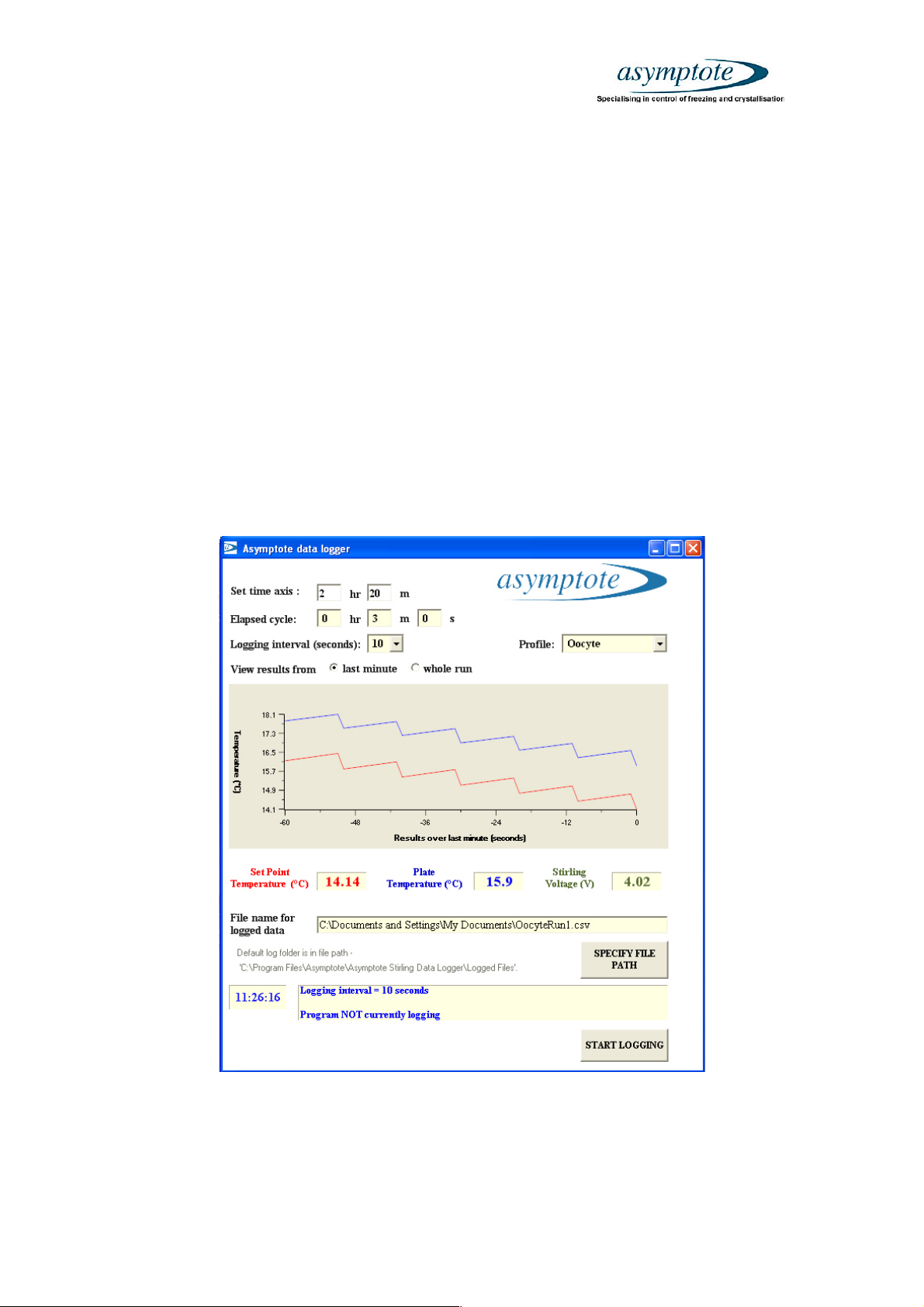
4. User Interface (EF600-01, EF600-10)
The current ‘Set Point Temperature’ of the freezer is displayed in red on the
left of the screen. This is the required temperature of the sample plate.
The current ‘Plate Temperature’ is displayed in blue in the centre of the
screen. This is the actual temperature of the sample plate.
The current ‘Stirling Voltage (V)’ is displayed in green on the right of the
screen. This is the output level of the Stirling Engine and is only provided for
diagnostic engineering purposes only.
The graph can show either the last minute of the cycle or the whole run.
Check ‘last minute’ or ‘whole run’ to switch between these features. The time
elapsed and the total run time of the cycle is displayed in the top left hand
corner of the user interface. The bottom of the user interface displays
information on the status of the cycle.
Figure 4 – User interface
4.1 Selecting the logging interval (EF600-01, EF600-10) and freezing profile
Questo manuale è adatto per i seguenti modelli
3
Indice
Altri manuali Asymptote Congelatore