
AT&T Cingular Flip 3 Manuale utente

USER
MANUAL
AT&TCingularFlip™3

Table of Contents
1
2
3
4
5
6
6
6
9
11
11
14
14
16
17
19
21
21
22
22
23
23
24
24
25
26
28
28
29
29
31
31
32
33
33
33
Getting started ........................................................................................
1.1 Keyboard layout and icon status ........................................................................
1.2 Set up your device ........................................................................................................
1.3 Power options .................................................................................................................
¬¸ÇÈÃÌÂÈÅûÂÁ¸¹ÂÅÇ»¸èÅÆÇǼÀ¸
Home Screen apps ..................................................................................
2.1 KaiStore ...............................................................................................................................
2.2 Google Assistant ..........................................................................................................
2.3 Google Maps ....................................................................................................................
2.4 YouTube .............................................................................................................................
Phone call ..................................................................................................
3.1 Make a phone call ..........................................................................................................
3.2 Answer or decline a call ............................................................................................
»¸¶¾ÌÂÈÅɼ¶¸À´¼¿
Contacts ....................................................................................................
4.1 Add a contact ...................................................................................................................
4.2 View contact details ...................................................................................................
4.3 Edit a contact ..................................................................................................................
4.4 Delete a contact ...........................................................................................................
4.5 Other options ..................................................................................................................
Messages ...................................................................................................
!¬¸Á·´Ç¸ËÇÀ¸ÆÆ´º¸
!··´Á´ÇÇ´¶»À¸ÁÇ
!»´Áº¸¼ÁÃÈÇÀ¸Ç»Â·ÆÊ»¸ÁǸËǼÁº
5.4 Other options .................................................................................................................
Email ...........................................................................................................
"¬¸ÇÈÃÌÂÈŸÀ´¼¿´¶¶ÂÈÁÇ
"ÂÀÃÂƸ´Á¸À´¼¿
"«¸Ã¿ÌÇ´Á¸À´¼¿
6.4 Other options .................................................................................................................
2

7
8
9
10
11
12
13
14
15
16
34
35
35
36
37
37
38
39
39
40
42
43
44
45
46
46
47
48
49
49
50
51
51
52
53
55
55
Camera .......................................................................................................
7.1 Take a photo .....................................................................................................................
#¯¼·¸ÂÀ·¸
7.3 Other options ..................................................................................................................
Gallery ........................................................................................................
8.1 Gallery options ................................................................................................................
8.2 Individual photo options ..........................................................................................
Video ...........................................................................................................
9.1 Play videos .........................................................................................................................
9.2 Other options ..................................................................................................................
Browser ......................................................................................................
10.1 Top sites ............................................................................................................................
10.2 History ...............................................................................................................................
10.3 Search or enter URL .................................................................................................
Clock ...........................................................................................................
¬¸Ç´Á´¿´ÅÀ
¬¸Ç´Ç¼À¸Å
11.3 Start a stopwatch .......................................................................................................
Music ...........................................................................................................
¥¼ÆǸÁÇÂÀÈƼ¶
··ÀÈƼ¶µÌ¿È¸ÇÂÂÇ»ÇÅ´Áƹ¸Å
Calendar .....................................................................................................
13.1 Create an event ............................................................................................................
Calculator ..................................................................................................
FM Radio ....................................................................................................
Settings .....................................................................................................
16.1 Network & connectivity ..........................................................................................
3

17
18
19
20
21
22
23
58
61
62
63
65
66
67
67
67
68
68
71
16.2 Personalization ............................................................................................................
16.3 Privacy & security .......................................................................................................
16.4 Storage .............................................................................................................................
16.5 Device .................................................................................................................................
16.6 Account .............................................................................................................................
Unit Converter .........................................................................................
File Manager .............................................................................................
Note ............................................................................................................
Recorder ....................................................................................................
¬ÂìʴŸÈ÷´Ç¸
Troubleshooting ......................................................................................
Warranty ....................................................................................................
4

»¼Æ·¸É¼¶¸À¸¸ÇÆ´Ãÿ¼¶´µ¿¸Á´Ç¼ÂÁ´¿¬«¿¼À¼Çƹ"°¾º°»¸Á
carrying the device or using it while worn on your body, either use
´Á´ÃÃÅÂɸ·´¶¶¸ÆÆÂÅÌÆȶ»´Æ´»Â¿ÆǸÅÂÅÂÇ»¸ÅʼƸÀ´¼ÁÇ´¼Á´
·¼ÆÇ´Á¶¸Â¹!ÀÀ¹ÅÂÀÇ»¸µÂ·ÌǸÁÆÈŸ¶ÂÀÿ¼´Á¶¸Ê¼Ç»«
¸ËÃÂÆÈŸŸÄȼŸÀ¸ÁÇƧÂǸǻ´ÇÇ»¸ÃÅ·ȶÇÀ´Ìµ¸
ÇÅ´ÁÆÀ¼ÇǼÁº¸É¸Á¼¹ÌÂȴŸÁÂÇÈƼÁº¼Ç
ÂßɸÁÇÃÂÆƼµ¿¸»¸´Å¼Áº·´À´º¸·ÂÁÂÇ¿¼ÆǸÁ´Ç»¼º»É¿ÈÀ¸
levels for long periods. Exercise caution when holding your device
near your ear while the loudspeaker is in use.
»¸·¸É¼¶¸¶ÂÁÇ´¼ÁÆÀ´ºÁ¸ÇÆÊ»¼¶»À´Ì¼ÁǸŹ¸Å¸Ê¼Ç»ÂÇ»¸Å
·¸É¼¶¸Æ´Á·¼Ç¸ÀÆÆȶ»´Æ¶Å¸·¼Ç¶´Å·Æô¶¸À´¾¸ÅÆ·¸èµÅ¼¿¿´ÇÂÅÆ
¸Ç¶©¿¸´Æ¸À´¼ÁÇ´¼Á´Ç¿¸´ÆÇ!ÀÀ¹ƸôŴǼÂÁµ¸Çʸ¸ÁÌÂÈÅ
ûÂÁ¸´Á·Ç»¸·¸É¼¶¸Æ¼Ç¸ÀÆÀ¸ÁǼÂÁ¸·´µÂɸ
5

1. Getting started
1.1 Keys and Icon status
Keyboard Layout
Mic
Speaker
Navigation Ring
(Up, Down, Left, Right)
6

Icon Function/Description
OK
• ©Å¸ÆÆǶÂÁèÅÀ´Æ¸¿¸¶Ç¼ÂÁ
• ÅÂÀÇ»¸¡ÂÀ¸Æ¶Å¸¸ÁßÆÆÇ´¶¶¸ÆÆÇ»¸´ÃÃÀ¸ÁÈ
• Long press to launch the GoogleTM Assistant or activate speech-to-text
Navigation Ring
• ©Å¸ÆÆÈ÷ÂÊÁ¿¸ìÂÅżº»ÇÇÂÁ´É¼º´Ç¸
• UP: Shortcut settings
• DOWN:À´¼¿´ÃÃ
• LEFT: Use the navigation ring to scroll up and down to access the KaiStoreTM, Google
Assistant, Google Maps and YouTubeTM
• RIGHT: Google app
Messages
• Press to access the Messages app
Back/Clear
• ©Å¸ÆÆÇŸÇÈÅÁÇÂÇ»¸ÃŸɼÂÈÆƶŸ¸Á¶¿ÂƸ´·¼´¿ÂºµÂËŸ˼ÇÇ»¸ÂÃǼÂÁÆÀ¸ÁÈ
• ¢ÁÇÌüÁºÀ·¸ÃŸÆÆÇ·¸¿¸Ç¸´¶»´Å´¶Ç¸Å
Call/Answer
• ©Å¸ÆÆÇ·¼´¿´¶´¿¿ÂÅÇ´ÁÆʸŴÁ¼Á¶ÂÀ¼Áº¶´¿¿
• ÅÂÀÇ»¸¡ÂÀ¸Æ¶Å¸¸ÁßÆÆÇ´¶¶¸ÆÆÇ»¸¶´¿¿¿Âº
End/Power
• ©Å¸ÆÆǸÁ·´¶´¿¿ÂÅŸÇÈÅÁÇÂÇ»¸¡ÂÀ¸Æ¶Å¸¸Á
• ¥ÂÁºÃŸÆÆÇÂÃÂʸÅÂÁÂæÇ»¸·¸É¼¶¸
Camera Button
• ©Å¸ÆÆÇ´¶¶¸ÆÆÇ»¸´À¸Å´´ÃÃ
• ¢ÁÇ»¸´À¸Å´´ÃÃßÆÆÇÂÇ´¾¸´Ã¼¶ÇÈŸÂÅÆÇ´ÅÇÆÇÂ߶ÂÅ·¼Áº´É¼·¸Â
• ©Å¸ÆÆ´Á·»Â¿·Ç»¸´À¸Å´´Á·¯Â¿ÈÀ¸·ÂÊÁµÈÇÇÂÁÆƼÀÈ¿Ç´Á¸ÂÈÆ¿ÌǶ´ÃÇÈŸ´
screenshot
Volume Button, Up and Down
• °»¼¿¸ÂÁ´¶´¿¿ÃŸÆÆ®ÃÂÊÁÇ´·½ÈÆÇÇ»¸¸´Åü¸¶¸ÂÅ»¸´·Æ¸ÇÉ¿ÈÀ¸
• °»¼¿¸¿¼ÆǸÁ¼ÁºÇÂÀÈƼ¶ÃŸÆÆ®ÃÂÊÁÇ´·½ÈÆÇÀ¸·¼´É¿ÈÀ¸
• ÅÂÀÇ»¸¡ÂÀ¸Æ¶Å¸¸ÁßÆÆ®ÃÂÊÁÇ´·½ÈÆÇÇ»¸É¿ÈÀ¸Â¹Å¼ÁºÇÂÁ¸Æ´Á·´¿¸ÅÇÆ
• °¼Ç»´Á¼Á¶ÂÀ¼Áº¶´¿¿ÃŸÆƸ¼Ç»¸ÅµÈÇÇÂÁÇÂÀÈǸǻ¸Å¼ÁºÇÂÁ¸
Camera
Camera Key
External Screen
Volume
Headset Jack
Charging Port
7
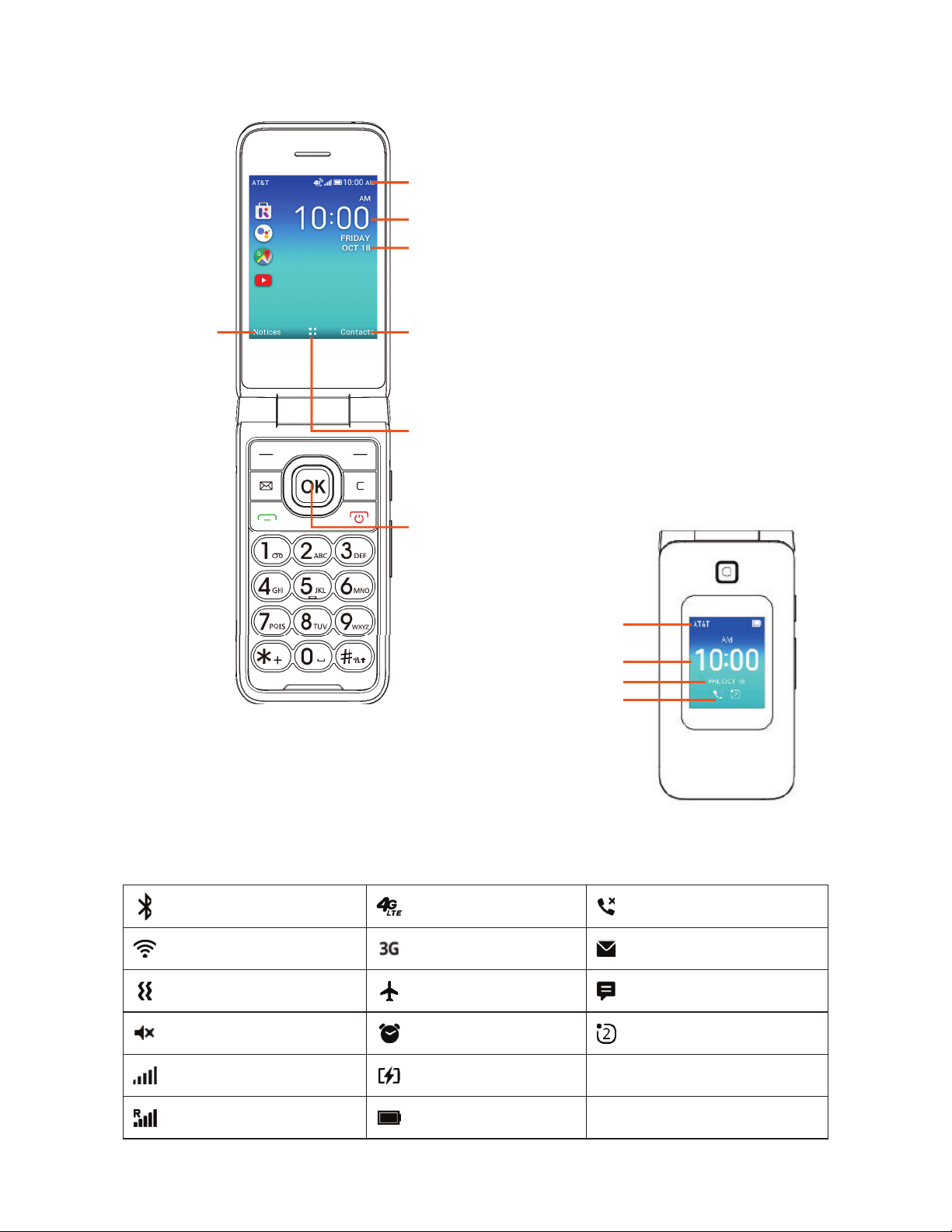
Internal and External Display
Status Bar
Time
Date
Notifications
Status Bar
The status bar runs along the top of your screen and shows the phone's
ÆÇ´ÇÈÆÂÁÇ»¸Å¼º»ÇƼ·¸´Á·ÌÂÈÅÁ¸ÇÊž´Á·ÁÂǼ趴ǼÂÁ¼¶ÂÁÆÂÁÇ»¸¿¸ì
´ÇǸÅ̼ƴǹȿ¿¶»´Åº¸
Connected to Network
Å´À¼Áº
ÂÈÁǸÅÆ»ÂÊÆÁÈÀµ¸Å¹
ÂÇ»¸ÅÁÂǼ趴ǼÂÁÆ
Connected to Network
¹È¿¿Æ¼ºÁ´¿
¬¼¿¸ÁÇÀ·¸¼ÆƸÇ
Device is set to vibrate only
°¼¼® is connected
¿È¸ÇÂÂÇ»® is active
´ÇǸÅ̼ƶÈÅŸÁÇ¿Ì
charging
Á´¿´ÅÀ¼ÆƸÇ
¼Åÿ´Á¸À·¸¼ÆÂÁ
3G data is available
4G LTE is available
§¸ÊÀ¸ÆÆ´º¸¼Æ´É´¼¿´µ¿¸
§¸Ê¸À´¼¿¼Æ´É´¼¿´µ¿¸
Missed a call
Status/Notifications Bar
•Displays Status and
Notification indicators.
Time
Date
Contacts
•Lists all saved contacts,
press the Right Menu key
to access.
Apps (Applications) Menu
•Displays all apps, press the
OK key to access.
OK Key
•Press to access Apps
Menu or select the
option displayed.
Notices
•Displays all
Notifications,
press the Left
Menu key to
access.
8

1.2 Set up your device
Remove the back cover
«¸ÀÂɸǻ¸µ´ÇǸÅ̶Âɸŵ̺¸ÁÇ¿Ì
¿¼ì¼ÁºÈüÁÇ»¸·¼Å¸¶Ç¼ÂÁÆ»ÂÊÁ»¸Å¸
¼Æ´ÁÂǶ»¿Â¶´Ç¸·ÂÁÇ»¸µÂÇÇÂÀ¿¸ì
hand corner of the phone's back cover
Ç»¸¿Ã¿¼ì¼ÇÈÃ
Replace the back cover
Replace the back cover properly by
aligning it with the back of the device.
Make sure the speaker holes are
positioned at the top and press gently
until the back cover clicks into place on
all sides.
Remove the battery
¸ÁÇ¿Ì¿¼ìÇ»¸µ´ÇǸÅÌÈùÅÂÀÇ»¸
notch located at the center top of the
µ´ÇǸÅÌ´Á·Å¸ÀÂɸ¼Ç¹ÅÂÀÇ»¸Æ¿ÂÇ
Install the battery
Line up the gold contacts on the
battery with the gold connectors at the
µÂÇÇÂÀ¹ǻ¸µ´ÇǸÅÌÆ¿ÂÇ´Á·º¸ÁÇ¿Ì
push the battery down into the slot.
9
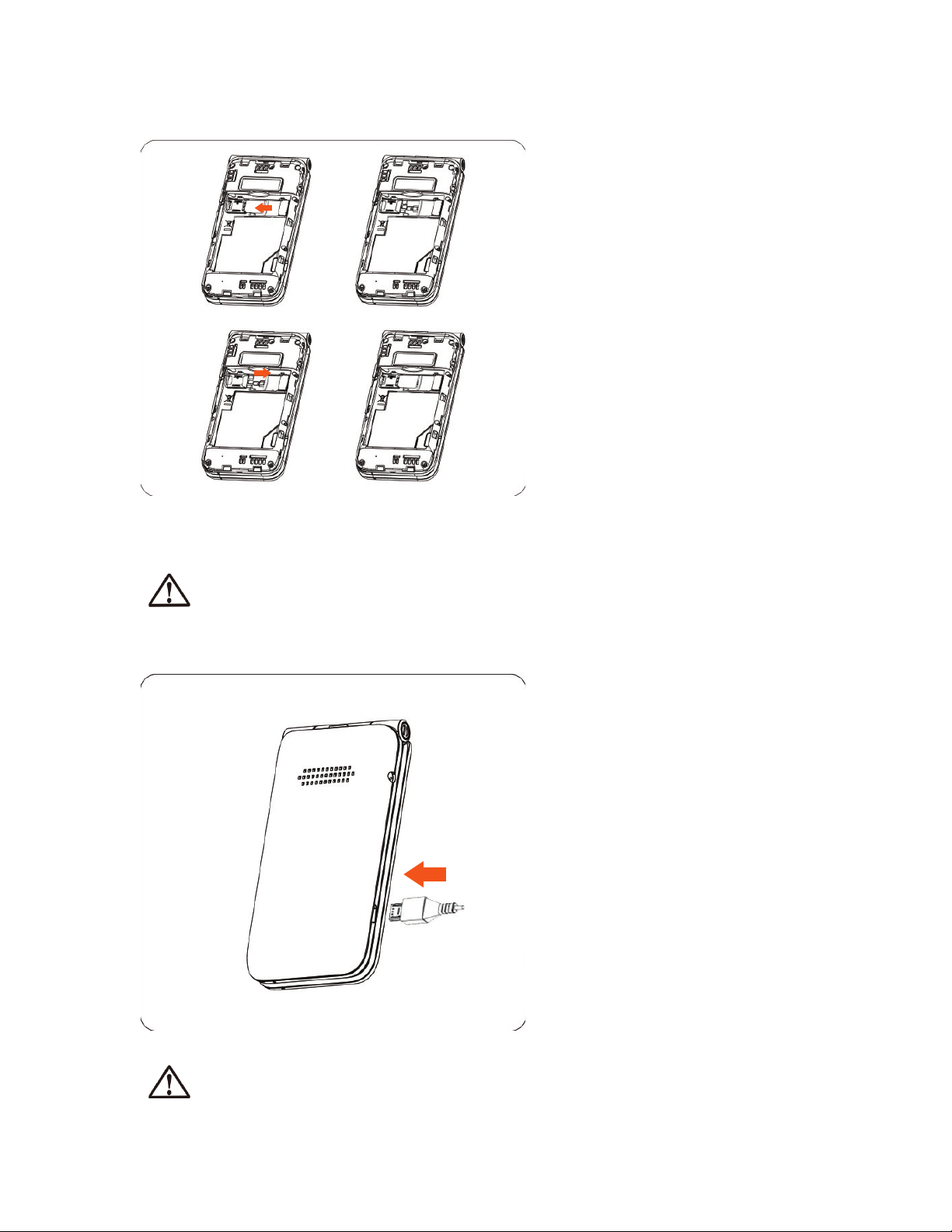
Insert a SIM or
microSDTM card
°¼Ç»Ç»¸µ´ÇǸÅÌŸÀÂɸ·»Â¿·Ç»¸Á¸Ê
¬¢¦Ê¼Ç»À¸Ç´¿¶ÂÁÇ´¶Çƹ´¶¼Áº
downward and the cut corner at the
¿Âʸſ¸ì¬¿¼·¸Ç»¸¶´Å·¼ÁÇÂÇ»¸¬¢¦
Æ¿ÂÇÂÁÇ»¸¿¸ìÂÅ´À¼¶Å¬¶´Å·Æ¿¼·¸
the card with gold contacts facing
·ÂÊÁÊ´Å·¼ÁÇÂÇ»¸À¼¶Å¬¶´Å·Æ¿ÂÇ
ÂÁÇ»¸Å¼º»Ç²ÂÈÅûÂÁ¸ÆÀ¸ÀÂÅ̼Æ
¸ËôÁ·´µ¿¸µÌÈÃÇÂʼǻ´
¶ÂÀôǼµ¿¸À¼¶Å¬¶´Å·Æ¿·
separately).
Remove nano SIM or
microSDTM card
Push down on the plastic clip located at
Ç»¸¸·º¸Â¹Ç»¸¬¢¦ÂÅÀ¼¶Å¬¶´Å·
slot to allow the card to slide out of the
Æ¿ÂǬ¿¼·¸Ç»¸¬¢¦ÂÅÀ¼¶Å¬¶´Å·ÂÈÇ
of the slot.
Charge the battery
¢ÁƸÅÇÇ»¸ÆÀ´¿¿¸Å¸Á·Â¹Ç»¸¶»´Åº¸Å
into the device charging port and plug
the charger into an electrical outlet.
²ÂÈÅûÂÁ¸ÂÁ¿ÌÆÈÃÃÂÅÇƧ´Á¬¢¦¶´Å·ÆÂÁÂÇ´ÇǸÀÃÇǼÁƸÅÇ´¦¼Á¼ÂŦ¼¶Å¬¢¦
¶´Å·ÂÅÌÂÈÀ´Ì·´À´º¸ÌÂÈÅûÂÁ¸
Ÿ·È¶¸ÃÂʸŶÂÁÆÈÀÃǼÂÁ´Á·¸Á¸ÅºÌÊ´ÆǸ·¼Æ¶ÂÁÁ¸¶ÇÌÂÈŶ»´Åº¸ÅÊ»¸ÁÇ»¸
battery is fully charged.
10
Indice
Altri manuali AT&T Telefono cellulare

AT&T
AT&T Fusion 2 Manuale utente

AT&T
AT&T ADS1 Manuale utente

AT&T
AT&T Calypso 3 Manuale utente

AT&T
AT&T Quickfire Manuale utente

AT&T
AT&T Maestro 3 Manuale utente

AT&T
AT&T 8525 Manuale utente

AT&T
AT&T Radiant Manuale utente

AT&T
AT&T Avail Evolution Manuale utente

AT&T
AT&T Tilt Manuale utente

AT&T
AT&T Avail Manuale utente

AT&T
AT&T Radiant Manuale utente

AT&T
AT&T Z223 Manuale utente

AT&T
AT&T Z812 Manuale utente

AT&T
AT&T TCL 30Z Manuale utente

AT&T
AT&T U102AA Manuale utente

AT&T
AT&T F160 Manuale utente

AT&T
AT&T Axon M Manuale utente

AT&T
AT&T Calypso Max Manuale utente

AT&T
AT&T Sonim XP5s Manuale utente

AT&T
AT&T P506 Manuale utente


