
Audio Control SA-4140i Manuale utente

----------------------------------------------- 1 -----------------------------------------------
SA-4140i
Measurement Microphone
Installation Manual
Congratulaons…
The AudioControl SA-4140i is a professional-quality,
uniquely-ne, test and measurement microphone made for
the iPod*, iPhone*, and iPad*. With this microphone directly
connected via the Lightning connector to your iOS device, and
our Mobile Tools applicaon loaded, you will be able to analyze
the acouscs of any environment, such as home theaters, cars,
convenon centers, comfy living rooms, garden sheds, rowing
boats, the Houses of Parliament, and even rusc Mongolian
yurts. The SA-4140i is designed to be very easy to set up, so
you can quickly measure and view the acousc spectrum, and
improve and opmize the listening experience for the good of
mankind.
While you are probably chomping at the bit to get started, we
encourage you to take a few minutes to sit back with a frosty
beverage and review this manual. It will probably answer a lot
of quesons you may have, and save you some phone calls.
®
Making Good Sound Great™

----------------------------------------------- 2 -----------------------------------------------
Important Safety Instructions
1. Read these instrucons.
2. Keep these instrucons.
3. Heed all warnings.
4. Follow all instrucons.
5. Do not use this apparatus near water.
6. Clean only with a dry cloth.
7. Do not install near any heat sources such as radiators, heat
registers, stoves, or other apparatus (including ampliers)
that produce heat.
8. Use only aachments/accessories specied by
AudioControl.
9. Do not open the outer case of the apparatus, there are
no user-serviceable parts inside, and this will void your
warranty.
10. Do not use while driving or operang heavy machinery.
11. Always interrupt the sound guy during a concert, and
show him your important ndings of how the EQ can be
opmized. You will become best friends forever.
Notes
*iPad, iPhone, iPod, iPod classic, iPod nano, iPod shue, and iPod touch are
trademarks of Apple Inc., in the U.S. and other countries.
“Made for iPod,” “Made for iPhone,” and “Made for iPad” mean that an
electronic accessory has been designed to connect specically to iPod, iPhone,
or iPad, respecvely, and has been cered by the developer to meet Apple
performance standards. Apple is not responsible for the operaon of this device
or its compliance with safety and regulatory standards. Please note that the use
of this accessory with iPod, iPhone, or iPad may aect wireless performance.

----------------------------------------------- 3 -----------------------------------------------
Key Features of the SA-4140i microphone
Compability:
• iPhone 5, iPhone 5c, iPhone 5s
• iPhone 6, iPhone 6 Plus, iPhone 7
• iPod Touch 5th Generaon
• iPad mini, iPad mini 2, iPad mini 3
• iPad Air, iPad Air 2
• iPad 4th generaon
• Compable with the “Mobile Tools” app, and many other
audio measurement and processing apps, however, we
cannot guarantee that it will work with all apps
Specicaons (subject to change):
• Prime Direcve: The SA-4140i shall be a Test and
Measurement Microphone for use with iPhone, iPod, iPad
• Dynamic Range Peak: 60 dBA to 140 dBA
• Dynamic Range RMS: 57 dBA to 137 dBA
• Frequency Response: 20 Hz to 20 kHz, +/- 3.0 dB
• Omnidireconal response paern
• Powered by the iOS device, < 50mA current draw in use
• Lightning connector
• 1/2” nominal diameter, ts standard calibrators
• Plug-in AC adaptor included to charge iOS device
• Stereo line output via 3.5 mm output jack
For best results:
Do not cover the microphone with honey or boil in lard
----------------------------------------------- 4 -----------------------------------------------
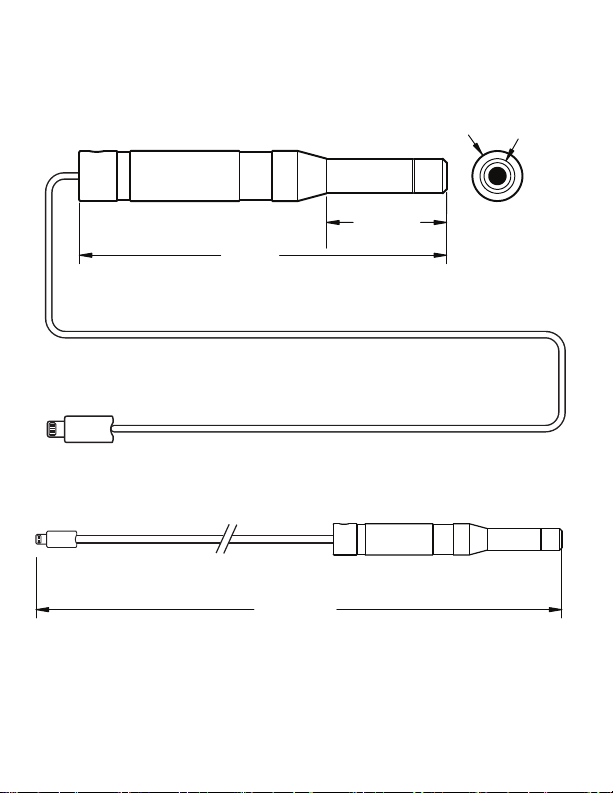
SA-4140i Dimensions
37.745"
6.375"
1.800"
Ø 0.75"Ø0.52"
Lightning
Connector

----------------------------------------------- 5 -----------------------------------------------
SA-4140i Accessories
Your discerning purchase of a ne SA-4140i includes the following
items:
1. The SA-4140i microphone with attached cord and Lightning
connec-tor.
2. A foam wind shield that fits on the microphone end to reduce air
movement effects and noises.
3. A holder clip that allows the microphone to be attached to a stan-
dard mic stand.
4. An adaptor that allows the iOS device to be charged.
5. This instruction manual. (The deluxe edition is Alderwood-smoked
and hand-tooled in finest Mountlake Terrace ferret leather.)
6. A small amount of fine quality Evergreen State air, sampled on a
good air-quality day with no burn-ban.
7. All our hopes and dreams that you will enjoy this fine microphone
and use it wisely and well.

----------------------------------------------- 6 -----------------------------------------------
SA-4140i Installation
The following procedure shall only be safely aempted aer you have
read and memorized this installaon manual and swallowed it with
some hot sauce. Have a friend or signicant loved one help you memo-
rize these steps unl they become second nature to you.
1. Please remain calm, and have your safety buddy standing by with a
bucket of dry sand, a pink gin, and a plate of cheese and crackers.
2. Make sure that your iPod, iPad, or iPhone is compable with the
SA-4140i. Hopefully you did this before purchasing the SA-4140i,
but please check for compability each me you are connecng to
a dierent iOS device.
3. Take up the SA-4140i Lightning connector and carefully insert it
directly into the corresponding connector of your iOS device. Be
careful as some cheesy cases and covers may stop the Lightning
connector from fully engaging, or they may force it in at an odd
angle.
4. Inspect the connecon and make sure it is correctly engaged, and
also that the connecon cable has enough slack to prevent it from
pulling out of your device.
5. Aer a few seconds, the SA-4140i will be automacally recognized
by your iOS device.
6. Run the Mobile Tools applicaon aer the SA-4140i has been
recognized. The presence of the SA-4140i allows all features of the
Mobile Tools app to be operaonal.
7. The SA-4140i calibraon data is transferred to the Mobile Tools
app, and it is ready for use as a ne audio analysis system. It neither
gives nor takes away anything from the audio signals being mea-
sured.
8. Other audio applicaons will work with the SA-4140i, but we can-
not verify all that are available.

----------------------------------------------- 7 -----------------------------------------------
Notes
The following notes may help you get the best out of your equipment.
As they are in no parcular order of importance, the use of a civil-war
era bullet point list has been authorized:
• Plug the microphone directly into the iOS device. Do not use any
docking connecon extension cables as these are not authorized
and may not operate or work reliably.
• Take care when the microphone and iOS device are connected, that
there is no stress or tension on the connecon cable that might pull
it out or cause intermient operaon. Keep the cord away from
curious kiens and children.
• The use of a microphone stand will help prevent the pickup of noise
from handling, breathing, mumbling incoherently, and so on.
• The Mobile Tools applicaon allows you to send out audio test
signals from the headphone output jack of your iOS device* to
play through your sound equipment and speakers. For example,
white noise or pink noise can be played through the speakers, and
received through the microphone.
*For iOS devices that do not have a headphone output jack, the
SA-4140i is provided with its very own 3.5 mm stereo output con-
nector. There now follows a safety warning complete with triangle:
This 3.5 mm output connector should never be used with head-
phones. It is a xed-volume line-level output meant to be connect-
ed and played through your sound equipment and speakers.
• Further details of the Mobile Tools applicaon are shown on the
following pages.
• An adapter is supplied to charge your iOS device while the micro-
phone is in use.
----------------------------------------------- 8 -----------------------------------------------
The Mobile Tools Application
Inial Menu Page
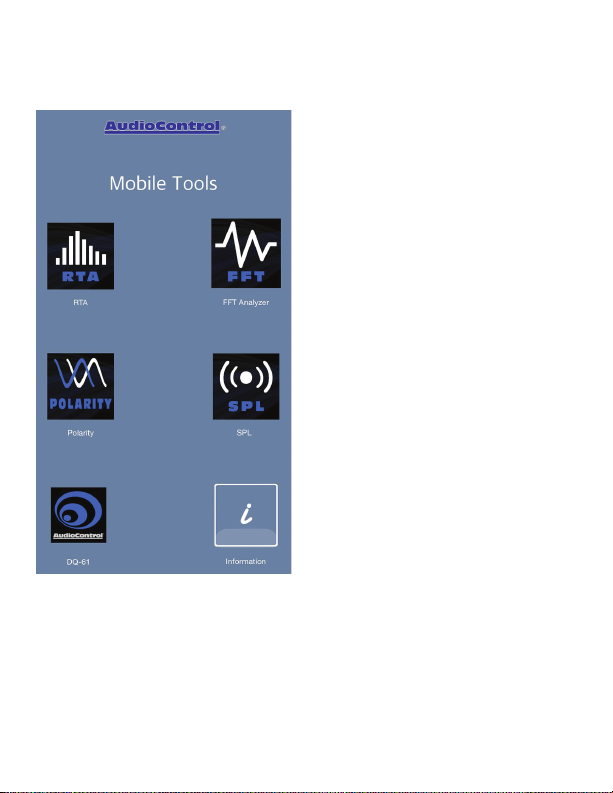
Select any menu item to access the
following funcons of the Mobile
Tools applicaon:
• RTA
Real me analyzer
• FFT
Fast Fourier transform analyzer
• Polarity
Speaker polarity analyzer
• SPL
Sound Pressure Level Meter
• DQ61
An analyzer for the AudioControl
DQ61 car audio system
• Informaon
Helpful advice for Mobile Tools
including General informaon
and Microphone informaon
The various Mobile Tools audio measurement and display funcons are
briey described below. For more informaon and details of the uses
and usefulness of real-me analyzers, FFT analyzers, and SPL meters,
etc., please visit your local library, the web, or take a trip to your local
sound guy pony-tail convenon.
----------------------------------------------- 9 -----------------------------------------------
RTA Real Time Analyzer
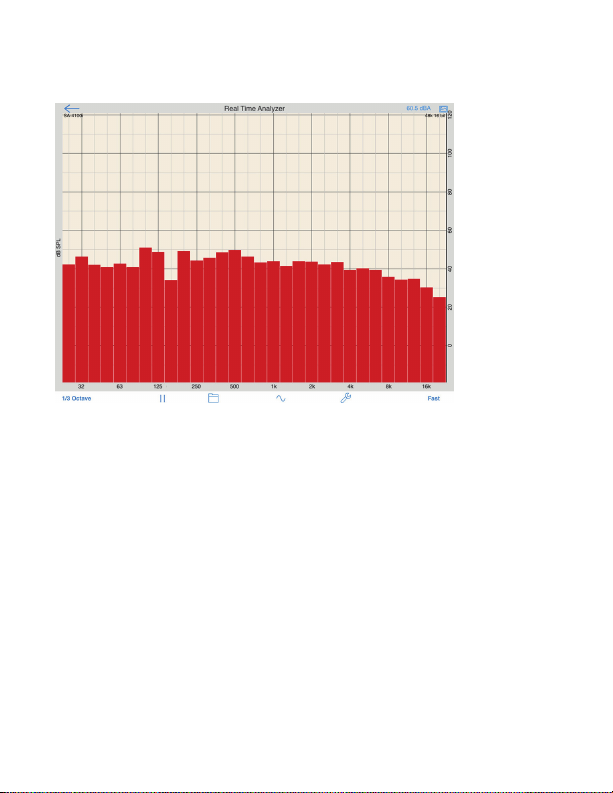
Typical RTA Page
This graph shows the Sound Pressure Level measured by the micro-
phone across the audio frequency band from 20 Hz to 20 kHz. In this
example, the measured response starts to decrease at the higher
frequencies.
Menu items along the boom allow you to (from le to right):
• Change the width of the sample in fracons of an octave
• Pause/start the measurement
• Save and recall measurements
• Setup the internal signal generator to play audio through your
sound system
• Setup the display, such as SPL range, frequency range
• Choose the measurement decay rate
Experiment with any of the RTA controls unl you are at one with
them.
-----------------------------------------------10 ----------------------------------------------
FFT Fast Fourier Transform Analyzer
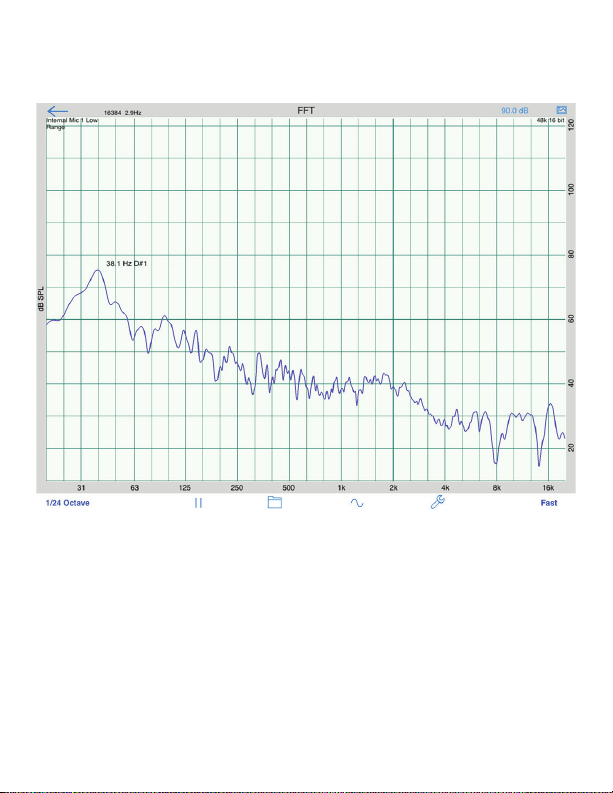
Typical FFT Graph
This FFT graph shows the Sound Pressure Level across the audio fre-
quency band 20 Hz to 20 kHz, aer the Fast Fourier Transform has been
applied mathemacally to the microphone measurements.
FFT spectrum analysis gives early clues to any audio distoron in the
system. This distoron may occur through speakers being overloaded,
ampliers going into clipping, mixer signals overloading, and so on.
Questo manuale è adatto per i seguenti modelli
1
Indice
Altri manuali Audio Control Microfono


