
Audiovox DT102 Manuale utente

DTT7810FM
DESK TOP
DOCKING STATION
For DT102, DT85, and DT7
128-7349
Operation
Manual
®
POWER
BAS S BOOST
ALA RM OFF SLEEP DIM ME R SN OO ZE
AM/FM


Materials Included In This Package
1) Tabletop Docking Station for DT102, DT85 & DT7 (P/N: 136-3958) ~ 1pc
2) Remote Control (P/N: 136-3956) ~ 1pc
3) Picture Frame (P/N: 102-4126) ~ 1pc
4) Adaptor AC to DC 100V/240V DC 12V 2.5A (P/N: 112-3542) ~ 1pc
5) AM/FM Antenna (P/N: AMFM+BP) ~1pc
6) Antenna Adaptor (P/N: 154-1130) ~ 2pc
4
3
65
1
2
1
4
7 9
2
5
8
6
3
0
SUBT ITLEANGL E
RADI O TV/C ATVTV DVD
DISP LAY BA ND RECA LL STO RE
ZOOMAUDI O
PLAY
STOP
II PAUS E
SET UP
REP EAT
SOU RCE
AUTO
MEM ORY
SKI P/
SEA RCH
ERA SE/
WRI TE
RET URN
MEN U
ENTE R
+
PIXMUTE
SEA RCH S EAR CH
ON/OFF
POW ER
FMM
EJE CT
CHANNEL
SELECT
SEE K / CH
A-B
SEE K / CH
--
VOL UME
1
Main Features
• Desk Top Docking Station.
•125 Channel Cable Ready TV tuner.
•AM/FM Radio.
•Alarm Clock.
•AV Input
•Bass Boost
•10 FM and 5 AM Presets
2
Main Features
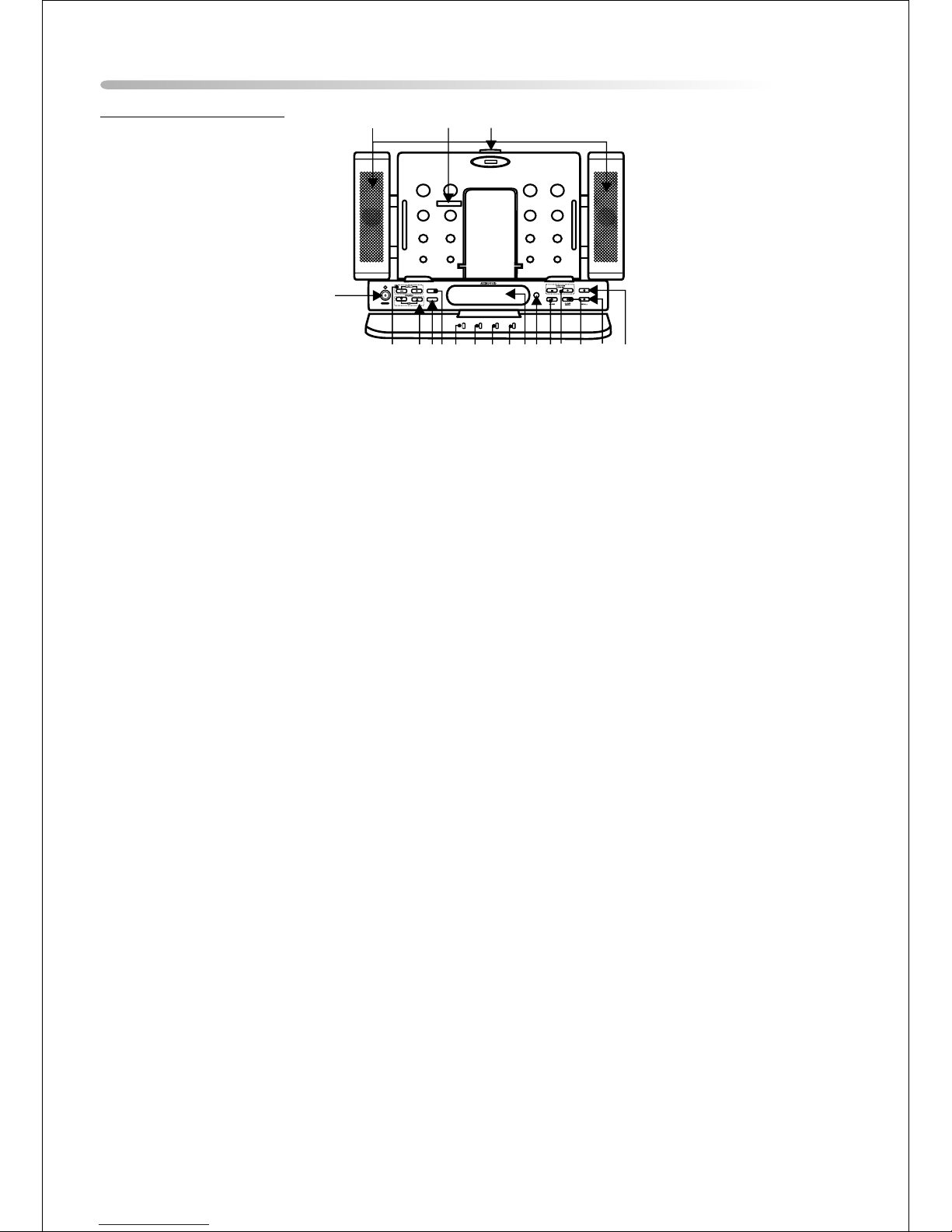
Front Panel Controls
1. Release Button – Press this button to release the shuttle unit.
2. 24 pin Shuttle Interface Connector – Used to connect the shuttle to the DTT7810FM.
3. Speakers for Shuttle Models DT102, DT85 and Dt7.
4. Power Button – To turn the DTT7810 FM (ON/OFF)
5. Volume Up / Down Button – Used to increase and decrease the volume level.
6. Channel Up / Down Button – Used to go to the next channel Up or Down.
7. Source Button – Select from the four (4) available sources. DVD > TV > AV > RADIO
8. Bass Boost Button – Used to increase the low bass
9. Alarm Off Button – Used to turn off the alarm. The alarm will automatically turn off after one
minute
10. Sleep Button – Used to set the DTT7810 sleep mode. The unit will turn OFF in 15, 30, 45, 60, 90,
or 120 minutes.
11. Dimmer – Used to control the brightness of the LCD display.
12. Snooze – Used to reset the alarm function for 9 minutes.
13. LCD Display Window – The LCD display is used to show the Time, Source selected, and Radio
Station.
14. IR Receiver – Allows remote control of the DTT7810 and the installed shuttle
(DT102, Dt85 or DT7).
15. Store Button – Used to set the AM/FM presets into memory.
16. Radio Tune /
Clock Set – In Standby mode these buttons are used for setting hours, minutes, and to select
from 12 and 24 hour mode.
– In operation mode these buttons are used for radio tuning Up and Down.
17. Clock Mode Button – Used to select the clock or alarm item to be set.
18. Recall Button – Used to recall the radio display and select preset stations.
19. AM / FM Button – Radio Band selector. (FM1, FM2 and AM)
frequency ( ) response.
WARNING !
TO AVOID POSSIBLE DAMAGE
TO THIS DEVICE.
DO NOT TOUCH CONNECTOR PINS
WITH METAL OBJECT
WHILE POWER ON.
POWE R
BASS BO OST
ALARM OFF SLE EP DIM MER SNOOZE
AM/FM
1
2
3
4
567 8 9 10 11 131415 16 17 18 1912
3

Main Features
Back Panel Connections
1. AV IN – The shuttle will accept an AV input through the AV jacks located on the rear of the unit.
The video device could be a video game system, video camera, or other input device.
• VIDEO IN – Yellow
• AUDIO IN (L ) – White
• AUDIO IN (R) – Red
2. DC 12V – Connect the supplied AC to DC adapter to this jack. The shuttle is designed for negative
ground 12V DC operation.
3. ANT – Connect the coaxial cable from an antenna or cable TV system to this jack.
4. FM IN – Connect the FM radio antenna to this jack.
5. AM IN – Connect the AM radio antenna to this jack.
VID EO IN
AUD IO IN
LRDC 12 V ANT FM IN AM IN
12345
4
Remote Control Operation
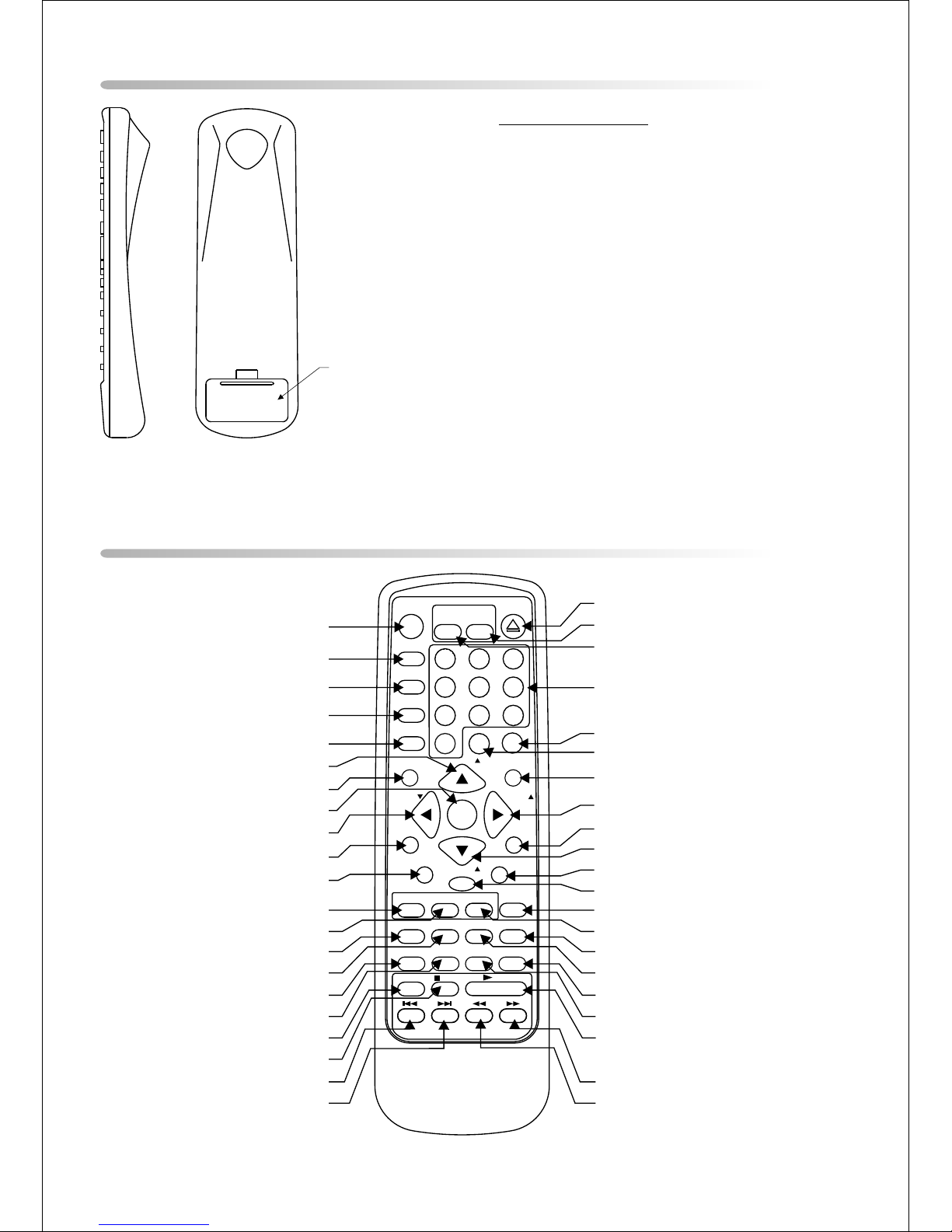
Remote Control Function Descriptions
BATTERY COVER
SETUP
REPEAT
SUBTIT LE
SOURCE
AUTO
MEMORY
SKIP /
SEARCH
ERASE/
WRIT E
RETURN
MENU
1
4
7
ENTER
+
PIXMUTE
SEARCH SEARCH
9
2
5
8
6
3
POWERPOWER
FMM
ON/OFFON/OFF
ANGLE
EJECT
CHANNEL
SELECT
SEEK / CH
A-B
SEEK / CH
RADIO TV /C ATVTV DVD
DIS PLAY BAND RECA LL STORE
ZOOMAUDIO
PLAY
STOP
II PAUSE
--
1
2
3
4
5
7
6
8
9
10
11
12
13
14
15
16
17
18
19
20
21
23
22
24
25
26
27
28
29
30
31
32
34
33
35
36
37
38
0
39
40
41
42
VOLUME
Battery Installation
Before attempting to operate your Remote
Control, install the batteries as described
below.
1) Turn the Remote Control face down. Using a
fingernail, lift the battery cover off.
2) Install two “AAA” batteries. Make sure that
proper polarity (+ or -) is observed.
3) Align the cover tabs with the remote control
and press down until the cover clicks.
The remote control will operate the VDS102T
and Audiovox shuttle models (DT102, DT85 or
DT7) It is not a universal remote control and
will not control equipment from other
5

6
*Function control is available on the unit and the remote control.
** Used only when Shuttle (DT102, DT85 or DT7) is installed.
1. POWER Button*
Press this button to turn the DTT7810FM ON.
Press the button again to turn the DTT7810FM OFF.
2. SOURCE Button*
Use to select one of the four sources (DVD, TV, AV, and Radio)
3. AUTO MEMORY Button
(AUTO PROGRAM Button)**
When the AUTO MEMORY button is pressed, all channels are searched and
channels that are detected with signals of sufficient levels are automatically stored inmemory.
4. SKIP / SEARCH Button**
This button selects between SKIP ON and SKIP OFF mode. In “SKIP mode” the TV tuner will only
stop on channels that are programmed into memory. In SKIP OFF mode the TV will stop on all
active channels.
5. ERASE / WRITE Button**
While tuned to a channel, pressing this button will store or erase the channel from memory.
The word “ADD” and the stored channel numbers are displayed in “GREEN”. The word “ERASE” and
the erased channel numbers are displayed in “RED”.
6. SEEK / CHANNEL UP (5) Button**
Use this button to increase the TV channel number or radio station to the desired channel and to
scroll upward in menu options.
7. MUTE Button
Press this button to mute the audio.
Pressing the button again restores the sound to the previously set level.
8. ENTER Button**
Used to implement a selected setting or menu option.
9. LEFT (3) Button**
Allows the user to shift left in the menu options.
-Or-
SEARCH(6) Button**
When this button is pressed radio stations are searched in descending order and
the tuner will stop on the next active channel
10. MENU Button**
Allows the user to access the DVD root.
11. RETURN Button**
Not used in this model.
12. TV Mode Select Button**
Switches certain function keys on the remote control to TV functions.
13. DVD Mode Select button**
Switches certain function keys on the remote control to DVD functions.
14. DISPLAY Button**
Press to display the current DVD disc information.
or radio station

15. BAND Button**
Used to select the desired radio band (FM1/FM2/AM)
16. AUDIO Button**
Press this button to display and select the desired AUDIO language. Each time the button is
pressed, the language or track changes.
NOTE: The languages & tracks you can select vary from disc to disc.
17. ZOOM Button **
Press this button to enlarge the picture.
18. PAUSE(;)Button**
Allows the user to pause the playback. Pressing the pause button again will put the DVD player in
step (;4) mode allowing frame by frame playback. Press PLAY to return to normal playback
19. STOP(<)Button**
Disc playback will be stopped.
20. PREVIOUS(9)Button**
Allows the user to return to the previous chapter or track.
21. NEXT(:)Button**
Allows the user to skip to the next chapter or track.
22. REV(7)Button**
Allows the user to search in a backward direction at 2, 4, 8, and 20 times the normal speed.
23. FWD (8) Button**
Allows the user to search in a forward direction at 2, 4,8, and 20 times the normal speed.
24. PLAY (4)Button**
Press this button to activate the play mode when a disc is loaded into the disc compartment.
25. ANGLE Button**
Press this button to display and select the available camera angles. Each time the button is
pressed the angle will change.
NOTE: The number of angles vary from disc to disc.
26. SUBTITLE Button**
Press this button to display and select the available subtitle language in DVD mode. Each time the
button is pressed, the subtitle language changes.
NOTE: The type & number of languages for subtitles vary from disc to disc.
27. RECALL Button**
Used to recall the radio display and select preset stations.
28. STORE Button
Used to store radio presets into memory.
29. RADIO Button
Switches certain function keys on the remote to radio functions..
30. TV/CATV Button
Use this button to select regular (AIR) 69-channel broadcast TV or 125-channel cable TV (standard
Cable, HRC cable, or IRC cable). As the button is pressed, the on-screen display will cycle as
Follows:
AIR CABLE-S CABLE-H CABLE-I
7

8
31. A-B Button
Allow the user to repeat playback of a DVD or CD from point A to point B.
32. REPEAT Button**
Allows the user to repeat a chapter, title, track, or all of a DVD, CD or MP3.
33. SEEK / CHANNEL DOWN (6) Button
Use this button to decrease the TV channel number or radio station to the desired channel and to
scroll downward in the menu options.
34. SETUP Button**
Allows the user to access the DVD setup menu and select various playback options (Display,
OSD Language, Defaults, Parental Control, Password, Exit Setup).
35. RIGHT (4) Button**
Allows the user to shift to the right in the menu options.
-Or-
SEARCH(5) Button**When this button is pressed radio stations are searched in
ascending order and the tuner will stop on the next active channel.
36. PIX Button (PICTURE SELECT)**
Each time this button is pressed, the OSD will display the “adjustment bars” for BRIGHTNESS,
CONTRAST, COLOR or TINT. Once the desired adjustment bar is displayed, use the VOLUME
UP/DOWN buttons to adjust the setting. The display will automatically turn off if no adjustments
are made within 6 seconds, or if any other button is pressed.
37. VOLUME (–) Button
Press this button to decrease the volume level.
38. VOLUME (+) Button
Press this button to increase the volume level.
39. NUMERIC KEYPAD
Allows the user to directly access specific TV channels, enter a parental control password and
select a specific track or chapter.
40. FMM ON/OFF
Not Used On This Model
41. CHANNEL SELECT Button**
Not Used On This Model
5
42. EJECT ( ) Button**
Used to eject the disc.
Altri manuali per DT102
1
Questo manuale è adatto per i seguenti modelli
3
Altri manuali Audiovox Stazione di attracco

Audiovox
Audiovox IBOX 200 Guida rapida

Audiovox
Audiovox VDS102T Manuale utente

Audiovox
Audiovox IPD-HDSS Manuale utente

Audiovox
Audiovox AR5100 Manuale utente

Audiovox
Audiovox G2 Cradles Guida alla risoluzione dei problemi

Audiovox
Audiovox DTT7810FM Manuale utente

Audiovox
Audiovox VDS102T - Deluxe Overhead Docking Station Manuale utente

Audiovox
Audiovox VDS102T Manuale utente

Audiovox
Audiovox XPress RCi Manuale utente

Audiovox
Audiovox DKP102 Scheda tecnica


