
Audity Infinite Manuale utente

Wireless Headphones
User Manual

Uniquely designed to
bring you an immersive
audio experience like no
other. Beat to the sound
of your own drum.
Beat Unique.

54
Getting the Right Fit
You can adjust the Audity Infinite
Headphones by pulling up or down
on the headband until you find a
comfortable fit on your ears.
Connecting/Bluetooth Pairing
1. Make sure Bluetooth is turned ON
on your device.
2. Press and hold POWER button for 6
seconds to enter pairing mode. The
LED light will rapidly flash blue and
red when pairing.
3. Select “Audity Infinite” from the list
of found devices.
4. When paired, the LED slowly
flashes blue.
Pairing Troubleshooting
1. When performing the pairing on a Bluetooth device
to detect the headphones, enter 0000 if your device
prompts you for a password during the pairing
process.
2. If the pairing is not successful, turn off the headphones
and perform the pairing connection according to the
Bluetooth Pairing steps on the previous page.
Note: To clear pairing history, hold the volume up/down
button for 12 seconds.
Adjustable
En

76
Pairing with a Second Device
Lets say you’re using your phone and your laptop and
don’t want to use the speaker for sound. When you pair
both those devices to your Audity Infinite, you experience
the following situation: If a call comes in on your phone
while you’re watching a movie on your laptop, the Audity
Infinite Bluetooth connection will pause the movie and
connect to the phone call automatically.
1. Keep your first paired device on when you pair your
second device. Make sure your second device has
Bluetooth turned ON.
2. Turn off your headset then hold the POWER button
for 6 seconds to go into pairing mode again and pair
your second device.
3. After your second device is successfully paired and
connected, the Bluetooth status on your first device
will automatically disconnect.
4. Go back to your first device and select “Audity
Infinite” from the Bluetooth device list.
Troubleshooting Pairing a Second Device
If going back to the first device isn’t working after
pairing the second device, you may need to adjust your
Bluetooth settings for the first device.
1. Open Bluetooth and make sure it is turned ON.
2. Select “Audity Infinite”.
3. FOR ANDROID USERS: Refer to your device manual
for Bluetooth connection instructions.
En
98
Use with the Aux Cable
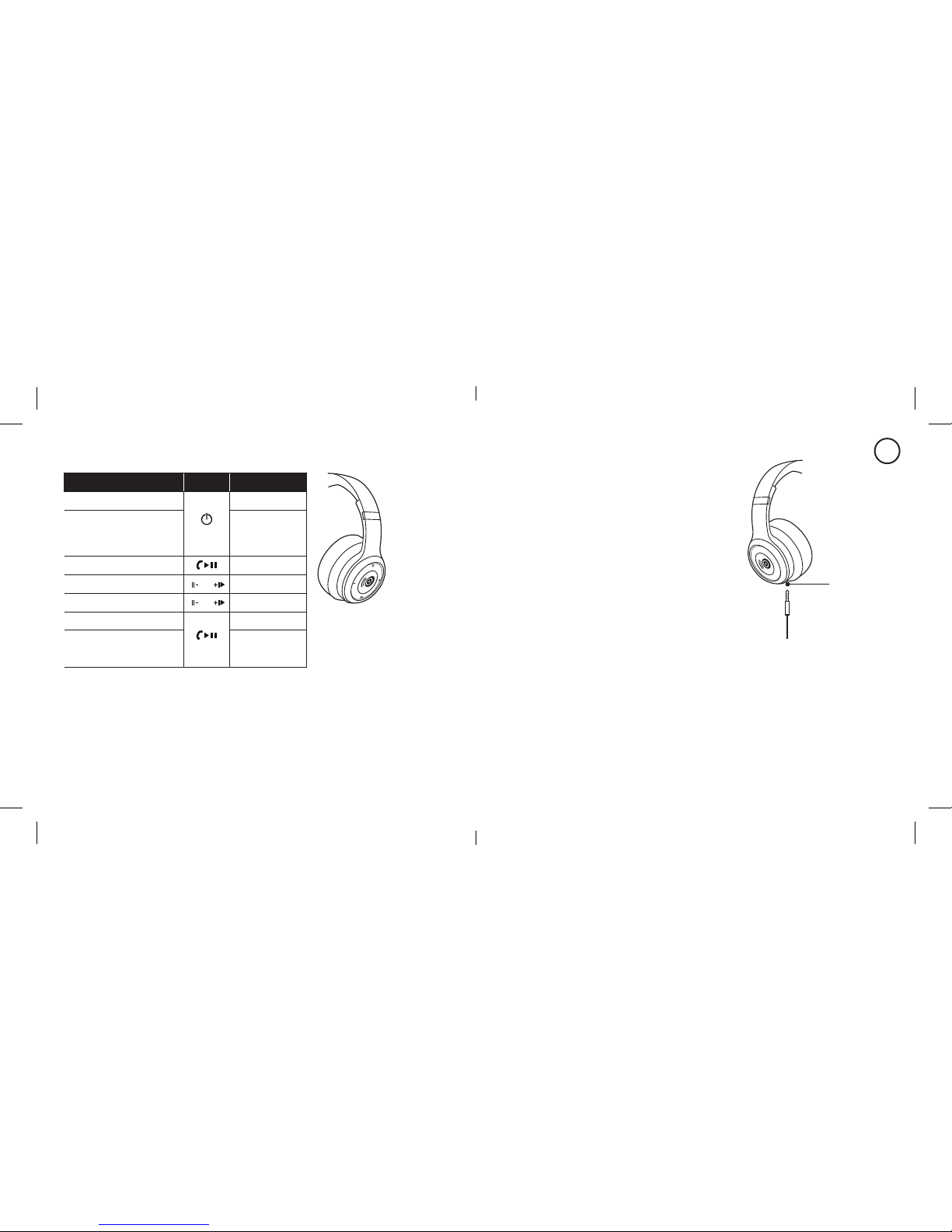
Alternatively connect the Audity Infinite
using the supplied Aux cable by plugging
the cable directly into the Aux port
located on the bottom left side
of your headphones.
Convenient Storage
To save space, the Audity Infinite
can be folded inward and conveniently
placed in the pouch.
Specifications:
Driver: 40mm per ear cup
Bluetooth 4.0
Frequency: 20Hz-20KHz
Battery Capacity: 3.7V/500mA
Operating Audity Infinite
LED Indicators
• Red and blue LEDs flash: Headphones are in pairing mode.
• Red LED: Power is running low, time to charge.
• Blue LED gradually flashes: Audity Infinite headphones in use.
Aux Port
Note: Music playback
is paused during call
functions and resumes
when the call ends.
To... Button Press
Turn on/off headphones and hold 4 secs
Start Bluetooth pairing
When
headphones
turned off, press
and hold 6 sec
Play/Pause/Call x1
Volume up/down / x1
Go to next/previous track / ...and hold
Answer/end call x1
Reject an incoming call Hold until call ends
En

1110
Compatibility
The ear cup controls only work in Bluetooth mode.
Functions may vary depending on your device’s
compatibility:
• iOS and Android smartphones with Bluetooth
• Laptops, tablets and MP3 players with Bluetooth
Listening Safely
Do not wear headphones while driving a vehicle or cycling.
This can create a traffic hazard and could be illegal in
some areas. To protect your hearing, do not listen at high
volume. Extended high-volume listening can lead to
permanent hearing loss.
Charging your Audity Infinite Headphones
1. Plug the Micro-USB charging cable into the port on the
right ear cup. Next, plug the USB-A connector into a
USB wall charger.
2. The LED light will be red during charging. When
charging is complete, the light turns blue.
Note:
1. When the power is low, the LED light will ash red.
2. When there is no Bluetooth connection, the headphones
will automatically turn off after 3 minutes.
En

1312
FCC Compliance
1. This device complies with Part 15 of the FCC Rules. Operation is subject to the
following two conditions:
(1) This device may not cause harmful interference, and
(2) This device must accept any interference received, including interference
that may cause undesired operation.
2. Changes or modifications not expressly approved by the party responsible for
compliance could void the user's authority to operate the equipment.
NOTE: This equipment has been tested and found to comply with the limits for
a Class B digital device, pursuant to Part 15 of the FCC Rules. These limits are
designed to provide reasonable protection against harmful interference in a
residential installation.
This equipment generates uses and can radiate radio frequency energy and, if
not installed and used in accordance with the instructions, may cause harmful
interference to radio communications. However, there is no guarantee that
interference will not occur in a particular installation. If this equipment does
cause harmful interference to radio or television reception, which can be
determined by turning the equipment off and on, the user is encouraged to
try to correct the interference by one or more of the following measures:
- Reorient or relocate the receiving antenna.
- Increase the separation between the equipment and receiver.
En
- Connect the equipment into an outlet on a circuit different from that
to which the receiver is connected.
- Consult the dealer or an experienced radio/TV technician for help.
RF warning statement:
The device has been evaluated to meet general RF exposure requirement.
The device can be used in portable exposure condition without restriction.
IC warning
This device complies with Industry Canada’s licence-exempt RSSs. Operation
is subject to the following two conditions:
(1) This device may not cause interference; and
(2) This device must accept any interference, including interference that may
cause undesired operation of the device.
Applicant – Superior Communications, dba Audity. 62457AU

15
Casque d‘écoute sans fil
Guide d’utilisation
Pour un ajustement optimal
Vous pouvez ajuster le casque Audity
Infinite en tirant sur le serre-tête vers
le haut ou vers le bas jusqu’à ce que
vous trouviez un ajustement confortable
pour vos oreilles.
Couplage de votre casque d’écoute
Audity Infinite avec votre appareil
1. Assurez-vous que la fonction Bluetooth
est ACTIVÉE sur votre appareil.
2. Appuyez sur le bouton d'alimentation (POWER)
pendant 6 secondes pour le mettre en mode couplage.
Le voyant clignotera en bleu et rouge pendant le
couplage.
3. Sélectionnez Audity Infinite dans la liste des appareils
trouvés.
4. Une fois couplé, le voyant clignote lentement en bleu.
Réglable
Fr

1716
Dépannage – couplage
1. Lorsque vous effectuez le couplage sur un appareil
Bluetooth pour détecter le casque d’écoute, tapez
0000 si votre appareil exige un mot de passe lors
de cette opération.
2. Si le couplage échoue, éteignez le casque d’écoute et
effectuez la connexion en suivant les étapes de couplage
Bluetooth ci-dessus.
Remarque : Pour annuler ou arrêter le couplage, appuyez
sur le bouton du volume pendant 12 secondes et essayez
de nouveau.
Couplage avec un deuxième appareil
Supposons que vous êtes en train d’utiliser votre téléphone et
votre ordinateur portable, mais que vous ne voulez pas utiliser le
haut-parleur. Au moment du couplage de ces deux appareils à
votre casque Audity Infinite, la situation suivante se produit : Si
vous recevez un appel pendant que vous regardez un film sur
votre ordinateur portable, la connexion Bluetooth mettra le
film en pause et acheminera automatiquement l’appel à votre
téléphone.
1. Maintenez votre premier appareil couplé pendant que vous
couplez le deuxième. Assurez-vous que la fonction Bluetooth
est ACTIVÉE sur votre deuxième appareil.
2. Éteignez votre casque et appuyez sur le bouton
d’ALIMENTATION pendant 6 secondes pour passer à
nouveau au mode couplage, puis couplez votre deuxième
appareil.
3. Une fois votre deuxième appareil couplé et connecté, la
fonction Bluetooth sur votre premier appareil sera
automatiquement désactivée.
4. Revenez à votre premier appareil et sélectionnez « Audity
Infinite » dans la liste des appareils Bluetooth.
Fr

1918
Dépannage – couplage d’un deuxième appareil
Si vous constatez que le premier appareil ne fonctionne
pas après avoir couplé le deuxième, vous devrez peut-être
modifier les réglages Bluetooth du premier appareil.
1. Sélectionnez la fonction Bluetooth et assurez-vous
qu’elle est ACTIVÉE.
2. Sélectionnez « Audity Infinite ».
3. UTILISATEURS ANDROID : Assurez-vous d’activer
les boutons Call Audio et Media Audio.
Utilisation du Audity Infinite
Témoins lumineux
• Voyants rouge et bleu clignotant : Le casque d’écoute
est en mode couplage.
• Le voyant rouge : La charge est faible; il est temps de
recharger le casque.
• Le voyant bleu clignote graduellement : Le casque
d’écoute Audity Infinite est en cours d’utilisation.
REMARQUE : L’écoute
musicale est mise en
pause pendant l’utilisation
des fonctions d’appel et
reprend une fois l’appel
terminé.
À Bouton Presse
Allumer / éteindre les casque
d’écoute tenir pendant 4 sec
Commencer couplage
Bluetooth
lorsque les écouteurs
sont éteints, maintenez
la touche enfoncée
pendant 6 secondes
Lecture / Pause / Appel x1
Monter / Baisser / x1
Chanson suivante /
précédente / ...et maintenez
Répondre ou mettre fin à
un appel x1
Rejeter un appel Appuyez jusqu’à la
fin de l’appel
Fr
Indice
Lingue:


