
AUO PN27FTN02.0 Manuale utente

Touch LCD Monitor User Manual
PN27FTN02.0


Contents
Safety Precautions ………………………………………………………………………………………………1
Product Introduction ……………………………………………………………………………………………2
Installation ………………………………………………………………………………………………………3
Adjustment ..……………………………………………………………………………………………………5
Instructions ..……………………………………………………………………………………………………6
OSD Menu ..…………………………………………………………………………………………………….8
Parameters .……………………………………………………………………………………………………10
Troubleshooting ……………………………………………………………………………………………….11

Warning: Excessive use may damage the eyesight.
The terms HDMI and HDMI High-Definition Multimedia Interface, and the HDMI Logo are trademarks or registered trademarks of
HDMI Licensing Administrator, Inc. in the United States and other countries.
Safety Precautions
1
Please read this manual carefully before using the product and keep it in a safe place.
Keep the monitor away from water sources or damp places, such as bath rooms, kitchens, basements and
swimming pools.
Make sure the monitor is placed on a flat surface. If the monitor falls down, it may cause human injury or
device damage.
Store and use the monitor in a cool, dry and well ventilated place, and keep it away from emission and heat
sources.
Do not cover or block the vent hole in the rear casing, and do not use the product on a bed, sofa, blanket or
similar objects.
The range of the supply voltage of the monitor is printed on the label on the rear casing. If it is impossible to
determine the supply voltage, please consult the distributor or local power company.
If the monitor will not be used for a long period, please cut off the power supply to avoid electric shock in
rainy days and damage due to abnormal supply voltage.
Please use a reliable grounded socket. Do not overload the socket, or it may cause fire or electric shock.
Do not put foreign matters into the monitor, or it may cause short circuits resulting fire or electric shock.
Do not disassemble or repair this product by self to avoid electric shock. If faults occur, please contact the
after-sales service directly.
Do not pull or twist the power cable forcedly.
Please use a reliable grounded socket. Do not overload the socket, or it may cause fire or electric shock.
Please take a 10-minute break after 30 minutes of use. Children under 2 years old should not look at the
screen, and over 2 years old should not look at the screen for more than 1 hour a day.
®
WARNING: Use of control, adjustments or procedures other than those specified in this documentation
may result in exposure to shock, electrical hazards and/or mechanical hazards.

Précautions de sécurité Veuillez lire attentivement ce manuel avant
d'utiliser ce produit et le conserver en lieu sûr.
Attention: Un surdosage peut endommager la vue.
Éloignez le moniteur de l'eau ou des endroits humides comme la salle de bain, la cuisine, le Sous - sol et la
piscine.
Assurez - vous que le moniteur est placé sur une surface plane. Si le moniteur tombe, il peut causer des
blessures corporelles ou des dommages à l'équipement.
Entreposer et utiliser le moniteur dans un endroit frais, sec et bien a éré, loin des émissions et des sources de
chaleur.
Ne couvrez pas ou ne bloquez pas les évents du boîtier arrière et n'utilisez pas ce produit sur un lit, un
canapé, une couverture ou un objet similaire.
La plage de tension d'alimentation du moniteur est imprimée sur l'étiquette du boîtier arrière. Si la tension
d'alimentation ne peut être déterminée, consultez votre revendeur ou votre compagnie d'électricité locale.
Si l'affichage n'est pas utilisé pendant une longue période, couper l'alimentation électrique afin d'éviter les
dommages causés par un choc électrique et une tension d'alimentation anormale pendant les jours de pluie.
Utilisez une prise de terre fiable. Ne surchargez pas la prise, car elle peut causer un incendie ou un choc
électrique.
Ne pas placer de matières étrangères sur l'écran, car cela peut entraîner un court - circuit, un incendie ou un
choc électrique.
Ne pas démonter ou réparer le produit par vous - même pour éviter un choc électrique. En cas de
défaillance, veuillez contacter directement le service après - vente.
Ne tirez pas ou ne tordez pas le cordon d'alimentation.
Utilisez une prise de terre fiable. Ne surchargez pas la prise, car elle peut causer un incendie ou un choc
électrique.
Après 30 minutes d'utilisation, prenez 10 minutes de repos. Les enfants de moins de 2 ans ne doivent pas
regarder l'écran et les enfants de plus de 2 ans ne doivent pas regarder l'écran plus d'une heure par jour.
Avertissement: l'utilisation de commandes, de réglages ou de procédures autres que ceux précisés dans le
présent document peut entraîner un choc électrique, un danger électrique et / ou un danger mécanique.

Monitor
Power cable
Type-C signal cable USB A-B cable
Please be sure to use regular
USB-B 3.0 cables
User manual
Power adapter HDMI signal cable
Stand Base
2
2
Packing list
ss
ss
Touch LCD Monitor User Manual
PN27FTN02.0
Please check that the package of the monitor contains all parts. If any part is lost, please contact the distributor.
The color and shape of parts may vary with models. Figures in this User Manual are for reference only.
Product Introduction
*

Stand
Base
3
Installation procedure
Open the package to take out foams and put them on a flat tabletop.
Remove the upper foam cover and set it aside, remove the plastic bag of the monitor and place the monitor
in the lower foam cover. Put the monitor in the lower foam cover.
Screwed the bracket and base by thumb screw.
Installation
1.
2.
3.

Quick-disassembly button
4
Put the assembled base into the corresponding slot of the back shell, gently press the bracket to lock it into
the lock, please make sure it can be locked.
4.
Hold it to the final position, then finished.
Note: Please do not press the screen glass when doing the assembling.
5.

Vertical angle
±90°(±2.0°)
Rotation angle
±22.5°(±2.5°)
Tilting angle
-5.0°(±2.0°) ~ +20°(±2.0°)
Height adjustment
150mm(±5.0mm)
150mm
-5° 20°
5
Adjustment
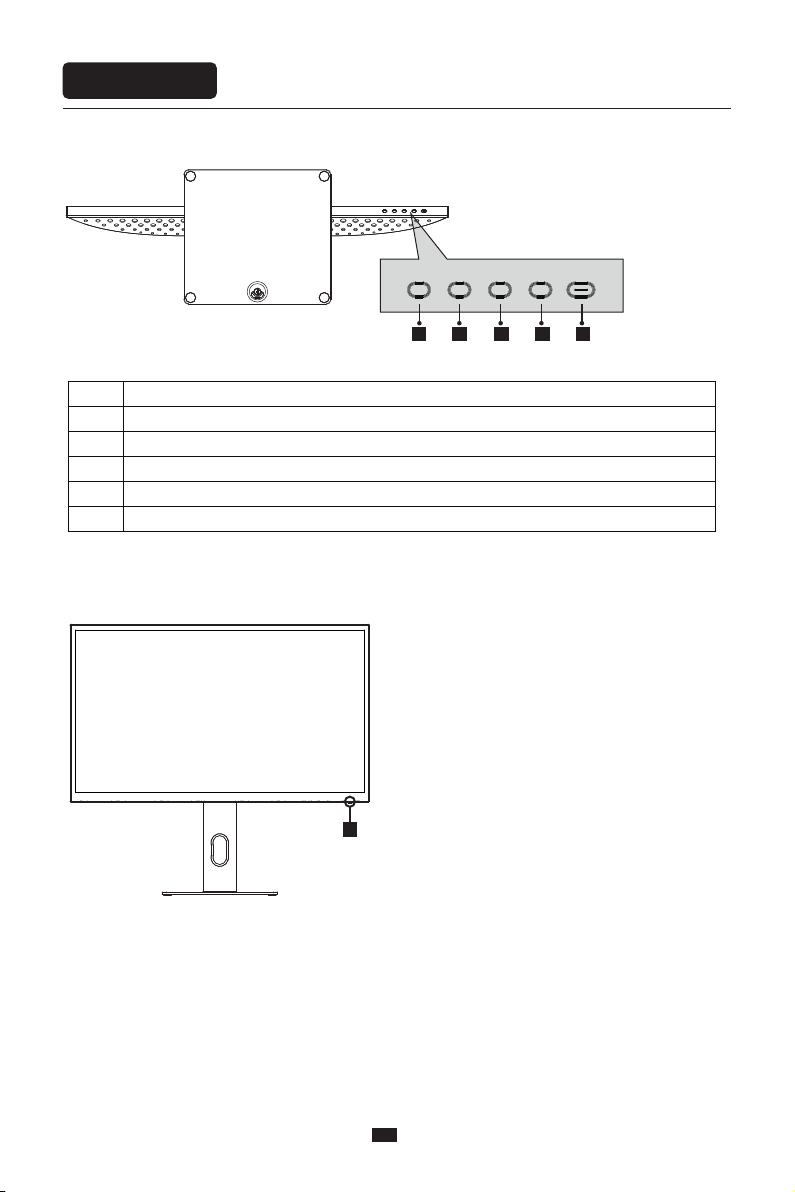
Button Function
1 2 3 4 5
6
6
Description of buttons
Explanation of indicator light
Instructions
1
2
3
4
5
6.
Menu button: Press to enter sub-menus/quickly enter the main menu
Down button: Press to move down in the menu/quickly adjust the brightness
Up button: Press to move up in the menu/quickly adjust the volume
Exit/hot key: Press to return to the previous menu/quickly switch input signals of the port
Power button: Press to turn on/off the monitor
Indicator light: Steady white light indicates the power is on and the monitor runs normally. Blue light indicates
no video signal detected or low voltage. Please make sure that your computer is turned on and all signal
cables are connected.
Indice
Altri manuali AUO Monitor


