
Avantree Vox-pop Manuale utente
Bluetooth Voice Headset
User Guide
Vox-pop

1. Product Description
The Avantree Vox-pop is a new Bluetooth mono headset from the Avantree
family. It delivers clear transmission with voice prompts and high quality sound.
With Multipoint Technology, your headset seamlessly transforms into a powerful
communication solution for up to two Bluetooth devices. The Avantree Vox-pop is
stylish and lightweight for all-day comfortable use.
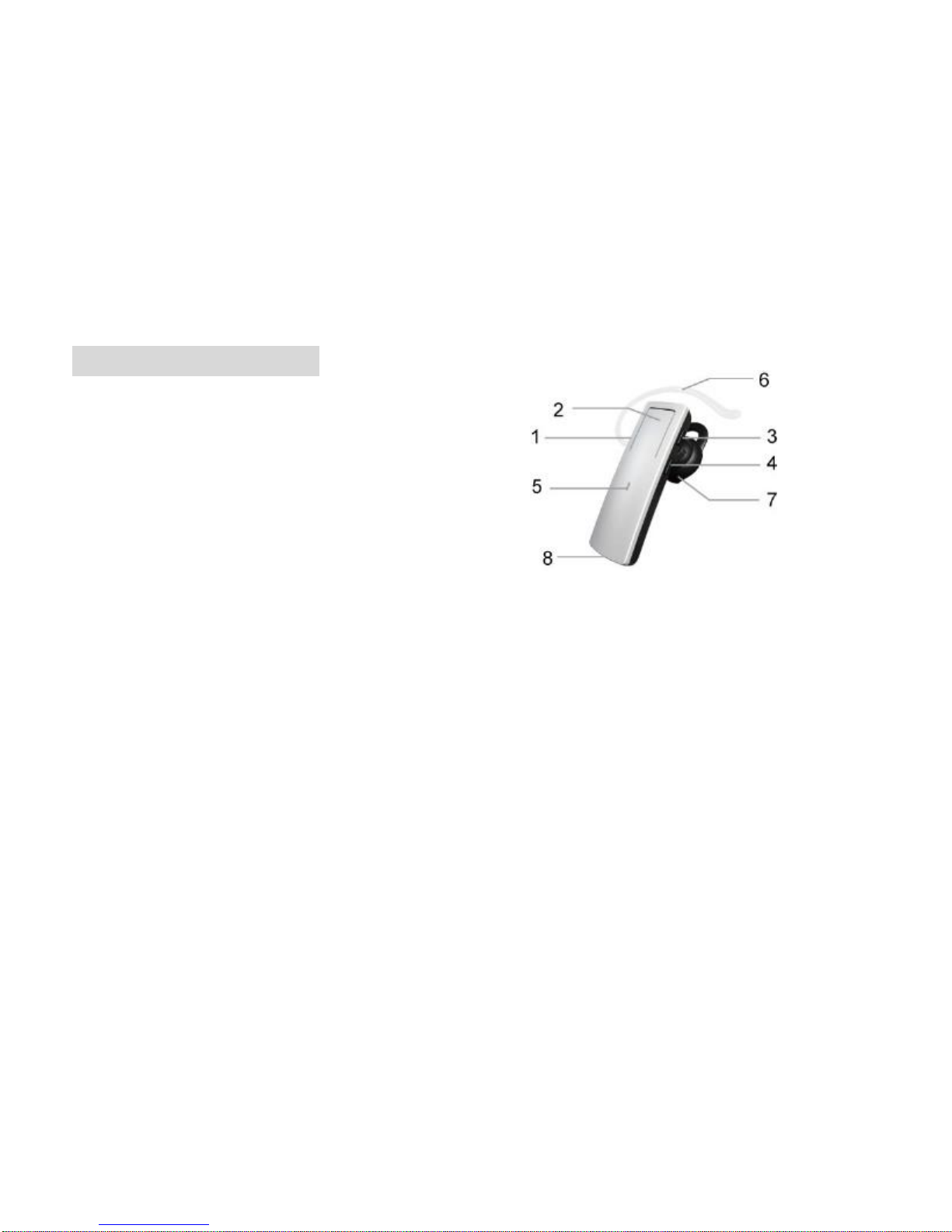
2. Product Overview
1). Charging socket
2). Multi-function button (MFB)
3). Volume up button
4). Volume down button
5). LED indicator
6). Ear hook
7). Earphone
8). Main microphone
What’s in the box:
A. Avantree Vox-pop headset
B. USB charging cable
C. Ear hook
D. 2 silicone ear buds

3. Charging
User can charge the unit by using a Micro USB cable via a PC.
1). Before use, please charge the device for 3 hours to make sure the headset
is fully charged and the battery reaches its full capacity.
2). Afterwards, each charge cycle may take up to 2 hours.
3). LED will indicate red during charging and off when charging is complete.
4). If you have not used your Avantree Vox-pop for a few months, LED might not
turn red when first charging. It might take 15-35 minutes before the LED will
come on.
5). We suggest fully charging the device at least once every two months.
NOTE: When the battery power is low, the LED flashes red and a voice prompt
“Low Power”is given every 15 seconds. Please recharge the battery as
advised above.
4. Pairing / Connect (Tutorial online)
1). It is important to pair the headset with your Bluetooth device for first time use.
2). Pairing procedure:

A. Ensure the headset is off.
B. Press and hold the multi-function button for about 7 seconds until LED
blinks blue and red alternately, and you will hear “Paring”.
C. Search the device from your phone / PC.
D. Once the “Oritone Drivo‟‟ is found, follow the steps and enter pin code
0000 to pair if needed, most phones don‟t need this pin code.
E. Connect the headset to the device and you will here “Connected”.
F. Headset is ready for use now.
3). Once paired and connected, the headset will automatically connect to your
phone whenever you turn the headset on again, provided it is in range.
4). The headset will automatically switch itself off if disconnected for 10 minutes.
We found most problems are caused by improper pairing between the headset
and the Bluetooth device. Please follow the online tutorial step-by-step.

5. Basic Operations
5.1 Headset on/off
Turn on –Press and hold the MFB for 3 seconds until blue LED flashes
3 times and you will hear “Power On”.
Turn off –Press and hold the MFB for 3 seconds until red LED flashes
twice and you will hear “Power Off”.
NOTE: Under standby mode, the LED indicator will flash blue every
3 seconds.
5.2 Answer a call –Press MFB briefly to answer the call.
5.3 Reject a call –Press and hold MFB for 3 seconds until you hear
“Rejected”.
5.4 Re-dial –Briefly press the MFB button twice and you will hear “Redial”.
5.5 End a call –Briefly press the MFB once.
5.6 Transfer a call
1). Headset to phone: Press MFB button for 3 seconds until you hear
a beep.
2). Phone to headset: Press MFB button for 3 seconds until you hear
a beep.

5.7 Voice dialing
Please check if your mobile phone supports a voice dialing function.
If your phone does support this function, follow your mobile phone manual
instructions to set it up.
1). Press the MFB briefly, then you can hear a short beep.
2). Say the name of person you wish to call.
3). If the voice tags are paired to the related phone number stored in your
mobile phone, the number will be dialed.
5.8 Volume adjustment
Volume up: Quickly press “V+” to increase the volume.
Volume down: Quickly press “V-” to decrease the volume.
5.9 Mute & unmute
Mute: To mute the headset during a call, press and hold “V-”button
for 3 seconds until you hear a beep.
Unmute: To unmute the headset during a call, press and hold “V-”button
for 3 seconds until you hear a beep.
5.10 Answer a second call during a call
When receiving a second call, press the “V+” button for about 2 seconds.
You will hear a beep to answer the second call, and put the first caller
on hold.

5.11 Switch between 2 phone calls
When having 2 calls on the line, press “V+”button for about 2 seconds.
You will hear a beep to switch between the 2 phone calls.
When having 2 calls on the line, quickly press the “MFB”button once
to end the current call, then press “V+”button for about 2 seconds again
to talk with the other caller.
6. Advanced Operations –Multipoint (Tutorial online)
6.1 Pairing with two mobile phones
From OFF, press and hold the MFB button for 7 seconds until LED blinks
blue and red alternatively. Then pair it with the first phone.
Turn off the headset and the Bluetooth function of the first phone.
From OFF, press and hold the MFB button for 7 seconds until LED blinks
blue and red alternatively. Then pair it with the second phone.
Power off the headset again, and turn on the Bluetooth of the first phone.
Then turn on the headset again –it will automatically connect with last 2
paired phones.

6.2 Last number redialing
When the headset is connected with two Bluetooth mobile phones, quickly
press MFB button twice –the last dialed number on the second phone will
be re-dialed.
NOTE: When connected to two Bluetooth mobile phones at the same time, when
one phone is on a call, the other phone keeps its connection with the headset.
7. Product Specification
* Bluetooth compliance: Bluetooth 3.0+EDR specifications
* Operating frequency band: 2.4GHz ~ 2.48GHz unlicensed ISM band
* Output power: Class 2 power output, up to 10 meters
* Support profiles: HSP and HFP profiles
* Integrated with echo cancellation.
* Built-in speaker and microphone.
* Standby time: up to 120 hours
* Talk time: up to 4-5 hours
* Battery charging time: about 2 hours
* Charger voltage: DC5.0V 300mA
* Battery type: 65 mAH (rechargeable Li-Polymer battery)

* Dimensions: 50mm x 23mm x 16mm
* Weight: 7.3g
The talk and standby times may vary when used with different mobile phones or
other compatible Bluetooth devices, usage settings, usage styles and environments.
8. Safety Information
To avoid damage or malfunction of this device, do not drop it from high places.
Keep this device away form humidity, water and other liquids. If the device is
exposed to water, moisture or other liquids, do not operate it to avoid the
potential of electric shock, explosion or damage to the device/injury to
yourself.
Do not place or keep this device near any heat source, such as direct sunlight,
radiators, stoves or other apparatus which produces heat. It may cause an
explosion or degrade the performance and/or life of the battery.
Do not attempt to modify, repair or disassemble this device yourself (especially
the battery). It may cause an explosion. Attempting any repair or modification
of this device yourself will void the warranty.
Do not place heavy objects on this device.
Indice
Altri manuali Avantree Cuffia

Avantree
Avantree Sacool Manuale utente

Avantree
Avantree HT3189 Manuale di istruzioni

Avantree
Avantree AS9P Manuale utente

Avantree
Avantree HM100P Manuale utente

Avantree
Avantree Alto 8060 Manuale utente

Avantree
Avantree Clipper Manuale utente

Avantree
Avantree BTHS-AH6 Manuale utente

Avantree
Avantree Sacool Manuale utente

Avantree
Avantree BTHS-AH6 Manuale utente


