
AVE Time-Date-Character-Title TDCT-Pro Manuale utente

1
TDCT-Pro
Time-Date-Character-Title
Operation Manual
March 2007

2
Contents
1. INTRODUCTION............................................... 3
2. FEATURES........................................................ 3
3. PROGRAMMING............................................... 4
3.1 Front Control Panel ..................................................4
3.2 Main Programming Menu............................................6
3.3 Set Master / Slave ..................................................6
3.4 Time and Date ..................................................7
3.5 Set Time and Date ..................................................8
3.6 Reset Time and Date ..................................................8
3.7Titler ..................................................8
3.8 Screen Setup ..................................................9
3.9 Communication ..................................................9
4. CABLES .......................................................... 10
APPENDIX .......................................................... 11
-TDCT-Pro Software
- RS-232 Command Set
Copyright C AVE Thailand Co., Ltd. 2000-2006
TO PREVENT ELECTRIC SHOCK, DO NOT REMOVE THE COVER. DO NOT EXPOSE THE EQUIPMENT TO RAIN OR
MOISTURE.NOUSER SERVICEABLEPARTSAREINSIDE. REFER SERVICINGTOQUALIFIEDPERSONNEL.
CAUTION!
RISK OF ELECTRICAL SHOCK!
DONOT OPEN!
WARNING!
THISEQUIPMENTGENERATES, USES,AND CANRADIATE RADIOFREQUENCYENERGYAND IFNOT INSTALLEDAND
USED IN ACCORDANCE WITH THE INSTRUCTION MANUAL MAY CAUSE INTERFERENCE TO RADIO COMMUNICA-
TIONS. IT HAS BEEN TESTED AND FOUND TO COMPLY WITH THE LIMITS FOR A CLASS A COMPUTING DEVICE
PURSUANT TO SUBPART J OF PART 15 OF FCC RULES, WHICH ARE DESIGNED TO PROVIDE REASONABLE PRO-
TECTION AGAINST SUCH INTERFERENCE WHEN OPERATED IN ACOMMERCIAL ENVIROMENT. OPERATION OF
THISEQUIPMENTINA RESIDENTIALAREAIS LIKELYTO CAUSE INTERFERENCE IN WHICH CASE THEUSERATHIS/
HER OWN EXPENSE WILL BE REQUIRED TO TAKE WHATEVER MEASURES MAY BE REQUIRED TO CORRECT THE
INTERFERENCE.

3
1. INTRODUCTION
Introduction
TheTDCT-Proisthepowerfultime,date, character,andtitler
whichhasallthefeatures ofexistingTDCTproducts(TDCT-T,
mTDCT,TDCT-60,TDCT-Military,MTDCT,STDCT,mSTDCT,
andmSVTDCT). Daylight Savingstime isalsosupported along
witha setofRS-232 commandsallows themasterunit tobe
programmedby otherdevices ofTitle andTimeand Dateset-
tings.Thefollowingisthe featuresofTDCT-Pro.
2. FEATURES
• Easyonscreen programming
• Programmable Date & time.
• Programmable single line or dual lineTime & Date display
• ProgrammableTimeFormathh/mm/ssorhh/mm/ss/fr (hh/mm/
ss/frwillresultin twolinetimeanddate display. The fr=frame
rate 1/60 sec for NTSC and 1/50 for PAL)
• ProgrammableforTenthsof SecondorFrame RateCounter
• Programmable12 houror24 hourtimeformat
• DaylightSavingsTimeforUSA/Canada/Australia/Tasmania
• ProgrammableDatemm/dd/yyordd/mm/yyoryy/mm/dd
• Programmabletitleupto20characters and singlelinedisplay
• Programmable10 charactersize.s
• Grayscaleandborderselectionfromfrontpanelandfrompro-
grammingmenu.
• Programmablemasterand slaveselection
• Setor changethetitle ofthemaster orthe slave TDCTvia
serialinterfacingbetween themasterTDCT and acommuni-
cationdevice(e.g Personalcomputer).
• Synchronizingthe timeand date between master and
slave.
• Compatible with the AVE RS-232 to RS-485 Adapter for dis-
tancesofup to3000’for masterslaveconnections.

4
3. PROGRAMMING
TDCT-Pro hasaneasy programmableoption that canbe ac-
cessedbypressing “UP”,“DOWN”,“SET”,button andbypress-
ingandreleasingthe“RESET” button.
Figure 2: Four Front Pannel Push Buttons of TDCT-Pro
3.1 FRONT CONTORL PANEL
Thefront panel controlsare provided toallow simple chang-
ing of the display’s vertical and horizontal position and the gray
scale or border. This eliminates the need of the user to enter the
mainmenuandinadvertentlychangeimportantprogrammingset-
ups.

5
Changing the Gray scale
Down Up Set Reset
1) Press and hold the “Down” button
2) Press and release the “Reset” button
3) Release the “Down” button
4) Press “Down” or “Up” to select the Gray scale
5) When choice is made, press and release the “Reset” button
Changing the Horizontal Position
Down Up Set Reset
1) Press and hold the “Up” button
2) Press and release the “Reset” button
3) Release the “Up” button
4) Press “Down” or “Up” to move the text block
5) When choice is made, press and release the “Reset” button
Changing the Vertical Position
Down Up Set Reset
1) Press and hold the “Set” button
2) Press and release the “Reset” button
3) Release the “Set” button
4) Press “Down” or “Up” to move the text block
5) When choice is made, press and release the “Reset” button
PROGRAMMING CONT.

6
Followingis adetailed descriptionofthe Menuselections
andthe programmingcapabilitiesof the TDCT-Pro.
3.2 Main Programming Menu
Note: If a sub menu has an "EXIT" selection, always go there and
press "SET". Pressing "RESET" at the main menu exits you from
the program
3.3 Set Master / Slave
This programming feature can be used to select the TDCT-Pro as a
master or slave or a stand-alone unit. The Following menu appears
when you select the Set Master Slave from the main menu.
PROGRAMMING CONT.
Figure 3: TDCT-Pro main menu
•Set Master/ Save
•Time & Date
•Set Time & Date
•Reset Time & Date
•Titler
•Screen Setup
•Communication
•Help
•Set Address MSTR/ANY/0..254
•Exit

7
PROGRAMMING CONT.
By selecting the SetAddress between 0 to 254 make TDCT-Pro
toact as aslave and thatmakeTDCT-Pro ready toreceive
commandfromthe master. Selecting “ANY”willmakeTDCT-Pro
asa stand-alone unit. Selecting “MSTR”make theTDCT-Pro to
actas amaster. TDCT-Pro cansense all theslaves bypressing
theresetbuttonandsynchronizethe time ofslavesTDCT-Pros
connectedwithit. Appendix1 illustratestheconnectioninforma-
tionbetweenmasterand salve.
3.4 Time & Date
Thisprogramming feature canbe use toformat thetimeand
dateon display. Following menuisappears onthescreen when
“Time &Date”is selectedfrom themainprogramming menu.
•Time Display ON/OFF
•Date Display LN1/LN2/OFF
•Counter FIELD/T/10/OFF
•Time Format 12/24
•Date Format (MM/DD/YY)/(DD/MM/YY)/(YY/MM/DD)
•DST DISABLED/USA/CANADA/AUSTRALIA/TASMANIA
•Exit
3.5 Set Time & Date
Timeand Datecanmanually setbyselecting settimeand date
fromtheprogrammingmenu.

8
PROGRAMMING CONT.
TimeDisplay canbe programmed on or offbyselecting ONor
off. Date can be displayed in 1 line or, 2 lines or can be pro-
grammedoffby selectingDatedisplay feature. Ifthecounter is
turnedonthenthe dateisautomaticallydisplayedin the 2ndline.
TheCounter canbe programmed eitheras afield counteror as
1/10th ofthe secondcounter.Fieldcounter countsthenumberof
fields in a second (60 fields per second in NTSC or 50 fields per
secondin PAL). If1/10th of secondis selected, thenitscount
from 0 to 10 in a second. Time format can be programmable as
a12-hour displayor24-hour ormilitarytimedisplay. Date format
isprogrammableto (mm/dd/yy),(dd/mm/yy),or(yy/mm/dd).
IfDaylightsavingsselected thenthetimeisautomatically ad-
vancedonehourin the Spring and automaticallyreversedinthe
Fallatthe appropriatetimefor theselectedcountry.
3.6 Reset Time & Date
Timeand datecanbe set tothefactory defaultbyselecting the
timeand date fromthe programming.
3.7 Titler
Selectingtitlerinthe programmingmenudisplaysthefollowing
menuonthescreen.
•Title ON/OFF
•Title
•Exit

9
Thetitle canbeprogrammed eitherON orOFFby selectingON
orOFF fromthe tiler menu. A20characterstitle canbe entered
byselectingthetitlefrom theprogrammingmenu.
3.8 Screen Setup
Charactersize, position,and gray scaleis programmedfrom this
menu. Followingmenupopups whenselectedScreensetup
fromthemainprogrammenu.
•Character Size
•Border /Gray Scale
•Horizontal Position
•Vertical Position
•Exit
Grayscale,horizontal position,andvertical positioncanalso be
setfromthefrontbuttonswithoutenteringtheprogramming
mode.
3.9 Communication
Thisprogrammingfeature letTDCT-Proto communicatewith
masteror slaveorwith aRS-232 serialdevice. Following menu
popsupwhen communication isselectedfromthe mainmenu.
•RX Baudrate 1200 to 38.8 kbaud/sec
•TX Baudrate 1200 to 38.8kbaud/sec
•Parity ODD/EVEN/NONE
•Data Bits 8/7
•Hand shake ON/OFF
•Exit
PROGRAMMING CONT.
10
4. Cables
4.1 Cable
User are able to program TDCT-Pro via RS232C byTDCT- Pro
softwarefor Windows. The cableis optionalforthis product.
COM1or COM2(Newer computerrequired COM1 cable) cable
are needed if RS-232 device is used to set the time and date
andtitle oftheTDCT-Pro SeeAppexdixforTDCT-Pro software
andcommandset.
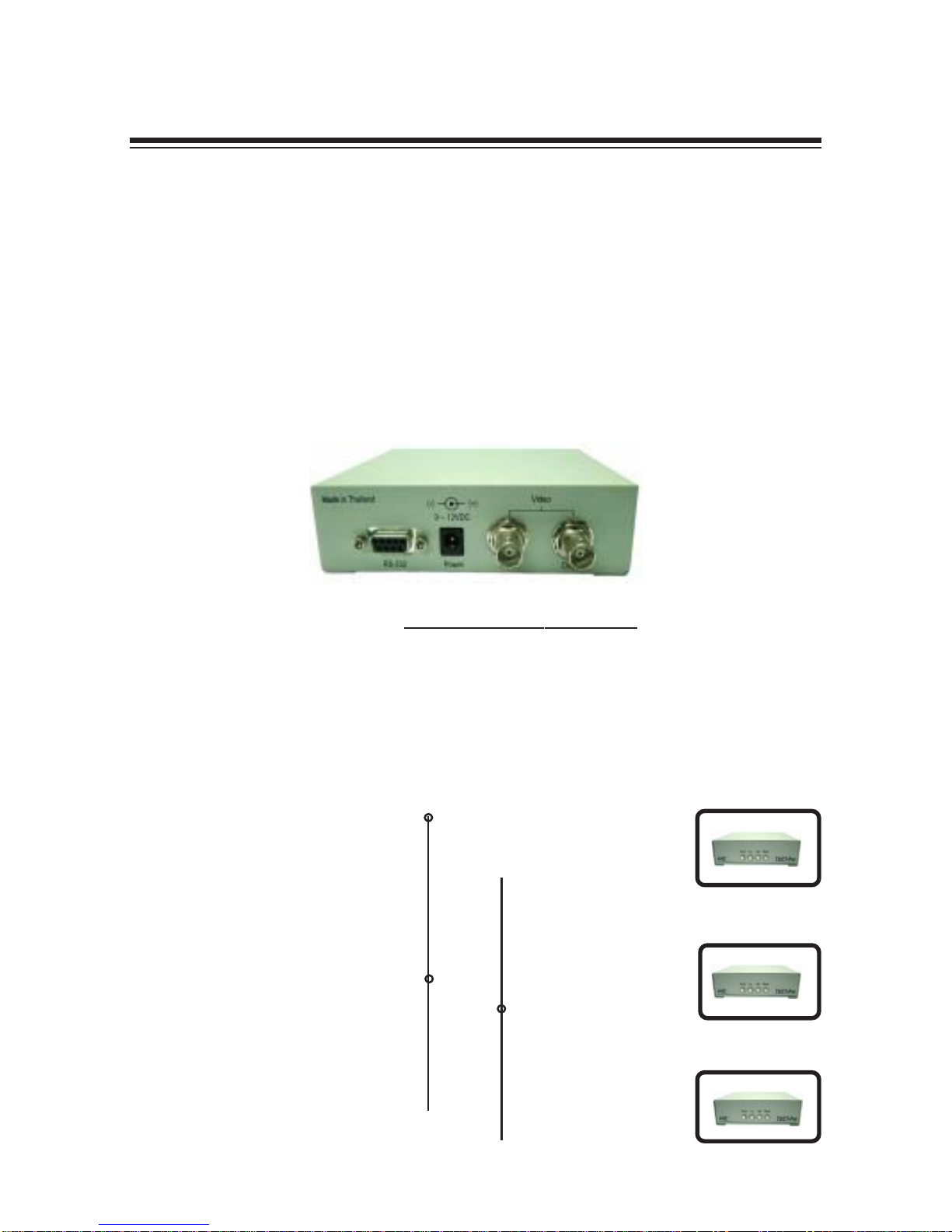
Figure 3: BackPannelofTDCT-Pro
Pin Asignments and Connectors for RS-232
PC-Com1 MasterTDCT-Pro
DB9Female.............................................DB9 Male
Pin-5(Gnd)--------------------------------Pin-5(Gnd)
Pin-3(Txd)--------------------------------Pin-2(Rxd)
--------Pin-3(Txd)
SlaveTDCT-Pro
DB9Male
-----------------Pin-5(Gnd)
---------Pin-2(Rxd)
SlaveTDCT-Pro
DB9Male
-----------------Pin-5(Gnd)
---------Pin-2(Rxd)
Questo manuale è adatto per i seguenti modelli
1
Indice
Altri manuali AVE Hardware di rete


Manuali Hardware di rete popolari di altre marche

Matrix Switch Corporation
Matrix Switch Corporation MSC-HD161DEL Manuale utente

B&B Electronics
B&B Electronics ZXT9-IO-222R2 Manuale utente

Yudor
Yudor YDS-16 Manuale utente

D-Link
D-Link ShareCenter DNS-320L Manuale utente

Samsung
Samsung ES1642dc Istruzioni per l’uso

Honeywell Home
Honeywell Home LTEM-PV Istruzioni per il montaggio


