Avermedia Live Streamer MIC 330 Manuale utente

Quick Guide
Live Streamer MIC 330 AM330
English Čeština
Deutsch Pусский
Français
Italiano 繁體中文
Español 简体中文
Nederlands 한국어
Polski

2
Disclaimer
All pictures contained in this documentation are example images only. The images may vary depending on
the product and software version. Information presented in this documentation has been carefully checked
for reliability; however, no responsibility is assumed for inaccuracies. The information contained in this
documentation is subject to change without notice.
Copyright and Trademark Information
© 2021 by AVerMedia Technologies, Inc. All rights reserved. No part of this publication, in whole or in
part, may be reproduced, transmitted, transcribed, altered or translated into any language in any form by
any means without the written permission of AVerMedia Technologies, Inc. Information and specication
contained in this manual are subject to change without notice and do not represent a commitment on the
part of AVerMedia.
For more information, please visit www.avermedia.com.
AVerMedia is trademark or registered trademark of AVerMedia Technologies, Inc.
Headquarters
Address No.135, Jian 1st Rd., Zhonghe Dist., New Taipei City 23585, Taiwan
Website www.avermedia.com
Support www.avermedia.com/support
Telephone +886-2-2226-3630
US Oce
Address 4038 Clipper Ct., Fremont, CA 94538, United States
Website www.avermedia-usa.com
Europe Oce
Address Hanauer Landstrasse 291 B, 60314 Frankfurt Hessen, Germany
國際總部
地址 23585新北市中和區建一路135號
網址 www.avermedia.com
支援 www.avermedia.com/support
電話 +886-2-2226-3630
中国子公司
地址 上海市静安区武宁南路488号智慧广场1510室
网址 www.avermedia.com.cn
电话 +86-21-52987985

3
Important Safety Instructions
1. Read these instructions.
2. Keep these instructions.
3. Follow all instructions.
4. Heed all warnings.
5. Do not use the apparatus on uneven or unstable surfaces.
6. Do not use this apparatus in a wet environment or near water.
7. Unplug the apparatus before cleaning. Clean only with a dry cloth.
8. Use in a well ventilated environment. Do not block any ventilation openings.
9. Use the apparatus within ambient temperatures 32–104°F (0–40°C).
10. Use power sources within the specied voltage range.
11. Do not place heavy objects on the apparatus.
12. Do not install near heat sources such as radiators or stoves.
13. Do not defeat the safety purposes of the polarized or grounding-type plug.
14. Protect the power cord from being walked on or pinched, particularly where the cord
connects with plugs or adapters.
15. Only use the attachments and accessories specied by the manufacturer.
16. Unplug this apparatus during lightning or when unused for prolonged periods of time.
17. Do not modify or disassemble the apparatus in any way.
18. Refer all servicing to AVerMedia Customer Service.
19. Do not dispose the apparatus as general household waste. Dispose in accordance
with local environmental laws.
重要安全說明
1. 仔細閱讀這些說明。
2. 妥善保存這些說明。
3. 遵守所有的指示。
4. 注意所有的警告。
5. 請勿將本產品安裝於不平穩的表面。
6. 請勿在潮濕或靠近水的地方使用本產品。
7. 清潔前請拔除電源。僅使用乾布清潔。
8. 請於通風的環境使用本產品。請勿堵住通風口。
9. 請於規格溫度範圍32–104°F(0–40°C)使用本產品。
10. 請使用額定電壓範圍內的電源。
11. 請勿放置重物於本產品上。
12. 請勿安裝於熱源附近如暖器或火爐旁。
13. 請勿破壞極性或接地插頭的安全防護設計。
14. 請保護電源線,勿使其被踩踏或碾壓,特別是與插頭或變壓器的連接處。
15. 僅使用製造商指定的配件及零件。
16. 打雷或長時間不使用時請拔除電源。
17. 請勿以任何方式改造或拆解本產品。
18. 如需維修請洽本公司客服人員。
19. 請勿當作家庭垃圾任意丟棄。請遵從當地環境法規妥善處理。

4
重要安全说明
1. 仔细阅读这些说明。
2. 妥善保存这些说明。
3. 遵守所有的指示。
4. 注意所有的警告。
5. 请勿将本产品安装于不平稳的表面。
6. 请勿在潮湿或靠近水的地方使用本产品。
7. 清洁前请拔除电源。仅使用干布清洁。
8. 请于通风的环境使用本产品。请勿堵住通风口。
9. 请于规格温度范围32–104°F(0–40°C)使用本产品。
10. 请使用额定电压范围内的电源。
11. 请勿放置重物于本产品上。
12. 请勿安装于热源附近如暖器或火炉旁。
13. 请勿破坏极性或接地插头的安全防护设计。
14. 请保护电源线,勿使其被踩踏或碾压,特别是与插头或变压器的连接处。
15. 仅使用制造商指定的配件及零件。
16. 打雷或长时间不使用时请拔除电源。
17. 请勿以任何方式改造或拆解本产品。
18. 如需维修请洽本公司客服人员。
19. 请勿当作家庭垃圾任意丢弃。请遵从当地环境法规妥善处理。

5
EN
Parts and Ports
Inside the Box
These are what you'll nd in the box:
Live Streamer
MIC 330
Quick Guide
XLR Cable
1 Microphone Grille 4 On/Off Switch
2Interchangeable Color Ring 5 XLR Port
3Adjustment Knobs 6Mounting Bracket
(5/8" Thread)
Interchangeable
Color Ring
2
5
36
4
1
5/8" to 3/8"
Thread Adapter

6
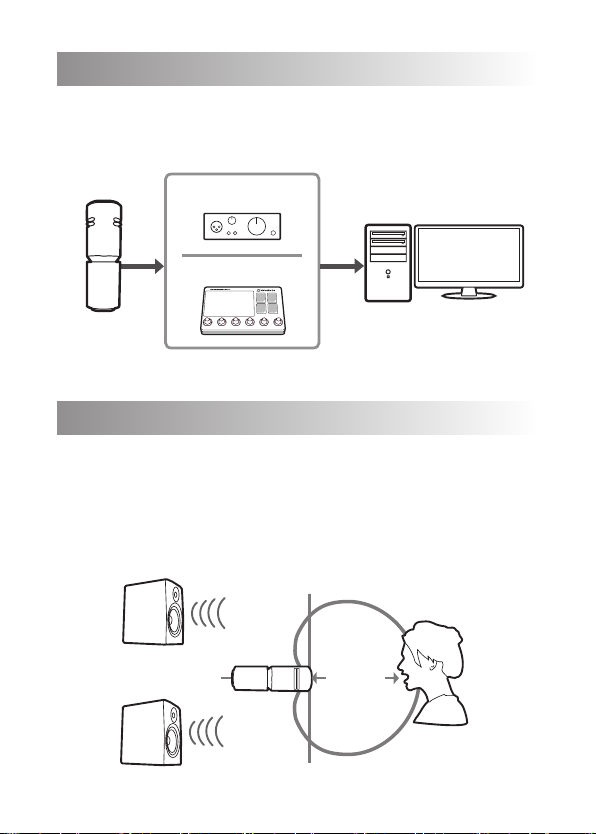
Connection
A device like preamp, audio interace, or Live Streamer NEXUS is re-
quired to connect your Live Streamer MIC 330 to a computer.
Preamp/Audio Interface
XLR USB
Live Streamer NEXUS
MIC
LINEIN
CONSOLE SYSTEM GAME CHAT
Use and Placement
To get the richest sounds, aim the Live Streamer MIC 330 directly
toward your mouth and keep it within 10 cm (4 in). Make sure to point
the microphone away from your speakers to avoid unwanted sound
sources. To minimize feedback, always test your microphone place-
ment before streaming or recording.
90°
90°
180°
Speakers
Loudspeakers
10 cm
4 in
<

7
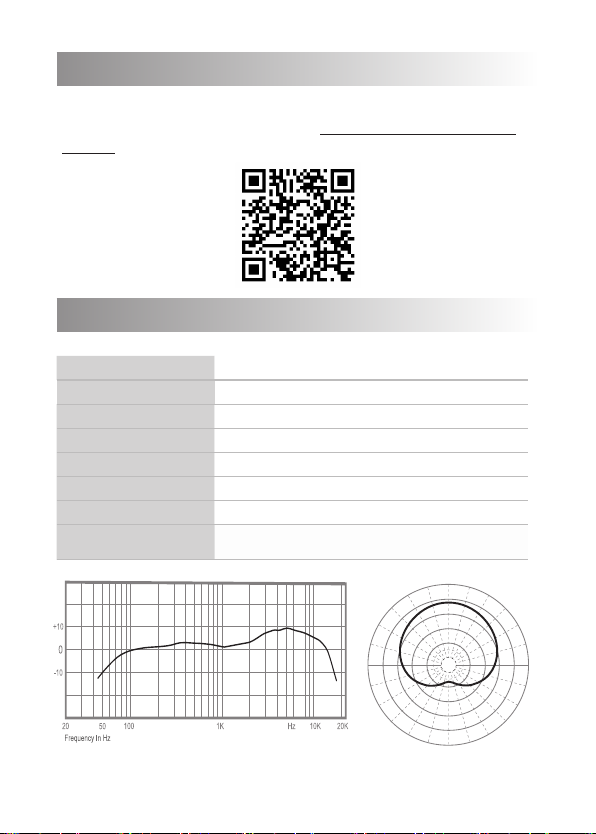
Specications
Type Dynamic microphone
Polar Pattern Cardioid
Connection XLR
Sensitivity -52 dB ±3 dB at 1 kHz (0 dB = 1V/Pa)
Frequency Response 50 – 18,000 Hz
Impedance 600 Ω ±30% (at 1 kHz)
Dimensions (Ø x L) 56 x 167 mm (2.20 x 6.57 in)
Weight Mic: 530.6 g (18.72 oz)
Bracket: 95.8 g (3.38 oz)
More Info
This device does NOT require a driver installation. For more
information, visit our webpage at http://q.avermedia.com/
AM330 or scan this QR code.
dB
30º 30º
0º
60º
90º
120º
150º
180º
150º
120º
90º
60º

8
Deutsch
Verpackungsinhalt
Inhalt der Schachtel:
• Live Streamer MIC 330
• XLR-Kabel
• Auswechselbarer Farbring
• 5/8 "bis 3/8" Gewindeadapter
• Schnellanleitung
Teile und Anschlüsse
1. Mikrofon-Schutzgitter
2. Auswechselbarer Farbring
3. Einstellknöpfe
4. An-/Ausschalter
5. XLR-Anschluss
6. Montagehalterung (5/8-Zoll-
Gewinde)
Verbindung
Für den Anschluss des Live Streamer
MIC 330 an einen Computer wird
ein Gerät wie z. B. ein Vorverstärker,
ein Audioanschluss oder ein Live
Streamer NEXUS benötigt.
Verwendung und Platzierung
Richten Sie für den besten Klang
das Live Streamer MIC 330 direkt
auf Ihren Mund und halten Sie es in
einem Abstand von 10 cm zu diesem.
Achten Sie darauf, das Mikrofon nicht
auf Ihre Lautsprecher zu richten, um
unerwünschte Rückkopplungen zu
vermeiden. Um Rückkopplungen
zu minimieren, müssen Sie die
Mikrofonpositionierung vor dem
Streaming oder der Aufnahme stets
testen.
Weitere Informationen
Dieses Gerät benötigt KEINE
Treiberinstallation.
Für weitere Informationen besuchen
Sie bitte unsere Webseite unter:
http://q.avermedia.com/AM330 oder
scannen Sie den QR-Code.
Français
Contenu du Coffret
Contenu de la boîte:
• Live Streamer MIC 330
• Câble XLR
• Anneau de Couleur
Interchangeable
• Adaptateur letage 5/8 "à 3/8"
• Guide de démarrage rapide
Présentation du produit
1. Grille Microphone
2. Anneau de Couleur Interchangeable
3. Boutons de Réglages
4. Interrupteur marche / arrêt
5. Port XLR
6. Support de Montage (Filetage 5/8 ")
Connexion
Un appareil tel qu'un pré-ampli, une
interface audio, ou le Live Streamer
NEXUS est nécessaire pour connecter
votre Live Streamer MIC 330 à un
ordinateur.
Utilisation et placement
Pour obtenir les sons les plus riches,
orientez le Live Streamer MIC 330
directement vers votre bouche et
maintenez-le à moins de 10 cm (4
pouces) de votre visage. Assurez-vous
de placer le microphone loin de vos
haut-parleurs pour éviter des sources
sonores indésirables. Pour minimiser les
commentaires de vos auditeurs, testez
toujours le positionnement de votre
microphone avant de streamer ou
d'enregistrer.
Plus d’informations
Cet appareil ne nécessite PAS
l'installation de pilotes.
Pour plus d'informations, visitez notre
page web http://q.avermedia.com/
AM330 ou scannez ce code QR.

9
Italiano
Contenuto della scatola
Contenuto:
• Live Streamer MIC 330
• Cavo XLR
• Anello di colore intercambiabile
• Adattatore lettato da 5/8 "a 3/8"
• Guida rapida
Parti e porte
1. Griglia del microfono
2. Anello di colore intercambiabile
3. Manopole di regolazione
4. Interruttore on/off
5. Porta XLR
6. Staffa di montaggio (lettatura 5/8")
Collegamento
È necessario un dispositivo come
preamplicatore, interfaccia audio
o Live Streamer NEXUS per collegare
il tuo Live Streamer MIC 330 a un
computer.
Uso e posizionamento
Per ottenere i suoni più ricchi, puntare
il Live Streamer MIC 330 direttamente
verso la bocca e mantenerlo
entro 10 cm (4 pollici). Assicurati di
puntare il microfono lontano dagli
altoparlanti per evitare sorgenti sonore
indesiderate. Per ridurre al minimo il
feedback, verica sempre la posizione
del microfono prima dello streaming o
della registrazione.
Maggiori informazioni
Questo dispositivo NON richiede
l'installazione di un driver
Per maggiori informazioni, visita
la nostra pagina web http://
q.avermedia.com/AM330 o fai la
scansione di questo codice QR.
Español
Dentro de la caja
Esto es lo que encontrarás en la caja:
• Live Streamer MIC 330
• Cable XLR
• Anillo de Color Intercambiable
• Adaptador de Rosca de 5/8” a
3/8”
• Guía rápida
Componentes del producto
1. Rejilla de Micrófono
2. Anillo de Color Intercambiable
3. Perillas de Ajuste
4. Interruptor de Encendido/
Apagado
5. Puerto XLR
6. Soporte de Montaje (Rosca de
5/8")
Conexión
Se requiere un dispositivo como
preamplicador, interfaz de audio o
Live Streamer NEXUS para conectar
su Live Streamer MIC 330 a un
ordenador.
Uso y colocación
Para obtener los sonidos más ricos,
apunte el Live Streamer MIC 330
directamente hacia su boca y
manténgalo dentro de los 10 cm (4
pulgadas). Asegúrese de apuntar
el micrófono lejos de los altavoces
para evitar fuentes de sonido
no deseadas. Para minimizar la
retroalimentación, pruebe siempre su
micrófono antes de hacer streaming
o grabar.
Más Información
Este dispositivo no requiere de
instalación de driver.
Para más información, visite nuestra
página web http://q.avermedia.
com/AM330 o escanee este código
QR.

10
Nederlands
In de doos
Dit is wat u in de doos zult vinden:
• Live Streamer MIC 330
• XLR-kabel
• Verwisselbare kleurenring
• 5/8 "tot 3/8" schroefdraadadapter
• Beknopte handleiding
Onderdelen en poorten
1. Microfoonrooster
2. Verwisselbare kleurenring
3. Regelknoppen
4. Aan/Uit-schakelaar
5. XLR-poort
6. Montagebeugel (5/8"
schroefdraad)
Verbinding
Voor een apparaat als preamp,
audio-interface of Live Streamer
NEXUS is het nodig om uw Live
Streamer MIC 330 aan te sluiten op
een computer.
Gebruik en plaatsing
Om de rijkste geluiden te krijgen,
richt de Live Streamer MIC 330
direct op uw mond en houd deze
op een afstand van minder dan
10 cm (4 in). Zorg ervoor dat u de
microfoon van uw luidsprekers
vandaan richt om ongewenste
geluidsbronnen te vermijden. Om
feedback te minimaliseren, moet u
altijd de plaatsing van de microfoon
testen voordat u gaat streamen of
opnemen.
Meer informatie
Dit apparaat vereist GEEN installatie
van een stuurprogramma.
Ga voor meer informatie naar onze
webpagina http://q.avermedia.
com/AM330 of scan deze QR-code.
Polski
W pudełku
W opakowaniu znajdują się:
• Live Streamer MIC 330
• Kabel XLR
• Wymienny kolorowy pierścień
• Adapter gwintu 5/8 "do 3/8"
• Skrócona instrukcja obsługi
Części i złącza
1. Kratka mikrofonu
2. Wymienny kolorowy pierścień
3. Pokrętła regulacyjne
4. Przełącznik włącz / wyłącz
5. Port XLR
6. Wspornik montażowy (gwint 5/8 ")
Połączenia
Do podłączenia urządzenia Live
Streamer MIC 330 do komputera
wymagane jest urządzenie takie jak
przedwzmacniacz, interfejs audio lub
Live Streamer NEXUS.
Użytkowanie i umiejscowienie
Aby uzyskać najlepszy dźwięk, skieruj
Live Streamer MIC 330 bezpośrednio w
stronę ust i trzymaj go w promieniu 10
cm (4 cale). Upewnij się, że mikrofon
nie jest skierowany w stronę głośników,
aby uniknąć niepożądanych źródeł
dźwięku. Aby zminimalizować
sprzężenie, zawsze sprawdź
położenie mikrofonu przed transmisją
strumieniową lub nagrywaniem.
Więcej informacji
To urządzenie NIE wymaga instalacji
sterownika.
Aby uzyskać więcej informacji,
odwiedź naszą stronę internetową
http://q.avermedia.com/AM330 lub
zeskanuj kod QR.

Questo manuale è adatto per i seguenti modelli
1
Indice
Altri manuali Avermedia Microfono

Avermedia
Avermedia AEGIS Manuale utente

Avermedia
Avermedia AVerMic AW315 Manuale utente

Avermedia
Avermedia LIVE STREAMER MIC 350 Manuale utente

Avermedia
Avermedia AEGIS Manuale utente

Avermedia
Avermedia AW310 Manuale utente

Avermedia
Avermedia AM310 Manuale utente

Avermedia
Avermedia AW313 Manuale utente

Avermedia
Avermedia Live Streamer MIC 133 Manuale utente