Avidyne FLIGHTMAX Entegra Manuale

Primary Flight Display
Pilots Guide
600-00081-000 Rev 07

600-00081-000 Rev 07 -i- FlightMax Entegra PFD
Revision History
Date Revision Description
Oct 25, 2002 00 Initial Release per ECO 02-284
Feb 03, 2003 01 Updated per EC0 03-046
Feb 04, 2003 02 Updated per ECO 03-049
Feb 06, 2003 03 Updated per ECO 03-055
Feb 20, 2003 04 Updated per ECO 03-067
May 23, 2003 05 Updated per ECO 03-159
Aug 1, 2003 06 Updated per ECO 03-194
Aug 12, 2003 07 Updated per ECO
Note: Cover picture depicts a standard SR20/SR22
Configuration.

FlightMax Entegra PFD -ii- 600-00081-000 Rev 07
Note: Above picture depicts a standard SRV Configuration.

600-00081-000 Rev 07 -iii- FlightMax Entegra PFD
Table of Contents
Introduction . . . . . . . . . . . . . . . . . . . . . . . . . . . . . . . . . . .1
System Overview
ADI Symbology . . . . . . . . . . . . . . . . . . . . . . . . . . . . . . . . . . . . .2
HSI Symbology . . . . . . . . . . . . . . . . . . . . . . . . . . . . . . . . . . . . .4
Right Knob & Buttons . . . . . . . . . . . . . . . . . . . . . . . . . . . . . . . .6
Left Knob & Buttons . . . . . . . . . . . . . . . . . . . . . . . . . . . . . . . .10
Users Guide
Initialization . . . . . . . . . . . . . . . . . . . . . . . . . . . . . . . . . . . . . . .13
Default Settings . . . . . . . . . . . . . . . . . . . . . . . . . . . . . . . . . . .16
Setting up the HSI . . . . . . . . . . . . . . . . . . . . . . . . . . . . . . . . .17
Use of GPS/VHF . . . . . . . . . . . . . . . . . . . . . . . . . . . . . . . . . . .18
Precision Flight with PFD . . . . . . . . . . . . . . . . . . . . . . . . . . . .19
Use of Trend Indicators . . . . . . . . . . . . . . . . . . . . . . . . . . . . .20
Autopilot Use and Control . . . . . . . . . . . . . . . . . . . . . . . . . . . .21
Horizontal Modes . . . . . . . . . . . . . . . . . . . . . . . . . . . . . . .22
Vertical Modes . . . . . . . . . . . . . . . . . . . . . . . . . . . . . . . . .23
Autopilot Operation During PFD Failures . . . . . . . . . . . .24
Winds Vector and Track Line . . . . . . . . . . . . . . . . . . . . . . . . .25
Precision Approaches . . . . . . . . . . . . . . . . . . . . . . . . . . . . . . .26
Non-precision Approaches . . . . . . . . . . . . . . . . . . . . . . . . . . . . .28
Missed Approach . . . . . . . . . . . . . . . . . . . . . . . . . . . . . . . . . . . .29
Operation with Invalid Sensor Data
Invalid Air Data . . . . . . . . . . . . . . . . . . . . . . . . . . . . . . . . . . . .30
Invalid Heading . . . . . . . . . . . . . . . . . . . . . . . . . . . . . . . . . . . .31
Crosscheck Monitor . . . . . . . . . . . . . . . . . . . . . . . . . . . . . . . .32
Recoverable Attitude . . . . . . . . . . . . . . . . . . . . . . . . . . . . . . . .33
Invalid Attitude & Heading . . . . . . . . . . . . . . . . . . . . . . . . . . .34
Appendix
Warranty . . . . . . . . . . . . . . . . . . . . . . . . . . . . . . . . . . . . . . . .35
Software License . . . . . . . . . . . . . . . . . . . . . . . . . . . . . . . . . .36

FlightMax Entegra PFD -iv- 600-00081-000 Rev 07
Intentionally Left Blank

600-00081-000 Rev 07 -1- FlightMax Entegra PFD
1. Brightness Control (BRT/DIM)- Controls display brightness.
Power-on default is 75% brightness.
2. Buttons & Knobs - Used to select modes or change the display
as indicated. Right knob and button functions are described in detail
starting on page 8. Left knob and button functions are described in
more detail starting on page 12.
Introduction
Congratulations on choosing FlightMax Entegra, general aviations
most advanced Primary Flight Display (PFD) system. FlightMax
Entegra represents Avidynes commitment to providing simple, easy
to use, integrated flight instrumentation, with all the situational
awareness and safety benefits of air transport and business jet flight
decks.
2
1
2

FlightMax Entegra PFD -2- 600-00081-000 Rev 07
1. Air Data - Displays True Airspeed (TAS) and Ground Speed (GS) in
knots, and Outside Air Temperature (OAT) in degrees Celsius. Invalid data
is displayed as dashes (---). OAT will not be displayed on the PFD when
the aircraft is equipped with an EX5000 MFD and EMax engine monitor.
2. Airspeed Window- Displays current indicated airspeed in knots.
Hash marks are displayed below 20 knots.
3. Airspeed Tape- Indicated airspeed with a display range from 20 kts to
300 kts. Each minor graduation represents 2 knots and each 10 knot major
graduation is labeled. Color bands are aircraft type specific:
Red Band: Never exceed speed, VNE, up to top of the airspeed tape.
Yellow Band: Maximum structural cruise speed, VNO,
up to never exceed speed, VNE.
Green Band: No flap stall speed, VS, up to maximum structural
cruise speed, VNO.
White Band: Full flap stall speed, VSO, up to maximum flap
extension speed, VFE.
Red Band: 20 kts up to full flap stall speed, VSO.
4. Aircraft Reference Symbol- Current aircraft pitch angle is represented
by a black dot in the center of the Flying-W against the pitch ladder.
System Overview ADI Symbology
2
1
5
4
8
10
11
12
9
7
6
3

600-00081-000 Rev 07 -3- FlightMax Entegra PFD
5. Pitch Ladder- The pitch ladder has graduations every 2 1/2
degrees within the range of ±20 degrees and graduations every 5
degrees from +20 degrees to +50 degrees and -20 degrees to -30
degrees. The 10 degree graduations of the pitch ladder have bar
ends that point toward the horizon line. Large chevrons (see Page
18) visible at excessive pitch angles, point toward the horizon
(above +50 degrees and below -30 degrees). ±90 degrees is
represented by small circles.
6. Bank Angle Indicator- Composed of an inverted white triangle
and an upright white triangular Roll Pointer. The upright white trian-
gle points to the current bank angle. Graduations at 0, 10, 20, 30, 45,
& 60 degrees. (Note: the 0 and 45 degree marks are inverted triangles).
7. Skid/Slip Indicator- The black trapezoid is centered under the roll
pointer in coordinated flight. Full scale deflection is the width of the trapezoid.
8. Altitude Tape- Displays pressure altitude (with barometric
correction) with a display range from -1,000 feet to 25,000 feet. Each
minor graduation represents 20 feet and each 100 foot graduation is
labeled.
9. Altitude Window- Displays current baro-corrected altitude.
10. Vertical Speed Indicator (VSI)- The scale graduations
between ±1,000 fpm, are every 100 fpm. Above scale limits, a digi-
tal readout of the current vertical speed is displayed on the appro-
priate end of the VSI scale. The max displayed value of the digital
readout is ±4,000 fpm.
These features are only available in configurations that include at least
one GPS/VHF navigator :
11. Vertical Deviation Indicator (VDI)- The VDI is displayed when
VLOC is selected as NAV source and the ILS glide slope signal is
received. The source of the VDI data is displayed immediately below
the VDI (eg. ILS). If the GS signal is lost, the VDI is replaced with a
red X and the letters ILS turn red. Once displayed, the VDI may be
removed by changing the NAV Source or changing the localizer fre-
quency.
12. Horizontal Deviation Indicator (HDI)- Displayed when
VLOC is selected as NAV source and and the localizer signal is
received. The source of the HDI data is displayed immediately to
the right of the HDI (eg. LOC or ILS). If the signal is lost, the HDI
is replaced with a red-X and the source letters turn red. Once
displayed, the HDI may be removed by changing the NAV Source
or changing the VOR/LOC frequency.
ADI Symbology System Overview

FlightMax Entegra PFD -4- 600-00081-000 Rev 07
EHSI 360-degree View
1. HSI Moving Map- Displays up to a maximum of 15 waypoints
and labels from the active flight plan. The active leg of the flight
plan is depicted in magenta, and all other legs of the flight plan are
depicted in white. The moving map will also display waypoints and
labels of an approach and hold. NOTE: This feature is not
available in SRV configurations.
2. Magnetic Heading- A numeric indication of current aircraft
magnetic heading.
3. Wind Vector- Displays the current wind speed and wind
direction. The arrow indicates the direction of the wind relative to
the current aircraft heading. There will be a several-second lag in
updating current wind speed and direction after turns.
4. HSI Map Range- When the moving map is selected for display
on the HSI via the View knob, the outer and inner rings of the
compass rose are labeled with range in nautical miles. Selectable
ranges for the outer ring are 2, 5, 10, 20, 50, 100, and 200 NM.
NOTE: This feature is not available in SRV configurations.
System Overview HSI Symbology
2
1
5
4
8
7
6
3

600-00081-000 Rev 07 -5- FlightMax Entegra PFD
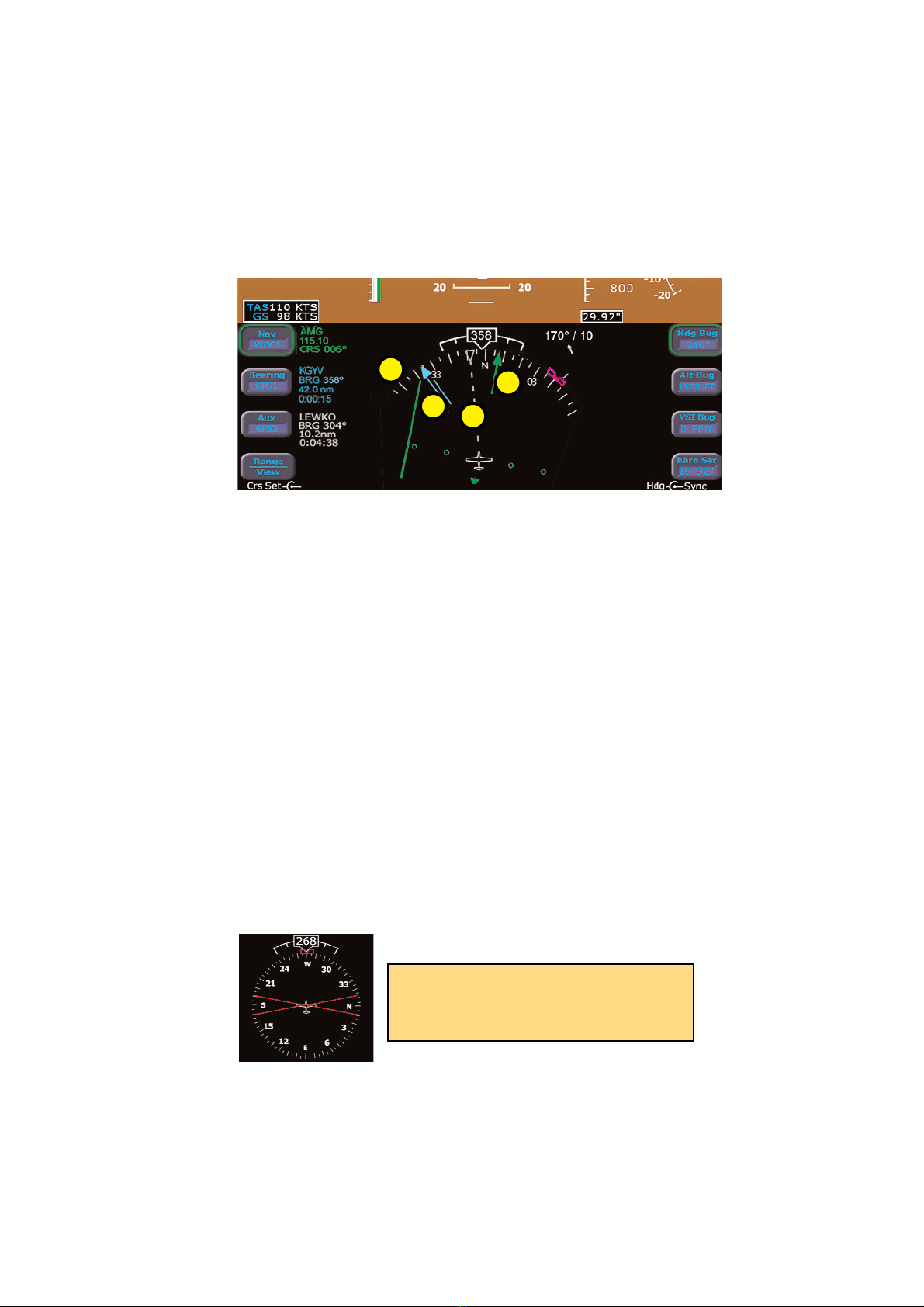
5. Projected Track Line- The dashed white projected track line
originates from the aircraft present position symbol and terminates
at the triangle along the outer edge of the compass rose. It dis-
plays a projection of the current ground track of the aircraft.
6. Course Deviation Indicator (CDI)- The green single-line CDI
displays deviation from the set or desired course.
7. Bearing Pointer- The blue dual-line bearing pointer is associated
with the Bearing source and displays the current bearing to the
Bearing waypoint (GPS1 or GPS2) or bearing to the station (VLOC1
or VLOC2). A bearing pointer will not be displayed if the VLOC
source is tuned to an ILS or LOC station. NOTE: This feature
requires that at least one GPS/VHF navigator be installed.
8. Compass Rose- In both 360 degree full view and 120 arc view,
the minor graduation marks represent 5 degrees, major
graduation marks represent 10 degrees, with every 30 degrees
labeled. The outer edge of the compass rose is marked with refer-
ence marks every 45 degrees.
EHSI Arc View
HSI Symbology System Overview
5
8
7
6
Until a flight plan is activated in GPS/Nav
1, the HSI will show a red X in place of
the CDI.
Indice
Altri manuali Avidyne Monitor