
avolta PC40-AMK Manuale utente

PORTABLE AIR-CONDITIONER
USER MANUAL
PC40-AMK

1
VERY IMPORTANT
CAUTION
1. " PLEASE MAKE SURE THE PRODUCT
VENTILATES ALLTHE TIME "! Please make sure
the inlet and outlet ventilation is not blocked at all
times.
2. Operate this unit on a horizontal surface to avoid
water leakage.
3. Do not operate this unit in an explosive or
corrosive atmosphere.
4. Operate this unit in an ambient of 35 degree
centigrade or less.
5. The heating function of the unit should be operated
in an indoor ambient temperature between 7℃and
23℃
6. Clean air filter periodically to enjoy the most efficient
cooling.
7. When the unit is shut off, please wait at least 3.5
minutes before restarting this is to prevent the
compressor from being damaged.
8. This unit needs at least 7Amps of electricity to
have its compressor operational. To avoid the
household electricity block out, please do not use
any extension cord for this unit.
Please read this instruction guide before install and using
your portable air conditioner unit.
This instruction manual is the universal-purpose version
for the units that you purchase, it might be slightly
different from the ones described in the manual, but it does
not affect your proper operations and usage.

2
9. This unit is for indoor cooling, heating and
dehumidifying.
10. When turning on the unit, the fan will operate
but the compressor will start up after the cooling
alarm flashes for three minutes
● In heating function, the heating alarm will
flash for 3.5 minutes before the compressor
and fan start up.
11. When the supply cord is damaged, it must be
replaced by the manufacturer, its service agent
or similarly qualified persons in order to avoid
hazard.
12. In order to dispose the appliance safely, please
remove the batteries from the unit before scrapping
it.
13. This appliance can be used by children aged from 8
years and above and persons with reduced
physical,sensory or mental capabilities or lack of
experience and knowledge if they have been given
supervision or instruction concerning use of the
appliance in a safe way and understand the hazards
involved. Children shall not play with the appliance.
Cleaning and user maintenance shall not be made
by children without supervision.
14. The air-conditioner can be connected only to a
supply with system impedance no more than
0.219Ω.In case necessary, please consult your
supply authority for system impedance information.

3
ATTENTION
For effective heating and cooling functions, please
ensure that the following steps are undertaken:
1) Extend the exhaust hose to a length of not
more than 400 mm. The exhaust hose must
be kept parallel and must not be bent up or
down.
2) A distance of 500mm minimum must be kept
between the filter side of the unit and wall or
any other obstacles”.
3) When this appliance starts to defrost, the
word “DF” will be displayed on the LED
CONGRATULATIONS ON YOUR
SELECTION OF A QUALITY
PORTABLE AIR CONDITIONER
PORTABLE AIR CONDITIONER
This Air Conditioner has been designed and manufactured to the
highest standards of modern engineering.
Our product not only provides you a remote control to help user
operate all the functions easily and conveniently but also has below
benefits:
- Moves easily from room to room on easy glide castors
- Please follow the picture to install the window kit and attach
the exhaust hose before pluging the unit
.-Powerful refrigerated air system cools down the ambience

4
instantly whenever you want.
-Dehumidified and filtered air cycle improve breathing
environments effectively.
- Besides the remote control, your one touch electronic pad
also provides easy-identifying manual operation.
- 24 hour Programmable timer for cooling, heating and
dehumidifying functions.
- Unique sleep control function
- 220~240 Volt 50Hz operation
UNPACKING INSTRUCTIONS
1. Place the unit in the correct upright position before unpacking.
2. Cut the two packing straps.
3. Slide the carton in an upwards motion and it will release from the base.
4. Grip the carry handles located on either
sides of the unit and carefully lift until it slides
out of the foam base.
5. Remove the air outlet and take out the
exhaust hose as the picture.
6. Install the exhaust hose on the unit before
operating the unit.
CONTENTS
1 / Air conditioner unit
2 / Remote control
3 / Batteries
4 / Window Kit B

5
NAME OF THE PARTS
1. Control panel
2. Remote control receiver
3. Adjustable air vent
4. Joint tube
5. Exhaust hose
6. Upside drain hole
7. Cool air inlet
8. Cool air filter
9. Hot air inlet
10. Hot air filter
11. Downside drain hole

6
CONTROL PANEL & DESCRIPTION OF FUNCTION
1. POWER KEY
Press to turn unit "ON" or "OFF".
2. FUNCTION
Press this key to select cooling, heating, or dehumidifying.
3. TEMPERATURE REGULATION KEY (UP)
During cooling function:This key raises the preset temperature by 1℃each time it is
pressed and the maximum limit is 30℃.
During heating function:This key raises the preset temperature by 1℃each time it is
pressed and the maximum limit is 25℃.
4. TEMPERATURE REGULATION KEY (DOWN)
During cooling function:This key lowers the preset temperature by 1℃each time it is
pressed and the minimum limit is 17℃.
During heating function:This key lowers the preset temperature by 1℃each time and
the minimum limit is 15℃.

7
5. L.E.D. DISPLAY
The display indicates the current setting temperature or the timer setting. When the set
temperature or the timer is adjusted, the new setting is shown then the display returns the
current set temperature.
※The display is also used to show error codes should a fault occur, see ERROR
CODES.
6. SPEED
Press to select either LOW, MEDIUM, HIGH orAUTO fan speed.
If "AUTO" is selected (During cooling function),”HIGH” or "MEDIUM" or “LOW" will be
selected automatically according to the difference between setting temperature and
ambient temperature.
7. PROGRAMMABLE TIMER
Programmable timer ON/OFF key.
TIMER-ON: The timer-on is used to turn on the unit automatically after the set time is
over.
1. Press the "TIMER" key at stand-by status to set the time you desired.
2. Once the set hour has come to an end, the unit will turn on automatically.
3. Press the "POWER" key before time out, the setting time will be canceled and the
unit will turn on.
4. You can set the function and fan speed while setting the timer.
TIMER-OFF: The timer-off is used to turn off the unit automatically after the setting
time is over.
1. Press the "TIMER" key at operating status to set the time you desired.
2. Once the set hour has come to an end, the unit will turn off automatically.
Note: In heating function and dehumidifying function, this key is invalid because
the unit is defined to be high speed in heating mode and low speed in
dehumidifying mode.

8
3. Press the "POWER" key before the time out, the setting time will be canceled and
the unit will turn off.
8. SLEEP CONTROL FUNCTION
1. While in cooling mode, press the SLEEP key to set the temperature. It increases1 ℃
after an hour and at most increases 2 ℃after 2 hours.
2. While in heating mode, press the SLEEP key to set the temperature. It decreases
1 ℃after an hour and at most decreases 2 ℃after 2 hours.
3. Press the SLEEP key again can cancel the setting.
9. SWING
Press this key and the outlet will oscillating, and it will stop when this key
ispressed again.
10. ALARM
When the water tank is full,"E4" will be displayed on the display panel. To resume
operation, please remove the rubber cap of the drain hose to drain out the water firstly.
The E4 warning will disappear after draining, and then you can restart the unit by
pressing the POWER key.
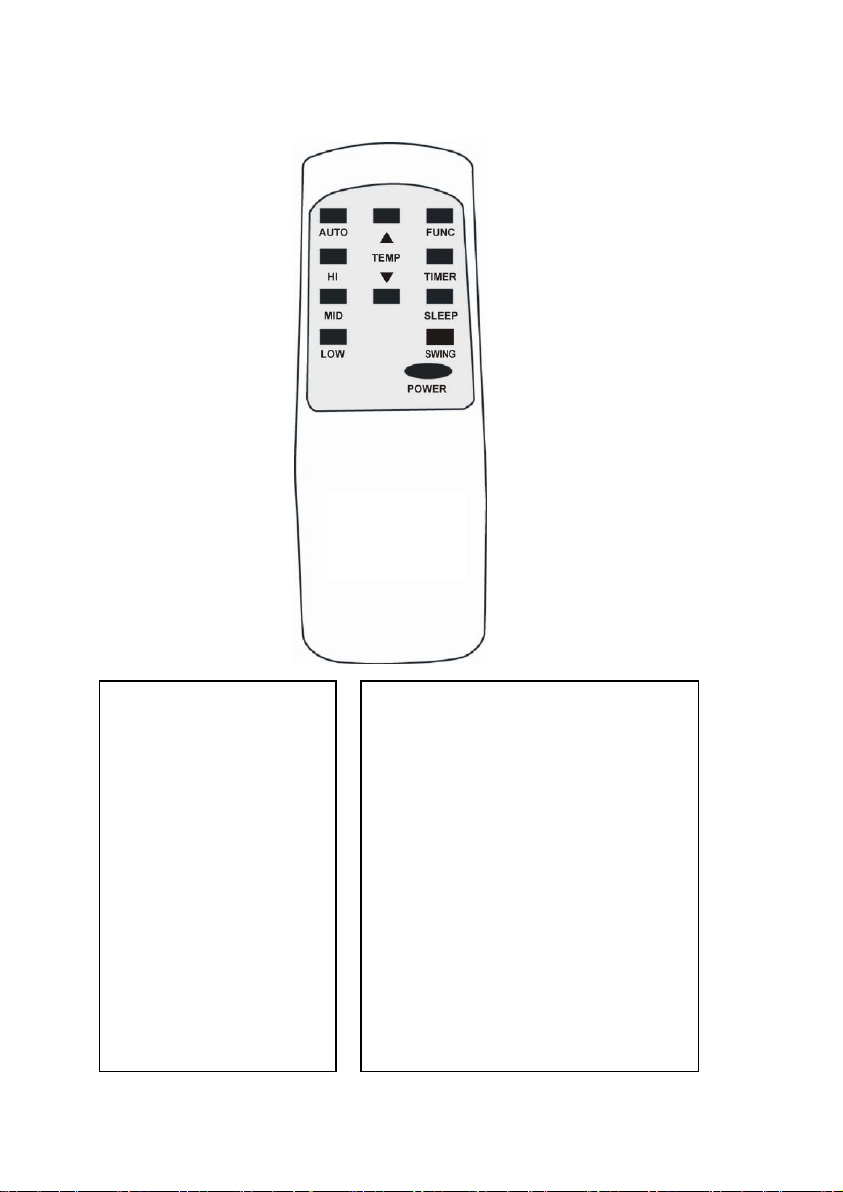
9
REMOTE CONTROL FUNCTION
1. POWER
2. FUNC
3. TIMER
4. AUTO
5. HI
6. MID
7. LOW
8. SLEEP
9. TEMP.
10.SWING
On/Off switch
Function “MODE” selector
Hourly programming
Automatic fan speed
High fan speed
Medium fan speed
Low fan speed
Night operation selector
Temperature selector
Swing
Indice
Altri manuali avolta Condizionatore d'aria


