
AWA MSDV3211-03 Manuale utente

USER MANUAL
Thank you for purchasing this LCD TV. Before connection and operation of this
product please read the manual carefully and completely.
Please keep this manual for future reference.
N294
MSDV3211-O3
32" (81cm) HD READY LCD Television

Contents
-1-
INTRODUCTION..............................................................................1
SAFETY ANDWARNINGS.............................................................2-4
STAND INSTALLATION GUIDE.........................................................5
WALL MOUNTING INSTALLATION GUIDLINES................................. 6
INSTALLATION..........................................................................7 -12
REMOTE CONTROL.................................................................13-14
OPERATION.............................................................................15-19
TROUBLE SHOOTING....................................................................20
TECHNICAL SPECIFICATION.........................................................21

-2-
SAFETY AND WARNINGS
IMPORTANT SAFETY INSTRUCTION
TO REDUCE THE RISK OF ELECTRIC SHOCK, DO
NOT REMOVE COVER (OR BACK).NO USER
SERVICEABLE PARTS INSIDE. REFER SERVICING
TO QUALIFIED SERVICE PERSONNEL.
RISK OF ELECTRIC SHOCK
DO NOT OPEN!
CAUTION
CAUTION
The symbol indicates that dangerous
voltages constituting a risk of electric
shock are present within this unit.
The symbol indicates that there are
important operating and maintenance
instructions in the literaturaccompanying
this unit.
Toreduce the riskof fire or electric shock,
do not exposethis apparatus torain or
moisture.
WARNING:
1) Read theseinstructions.
2) Keep theseinstructions.
3) Heed allwarnings.
4) Follow allinstructions.
5) Do notuse this apparatusnear water.
6) Clean onlywith dry cloth.
7) Do notblock any ventilation openings,
install in accordancewith the instructions.
8) Do notinstall near anyheat sources such
as radiations, heatregisters, stoves, or
other apparatus (includingamplifiers) that
produce heat.
9) Do notdefeat the safetypurpose of the
polarized plug. Ifthe provided plug does not
fit into youroutlet, consult anelectrician for
replacement of theobsolete outlet.
10) Protected thepower cord frombeing
walked on orpinched particularly at plugs,
convenience receptacles, andthe point
where they exitfrom the apparatus.
11) Only use attachments/accessories
specified by themanufacturer.
12) Unplug thisapparatus during lighting
storms or whenunused for long periods of
time.
13) Refer allservicing to qualified service
personnel. Servicing isrequired when the
apparatus has beendamaged in any way,
such as power-supplycord or plug is
damaged, liquid hasbeen spilled or objects
have fallen intothe apparatus, the
apparatus has beenexposed to rain or
moisture, does notoperate normally, or has
been dropped.
14) Mains plugis used as the disconnect
device, the disconnectdevice shall remain
readily operable.
15) The ventilation should notbe impeded
by covering theventilation openings with
items, such asnewspapers, table-cloth,
curtains, etc.
16) No nakedflame sources, such as
lighted candles, shouldbe placed on the
apparatus.
17) Attentionshould be drawn to the
environmental aspects ofbattery disposal.
18) The use of apparatusin moderate
climate.
19) The apparatus shall notbe exposed to
dripping or splashingand that no objects
filled with liquids,such as vases,shall be
placed on theapparatus.
This symbol indicates thatthis product
incorporates double insulation between
hazardous mains voltage anduser
accessible parts. When servicinguse only
identical replacement parts.
The batteries shallnot be exposed to
excessive heat suchas sunshine, fire or
the like.
WARNING:

-3-
High voltages are used in the operation of this
television receiver. Do not remove the cabinet
back from your set.
Refer servicing to qualified service personnel.
To prevent fire or electrical shock hazard, do not
expose the television receiver to rain or moisture.
Do not drop or push objects into the television
cabinet slots or openings. Never spill any kind
of liquid on the television receiver.
Do not block the ventilation holes in the back
cover.
Adequate ventilation is essential to prevent
failure of electrical components.
Do not trap the power supply cord under the
television receiver.
Never stand on, lean on, or suddenly push the
television or its stand. You should pay special
attention to children. Serious injury may result if it
falls.
Do not place your television on an unstable cart,
stand, shelf or table. Serious injury to an individual,
and damage to the television, may result if it falls.
When the televisionreceiver is notused for an
extended period of time, it is advisable to
disconnect theAC power cord from the AC outlet.
Avoid exposing the television receiver to direct sunlight
and other sources of heat. Do not stand the television
receiver directly on other products which give off heat,
e.g. video cassette players and audio amplifiers. Do not
place naked flame sources, such as lighted candles on
the television.
If the television is to be built into a compartment or similar
enclosure, the minimum distances must be maintained. Heat
build-up can reduce the service life of your television, and
can also be dangerous.
Dim:515*320mm(
SAFETY AND WARNINGS

-4-
CAUTION
Never tamper with any components inside the TV, or any other adjustment controls not mentioned in
this manual.
All LCD-TVs are high voltage instruments. When you clean up dust or water drops on the LCD
PANEL or CABINET, the power cord should be pulled out from the receptacle, then wipe the TV with
a dry soft cloth. During thunder and lighting, unplug the power cord and antenna cord to prevent
damage to your TV.All repairs to this TV should only be performed by qualified TV service
personnel.
Warning: Change or modifications to this unit not expressly by the part responsible for compliance
could void the user 's authority to operate the Equipment.
a. Do not expose to dripping or splashing.
b. No objects filled with liquids, such as vases, shall be placed on the apparatus.
c. The mains plug of this device is used as the disconnect device and shall remain readily accessible
and operable.
d. No naked flame sources, such as lighted candles, should be placed on the apparatus.
e. Allow suitable distances around the apparatus for sufficient ventilation. Ventilation should not be
impeded by covering ventilation openings with items such as newspapers, table cloths, curtains and
such like.
The display panel isa very sensitive andhigh technology product, givingyou finely detailed
pictures. Occasionally,a few non-active pixelsmay appear on thescreen as a fixedpoint of
black, blue, green orred. Please note thatthis does not affect the performance ofyour product.
These pixels shall notbe regarded as afailure.
About After- Image
The extended use offixed image programme materialcan cause a permanentafter - image on
the screen.
This background image isviewable on normal programsin the form ofa stationary fixed image.
This type of irreversiblescreen deterioration can belimited by:
A. Reduce the brightness/contrastsetting to a minimumviewing level.
B. Do not displaythe fixed image forextended periods of time.
C. Turn the power off when not in actualuse.
Important Information Regarding Useof Video Games, Computers, Captions or Other Fixed
Image Displays.
Do not allow astill picture to bedisplayed for an extendedperiod, as this cancause a
permanent after-image to remainon the screen.
Examples of still picturesinclude logos, video games,computer images, teletext andimages
displayed in 4:3 mode.
CAUTIONS:
The permanent after-image onthe screen resulting fromfixed image use isnot an operating
defect and as suchis not covered bythe warranty.
This product is notdesigned to display fixedimages for extended periodsof time.
SAFETY AND WARNINGS

-5-
This STANDINSTALLATION GUIDE isprovided to help you easily install the stand .Pleasecarefully follow
Step 1 throughStep 3.
STAND INSTALLATION GUIDE
Open the boxand find the parts
Open the boxand find the following parts.
- Stand x1pc
- Screws x4purchase
Packing
Stand
Packing
TV
Screws
Stand
Place the Standon the TV
1. Place theTV with thedisplay side down
on the tableor the desk (flat surface).
2. Place theStand on the TV as shownbelow.
Stand
Secure the Standto the TV
Secure the Standto the TVby using 4pcs Screws.
12
43

For wall mountingwith the optionalbracket, please readthe following instructionand the
bracket instruction. Makesure qualified servicepersonnel perform theoperation.
bears no responsibilityfor improper mountingthat results inaccident or injury.
DICK SMITH
Wall Mounting Holes Spacing and Location
Base Stand DisassembleIllustration
How to removethe stand fromthe TV
(The LCD Displayis very fragile,and must beprotected at alltimes when removing the
base stand. Besure that nohard or sharpobject, or anythingthat could scratchor
damage the LCDdisplay, comesinto contact with it. DO NOTexert pressure onthe front
of the unitat any timebecause the screencould crack.)
1.Use the screwdriverto remove 4screws from thescrew location.
2.Remove the basestand from theMain body.
4 Wall mount M4 Screws
-6-
INSTALLATION
400 mm
200 mm

FRONT PANEL
AC Power Cord.........................
1
Infrared Remote Control............
1
User s Manual ........................1
Battery(AAA)...........................2
ACCESSORIES
INSTALLATION
-7-
1: Remote control sensor.
2: Indicator LED: GREEN POWER ON.
RED STANDBY.
3: Key board.
123
456
7890
+
CH
_
+
_
VOL
30 30
3
1
2
INSTALLATION
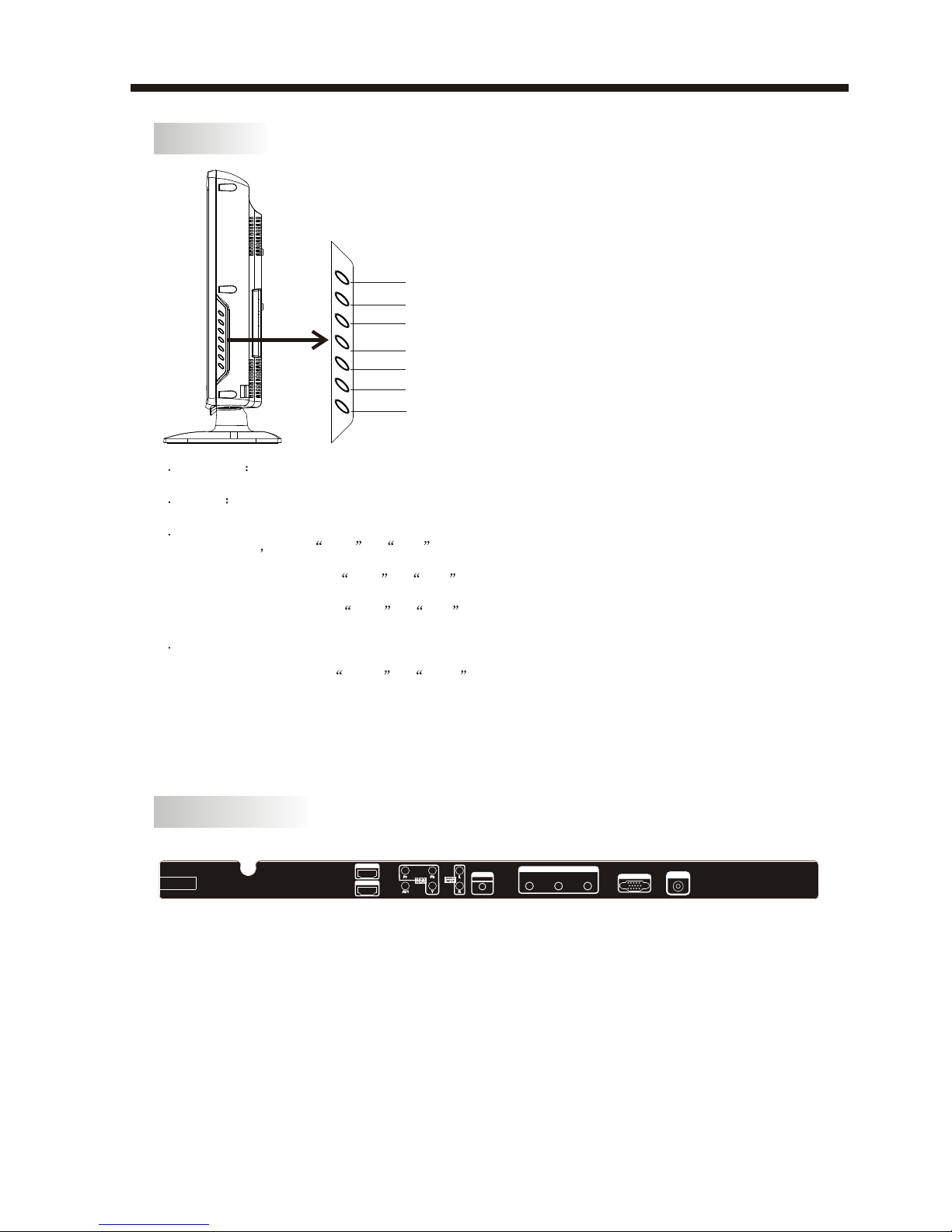
KEY BOARD
REAR PANEL
-8-
All the terminals are(from left to right):
AC POWER SOCKET, HDMI2 input, HDMI1 input, YPbPr input, AV1, Rear Audio input,
PC AUDIO input, AV output, VGA, ANTENNA SOCKET.
Note: 1.AV1 and YPbPr share the Rear Audio input channel.
2.When HDMI1 port get DVI signal, the audio signal receives from the PC Audio
channel.
1 SOURCE
Display the input source menu.
2 MENU
Display main MENU.
3 CH+/CH-
In TV mode press CH+ or CH- to change
the channel up and down.
In MENU mode, press CH+ or CH- to select
items .
In standby mode, press CH+ or CH- to turn
on the TV.
4 VOL+/VOL-
Adjust sound level.
In MENU mode, press VOL+ or VOL- to
adjust the item that you selected.
5. STANDBY
Press this button to turn the unit ON from
STANDBY mode.
Press it again to turn the set back to STANDBY.
SOURCE
MENU
CH+
CH-
VOL+
VOL-
STANDBY
VGA INPUT RF INPUT
PC
AUDIO INPUT
100-240V~ 50/60Hz
AC-INPUT HDMI1 INPUT
HDMI2 INPUT
AV LR
AV OUTPUT
Indice
Altri manuali AWA TV LCD

AWA
AWA MSDV2203-F3-D0 Manuale utente

AWA
AWA PDVT-118HD Manuale utente

AWA
AWA LC-32G76 Manuale utente

AWA
AWA TFTD94G Manuale utente

AWA
AWA MHDV3209-F4 Manuale utente

AWA
AWA MHDV2245-03-D0 Manuale utente

AWA
AWA MSDV2968-O5 Manuale utente

AWA
AWA JTM19T212-TD Manuale utente

AWA
AWA LTW-42D Manuale utente

AWA
AWA LE4603-O5 Manuale utente

AWA
AWA MSDV3203-F4 Manuale utente

AWA
AWA LC-47G58 Manuale utente

AWA
AWA TFTD66 Manuale utente

AWA
AWA MHDV4211-O3 Manuale utente

AWA
AWA JTM32K212A-TUser's Manu Manuale utente

AWA
AWA MSDV1911-O3-D0 Manuale utente

AWA
AWA MSDV1903-F3 Manuale utente

AWA
AWA CL-40KDF10S Manuale utente

AWA
AWA LT20D Manuale utente

AWA
AWA MHDV3703-F4 Manuale utente


