
Axis AX1522 Manuale utente


,PSRUWDQW6DIHW\,QVWUXFWLRQV
8VHDQG0DLQWHQDQFH
2YHUYLHZ)URQW9LHZ$FFHVVRULHV
2YHUYLHZ%DFN9LHZ
Remote control ..................................................................................................................................................
Basic Operation .................................................................................................................................................
1. PICTURE Menu ............................................................................................................................................
2. SOUND Menu ...............................................................................................................................................
4. FEATURE Menu ............................................................................................................................................
5. SETUP Menu ...................................................................................................................................................
3. CHANNEL Menu .............................................................................................................................................
Contents
OSD Menu
Recording Operation
Recording Operation .........................................................................................................................................
Multimedia Operation
Multimedia Operation ........................................................................................................................................ 1
DVD operation ...................................................................................................................................................
DVD operation
Simple Troubleshooting ...................................................................................................................................

Care is required when using the unit in tropical climates.
Do not Rperate the appliance in temperatures over 40°CProtect
the power cord from being walked on, pulled or pinched.
Use only with a strong bracket or stand supplied.
domestic
Important Safety Instructions

Important Safety Instructions
listen through headphones at high volumes. Excessive soundSUHVVXUHIURPHDUSKRQHV
out of direct sunlight.
it gently with
should be placed
buttons buttons or

Use and Maintenance

Overview
Front View
4
Cabinet
User’s Guide Remote Control Batteries (2xAAA) Power Adaptor
(AX -1522 / AX-1524 / AX -1519)
Power Adaptor
(AX -1532) HDMI cableCar adaptor
AX1519/AX1522/AX1524
AX1519/AX1522/AX1524
AX1532
AX1532
The screws in the package are for securing the TV stand only. If you are
on bracket support and wall support.
INPUT/SOURCE :
MENU: Display/exit the OSD menu.
CH+/-: Scan through channels.
VOL+/-: Adjust the volume.
PLAY: Play / Pause the disc
EJECT: Eject the disc.
Display input source menu.
: Turn on/standby the TV set.
Please insert a 12cm disc with the label
to the back.
SOURCE
MENU
CH+
CH-
VOL+
VOL-
EJECT
PLAY
SOURCE MENU CH- CH+ VOL- VOL+ PLAY EJECT

Overview
Back View
VIDEO L-IN
HDMI
POWER
R-IN
PC AUDIO IN
POWER
Headphone
VIDEO L-IN R-IN
PC AUDIO IN
HDMI1 HDMI2
HDMI3
Headphone
POWER: Connect to the power.
HEADPHONE: Connect it to your headphone or other audio equipment.
Video:Connect it to video output terminal of DVD.
L/R in: Connect them to audio output terminals of DVD, shared with YPbPr.
PC AUDIO IN:Connect it to the audio output terminal of PC.
VGA: For PC display. Connect it to the D-Sub 15 pins analog output connector of the PC.
HDMI1/2/3:&RQQHFWWRRWKHUHTXLSPHQW
COAX:Digital output to AV receiver.
RF: Connect antenna or cable 75 Ohm coaxial to receive TV signal.
USB:USB jack for Recording and Media.
YPbPr: Connect them to the YPbPr video output terminal of DVD.
USB
COAX
COAX YPbPr
USB YPbPr
Model: AX15$;$;
POWER: Connect to the power.
HEADPHONE: Connect it to your headphone or other audio equipment.
Video:Connect it to video output terminal of DVD.
L/R in: Connect them to audio output terminals of DVD, shared with YPbPr.
PC AUDIO IN:Connect it to the audio output terminal of PC.
VGA: For PC display. Connect it to the D-Sub 15 pins analog output connector of the PC.
HDMI:Connect WRother equipment.
COAX:Digital output to AV receiver.
RF: Connect antenna or cable 75 Ohm coaxial to receive TV signal.
USB:USB jack for Recording and Media.
YPbPr: Connect them to the YPbPr video output terminal of DVD.
Model: AX132


button to select the function item, press / OK button to enter
Basic Operation
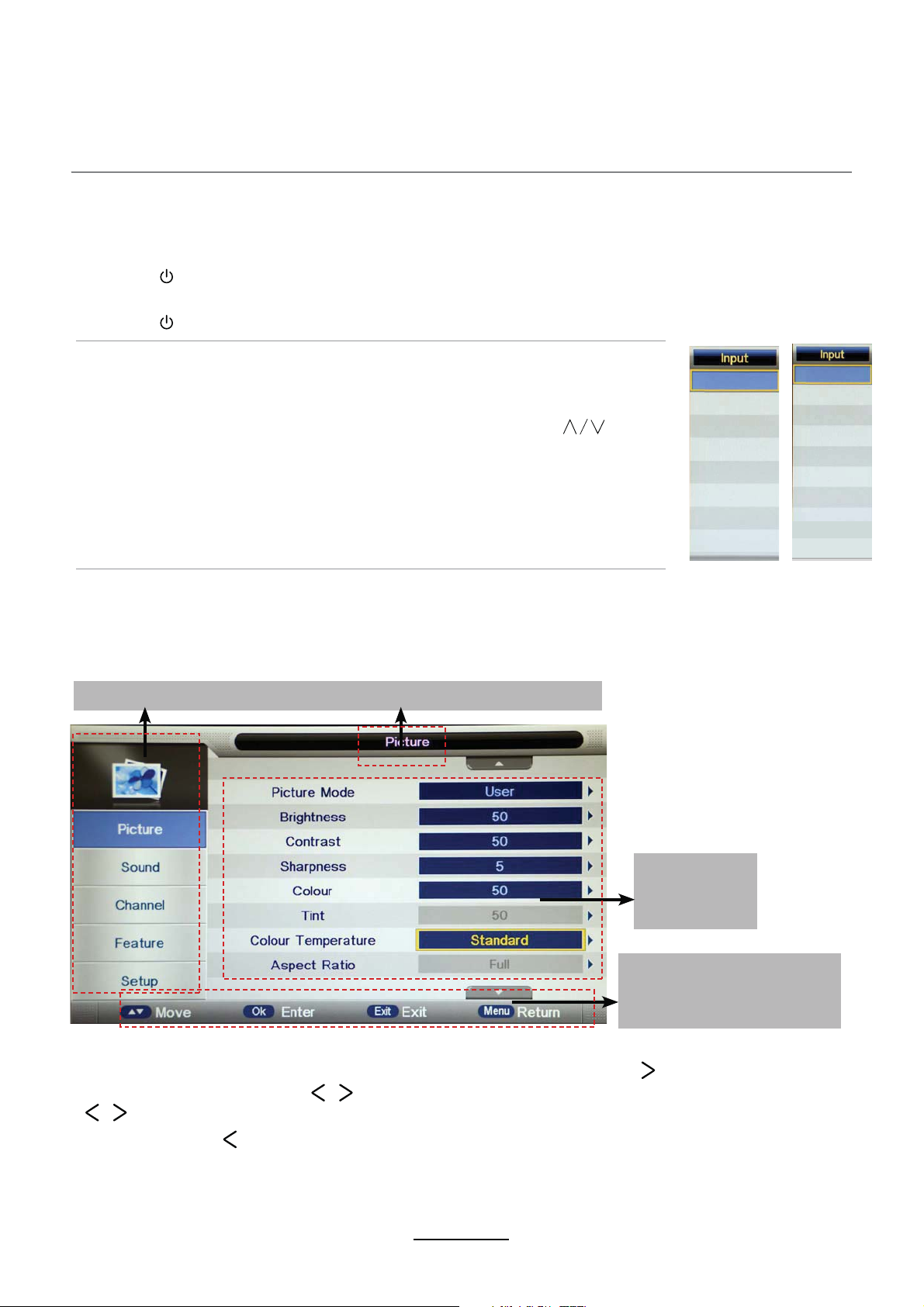
Main menu: Picture Sound Channel Feature Setup
Submenu
(Picture menu
for example)
Basic OSD Menu operation
Press MENU button to display the On Screen Display menu as below:
Use /
∨
button to select the main menu, and press / OK button to enter the submenu.
In the submenu, use
the setup menu, then press / button to adjust, or press / to select and press OK /
/ button to confirm.
∧
/
∨
∧∨
∧∨
* (Press MENU / button to return to the upper menu.)
* (Press EXIT button to exit the menu display.)
Note 1: The relevant items can only be activated after you input the matching signal.
Note 2: Please operate the OSD menu according to the message displayed .
Hint---Operate the OSD
menu according to the
message shown.
8
Power on/off
1. Connect to the power supply with an adaptor.
2. -To turn on the TV
Press button on the TV or remote control.
-To turn off the TV
Press button on the TV or remote control.
Input Source select
Press SOURCE button on the TV set or remote control to display the
input source menu, and use CH+/- button on the TV set or button
on remote control to select the input source.
Press OK button on the remote control to enter.
Note: Before you select the input source, make sure the
connections and media are prepared.
DTV
AV
YPBPR
ATV
PC
HDMI
Media
DVD
DTV
AV
YPBPR
HDMI1
HDMI2
HDMI3
ATV
Media
PC
DVD
AX1519 / AX -1522 /
AX1524 AX1532
Questo manuale è adatto per i seguenti modelli
3
Indice
Altri manuali Axis Combinazione TV DVD


