
B&B Electronics VLINX VFG1000 Manuale utente
1
CONVERTS NUMEROUS PROTOCOLS SIMULTANEOUSLY
EXTENSIVE BUILT-IN DRIVER LIST ALLOWS EASY DATA
MAPPING TO PLCs, PCs, AND SCADA SYSTEMS
10 BASE-T/100BASE-TX ETHERNET PORT SUPPORTS FOUR
SIMULTANEOUS PROTOCOLS
INDEPENDENT SERIAL PORTS PROVIDE VIRTUALLY
UNLIMITED INTEGRATION METHODS
SUPPORTS UP TO NINE PROTOCOLS SIMULTANEOUSLY(with
expansion card)
GENERAL DESCRIPTION
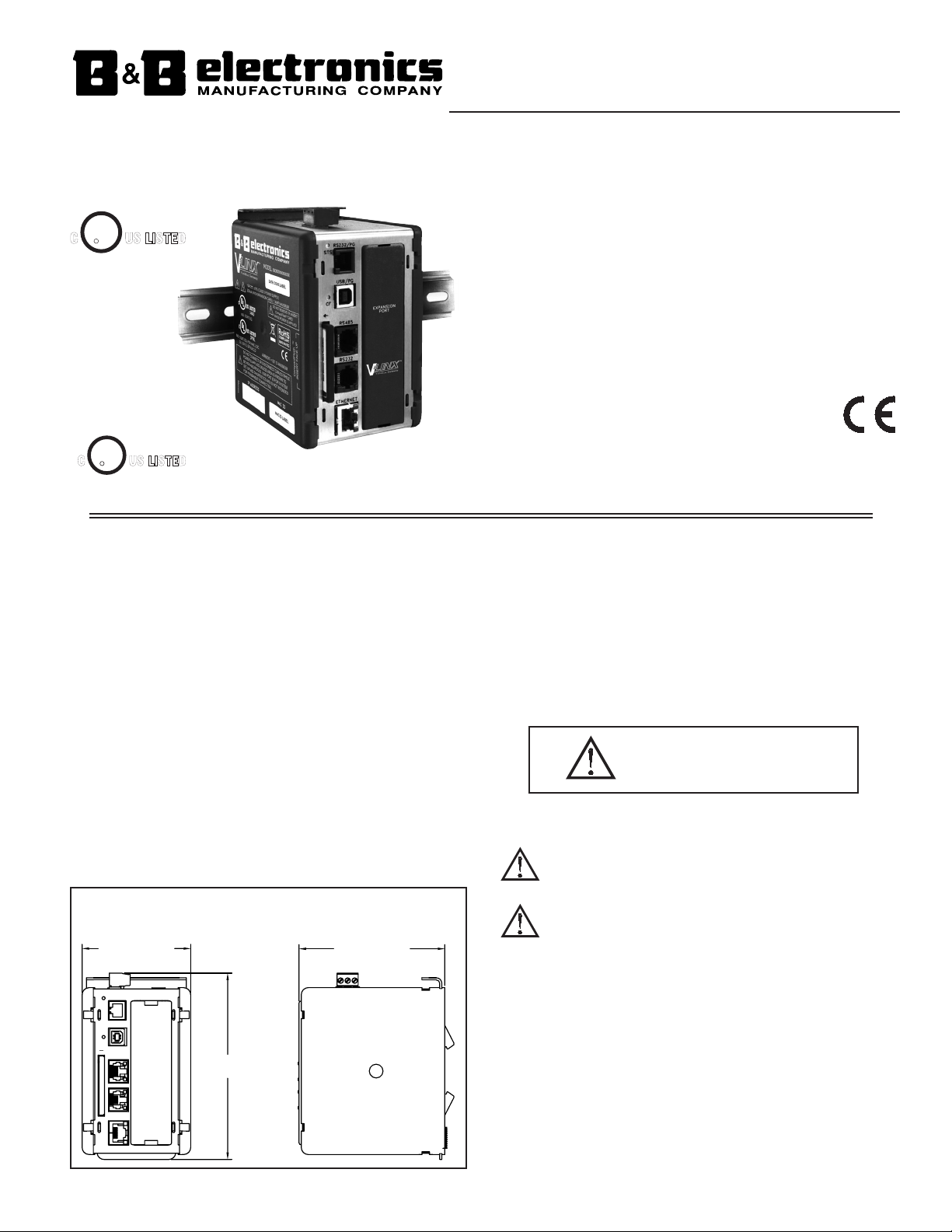
The Vlinx Fieldbus Gateway was designed to act as a nexus for industrial data
collection and management. With three built in serial ports and a 10 Base-T/100
Base-TX Ethernet port, the unit performs protocol conversion, allowing
disparate devices to communicate seamlessly with one another. The Ethernet
port supports up to four protocols simultaneously so even Ethernet to Ethernet
conversion may be performed.
The CompactFlash card allows new configuration files to be loaded into the
Vlinx Fieldbus Gateway. The USB port may be used for blazing fast file
downloads, or to mount the Vlinx Fieldbus Gateway’s CompactFlash card as an
external drive to your PC. The Vlinx Fieldbus Gateway’s DIN rail mounting
saves time and panel space and snaps easily onto standard top hat (T) profile
DIN rail.
SOFTWARE
The Vlinx Fieldbus Gateway is programmed with Fieldbus Gateway Manager
for Windows® 2000 or later platforms. The software is an easy to use graphical
interface which can be purchased as part of a kit that includes a manual and
cables, or downloaded free of charge.
SAFETY SUMMARY
All safety related regulations, local codes and instructions that appear in the
manual or on equipment must be observed to ensure personal safety and to
prevent damage to either the instrument or equipment connected to it. If
equipment is used in a manner not specified by the manufacturer, the protection
provided by the equipment may be impaired.
Do not use the controller to directly command motors, valves, or other
actuators not equipped with safeguards. To do so can be potentially harmful to
persons or equipment in the event of a fault to the controller. An independent
and redundant temperature limit indicator with alarm outputs is strongly
recommended.
CompactFlash is a registered trademark of CompactFlash Association.
VLINX FIELDBUS GATEWAY
CAUTION: Risk of Danger.
Read complete instructions prior to
installation and operation of the unit.
5.30 (134.7)
RS232
ETHERNET
CF
STS
USB/PG
RS485
RS232/PG
3.09 (78.5) 4.15 (105.4)
DIMENSIONS In inches (mm)
FOR USE IN HAZARDOUS LOCATIONS:
Class I, Division 2, Groups A, B, C, and D
CUS LISTED
UL
R
3PWL
PROGRAMMABLE
CONTROLLERS
CUS LISTED
UL
R
IND. CONT. EQ.
34AD
WARNING - EXPLOSION HAZARD - SUBSTITUTION OF
COMPONENTS MAY IMPAIR SUITABILITY FOR CLASS I,
DIVISION 2
THIS EQUIPMENT IS SUITABLE FOR USE IN CLASS I,
DIVISION 2, GROUPS A, B, C, D, OR NON-HAZARDOUS
LOCATIONS ONLY
Phone: (815) 433-5100
Fax: (815) 4334-5104
www.bb-elec.com
VFG1000-0310-qsg
LP0832X
Effective 01/10
2
SPECIFICATIONS
1. POWER: 24 VDC ± 10%
200 mA min., without expansion card
1 Amp maximum with expansion card fitted
Must use NEC Class 2 or Limited Power Source (LPS) rated power supply.
2. COMMUNICATIONS:
USB/PG Port: Adheres to USB specification 1.1. Device only using Type B
connection.
Serial Ports: Format and Baud Rates for each port are individually software
programmable up to 115,200 baud.
RS232/PG Port: RS232 port via RJ12
COMMS Ports: RS422/485 port via RJ45, and RS232 port via RJ12
DH485 TXEN: Transmit enable; open collector, VOH = 15 VDC,
VOL = 0.5 V @ 25 mA max.
Ethernet Port: 10 BASE-T / 100 BASE-TX
RJ45 jack is wired as a NIC (Network Interface Card).
3. LEDs:
STS – Status LED indicates condition of Fieldbus Gateway.
TX/RX – Transmit/Receive LEDs show serial activity.
Ethernet – Link and activity LEDs.
CF – CompactFlash LED indicates card status and read/write activity
4. MEMORY:
On-board User Memory: 4 Mbytes of non-volatile Flash memory.
On-board SDRAM: 2 Mbytes
Memory Card: CompactFlash Type II slot for Type I and Type II cards.
Used for optional database storage only
5. REAL-TIME CLOCK: Typical accuracy is less than one minute per month drift.
Battery: Lithium Coin Cell. Typical lifetime of 10 years at 25 ºC.
A “Battery Low” system variable is available so that the programmer can
choose specific action(s) to occur when the battery voltage drops below
its nominal voltage.
This unit is NOT field serviceable. All work must be done by a qualified
technician.
6. ENVIRONMENTAL CONDITIONS:
Operating Temperature Range: 0 to 50 °C
Storage Temperature Range: -30 to +70 °C
Operating and Storage Humidity: 80% max relative humidity,
non-condensing, from 0 to 50 °C
Vibration According to IEC 68-2-6: Operational 5 to 150 Hz, in X, Y, Z
direction for 1.5 hours, 2 g’s.
Shock According to IEC 68-2-27: Operational 30 g's, 11 msec in 3 directions.
Altitude: Up to 2000 meters
7. CONSTRUCTION: Case body is high impact plastic and stainless steel.
For indoor use only. Installation Category II, Pollution Degree 2.
8. POWER CONNECTION: Removable wire clamp screw terminal block.
Wire Gage Capacity: 24 AWG to 12 AWG
Torque: 4.45 to 5.34 in/lb (0.5 to 0.6 N-m)
9. MOUNTING: Snaps onto standard DIN style top hat (T) profile mounting
rails according to EN50022 -35 x 7.5 and -35 x 15.
10. CERTIFICATIONS AND COMPLIANCES:
SAFETY
UL Listed, File #E222870, UL508, CSA 22.2 No. 14-M05 and File #E245458,
ANSI/ISA 12.12.01-2007, CSA 22.2 No. 213-M1987
LISTED by Und. Lab. Inc. to U.S. and Canadian safety standards
IEC 61010-1, EN 61010-1: Safety requirements for electrical equipment for
measurement, control, and laboratory use, Part 1.
ELECTROMAGNETIC COMPATIBILITY
Emissions and Immunity to EN 61326: 2006: Electrical Equipment for
Measurement, Control and Laboratory use.
Notes:
1. Criterion A: Normal operation within specified limits.
2. Criterion B: Temporary loss of performance from which the unit self-
recovers.
11. WEIGHT: 15.1 oz (428 g)
HARDWARE
INSTALLATION
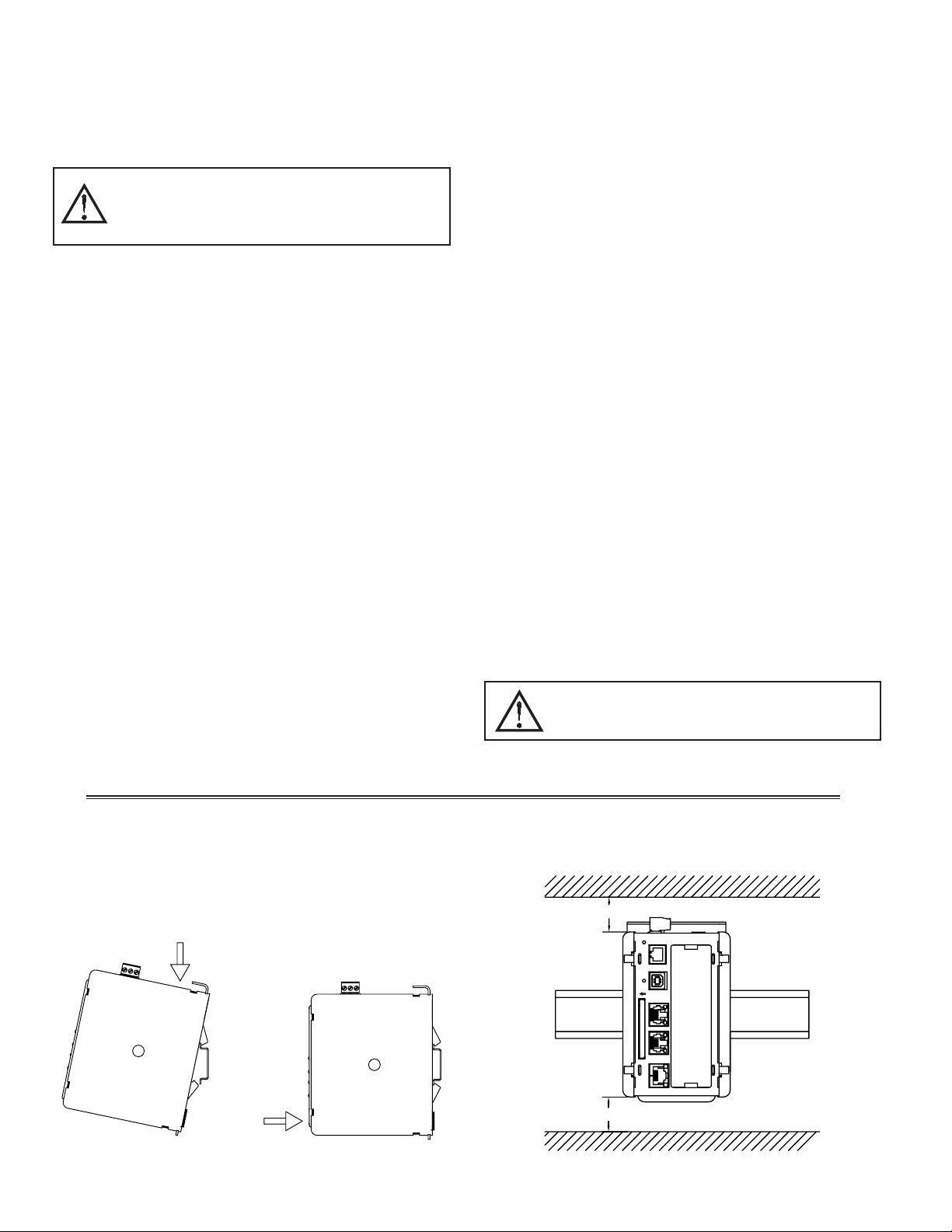
DIN rail should be mounted horizontally so that the unit’s ventilation holes
are vertical in relation to cabinet orientation. A minimum clearance of 1 inch
(25.4 mm) should be maintained above and below the unit in order to ensure
proper thermal regulation.
Figure 1 - Attach Fieldbus Gateway To DIN Rail
2
1
Immunity to Industrial Locations:
Electrostatic discharge EN 61000-4-2 Criterion B
4 kV contact discharge
8 kV air discharge
Electromagnetic RF fields EN 61000-4-3 Criterion A
10 V/m
Fast transients (burst) EN 61000-4-4 Criterion A
power 2 kV
I/O signal 1 kV
Surge EN 61000-4-5 Criterion B
signal
power
1kV
1kV L-L,2 kV L-G
RF conducted interference EN 61000-4-6 Criterion A
3 V/rms
Emissions:
Emissions EN 55011 Class A
ETHERNET
RS485
RS232
USB/PG
CF
RS232/PG
STS
1.00"
1.00"
min. clearance
min. clearance
TOP
BOTTOM
WARNING - DO NOT CONNECT OR DISCONNECT CABLES
WHILE POWER IS APPLIED UNLESS AREA IS KNOWN TO BE
NON-HAZARDOUS. USB PORT IS FOR SYSTEM SET-UP AND
DIAGNOSTICS AND IS NOT INTENDED FOR PERMANENT
CONNECTION.
WARNING - EXPLOSION HAZARD - DO NOT DISCONNECT
EQUIPMENT UNLESS POWER HAS BEEN SWITCHED OFF OR
AREA IS KNOWN TO BE NON-HAZARDOUS.
3
EMC INSTALLATION GUIDELINES
Although B&B Electronics Products are designed with a high degree of
immunity to Electromagnetic Interference (EMI), proper installation and wiring
methods must be followed to ensure compatibility in each application. The type
of the electrical noise, source or coupling method into a unit may be different
for various installations. Cable length, routing, and shield termination are very
important and can mean the difference between a successful or troublesome
installation. Listed are some EMI guidelines for a successful installation in an
industrial environment.
1. To reduce the chance of noise spikes entering the unit via the power lines,
connections should be made to a clean source. Connecting to circuits that also
power loads such as contactors, relays, motors, solenoids etc. should be avoided.
2. The unit should be mounted in a metal enclosure, which is properly connected
to protective earth.
3. Use shielded (screened) cables for all Signal and Control inputs. The shield
(screen) pigtail connection should be made as short as possible. The
connection point for the shield depends somewhat upon the application.
Listed below are the recommended methods of connecting the shield, in order
of their effectiveness.
a. Connect the shield to earth ground (protective earth) at one end where the
unit is mounted.
b. Connect the shield to earth ground at both ends of the cable, usually when
the noise source frequency is over 1 MHz.
c. Connect the shield to common of the Fieldbus Gateway and leave the other
end of the shield unconnected and insulated from earth ground.
4. Never run Signal or Control cables in the same conduit or raceway with AC
power lines, conductors feeding motors, solenoids, SCR controls, and
heaters, etc. The cables should be run through metal conduit that is properly
grounded. This is especially useful in applications where cable runs are long
and portable two-way radios are used in close proximity or if the installation
is near a commercial radio transmitter. Also, Signal or Control cables within
an enclosure should be routed as far away as possible from contactors, control
relays, transformers, and other noisy components.
5. Long cable runs are more susceptible to EMI pickup than short cable runs.
Therefore, keep cable runs as short as possible.
6. In extremely high EMI environments, the use of external EMI suppression
devices is effective. The following EMI suppression devices (or equivalent)
are recommended:
Ferrite Suppression Cores for signal and control cables:
Fair-Rite part number 0443167251
TDK part number ZCAT3035-1330A
Steward part number 28B2029-0A0
Line Filters for input power cables:
Schaffner part number FN610-1/07
Schaffner part number FN670-1.8/07
Corcom part number 1 VR3
COMPACTFLASH® CARD
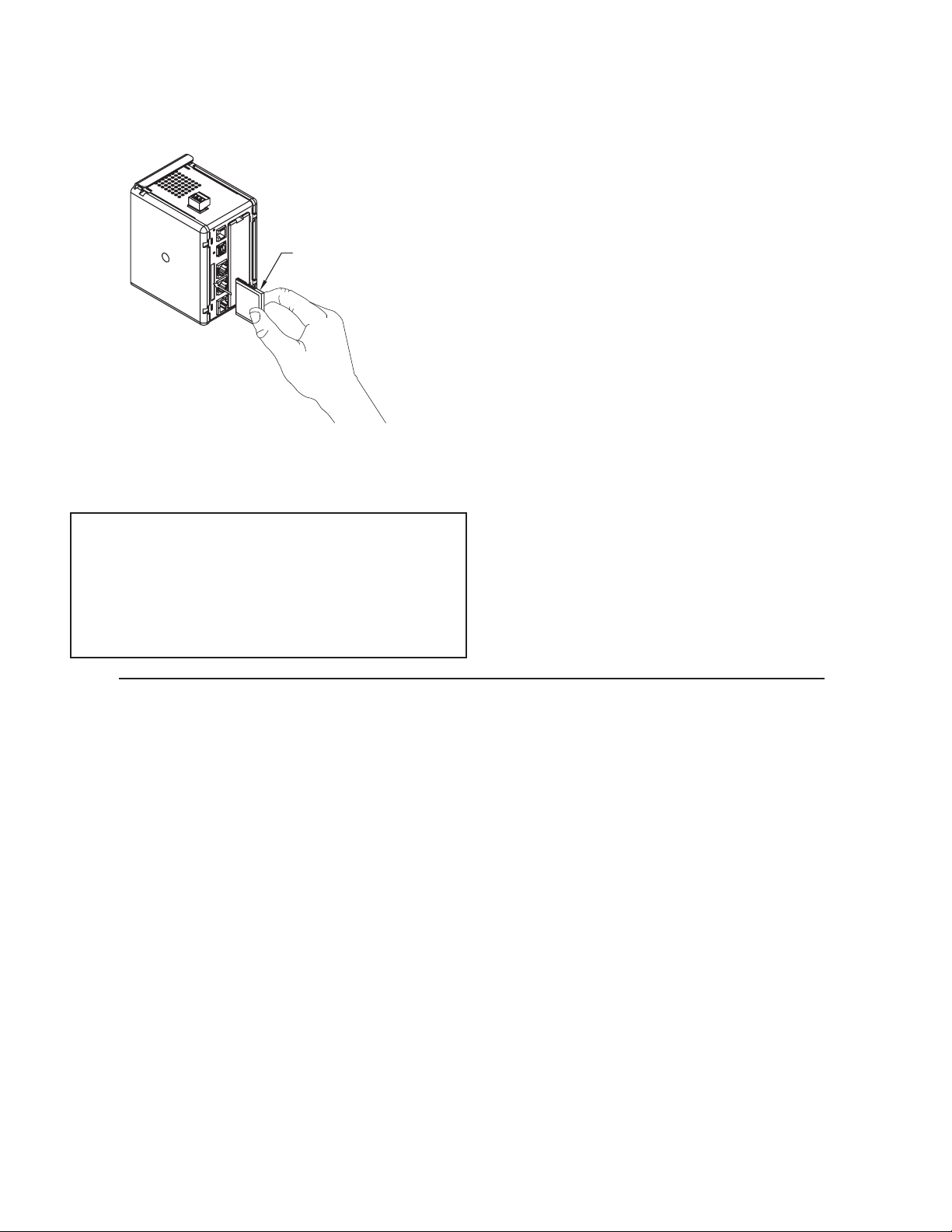
CompactFlash socket is a Type II socket that can accept either Type I or II
cards. Use cards with a minimum of 4 Mbytes and a maximum of 2 Gbytes with
the Fieldbus Gateway’s CompactFlash socket. Cards are available at most
computer and office supply retailers. The CompactFlash can be used for
optional database storage only.
Information stored on a CompactFlash card can be read by a card reader
attached to a PC. This information is stored in IBM (Windows®) PC compatible
FAT16 file format.
CompactFlash
(Top Side)
CompactFlash-
Insert Top Side
Towards Left
Note: Do not remove or insert
the CompactFlash card while
power is applied.
POWER SUPPLY REQUIREMENTS
It is very important that the power supply is mounted correctly if the unit is
to operate reliably. Please take care to observe the following points:
– The power supply must be mounted close to the unit, with usually not more
than 6 feet (1.8 m) of cable between the supply and the Fieldbus Gateway.
Ideally, the shortest length possible should be used.
– The wire used to connect the Fieldbus Gateway’s power supply should be
at least 22-gage wire. If a longer cable run is used, a heavier gage wire
should be used. The routing of the cable should be kept away from large
contactors, inverters, and other devices which may generate significant
electrical noise.
– A power supply with an NEC Class 2 or Limited Power Source (LPS) and
SELV rating is to be used. This type of power supply provides isolation to
accessible circuits from hazardous voltage levels generated by a mains
power supply due to single faults. SELV is an acronym for “safety extra-
low voltage.” Safety extra-low voltage circuits shall exhibit voltages safe
to touch both under normal operating conditions and after a single fault,
such as a breakdown of a layer of basic insulation or after the failure of a
single component has occurred.
NOTE
For reliable operation of this and other B&B Electronics products, one of
the following brands of CompactFlash card must be used...
SimpleTech SMART® Modular
SanDisk® Silicon Systems
Not all of the above manufacturers offer CompactFlash cards recognized
to UL standards, which may be required for your application.
4
COMMUNICATION PORTS
COMMON
+24 VDC +24
N/C
COMM
WIRING
POWER CONNECTION
PROGRAMMING PORTS
RS232
RTS
COMM
Tx
COMM
CTS
Rx
YELLOW LED
GREEN/AMBER LED
ETHERNET
RS232
CF
RS485
USB/PG
RS232/PG
STS OR
Ethernet (Crossover)
OR
Tx
RS232
RTS
COMM
COMM
CTS
Rx
RS232
RS485
USB/PG
RS232/PG
ETHERNET
CF
STS
CHASSIS GND
OR
REM
SLC 5/03 CPU
RUN
BATT
FLT
RUN
RS232
DH485
FORCE
PROG
VDC
PWR OUT +24
PWR OUT COM
VAC NEUT
120/240 VAC
USER
POWER
POWER
RS232/PG
USB/PG
RS232/PG
ETHERNET
WARNING - EXPLOSION HAZARD - DO NOT DISCONNECT
WHILE CIRCUIT IS ALIVE UNLESS AREA IS KNOW TO BE
NON-HAZARDOUS.
INPUT AND OUTPUT (I/O) WIRING MUST BE IN
ACCORDANCE WITH CLASS I, DIV. 2 WIRING METHODS
AND IN ACCORDANCE WITH THE AUTHORITY HAVING
JURISDICTION.
ETHERNET
RS232
RS485
USB/PG
RS232/PG
CF
STS
Standard Ethernet cable
CTS
Tx
COMM
Rx
RTS
COMM
RS232
TxB
RxB
RxA
TxA
TxB
COMM
TxEN
TxA
RS485
GREEN/AMBER LED
YELLOW LED
ETHERNET
RS232
RS485
USB/PG
RS232/PG
CF
STS
REM
SLC 5/03 CPU
RUN
RUN
FLT
BATT
FORCE
PROG
DH485
RS232
120/240 VAC
VAC NEUT
CHASSIS GND
VDC
PWR OUT COM
PWR OUT +24
USER
POWER
POWER
RS232
ETHERNET
RS485
USB/PG
RS232/PG
CF
STS
REM
SLC 5/03 CPU
RUN
RUN
FLT
BATT
FORCE
PROG
DH485
RS232
120/240 VAC
VAC NEUT
CHASSIS GND
VDC
PWR OUT COM
PWR OUT +24
USER
POWER
POWER
* Use appropriate communications cable. See Ordering
Information for descriptions of the available cables.
WARNING: Do NOT use a standard DH-485
cable to connect this port to Allen Bradley
equipment.
PORT 3 - ETHERNET CONNECTION
RS232
RS485
5
EXPANSION
24VDC ±10%
USB/PG
TxA (PIN 8)
GREEN/
YELLOW
LED
LED
AMBER
(NIC)
ETHERNET
RS232
PORT
COMMS
COMMS
PORT
COMM
CTS (PIN 1)
COMM
Rx
Tx
RTS (PIN 6) TxB
COMM
RxA
RxB
TxA
TxB (PIN 1)
TxEN
RS485
ETHERNET
RS232
RS485
CF
RS232/PG PORT
RTS (PIN 6)
CTS (PIN 1)
USB/PG
RS232
COMM
Tx
COMM
Rx
RS232/PG
STS
POWER
CONNECTOR
N/C
3
2
COMMON
1
PORT
FIELDBUS GATEWAY PORT PIN OUTS
TROUBLESHOOTING
If for any reason you have trouble operating,
connecting, or simply have questions concerning your
new Fieldbus Gateway, contact B&B Electronic’s
technical support. For contact information, refer to the
back page of this bulletin for phone and fax numbers.
Web Site: http://www.bb-elec.com
6
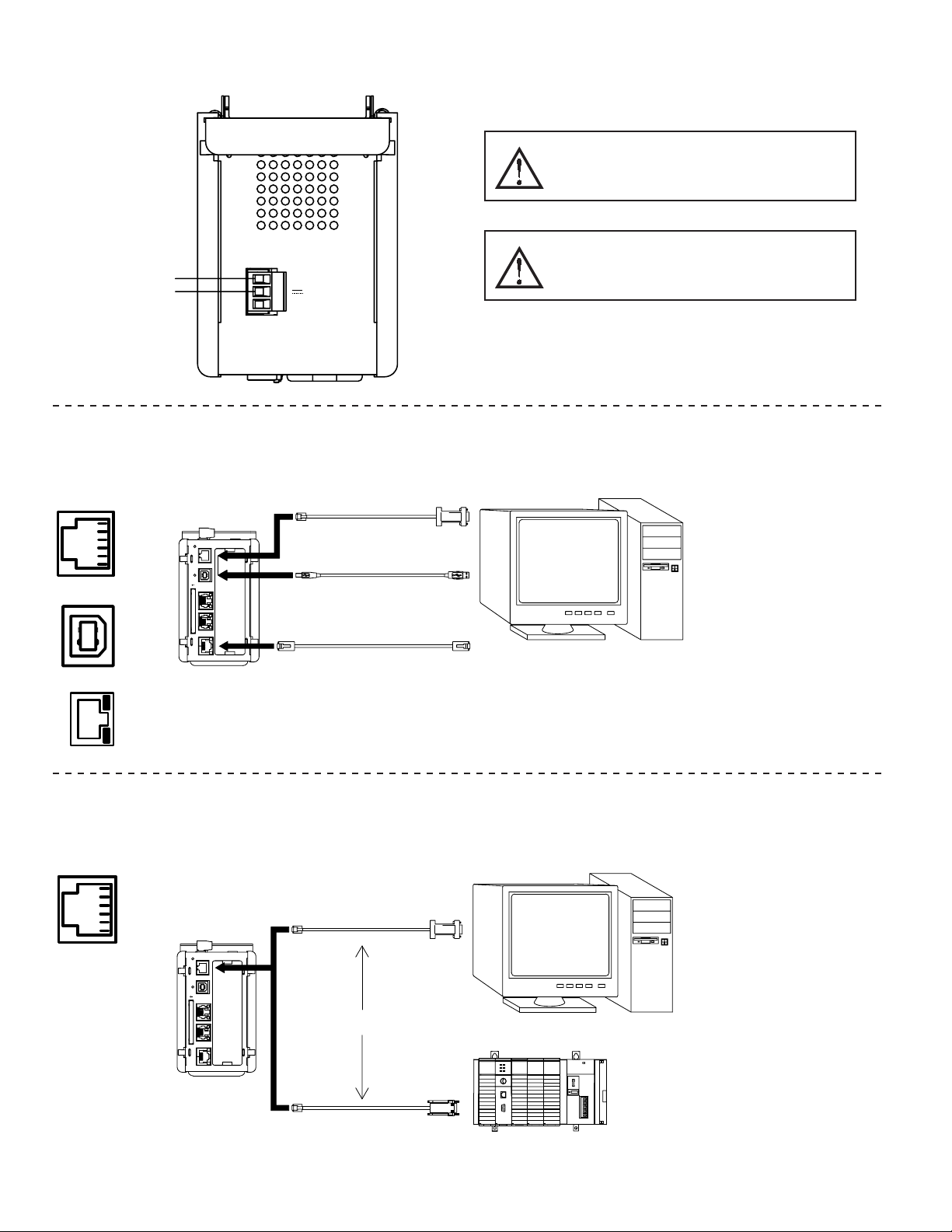
CONFIGURING A FIELDBUS GATEWAY
The Fieldbus Gateway is configured using Fieldbus Gateway Manager
software. Updates to the software for new features and drivers are posted on the
website as they become available. By configuring the Fieldbus Gateway using
the latest version of the software, you are assured that your unit has the most up
to date feature set. The software can configure the Fieldbus Gateway through
the RS232/PG port, USB/PG port, Ethernet, or CompactFlash. The USB/PG
port is connected using a standard USB cable with a Type B connector.
The driver needed to use the USB port will be installed with the software.
The RS232/PG port uses a programming cable made by B&B to connect to the
DB9 COM port of your computer. If making your own cable, refer to the
“Fieldbus Gateway Port Pin Outs” for wiring information.
The CompactFlash can be used to program a Fieldbus Gateway by placing a
configuration file and firmware on the CompactFlash card. The card is then
inserted into the target Fieldbus Gateway and powered.
CABLES AND DRIVERS
B&B has a wide range of cables and drivers for use with many different
communication types. A list of these drivers and cables along with pin outs is
available from B&B’s website. If making your own cable, refer to the “Fieldbus
Gateway Port Pin Outs” for wiring information.
USB, DATA TRANSFERS FROM THE
COMPACTFLASH CARD
In order to transfer data from the CompactFlash card via the USB port, a
driver must be installed on your computer. This driver is installed with the
software and is located in the folder C:\Program Files\B&B Electronics\Vlinx
Fieldbus Gateway Manager\Device after the software is installed. This may
have already been accomplished if your Fieldbus Gateway was configured
using the USB port.
Once the driver is installed, connect the Fieldbus Gateway to your PC with a
USB cable, and follow “Mounting the CompactFlash” instructions in the
Fieldbus Gateway Manager user manual.
Note: The USB port is for system set-up and diagnostics and is not intended for
permanent connection.
ETHERNET COMMUNICATIONS
Ethernet communications can be established at either 10 BASE-T or 100
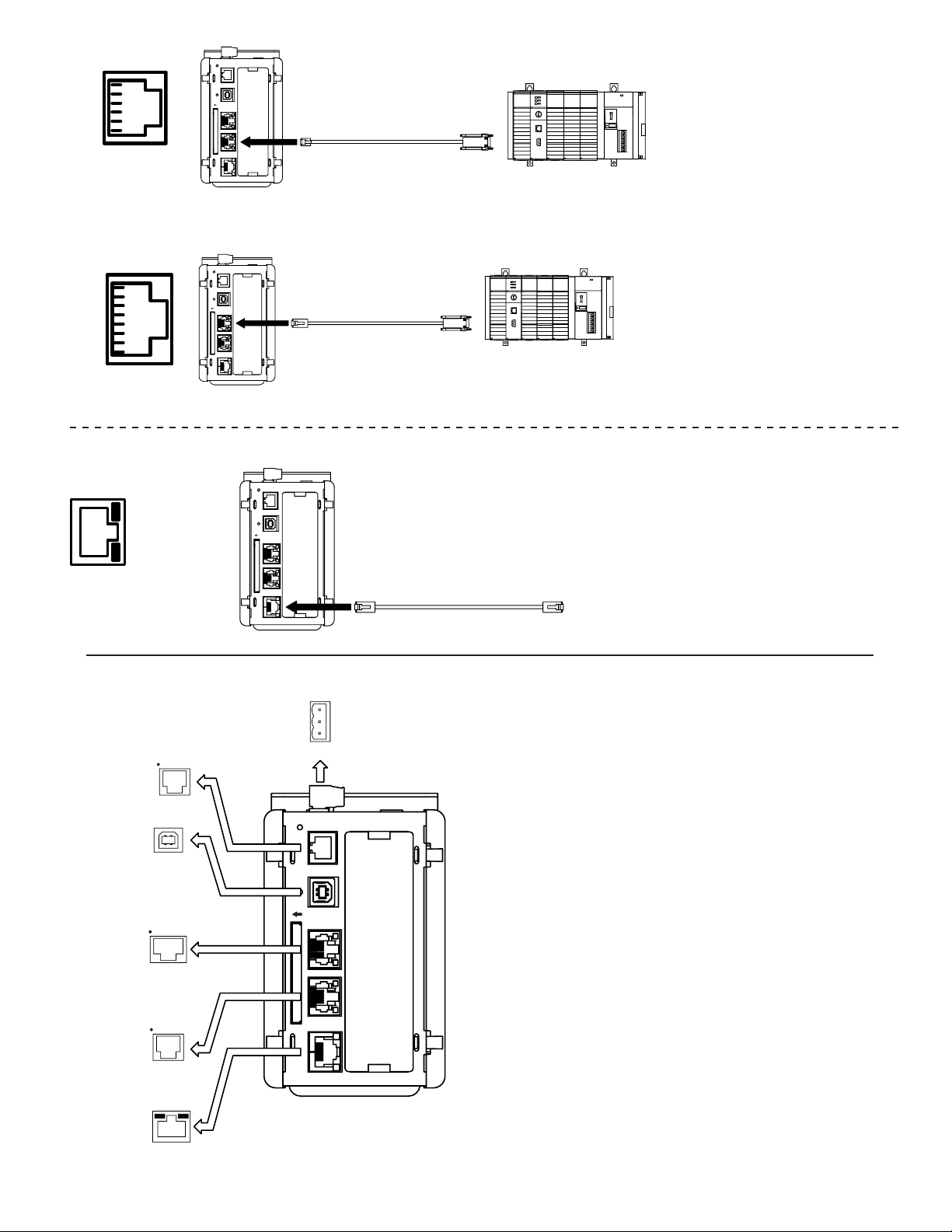
BASE-TX. The Fieldbus Gateway’s RJ45 jack is wired as a NIC (Network
Interface Card). For example, when wiring to a hub or switch use a straight-
through cable, but when connecting to another NIC use a crossover cable.
The Fieldbus Gateway Manager manual contains additional information on
Ethernet communications.
RS232 PORTS
The Fieldbus Gateway has two RS232 ports. There is the RS232/PG port and
the COMMS port. Although only one of these ports can be used for
programming, both ports can be used for communications with a PLC. The
RS232/PG port can be used for either master or slave protocols.
RS422/485 PORT
The Fieldbus Gateway has one RS422/485 port. This port can be configured
to act as either RS422 or RS485.
Note: All B&B devices connect A to A and B to B.
DH485 COMMUNICATIONS
The Fieldbus Gateway’s RS422/485 COMMS port can also be used for Allen
Bradley DH485 communications.
WARNING: DO NOT use a standard DH485 cable to connect this port to Allen
Bradley equipment. A cable and wiring diagram are available from B&B.
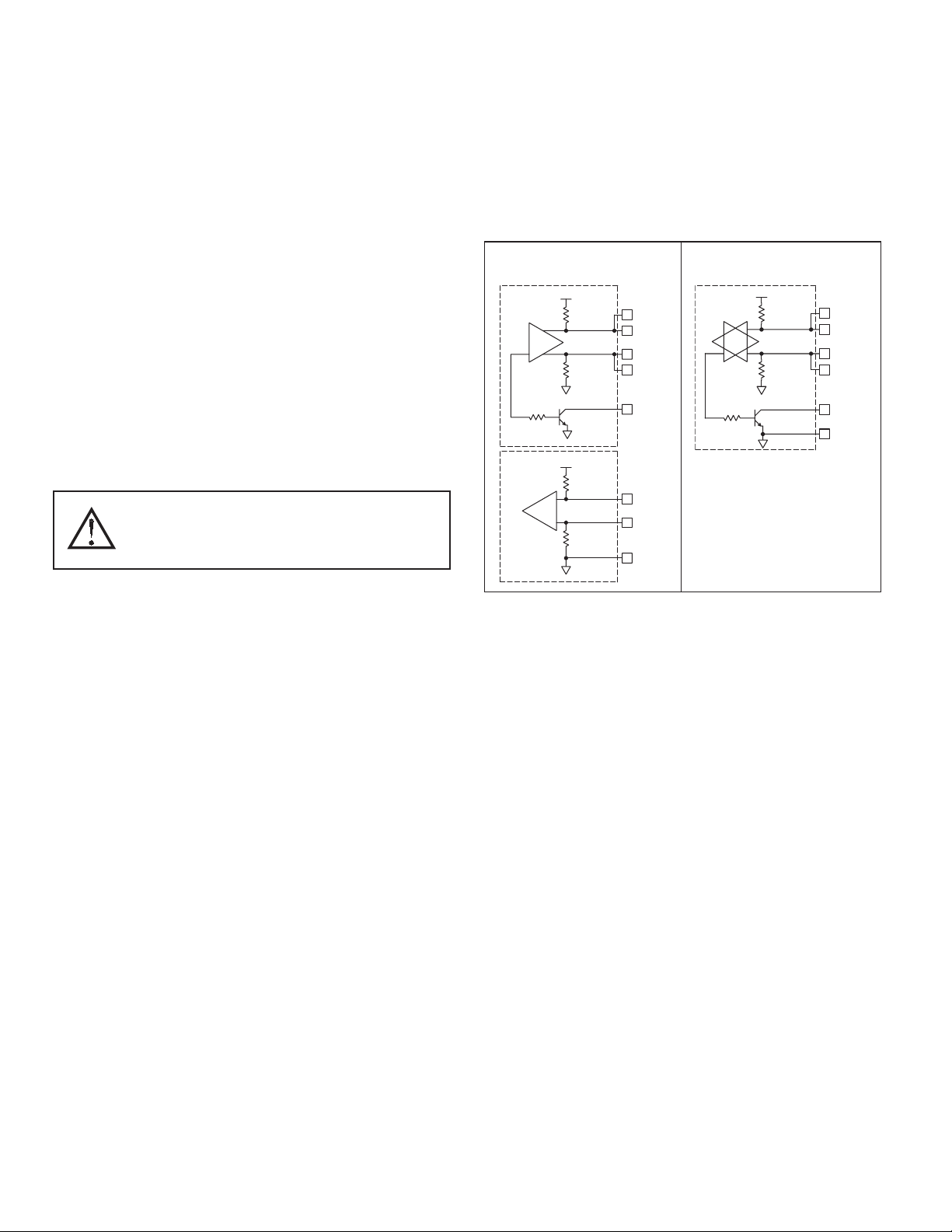
TX
5V
8
1
7
2
TxB
TxA
130K
130K
5TxEN (OC)
RX
130K
5V
130K
RxB
4
RxA
3
GND
6
TxEN (OC)
TX/RX
130K
5
TxA
2
8
130K
5V
7
1
TxB
6 GND
RS422/485 4-WIRE
CONNECTIONS
RS485 2-WIRE
CONNECTIONS
COMMUNICATING WITH THE Fieldbus Gateway
WARNING - DO NOT CONNECT OR DISCONNECT CABLES
WHILE POWER IS APPLIED UNLESS AREA IS KNOWN TO BE
NON-HAZARDOUS. USB PORT IS FOR SYSTEM SET-UP AND
DIAGNOSTICS AND IS NOT INTENDED FOR PERMANENT
CONNECTION.

7
LEDS
STS – STATUS LED
The green Status LED provides information regarding the state of the
Fieldbus Gateway. This includes indication of the various stages of the start-up
routine (power-up), and any errors that may occur.
Startup Routine
Rapidly Flashing
INDICATION
Fieldbus Gateway is currently running the boot loader
and/or being flash upgraded by the software.
Steady Fieldbus Gateway is operating properly.
CF – COMPACTFLASH LED
USER COMMUNICATION PORTS - TX/RX LEDS
ETHERNET LEDS
No CompactFlash Card is present.Off
Incorrectly formatted CompactFlash card present.
Unit is writing to the CompactFlash, either
because it is storing data, or because the PC
connected via the USB port has locked the drive. 1
Flashing Slowly
Flickering
CompactFlash card is being checked.Flashing Rapidly
Valid CompactFlash card is present.Steady
INDICATIONLED
1. Do not turn off power to the unit while this light is flickering. The unit writes
data in two minute intervals. Later Microsoft operating systems will not lock
the drive unless they need to write data; Windows 98 may lock the drive any
time it is mounted, thereby interfering with logging. Refer to “Mounting the
CompactFlash” in the Fieldbus Gateway Manager User Manual.
TransmittingGREEN
ReceivingRED
INDICATIONLED
Note: LEDs are not available on the Programming Port: RS232/PG.
Link EstablishedYELLOW (Solid)
100 BASE-TX CommunicationsAMBER
10 BASE-T CommunicationsGREEN
Network ActivityYELLOW (Flashing)
INDICATIONLED
ORDERING INFORMATION
TYPE MODEL NO DESCRIPTION PART NUMBER
Fieldbus Gateway VFG Fieldbus Gateway with multiple protocol converter, Comms, Ethernet
and expansion slot. VFG1000
Communications
Cables (10 feet) CBL
RS-232 Programming Cable CBL01500
USB Cable USBAMBM-6F
Communications Cables 1CBLxxxxx
Accessories VFG9
CANopen option card for Fieldbus Gateway VFG9000-CAN
GSM/GPRS Cell Modem Option Card for Fieldbus Gateway VFG9000-CEL
DeviceNet option card for Fieldbus Gateway VFG9000-DN
PROFIBUS option card for Fieldbus Gateway VFG9000-PBDP
RS232/485 option card for Fieldbus Gateway VFG9000-SERIAL
1 Visit www.bb-elec.com for a list of communication drivers and cables.

B&B Electronics
International Headquarters
707 Dayton Road
P.O. Box 1040
Ottawa, IL 61350
Phone: (815) 433-5100
Fax: (815) 433-5104
B&B Electronics Ltd
European Headquarters
Westlink Commercial Park,
Oranmore, Co. Galway, Ireland
Phone: +353 91 792444
Fax:+353 91 792445
Indice
Altri manuali B&B Electronics Portale


Manuali Portale popolari di altre marche

LST
LST M500RFE-AS Manuale utente

Kinnex
Kinnex Media Gateway Manuale utente

2N Telekomunikace
2N Telekomunikace 2N StarGate Manuale utente

Mitsubishi Heavy Industries
Mitsubishi Heavy Industries Superlink SC-WBGW256 Manuale utente

ZyXEL Communications
ZyXEL Communications ZYWALL2 ET 2WE Manuale utente

Telsey
Telsey CPVA 500 - SIP Manuale utente


