
BANGGOOD Bugs 7 Manuale utente

Farther.Faster.Clearer
Bugs 7
User Manual

Contents
Product Profile
Introduction
Prepare Your B7
Prepare the Remote Controller
Major Parts & Functional Switch
Flight Modes
Aircraft Status Indicator Lights
Return to Home (RTH)
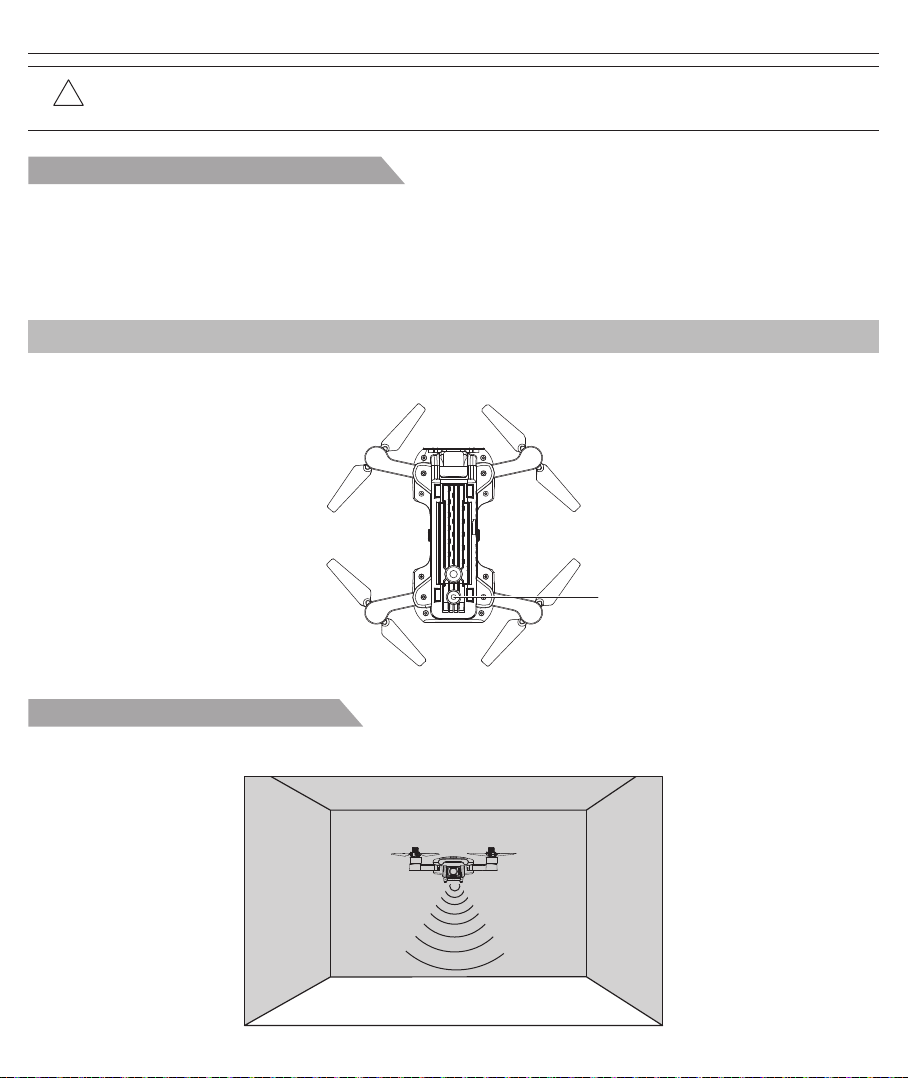
Vision System
Aircraft Power Switch
Aircraft Battery
Attach and Detach the Propellers
Remote Controller Functions and Status
Throttle Control Stick Mode
Install the Mobile Phone Holder
FPV Real-time Image Transmission Software “M RC PRO”
Flight Environment Requirements
Pre-flight Checklist
Aircraft Operations
Test Flight
Product Parameters
Packing Detail
Important Statement
Flight Safety Guidelines
1
1
2
3
5
6
7
8
9
10
11
13
17
18
19
21
21
22
25
26
29
30
30
Aircraft
Remote Controller
APP Download & Installation
Flight
Appendix

Product Profile
This section mainly introduces
functions and installation guidelines
of B7 and lists the components of the
aircraft and remote controller.
The Aircraft is folded inside the package. Follow the steps as below to unfold the aircraft.
Step 1: Unfold the front arms (Pic. 1);
Step 2: Repeat again to unfold rear arms (Pic. 2).
● The Bugs 7 aircraft is equipped with optical flow and GPS system. It can hover and fly stably indoor and outdoor.
It has automatic return home function and other easy-to-use intelligent flight functions, such as orbit flight, follow-me
and waypoint flight. Bugs 7 can shoot 4K HD videos.
● The transmitter is equipped with a complete set of function keys, it can realize various operations and settings of
the aircraft and camera. Not only can display real-time HD pictures on the mobile device through the APP, but also
display information such as flight parameters on the device screen. The folding transmitter improves users' operation
experience. The pull-out stand is easy to carry and for storage. What’s more, the gimbal can adjust manually the
camera shooting angle before flying.
● The maximum flight speed of Bugs 7 is 32km/h.
Prepare Your B7
Introduction
Unfold the aircraft
Pic. 1 Pic. 2
-1-

Battery installation
Install the battery of remote controller
!Attention: The battery should be installed firmly, failure to do so may affect the flight safety of your aircraft.
The aircraft may crash due to power-cut during the flight.
Insert the fully charged battery into the aircraft battery box (see as the picture), ensure the battery install correctly.
Pic. 1 Pic. 2 Pic. 3
Step 1: Unfold the hand sticks and open the battery door (Pic. 1);
Step 2: Install 2*AA batteries into the battery compartment according to the given polarity (Pic. 2);
Step 3: Close the battery compartment (Pic. 3).
Prepare the Remote Controller
!● Insert batteries with correct polarity.
● Non rechargeable batteries are not to be charged; the transmitter need 2*AA batteries for work.
● Do not mix old and new batteries.
● Do not mix alkaline, standard (carbon-zinc), or rechargeable (nickel-cadmium) batteries.
● Rechargeable batteries are to be removed from the aircraft before being charged.
● Rechargeable batteries are only to be charged under adult supervision.
● Exhausted batteries are to be removed from the aircraft.
● The supply terminals are not to be short-circuited.
Bugs 7 User Manual
-2-

Bugs 7 User Manual
[1]
[2]
[3]
[4]
[6]
[7]
[5]
[1] Photo/Video
[2] Left stick
[3] Unlock/Lock
[4] One-key RTH
[5] Right stick
[6] Power switch
[7] LCD display
[7]
[6]
[6] Bottom lights
[7] Optical flow camera
[3]
[5]
[1] Power switch
[2] Drone’s status
indicator light
[3] Propeller
[4] Battery
[5] Camera
[4]
[1]
[2]
Major Parts & Functional Switch
-3-

Bugs 7 User Manual
[10]
[10] GPS Switch
[8] One-key takeoff/
One-key landing
[9] Short- press for the optical
flow switch
Long- press for the fast-slow
speed switch.
[8] [9]
-4-

The following flight modes are available in Bugs 7.
GPS mode:
● When the drone is in GPS mode, it can receive the GPS signal to realize accurate hovering.
● If the GPS signal is weak, the drone will enter into altitude-hold or optical flow position mode.
(For specific situation, please refer to APP status bar)
● Please make the drone land ASAP when the GPS signal is poor lest any accidents.
● By the way, please note do not fly the drone in any weak GPS signal place or narrow space place lest any flight
accidents.
Optical flow positioning mode:
● If the drone does not receive GPS signal or GPS turned off and its altitude is within 3 meters, it automatically enters
into the optical flow positioning mode. It utilizes the optical flow positioning mode to hover stably.
● If the drone does not receive GPS signal or GPS turned off, what's more its altitude is beyond 3 meters, it will enter
into altitude-holding mode, cannot realize accurate hovering. In the situation, the user should be have some basic
operations, recommended not to fly the drone.
Aircraft
This section introduces functions and
features of the B7.
Flight Modes
-5-

Drone’s status
indicator light
Aircraft Status Indicator Lights
Aircraft status indicator
Bugs 7 User Manual
6 Indicator yellow light flash. Aircraft is in compass horizontal calibration.
7 Indicator green light flash. Aircraft is in compass vertical calibration.
8 Indicator red light flash slow. Aircraft is nearly low voltage, 1/6 battery level left.
9 Indicator red light flash fast. Aircraft is in low voltage, only 1/8 voltage left.
10 Indicator red light flash one time
then stop for 1.5 seconds. Something wrong with the gyroscope.
11 Indicator red light flash twice
then stop 1.5 for seconds. Something wrong with the barometer.
12 Indicator red light flash three times
then stop for 1.5 seconds. Something wrong with the compass.
13 Indicator red light flash four times
then stop for 1.5 seconds. Something wrong with the GPS module.
14 Indicator red light flash six times
then stop for 1.5 seconds. Something wrong with the vision positioning module.
No.
3 Indicator yellow light stays on. No GPS signal, aircraft is in gesture mode.
1 Indicator yellow light flash fast. Aircraft 2.4GHz disconnected.
2 Indicator yellow green red light flash by turn. Aircraft is in initialization detection status.
4 Indicator green light stays on. Good GPS signal, aircraft is preparing for GPS mode.
5 Indicator green light flash fast. Aircraft is in gyroscope calibration status.
Indicator status Meanings
-6-

Pic. 1 Pic. 2
Aircraft status indicator
Low battery RTH
Bugs 7 User Manual
Home Point
GPS Description
If a strong GPS signal (satellites over 7) was acquired before takeoff, the Home Point
is the location from which the aircraft launched. The GPS signal strength is indicated
by the GPS icon( ). The aircraft rear indicator lights will blink rapidly from yellow
color to green color when the home point is recorded.
The Return-to-Home (RTH) function brings the aircraft back to the last recorded Home Point.
There are 3 types of RTH: smart RTH, low battery RTH and failsafe RTH. This section describes these 3 scenarios in
detail.
Return to Home (RTH)
When the GPS signal is available (more than 7 satellites is presented), use the RTH button on the remote
controller (Pic. 1) or tap the RTH button in the “M RC PRO” APP (Pic. 2) and then follow the on-screen instructions
to initiate Smart RTH. During the smart RTH, you can use the remote controller to guide the aircraft around obstacles.
You can press the RTH button again to exit RTH procedure and regain control of the aircraft.
!● During the return home flight, the drone will fly straight to return home point and cannot avoid obstacles.
Please make sure there are no any obstacles on the path.
● Aircraft can not return to the Home Point when the GPS signal is weak or unavailable.
● Aircraft will stop ascending and immediately return to the Home Point if user moves the throttle stick in the
aircraft reaches 15 meters altitudes or beyond during Smart RTH.
● If there is no GPS signal and the remote controller signal lost for more than 6 seconds, the aircraft can not
Return-to-Home but descend slowly until land to the ground and lock the aircraft.
The low battery level failsafe is triggered when the intelligent battery is depleted to a point that may affect the safe
return of the aircraft. Users are advised to return home or land the aircraft immediately when prompted.
1. If the rear indicator light flash slow, the battery icon in transmitter LCD screen is “ ”, with transmitter has “DIDI”
sound. As only the aircraft is beyond 30 meters altitude or 100 meters distance, the aircraft will return home
automatically. As long as the aircraft is in 100 meters distance, the user can cancel the return via “ ” button.
2. When the aircraft rear lights flash slowly, battery icon “ ” is shown on the remote controller or on the “M RC PRO”
APP. And steady “beep...beep...beep” sound is heard. At this moment, the aircraft will automatically return to the
Home Point if the flying altitude is beyond 15 meters or the flying distance against the home point is beyond 15
meters. If the aircraft flying altitude is less than 15 meters or the flying distance is less than 15 meters, the aircraft
will automatically land to the ground.
-7-
!Attention: When the aircraft is automatically return home with Low Battery RTH function activated, you can
not cancel the RTH procedure by pressing the RTH button to regain control of the aircraft.
Out of connection return home function
Vision Positioning System function
The Vision Positioning System is typically used in indoor environment when GPS is weak or unavailable. It works best
when the aircraft altitude is less than 3 meters.
Bugs 7 User Manual
The optical flow system consists of optical flow lens modules. The optical flow system is an image positioning system,
obtaining the aircraft’s position through the optical image thereby ensuring the the accurate positioning and safe flight.
Vision System
Optical flow camera
The GPS signal is good (the No. of GPS satellites is more than 7), the compass is working and the home point has
been recorded successfully, if the control signal continuously interrupted for longer than 6 seconds and APP control
turning off, the flight control system will take over the transmitter control, controlling the aircraft to fly return home point.
If the control signal is restored during returning home, the returning home flight will continue unless the user cancel it
by transmitter’s return home button and get back the aircraft’s control right.
-8-
Indice
Altri manuali BANGGOOD Drone


