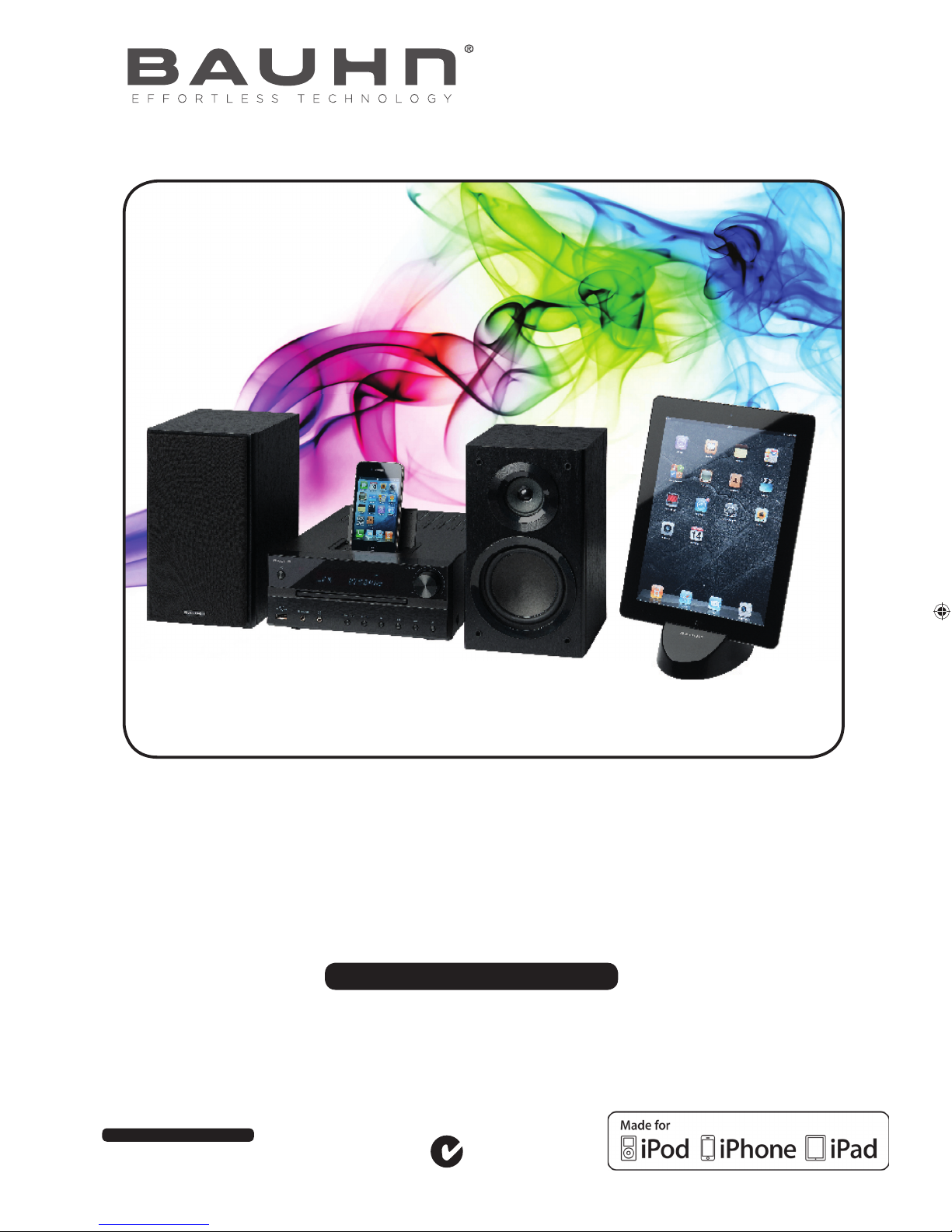
Bauhn MD 83615 Manuale utente

After Sales Support
Telephone: 1300 884 987
Email: [email protected]
Premium Micro System
for iPad/iPhone/iPod
10/12
MEDION Australia Pty Ltd
St Leonards, NSW 2065
Australia
helpline: 1300 884 987
e-mail: [email protected]
www.medion.com.au
INSTRUCTION MANUAL
Model Number: MD 83615
N26968
audio

Premium Micro System
for iPad/iPhone/iPod
Warranty Details
The product is guaranteed to be free from defects in workmanship and parts for a period of 12 months
from the date of purchase. Defects that occur within this warranty period, under normal use and care, will
be repaired, replaced or refunded at our discretion. The benefits conferred by this warranty are in addi-
tion to all rights and remedies in respect of the product that the consumer has under the Competition and
Consumer Act 2010 and similar state and territory laws.
Our goods come with guarantees that cannot be excluded under the Australian Consumer Law. You are
entitled to a replacement or refund for a major failure and for compensation for any other reasonably
foreseeable loss or damage. You are also entitled to have the goods repaired or replaced if the goods fail
to be of acceptable quality and the failure does not amount to a major failure.
After Sales Support
Telephone: 1300 884 987
Email: [email protected]
After Sales Support
Telephone: 1300 884 987
Email: [email protected]
Premium Micro System
for iPad/iPhone/iPod
Repair and Refurbished Goods
or Parts Notice
Unfortunately, from time to time, faulty products are manufactured which need to be returned to the Sup-
plier for repair.
Please be aware that if your product is capable of retaining user-generated data (such as files stored on a
computer hard drive, telephone numbers stored on a mobile telephone, songs stored on a portable media
player, games saved on a games console or files stored on a USB memory stick) during the process of
repair, some or all of your stored data may be lost. We recommend you save this data elsewhere prior to
sending the product for repair.
You should also be aware that rather than repairing goods, we may replace them with refurbished goods
of the same type or use refurbished parts in the repair process.
Please be assured though, refurbished parts or replacements are only used where they meet ALDI’s strin-
gent quality specifications.
If at any time you feel your repair is being handled unsatisfactorily, you may escalate your complaint.
Please telephone us on 1 300 884 987 or write to us at:
MEDION Australia Pty Ltd
St. Leonards, NSW 2065
Australia
MEDION Help Desk 1300 884 987
(Operating Hours: Mon-Fri 8:30AM to 6:00PM EST)
Email: [email protected]
audio audio

1
After Sales Support
Telephone: 1300 884 987
Email: [email protected]
Table of contents
Welcome 3
General safety instructions 4
Overview of the equipment 7
Front 7
Rear 8
Display 9
Remote control 10
Parts List 11
Getting started 11
Insert batteries into the remote control 11
Setting up the device 11
Connections 12
Connecting the loudspeakers 12
Connecting headphones 12
Aerial connection 12
Image transmit 13
Connecting external device to the LINE IN connection 13
Connecting external device to the AUDIO IN connection 13
Mains connection 14
Connecting an iPod/iPhone/iPad 14
Attaching/replacing iPod/iPhone holder 14
Connecting an iPad 14
Connecting a USB memory stick 14
General operating functions 15
Audio functions 15
Setting clock time 15
Using the timer 15
Using the sleep timer 16
Select operating mode 16
Radio 17
Tuning 17
Search function 17
Automatic station saving 17
Saving and selecting stations 17
Clearing stations 17
Stereo/mono reception 17
RDS reception 17
USB operation 18
Starting/stopping playback 18
Track selection, fast rewind/forward 18
Direct track selection 18
Folder selection 18
Program the playing order of tracks 18
Repeat function/random playback 18
Display track information 18
iPod/iPhone/iPad playback control 19
Starting/stopping playback 19
Track selection, fast rewind/forward 19
Repeat function/random playback 19
Image playback on the TV (iPod/iPhone only via dock) 19
Playback on AUDIO IN/LINE IN connections 19
Playing audio or MP3 CDs 20
Inserting a disc 20
Readouts in the display 20
Starting/pausing/stopping playback 20

2After Sales Support
Telephone: 1300 884 987
Email: [email protected]
Track selection, fast rewind/forward 20
Direct track selection 20
Folder selection 20
Program the playing order of tracks 20
Repeat function/random playback 21
Display track information 21
FAQ 21
Cleaning 21
Disposal 22
Technical data 23
Copyright © 2012. All rights reserved.
The company Medion® owns the copyright.
"Made for iPod", "Made for iPhone", and "Made for iPad" means that an electronic accessory has been designed to connect specifically to
iPod, iPhone. or iPad, respectively, and has been certified by the developer to meet Apple performance standards. Apple is not responsible
for the operation of the device or its compliance with safety and regulatory standards. Please note that the use of this accessory with iPod,
iPhone, or iPad may affect wireless performance.
iPad, iPhone, iPod, iPod classic, iPod nano, iPod shuffle, and iPod touch are trademarks of Apple Inc., registered in the U.S. and
other countries.
Subject to technical and optical changes, as well as printing errors.

3
After Sales Support
Telephone: 1300 884 987
Email: [email protected]
Welcome
Congratulations on choosing to buy a BAUHN® product. By doing so you now have the assurance and peace of mind that comes with
purchasing a product made by one of the leading manufacturers. All products brought to you by BAUHN® are manufactured to the
highest standards of performance and safety and, as part of our philosophy of customer service and satisfaction, are backed by our
comprehensive 1 Year Warranty. We hope you will enjoy using your purchase for many years to come.

4After Sales Support
Telephone: 1300 884 987
Email: [email protected]
General safety instructions
Please be sure to read these operating instructions carefully and follow all instructions given. The instructions will help you
to operate the device reliably and help increase its service life. Always store these instructions near the device. Keep these
operating instructions so that you can pass them on with the device if you sell it.
Warning symbols and key words used in these instructions
DANGER!
Warning: immediate mortal danger!
WARNING!
Warning: possible mortal danger and/or serious irreversible injuries!
CAUTION!
Please follow the guidelines to avoid injuries and/or property damage!
CAUTION!
Please follow the guidelines to avoid property damage!
PLEASE NOTE!
Additional information on using the device!
PLEASE NOTE!
Please follow the guidelines in the operating instructions!
WARNING!
Warning: danger of electric shock!
Proper use
This device offers various options in terms of its use:
The device is intended for playing sound and image media (CDs, MP3 data media, USB devices), as well as for radio reception. In addition,
you can connect an iPod, iPhone or iPad device for charging and for the playback of audio/video files (video data on iPod/iPhone only).
The device is intended for private use only and not for industrial/commercial use.
Please note that we shall not be liable in case of improper use:
• Do not modify the device without our consent and do not use any auxiliary equipment which we have not approved or supplied.
• Use only spare parts and accessories which we have supplied or approved.
• Follow all the instructions in these directions for use, especially the safety information. Any other use is deemed improper and can
cause personal injury or damage to the product.
• Do not use the device in extreme ambient temperatures and conditions.
This device is not intended for use by people (including children) with reduced physical, sensory or mental abilities or by those without
experience and/or knowledge, unless they are supervised by a person responsible for their safety or they have been instructed in its use by
that person. Children should be supervised to ensure they do not play with this device.

5
After Sales Support
Telephone: 1300 884 987
Email: [email protected]
Setting up the device in a safe place
This device is intended for private use only. Only use the device in residential rooms or similar rooms.
Set up and operate all components on a stable, level and vibration-free surface to prevent the device from falling down.
Make sure that:
• the device is not exposed to direct sources of heat (for example, heaters)
• the unit is not in direct sunlight
• there is no contact with moisture, water and splashes
• naked flames (such as lit candles) are not placed near or on the device
• no liquid-filled containers (e.g. vases) are placed on any part of the device
• the device is not placed close to magnetic fields (e.g. television sets or speakers)
• Ensure that there is sufficient distance between the device and the speaker of at least 10cm on all sides.
• To prevent interference, the speakers should be kept at a distance of at least 30cm from the CRT TV or monitors.
Ventilation
Do not cover the air vents. Ensure that ventilation is adequate.
Maintain a minimum clearance of approx. 10cm above and to the sides of the main device.
Ensure accessibility of mains power socket
Only connect the device to a power point (230 V ~ 50 Hz) that is easy to reach and close to the place where you have set
up the device. The socket must be easily accessible so that you can quickly unplug the device from the mains if necessary.
Unplug the device from the mains if there is a storm or if the device is not going to be used for a long period of time.
Never carry out repairs yourself
Never try to open and/or repair the device yourself. There is the risk of electric shock! In the event of a fault, contact our Service Centre or
another suitable professional repair workshop. The user may be subject to serious risks if repairs are not carried out by a qualified person.
If the device or mains cable is damaged, remove the plug from the mains immediately, to avoid risks.
CD player
The CD player is a class 1 laser product. The machine is supplied with a safety system which prevents dangerous
laser beams from escaping during normal use. To avoid eye injuries, never tamper with or damage the safety
system of the device.
Information on electrostatic charge
If the device does not work correctly because of electrostatic charge, reset it by disconnecting it from the mains for a short period of time.

6After Sales Support
Telephone: 1300 884 987
Email: [email protected]
Safe handling of batteries
The remote control is battery-operated. Please observe the following instructions:
• Keep batteries out of the reach of children. Seek medical attention immediately if a battery is swallowed.
• Before inserting the batteries, check that the contacts in the device and on the batteries are clean and, if necessary, clean them.
• Only use new batteries. Never use old and new batteries together.
• Do not use a combination of battery types.
• Please note the polarity (+/-) when inserting the batteries.
• ATTENTION! There is a risk of explosion if batteries are incorrectly replaced! Replace the batteries only with the same or equivalent
type.
• Never try to recharge non-rechargeable batteries. There is a risk of explosion!
• Never expose the batteries to excessive heat (such as direct sunlight, fire or similar).
• Store batteries in a cool, dry place. Strong direct heat can damage batteries. Therefore, keep the unit away from strong heat sources.
• Never short-circuit batteries.
• Never throw batteries into a fire.
• Remove leaking batteries from the device immediately. Clean the contacts before inserting a new battery. There is a risk of chemical
burns from battery acid!
• Also remove dead batteries from the device.
• If the device is not going to be used for long periods, remove the batteries.
Headphones
WARNING!
Listening with headphones at a high volume can damage your hearing. Before putting on headphones set the volume to
minimum! Your hearing can be damaged if you listen at high volumes over a long period or if the volume is increased too
suddenly.

7
After Sales Support
Telephone: 1300 884 987
Email: [email protected]
Overview of the equipment
Front
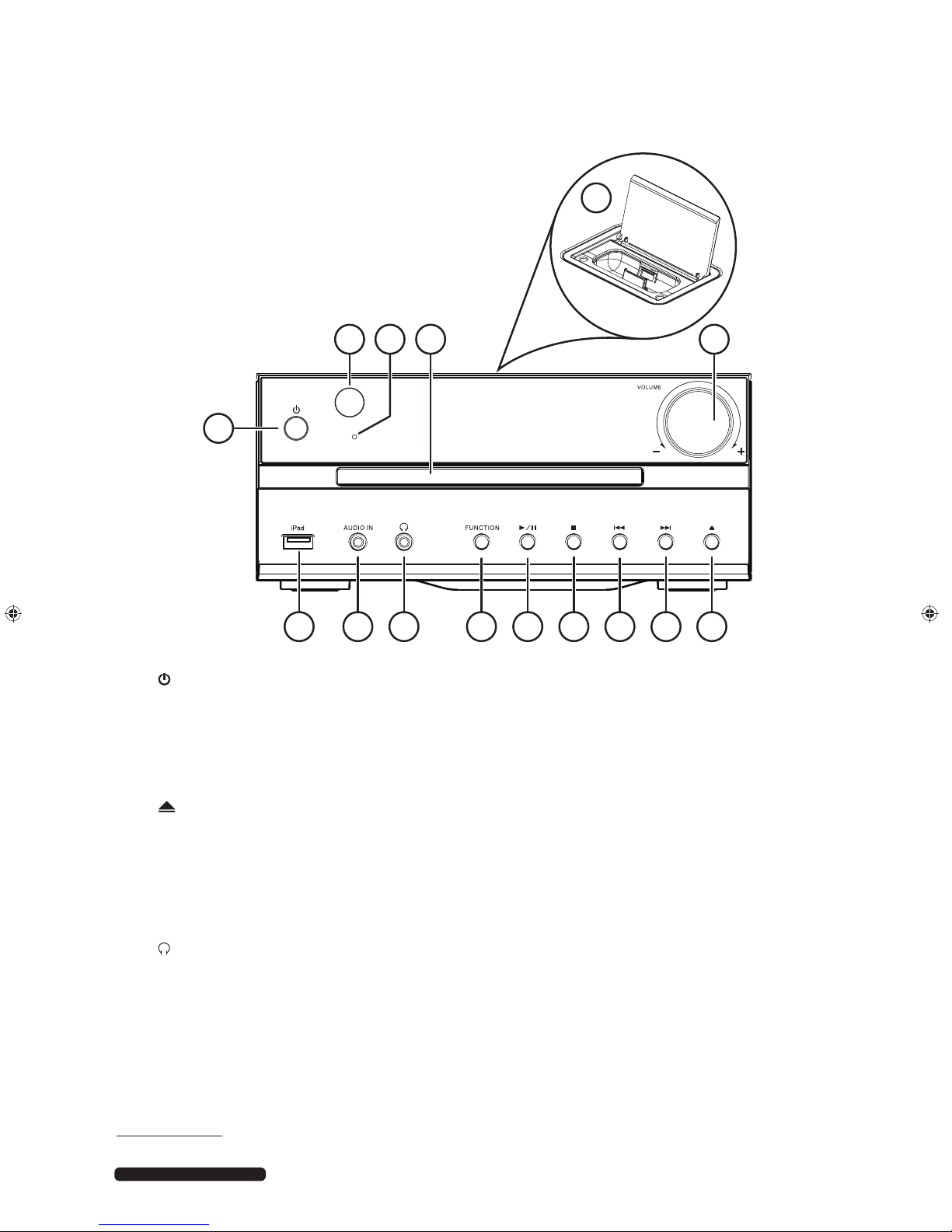
15
1
2 643
5
14 13 12 11 10 9 8 7
1) : switch device on/off
2) IR sensor for remote control
3) Timer display
4) Disk tray
5) iPod/iPhone cradle: “Docking station” for an iPod/iPhone device1
6) Volume selector
7) : open/close disk compartment
8) : iPod/iPhone/iPad/CD/USB: next track, radio: forward station search
9) : iPod/iPhone/iPad/CD/USB: previous track, radio: forward station search
10) : iPod/iPhone/iPad/CD/USB: stop playback
11) /: iPod/iPhone/iPad/CD/USB: start/pause playback
12) HWPEVKQP": select operating mode
13) : headphone connection 3.5mm jack
14) CWFKQ"KP: audio input
15) USB connection
1 iPod/iPhone/iPad is a registered trademark of Apple Inc. in the USA and other countries.

8After Sales Support
Telephone: 1300 884 987
Email: [email protected]
Rear
DC
DC
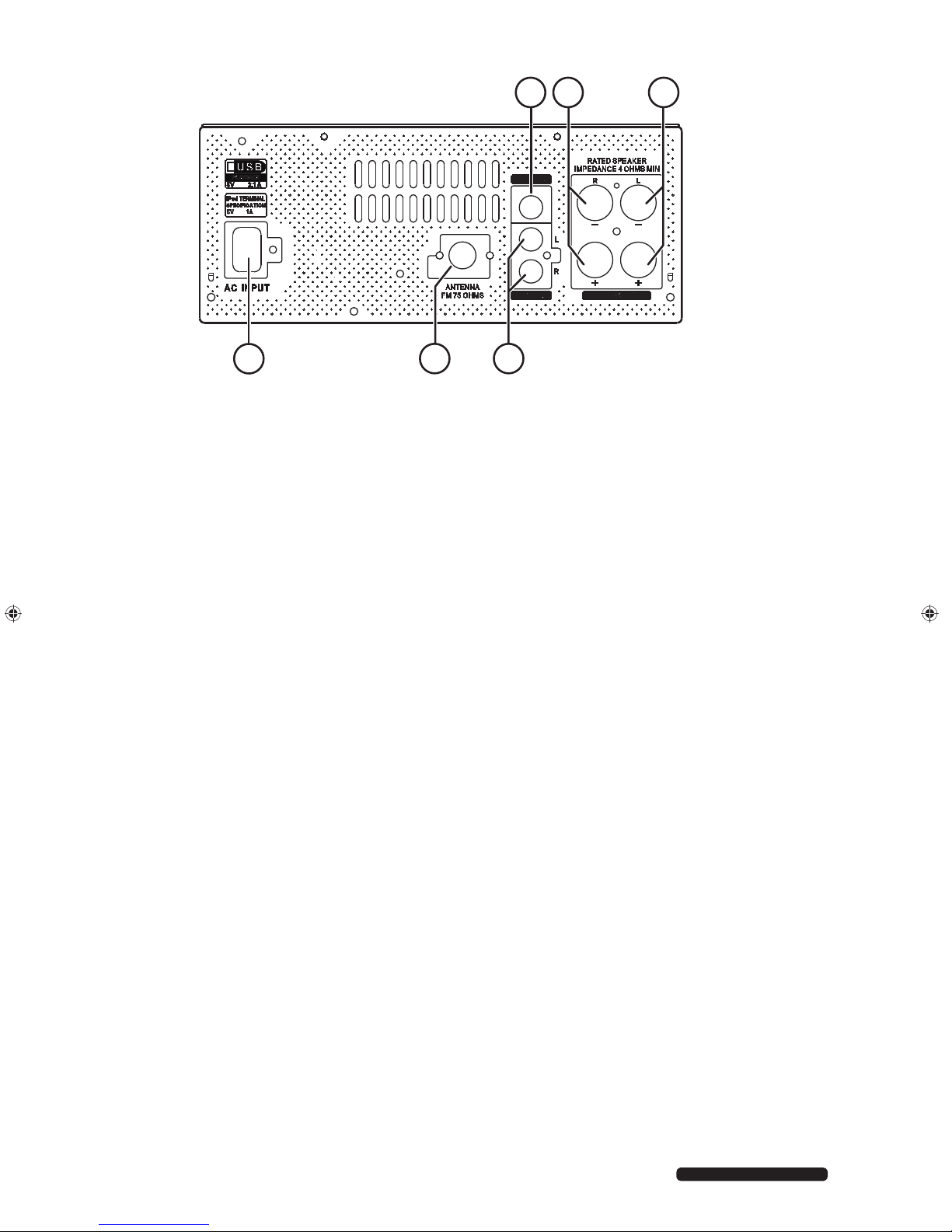
1
6
2 3
45
1) XKFGQ"QWV: cinch video output
2) URGCMGT"T: connections for the right-hand speaker
3) URGCMGT"N: connections for the left-hand speaker
4) NKPG"KP: audio cinch inputs L/R
5) HO"CPV"97"QJO: aerial connection
6) CE"KPRWV: mains connection
Indice
Altri manuali Bauhn Impianto stereo

Bauhn
Bauhn AMHFB-815 Manuale utente

Bauhn
Bauhn ASBW-0716 Manuale utente

Bauhn
Bauhn AMHFB-0319 Manuale utente

Bauhn
Bauhn AMHST-014 Manuale utente

Bauhn
Bauhn ACD-108 Manuale utente

Bauhn
Bauhn AMHFB-815 Manuale utente

Bauhn
Bauhn AMHST-014 Manuale utente

Bauhn
Bauhn ASPP4-0721-B Manuale utente

Bauhn
Bauhn AMHFB-0319 Manuale utente

Bauhn
Bauhn ACD-108 Manuale utente